Agent File and Document Workflows
What happens to files once an agent is in the loop. These pages cover ingestion and classification, document processing and extraction, versioning and lineage, permissions on generated output, batch operations, and the handoff to a human who needs to review the result. This is the part of agent work that fails quietly, because an agent that produces good output nobody can find has not finished the job. Fast.io keeps full version history and citation-backed search across the files it holds.
The pages cover the boring parts deliberately: naming and structure that survive contact with other people, permissions that outlast whoever set them, and the record that answers what happened three months later. Where an agent generates output for a client or a colleague, they carry on past the file being written to the part where somebody else opens it, which is where these workflows usually break.
346 guides in this topic.
Start here

How to Extract Metadata from YouTube Videos
YouTube video metadata includes title, description, tags, view counts, thumbnails, and dozens of other structured fields. This guide covers four practical ways to extract that data: the YouTube Data API v3, the yt-dlp command-line tool, custom Python scripts, and browser-based viewers.

8 Best Batch Metadata Editing Tools in 2026
Batch metadata editing software lets you modify embedded file properties like titles, dates, tags, and copyright across hundreds or thousands of files in a single operation. This guide compares eight tools that handle bulk metadata workflows, from free command-line utilities to AI-powered cloud platforms, so you can pick the right one for your file types and team size.

How to Extract File Metadata with PowerShell on Windows
PowerShell ships with every Windows 10 and 11 machine, making it the fastest way to read file metadata without installing anything. This guide covers four approaches, from Get-ItemProperty for basic timestamps to Shell.Application COM objects that expose over 300 extended properties, System.Drawing for image EXIF data, and recursive scripts that process entire folder trees into CSV reports.

Best Document Processing Tools for AI Agents
Document processing tools for AI agents automate the extraction, parsing, and transformation of unstructured documents (PDFs, images, contracts) into structured data that agents can act on. This guide reviews leading platforms across OCR engines, parsing APIs, extraction tools, and end-to-end IDP solutions optimized for AI workflows.

7 Best Free Online File Metadata Viewers
A hands-on comparison of seven free browser-based metadata viewers. Each tool is tested for format support, file size limits, and privacy approach, so you can pick the right one for inspecting photos, documents, and video files without installing anything.

How to Extract GPS, Altitude, and Flight Data from Drone Photos
Drone photos contain far more metadata than standard camera images. Beyond GPS coordinates, they embed relative and absolute altitude, gimbal orientation, flight attitude, and manufacturer-specific telemetry. This guide covers how to extract that data from DJI, Autel, and Skydio images using ExifTool and programmatic methods, plus how to reconstruct flight paths from photo sequences.
All guides
7 Best Free Online File Metadata Viewers
A hands-on comparison of seven free browser-based metadata viewers. Each tool is tested for format support, file size limits, and privacy approach, so you can pick the right one for inspecting photos, documents, and video files without installing anything.

8 Best AI Spreadsheet Automation Tools for Agents in 2026
AI spreadsheet automation tools let agents programmatically read, transform, and generate spreadsheet data using natural language or API calls instead of manual formulas. This guide covers 8 tools evaluated for agent-readiness, from MCP-native platforms to API-first add-ins, with pricing and integration details for each.
8 Best Batch Metadata Editing Tools in 2026
Batch metadata editing software lets you modify embedded file properties like titles, dates, tags, and copyright across hundreds or thousands of files in a single operation. This guide compares eight tools that handle bulk metadata workflows, from free command-line utilities to AI-powered cloud platforms, so you can pick the right one for your file types and team size.

AI Agent File Lineage Tracking: A Practical Guide
File lineage tracking records which agents touched a file, when, and what they changed, so downstream agents and humans can trace outputs back to their source. This guide covers what to capture, how to model events, and how to wire lineage into a multi-agent pipeline without slowing it down.

AI Agent File Permissions: How to Control What Agents Can Read, Write, and Share
AI agent file permissions define what files an autonomous agent can read, write, delete, or share, using role-based or attribute-based access controls to prevent unauthorized data access and enforce least-privilege principles. This guide covers how to secure agentic workflows through sandboxing, per-task scoping, and granular access levels.
AI Document Processing Agents: A Developer Guide
AI document processing agents automatically read, understand, extract, and transform information from PDFs, images, and scanned files. This guide covers how they work, what they can process, and how to integrate persistent storage for extracted data.

Airtable Attachment Limits: File Sizes, Base Storage, and Workarounds
The Airtable attachment limit framework caps individual file uploads at 5 GB across all subscription tiers, while cumulative base storage ranges from 1 GB on Free to 1,000 GB on Enterprise Scale. Beyond base limits, automated pipelines frequently encounter expiring download URLs that invalidate after a few hours. Understanding these thresholds and storing heavy files in external workspaces prevents base bloat and broken integrations.

Amazon Bedrock SharePoint Connector: Setup, Limitations, and Alternatives
The Amazon Bedrock SharePoint connector allows Amazon Bedrock Knowledge Bases to ingest and index documents stored in Microsoft SharePoint Online for RAG workflows. While native crawling indexes document libraries directly, teams face scheduled sync delays, Graph API rate limits, and OpenSearch Serverless collection fees. Evaluating these constraints helps teams decide when native connectors work and when indexed cloud workspaces offer a simpler retrieval path.

APFS File Size Limit: Architecture, Volume Caps, and Practical macOS Bounds
The APFS file size limit is 8 exbibytes (8 EiB, or approximately 9.22 quintillion bytes), matching its 64-bit inode architecture and maximum volume capacity. While Apple File System removes the volume and allocation constraints of HFS+, macOS developers and AI pipelines encounter practical boundaries including shared container space contention and local snapshot retention. Managing multi-gigabyte models and corpora requires moving beyond physical drive ceilings to indexed cloud workspaces.

AWS Bedrock File Size Limits: Document Constraints in Knowledge Bases and Converse API
AWS Bedrock Knowledge Bases enforces a 50 MB per-document limit for file ingestion, while the Bedrock Converse API caps inline document payloads at 4.5 MB per file. Direct uploads and automated synchronization pipelines fail when files exceed these quotas or when raw data payloads breach inference boundaries. Understanding ingestion pathways, chunking behavior, and external workspace architectures prevents pipeline failures across large document sets.

AWS Lambda File Size Limits: Payload, Package, and Ephemeral Storage Caps
An AWS Lambda file size limit encompasses the execution constraints of AWS Lambda functions, specifically the 50MB direct zip upload limit, 250MB unzipped code limit, 10GB ephemeral /tmp storage ceiling, and 6MB synchronous invocation payload threshold. Processing files larger than these boundaries requires decoupling payloads using Amazon S3, response streaming, or external workspaces. Autonomous AI agents can query large corpora via MCP without hitting Lambda memory or payload caps.

Azure AI Search SharePoint: How to Index SharePoint Files for Agentic Retrieval
Indexing Microsoft SharePoint document libraries with Azure AI Search requires configuring Entra ID service principals, Graph API permissions, vector skillsets, and scheduled batch indexers. However, pipeline failure modes like Graph API throttling, folder rename indexing breaks, and ACL sync limits create friction. Syncing SharePoint folders into an intelligent workspace lets agents query indexed files directly via MCP without cloud search infrastructure.

Base64 File Size Limit: Payload Overhead, Memory Usage, and API Constraints
While Base64 encoding imposes no theoretical file size limit, transmitting binary files as ASCII text causes an immediate payload expansion of one-third. In production systems, Base64 strings hit runtime memory ceilings like V8's string primitive cap and trigger HTTP 413 errors on API gateways. Decoupling file storage into persistent workspaces eliminates encoding bloat for agentic systems.
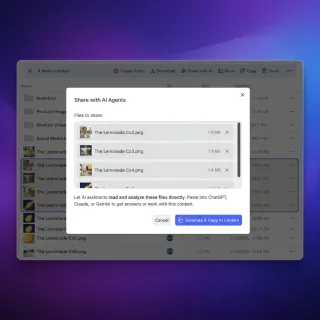
Best AI Document Management Systems: 10 Platforms Compared
AI document management systems combine semantic search, cited RAG chat, and structured field extraction so teams and AI agents can work with files without manual tagging. Because connecting an AI assistant to an entire cloud drive exposes sensitive folders, scoping access by workspace matters as much as search quality. This comparison covers 10 AI DMS solutions based on documented search, machine learning extraction, agent integration, and pricing.

Best AI Document Summarization Tools in 2026
AI document summarization tools differ wildly in how they handle long PDFs, legal contracts, and academic papers. After reviewing results from Fritz AI's 8-tool benchmark, Lindy AI's 20-tool comparison, and AI Lawyer Pro's legal-focused evaluation, this guide ranks the 10 best summarizers by what they actually do well and where they fall short.

Best AI File Organizers in 2026: 8 Tools That Actually Sort Your Files
McKinsey estimates that employees spend 1.8 hours every day just searching for and gathering information. AI file organizers attack that problem by reading file contents, applying tags, renaming documents, and routing them into the right folders automatically. This guide covers eight tools across desktop, cloud, and hybrid platforms, with honest evaluations of what each does well and where it falls short.
Best Document Processing Tools for AI Agents
Document processing tools for AI agents automate the extraction, parsing, and transformation of unstructured documents (PDFs, images, contracts) into structured data that agents can act on. This guide reviews leading platforms across OCR engines, parsing APIs, extraction tools, and end-to-end IDP solutions optimized for AI workflows.

Best File Sharing for Fine-Tuning AI Datasets
Guide to file sharing fine tuning datasets: Fine-tuning an LLM starts long before you write a training config. You need to collect, clean, version, and distribute datasets across your team and your agents. This guide compares the most common ways to share private fine-tuning datasets and explains where each option fits in a real ML pipeline.
Best OCR Tools for AI Agents: Vision-to-Text APIs for Developers
OCR tools for AI agents use computer vision to extract text from images, scans, and handwritten notes, feeding the result into LLMs for analysis or action. Modern AI-based OCR reaches 99%+ character accuracy, with handwritten text extraction improving by 40% through multimodal models. This guide compares traditional OCR, LLM-native vision, and specialized APIs.
Best Secure File Sharing for AI Teams in 2026
AI teams face unique security challenges when sharing sensitive training data, proprietary model weights, and research outputs. This guide evaluates the best secure file sharing platforms based on encryption strength, large file support, access controls, and API integration for ML workflows.

Best Social Media Metadata Extraction API Tools for 2026
Social media metadata extraction tools pull structured data from posts, profiles, and shared links across platforms like X, Instagram, TikTok, and LinkedIn. This guide compares seven tools across three extraction approaches, with pricing, rate limits, and data quality tradeoffs for each.

Bitbucket File Size Limit: Repository Limits, Git LFS, and Large Assets
Bitbucket enforces a soft repository size warning at 2GB, a hard push restriction at 4GB, and blocks individual files exceeding 100MB unless tracked via Git Large File Storage (LFS). Pushing large binary assets like model checkpoints, datasets, or build archives into standard Git history causes pre-receive hook rejections. This guide details Cloud versus Data Center limits, step-by-step history rewrites with git-filter-repo, and external workspace patterns for large assets.

Box File Request vs Intelligent Agent Rooms: Inbound File Intake Comparison
Inbound file intake requires more than dumping documents into static folders. While Box File Request collects files through simple web links, intelligent agent rooms transform incoming payloads into active workspaces where autonomous agents and human teams index, extract, and query documents immediately upon arrival.

Box File Size Limit: Upload Caps by Plan and Large-Corpus AI Search
Box documents an individual file upload limit across account plans, ranging from 250 MB on free accounts to 5 GB on Business, 50 GB on Enterprise, and up to 150 GB on Enterprise Plus. While higher tiers support large assets, browser drops, folder ownership inheritance, and API chunking complicate bulk transfers. Connecting Box to AI assistants requires offloading data to indexed workspaces instead of attaching files to context windows.

Box to SharePoint Migration Guide: Planning and Execution
Box to SharePoint migration transitions files, folder hierarchies, and metadata from Box Enterprise to Microsoft SharePoint Online, requiring translation of Box's granular 7-level permission model to SharePoint security groups. A successful cutover depends on planning for identity mapping, Box Notes conversion, version history limits, and metadata retention. Teams can also sync existing cloud storage into intelligent workspaces via MCP for fast semantic search without full migration.

Browser File Upload Limits: Memory Ceilings, Chunked Transfer, and Web Workflows
Web browsers enforce operational file upload limits through client-side memory ceilings, JavaScript engine buffer thresholds, and network connection timeouts. While the HTML specification defines no maximum payload, un-chunked transfers crash browser tabs or time out. Handling multi-gigabyte files requires client-side chunking, resumable protocols, and intelligent workspaces that decouple asset ingestion from client memory constraints.

Can ChatGPT Upload Files to Google Drive? How to Save AI Outputs
ChatGPT cannot natively upload, write, or export files directly back to Google Drive; its native integration is strictly read-only for pulling source context into the chat session. When models generate CSV spreadsheets, code scripts, or documents, teams must either manually download them or configure external automation. Using third-party automation tools, custom API scripts, or agentic cloud workspaces with MCP connectivity bridges this gap and automates file persistence.

ChatGPT Attachment Limit: File Sizes, Counts, and Large Corpus Workarounds
ChatGPT caps message attachments at 20 files, enforces a 512 MB file ceiling, and silently truncates documents beyond 2 million tokens. Stacking rate caps, 25 GB user storage ceilings, and project limits create hard friction for engineering and research teams. Rather than continually bundling and splitting files, teams working with massive document corpora use persistent cloud workspaces and remote MCP servers to perform targeted semantic retrieval without direct conversational attachments.
ChatGPT Code Interpreter File Size Limit: Upload Caps and Sandbox Workarounds
While ChatGPT Code Interpreter permits raw file uploads up to 512MB per file, the sandboxed Python execution container enforces strict memory boundaries (typically 512MB to 1GB of RAM), meaning datasets that upload without error can still crash the session during dataframe parsing or memory-intensive calculations. Distinguishing transport limits from execution caps enables teams to optimize column types, stream data in chunks, and decouple large persistent files from ephemeral chat sessions.

ChatGPT CSV Upload Limit: File Size Caps, Row Limits, and Memory Workarounds
The ChatGPT CSV upload limit allows raw files up to 512MB, but the Python sandbox frequently crashes on dataframes exceeding 150MB to 200MB in memory. While spreadsheets are exempt from the 2-million-token document ceiling, web table previews truncate at 1,000 rows. Understanding runtime container boundaries helps teams avoid out-of-memory errors and query large datasets effectively.

ChatGPT Excel Upload Limit: Workbook Size, Sheet Caps, and Sandbox Constraints
The ChatGPT Excel upload limit pairs a 512MB binary file cap with a practical 50MB guideline for spreadsheets. Inside the Python execution sandbox, workbooks face strict memory ceilings, 60-second timeouts, and unsupported VBA macros. Formatting sheets cleanly or routing oversized datasets to persistent, indexed workspaces enables reliable data analysis.

ChatGPT File Limit: How Many Files You Can Upload and Storage Caps
ChatGPT restricts file uploads to 10 files per message turn, 512MB per document or audio file, and 2 million tokens per text document. Users also face account storage quotas of 25 GB per individual and 100 GB per organization. Connecting an external indexed workspace through the Model Context Protocol allows teams to reference large document corpora without hitting chat attachment limits.
ChatGPT File Upload Failed: Causes, Limits, and Workspace Workarounds
A ChatGPT file upload failed error occurs when an attached file exceeds OpenAI size limits (typically 512MB per file or 10M tokens), contains unsupported encoding, or times out during client-to-server transfer. While standard chat processes attachments ephemerally, Projects and custom GPTs enforce strict token ceilings. Understanding these constraints lets teams diagnose upload errors quickly and query large document collections using external MCP workspaces.
ChatGPT File Upload Limits: How to Handle Large Files and Folders
ChatGPT limits documents to 512MB per file, uploads to 80 files every 3 hours, and upload storage to 25 GB per user, creating problems for large datasets.

ChatGPT Free Upload Limit: Daily File Caps, Quotas, and Workarounds
The ChatGPT Free upload limit restricts non-paying accounts to 3 file uploads every 24 hours with a 512MB per-file size ceiling. Once this quota is exhausted, document analysis and attachment features lock until the rolling window clears. Users working across multiple documents can combine text files, host documents on public URLs, or connect external workspaces through MCP to query documents without manual chat uploads.

ChatGPT Image Upload Limits: File Caps, Resolution, and Vision Token Costs
The ChatGPT image upload limit defines the maximum file size, resolution, and image count OpenAI models ingest per prompt, capping API uploads at 20MB and web uploads at 512MB with vision token scaling up to 1,445 tokens per image. While low-detail processing uses a flat 85 tokens, high-detail multi-image prompts rapidly erode context windows. Managing large visual corpora requires separating asset storage and search from model prompt payloads.

ChatGPT Max File Size: The 512 MB Upload Limit Across Plans
ChatGPT enforces a strict maximum file size limit of 512 MB per uploaded file across all subscription plans, alongside format-specific restrictions such as a 50 MB cap on spreadsheets and a 2 million token limit on text documents. Individual user accounts also face a cumulative storage cap of `10 GB`. When datasets exceed these boundaries, teams switch from chat attachments to external shared workspaces connected through the Model Context Protocol.

ChatGPT PDF Limit: File Size, Page Count, and Large Document Workarounds
The ChatGPT PDF limit enforces a 512MB file size ceiling, a 2 million token extraction threshold, and a restriction of 10 files uploaded at a time. Long, scanned, or complex documents frequently encounter silent text truncation, execution timeouts, or dropped chapters during Python sandbox and retrieval parsing. Understanding these ingestion boundaries and structuring multi-document workflows prevents data loss and preserves context.

ChatGPT Plus File Limit: Upload Caps, Attachment Counts & Storage
The ChatGPT Plus file limit permits users to upload up to `10` files per prompt, with each file capped at `512 MB` and text files capped at `2,000,000` tokens. While individual uploads handle substantial datasets, conversational context saturation and rolling caps create strict operational boundaries for active research. Connecting an external indexed workspace allows teams to query large corpora without hitting attachment or memory ceilings.

ChatGPT Plus Upload Limit: File Size, Count, and Rolling Caps
The ChatGPT Plus upload limit caps subscribers at `80` file uploads every 3 hours, a `512 MB` file ceiling, and a `10,000,000` token extraction limit per file. Stacking message boundaries, image caps, and spreadsheet memory limits create operational bottlenecks for data teams. Understanding these technical rules helps teams troubleshoot blocked uploads and connect external storage for large document corpora.

ChatGPT Projects File Limit: Plan Caps, Workarounds, and Large-Corpus Search
The ChatGPT Projects file limit restricts workspace knowledge to 5 files on Free, 25 on Plus, and 40 on Enterprise, with each file capped at 512MB and 2 million tokens. While users often resort to merging PDFs or deleting older documents, decoupling storage through an external indexed workspace and MCP search allows assistants to query large document collections without hitting attachment ceilings.
ChatGPT Projects File Size Limit: Document Caps and Large-Corpus Search
The ChatGPT Projects file size limit enforces a 512MB and 2 million token cap per text document, a 50MB ceiling on spreadsheets, and a 20MB limit on images. Because project knowledge bases rely on retrieval rather than unbounded model memory, uploading massive files leads to parsing timeouts and context exhaustion. Decoupling storage into an external workspace lets ChatGPT query large document collections via MCP on demand.
ChatGPT SharePoint Connector Limits: 100 MiB File Cap, Throttling, and Architecture
As of October 2026, the native ChatGPT SharePoint connector enforces a 100 MiB file ceiling and triggers Microsoft Graph HTTP 429 throttling during multi-file searches. Organizations with deep document libraries frequently experience failed queries and timeouts. By syncing SharePoint libraries into Fastio workspaces and connecting via remote MCP, teams query enterprise files without triggering tenant rate limits.

ChatGPT SharePoint Connector: Enterprise Setup vs. Fast.io MCP Workspaces
Connecting ChatGPT to SharePoint document libraries gives conversational models access to enterprise knowledge. While native ChatGPT Enterprise connectors synchronize files through Microsoft Graph, production rollouts face administrative consent hurdles, synchronization delays, and API rate limits. Syncing SharePoint folders into Fast.io workspaces lets AI agents query pre-indexed files via remote Model Context Protocol (MCP) endpoints with hybrid search and zero Graph API bottlenecks.

ChatGPT SharePoint Integration: Native Connectors vs. Intelligent Workspaces
A ChatGPT SharePoint integration connects OpenAI language models to enterprise document libraries for conversational search. While Microsoft native connectors provide read-only grounding through Microsoft Graph, they introduce API throttling and high latency. Syncing SharePoint folders into intelligent workspaces and querying through a remote MCP server offers indexed search and faster retrieval without dumping whole folders into prompts.

ChatGPT SharePoint Permissions: Admin Setup and Access Controls
ChatGPT SharePoint permissions rely on Microsoft Entra ID delegated and application access grants that govern how language models read enterprise files. Unrestricted permission scopes risk exposing confidential human resources and financial records across organization-wide chat sessions. Configuring granular permissions through admin consent, Sites.Selected scoping, and synced workspaces isolates sensitive files while enabling AI search.
ChatGPT SharePoint Plugin: Connect AI Without Graph Throttling
A ChatGPT SharePoint plugin connects OpenAI conversational models directly to corporate document libraries, enabling automated file retrieval, semantic search, and document summarization within chat. While direct Microsoft Graph API calls trigger rate throttling and require tenant administrator consent, syncing document libraries into a Fast.io workspace allows ChatGPT to query indexed files via remote MCP without polling delays.

ChatGPT SharePoint Sync: How to Keep SharePoint Files Synchronized
ChatGPT SharePoint synchronization reflects additions, edits, and deletions in SharePoint libraries within AI chat sessions without manual document re-uploads. Native Microsoft 365 connectors pull static snapshots that quickly drift out of date and risk Graph rate throttling. Syncing folders into an intelligent workspace provides automated hybrid indexing and remote MCP access for ChatGPT.

Cloudflare Upload Limits: Plan Caps, Error 413, and Workarounds
Cloudflare restricts client request bodies passing through its edge proxy to 100 MB on Free and Pro tiers, 200 MB on Business, and 500 MB by default on Enterprise. Uploads exceeding these limits trigger an HTTP 413 Payload Too Large error before reaching the origin server. Resolving these caps requires chunked uploads, unproxied DNS subdomains, direct object storage uploads, or connecting persistent workspaces where AI agents and teams access large files without hitting proxy bottlenecks.

Connecting AutoGen Multi-Agent Systems to SharePoint: Architecture and Setup
An AutoGen SharePoint connector enables Microsoft AutoGen agent teams to authenticate against Microsoft Graph and query enterprise SharePoint document repositories. Direct API traversal triggers recursive directory searches, context saturation, and OAuth token expiration during multi-turn dialogues. By synchronizing SharePoint libraries into an indexed Fast.io workspace, AutoGen agents query pre-chunked documents via remote MCP, cutting token overhead and avoiding API rate limits.

Connecting Semantic Kernel to SharePoint: Architecture and Setup
A Semantic Kernel SharePoint connector enables enterprise AI agents to access, search, and extract document content from Microsoft SharePoint libraries. Development teams can choose between building custom native plugins that call the Microsoft Graph API or syncing document libraries to Fastio workspaces with built-in hybrid search and remote MCP connectivity. This guide details authentication lifecycles, permissions scoping, context window management, and production retrieval patterns.

Converting std::filesystem::path to String in C++ (Cross-Platform)
Converting a C++ filesystem path to a string portably requires addressing operating system encoding differences and language updates. C++20 introduces char8_t string types for UTF-8 paths, breaking compatibility with older narrow string APIs. Understanding how to handle these type changes and native wide-character paths on Windows ensures cross-platform agents can exchange paths without data corruption.

CSV File Size Limits: AI Assistant Upload Caps, Parsing Ceilings, and Fixes
CSV file size limits vary from strict row boundaries in spreadsheets to memory and token constraints in AI chat assistants. While the plain text CSV standard imposes no technical ceiling, software platforms reject or truncate large files when context windows or upload parsers are overwhelmed. Understanding these vendor thresholds helps teams avoid silent data loss and connect external workspaces using Model Context Protocol.

CSV Row Limit: Specification Realities vs Software Constraints
Under RFC 4180, CSV files have no theoretical or specification row limit; any practical limit is imposed entirely by the software, operating system, or available memory used to read the file. While plain text streams can hold billions of lines, spreadsheet grids and AI chat interfaces enforce rigid memory ceilings that truncate data. Understanding these software boundaries prevents silent record loss and guides teams toward stream processing and persistent workspaces.

Custom GPT File Limit: Knowledge Base Caps and Large-Corpus Search
OpenAI restricts Custom GPT Knowledge bases to a hard ceiling of 10 files, 512MB per file, and 2 million tokens per document. While standard workarounds suggest merging text into giant documents, large knowledge bases quickly degrade prompt precision and retrieval accuracy. Connecting external workspace storage through remote Model Context Protocol servers enables assistants to search extensive document libraries on demand without hitting file count caps.

DeepSeek File Upload Limit: File Constraints and Large-Corpus Indexing
DeepSeek limits attachments to 50 files and 100MB per document in web chat, while its Files API caps individual uploads at 64 MiB. Feeding large document collections into chat prompts consumes context and silently truncates source text. Decoupling storage from inference through an intelligent workspace with remote Model Context Protocol (MCP) search allows teams to index and query multi-gigabyte document libraries without hitting file upload gates.

Distributed File System Architectures for Multi-Agent Collaboration
Coordinating parallel autonomous AI agents requires moving beyond isolated containers. This guide examines how distributed file system architectures provide a shared, versioned storage substrate to maintain consistency and prevent state corruption in multi-agent environments.

Docker File Server vs. Agent Rooms: Persistent Storage for Sandboxed Agents
Self-hosting a Docker file server for containerized coding agents requires managing port forwarding, custom permission models, and volume backups. In contrast, cloud-hosted Agent Rooms connect sandboxed agents with zero networking configuration using a remote Model Context Protocol endpoint. This article compares the two storage approaches, highlighting the RAG indexing, webhook event streams, and version controls needed for autonomous developer workflows.
Dropbox API Download File: Endpoints, Rate Limits & Agent Workflows
The Dropbox API download file endpoint (/2/files/download) streams raw binary files by passing parameters through HTTP headers rather than a request body. While direct downloads work for local scripts, autonomous AI agents face severe memory bottlenecks and rate limits when retrieving large assets. Syncing Dropbox folders into indexed workspaces allows agents to query documents through remote Model Context Protocol tools without downloading entire files.

Dropbox File Request vs Intelligent Rooms: Modernizing File Intake for AI Teams
Traditional Dropbox file requests collect documents into isolated folders, leaving incoming files dormant until manual review. Intelligent rooms modernize file intake by indexing files on arrival, extracting structured data via Metadata Views, and enabling direct coordination between human teams and AI agents.

Dropbox to SharePoint Migration: Guide, Tools, and Architecture
Dropbox to SharePoint migration is the process of transferring folders, permissions, and file versions from Dropbox Team accounts to Microsoft 365 SharePoint document libraries. A successful rollout requires translating Dropbox access roles into SharePoint security groups, resolving unsupported Paper documents, and avoiding destination rename loops during delta passes. Teams can also sync existing cloud storage into intelligent workspaces via MCP for fast semantic search.

Dublin Core vs XMP vs IPTC: Choosing the Right Metadata Standard
Dublin Core, XMP, and IPTC each solve a different metadata problem. Dublin Core catalogs resources across libraries and archives, XMP embeds extensible metadata inside file formats, and IPTC describes the content and rights of photographs. This guide compares all three standards head to head, maps each to its strongest use cases, and explains how they overlap inside the same file.

Elasticsearch Document Size Limit: http.max_content_length and Bulk Indexing
An Elasticsearch document size limit is determined by the HTTP transport layer setting `http.max_content_length` (default `100MB`) and Lucene's internal `2GB` indexing ceiling, although production clusters recommend keeping individual documents below a few megabytes. In production, indexing documents larger than a few megabytes introduces severe JVM heap pressure, lengthy garbage collection pauses, and segment bottlenecks. Stable clusters rely on tuned bulk batches and external blob storage.

Embedded Metadata vs Sidecar Files: Which XMP Approach to Use
Embedded metadata lives inside the file itself, while sidecar files store metadata externally in a companion .xmp file. Each approach has real tradeoffs around portability, file integrity, format compatibility, and workflow complexity. This guide compares them head to head and provides a decision framework based on your file formats, sharing needs, and preservation goals.

Excel File Size Limits: Documented Caps and Large Workbook Workarounds
Microsoft Excel enforces a 1,048,576 row cap per worksheet, Excel Online restricts browser editing to 100MB workbooks, and Anthropic Claude Projects limits file uploads to 30MB. When large models exceed these thresholds, workbooks fail to open or saturate AI context windows. Overcoming these limits requires binary workbook formats (.xlsb), 64-bit desktop runtimes, streaming data pipelines, or intelligent cloud workspaces connected through the Model Context Protocol.

exFAT File Size Limit: Theoretical Ceilings, Practical Limits, and Compatibility
The exFAT file size limit reaches 16 exbibytes theoretically, removing the restrictive 4 GB barrier imposed by FAT32. While exFAT enables cross-platform compatibility across Windows, macOS, and Linux without file size friction, practical deployments face volume boundaries, cluster slack waste, and data corruption risks due to the lack of file journaling. Modern data pipelines and AI agent workflows increasingly rely on intelligent cloud workspaces to bypass local disk constraints.

Express.js File Upload Limits: Configuration, Multer, and Body Parser
Express file upload limits depend on whether requests pass through built-in body parsers or streaming multipart middleware. Express body-parser defaults to 100KB for JSON and URL-encoded payloads, while Multer accepts unlimited payloads unless constrained by limits.fileSize. Raising express.json limits does not process multipart form-data. Resolving 413 Payload Too Large errors requires tuning middleware, adjusting reverse proxy ceilings, or offloading files to persistent storage.

ext4 File Size Limit: Inode Boundaries, Block Sizes, and Linux Container Ceilings
The ext4 file size limit is 16 TiB under the standard 4 KiB block size, governed by 32-bit logical block addressing in the Linux kernel extent tree. While ext4 supports volume sizes up to 1 EiB, containerized workloads and AI pipelines often fail earlier due to fixed inode exhaustion and dirty buffer writeback stalls. This guide examines the extent architecture, block size mathematics, container storage limits, and persistent workspace storage patterns.

FastAPI Upload File Size Limits: Memory Spooling, Middleware, and Direct Storage
FastAPI imposes no native file size limit, but Starlette spools multipart uploads in memory up to `1,048,576 bytes` before writing chunks to temporary disk storage. While this prevents memory exhaustion on modest uploads, high-volume files can exhaust server disk space, trigger gateway timeouts, or fail behind reverse proxies. Configuring streaming chunk handlers, enforcement middleware, and direct cloud storage pipelines ensures dependable large file processing without crashing ASGI workers.
Fastio Event Feeds: A Guide to Real-Time File Events
Fastio enables developers to trigger AI agents or human workflows instantly when files are added, modified, or deleted in a workspace. Real-time WebSocket event feeds and activity polling eliminate inefficient short-polling and power responsive event-driven architectures.

File Descriptor Limits in Linux: ulimit, Systemd, and EMFILE Fixes
A file descriptor limit caps the number of open files, network sockets, and pipes a Linux process or system can maintain simultaneously. Hitting default boundaries triggers EMFILE errors and halts concurrent agent workers, web servers, and database pools. Resolving these bottlenecks requires configuring ulimit, PAM limits, systemd service overrides, and kernel sysctl values.

File Server for Small Business: Comparing NAS, Cloud Storage, and Agent Rooms
Small business file storage is moving beyond passive hardware drives toward active cloud workspaces where people and software agents collaborate. Traditional NAS units and desktop sync tools isolate data behind VPNs or cause synchronization conflicts during automated file writes. This guide evaluates on-premises appliances, cloud sync, and intelligent agent rooms to help teams choose the right storage architecture.

File Server Migration Checklist: Moving Legacy Shares to Modern Agent Workspaces
A file server migration checklist is a structured phase-by-phase framework for auditing data, mapping access controls, synchronizing files, and cutting over from legacy on-premises servers to modern cloud workspaces. Transitioning from Windows SMB or NFS shares to collaborative agent workspaces prevents permission drift, eliminates agent write collisions, and activates semantic indexing across project files. Here is the technical checklist to audit, transfer, and validate your shares.

File Size Reducer Tools vs Cloud Workspaces for Large Files
A file size reducer compresses digital files by stripping metadata, downsampling media resolution, or re-encoding container formats, but lossy compression degrades document fidelity and introduces security risks. Cloud workspaces replace destructive file shrinking with high-capacity storage, direct access links, and built-in search. This guide examines compression algorithms, vendor upload limits, and scalable workspace architectures for teams and AI agents.

File System Access API Limits: Browser Quotas, OPFS, and Large File Handling
The File System Access API allows web applications to read or save changes directly to files and folders on the user's device, subject to browser permission prompts and origin storage quota caps. While direct picker handles lack fixed file size caps, Origin Private File System storage is bounded by origin quotas. Handling large datasets requires quota inspection, worker-based sync access handles, and chunked streams to prevent memory bloat on files above 200 megabytes.

Fix ChatGPT SharePoint Not Working: Permissions, Auth & Sync Errors
When ChatGPT SharePoint integration stops working, the root cause is typically Microsoft Entra ID admin consent blocks, conditional access restrictions, or Microsoft Graph API throttling on large document libraries. Standard troubleshooting like clearing browser cookies fails because enterprise identity policies govern tenant access. Resolving these failures requires configuring tenant admin consent or syncing libraries into an indexed workspace to bypass live API crawl limits.
Gemini Attachment Limit: File Caps and Multi-Document Workarounds
The Gemini attachment limit restricts uploads to 10 files per prompt (subject to availability) in the Gemini web and mobile apps, a figure Google's help page gives without separate numbers per plan. While Gemini models on paid plans work with a 1 million token context window, the interface blocks batch document ingestion for larger corpora. Teams can combine files, use developer APIs, or connect persistent external workspaces through Model Context Protocol servers to bypass upload caps.

Gemini Gems File Limit: 10-File Upload Cap and Knowledge Base Solutions
The Gemini Gems file limit caps custom knowledge bases at 10 reference files and 100 MB per document. While attached knowledge persists across Gem interactions, active chat sessions also face rolling upload caps and context window constraints. When your reference library exceeds 10 files, external retrieval and workspace indexing provide an alternative to manual document merging.

Gemini Image Upload Limits: File Size, Image Counts, and Multimodal Tokens
The Gemini image upload limit allows up to 3,600 images per prompt in developer APIs, but operational ceilings vary across environments. Inline base64 requests cap out at `20MB`, the temporary File API staging buffer accommodates assets up to `2GB` each, and consumer chat interfaces limit prompts to 10 files. Understanding fixed 258-token tiling mechanics, image formats, and context consumption prevents runtime errors and token exhaustion.
Gemini Max File Size: Limits for Web, Advanced, and API Uploads
The Google Gemini max file size restricts web interface users to 100MB per document and 2GB for video files, with a 10-file cap per prompt. Developers using the Gemini Files API can stage files up to 2GB with a 20GB project storage quota, while inline API requests accept payloads up to 100MB (50MB for PDFs). Processing multi-gigabyte document archives requires persistent workspace indexing rather than repeated file attachments.

Git File Size Limit: Protocol Thresholds, Push Blocks, and AI Datasets
Git enforces no inherent file size limit in its core protocol, but major hosting remotes reject pushes containing files larger than 100 MB and issue warnings at 50 MB. Storing large binary assets degrades repository performance by inflating packfile transfer times and clone sizes. Resolving push rejections requires rewriting unpushed history, migrating assets to Git LFS, or moving large datasets and AI corpora to external intelligent workspaces.

GitHub File Size Limits Explained for Teams and Copilot
GitHub hard-blocks any single file larger than 100 MiB in normal Git history, warns above 50 MiB, and caps browser uploads at 25 MiB. Those thresholds are why model weights, datasets, and agent build artifacts break pushes long before a repository feels "large." This guide maps the official caps, shows how to fix a rejected push, and helps you choose Git LFS, Releases, object storage, or a shared workspace when GitHub Copilot and human teammates need big files outside the repo.

GitHub Release File Size Limit: The 2 GiB Ceiling and Workarounds
The GitHub release file size limit caps individual binary assets at 2 GiB per file. While repositories restrict standard commits, releases support detached binary assets. When installers, datasets, or model weights exceed this ceiling, teams use multi-part archive splitting, Git LFS, or external workspace distribution to deliver files without pipeline failures.

GitLab File Size Limits: Repository Caps, LFS, and Agent Workspaces
GitLab file size limits restrict web UI attachments to 100 MB by default and individual git pushes to 5 GiB through Cloudflare, with Git LFS supporting 5 GB single files. While self-managed instances allow custom upload thresholds, GitLab SaaS enforces strict repository storage caps starting at 10 GB on Free. Automated CI pipelines and AI coding agents pushing heavy datasets or build artifacts trigger push rejections unless large assets are decoupled into external persistent workspaces.

Gmail Attachment Size Limit: 25MB Threshold and Large File Sharing
The Gmail attachment size limit is a strict 25 MB cap on the total size of all attached files per outgoing email, which restricts binary attachments to roughly 18 MB to 20 MB due to MIME and Base64 encoding overhead. While Google automatically routes oversized attachments to Google Drive links, this introduces permission friction and quota consumption. Engineering teams and agentic workflows bypass email transfer ceilings by maintaining persistent, indexed workspaces accessible via MCP.

Google AI Studio File Upload Limits: File API Constraints and Large Corpora
Google AI Studio and the Gemini File API enforce a 2 GB per-file upload limit and a 20 GB total project storage cap, with uploaded files automatically deleted after 48 hours. While Gemini models support context windows up to `2 million` tokens, large media files and document archives quickly hit these ceilings. Understanding file lifecycle management, resumable chunked transfers, and remote workspace indexing prevents broken ingestion pipelines when working with large corpora.

Google Drive API for Shared Drives: Querying, Permissions, and Corpora
Accessing files inside Google Shared Drives with Google Drive API v3 requires explicit configuration flags that differ from personal drive queries. Omitting supportsAllDrives, includeItemsFromAllDrives, or proper corpora parameters leads to empty query responses and unexpected 404 errors. This guide details how to configure API v3 parameters, manage service account permissions, and connect Shared Drive contents to agentic workflows.

Google Drive Resumable Upload: Architecture, Limits, and Workspace Solutions
Google Drive resumable upload is an HTTP protocol for transferring files larger than 5 MB in chunks, using a temporary session URI to resume interrupted transfers without re-uploading completed bytes. Understanding session expiration, chunk alignment in multiples of 256 KiB, and status check polling prevents silent failures in automated data pipelines. For multi-agent systems and headless workflows, coordinating transfers through shared workspaces avoids connection drops and quota exhaustion.

Google Gemini Document Upload Limits: 10-File Caps, Sizes, and Workarounds
The Google Gemini document upload limit restricts web interface users to a maximum of 10 attached files per prompt up to 100MB each, while the Google Gemini File API allows individual files up to 2GB with a 20GB per-project storage cap and 48-hour retention. Working with enterprise repositories or large document sets requires bypassing manual chat attachments using remote retrieval architectures and shared workspaces.

Google Gemini PDF Limits: File Sizes, Page Caps, and Parsing Fixes
The Gemini PDF limit enforces distinct document ceilings across environments: 100MB and 10 files per prompt in web apps, compared to 50MB and 1,000 pages per document in the Gemini API. Exceeding page thresholds triggers immediate invalid argument errors, while dense layouts and unscanned images cause OCR extraction failures. Understanding staging limits versus document processing pipelines prevents failed uploads and token exhaustion.
Google Gemini Upload Limits: File Caps, Size Ceilings & Large-Corpus Solutions
The Google Gemini upload limit restricts users to attaching a maximum of 10 files per prompt, with individual file sizes capped at 100MB and PDF documents limited to 48 pages on free accounts. Although Gemini models handle large context windows, prompt attachment caps trigger well before token exhaustion. Teams working with large document libraries bypass manual upload ceilings by connecting external workspaces through remote Model Context Protocol servers.

Google NotebookLM File Limit: 50 Sources, Word Counts, and Large Corpus Workflows
The NotebookLM file limit in Gemini Notebook restricts standard accounts to 50 active sources per notebook, representing an aggregate capacity of up to 25 million words. While paid tiers expand container capacity up to 600 sources, every individual source remains capped at 500,000 words or 200MB. Scaling beyond these container boundaries requires organizing corporate files in an indexed workspace queried via remote MCP retrieval.
Google NotebookLM File Size Limit: Source Caps and Large-Corpus Storage
Google NotebookLM restricts individual uploaded files to 200MB and 500,000 words across 50 sources on its free tier. While paid Google AI plans expand source counts up to 600 per notebook, they leave the single-source size ceilings unchanged. For research teams managing multi-gigabyte collections, decoupling storage into an intelligent workspace and querying documents via MCP search bypasses upload barriers without prompt bloat.

Google Shared Drive Access Levels: Manager vs Contributor Role Breakdown
Google Shared Drive access levels govern what members can edit, organize, delete, and administer across shared company storage. Understanding the operational differences between Manager, Content Manager, and Contributor permissions is essential for maintaining data security and avoiding workflow failures in automated pipelines. Proper role assignment prevents accidental file loss, resolves subfolder inheritance constraints, and keeps storage connectors functioning smoothly.
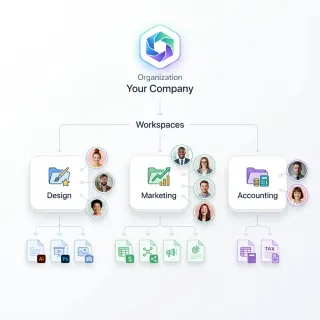
Google Shared Drive Best Practices: Architecture, Limits, and Organization
Google Shared Drives centralize file ownership across organizations, but unmanaged sprawl quickly triggers item caps, crawl timeouts, and permission chaos. Implementing structured drive boundaries, group-based permissions, and shallow folder hierarchies keeps assets organized and accessible. When connecting storage to AI pipelines, synchronizing folders into an intelligent workspace prevents connector delta-sync bottlenecks.

Grok File Upload Limit: File Size Caps, Formats, and Workarounds
The Grok file upload limit caps individual document attachments at 150MB on web chat and 48MB via the xAI Files API. Understanding these platform boundaries prevents payload errors during automated ingestion and interactive analysis. When document collections exceed single-file limits, storing files in an intelligent workspace queried through the Model Context Protocol replaces manual attachments with indexed semantic search.

How AI Agents Resolve Filesystem Paths in Shared Sandboxes
AI agents operating in shared sandboxes must resolve filesystem paths safely to prevent directory traversal vulnerabilities and unauthorized system access. This guide explains the differences between relative and absolute paths, provides a step-by-step validation checklist, and demonstrates how to configure secure workspaces for multiple agents.
How Many Files Can You Upload to ChatGPT? Per-Prompt and Daily Limits
If you are wondering how many files can you upload to ChatGPT, limits depend on your plan: Free accounts allow 3 file uploads per day, while paid subscriptions permit up to 80 files every 3 hours and up to 20 files in a single prompt. Documents carry a maximum file size limit of 512MB, with a 2 million token ceiling on text files. For research teams and developers analyzing large document archives, understanding these boundaries prevents ingestion errors and context dilution.

How to Access SharePoint Files with Microsoft Graph API and AI Agents
The Microsoft Graph API for SharePoint provides programmatic endpoints to access sites, lists, and document libraries across Microsoft 365 tenants. Connecting AI agents directly to Microsoft Graph requires multi-step identifier resolutions, managing broad tenant permissions, and consuming context tokens on directory traversals. Synchronizing SharePoint libraries into indexed agent workspaces via remote Model Context Protocol servers offers a token-efficient retrieval pattern.
How to Add File Watermarking to Your AI Agent Pipeline
AI agent file watermarking is the automated process of embedding visible or invisible identifiers into documents, images, or videos before an agent shares them with recipients. This guide walks through watermarking types, how to build watermarking into an agentic delivery pipeline, and how to trace leaks back to specific recipients when something goes wrong.
How to Automate Document Processing with AI Agents
AI agent document processing uses autonomous agents to extract, analyze, and transform information from documents without manual intervention. Unlike traditional OCR, these agents can reason about content, handle unstructured data, and execute complex workflows. This guide shows you how to build agent pipelines that process documents quickly and accurately.

How to Automate File Classification with AI Agents
AI agent file classification automation uses intelligent agents to categorize incoming documents, apply tags, and route them to the right storage locations without human intervention. This guide walks through the full pipeline, from ingestion to verification, and shows how to wire it up with workspace routing and granular permissions that most classification guides skip.

How to Automate File Unzipping on macOS inside Agent Workspaces
Automating how you unzip files on Mac workspaces allows autonomous AI agents to process compressed archives. Using terminal utilities like ditto or unzip in automated script execution avoids execution failures.
How to Automate PDF Report Generation with AI Agents
AI agent PDF report generation is the process of autonomous agents creating, formatting, and delivering PDF documents from data analysis, research findings, or business workflows without human intervention. By replacing manual compilation with intelligent automation, enterprises can save significant time annually while improving report accuracy and consistency.

How to Automate Share Link Revocation for AI Agents
AI agents generate share links at machine speed, and every link that outlives its purpose is a potential leak. This guide covers four automation triggers for revocation, how to wire them up with event feeds and scheduled jobs, and how Fastio fits into an event-driven share lifecycle.
How to Automate Spreadsheets with AI Agents
Manual data entry takes up nearly 30% of the work week. AI agents take over these repetitive tasks by reading, updating, and creating spreadsheets autonomously. Unlike Excel plugins that require your active attention, these agents process thousands of rows in the background. This guide shows you how to build a fully automated pipeline where agents pull files from storage, transform the data, and deliver clean reports.

How to Automate the Fastio API Metadata Extraction Workflow
The Fastio metadata extraction workflow automatically processes uploaded files, pulling out important EXIF data, text summaries, and structural attributes to feed directly into agent memory. This capability lets developers build context-aware AI agents without relying on third-party parsing libraries for many common file types. Knowing how to map this structured data keeps your intelligent workspace organized and performant.

How to Automatically Organize and Sort Files Using Metadata
Most file organization systems rely on manual folder structures that break down as libraries grow. Metadata-based organization uses properties already embedded in your files, like creation dates, camera models, and document authors, to sort them automatically. This guide covers practical tools and scripts for building metadata-driven file workflows, from single ExifTool commands to AI-powered extraction at scale.

How to Build a Document Processing Pipeline with Fastio API
A document processing pipeline built on the Fastio API listens for new file uploads, automatically routes them for AI extraction, and stores structured metadata back in the workspace. This guide walks through each stage, from workspace setup and event listening to LLM-powered extraction and metadata tagging, with practical code examples you can adapt for invoices, contracts, and forms.

How to Build a File Sharing Portal with Fastio API
Building a custom file sharing portal gives your team control over the user experience without managing backend storage. A custom portal uses the Fastio API as the storage engine while you design the interface. This guide covers how to create a fast and secure client portal, handle authentication, and add AI agent integrations directly.

How to Build a LangGraph SharePoint Connector for Multi-Agent Systems
A LangGraph SharePoint connector provides stateful multi-agent workflows with callable tools to query, filter, and retrieve enterprise documents in Microsoft SharePoint Online libraries. Direct traversal through Microsoft Graph APIs introduces HTTP 429 throttling and context window bloat from downloading raw files. Synchronizing SharePoint libraries into an intelligent Fast.io workspace enables agents to search pre-indexed files via remote Model Context Protocol in milliseconds.

How to Build a Metadata Governance Framework That Actually Works
A metadata governance framework defines the policies, roles, standards, and processes an organization uses to keep metadata accurate, consistent, and discoverable across all data assets. This guide walks through the seven pillars of effective metadata governance, common implementation pitfalls, and how automation tools can reduce the manual burden of keeping metadata clean.

How to Build AI Data Extraction Agents That Store and Organize Results
AI data extraction agents are autonomous systems that identify, extract, and structure data from websites, documents, and databases without predefined templates. This guide covers how they work, the main technologies behind them, and the part most guides skip: how to store, organize, and query your extracted data so it actually becomes useful.

How to Build an Agentic File Router with Fastio Events
An agentic file router uses Fastio realtime events to dispatch uploaded files to specialized AI agents based on metadata or content type. Connecting event payloads directly to LLM context windows reduces processing latency and helps you build reactive multi-agent systems. This guide shows you how to build a router that evaluates incoming files and hands them off to the right agent for the job.
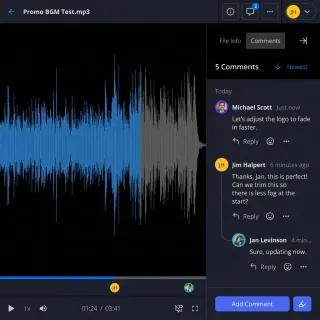
How to Build an AI Agent Delivery Portal
Most AI agent guides stop at "save to disk," leaving a gap between agent output and the humans who need it. A delivery portal bridges that gap by giving agents a secure, white-labeled destination to deposit completed work for clients, teammates, or stakeholders. This guide walks through building one with Fastio's share system, covering password protection, expiration controls, and guest access.
How to Build an AI Agent Document Redaction Pipeline
AI agent document redaction automation uses an autonomous agent to detect and remove sensitive information like names, SSNs, and account numbers from documents without manual review. This guide walks through building a five-stage redaction pipeline, from document ingestion to verified delivery, and explains how to connect it to a workspace where humans can review the output.

How to Build an AI Document Processing Workflow
An AI document processing workflow automates the ingestion, extraction, validation, and routing of documents using machine learning models. This guide covers practical architectures from OCR to agentic workflows, including storage integration and delivery patterns.
How to Build an AI File Manager with the Fastio API
Most AI agent tutorials skip the hardest part: giving your agent reliable, searchable file storage that works across sessions. This guide walks through building a complete AI file manager on the Fastio API, from authentication and uploads to semantic search and ownership transfer.

How to Build Automated Metadata Extraction Webhook Workflows
Polling for new files wastes compute and delays processing. Webhook-driven metadata extraction pipelines react to file events in real time, pulling structured data from documents, images, and media the moment they arrive. This guide walks through building these pipelines with storage event feeds, n8n, and custom Node.js handlers.

How to Build Base44 Metadata Views for Document Extraction
Base44 metadata views automatically parse file attributes to populate structured database tables and search filters. Extracting document properties into typed fields allows developers to build responsive UI components, eliminate manual data entry, and simplify file workflows across web applications.

How to Build Concurrent File Uploads with the Fastio API
Handling massive data ingestion for AI agents requires more than just standard file transfer protocols. This guide explains how to implement concurrent file uploads using the Fastio API to maximize throughput. You will learn how to build connection pools, balance high concurrency against enterprise rate limits, and ensure reliable data delivery for multi-agent systems.
How to Build Multi-Agent File Annotation Workflows
Manual data annotation is a bottleneck for AI development. Multi-agent file annotation allows parallel labeling with conflict resolution, speeding up workflows. By using specialized agents for different data types and a coordination layer like Fastio, teams can process thousands of files simultaneously while coordinating who edits each file.

How to Choose a File Conversion API for AI Agents
AI agents often hit a wall when they encounter proprietary file formats like PDF, DOCX, or PSD. A file conversion API bridges this gap, allowing agents to transform unreadable binary data into text or standard formats they can process. This guide explores the best APIs for agentic workflows and introduces a zero-conversion alternative.

How to Compare Documents with AI Agents
Traditional diff tools show you what changed between two documents. AI agents go further, comparing meaning, flagging risk, and producing structured reports that teams can act on. This guide walks through how AI agent document comparison works, what to look for in a comparison pipeline, and how to build one that delivers results to the right people.

How to Configure FileZilla SFTP Server for AI Agent Workspaces
Setting up FileZilla Pro Enterprise Server for secure SFTP access allows developers to expose local directories to containerized AI agents. By hardening directory permissions, disabling file deletion, and utilizing SSH public keys, teams can build secure local workspaces. This guide explains how to configure FileZilla listeners, restrict user folder permissions, and connect agent tools to Fast.io workspaces.

How to Configure Open WebUI File Upload Limits and Fix RAG 413 Errors
Open WebUI enforces file upload limits through reverse proxy request caps, application environment variables, and background vector embedding constraints. Resolving upload errors requires adjusting Nginx body size settings and the RAG_FILE_MAX_SIZE variable or moving large document collections to external intelligent workspaces connected through MCP.

How to Configure the Filesystem MCP Server for AI Agents
The official filesystem MCP server (@modelcontextprotocol/server-filesystem) exposes local directory access to AI agents via read/write file tools. This guide shows you how to configure the server for Claude Desktop, restrict directory scope to prevent security risks, and implement secure cloud-based workspaces using Fastio.
How to Connect AI Agents to Files and Cloud Storage
Connecting AI agents to files is the practical bottleneck most developers hit after getting their agent logic working.

How to Connect ChatGPT to Google Shared Drives
Connecting ChatGPT to Google Shared Drives gives teams direct conversational access to collective documentation, project archives, and shared research. The native Google Drive connector queries only personal user files by default, leaving team-owned repositories hidden in the file picker. Bridging this gap requires understanding Google Drive API search scopes or importing shared storage into indexed workspaces queryable through the Model Context Protocol.

How to Connect ChatGPT to SharePoint Document Libraries
Connecting ChatGPT to SharePoint allows conversational AI models to query enterprise document libraries through Microsoft Graph or remote MCP workspace endpoints. While native connectors synchronize files into ChatGPT Enterprise, high-concurrency retrieval can trigger Microsoft Graph rate limits. Syncing SharePoint folders into an indexed Fastio workspace lets agents run hybrid search without exhausting API quotas or context windows.

How to Connect CrewAI to SharePoint: Integration Guide
Connecting CrewAI to SharePoint enables multi-agent teams to inspect, summarize, and synthesize organizational knowledge from SharePoint document libraries using structured search tools. Direct Microsoft Graph API connectors frequently hit request throttling, tenant consent barriers, and token budget depletion in multi-agent loops. Syncing SharePoint folders into an indexed Fastio workspace lets agents query documents via remote MCP with fewer tool calls.

How to Connect Dify AI to Microsoft SharePoint
Connecting Dify to SharePoint enables agentic workflows and LLM applications to retrieve, cite, and analyze enterprise documents stored across Microsoft 365 libraries. Direct Microsoft Graph ingestion triggers API rate limits, complex Entra ID permissions, and memory pressure during recursive folder crawls. Synchronizing SharePoint libraries into an intelligent Fast.io workspace allows Dify agents to execute hybrid search over pre-indexed files via remote Model Context Protocol (MCP) tools.
How to Connect Google Gemini to SharePoint for Enterprise Document Search
Deploying a Gemini SharePoint connector allows enterprise teams to query, retrieve, and summarize files stored across Microsoft 365 directly within Google Gemini agent workflows. While cross-cloud architectures separate documents in SharePoint from AI models in Google Cloud, connecting them requires balancing authentication and retrieval speed. This guide covers native data stores, federated search, and unified workspace retrieval via remote MCP.

How to Connect Google Gemini to SharePoint via Fast.io Workspaces
A Gemini SharePoint integration connects Google Gemini models and agentic workflows to Microsoft SharePoint libraries, enabling cross-cloud document retrieval through pre-indexed workspace endpoints. By syncing SharePoint folders into a Fast.io workspace, teams eliminate repetitive Graph API traversals and large file downloads. Gemini queries pre-indexed semantic search and document metadata directly through Fast.io's remote Model Context Protocol server.

How to Connect Langflow AI Agents to Microsoft SharePoint
A Langflow SharePoint integration connects visual AI agents to Microsoft SharePoint document libraries, enabling conversational retrieval over enterprise repositories without complex Graph permissions. Direct Graph API polling causes HTTP 429 throttling and memory bloat on large directories. Synchronizing SharePoint folders into an intelligent Fast.io workspace lets Langflow agents query pre-indexed documents via remote Model Context Protocol (MCP) tools.

How to Connect LibreChat to Microsoft SharePoint
Connecting LibreChat to SharePoint enables multi-user AI chat interfaces to retrieve enterprise documents with page-level citations while shielding organizations from Microsoft Graph API throttling. Direct Microsoft Graph ingestion triggers complex Azure Entra ID permissions, container storage bloat, and rate limiting. Synchronizing SharePoint libraries into an intelligent Fast.io workspace allows connected models in LibreChat to query pre-indexed files over remote MCP tooling.

How to Connect n8n Workflow Agents to SharePoint Files
An n8n SharePoint integration links workflow automation pipelines and AI agent nodes with Microsoft SharePoint document libraries to extract, summarize, and route files. Teams connecting n8n to enterprise documents often hit file size caps and token bloat when pulling raw binaries across Microsoft Graph. Synchronizing SharePoint folders into an intelligent workspace lets n8n AI agent nodes query pre-indexed text and metadata via remote MCP.

How to Connect NotebookLM (Now Gemini Notebook) to SharePoint
A NotebookLM (now Gemini Notebook) SharePoint integration enables teams to ground AI research on corporate documents hosted in Microsoft SharePoint libraries. Synchronizing SharePoint libraries into an intelligent workspace gives AI agents direct access to indexed files without ongoing manual downloads. Teams retain their existing Microsoft 365 repository while providing external reasoning models and developer agents with citation-backed search across the entire document corpus.

How to Connect Open WebUI to SharePoint via MCP
Open WebUI SharePoint integration connects self-hosted AI models to Microsoft SharePoint document libraries via the Model Context Protocol, allowing private LLMs to retrieve corporate records without direct Microsoft Graph throttling. Syncing SharePoint folders into an indexed Fast.io workspace provides persistent retrieval. Self-hosted models query enterprise documents via remote MCP tools, returning page-level citations without downloading whole libraries.

How to Coordinate AI Agents: Google Drive Shared Folders vs. Agent Rooms
Exposing shared directories to autonomous AI agents requires instant synchronization, granular permissions, and detailed version history. Traditional human-centric platforms like Google Drive introduce severe latency and lack context for parallel LLM executions. Using a dedicated agent room workspace resolves these challenges by introducing webhooks for sub-second event propagation, built-in semantic search, and structured metadata extraction via Metadata Views.
How to Create AI Agent Testing File Fixtures
Testing file fixtures provide consistent, versioned test data for validating AI agent behavior across different scenarios. Without reliable fixtures, random LLM responses and non-deterministic tool usage can make debugging file operations impossible.

How to Create Branded Client Portals with Fastio API
Guide to creating branded client portals with fast api: The Fastio API lets developers build branded, secure client portals for delivering agent-generated files to human users. Building these programmatic workspaces removes manual email attachment workflows and creates customized handoff links instantly.

How to Create Folders with SharePoint API: REST, Graph, and Agent Workspaces
Creating folders across SharePoint environments requires choosing between legacy REST endpoints and modern Microsoft Graph calls. While REST relies on server-relative URLs and form digests, Graph uses drive item hierarchies and folder facets. For AI agent teams, automating directory provisioning and syncing SharePoint document libraries into indexed Fast.io workspaces eliminates the latency and token waste of recursive API traversal.
How to Debug AI Agent File Access Issues
File access errors are a leading cause of agent failures. These turn automated workflows into broken pipelines. This guide shows how to fix permission conflicts, stop API timeouts, decode error codes, and set up reliable storage.

How to Design a Metadata Extraction Pipeline
A metadata extraction pipeline takes raw files and turns them into structured, queryable data. Getting the architecture right means choosing the correct queue topology, routing files to format-specific workers, normalizing output schemas, and handling failures without losing data. This guide walks through each design decision with concrete implementation patterns.

How to Detect AI-Generated Images Using Metadata
AI-generated image metadata detection uses embedded file properties like IPTC DigitalSourceType, EXIF software tags, and C2PA manifests to identify whether an image was created by generative AI tools. This guide covers how each major generator marks its output, the practical tools for reading those markers, and what to do when metadata has been stripped.

How to Download Files from Box via API: Endpoints, Tokens & Limits
Downloading files through the Box REST API requires requesting the GET /files/{file_id}/content endpoint and following an HTTP 302 redirect to temporary object storage. Learn how to configure bearer authentication, handle transient download URLs, stream large payloads with byte-range headers, and avoid agent context exhaustion.

How to Download Files via OneDrive API: Microsoft Graph Guide
Downloading a file via the OneDrive API requires requesting the binary stream from a driveItem content endpoint using Microsoft Graph. The API responds with an HTTP 302 redirect pointing to a temporary download URL, offloading binary retrieval from API counters. Production pipelines and agents must manage Entra ID permissions, streaming chunk buffers, and HTTP 429 throttling backoff. This guide covers Graph endpoints, Python scripts, and workspace indexing.

How to Download Files with Google Drive API: Media vs Export Methods
Downloading files through the Google Drive API requires using files.get with alt=media for binary files or files.export with a target MIME type for native Google Docs. Handling both types requires inspecting item metadata, managing chunked transfers for large payloads, and respecting per-minute quota units. This guide covers Python implementations, HTTP range requests, error handling, and intelligent workspace retrieval.

How to Edit and Extract ID3 Tag Metadata from Music Files
ID3 tags are metadata containers embedded in audio files that store artist, album, track number, genre, album art, and other descriptive fields. This guide walks through the differences between ID3 tag versions, how to edit tags with desktop tools like Mp3tag, and how to read and write metadata programmatically using Python and Node.js libraries.

How to Edit and Extract XMP Metadata from Any File
XMP (Extensible Metadata Platform) is the ISO standard for embedding structured metadata in files like PDFs, images, and video. This guide covers what XMP metadata is, how it differs from EXIF and IPTC, and walks through the best free and professional tools for editing and extracting it, including batch workflows and DAM integration.

How to Extract and Verify C2PA Content Credentials
C2PA Content Credentials are cryptographically signed manifests that record an asset's origin, edits, and provenance chain. This guide covers extracting manifests with c2patool CLI, reading them programmatically with the JavaScript SDK, verifying signatures against trust lists, and comparing C2PA to traditional EXIF metadata.

How to Extract Document Metadata with Large Language Models
Large language models can read unstructured documents and return structured metadata fields like author, date, topic, and entity tags without hand-coded rules. This guide covers how to prompt LLMs for reliable extraction, catch hallucinated fields, compare costs against traditional parsers, and build a production pipeline.

How to Extract File Metadata for Digital Forensics Investigations
Digital forensic metadata extraction is the process of systematically recovering and preserving embedded file properties as evidence, maintaining chain of custody and data integrity for legal proceedings. This guide covers the types of metadata relevant to investigations, forensically sound extraction workflows, the tools practitioners use, and how to keep extracted data admissible in court.
How to Extract File Metadata with C# and .NET Libraries
C# has several mature libraries for reading metadata from files, each targeting different formats. This guide compares MetadataExtractor for images, TagLib# for audio, iText7 for PDFs, and built-in .NET APIs for basic file properties. You will learn how to install each library, write extraction code, handle cross-platform pitfalls, and build a metadata pipeline that works in ASP.NET and Azure Functions.

How to Extract File Metadata with JavaScript and Node.js
JavaScript and Node.js metadata extraction libraries let developers read embedded file properties like EXIF tags, ID3 audio tags, and PDF document info directly in server-side or browser-based applications. This guide compares the five most popular libraries, walks through code examples for each file type, and covers how to handle metadata extraction at scale without writing custom parsers.

How to Extract File Metadata with PHP Libraries
PHP ships with built-in EXIF and IPTC functions that most other languages lack, and its ecosystem includes mature libraries like getID3 and smalot/pdfparser for audio, video, and document metadata. This guide walks through each option with working code, covers format-specific gotchas, and shows how to build a metadata extraction pipeline that handles mixed file types in production.
How to Extract File Metadata with PowerShell on Windows
PowerShell ships with every Windows 10 and 11 machine, making it the fastest way to read file metadata without installing anything. This guide covers four approaches, from Get-ItemProperty for basic timestamps to Shell.Application COM objects that expose over 300 extended properties, System.Drawing for image EXIF data, and recursive scripts that process entire folder trees into CSV reports.

How to Extract File Metadata with Python Libraries
Python has more than ten mature libraries for reading metadata from files, each specialized for different formats. This guide compares the leading options, from Pillow for image EXIF data to pypdf for PDF properties, Mutagen for audio tags, and pymediainfo for video streams. You will learn how to install each library, write extraction scripts, and build a pipeline that handles mixed file types at scale.

How to Extract Geolocation Metadata from Photos
Every photo your smartphone takes embeds GPS coordinates accurate to a few meters. This guide covers how to read that geolocation data, extract it in bulk from hundreds of photos, convert coordinates to street addresses, and manage location metadata across teams and platforms.
How to Extract GPS, Altitude, and Flight Data from Drone Photos
Drone photos contain far more metadata than standard camera images. Beyond GPS coordinates, they embed relative and absolute altitude, gimbal orientation, flight attitude, and manufacturer-specific telemetry. This guide covers how to extract that data from DJI, Autel, and Skydio images using ExifTool and programmatic methods, plus how to reconstruct flight paths from photo sequences.

How to Extract Metadata for AI Training Datasets
Metadata extraction for AI training datasets is the process of programmatically reading file properties, format details, dimensions, duration, creation dates, and labels, then assembling that information into structured manifests that govern dataset composition and provenance. This guide walks through building extraction pipelines, choosing the right metadata fields, meeting regulatory requirements like the EU AI Act, and using workspace tools to manage training data at scale.

How to Extract Metadata for Content Migration Projects
Content migration metadata extraction is the process of pulling structured properties like titles, tags, categories, authors, dates, and permissions from a source system and mapping them to the target platform's schema so that content retains its organization and discoverability after migration. This guide covers auditing source metadata, building field mapping documents, handling schema mismatches, and validating completeness after migration.

How to Extract Metadata for Data Catalog Ingestion
Metadata extraction is the foundation of every useful data catalog. Without a reliable pipeline pulling technical, operational, and business metadata from your data sources, the catalog stays empty and nobody trusts it. This guide covers extraction patterns, pipeline architecture, and freshness strategies that work across catalog platforms, plus how AI-powered extraction handles document metadata that schema crawlers can't reach.

How to Extract Metadata from 3D Model Files
3D model files carry embedded metadata about authoring software, polygon counts, material references, animation rigs, units, and scene hierarchy. This guide covers what metadata each major format stores, how to extract it with desktop tools and code, and how to manage 3D file metadata across large projects.

How to Extract Metadata from CAD Files (DWG and DXF)
CAD file metadata includes drawing properties like author, title, revision history, creation and modification timestamps, units, coordinate systems, layer definitions, and block reference counts. This guide covers practical methods for extracting that metadata from DWG and DXF files using Python ezdxf, ODA File Converter, LibreDWG, and structured extraction platforms.

How to Extract Metadata from Database Exports (CSV, SQL, Parquet)
Database exports carry schema definitions, column types, row counts, encoding formats, and provenance information that most teams ignore during migration and cataloging work. This guide walks through extracting that metadata from CSV, SQL dump, and Parquet files using practical tools and code examples, then compares what each format actually gives you.

How to Extract Metadata from DICOM Medical Imaging Files
DICOM metadata extraction is the process of reading standardized tags from medical imaging files to retrieve patient demographics, imaging parameters, equipment settings, and study context. This guide covers the DICOM tag hierarchy, practical extraction with Python and pydicom, anonymization workflows for research datasets, and tools for managing medical imaging files at scale.

How to Extract Metadata from Docker Container Images
Docker container images carry structured metadata far beyond the filesystem layers themselves. OCI manifests, image configs, labels, layer history, and registry-level tags all hold information that matters for security audits, compliance checks, and build reproducibility. This guide covers five practical extraction methods, from docker inspect for local images to registry API calls for remote inspection without pulling.

How to Extract Metadata from Email EML and MSG Files
Email metadata extraction reads header fields, routing information, timestamps, sender and recipient data, and attachment references from EML and MSG email file formats. This guide covers the structural differences between these two formats, walks through programmatic extraction with Python and Node.js, and explains how to manage extracted metadata for forensic, compliance, and archival workflows.

How to Extract Metadata from Excel Spreadsheets
Excel spreadsheets store far more than visible cell data. Author names, revision history, external data connections, and hidden sheets all live inside the file as metadata. This guide covers how to extract that metadata using Excel's built-in inspector, Python's openpyxl library, and PowerShell, plus how to handle bulk extraction across hundreds of files.

How to Extract Metadata from Figma and Sketch Design Files
Design file metadata includes version history, component names, author information, frame dimensions, export settings, and style tokens embedded in Figma and Sketch files. This guide covers how to extract that metadata programmatically using the Figma REST API and Sketch's ZIP-based file format, with practical code examples for asset management and DAM integration.

How to Extract Metadata from Font Files (TTF, OTF, WOFF)
Font files carry a surprising amount of metadata in their OpenType name tables, from designer attribution and foundry info to license terms and embedding permissions. This guide walks through the practical tools and techniques for extracting that metadata from TTF, OTF, and WOFF files, whether you need to audit font licenses across a project, verify usage rights before distribution, or catalog design assets at scale.

How to Extract Metadata from Geospatial Files (GeoTIFF, Shapefile)
Geospatial metadata describes the spatial properties of geographic data files: coordinate reference systems, bounding boxes, pixel resolution, band counts, and attribute schemas. This guide covers practical methods for extracting that metadata from GeoTIFF, Shapefile, GeoJSON, and GeoPackage formats using command-line tools, Python libraries, and desktop GIS software.

How to Extract Metadata from Git Repositories
Git repositories hold far more than source code. Every commit stores author details, timestamps, diff stats, branch references, and GPG signatures that are valuable for analytics, compliance audits, and migration planning. This guide covers practical methods for pulling that data out and putting it to work.

How to Extract Metadata from JPG and JPEG Photos
JPEG photos embed metadata in APP marker segments that most image viewers never show you. This guide explains where EXIF, IPTC, and XMP data physically lives inside a JPEG file, then walks through five extraction methods from command-line tools to AI-powered batch processing.

How to Extract Metadata from Jupyter Notebooks (ipynb Files)
Jupyter notebooks store structured metadata at the file, cell, and output levels inside their JSON-based .ipynb format. This guide walks through extracting kernel specs, language info, execution timestamps, cell tags, and custom metadata fields using raw JSON parsing and the nbformat Python library.

How to Extract Metadata from Notion Pages and Databases
Notion databases hold structured metadata that many teams rely on for project tracking, content management, and CRM workflows. This guide covers how to extract that data programmatically through the Notion API, handle pagination for large datasets, normalize the nested property format into clean output, and store results in external systems.

How to Extract Metadata from Photoshop PSD Files
PSD files store far more metadata than JPEGs or PNGs. Beyond standard XMP and IPTC fields, they contain layer names, blend modes, color profiles, smart object references, and Photoshop-specific resource blocks. This guide covers how to extract all of it using ExifTool, Python, and automated extraction workflows.

How to Extract Metadata from PNG Files
PNG files store metadata in discrete chunks rather than the APP markers used by JPEG. This guide explains the five main PNG metadata chunk types, walks through extraction with ExifTool, Python, and online tools, and shows how to automate metadata extraction for large image collections.

How to Extract Metadata from PowerPoint Presentations
Guide to metadata extraction from powerpoint presentations: PowerPoint metadata encompasses document properties, slide notes, embedded media information, revision history, and hidden content stored within .pptx files. This guide walks through every layer of metadata in a presentation file and shows you how to extract, audit, and manage it using built-in tools, programmatic methods, and cloud-based platforms.

How to Extract Metadata from RAW Camera Files (CR2, NEF, ARW)
RAW camera files like Canon CR2, Nikon NEF, and Sony ARW store far richer metadata than JPEGs, including proprietary MakerNote tags, lens correction profiles, and full shooting parameters. This guide walks through extracting that metadata with command-line tools, Python libraries, and GUI applications, plus how to handle vendor-specific tags and batch processing across large photo libraries.

How to Extract Metadata from Scanned Documents Using OCR
OCR metadata extraction converts scanned document images into structured, searchable data. This guide walks through the complete pipeline, from digitization to indexed output, with tool recommendations for each stage and tips for improving accuracy on real-world documents.

How to Extract Metadata from SharePoint Documents
SharePoint document libraries hold structured metadata across custom columns, content types, and managed metadata term stores. This guide covers three extraction methods: the Microsoft Graph API for programmatic access, PnP PowerShell for bulk scripting, and Power Automate for low-code workflows.

How to Extract Metadata from TIFF Image Files
TIFF files carry more metadata than most image formats, from standard EXIF camera data to GeoTIFF spatial coordinates and multi-page document structures. This guide walks through extracting TIFF metadata with ExifTool, Python, and GDAL, then shows how to automate extraction at scale with AI-powered tools.

How to Extract Metadata from Web Pages (Open Graph, Schema.org, and Twitter Cards)
Web pages carry structured metadata in Open Graph tags, Schema.org JSON-LD, and Twitter Card elements. This guide walks through extracting all three protocols with Python and JavaScript, handling JavaScript-rendered pages, and building a pipeline that pulls consistent data from any URL.

How to Extract Metadata from WebP and AVIF Images
WebP and AVIF store EXIF, XMP, and ICC profile metadata inside container structures that older tools often skip entirely. This guide covers how to extract metadata from both formats using ExifTool, webpmux, Pillow, ExifReader, and libheif, with practical commands and code snippets for each approach.
How to Extract Metadata from YouTube Videos
YouTube video metadata includes title, description, tags, view counts, thumbnails, and dozens of other structured fields. This guide covers four practical ways to extract that data: the YouTube Data API v3, the yt-dlp command-line tool, custom Python scripts, and browser-based viewers.

How to Extract Metadata from ZIP and Archive Files
Archive metadata includes container-level properties like compression method, encryption flags, and internal timestamps, plus the embedded metadata of each file inside. This guide covers how to extract that metadata from ZIP, RAR, 7z, and tar archives using ExifTool, Python, and 7-Zip on the command line.

How to Extract Metadata in Real Time on File Upload
Real-time metadata extraction on file upload parses file properties the moment a file is received, making metadata available for search, validation, and routing before the user leaves the upload screen. This guide covers the architecture, implementation patterns, and tooling for building extraction into your upload flow, including partial parsing for large files and AI-powered structured extraction.
How to Fix NotebookLM Upload Failed Errors and Source Caps
A NotebookLM upload failed error occurs when a notebook reaches its 50-source ceiling, an individual source exceeds 500,000 words or 200MB, or Google Docs/Drive sync permissions fail. Ingestion errors also stem from unindexed scanned PDFs, complex DRM locks, and YouTube transcript delays. Applying targeted pre-processing scripts and connecting large document collections to external indexed workspaces allows teams to resolve upload errors and scale past standard source caps.

How to Fix the Google Drive Download Quota Exceeded Error
When multiple active AI agents and developers pull files from a single shared Google Drive link, they easily trigger the google drive download quota exceeded error. This lockout halts automated data pipelines and disrupts human-agent collaboration. This guide explains how to bypass this limitation using direct cloud import, granular workspace permissions, and collaborative spaces.

How to Generate Branded Share Links via Fastio API
File delivery is often the weakest link in automated workflows. Using the Fastio API, developers can automate the creation of custom-branded share links, allowing AI agents to easily deliver finalized assets to human clients. This guide covers how to implement programmatic branded shares, from initial setup to tracking access events via audit logs. It provides everything developers need to build intelligent, autonomous workspaces that prioritize professional presentation.

How to Get a SharePoint API Key: Authentication and App Registration
SharePoint does not issue traditional static API keys; programmatic access requires Microsoft Entra ID App Registration, OAuth 2.0 client credentials, and scoped Microsoft Graph permissions. Developers building automation scripts or agent connectors often face permission hurdles and tenant consent requirements. This guide covers registering an Entra ID application, generating client credentials, managing permission boundaries, and connecting AI agents to SharePoint document libraries.

How to Give ChatGPT Access to Local Files and Synced Folders
Connecting ChatGPT to local files and synced cloud directories eliminates repetitive manual uploads and keeps document analysis up to date. While local scripts and desktop tools offer partial access, virtual cloud stubs and operating system sandboxes create silent read failures. Connecting ChatGPT through a synchronized cloud workspace over the Model Context Protocol provides persistent, searchable access without exposing your local filesystem.

How to Handle Files in No-Code AI Agents
No-code AI agent builders let you create file-processing workflows without writing code. This guide shows how to add file storage, connect cloud services, and build agents that can read, process, and deliver files to users.
How to Handle Files in Pydantic AI Agents
Pydantic AI agents need valid file handling to go beyond text processing. Learn how to upload documents, store files, and process data using Pydantic's validation with the Fastio MCP server.

How to Implement Agent-to-Agent Communication Protocols Using Shared Files
File-based agent communication uses a shared workspace as a 'blackboard.' Agents post tasks, results, and state updates in a central spot where the whole team can see them. This approach lets multi-agent systems coordinate complex workflows without the constant chatter of traditional API calls. By using persistent files, teams create a clear audit trail and can handle large datasets that would normally overwhelm network protocols.
How to Implement AI Agent File Deduplication Techniques
AI agent file deduplication removes duplicate files generated by autonomous agents in shared workspaces. Agent fleets naturally produce redundant outputs during retry loops, iterative refinement, and parallel executions, consuming storage and context windows rapidly. By implementing intelligent deduplication techniques like cryptographic hashing and content analysis, engineering teams can save up to 60% of their storage footprint.
How to Implement AI Agent RBAC File Permissions
RBAC for AI agent file permissions is a security model that assigns file access rights based on role, task scope, and trust level. Implementing these controls ensures that autonomous agents only read, write, or delete files they are authorized to handle, reducing unauthorized data access risks.

How to Implement API File Versioning: A Complete Developer Tutorial
File versioning with the Fastio API lets applications programmatically store, track, and roll back document iterations without duplicating filenames. This tutorial covers the exact REST API paths needed to manage file iterations securely in multi-agent environments. We will look at how to protect against agent hallucination overwrites by keeping historical backups.

How to Implement Fastio API Chunked Uploads and Streaming
Chunked uploads let developers transfer massive files to Fastio by breaking them into smaller, resumable parts. This Fastio API chunked uploads and streaming guide walks you through the steps to implement these transfers. You will learn how to handle network interruptions, improve your streaming logic, and maintain high success rates for your applications.
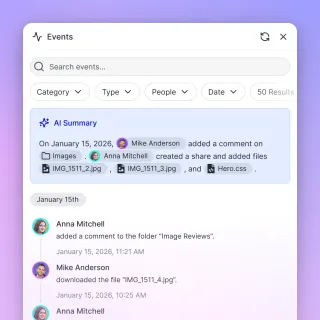
How to Implement Fastio API Large File Chunked Uploads
Chunked uploading in the Fastio API splits large files into manageable segments, ensuring reliable transmission over unstable networks without exhausting agent memory. This guide covers how to initialize, upload, and complete parallel chunked sessions for massive payloads.

How to Implement Fastio API Real-Time File Event Notifications
File sharing is the practice of distributing digital files between users over a network, but when AI agents collaborate, they require instant context. Fastio API real-time file event notifications solve this by streaming updates via a WebSocket events feed and activity polling, ensuring agents always have the latest context. This guide covers how to monitor feeds, coordinate concurrent writes with advisory file locks, and reduce latency.
How to Implement File Locks with the Fastio API
Guide to implementing file locks with the Fastio API: learn how to acquire, heartbeat, and release advisory file locks to coordinate multi-agent writes safely.
How to Implement Generative UI File Uploads with Fastio API
Generative UI file uploads use LLMs to dynamically render interactive upload components backed by the Fastio API based on user intent. This approach is rapidly replacing static forms in AI-native applications, allowing developers to handle binary files smoothly within conversational interfaces. This guide covers the complete implementation flow, from configuring the AI SDK to securely routing file streams directly to Fastio workspaces.

How to Implement Multi-Agent Context Sharing Patterns
Multi-agent context sharing patterns are architectural frameworks that define how AI agents exchange state and memory. Efficient sharing allows teams to coordinate multiple agents without redundant processing or context conflicts. Implementing the right pattern can help multi-agent systems complete complex tasks up to four times faster than isolated agents.

How to Implement Zero Trust File Access with Fastio API
Implement zero trust file access with Fastio API by validating tokens and applying RBAC to every file operation. No implicit permissions exist, so each request proves authorization. This prevents unauthorized access even after network perimeter breaches. Over 60% of data breaches start with compromised credentials, but zero trust cuts average breach costs by $1.76 million.

How to Import Cloud Files for AI Training Data
ML teams pull training data from an average of three or more sources, and data preparation consumes roughly 80% of project time according to CrowdFlower's data science report. Consolidating datasets from scattered cloud providers into a single workspace cuts that overhead significantly. This guide walks through five steps to import cloud files for AI training, from auditing your sources to validating the imported data.

How to Index SharePoint Documents in LlamaIndex for AI Agents
LlamaIndex SharePoint integration connects LlamaIndex readers to Microsoft SharePoint document libraries, extracting and indexing corporate documents for generative AI retrieval. While native connectors allow direct retrieval via Microsoft Graph, large enterprise libraries frequently trigger throttling errors and high latency. This guide covers how to configure SharePointReader, handle Graph API limits, and connect agents to synchronized, pre-indexed workspaces over remote MCP.

How to Integrate Flowise with Microsoft SharePoint
A Flowise SharePoint integration connects Flowise visual canvas nodes to SharePoint document libraries, enabling no-code RAG pipelines over enterprise files. Direct Microsoft Graph API traversal introduces OAuth token expiration, pagination latency, and context bloat. By synchronizing SharePoint libraries into an indexed Fastio workspace, Flowise agents query pre-chunked documents via remote MCP, reducing token consumption and eliminating API rate limits.

How to List Files with Google Drive API: Pagination, Queries, and Agent Workspaces
Listing files with the Google Drive API requires using the files.list method with structured query parameters, explicit field masks, and pageToken pagination. Handling multi-page results and nested folder hierarchies directly can exhaust agent context windows and trigger API rate limits. This guide covers query syntax, Python pagination loops, Shared Drive filters, and indexed workspace alternatives.

How to List Files with OneDrive API: Graph Endpoints and Agent Workspaces
The OneDrive API, integrated into Microsoft Graph, lists drive items using the /me/drive/root/children or /drives/{drive-id}/items/{item-id}/children endpoints. Large directories require following @odata.nextLink tokens across requests. While manual pagination works for scripts, autonomous agents face token bloat when crawling deep folder trees. Connecting OneDrive storage to Fast.io workspaces lets AI tools query indexed documents directly over MCP without traversing raw directories.
How to List Files with SharePoint API: REST, Graph, and Agent Workspaces
Listing files across SharePoint environments requires choosing between legacy REST endpoints and Microsoft Graph drive items. While the SharePoint REST API relies on server-relative URLs and CAML queries, Microsoft Graph provides unified drive item hierarchies with paging tokens. For AI agent teams, syncing SharePoint document libraries into indexed Fast.io workspaces eliminates the latency, rate limiting, and context window bloat of recursive folder traversal.

How to List Files with the Dropbox API: Pagination, Cursors, and Agent Workspaces
Listing files through the Dropbox API requires managing cursor-based pagination across the /files/list_folder and /files/list_folder/continue endpoints. Without proper cursor tracking and rate-limit backoff, deep directory traversals quickly exhaust API quotas. Synchronizing storage folders into an intelligent workspace provides an alternative path, allowing AI agents to query indexed files directly without recursive polling.

How to Manage AI Agent Artifacts: Persistent Storage for Agent Outputs
AI agent artifacts are the tangible outputs created during agent tasks: code, documents, data visualizations, and structured data that need persistent storage and versioning. While Claude Artifacts popularized the concept, production agent systems require reliable storage that fits into team workflows. This guide covers artifact types, storage strategies, and how to move beyond chat UIs to artifact management where agents save work directly to shared workspaces.

How to Manage AI Agent Background Processing Files
Background processing enables AI agents to handle long-running tasks asynchronously, storing intermediate results and final outputs for later retrieval. By decoupling execution from ingestion, agents can process massive datasets without blocking. This guide explores architecture patterns for reliable async agent workflows.
How to Manage AI Agent File Versions
Version management lets AI agents track, compare, and restore files they create.
How to Manage AI Content Generation Agent Files
AI agents generate thousands of files: drafts, metadata, and images. Standard storage can't handle the volume. To keep publishing workflows moving, you need a structured system with versioning and API access.

How to Manage API Sharing Permissions and Link Expiration
The Fastio API lets developers generate secure, time-limited sharing links to enforce data governance during agent-to-human handoffs. Managing sharing permissions and link expiration helps secure modern applications, especially for agent-to-human workflows. Expiring links automatically reduce the risk of unauthorized data access.

How to Manage Custom File Metadata with Fastio API
Custom file metadata in Fastio allows developers to attach application-specific key-value pairs to files to improve search and organization. Using these programmatic file attributes, developers and automated workflows can retrieve context instantly without needing to parse entire file contents. This guide details exactly how to implement custom metadata schemas via the Fastio API to build scalable agentic workspaces.
How to Manage Fastio File Metadata with Drizzle ORM
Managing Fastio file metadata with Drizzle ORM lets developers store and query agent workspace data in Postgres with full type safety. This approach syncs file details like IDs, sizes, and AI states from the Fastio API to a local database. Caching metadata reduces repeated API calls and enables complex relational queries beyond API limits.
How to Manage Fastio File Metadata with Prisma ORM
Managing Fastio file metadata with Prisma ORM involves setting up a schema matching Fastio's file and workspace IDs. Poll the activity feed or consume WebSocket events to keep your database current. You can then query files with app data using Prisma's type-safe client. Prisma is trusted by more than 500k monthly active developers and works well for workspace-file relationships. Developers use it to track agent uploads, check usage, or build dashboards. Start with the Prisma schema, followed by the event handler.
How to Manage File Versioning for AI Agents
AI agents can generate huge volumes of files during iterative tasks, often overwriting previous best attempts. Effective file versioning creates an automatic safety net, allowing developers to compare iterations, roll back to stable states, and audit the full history of an agent's work.
How to Manage Files for Image Generation Agents
Image generation agents create thousands of files in minutes. Learn how to organize prompts, version outputs, and automate storage workflows to keep your creative library searchable and organized.
How to Manage Files for Resume Parsing Agents
Managing files for resume parsing agents means organizing candidate documents for AI recruitment systems. Learn to build secure workflows that extract structured data from different file types.
How to Manage Files in Rasa Chatbots
Rasa file management includes storing conversation data, training files, model artifacts, and user documents. Rasa handles training data well, but real-world assistants need a plan for runtime files. You need to handle user uploads, generate reports, and secure your model versions.
How to Manage Files with Google ADK Agents
Google ADK (Agent Development Kit) provides a structured way for agents to manage binary data through the Artifacts pattern. This guide explains how to implement persistent storage, session services, and tool integrations to build strong file handling into your AI agent workflows.
How to Manage Files with the Gemini API
Google's Gemini API offers powerful multimodal capabilities, allowing you to analyze images, audio, and video directly. However, its native file storage is transient, with a 48-hour expiration window.

How to Manage Files with the OpenAI Assistants API
Managing files in the OpenAI Assistants API requires more than just a simple upload. It involves structuring knowledge through vector stores, balancing file limits, and choosing between tools like file search and code interpreter. This guide covers how to upload, organize, and automate the lifecycle of files for assistants that need to process complex documents and large datasets efficiently.

How to Manage Google AI Studio Files
Google AI Studio lets developers upload documents, images, and video for Gemini's large context window. But the file expiration policy hurts production workflows.

How to Manage Google Shared Drive Permissions for AI Agent Rooms
Setting up AI agent rooms requires precise mapping of Google Shared Drive permissions to avoid data loss and rate limits. This guide explains how to scope service account access using Google's five standard roles, handle folders with limited access, construct API requests using correct query parameters, and coordinate files in Fast.io workspaces.

How to Manage IPTC Metadata as a Photographer
IPTC metadata is the international standard for describing and identifying photo content. This guide covers the full workflow from building reusable templates through batch editing at import, keywording for stock agencies, and delivering files with clean metadata intact. It also covers the 2025.1 standard update that added fields for AI-generated images.
How to Manage Logistics Files with AI Agents
AI agent logistics file management uses autonomous AI to handle supply chain documents like manifests, invoices, and tracking reports in real time. Agents organize files, update statuses, and share with teams, cutting manual work. Fastio provides intelligent workspaces where agents and humans collaborate using a consolidated MCP toolset and built-in RAG for semantic search once Intelligence is enabled.

How to Map SharePoint as a Network Drive (and Modern Alternatives)
Mapping SharePoint as a network drive assigns a local drive letter to a SharePoint document library using WebDAV, a legacy protocol increasingly deprecated due to modern authentication and session timeout failures. While legacy WebClient mappings frequently drop connections, modern IT environments rely on three stable alternatives: OneDrive Files On-Demand, Microsoft Graph API scripting, and intelligent workspace sync via MCP.
How to Master WhatsApp AI Agent File Management
WhatsApp agents need more than text to be useful. Learn how to set up your bot to receive PDFs, images, and videos, and store them securely to bypass API limits.

How to Move Files with Google Drive API: addParents, removeParents & Shared Drives
Moving files in the Google Drive API requires calling files.update with addParents and removeParents parameters rather than renaming a path. Because Google Drive models directories as zero-byte metadata nodes, moving an item transfers parent ID references while preserving the unique file ID. When operating across Shared Drives, requests must include supportsAllDrives=true to prevent permission errors.

How to Normalize Metadata Across File Formats
Different file formats store metadata in incompatible standards. EXIF handles photos, ID3 covers audio, Dublin Core describes documents, and IPTC and XMP bridge parts of the gap. Metadata normalization maps these fields into a single unified schema so you can search, compare, and manage files consistently regardless of format.

How to Optimize Google Drive Upload Speed for Agentic Workflows
Programmatic write requests frequently throttle Google Drive upload speeds due to API rate limits and quota unit exhaustion. Optimizing transfer rates requires adjustments to write concurrency, resumable chunk sizes, and client-side request pacing. Transitioning intermediate agent outputs to intelligent workspaces bypasses these API quotas while maintaining a versioned coordination layer for human-agent teams.

How to Paginate SharePoint REST API: skiptoken, next Links, and Agent Retrieval
SharePoint REST API pagination retrieves large result sets from lists and libraries in sequential batches using OData __next continuation URLs and skiptoken markers. While endpoints return 100 items by default, unindexed queries trigger the 5,000-item List View Threshold. Traversing raw paginated endpoints across multi-page libraries also consumes significant agent context tokens. Implementing server-driven cursors or syncing to indexed workspaces keeps document retrieval reliable.

How to Preserve Metadata During File Conversion
Converting files between formats often strips embedded metadata without warning. Author names, creation dates, GPS coordinates, and copyright notices can vanish in a single Save As operation. This guide covers which metadata survives common conversions, which tools preserve it, and how to build a workflow that keeps your file properties intact.
How to Query a SharePoint Document Library with AI Agents
Querying a SharePoint document library with AI agents involves indexing document text and metadata so agents can perform semantic retrieval without fetching massive payloads or hitting Graph API rate limits. While direct Graph API calls face strict throttling and local sync exhausts disk space, syncing libraries into an indexed workspace lets agents query documents via remote MCP. This approach minimizes token consumption while delivering accurate, citation-backed answers.

How to Read Files in C++ within Secure Agent Sandboxes
C++ file reading in a secure agent sandbox requires strict path validation and memory boundaries. Standard path resolution fails to verify directory scope, leaving agents vulnerable to traversal attacks. This guide shows how to validate paths using canonical checks, read files line-by-line or into strings, and coordinate multi-agent file storage safely.

How to Read Files Line by Line in Python (and Avoid Agent Token Bloat)
Reading files line by line in Python prevents system memory exhaustion and AI agent token bloat. Using native iterators and custom generators allows software agents to process massive text logs incrementally. This guide explains how to implement memory-efficient readers and coordinate agent access within shared workspaces.

How to Remove EXIF Data Before Sharing Photos
Guide to exif data removal before sharing photos: Every photo you take with a smartphone embeds hidden metadata, including GPS coordinates, device details, and timestamps. This guide walks through how to remove EXIF data on every major platform, which sharing methods preserve it, and how to set up a reliable workflow for stripping metadata before files leave your control.

How to Resolve Paths Safely in C++ with std::filesystem::absolute
When building AI agent workspaces, resolving untrusted file paths is a critical security boundary. This guide explains why std::filesystem::absolute fails to prevent directory traversal and how to use std::filesystem::canonical to secure path resolution.

How to Run Metadata Extraction with Serverless Cloud Functions
Serverless functions let you extract metadata from files on demand without provisioning or managing servers. This guide covers packaging binary tools like ExifTool and FFprobe as AWS Lambda layers, wiring S3 event triggers for automatic processing, and building extraction pipelines that scale to thousands of concurrent files while charging only for compute time used.
How to Save Structured Output Files from AI Agents
AI agents that produce structured output files, not just chat messages, can hand off work to other systems, create audit trails, and avoid expensive re-processing.

How to Score and Validate Metadata Quality Before It Hits Production
Metadata quality scoring assigns numeric ratings to extracted metadata based on completeness, accuracy, consistency, and timeliness. This guide walks through building quality checks that catch gaps before metadata enters production systems, from required field validation to cross-field logic rules and AI confidence scoring.

How to Search and Query Files by Metadata Attributes
Metadata search lets you find files by their properties, such as author, creation date, dimensions, or custom tags, instead of relying on filenames or full-text content. This guide covers six practical methods: macOS Spotlight and mdfind, Windows Advanced Query Syntax, Linux find with exiftool, cloud storage APIs, dedicated DAM platforms, and AI-powered semantic search. Each approach suits different workflows, and you can combine them for precise, cross-platform file retrieval.
How to Search SharePoint with ChatGPT: Enterprise Document Retrieval Guide
Searching SharePoint with ChatGPT allows users to perform natural language queries against documents stored in Microsoft SharePoint libraries without transferring files manually into ChatGPT conversations. Direct API queries can trigger Graph throttling and overwhelm prompt context. By synchronizing target libraries into an intelligent workspace and querying pre-indexed passages over remote MCP, teams retrieve exact citations while preserving API limits.

How to Secure C++ Agent Sandboxes With std::filesystem::permissions
Dynamic file creation by autonomous coding agents introduces the risk of file corruption and privilege escalation. Securing a C++ agent execution environment requires restricting local directory access at the operating system level. Using std::filesystem::permissions, developers can enforce read-only and owner-restricted access policies immediately after an agent generates a file. This tutorial walks through setting up permission boundaries and handing files off to shared workspaces.
How to Secure Fastio API Uploads with Clerk Authentication
Securing Fastio uploads with Clerk involves validating the Clerk JWT on your backend before generating a Fastio presigned upload URL. This prevents unauthorized users from consuming your storage and avoids unexpected billing. This guide shows you how to integrate Clerk authentication with Fastio's upload API using API keys, MCP tools, or direct REST calls.

How to Secure File Sharing for AI Agents
AI agents need secure file access just like human teammates do, but their autonomous nature creates unique risks. This guide walks through encryption, granular permissions, version history, and audit trails for multi-agent file sharing, with practical setup steps you can follow today.
How to Secure Files Accessed by AI Agents
AI agent file security includes the access controls, encryption, and audit mechanisms that protect sensitive documents accessed by autonomous agents. With 73% of security teams concerned about agent data access, proper implementation reduces breach risk by 89%.

How to Secure Tool Calling File Access for AI Agents
Secure tool calling allows AI agents to interact with files safely while keeping credentials hidden. Insecure tools often lead to agent failures through remote code execution or data leaks. This guide covers security best practices, risks, and MCP setups for your agents.

How to Set Up a Claygent File Upload Workflow
Poor data quality costs organizations an average of USD 12.9 million annually, making accurate research critical for outbound sales campaigns [Gartner Data Quality Research]. A Claygent file upload workflow attaches documents like PDFs or CSVs to a Claygent's prompt context to guide its autonomous web research. By configuring these prompt context documents in the Builder, GTM teams ground AI research in their brand voice and product guidelines.
How to Set Up AI Agent File Indexing (The Easy Way)
Most AI agent file indexing requires complex Python pipelines and vector databases. This guide shows you how to skip the infrastructure setup and give your agents instant, searchable access to documents using Fastio's built-in Intelligence Mode.

How to Set Up AI Agent File Sync Across Sessions
AI agent file sync maintains consistent file state across agent runs and workspaces. Without synchronization, agents lose intermediate files and progress whenever they restart between sessions. Fastio provides persistent cloud workspaces where agents can upload, update, and retrieve files using MCP tools or REST APIs. This architecture supports complex data processing pipelines, multi-step reasoning, and multi-agent collaboration.
How to Set Up AI Agent Shared KB
A shared KB lets multiple AI agents access the same indexed knowledge base in one workspace. It avoids duplicate data and helps agents work together on tasks like analysis or summarization. Turn on Intelligence Mode in Fastio for automatic file indexing and semantic search. Agents use a consolidated MCP toolset matching human capabilities, including advisory file locks for concurrent access. The 14-day Business Trial provides generous storage and credits.

How to Share a Google Drive Folder with AI Agents
Sharing Google Drive folders with AI agents requires balancing API limits, authorization protocols, and security risks. While service accounts and OAuth keys provide programmatic access, recursive scans often trigger Google Drive API throttling and expose sensitive data. This guide explains how to configure Node.js code for folder sharing, handle rate limits, and transition to structured workspaces that support multi-agent collaboration.

How to Share Files Between Multiple AI Agents
Multi-agent file access lets AI agents read, write, and share files through a centralized storage system with proper access controls.

How to Share Large Files on Google Drive with AI Agents
Sharing large files on Google Drive with AI agents requires managing API quotas, authorization tokens, and versioning. While Google Drive supports files up to 5TB, recursive scans from automated agents frequently trigger rate limits and sync conflicts. Ingesting these files into a Fast.io workspace takes agent reads off the Drive API entirely and gives humans and agents one shared, version-controlled place to work.
How to Test Fastio API File Uploads with Vitest
Guide to testing fastio api file uploads with vitest: Testing Fastio file uploads with Vitest involves using vi.mock() to intercept the Fastio Node.js SDK and simulate successful or failed upload responses. This guide shows you how to set up reliable unit tests that cover happy paths, error handling, and edge cases without making actual network requests.
How to Track C++ File Modifications with std::filesystem::last_write_time
Tracking file modification times is essential for C++ applications synchronizing local files with shared workspaces. However, standard library functions like std::filesystem::last_write_time follow symbolic links by default, creating sandbox escape vulnerabilities. This guide explains how to get and set file times securely within restricted environments.

How to Unzip Files in Google Drive (And Streamline Agentic Access)
Unzipping files in Google Drive refers to extracting compressed folder contents, a task that currently requires third-party add-ons or downloading files locally. Identity-based attacks targeting Google Workspace rose by 127% year-over-year in 2025, showing the risks of third-party integrations. This guide covers how to unzip archives via local workflows, Workspace Marketplace apps, and secure workspaces designed for programmatic agent access.

How to Upload a Base64 String as a File to the Fastio API
Agents can upload a file as a Base64 string through the Fastio MCP upload_manage tool. Pass content_base64 on a tools/call with action stream-upload, and the server decodes the string into a workspace file. This keeps the transfer inside JSON-RPC, which fits in-memory agent workflows and serverless functions. REST clients decode the Base64 locally and send the raw bytes as the multipart chunk field on POST /current/upload/. This guide covers encoding, the MCP request shape, size tradeoffs, and larger-file fallbacks.

How to Upload Files Directly from the Browser to Fastio
Open a Receive share, mint a guest token with POST /current/share/{share_id}/auth/guest/, then POST the file from the browser to https://api.fast.io/current/upload/ as multipart form data (name, size, chunk, action=create, instance_id, folder_id). Your application server stays off the byte path. Confirm the file with GET /current/events/search/ or GET /current/activity/poll/{entityId}, then let Ripley and MCP tools work from the same workspace.

How to Upload Files to Dropbox via API: Simple vs Upload Sessions
Choosing how to use the Dropbox API to upload file contents depends on asset size and network reliability. The Dropbox file upload API provides two endpoints: /files/upload for single-request payloads under 150 MB and /files/upload_session for multi-chunk transfers up to 350 GB with resumable commit offsets. While simple uploads execute in a single HTTP call, larger assets require dividing payloads into discrete byte chunks, tracking sequential session offsets, and handling rate limits.

How to Upload Files to OneDrive via API: Simple PUT vs Upload Sessions
Uploading files to OneDrive through the Microsoft Graph API requires selecting between simple PUT requests and multi-part upload sessions. Small files under four megabytes can transfer in a single call, while larger files demand chunked byte ranges aligned to 320 KiB increments with automated retry logic.

How to Upload Files: Fastio API File Upload Tutorial
Following a Fastio API file upload tutorial is the fast way to get your applications talking to intelligent agent workspaces. The Fastio API lets developers upload files programmatically, connecting traditional software with AI workflows. This guide covers the upload process from basic authentication to handling complex transfers. You'll learn how to ensure your agents can consume API-uploaded files instantly.
How to Upload Large Files to ChatGPT: Limits, Splitting, and MCP Solutions
OpenAI restricts individual document uploads in ChatGPT to 512 MB and 2 million tokens, creating friction for teams analyzing large datasets or long PDF archives. When native file splitting and format conversion become unmanageable, external indexed storage connected via Model Context Protocol provides a scalable alternative. By indexing documents in a persistent workspace, assistants can query multi-gigabyte corpora through semantic search without attaching raw files to chat prompts.

How to Upload Large Files to Google Drive without Timeouts
Standard single-stream uploads to Google Drive often fail due to network timeouts and process crashes. Implementing the Resumable Upload API protocol or optimizing command-line tools like rclone allows automated agents to transfer massive files reliably. This guide explains how to configure chunked uploads and manage multi-agent file delivery within shared workspaces.

How to Upload Large Files with Microsoft Graph API Using Resumable Sessions
The Microsoft Graph large file upload API uses resumable upload sessions to transfer files up to `250 GB` by slicing binary data into sequential byte ranges aligned to `320 KiB` increments. Microsoft Graph simple PUT calls cap out at 250 MB and drop partial transfers during transient socket resets, forcing clients to restart from byte zero. Resumable upload sessions provide dedicated temporary endpoints that track committed fragments across OneDrive and SharePoint.
How to Use AI Assistants for File Management and Organization
AI assistant file management uses artificial intelligence to organize, categorize, search, and manage files automatically. These systems reduce the time workers spend daily searching for files through auto-tagging, smart search, and workflows that process documents without manual intervention. This guide covers five practical ways AI assistants can manage your files, the tools available, and how to get started with AI-powered organization.
How to Use Fastio API for Batch File Operations
The Fastio API batch file operations guide shows developers how to handle multiple file uploads, downloads, and management tasks at scale. Build on workspaces, shares, and chunked upload sessions to process batches efficiently in agent workflows. This tutorial covers authentication, key endpoints, error handling, and optimization tips grounded in official API docs.

How to Use LangChain Document Loaders
Document loaders are the first step in any RAG pipeline. They pull data from over 100 sources into a standard format that LLMs can work.

How to Use Multimodal AI Vision Models for Metadata Extraction
Vision-language models can look at an image or document and return structured metadata that traditional parsers miss entirely: scene descriptions, object labels, text transcription, and sentiment. This guide covers how multimodal extraction works, when it outperforms rule-based tools like ExifTool, and how to build a pipeline that combines both approaches for complete metadata coverage.

How to Use NotebookLM with Google Shared Drives: Workaround & Sync Guide
Google Workspace policies and Team Drive permissions frequently block users from selecting documents in Google Shared Drives within NotebookLM. While common forum advice recommends making personal copies in My Drive, duplicating files breaks version control and severs team collaboration. This guide explains how Shared Drive permissions interact with NotebookLM, how to use native shortcut workarounds, and how to sync team drives into an intelligent workspace.

How to Use Redis as a Cache for AI Agent Files
Redis caching for AI agent files uses Redis as a high-speed intermediate cache layer for agent artifacts, processed documents, and frequently accessed data. This reduces latency from 50-200ms (object storage) to under 1ms and can cut storage API costs by 60-80%.
How to Use the LangChain File System for Persistent Data
The LangChain file system integration enables AI agents to read, write, and organize files on local disks or cloud storage. While most tutorials focus on loading data for analysis, this guide covers the essential "write" capabilities that allow agents to save their work, maintain persistent memory, and collaborate with human users.
Intelligent Document Processing APIs for Developers
Intelligent Document Processing (IDP) APIs use AI to automatically extract, classify, and validate data from unstructured documents like PDFs, images, and scanned files. Developers use IDP APIs to automate invoice processing, contract analysis, form extraction, and compliance workflows without building OCR and NLP pipelines from scratch.
Jira Attachment Size Limit: Cloud Defaults, Admin Limits, and Large File Handling
The Jira attachment size limit defines the maximum file payload users can attach to an issue, defaulting to 1 GB on Jira Cloud and 10 MB on Jira Data Center, with both platforms configurable to a 2 GB ceiling. Storing multi-gigabyte build artifacts and logs directly on tickets causes connection timeouts and depletes subscription storage quotas. This guide covers default limits, administrator configuration steps, and external workspace persistence patterns.

JSON File Size Limits: RFC Standards, Engine Memory, and AI Context Caps
The official JSON standard (RFC 8259) defines no maximum file size limit. In practice, the V8 JavaScript engine throws memory errors on strings exceeding runtime limits, cloud API gateways reject oversized request payloads, and Anthropic Claude restricts project file uploads to 30MB. Overcoming these limits requires streaming parsers, newline-delimited JSON (NDJSON), or external workspaces connected through the Model Context Protocol.

LangChain Document Loader Alternatives for Better File Handling
LangChain document loader alternatives let you ingest files for RAG and agent applications without LangChain's complexity. This guide compares LlamaIndex, Unstructured.io, Docling, and specialized parsing tools so you can pick the right solution for your use case.
LangChain SharePoint Connector: Ingesting Enterprise Libraries via MCP
A LangChain SharePoint connector enables autonomous agents to query enterprise document libraries, but direct batch loading quickly triggers Microsoft Graph API rate limits. Instead of pulling raw files across the network, teams can synchronize SharePoint libraries to an intelligent workspace and query indexed documents through MCP. This architecture enables hybrid semantic search while avoiding local parsing overhead, tenant scope creep, and request throttling.

LangChain SharePoint Integration: How to Query Enterprise Documents
A LangChain SharePoint integration connects autonomous agents and retrieval chains to Microsoft SharePoint libraries, enabling conversational search across institutional document repositories. Directly traversing Microsoft Graph triggers HTTP 429 throttling and latency across deep folder trees. Synchronizing SharePoint folders into an intelligent Fast.io workspace gives LangChain agents pre-indexed search via remote MCP without downloading raw files.
Linux Virtual File System (VFS): Architecture, Limits, and Agent Storage Mounts
The Linux Virtual File System (VFS) abstracts diverse filesystems behind a unified POSIX interface using four core kernel objects: superblocks, inodes, dentries, and open files. While VFS coordinates native storage and network mounts, autonomous agents frequently encounter file descriptor bottlenecks and FUSE latency when mounting large corpora. Moving agent files into indexed cloud workspaces enables AI workflows to search and retrieve data on demand without exhausting local system limits.
LlamaIndex SharePoint Connector: Ingesting Document Libraries for RAG
A LlamaIndex SharePoint connector links enterprise document libraries to retrieval-augmented generation pipelines. Engineering teams can ingest files directly through LlamaIndex SharePointReader using Microsoft Graph API credentials or synchronize libraries to Fast.io workspaces for automated hybrid indexing and remote MCP retrieval. This guide examines Entra ID permissions, Graph API throttling, vector indexing tradeoffs, and production retrieval architectures.

Metadata Extraction on Mobile: iOS and Android App Development Guide
Mobile metadata extraction works differently from desktop tools. iOS and Android each have their own APIs, permission models, and memory constraints that shape how your app reads EXIF, video, and document metadata. This guide walks through platform-native approaches with working code, covers the permission changes introduced in iOS 14 and Android's scoped storage, and shows how to handle extracted metadata at scale.

Metadata Extraction with Ruby Libraries: A Developer Guide
Ruby has a solid collection of gems for reading metadata from images, PDFs, audio files, and more. This guide compares the most useful options, from mini_exiftool's ExifTool wrapper to exifr's pure-Ruby EXIF parsing, pdf-reader for document properties, and taglib-ruby for audio ID3 tags. You will find installation steps, working code examples, and advice on building a multi-format extraction pipeline.

Modernizing File Server Resource Manager for Agentic Workflows
Modernizing File Server Resource Manager configurations for agentic workflows allows teams to transition from rigid directory limits to intelligent workspace storage. This comparative guide shows how replacing legacy active directory folder policies with cloud workspaces enables multi-agent environments to query, index, and manage shared files safely.

Modernizing Windows File Server for AI Agent Workspaces
Bridging legacy Windows file server infrastructure to AI agent workspaces requires resolving key protocol and security mismatches. While legacy storage relies on SMB and Active Directory, AI agents need streamable HTTP and structured metadata. This guide explains how to establish secure gateways, run remote MCP servers, and use Fast.io as a neutral workspace substrate.

MongoDB Document Size Limits: The 16MB BSON Ceiling and GridFS Alternatives
The MongoDB document size limit is a fixed 16-megabyte ceiling on individual BSON documents, designed to prevent excessive RAM utilization and maintain efficient wire protocol transmission during queries. Storing large binaries, extensive embedding arrays, or unbounded logs requires restructuring collections or decoupling files to external storage. AI agent workflows and large corpora avoid database memory bloat by indexing files in persistent workspaces.

Multer File Size Limit: Handling Large Uploads in Node.js and Express
Multer enforces no default file size limit, assigning Infinity to incoming file streams unless developers configure limits.fileSize in bytes. Uncapped multipart uploads expose Node.js applications to V8 heap memory exhaustion, string length range errors, and disk saturation. Setting explicit byte boundaries, catching LIMIT_FILE_SIZE errors in Express middleware, and choosing appropriate storage engines protects API stability and prevents unexpected server crashes.
Multi-Agent File Sharing: Patterns, Storage & Code
How multiple AI agents share, read, write, and collaborate on files in production systems. Covers storage architectures, coordination patterns, and working code examples.

n8n File Size Limits: How to Handle Large Files and Payloads Without Crashing
The n8n file size limit is the maximum payload threshold, governed by the N8N_PAYLOAD_SIZE_MAX environment variable with a default of 16 MiB, that an n8n workflow can ingest or transfer in a single execution. When automations stream massive binary files into memory, self-hosted instances risk crashing from Node.js heap exhaustion. This guide explains how to adjust payload caps, switch storage modes, and offload heavy files to intelligent workspaces to keep automations reliable.

NAS File Server vs. Agent Rooms: Modernizing Team Storage
Comparing a traditional nas file server setup with cloud-based agent rooms highlights a core shift in team storage. Physical servers require complex firewall configurations for remote access, whereas modern workspaces provide persistent environments that auto-index files for AI grounding. This guide examines how teams can secure file access, coordinate multi-agent workflows, and transition from local hardware to intelligent workspaces.
Next.js File Upload Size Limit: Server Actions and Route Handlers Guide
Next.js file upload size limits depend on whether you use Server Actions or Route Handlers. Server Actions enforce a strict default request body limit of `1MB`, while Route Handlers stream requests but face host platform boundaries like Vercel's `4.5MB` serverless payload ceiling. While next.config.js adjusts Server Action limits, multi-megabyte workflows require direct-to-storage uploads or external indexed workspaces.

NFS File Size Limit: Protocol Versions, Mount Constraints, and Distributed Workflows
The NFS file size limit varies by protocol version: legacy NFSv2 is capped at 2 GB by 32-bit signed offsets, while NFSv3 and NFSv4 support theoretical file sizes up to 8 EiB using 64-bit offsets. Practical boundaries depend on host filesystems, mount buffer settings, and network stability. Resolving multi-gigabyte transfer failures requires tuning mount parameters and addressing concurrency bottlenecks.
Node.js Virtual File System: In-Memory VFS, Memfs, and Memory Limits
A Node.js virtual file system simulates filesystem calls in memory without writing to persistent disk. While tools like memfs and the experimental node:vfs isolate unit tests and ephemeral code generation, buffering file trees inside process RAM risks unrecoverable V8 heap exhaustion. Managing large corpora requires understanding buffer overhead, setting explicit heap boundaries, and offloading persistent storage to remote workspaces.
NotebookLM Document Limit: Gemini Notebook Caps and Multi-Notebook Scaling
Google's Gemini Notebook, formerly NotebookLM, limits standard notebooks to 50 source documents, with each capped at 500,000 words or 200MB. When research collections exceed 50 files, teams face multi-notebook fragmentation because the platform cannot query across notebooks. Combining document preprocessing, strategic folder organization, and external workspace retrieval through MCP allows teams to scale to tens of thousands of documents without hitting container caps.

NotebookLM PDF Limit: Word Caps, Page Limits, and Gemini Notebook Rules
Google's Gemini Notebook, formerly NotebookLM, enforces a strict limit of 500,000 words and 200MB per uploaded PDF, with no fixed ceiling on page count. Free standard accounts can import up to 50 sources per notebook, while premium tiers support up to 600 sources. This guide details verified document limits, why PDF imports fail, and practical architectures for querying large document archives.

NotebookLM Supported File Types: Allowed Formats and Workarounds
A practical guide to NotebookLM supported file types, upload limits, and format workarounds. Google NotebookLM natively supports documents, presentations, audio recordings, web links, and YouTube video transcripts within strict source boundaries. While PDF, Google Docs, Markdown, and MP3 files upload directly, raw spreadsheets and multi-file codebases require pre-processing or external indexing to ground AI responses accurately.

NotebookLM Upload Limits: Source Counts, Size Caps and Failure Fixes
The NotebookLM upload limit caps each notebook at 50 total uploaded sources, restricting individual files to 200MB or 500,000 words across supported document, audio, and web formats. When research projects exceed these ingestion boundaries, import failures and fragmented notebooks slow down analysis. Understanding format rules, compression techniques, and external indexing strategies allows research teams to work productively with large document collections.

Notion File Upload Limits: Size Caps by Plan and Large-File Workarounds
Notion limits individual file uploads to 5MB on the Free plan and provides unlimited file uploads with a 5GB maximum per file on paid plans. While paid plans accommodate large files, attaching heavy assets directly to pages causes database rendering lag and browser memory strain. Offloading oversized files to external cloud storage or indexed workspaces allows teams and AI agents to search document archives without degrading Notion workspace performance.

NTFS File Size Limit: Maximum File and Volume Sizes Across Windows Versions
Under default 4 KB cluster configurations, the NTFS file size limit is 16 TiB minus 64 KiB, scaling up to 8 PB minus 2 MB when formatted with 2048 KB clusters on modern Windows Server releases. While NTFS mathematically permits theoretical limits up to 16 Exabytes, practical storage ceilings depend on allocation unit sizes and operating system drivers. This guide details NTFS limits, cluster tradeoffs, and cloud offloading.

OneDrive File Request: Setup, Folder Permissions & Workspace Ingestion
OneDrive File Request allows users and administrators to create a secure upload-only link for external contributors to deposit files into a designated folder without requiring an account or exposing existing contents. Setting up the feature requires tenant-level Anyone link policies, folder permission checks, and PowerShell configuration for enterprise environments. Downstream teams can then synchronize collected files into intelligent workspaces for automated indexing and AI agent analysis.

OneDrive File Size Limit: Upload Caps, Sync Bottlenecks, and AI Large-Corpus Workspaces
The OneDrive file size limit is 250 GB per individual file across all account types, including Personal, Business, and SharePoint in Microsoft 365. While an individual file upload to OneDrive folders can reach 250 GB, transfers are often constrained by browser timeouts, local sync engine item limits, and total account storage quotas. Connecting large OneDrive repositories to AI assistants requires offloading the corpus to indexed workspaces rather than attaching raw files to context windows.

OneDrive Shared Folders vs. Fast.io Agent Rooms: Solving the Storage Gap
When multiple AI agents and human teams collaborate in a shared folder, traditional sync tools like Microsoft OneDrive hit structural API limits. Fast.io Agent Rooms solve this gap by providing an API-first workspace with native Model Context Protocol support and automatic semantic indexing. This comparison reviews the file sharing constraints of Microsoft Graph and outlines the setup for agentic workspaces.

OpenAI Assistant File Limits: Upload Caps, Size Limits, and Solutions
OpenAI assistant file limits balance responsiveness against overhead, restricting direct attachments while capping uploads with size and token ceilings. While vector stores expand retrieval across large collections, daily storage fees and ingestion boundaries create friction for large corpora. Understanding these boundaries helps teams choose between native vector stores and external intelligent workspaces via Model Context Protocol.

OpenAI File Size Limits: API Endpoints, Whisper, and Workarounds
OpenAI file size limits vary by endpoint, from 512 MB on the Files API to 25 MB on Whisper speech-to-text. While individual files have hard caps, token ceilings and storage quotas create additional operational bottlenecks. Understanding these constraints helps engineering teams structure preprocessing pipelines or offload large corpora to external searchable workspaces.

OpenAI Files API Alternatives for AI Document Storage
OpenAI Files API provides basic document storage for GPT applications, but has significant limitations for production AI systems. Alternative solutions offer persistent storage, support for files beyond 512MB, and compatibility with multiple AI frameworks beyond OpenAI.
OpenAI SharePoint Connector: Connecting Enterprise Documents to OpenAI Agents
An OpenAI SharePoint connector bridges Microsoft SharePoint repositories with OpenAI models and the Assistants API, giving agents structured search over corporate files. Instead of writing custom loaders that crawl Microsoft Graph and hit rate limits, teams can synchronize SharePoint libraries to an intelligent workspace and query indexed files through MCP. This architecture provides hybrid search across enterprise documents while avoiding local vector parsing and tenant permission sprawl.

Outlook Attachment Size Limit: Exchange Thresholds and Sending Large Files
The Outlook attachment size limit is 20 MB for free Outlook.com accounts and defaults to 25 MB for Microsoft 365 commercial mailboxes, though Exchange administrators can adjust the ceiling up to 150 MB. However, MIME base64 encoding adds overhead that triggers size rejections well below administrative ceilings, and recipient mail servers frequently bounce messages larger than 25 MB. Sending large assets requires decoupled cloud workspaces rather than raw email attachments.

Parquet File Size Limits: Format Specs, Row Group Sizing, and AI Analytics
The Apache Parquet specification imposes no format-level maximum file size, but query engines and worker memory make moderate files the practical sweet spot. Tuning row group boundaries preserves predicate pushdown benefits while avoiding memory exhaustion during decompression. For AI data agents analyzing columnar tables, querying external workspaces via MCP and pushdown engines prevents context window failures.

Perplexity File Upload Limit: File Size, Daily Caps, and Cloud Workspaces
The Perplexity file upload limit restricts documents to 25MB each and limits free users to 3-5 daily uploads, while Perplexity Pro allows 500+ uploads per day. For researchers handling multi-file datasets or large document archives, cloud workspaces with remote MCP connections provide an indexed retrieval alternative without repeated manual file attachments.
Perplexity Pro File Limits: Upload Caps, Formats & Workspace Sync
Perplexity Pro caps each uploaded file at 40 MB and counts uploads against a rolling weekly allowance rather than a fixed daily number. While these allowances handle routine document review, session attachments expire after a retention period and cannot be searched across separate threads. For multi-file collections, connecting external cloud workspaces via MCP provides indexed, cross-query retrieval without repeated file attachments.

Perplexity SharePoint Integration: Enterprise Internal Search Setup
Connecting Perplexity Enterprise to Microsoft SharePoint enables unified search across internal documents and live web sources with inline citations. While native connectors query SharePoint through Microsoft Graph, large document libraries often hit indexing latency and stale session caches. Deploying an intermediate Fast.io workspace gives teams scheduled cloud sync, hybrid semantic retrieval, and remote MCP tooling for autonomous AI agents.

Perplexity Spaces File Limit: Upload Caps, Supported Formats, and Storage Workarounds
Perplexity Spaces enforces a 25MB per-file upload limit and a 50-document ceiling per project on Pro accounts. While these boundaries support focused research threads, teams analyzing large document archives quickly exhaust persistent workspace storage. By connecting external workspaces over the Model Context Protocol, researchers can index unbounded corpora without hitting native file size and count constraints.
Perplexity Supported File Types: Formats, Upload Limits, and Workarounds
Perplexity supported file types include PDFs, office documents, spreadsheets, code, images, audio, and video files capped at 40 MB per file. Direct thread attachments face strict parser limits, rolling weekly upload caps, and thread isolation. For large research archives, connecting external cloud workspaces through the Model Context Protocol provides persistent, searchable indexing without hitting upload boundaries.

PHP File Upload Limit: upload_max_filesize, post_max_size, and Memory Limits
The PHP file upload limit is governed by configuration directives in php.ini, primarily upload_max_filesize and post_max_size. Standard installations cap file uploads at 2 megabytes by default, dropping oversized uploads silently unless four synchronized directives are adjusted across PHP and upstream web servers. This guide details sizing rules, Nginx and Apache buffer alignment, error diagnostics, and architectural patterns for managing large files.

Pinecone Metadata Limits: The 40 KB Ceiling and Document Offloading Patterns
The Pinecone metadata limit caps the total payload of filterable key-value attributes attached to a single vector at 40 KB (40,960 bytes), returning an HTTP 400 Bad Request error if payloads exceed this ceiling. Treating vector metadata as a document store bloats index memory and triggers upsert failures. Production architectures decouple embeddings from file storage, holding lightweight pointers in Pinecone while persisting full documents in external workspaces.

Programmatic Google Drive Link Sharing vs. Decoupled Workspace API in Multi-Agent Workspaces
An AI agent tasked with delivering a client report on Google Drive must be granted permissions to modify the file's Access Control List. However, because the Google Drive API couples sharing permissions directly to the central storage environment, giving an agent the ability to write public permissions on a single file exposes the entire workspace to accidental disclosure or malicious data exfiltration.

Resolving Secure Sandbox Paths with std::filesystem::canonical
The std::filesystem::canonical function resolves all symbolic links, relative segments, and redundant separators in C++ filesystems. Naive path validation checks that do not resolve these components are vulnerable to path traversal attacks, especially in agentic environments where tools execute dynamically generated paths. This guide compares canonical, weakly_canonical, and absolute path operations and shows how to build a secure sandbox boundary in C++17.
Roo Code File Limit: Handling Large Files and Workspaces in VS Code
Roo Code file limits are not a single hard disk ceiling, but a combination of per-tool line caps, preview thresholds, and context window limits. By default, the read_file tool caps slice reads at 2000 lines, provides a 100KB preview for oversized files, and limits concurrent file reads to 5 files per request. Pairing strict .rooignore rules, indentation mode slicing, and external MCP-based semantic retrieval prevents token bloat and keeps VS Code agent sessions fast.

Rust Virtual File System Guide: VFS Crates, WASM Sandboxes, and Limits
A Rust virtual file system abstracts filesystem operations into traits, allowing applications to swap physical disk I/O for in-memory storage or sandboxed execution. While crates like vfs isolate unit tests and WebAssembly sandboxes, buffering large file collections in process memory risks fatal out-of-memory crashes. Production agent systems manage memory by enforcing strict buffer boundaries and offloading document corpora to indexed cloud workspaces.

S3 Presigned URL File Size Limit: Upload Caps, Multipart Transfers & Alternatives
The Amazon S3 presigned URL file size limit is strictly 5 GB for a single HTTP PUT operation, governed by the PutObject API ceiling. Uploading files larger than 5 GB up to the 5 TB Amazon S3 maximum requires orchestrating multipart uploads with individually presigned part URLs. Understanding S3 presigned URL limits, configuring client chunking, and evaluating agentic cloud workspaces prevents failed transfers and API timeouts.

Securing recursive_directory_iterator loops in agent sandboxes
Using std::filesystem::recursive_directory_iterator in C++ agent sandboxes can expose host systems to path traversal attacks if symbolic links and relative path segments are not validated. This how-to guide explains how to secure C++ filesystem iteration using canonical path validation and directory options.

SFTP File Size Limit: Protocol Constraints, Packet Buffers, and Large Transfers
The SSH File Transfer Protocol (SFTP) imposes no fixed protocol-level file size ceiling, using 64-bit integer offsets to support theoretical file payloads up to 16 exabytes. Practical transfer limits arise from local filesystem bounds, OpenSSH packet buffer allocations, and network timeouts. Configuring client chunk sizes, keepalive settings, and server thresholds resolves transfer drops, while agent data pipelines benefit from high-capacity cloud workspaces.

SharePoint Agent: Connecting Autonomous AI Agents to SharePoint Storage
Connecting autonomous AI agents to enterprise SharePoint storage gives tool-calling assistants access to company documentation without manual file streaming. While native Microsoft Copilot agents remain confined to browser sessions within Microsoft 365, external developer frameworks require standardized Model Context Protocol endpoints. Synchronizing SharePoint libraries into an intelligent Fast.io workspace enables agents to query pre-indexed files over remote MCP.

SharePoint App-Only Authentication: Entra ID Setup and Agent Storage Access
SharePoint app-only authentication enables scripts and AI agents to access SharePoint Online without user interaction. Modern unattended access requires Microsoft Entra ID application registrations authenticated with X.509 certificates following the retirement of Azure ACS endpoints. By scoping permissions with Sites.Selected and syncing libraries into indexed Fastio workspaces, teams eliminate broad tenant access while providing agents with hybrid search over remote MCP.

SharePoint Folder Permissions: Managing Unique Permissions and Access Control
Managing SharePoint folder permissions allows administrators to break permission inheritance and assign unique access control lists to specific directories. Exceeding Microsoft's recommended limit of 5,000 unique security scopes causes severe query degradation, crawl delays, and API throttling for automated connectors. Structuring permissions cleanly at the site or library level keeps enterprise data secure while enabling fast search for teams and AI agents.

SharePoint Indexing for AI Agents: Overcoming Context and API Limits
SharePoint indexing for AI agents structures and pre-indexes enterprise document libraries so autonomous models can search file contents without exhausting API quotas or context windows. Rather than building custom ETL pipelines and vector databases, teams can synchronize SharePoint libraries into an intelligent workspace and query pre-indexed files over remote MCP. This architecture provides hybrid semantic retrieval while protecting Microsoft Graph rate limits.

SharePoint REST API: Endpoints, Authentication, and Agent Retrieval
The SharePoint REST API provides direct HTTP access to SharePoint document libraries and metadata using OData standards. While REST endpoints support folder traversal and file retrieval, AI agents face steep challenges with form digest tokens, directory recursion overhead, and HTTP 429 throttling. Syncing document libraries into indexed workspaces allows engineering teams to bypass verbose OData payloads and ground AI agents via remote MCP.

SharePoint Semantic Search: How to Enable AI Vector Search Across SharePoint
Traditional SharePoint search relies on lexical Keyword Query Language (KQL) matching, leaving relevant files hidden when phrasing diverges. While Microsoft 365 Copilot adds semantic retrieval within its closed ecosystem, external AI agents require flexible, open access. Synchronizing SharePoint libraries into an intelligent workspace enables hybrid vector search over remote MCP without streaming raw multi-megabyte files across networks.

SharePoint Sync for AI Agents: Connecting Document Libraries to MCP
Connecting enterprise SharePoint document libraries to autonomous AI agents requires moving beyond local desktop sync stubs and direct Graph API crawling. Synchronizing SharePoint libraries to a cloud workspace enables hybrid semantic search over indexed files via the Model Context Protocol without hitting Microsoft rate limits. Development teams keep existing Microsoft 365 storage while giving agents fast, token-efficient document retrieval.

SharePoint WebDAV: Architecture, Deprecation, and Modern Storage Connectors
SharePoint WebDAV relies on the Windows WebClient service to mount SharePoint document libraries as WebDAV folders, a mechanism Microsoft has officially deprecated in SharePoint Online. Legacy workarounds using Edge Internet Explorer mode violate enterprise security policies and fail under session cookie expiration. Scheduled cloud workspace synchronization and remote MCP connectors replace fragile drive mappings with stable indexing and semantic retrieval.
Top 10 File APIs for AI Applications
A file API for AI applications provides programmatic endpoints for uploading, downloading, searching, and managing files that AI models and agents need to process, store, or deliver. This guide compares 10 leading file APIs built for AI workflows, from persistent storage to RAG-enabled document management.
Top 5 File Sharing Tools for AI Workflows
Over 60% of AI workflows involve document or file processing. Multi-agent systems can generate hundreds of artifacts per session. This guide evaluates the top five file sharing platforms designed to handle AI agent workflows, from API-first storage to LLM-native integrations.

Understanding Google Drive Shared Folder Limits in Multi-Agent Workflows
Google Workspace limits individual Shared Drives and My Drive folders to 500,000 items, a threshold that automated AI agents generating logs, code chunks, and assets can quickly exhaust. This guide analyzes these structural limits, details how they impact automated developer pipelines, and outlines strategies for coordinating multi-agent workflows.

Virtual File System in Python: In-Memory VFS, Limits, and Agent Sandboxes
A Python virtual file system creates an in-memory or abstracted storage layer within the process runtime, but heap boundaries and operating system file descriptor limits create severe ceilings during large data tasks. Autonomous agents require isolated sandboxes for ephemeral execution alongside persistent, indexed cloud workspaces to store deliverables and avoid memory exhaustion.

WebDAV File Size Limit: Client Constraints, Windows Registry, and Server Caps
The Windows WebDAV client imposes a default 50MB file size limit that triggers Error 0x800700DF during large transfers. Modifying the FileSizeLimitInBytes registry key raises this client ceiling to 4GB, the maximum supported by the underlying 32-bit Windows redirector. Overcoming transfer bottlenecks requires aligning client registry values with server limits across IIS, Nginx, and Apache, or adopting modern API-driven workspaces for automated pipelines.

Whisper File Size Limit: The 25 MB Cap, Chunking, and Cloud Workspaces
The OpenAI Whisper API enforces a strict 25 MB file size limit for audio and video uploads across all supported file formats. Transcribing long recordings requires reducing audio bitrates, chunking files into smaller segments, or querying transcripts in persistent cloud workspaces. This guide explains Whisper limits, practical FFmpeg chunking commands, and enterprise storage patterns for large audio archives.

Why SMB File Shares Fail for AI Agents (And What to Use Instead)
Traditional SMB file share systems were designed for local office local area networks, not distributed autonomous agents. Between outbound port 445 blocks by internet service providers, lack of reactive event feeds, and brittle stateful mounts in containerized environments, legacy network shares stall multi-agent pipelines. Persistent agent rooms replace file server mounts with web-native Model Context Protocol endpoints, per-file version history, and real-time coordination.

Windows Virtual File System Architecture: ProjFS, Cloud Filter API, and Driver Limits
The Windows Virtual File System architecture enables applications to project hierarchical file hierarchies dynamically using Windows Projected File System (ProjFS) or Cloud Files API without storing entire file payloads locally. This guide details driver mechanics, placeholder hydration lifecycles, Win32 MAX_PATH limits, and how agentic workflows bypass local filesystem driver bottlenecks.