

Use Fastio in ChatGPT and Codex
The Fastio plugin lets ChatGPT and Codex search your files, quote passages from documents, and manage workspaces, folders, shares and members, using your own Fastio account.
Opens the Fastio listing in the ChatGPT plugin directory.
 Fastio
Try these prompts. The examples from the Fastio listing. Use your own workspace and file names.
Install the plugin, then just ask
ChatGPT and Codex share one plugin directory. Install Fastio where you work, sign in, and mention it in a chat.
In ChatGPT
- 1
Find Fastio under Plugins in the ChatGPT sidebar.
- 2
Select Install plugin.
- 3
Select Connect, then sign in to Fastio in the window that opens and approve access.
- 4
Type @Fastio in a chat and ask about your files.
Codex in the ChatGPT desktop app
- 1
Open the Plugins tab in the ChatGPT desktop app.
- 2
Find Fastio and select Install plugin.
- 3
Sign in to Fastio in the window that opens and approve access.
- 4
Type @Fastio in a new Codex chat, or just ask about your files.
Codex CLI
Run /plugins inside Codex and install Fastio, or run this command. Then start a new session.
codex plugin add fast-io@openai-curated-remote The Codex IDE extension does not support plugins.
Use Fastio with your dot
A dot is an always-on agent inside ChatGPT, included with Business Premium, and with Pro outside the EEA, Switzerland and the UK.
Your dot can use the Fastio plugin for ChatGPT. Connect it, and your dot searches your team's Fastio workspaces, quotes the exact passage, and saves finished work where your team can open it.
Connect Fastio to your dot
- 1
Install the Fastio plugin from the ChatGPT plugin directory.
- 2
In your dot's profile, open Customize, then Plugins, and select Fastio.
- 3
Sign in to Fastio and choose Read Only or Read & Write, and which workspaces your dot can reach.
Then ask your dot to
- Search your team's Fastio workspaces
- Quote the exact passage an answer rests on
- With Read & Write, save finished work where your team can open it
Create, move and share from a chat
The plugin does more than search. Ask it to share a folder, move files into a new folder or leave a comment, and it makes the change in your workspace.
What the plugin can do
The plugin works with your own Fastio account and reaches only the workspaces you allow when you sign in.
-
Search files
Search a workspace or share by keyword or by meaning, with a short excerpt from each match.
-
Quote passages
Pull the exact passage from a document so you can see the text an answer rests on.
-
Browse workspaces
Browse workspaces, folders and files, and read a file's text and details.
-
Organize files
Create, move, rename and delete files and folders. Deleted items go to the workspace trash and can be restored.
-
Upload and import
Upload a file, or import one from a web address.
-
Branded shares
Create, update and delete branded shares for the people you work with.
-
Comments
Read the comments on a file and add your own.
-
Members
List, add and remove the members of a workspace or a share.
-
Metadata
Read a file's metadata and set metadata values.
Connect a custom MCP server instead
Use a custom MCP server when Fastio is not listed under Plugins for you, your workspace does not allow directory plugins, or you want to set the address yourself. ChatGPT and Codex both use this address.
https://mcp.fast.io/mcp/operations Claude, Cursor and other clients use their own addresses, listed in the Fastio MCP setup guide (opens in a new tab).
ChatGPT in developer mode connects to the address directly.
- 1
In ChatGPT, open Settings → Security and login and turn on Developer mode. Availability can depend on your workspace's policy.
- 2
Go to chatgpt.com/plugins and select the plus button.
- 3
Name it Fastio, enter
https://mcp.fast.io/mcp/operationsas the MCP server URL, and create the connection. - 4
Sign in to Fastio when prompted.
When you sign in through a custom MCP server, Fastio's Review Permissions screen lets you choose Read Only or Read & Write and which organizations and workspaces the connection can reach.
Add Fastio as a custom MCP server for Codex in the ChatGPT desktop app.
- 1
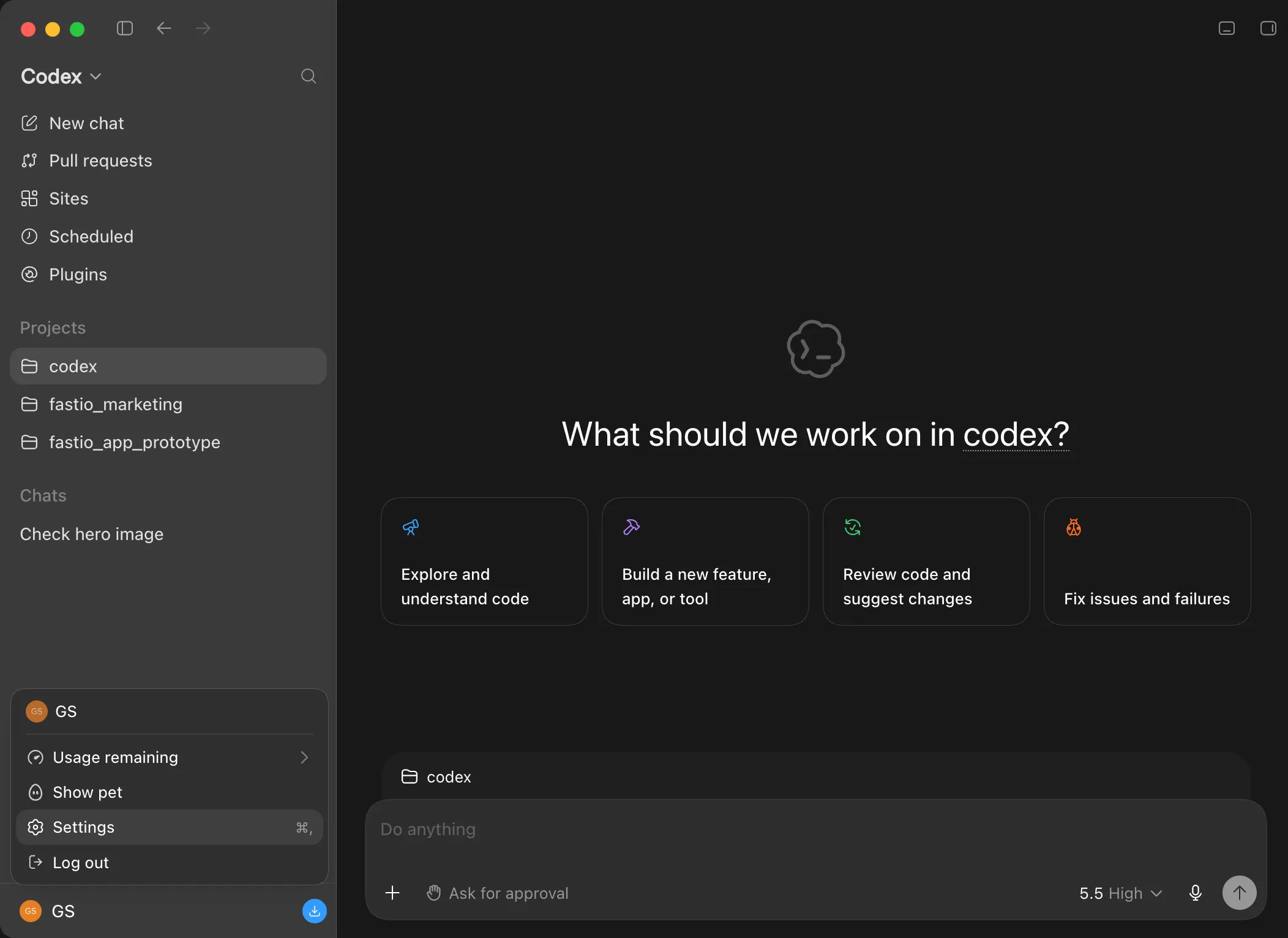
In the ChatGPT desktop app, select your profile icon in the bottom-left corner, then select Settings.
- 2
In Settings, select MCP servers.
- 3
Select Add server.
- 4
Enter the name below and choose Streamable HTTP.
Fastio - 5
Paste this address into the URL field and leave Bearer token env var blank. Select Save, then Restart.
https://mcp.fast.io/mcp/ operations - 6
Fastio now appears in the server list. Select Authenticate to sign in.
- 7
Fastio opens its Review Permissions screen in your browser. Choose Read Only or Read & Write and which organizations and workspaces the connection can reach, then select Continue.
- 8
Check that the Fastio account shown is the one you want, then select Approve.
- 9
When the browser says authentication is complete, close the window and return to the ChatGPT desktop app.
- 10
Type /mcp in the composer to see your connected servers, or ask "Which Fastio workspaces can you see?"
Add Fastio to the Codex CLI with one command.
- 1
Open your terminal and run the command below. Codex detects that the server uses OAuth and starts the sign-in in your browser. If it does not, run
codex mcp login fastio.codex mcp add fastio --url https://mcp.fast.io/mcp/ operations Or add these lines to
~/.codex/config.toml, then runcodex mcp login fastioto sign in.[mcp_servers.fastio] url = "https://mcp.fast.io/mcp/operations"On a machine without a browser, run the command below. Open the link it prints in a browser, sign in to Fastio and approve access, then paste the URL the browser ends on back into the waiting terminal.
codex mcp login fastio --no-browser - 2
Fastio opens its Review Permissions screen in your browser. Choose Read Only or Read & Write and which organizations and workspaces the connection can reach, then select Continue.
- 3
Check that the Fastio account shown is the one you want, then select Approve.
- 4
When the browser says authentication is complete, close the window and return to the terminal.
- 5
Run the command below to start Codex.
codex - 6
Type the command below and press Enter to list your configured MCP servers.
/mcp - 7
The fastio server should appear with Auth: OAuth. Ask something like "Which Fastio workspaces can you see?" to confirm it can reach your workspaces.
Try these prompts
Copy and paste these into Codex to see Fastio in action.
List all workspaces in this account Create a new folder named "Images" Give me a link to this newly created folder Fastio CLI
The Fastio CLI is also available as a standalone tool for Codex and ChatGPT workflows. It gives you the same workspace tools (upload, search, share) as a standalone command, and includes a built-in MCP server via fastio mcp.
npm install --global @vividengine/fastio-cli Troubleshooting
Fastio is not listed under Plugins
Whether a plugin can be installed depends on your plan, region and workspace. In Codex, changes to the plugin directory can take up to 6 hours to appear. You can also connect a custom MCP server instead.
ChatGPT says the plugin is disabled by an admin
Your workspace admin decides which plugins members can install. Ask them to allow Fastio.
Fastio is connected to the wrong account
Disconnect Fastio in ChatGPT under Settings, then Plugins. Connect again and sign in with the Fastio account that holds your workspaces.
Search finds file names but not what's inside them
Content search needs Intelligence turned on for the workspace. In Fastio, open the workspace's settings, go to the Intelligence tab and turn on Intelligence. New files are searchable once they have been processed.
FAQ
What is the Fastio plugin?
It connects your Fastio account to ChatGPT and Codex. From a chat you can browse and search your workspaces, read file text and metadata, organize folders, upload files, manage branded shares, read and add comments, and manage workspace and share members.
How do I install the Fastio plugin in ChatGPT?
Find Fastio under Plugins in the ChatGPT sidebar, or open the Fastio listing in the plugin directory, and select Install plugin. Select Connect and sign in to Fastio. Then type @Fastio in a chat and ask about your files.
Can I use the Fastio plugin in Codex?
Yes. ChatGPT and Codex share one plugin directory. In Codex in the ChatGPT desktop app, open the Plugins tab and install Fastio. In the Codex CLI, run /plugins and install Fastio, or run codex plugin add fast-io@openai-curated-remote, then start a new session. The Codex IDE extension does not support plugins.
Can my dot use the Fastio plugin?
Yes. Install the Fastio plugin, then in your dot's profile open Customize, then Plugins, and select Fastio. Sign in to Fastio and choose Read Only or Read & Write, and which workspaces your dot can reach.
Do I need developer mode to use Fastio in ChatGPT?
No. The plugin installs from the ChatGPT plugin directory. Developer mode is only needed if you connect Fastio as a custom MCP server at https://mcp.fast.io/mcp/operations instead.
How does sign-in work?
Sign in to Fastio in the window that opens and approve access. The plugin acts with your Fastio account's permissions, and no tool accepts or returns a password, API key or verification code.
What does the ChatGPT app leave out?
E-signature requests, managing pending invitations, profile updates and workspace AI chat are not part of the ChatGPT app. Connect Claude or a coding agent to Fastio for those. The app also does not handle billing or payments.
Will ChatGPT ask before it changes or deletes my files?
Tools that only read are labeled read-only. Tools that create, change or delete data are labeled as such, so ChatGPT can ask you before running them. Deleted files and folders go to the workspace trash and can be restored.
How do I disconnect Fastio?
In ChatGPT, open Settings, then Plugins, select Fastio and choose Disconnect. That removes the connection to your Fastio account. Uninstall plugin, where it is offered, removes the plugin itself but does not disconnect a connected account on its own. In Fastio, open Settings, then Devices & Agents, then Connected Devices, and select Revoke on the connection.
Can I see what ChatGPT uploads?
Yes. Everything ChatGPT stores is accessible at go.fast.io. You can browse, preview, comment on, and download files from any device.
Can ChatGPT share files with people who don't use ChatGPT?
Yes. Share links are regular web URLs. Recipients open them in a browser and get previews, downloads, and commenting features without needing an account.
Once ChatGPT is connected
Connecting is the first step. Here is what the workspace behind it does.
Works with Your Agent
A consolidated MCP toolset, persistent files, and somewhere for your agent to put its output.
Ripley AI
Search everything stored, chat with documents, and get summaries without opening a file.
Secure Workspaces
Org-owned shared spaces with granular permissions and per-file version history.
Cloud Import
Bring existing files in from Google Drive, Dropbox, OneDrive, Box, or any public URL.
Customizable Shares
Hand finished work to clients through links or branded portals. No account needed to open one.
Company Brain
Cited answers drawn from the documents your organization already has.

Bring your Fastio workspaces into ChatGPT and Codex
Install the Fastio plugin and work with your workspace files from a chat: search them, organize them, and share them with your team.
A real person can help with setup.