Legal Teams
File and document practice for legal work: matter organisation, client intake, discovery and disclosure sets, retention, chain of custody, and secure exchange with opposing counsel and clients. These pages describe capabilities rather than certifications. Fast.io provides encryption in transit and at rest, granular permissions, an append-only audit log, and full file version history, and it runs on certified infrastructure partners. It does not hold SOC 2, ISO 27001, or HIPAA certification.
The pages assume solo and small firms rather than practices with a records department. They cover file structures that survive a matter running for years, intake from clients with no patience for software, and the retention questions that surface at closure rather than at the start. Security is described as specific controls, so you can check them against whatever your own obligations actually require of you.
247 guides in this topic.
Start here

How to Organize Legal Files: Folder Structures and Best Practices
Firms struggle to maintain productivity because legal document retrieval remains slow and disorganized. Standardizing folder structures around client matters and establishing chronological naming templates is the key to faster lookup speeds. This guide outlines how to organize legal files using a matter-centric hierarchy, file-naming rules, and secure cloud portal setups to keep case documents findable.

Best File Storage for Solo Lawyers
Solo lawyer file storage must handle sensitive client documents securely while keeping costs low and access simple. Solo attorneys often juggle dozens of cases yearly, needing tools for organized case folders, client portals, and activity tracking. This guide covers key features and top options. It explains why workspace-based storage like Fastio fits independent practices best.

Lightweight eDiscovery for Small Law Firms
Traditional ediscovery software for small law firms is often too complex and expensive for boutique practices. This guide outlines a lightweight, four-step digital evidence workflow built around secure workspaces, hybrid search, and automated metadata extraction. Small firms can organize case files, extract key facts, and share discovery materials without seat-based fees or legacy IT overhead.

How to Set Up Google Drive for Law Firms
Establishing a structured folder hierarchy in Google Drive is essential for legal compliance and efficient retrieval. This guide outlines how to design a standardized matter-centric template, lock down permissions, and use secure sharing links. By pairing Google Workspace with intelligent workspaces, firms can manage large client uploads and extract document metadata without manual filing.

Best Law Practice Management Software for Solo Practitioners
Finding the best law practice management software for solo practitioners is essential for independent attorneys. The average lawyer bills about three hours of an eight-hour day, and a solo has nobody to hand the other five to. A lightweight, client-focused workspace allows solo practitioners to organize client files and manage invoicing without the complexity of legacy tools.

Best Exhibit Management Software for Litigation and Trial Prep in 2026
Firms struggle to maintain profitability when litigation teams waste hours manually indexing, labeling, and sharing court exhibits. Selecting the right exhibit management software and centralizing documents in an intelligent workspace eliminates administrative overhead. This guide compares specialized trial tools and secure document workspaces to help legal teams manage and share massive case files.
All guides

A Buyer's Guide to Legal Contract Management Software
Manual contract management can cost organizations up to 9% of agreement value annually. A dedicated legal contract database allows practice managers and legal operations leads to centralize agreements, index files for semantic search, and extract key terms. This buyer's guide compares traditional document storage with AI-powered repositories.

Aderant Legal Software: Enterprise Law Firm Practice and Financial Management
Aderant legal software serves as the operational and financial backbone for enterprise law firms, powering timekeeping, general ledger accounting, and complex LEDES billing. Running an Am Law 200 firm requires bridging rigid financial back-offices with agile matter collaboration. This analysis examines Aderant Expert, Expert Sierra cloud migration, and how legal operations can pair back-office practice management with secure front-office workspaces.

Alt Legal Review: Automated Trademark Docketing and Matter Workflows
Alt Legal automates trademark docketing by connecting directly to the USPTO, CIPO, and global IP registries. While the software calculates statutory deadlines and monitors conflicting marks, firms still need a structured system for managing high-resolution logos, specimens, and client deliverables. This review evaluates Alt Legal's docketing automation, intake tools, pricing tiers, and file workflow integration.

Amicus Attorney Cloud: Features, Cloud Hosting, and Migration Options
Amicus Attorney Cloud encompasses both legacy private cloud hosting and modern web-based legal practice management within the CARET software family. For law firms evaluating migration paths, the core operational challenge centers on document storage architecture, remote indexing reliability, and secure client file delivery. This guide analyzes Amicus Cloud capabilities, hosting costs, and modern workspace alternatives.

An Independent Evaluation of LEAP Legal Software for Document Workspaces
Evaluating LEAP legal software reviews, alternatives, and document management capabilities reveals a capable practice management system with a desktop-bound architecture and external sharing that runs through a separate portal. Growing firms require a flexible, search-first workspace that handles client delivery and large records without desktop-bound lag. This independent review examines where LEAP succeeds and where cloud-native repositories provide a modern alternative.

An Operations Review of LEAP Legal Software: Document Management and Client Portals
Firm operations leads evaluating practice management systems often focus on billing, overlooking the daily friction of file sharing. While LEAP Legal Software provides a comprehensive desktop application, its reliance on local Microsoft Word installations and the LawConnect portal creates distinct workflow challenges. This review analyzes these document management and portal constraints, showing how modern cloud platforms offer more flexible alternatives for client delivery.

Apps for Law Firms: Essential Legal Productivity Tools
Law firm technology often breaks down when attorneys rely on unmanaged personal apps for mobile document capture and client delivery. Dedicated apps for law firms solve these operational bottlenecks by providing matter-centric file organization, encrypted client exchanges, and auditable version control. This guide examines the core categories of legal utility applications and outlines how to structure mobile workflows without compromising practice security.

Best Case Bankruptcy Software: Features, Pricing, and Alternatives
Best Case bankruptcy software by Stretto remains the dominant petition preparation platform for consumer bankruptcy practices, handling more than 80% of nationwide filings. However, modern practices face major administrative bottlenecks during pre-filing debtor document collection. This guide reviews Best Case features, deployment models, and debtor workflow alternatives.
Best Case Management Software for Lawyers: Evaluation and Rankings
Legal case management software organizes matter records, docket dates, billable time, and client communications into a centralized platform. While traditional solutions handle core accounting and calendaring reliably, many law practices face restrictive file size caps and fragmented document storage. This evaluation ranks the top five legal case management platforms and explains how modern cloud workspaces resolve matter document bottlenecks.
Best Clio Connect Alternatives for Frictionless Legal Client Portals
Clio Connect alternatives are legal document portals that provide external clients and co-counsel with branded, friction-free document access and file uploading without requiring separate Clio login credentials. Many law firms encounter adoption hurdles because traditional portals force external collaborators through account setup and login loops. This guide evaluates top client portal alternatives and delivery workspaces.

Best CRM for Law Firms: Contact and Intake Management Guide
Firms struggle to scale client acquisition because intake processes are slow and disconnected. Standardizing client portals and matter-centric folders is the key to faster lead conversions. This guide outlines how to evaluate a CRM for law firms, manage document collection, and automate data extraction to keep client files organized.
Best Exhibit Management Software for Litigation and Trial Prep in 2026
Firms struggle to maintain profitability when litigation teams waste hours manually indexing, labeling, and sharing court exhibits. Selecting the right exhibit management software and centralizing documents in an intelligent workspace eliminates administrative overhead. This guide compares specialized trial tools and secure document workspaces to help legal teams manage and share massive case files.

Best Family Law Software: Case Management & Calculators
Selecting the right family law software requires separating general case management from specialized financial calculators. While practice management platforms handle trust accounting and client communication, dedicated calculation engines are necessary for child support and property division math. Establishing a dual-track software stack allows firms to maintain operational efficiency and calculation accuracy.
Best File Storage for Solo Lawyers
Solo lawyer file storage must handle sensitive client documents securely while keeping costs low and access simple. Solo attorneys often juggle dozens of cases yearly, needing tools for organized case folders, client portals, and activity tracking. This guide covers key features and top options. It explains why workspace-based storage like Fastio fits independent practices best.
Best Law Practice Management Software for Solo Practitioners
Finding the best law practice management software for solo practitioners is essential for independent attorneys. The average lawyer bills about three hours of an eight-hour day, and a solo has nobody to hand the other five to. A lightweight, client-focused workspace allows solo practitioners to organize client files and manage invoicing without the complexity of legacy tools.

Best Legal Software for Small Firms: Essential Tech Stack
Modern small law firms spend significant time on non-billable administrative work. Finding the best legal software for small firms is key to reclaiming these lost billable hours. Rather than adopting expensive, monolithic legacy suites, firms can design a modern, modular technology stack. This guide reviews the top legal software categories and demonstrates how a document-centric approach simplifies client intake and matter collaboration.

Best Practices for Legal Document Version Control
Implementing legal document version control protects firms from contract disputes and filing errors. Moving away from manual renaming to matter-centric workspaces ensures all drafts reside under a single source of truth.
Best Software for Law Firms: Legal Tech Buyer's Guide
Selecting the best software for law firms requires balancing daily practice management with secure document handling and client communication. Many legal teams find that all-in-one platforms fall short when managing heavy discovery files and client records. Modern practices deploy a modular technology stack that pairs specialized practice management with dedicated matter workspaces.
Best Time Matters Alternatives: Migrating Your Law Firm to the Cloud
Migrating a law firm from a legacy on-premises database like LexisNexis Time Matters to the cloud reduces IT overhead and security risks. Modern alternatives like Clio, MyCase, Filevine, and Fast.io provide secure document management that fits boutique practices. Transitioning requires careful database export and metadata preservation to prevent data loss. This comparison outlines the top cloud alternatives and the steps required for a successful migration.

Boutique Law Firm Software: Crafting a Specialized Tech Stack
Boutique law firms require specialized legal tech tools tailored for niche practices like intellectual property or corporate law. Monolithic general practice management suites often lack the precise file controls and document-sharing features these practices need. Building a modular tech stack connecting best-in-class tools allows specialized firms to manage files and secure client portals. This guide explains how to connect specialized tools to establish secure document workflows.

Box for Law Firms: Secure Document Management Alternatives
An analysis of Box for law firms alongside modern legal document management alternatives. While enterprise cloud storage platforms are popular, they often introduce client onboarding friction and complex permission structures. Modern workspaces offer simpler client delivery, automated metadata extraction, and strong security controls.

Box for Lawyers: Enterprise Document Storage, Security, and Legal Workflows
Deploying Box for lawyers requires balancing enterprise cloud storage with matter-centric document organization. While Box provides advanced security add-ons like Box Governance and KeySafe, law firms must manage the administrative overhead of folder permissions, high per-seat enterprise costs, and client file exchange friction. This guide evaluates Box for law firms, analyzes legal workflows, and outlines practical alternatives.

BriefCatch for Lawyers: Editing Legal Briefs, Style, and Citation Review
BriefCatch is a legal editing tool that runs in Microsoft Word, analyzing briefs for clarity, citation formatting, and judicial persuasion. Unlike general grammar tools that misread legal terms of art, BriefCatch applies rules modeled on elite appellate advocacy and judicial opinions. Across five scoring metrics, the software helps litigation teams catch citation errors, trim legalese, and sharpen arguments before filing.

Caret Legal Pricing Guide: Plans, Features, and Options
Compare CARET Legal pricing tiers, features, and billing options. Learn how to navigate gated software quotes and evaluate practice management costs alongside secure document tools.
Case File Management Software: Structuring Digital Matter Files
Case file management software provides structured, matter-centric digital repositories for legal pleadings, discovery documents, correspondence, and evidence. By standardizing folder hierarchies and document naming, law firms eliminate file sprawl and protect client confidentiality. Modern workspaces integrate full-text search, structured metadata extraction, and controlled client sharing.

Case Management for Paralegals: Workflows and Systems
Paralegals handle the bulk of document organization, deadline tracking, and file preparation at active litigation practices. Establishing a standardized, matter-centric folder structure and an alphanumeric naming schema is essential for preventing file clutter. This guide explains how case management for paralegals is simplified using structured workspaces, secure client portals, and automated data extraction.

Case Management Software for Law Firms: Document Workspaces
Modern legal practice requires moving beyond basic calendaring to centralize sensitive files. This guide explains how to evaluate case management software for law firms with a focus on document workspaces. By adopting case-centric document workspaces, teams can organize litigation files, stream video evidence, and secure discovery materials.
Case Management Systems for Law Firms: Architecture, Workflows, and Storage
A case management system for law firms organizes matter records, court deadlines, billing entries, and client communications into a centralized database. As litigation generates heavy discovery productions and multimedia evidence, firms must connect relational matter tracking with high-capacity cloud storage to prevent fragmented file systems.

Casepoint eDiscovery: Cloud Platform Review, Legal Hold, and Review Tools
Evaluating enterprise eDiscovery software requires assessing how well preservation workflows bridge into document collection and review. This review analyzes Casepoint eDiscovery, examining its cloud-native architecture, automated legal hold tracking, AI-assisted review tools, and pricing models. We also explore practical workarounds for sharing evidence with co-counsel and external collaborators.

Choosing a Document Management System for Law Firms: A Complete Guide
Choosing a document management system for law firms requires balancing secure internal case storage with the practical realities of external client collaboration. Many legal teams lose significant billable hours searching for files across disjointed email chains and shared drives. This guide details how to structure matter-centric workspaces, enforce security defaults, and implement direct client portals to simplify document intake and delivery.

Choosing an iManage Client Portal Alternative: Secure Legal Sharing
Many law firms struggle with client adoption barriers because their internal document management systems are too complex for external users. This comparison guide evaluates iManage client portal alternatives, focusing on how a secure, branded external portal can sit alongside an internal document repository to reduce friction and improve client satisfaction without requiring a full software replacement.

Clearbrief Review: AI Legal Citation and Factual Record Verification
Clearbrief accelerates legal brief drafting by verifying citations against legal databases and hyperlinking factual assertions directly to source exhibits in Microsoft Word. For litigation operations teams, successful deployment hinges on organizing underlying deposition transcripts, discovery exports, and trial records within secure workspaces before drafting begins.

Client Intake Software for Law Firms: Automating Onboarding & Case Files
Client intake software for law firms automates client screening, conflict verification, and case file creation. While many intake tools stop at CRM forms, efficient onboarding requires provisioning structured matter folders and collecting client documents through secure portals. Organizing this process eliminates administrative delays, protects case records, and sets up matters for immediate legal work.

Client Management Systems for Legal Practices: Architecture and Best Practices
A client management system in a legal practice coordinates client intake, matter file access, communication tracking, and secure document exchange across the client lifecycle. Unlike generic sales CRMs built around commercial pipelines, legal systems require strict matter isolation, granular permissions, and defensible audit records. Here is the operational architecture and best practices for deploying client management across active law firm matters.

Client Portal Software for Law Firms: Comparing Secure Client Workspaces
Client portal software for law firms creates a protected digital environment for sharing pleadings, collecting discovery records, and communicating with clients. While practice management platforms bundle basic messaging, firms handling large record sets and external co-counsel often require standalone branded workspaces. This guide compares portal architectures, security controls, and adoption strategies to eliminate unencrypted email attachments.

Client Portals for Criminal Defense: Managing Discovery and Client Access
A criminal defense client portal provides an encrypted channel for attorneys to share voluminous multimedia discovery with clients and collect evidence from families. Generic portals often fail when handling multi-gigabyte bodycam footage and forensic phone dumps. Modern matter workspaces solve this bottleneck through browser-based streaming, expiring share links, and upload portals configured for mobile devices.
Clio Document Management Alternatives: Upgrading Your Firm's File Storage
Clio document management alternatives are dedicated document management systems that connect to or replace Clio's built-in file storage to provide advanced search, version control, and client portal capabilities. This guide compares traditional systems like NetDocuments and iManage with modern workspaces like Fast.io, explaining how to upgrade your firm's file storage without abandoning Clio for practice management.

Clio Document Management: Best Practices & Workflows
Clio reports that legal document automation software can reduce routine legal drafting by 80%, but firms only capture that time when case files stop being scattered across systems. This guide explains how to organize case files, automate templates, and use secure client portals. By combining Clio's practice management with intelligent workspaces, firms can handle large files and media without sync delays.

Clio for Co-Counsel: Setting Up Joint Matter Collaboration and Secure File Sharing
Clio for co-counsel enables law firms to share matter files, notes, and billable time entries with partnering attorneys through an external portal. Setting up outside counsel requires strict permission boundaries to protect firm trust accounts, internal communications, and unrelated client records. While Clio handles core practice management, its 100 MB external portal upload limit requires dedicated workspaces for large discovery bundles.

Clio Legal Practice Management Software: A Document Strategy Guide
Clio is a cloud-based legal practice management software that centralizes client files, billing, and scheduling, but requires a structured document strategy to scale securely. Discover how to configure an optimal litigation folder hierarchy, implement standard file naming protocols, and use Fast.io to manage secure external sharing and metadata extraction.

Clio Legal Software: Architecture, Core Features, and Storage Limits
Clio legal software is a cloud-based practice management system that unifies matter management, billing, calendaring, and client communication for law firms. While its core modules handle daily firm operations, managing complex litigation, trial exhibits, and large discovery sets reveals architectural file limits. Here is how Clio functions, where upload limits create delivery friction, and how firms coordinate high-capacity files alongside their practice management software.

Clio vs SharePoint for Document Management: Choosing the Right System
Choosing between Clio and SharePoint for legal document management requires analyzing how your firm handles matter organization, version history, and client delivery. Clio provides matter-centric storage tied to billing, while SharePoint offers advanced file search, custom metadata schemas, and Microsoft 365 integration. Combining these tools with a dedicated collaborative workspace layer ensures secure client sharing and automated document extraction without database sync delays.

Cloud Based Legal Software: Architecture, Security, and Practice Workspaces
Cloud based legal software replaces vulnerable on-premise Windows servers with browser-accessible, secure practice workspaces. Law firms rely on modern cloud architectures to isolate matter files, enforce granular folder permissions, and deliver branded client portals. This guide examines how cloud legal platforms structure file security, maintain audit logs, and organize daily document operations.

Cloud Storage for Lawyers: Matter Workspaces and Case File Management
Cloud storage for lawyers provides encrypted, remote-accessible digital workspaces configured with matter-level isolation, access controls, and defensible audit logs tailored for legal work product. Standard consumer cloud tools create version collisions, lack client-specific partitioning, and struggle with large discovery files. By using matter-centric workspaces with granular permissions, durable shares, and metadata extraction, firms keep case records secure and audit-ready.

Cloud-Based Legal Practice Management Software: Architecture, Security, and File Workspaces
Cloud-based legal practice management software centralizes matter tracking, billing, and document administration on remote infrastructure. While web platforms coordinate daily scheduling, practices encounter storage bottlenecks and permission risks during discovery. This guide examines practice management architecture, evaluating file storage, client portals, and secure legal workspaces.
Co-Counsel Document Sharing: Secure Workspaces for Joint Litigation Teams
Co-counsel document sharing requires specialized protocols and neutral workspaces that allow collaborating law firms to exchange case evidence and strategy without exposing internal firm infrastructure. When joint litigation teams rely on fragmented email chains or consumer cloud drives, they risk version conflicts and administrative overhead. This guide explains how legal operations leads can provision neutral workspaces, configure scoped access, and extract structured document metadata.

ContractWorks Review: Secure Contract Repositories and Milestone Tracking
ContractWorks provides a dedicated contract repository focused on legal agreement storage, automated milestone alerts, and full-text OCR search. For legal operations and practice managers, separating post-execution storage from bloated lifecycle management platforms reduces setup complexity and administrative overhead. Combining dedicated repositories with structured matter workspaces gives legal teams rapid search, audit tracking, and automated metadata extraction.

CounselGO Vendor Portal: Law Firm LEDES Billing and Document Submission
CounselGO is a cloud-based vendor portal provided by SimpleLegal that allows law firms and legal service providers to submit LEDES invoices, track budgets, and share matter documentation with in-house legal departments. For law firm billing coordinators, navigating strict e-billing validation, rate approvals, and matter uploads is critical to avoiding payment delays. This guide details how to resolve rejections and organize firm-side matter records.

Court Case Management Software: Judicial Docketing and Case File Architecture
Court case management software provides the operational backbone for judicial chambers, clerk offices, and court administrators managing modern dockets. Unlike private law firm software built for client billing, judicial systems maintain the neutral public record, enforce statutory deadlines, and organize official case files. This architectural guide examines register of actions tracking, exhibit preservation, courtroom calendaring, and modern digital workspaces.

Criminal Law Case Management Software: Managing Sensitive Evidence & Video Discovery
Managing digital evidence is a major administrative challenge for criminal law firms. As video discovery grows, defense attorneys need secure, matter-centric workspaces to store and share sensitive media files. This guide covers how specialized document portals simplify evidence intake, track chain of custody, and protect case integrity without relying on insecure email attachments.

Deposition Management Software: Organizing Transcripts, Video, and Exhibits for Trial Teams
Deposition management software organizes deposition transcripts, synchronized video recordings, and evidentiary exhibits across litigation teams. While legacy tools isolate text search from multimedia files, modern trial teams require unified workspaces that link witness testimony directly to marked records and high-definition video. Here is how legal operations teams structure deposition files, coordinate live exhibit sharing, and accelerate trial preparation.

Deposition Review Software: Analyzing Testimony, Video Sync, and Exhibit Cross-Referencing
Deposition review software enables litigation teams to index transcripts, synchronize video timestamps, and cross-reference marked exhibits. Analyzing testimony across complex cases requires moving beyond generic file storage to structured legal workspaces. This guide examines the five stages of digital deposition review, video synchronization mechanics, tool comparisons, and matter workspace integration.

Deposition Summary Software: Streamlining Transcript Review and Fact Extraction
Deposition summary software parses deposition transcripts to automatically index key testimony, generate page-and-line digests, and extract critical admissions for trial prep. While automated tools accelerate initial review, litigation teams require strict citation verification to prevent inaccuracies. Here is how legal operations teams evaluate digestion software and organize transcripts in secure matter workspaces.

DISCO eDiscovery Pricing: Ingestion Costs, Hosting Fees, and Review Economics
DISCO eDiscovery pricing combines monthly gigabyte hosting fees, processed data measurements, and all-inclusive AI capabilities. This guide breaks down ingestion expansion multipliers, active versus nearline storage rates, high-water mark billing rules, and total matter review economics.

Docket Alarm Guide: Tracking Court Filings, Dockets, and Judicial Analytics
Docket Alarm aggregates federal PACER records, state court filings, and agency dockets into a unified search and tracking environment. Litigation teams use the platform to monitor active disputes, pull electronic court filings, and analyze judicial ruling tendencies across hundreds of motion types. Connecting real-time docket monitoring to structured matter workspaces ensures case teams transition from court alerts to organized trial exhibits and pleadings without manual data entry.

DocketBird Review: Court Docket Tracking and Law Firm File Integration
DocketBird automates court docket tracking and document retrieval across federal and state courts, capturing new filings the moment clerks post them. While it eliminates duplicate PACER download charges and extracts procedural deadlines, litigation teams often struggle to route downloaded pleadings into organized, matter-centric storage. This guide covers DocketBird features, pricing tiers, alternative docket platforms, and implementation practices for law firm file management.

Docketwise Client Portal: Setup, Document Intake, and Matter Collaboration
The Docketwise client portal provides immigration practices with a centralized interface for distributing questionnaires and gathering civil documentation. Managing intake effectively requires configuring access permissions, setting upload requests, and establishing standards for certified translations and scans. By pairing case management with dedicated workspaces, legal operations teams prevent intake bottlenecks and secure case files.
Documate Review: Legal Document Automation and Client Portals
Documate, now rebranded as Gavel, is a no-code legal automation platform for building customized workflows, client intake questionnaires, and complex document suites. While it excels at turning questionnaire inputs into initial drafts, law firms often struggle with delivering finished materials to clients securely. This review evaluates Documate features, pricing tiers, and how firms integrate secure workspaces to complete the client delivery cycle.

Document Control System Software: Governance and Revision Control for Legal Teams
Document control system software establishes formal policies for document creation, review, distribution, and obsolescence across corporate legal departments and law firms. Moving beyond basic cloud storage to an active document control management system eliminates version ambiguity, protects work product, and enforces matter file integrity. This operational guide details revision control protocols, five-pillar governance frameworks, and software selection criteria for legal teams.
Document Imaging Systems: Ingesting, OCR Indexing, and Managing Scanned Legal Records
Modern document imaging systems convert paper records and microforms into searchable digital files through systematic optical capture, character recognition, and metadata indexing. For legal operations, unorganized digital scans create search bottlenecks during discovery and trial preparation. This guide explains how to build a defensible document imaging workflow, from batch scanning and OCR layout analysis to structured metadata extraction and secure workspace governance.

Document Management Software for Attorneys: Workspaces and Active Case Files
Document management software for attorneys organizes privileged case files, discovery exhibits, and pleadings into secure, matter-centric workspaces. While legacy legal systems lock firms into rigid on-premises infrastructure, modern cloud workspaces provide instant hybrid search, automated metadata extraction, and controlled client delivery. This operational guide details technical requirements, folder hierarchies, and practical tooling comparisons for law firms.

Document Management Software for Small Law Firms: Simple Cloud Solutions
For solo and boutique practices, managing case files and client records without a dedicated IT department can lead to severe administrative overhead. Traditional law firm systems are often too complex and expensive, while generic storage lacks necessary security controls. This guide outlines the key document management requirements for small law firms and compares simple cloud solutions for organizing matters, securing client sharing, and reclaiming billable hours.

Document Process Automation: Intake, Routing, and Review in Legal Operations
Document process automation replaces clerical filing bottlenecks by applying software logic to capture, classify, route, and review legal files throughout their lifecycle. Legal operations teams use matter-centric cloud workspaces, automated metadata extraction, and client upload shares to accelerate intake without creating security gaps. Here is how to configure reliable document pipelines for legal matters.
Document Review Platforms: Evaluating Modern Collaborative Tools for Legal Ops
Document review platforms have expanded beyond adversarial litigation eDiscovery into fast-paced corporate diligence, contract audits, and internal investigations. Legal operations teams evaluating review software must weigh rigid per-gigabyte hosting fees against agile, workspace-based collaboration. This guide compares traditional litigation engines with modern collaborative review workspaces to help legal ops teams accelerate due diligence and control infrastructure costs.

Document Tracking Systems: Defensible Auditing and Lifecycle Tracking for Legal Operations
A defensible document tracking system provides legal operations teams with complete visibility into every stage across a matter file lifecycle. By maintaining detailed activity logs for creation, edits, moves, and permission changes, legal teams establish defensible governance and reduce data leakage risks. This guide explains how to establish defensible file tracking across internal teams, external counsel, and client delivery.

Dragon Legal Guide: Voice Dictation and Law Firm Workflow Integration
Dragon Legal is specialized speech recognition software developed by Nuance with a pre-trained legal vocabulary that enables attorneys to dictate briefs, contracts, and case notes directly into documents. While its speech engine accelerates first-draft creation, firm productivity depends on connecting dictation to structured audio queues and paralegal review. Organizing transcribed drafts inside matter workspaces ensures case teams produce accurate filings without version confusion.
Dropbox for Lawyers: Security Risks, Ethics Opinions, and Matter Workflows
Dropbox for lawyers requires evaluating client confidentiality, access controls, and state bar ethics rules. While Dropbox provides basic cloud synchronization, law firms face significant administrative friction with matter-centric folder partitioning, client file collection, and subpoena response auditing. This guide examines Dropbox security risks, ABA Formal Opinion 477R compliance, and purpose-built legal workspace alternatives.

eDiscovery Data Processing: Architecture, Workflows, and Load File Staging
eDiscovery data processing transforms unorganized electronic files into structured, searchable evidence for litigation review. A defensible pipeline extracts nested file containers, removes system files using DeNIST filters, eliminates redundant records through cryptographic deduplication, and extracts text and metadata. Understanding these processing stages helps legal operations teams control downstream review costs and prevent discovery sanctions.
eDiscovery File Transfer: Secure Delivery of Load Files and Production Sets
eDiscovery file transfer demands strict data integrity, cryptographic hash verification, and structured packaging to prevent load file corruption. Transmitting production sets across litigation teams requires moving multi-gigabyte collections of images, natives, and database files without dropping delimiters or breaking Bates number sequences. This guide covers load file mechanics, hash verification protocols, transfer method tradeoffs, and operational procedures for legal teams.

Electronic Case Files: How to Organize and Manage Digital Legal Records
An electronic case file is a structured digital repository containing all pleadings, discovery, correspondence, and work product for a legal matter. While court filing portals store public docket entries, law firms need internal matter directories that track pre-filing drafts, evidence, and confidential client records. This guide covers folder structures, naming rules, and workspace controls for managing digital legal records.

Electronic Discovery Software: Modern Guide for Legal Teams
Electronic discovery software manages electronically stored information across the litigation lifecycle, from legal holds to court production. While legacy platforms emphasize enterprise review, modern legal teams face daily bottlenecks around large file ingestion, uncompressed deposition video, and escalating hosting fees. This guide details the five-stage discovery framework, compares software delivery models, and outlines defensible staging strategies for litigation support.
Electronic Record Management: Defensible Governance and Retention for Law Firms
Electronic record management provides the governance framework legal practices need to preserve case integrity and prevent spoliation. While document management systems support active drafting and collaboration, records management enforces fixed lifecycles from matter closing through defensible disposition. This guide outlines records repository architecture, event-based retention, and migration off legacy file shares.
Enterprise Document Management Systems: Architecture and Scalability for Corporate Legal
Enterprise document management systems manage the creation, storage, compliance, and retrieval of vast document repositories across complex organizational units. For corporate legal departments, scaling these systems requires separating relational matter metadata from high-durability object storage while maintaining strict access governance. This guide examines EDMS architectural layers, scalability patterns, metadata indexing, and modern cloud workspace patterns for enterprise legal operations.

Enterprise Legal Management Software: ELM Systems and Workspace Guide
Enterprise Legal Management (ELM) software coordinates matter intake, outside counsel spend, e-billing, and document repositories for corporate legal departments. While legacy monolithic suites manage financial ledgers well, modern legal operations teams increasingly decouple matter workspaces to overcome external collaboration bottlenecks. This guide examines core ELM architecture, the limits of legacy systems, and strategies for modernizing legal file exchange.

Essential Legal Software Programs: The Modern Law Firm Tech Guide
Modern law firms rely on specialized legal software programs to eliminate administrative overhead, protect client confidentiality, and simplify matter operations. Rather than forcing diverse workflows into a rigid monolithic suite, growing practices build a modular stack connecting practice management, dedicated document workspaces, trust accounting, litigation support, and secure client portals. This guide details each essential software layer and practical implementation steps.

Estate Planning Software for Lawyers: Building a Secure Document Vault
Choosing the right estate planning software for lawyers requires looking beyond document drafting to long-term client delivery. This guide details how to build a secure digital document vault and client portal to protect trust packages, wills, and sensitive files over decades.

FileTrail Records Management: Law Firm Information Governance Guide
Law firms handle an expanding volume of paper archives, DMS files, and outside counsel compliance mandates. FileTrail provides records management and information governance software to track physical barcodes and automate electronic disposition across repositories. This guide reviews FileTrail features, architecture, pricing models, and practical alternatives for active matter file collaboration.

FoundationIP Review: Managing Global Patent Lifecycles and Prosecution Workspaces
FoundationIP is a cloud-based intellectual property management and docketing software platform designed to manage global patent and trademark prosecution lifecycles, automated rule verification, and foreign associate correspondence. While its rules engine tracks deadlines across hundreds of jurisdictions, law firms often struggle with large patent drawings and priority document transfers. Dedicated matter workspaces bridge that gap.

Google Drive Alternatives for Law Firms: Secure Document Management
Finding secure google drive alternatives for law firms is essential to protect client confidentiality and organize case files. General cloud storage tools lack matter-centric folder organization, detailed audit logs, and secure file delivery. This guide compares legal document management systems and secure cloud storage options to help your practice transition to a compliant workspace.

Google Vault for eDiscovery: Legal Holds, Retention, and Matter Exports
Google Vault is an information governance and eDiscovery tool for Google Workspace that allows administrators and legal teams to retain, hold, search, and export data from Gmail, Google Drive, Chat, and Meet. While Vault preserves records and produces matter export packages, it lacks native tagging, redaction, and Bates numbering. Legal teams pair Vault collections with structured matter workspaces to index, review, and exchange discovery files with outside counsel.

How Law Firms Deploy Secure Client Document Upload Portals Without Login Walls
Collecting sensitive records from clients is a frequent bottleneck in legal intake, where standard email attachment limits and complex portal logins cause dropped handoffs. Modern law firms use dedicated client document upload portals to provide secure, branded intake destinations that require no account creation. This guide covers portal architecture, large-file handling, automated metadata extraction, and how to structure matter workspaces for litigation and transactional teams.

How Law Firms Structure Document Collaboration for Drafting and Redlines
Law firm document collaboration encompasses the systems and processes that enable attorneys, paralegals, and outside parties to co-author, redline, and revise legal instruments with strict version control and immutable change histories. When teams draft briefs or negotiate agreements, disjointed email attachments cause overwritten clauses and leaked metadata. Structured practices prevent collisions by isolating active drafts, using granular permissions, and logging every file revision.

How to Archive Closed Matter Files: Step-by-Step SOP
Archiving closed matter files is the systematic process of auditing, indexing, and transferring completed case files into secure, read-only storage to free up active workspace capacity while maintaining audit defensibility. This standard operating procedure outlines how legal operations teams audit file inventories, establish standardized folder hierarchies, restrict workspace permissions, and maintain searchable indices for closed client matters.

How to Build a Contract Workflow Automation Pipeline
Contract workflow automation helps organizations accelerate document creation, review, and signing without the complexity of enterprise software. By organizing files in dedicated cloud workspaces and using AI-powered document extraction, small firms can build reliable pipelines. This guide outlines how to set up matter-centric workspaces, manage version control, and automate metadata tracking safely.
How to Build a Law Firm Client Portal
Law firm client portals give clients secure access to case documents. They replace risky email attachments and personal cloud shares with controlled access, activity logs, and your firm's branding. Expect to handle hundreds of files per case, from pleadings and discovery to correspondence. This guide walks you through building one with Fastio workspaces, including fine-grained permissions and audit trails for legal work.

How to Build a Seamless Law Firm Client Onboarding Process
Firms often struggle with onboarding new clients because secure document collection and intake are fragmented. Setting up structured client workspaces, secure Receive portals, and automated metadata views reduces administrative delay. This guide shows how to organize your onboarding workflow to secure files and establish trust.

How to Build a Searchable Client Database for Your Law Firm
Building a secure client database software structure does not require complex relational databases or custom development. By using Fast.io workspaces, law firms can organize case documents into file-based directories that function as a flexible legal client database. This guide explains how to sync matter files, deploy branded portals for clients, and use Metadata Views to extract important case details automatically, helping attorneys reclaim hours of unbillable administrative time.

How to Build a Secure SharePoint Client Portal
Setting up a secure client portal for SharePoint often introduces heavy login friction for legal clients through Microsoft Entra B2B guest verification. This guide explains how to design a secure, matter-centric folder structure, connect SharePoint storage to a branded external layer, and maintain audit trails without client account requirements.

How to Build a Secure Workspace for Legal Drafting Software Templates
Automating document generation cuts contract preparation time from hours to minutes, yet firms frequently expose master template files to accidental edits. Establishing a secure, version-controlled repository with granular permissions and detailed logs is critical for maintaining template integrity. This guide details how to build an automated legal drafting software template workspace and track agreements with metadata extraction.

How to Build a SharePoint Law Firm Site Template: Architecture and Matter Taxonomy
Standard SharePoint deployments fail law firms when generic folder structures collide with strict ethical walls, matter-centric organization, and privilege boundaries. Building an effective SharePoint law firm template requires dedicated site collections per matter, custom legal metadata schemas, and automated provisioning. This architecture guide details how legal IT teams configure document sets, manage permission inheritance, and structure client files for long-term retention.

How to Build an In-House Legal Software Stack: A Practical Guide
Building an in-house legal tech stack requires a secure document foundation that goes beyond basic cloud storage. This guide explains how to structure matter-centric workspaces and automate contract metadata extraction using Fast.io. By choosing a modular workspace, lean legal departments can simplify operations without paying for complex, multi-year enterprise software suites.

How to Build Custom Legal Software: A Guide for Law Firms
Many law firms are told they need to hire an expensive agency to build custom legal case management software from scratch. But the reality is that firms can compose their own custom legal software by combining existing APIs, secure workspace storage, and modern document extraction layers.

How to Build eDiscovery Document Review Workflows
Document review typically consumes up to 70% of total eDiscovery spend, presenting a significant financial hurdle for boutique law firms. Implementing a lean, folder-based review workflow allows smaller firms to bypass expensive enterprise software suites. By organizing files systematically and using structured metadata extraction, legal teams can execute a defensible review process internally.
How to Choose a File Management Platform for Paralegals
Guide to paralegal file management platform: Paralegals organize case documents, share securely with clients, and retrieve files quickly in busy law firms. They handle thousands of files yearly but lose time to searches and reorganization. Fastio workspaces include AI search, granular permissions, and audit logs to reduce admin and boost billable hours.

How to Choose a Virtual Data Room for Your Small Law Firm
Small law firms handle the same confidential deal work as large firms but rarely have the budget for enterprise VDR pricing. This guide compares virtual data room options that fit smaller practices, covers what features matter most for legal deal rooms, and walks through setting up a practical VDR using Fastio workspaces.

How to Choose Secure Client Management Software for Your Law Firm
Client management software in a law firm refers to the tools and portals used to securely communicate, exchange documents, and manage matter-related files with clients after onboarding. This guide outlines how to evaluate secure legal client portals, structure client-centric folders, and integrate workspace intelligence into daily firm operations.

How to Collect Documents from Legal Clients Securely
Learning how to collect documents from legal clients securely is essential for modern law practices. Standard email is insecure and forces staff to waste hours chasing missing paperwork. By implementing branded share links, law firms can eliminate this friction and keep client files organized.

How to Evaluate CARET Legal: Features, Pricing, and Reviews
Choosing the right legal case management software requires balancing practice management features against deployment and onboarding overhead. This guide evaluates CARET Legal, formerly Zola Suite, focusing on its billing capabilities, email integration, pricing structure, and the document sharing limits of its Caseway client portal.

How to Evaluate the MyCase Client Portal for Secure Legal File Sharing
The American Bar Association 2025 TechReport states that 29% of law firms have experienced a security breach at some point, often due to unencrypted email attachments. To protect client confidentiality, law firms must move communications to secure, encrypted portals. While MyCase offers case management, firms handling large media files need to evaluate dedicated workspaces like Fastio to protect sensitive matter data.

How to Implement Document Automation for Law Firms
Law firms can build open document assembly pipelines by storing Microsoft Word templates in Fastio workspaces, extracting client data via Metadata Views, and using external generation APIs to compile final agreements.

How to Implement Legal Document Comparison Software for Case Files
Attorneys spend an average of 4 hours weekly manually comparing document drafts, which siphons billable time away from client strategy. Implementing automated comparison engines helps firms identify text additions, deletions, and formatting changes across files without human error. This guide covers how to choose legal document comparison software and track contract revisions inside secure, version-controlled cloud workspaces.

How to Organize and Archive Closed Legal Files
Organizing and archiving closed files requires a systematic approach to legal document archiving. This guide outlines how to establish a compliant record retention policy, manage secure access controls, and use structured digital repositories to keep concluded legal cases searchable and secure.
How to Organize Legal Files: Folder Structures and Best Practices
Firms struggle to maintain productivity because legal document retrieval remains slow and disorganized. Standardizing folder structures around client matters and establishing chronological naming templates is the key to faster lookup speeds. This guide outlines how to organize legal files using a matter-centric hierarchy, file-naming rules, and secure cloud portal setups to keep case documents findable.
How to Send Large Legal Files: Overcoming Email Limits Securely
Learning how to send large legal files securely is a critical operational requirement for modern practices handling deposition videos, electronic discovery exports, and voluminous records that exceed email limits. Overcoming these technical barriers requires a defensible transfer workflow built on dedicated matter workspaces, expiring access controls, and a detailed activity log. Implementing secure cloud shares prevents transmission failures while protecting sensitive case documents.
How to Set Up a Centralized Document Management System for Legal Teams
A centralized document management system replaces fragmented desktop folders and scattered email attachments with an authoritative matter repository. By organizing files into structured matter workspaces with automated indexing and role-based access, legal teams eliminate version conflicts and speed up document retrieval. This guide details a five-step rollout strategy for law firms, from initial file auditing and hierarchy design to deprecating local silos and managing external client delivery.

How to Set Up a Legal Due Diligence Workspace
A legal due diligence workspace is a centralized digital environment where legal teams review, organize, and share documents during transactions or investigations. Setting up an effective workspace requires solid planning for security, access controls, and collaboration tools. This guide walks through establishing a workspace that supports efficient document review while maintaining the confidentiality that legal matters require.

How to Set Up a Secure Legal Document Exchange Portal
A step-by-step operational guide to structuring a secure portal for legal document exchange. Learn how to organize workspace folders for active matters, configure branded shares with granular access, and maintain immutable audit trails to protect client confidentiality without administrative overhead.

How to Set Up an AI Document Portal for Your Law Firm
Law firms generate thousands of documents per case, and finding the right clause or precedent buried in discovery dumps costs real billable hours. An AI document portal indexes those files for semantic search, generates summaries, and lets AI agents handle review tasks that used to take associates days. This guide walks through what these portals actually do, how to evaluate them, and how to set one up using Fastio workspaces.

How to Set Up an Immigration Document Portal for Your Law Firm
Immigration cases generate dozens of documents from petitioners, beneficiaries, employers, and government agencies. An immigration document portal gives attorneys a central place to collect, organize, and share case files while keeping sensitive information secure. This guide covers the six features every immigration portal needs and walks through practical setup for different visa categories.
How to Set Up Google Drive for Law Firms
Establishing a structured folder hierarchy in Google Drive is essential for legal compliance and efficient retrieval. This guide outlines how to design a standardized matter-centric template, lock down permissions, and use secure sharing links. By pairing Google Workspace with intelligent workspaces, firms can manage large client uploads and extract document metadata without manual filing.

How to Set Up Intellectual Property Management Software
A practical guide for legal operations and IT leads on setting up intellectual property document management software. Protect patents, trademarks, and trade secrets with granular permissions, version history, and advanced search.

How to Set Up Legal Workflow Automation for Your Law Firm
The average lawyer bills about three hours of an eight-hour day, and a large share of the rest goes into moving files around. Implementing legal workflow automation using matter-centric workspaces, expiring client portals, and event-driven document extraction enables firms to accelerate their case lifecycles. This guide details how to configure secure folder hierarchies, automate file collection, and use Metadata Views to speed up document processing.

How to Set Up Paralegal AI Agent Workspace
Paralegal AI agent workspaces let paralegals and agents share documents, case files, and client materials. Fastio adds semantic search, RAG chat, and MCP tools. Paralegals stay in control of sensitive docs. This guide covers setup and workflows.

How to Share Files with Opposing Counsel Safely and Securely
Exchanging litigation files with opposing counsel requires secure, authenticated channels. Traditional email and consumer file shares lack the permissions and audit trails needed to prevent unauthorized access and metadata exposure. Implementing matter-centric workspaces and expiring links protects sensitive data during discovery.

How to Share Large Deposition Video Files with Co-Counsel
Sharing large deposition video files with co-counsel requires moving multi-gigabyte recordings and synced transcripts across firm boundaries without hitting document management system limits. Traditional legal DMS platforms enforce strict file upload caps that reject full-day high-definition recordings. Using dedicated workspaces and scoped share links allows litigation teams to stream, download, and review large legal video files while maintaining clear records of file changes.

How to Structure 5 Legal Workflow Examples for Document Collection
Legal workflow examples provide structured blueprints that map out how law firms gather, review, store, and archive client documents. Implementing these workflows through secure client portals and matter-centric workspaces helps firms cut administrative overhead and maintain strict file organization. This guide details five essential legal workflows with concrete folder diagrams and permission layouts.

HubSpot for Law Firms: Setting Up Legal Intake, Pipelines, and Matter Workspaces
HubSpot for law firms is an inbound marketing and intake management system that tracks prospective clients from inquiry to retainer, designed to be paired with a dedicated matter document workspace once representation begins. While commercial CRMs coordinate lead qualification and pipeline stages, legal practices face confidentiality limits when handling evidentiary records. This guide outlines how to configure HubSpot intake pipelines and transition signed cases to secure matter workspaces.

iManage File Size Limits: Workarounds for Large Legal Files
An iManage file size limit refers to the maximum allowed file transfer threshold enforced by iManage Work desktop clients, web interfaces, and server gateways during document ingest. While legal document management systems excel at managing text pleadings and contracts, multi-gigabyte deposition recordings and forensic collections frequently trigger upload failures. This guide outlines default thresholds across web, drive, and API channels and details practical workarounds for litigation teams.
Immigration Case Management Software: Workflows and Systems Guide
Immigration practices handle document-heavy filings under strict USCIS deadlines. This guide covers how immigration case management software automates form preparation, tracks case milestones, and solves client intake bottlenecks across overseas document collection.

Immigration Client Portals: Secure Document Intake for Law Practices
Immigration client portals replace chaotic email threads with structured digital workspaces for collecting foreign civil records, identity proofs, and petition documentation. When law firms remove login barriers, enable direct smartphone camera uploads, and automate metadata extraction, they avoid processing halts and protect sensitive applicant data. Organizing intake around matter-centric workspaces ensures immigration files arrive complete, legible, and audit-ready.

InfoTrack Review: Court Filing, Service of Process, and PMS Integrations
InfoTrack embeds electronic court filing, service of process, and electronic signatures directly into legal practice management systems. While it eliminates repetitive data entry across court portals, litigation teams still face strict court upload ceilings and synchronization delays with large exhibit sets. This review analyzes InfoTrack workflows, integration mechanics, pricing structures, and how firms manage massive evidence bundles.

Is SharePoint for Law Firms Worth the Complexity?
Using SharePoint for law firms often seems like a logical choice because it is included in existing Microsoft subscriptions. However, configuring the platform for a matter-centric structure requires significant consulting fees and ongoing IT maintenance. This guide evaluates the true cost of using SharePoint for legal document management and introduces simpler alternatives for secure client sharing.

IT Support for Law Firms: Modernizing Infrastructure and Matter Workspaces
IT support for law firms encompasses the specialized technical assistance, software configuration, and infrastructure management required to keep attorney casework, client document exchange, and matter repositories secure and operational. Moving beyond generic desktop troubleshooting allows legal practices to isolate matter data, handle massive discovery files, and protect client communications.
Knowledge Management Systems: Architecture, Retrieval & Matter Workspaces
Modern knowledge management systems organize, index, and surface institutional work product across distributed teams. Traditional document repositories leave critical precedents buried in unindexed folders and closed matter archives. Implementing intelligent matter workspaces with semantic retrieval and structured metadata extraction enables legal teams to turn unstructured documents into reusable institutional intelligence.

Large File Transfer for Law Firms: Secure Methods for Video and Discovery
Law firms frequently struggle to transfer large video depositions and discovery files due to restrictive email attachment limits. This guide covers how to implement large file transfer for law firms securely, using matter workspaces and client portals. By implementing controlled share links and append-only audit trails, legal teams can securely exchange litigation files.

Law Firm Automation: Operational Workflows and Systems
Law firm automation is a critical mechanism for boutique practices to reclaim lost administrative hours and manage case volumes. This operational guide explores matter-centric workspace setups, secure client portal delivery, and automated metadata extraction to organize files and route documents.

Law Firm Cloud Backup: Defensible Data Redundancy and Version Protection
Law firm cloud backup protects sensitive matter files, discovery archives, and client records against accidental deletion, ransomware attacks, and hardware failure. Relying on basic desktop file sync leaves legal practices vulnerable when deletions or file corruptions replicate across every connected workstation. This guide outlines how legal practices establish defensible cloud backup with continuous version history, immutable snapshots, and granular access controls.

Law Firm Collaboration Software: Managing Cross-Firm, Co-Counsel, and Client Workspaces
Law firm collaboration software provides structured, permission-controlled digital workspaces where attorneys, paralegals, outside co-counsel, and clients securely coordinate files, exhibits, and communications per matter. By replacing fragmented email attachments and consumer cloud drives with standardized matter folders and branded client portals, legal teams safeguard privileged records and maintain a clear chain of custody across every active case.
Law Firm Data Security: Operational Guide to Protecting Matter Files and Client Data
Law firm data security requires strict technical controls, matter-level workspace isolation, and encrypted document exchange to protect confidential client files from unauthorized access. Relying on unencrypted email attachments or consumer cloud drives exposes firms to data leaks and compliance failures. Implementing role-based permissions, expiring share links, and append-only audit logging establishes a defensible environment for case files and client collaboration.
Law Firm Document Management Software: Evaluation Framework and Buyer Guide
Law firm document management software organizes confidential case records into structured matter workspaces with precise access controls, deep search indexing, and version history. This guide provides an operational evaluation framework for law firm IT leads and managing partners comparing enterprise suites, practice management tools, and modern cloud workspaces.
Law Firm Document Search Software: Finding Work Product Across Case Silos
Law firm document search software indexes pleadings, contracts, discovery files, and scanned exhibits across every matter folder to eliminate duplicated drafting. Comparing traditional Boolean keyword engines against modern semantic search reveals how firms locate work product without restructuring file trees. Combining full-text indexing, character recognition, and structured metadata extraction turns static matter silos into searchable institutional knowledge.

Law Firm Document Sharing: Secure External Delivery for Counsel and Clients
Law firm document sharing requires controlled, encrypted pathways to distribute privileged files, discovery materials, and closing binders to external counsel and clients. Unencrypted email attachments and consumer cloud drives expose firms to misdirection risks, attachment size caps, and zero audit tracking. Setting up matter-centric workspaces with scoped permissions, expiring links, and chunked transfer capabilities protects case records while eliminating transfer failures.
Law Firm Document Storage: Cloud Architecture, Structure, and Retention
Law firm document storage requires a centralized digital architecture that organizes active matter files, maintains version history, and safeguards client confidentiality. This guide provides an operational blueprint for structuring matter-centric cloud workspaces, replacing local file servers, managing client file exchanges, and establishing defensible retention workflows.

Law Firm IT Consulting: Cloud File Migration and Infrastructure Strategy
Law firm IT consulting modernizes legal technology infrastructure, file systems, and security architecture without disrupting active casework. Moving off legacy on-premise servers requires structured data auditing, strict permission mapping for ethical walls, and preserving evidentiary document metadata. This guide outlines the strategic milestones and technical controls required to transition legal matter files to modern cloud workspaces.

Law Firm IT Infrastructure Checklist: Hardware, Cloud, and Security
A law firm IT infrastructure checklist gives legal administrators a structured framework to evaluate workstation hardware, cloud workspace architecture, data redundancy, and perimeter defenses. Standardizing core technology systems prevents unscheduled downtime, protects confidential matter records, and simplifies client collaboration across distributed practices.

Law Firm IT Solutions: Modernizing Infrastructure and Secure Workspaces
Law firm IT solutions encompass the specialized cloud infrastructure, software platforms, and network architectures designed to protect client confidentiality and simplify legal operations. Modern law practices require moving beyond brittle on-premise file servers and VPN tunnels toward matter-centric cloud workspaces. This guide provides an architectural roadmap covering secure client portals, granular permission controls, and defensible audit logging.
Law Firm Paperless Transition Checklist: A Practical Implementation Guide
A law firm paperless transition checklist is an operational roadmap that details how legal practices digitize physical files, establish document scanning standards, and implement digital-first matter management. This implementation guide details scanner throughput specifications, 300 DPI text-searchable PDF/A parameters, standardized matter folder hierarchies, and secure disposition policies.
Law Firm Secure Documents: File Sharing and Collaboration for Legal Teams
Managing law firm secure documents breaks down when matter folders in SharePoint, Google Drive, or Box mix privileged attorney work product with files meant for clients, expert witnesses, and co-counsel. Isolating each matter into a dedicated workspace with role-based permissions, branded shares, encryption in transit and at rest, and a detailed activity log lets legal teams exchange files and connect AI assistants without exposing the underlying drive.

Law Firm Server Replacement: Hardware Refresh vs. Cloud Migration
Law firm server replacement is the strategic decision to either refresh aging on-premise server hardware or decommission local servers in favor of cloud workspaces. When on-premise legal servers reach end of life, practices face mounting hardware failure risks, expensive maintenance contracts, and rigid remote access limitations. Migrating to organized cloud workspaces eliminates local maintenance while establishing matter-centric access controls, version history, and secure client delivery.

Law Firm Workflow Automation: Practical Systems for Modern Legal Teams
Law firm workflow automation is the application of structured processes and standardized digital workspaces to automate repetitive administrative handoffs, document routing, and client interactions across legal matters. Instead of deploying complex legacy enterprise suites or unverified chatbots, legal teams build structured intake portals, automated metadata extraction, and defensible file closeout procedures. This guide details practical systems for automating core legal workflows.

Law Firm Workspace: Centralizing Matter Files, Client Portals, and Team Collaboration
Managing active legal matters requires a unified digital environment where attorneys, paralegals, and clients coordinate without losing track of document versions or sensitive files. A modern law firm workspace replaces fragmented storage drives and insecure email attachments with structured matter folders, branded client portals, and automated document data extraction. By centralizing case files, legal practices reduce administrative delays and protect client confidentiality.

Law Office File Management: Organizing Matter Folders, Indexing, and Archives
Law office file management requires standardized directory hierarchies, predictable file naming conventions, and disciplined archival protocols to prevent misfiled records and lost billable time. Implementing uniform matter structures across litigation and transactional files allows staff to retrieve documents instantly while maintaining strict access controls. This guide details practical folder taxonomies, metadata indexing strategies, and secure matter lifecycle workflows.

Law Practice Management Software Reviews: Operational Feedback and Ratings
Law practice management software reviews aggregate verified ratings and operational feedback from attorneys and firm managers to evaluate reliability, support responsiveness, and everyday usability. While review sites highlight billing and matter tracking, practitioners frequently report friction with slow document search, dropped sync connections, and confusing client portals. This guide analyzes real firm feedback across leading platforms and examines how to solve core document bottlenecks.

Law Ruler Review: Legal CRM, Intake Automation, and Document Workflows
Law Ruler is a legal CRM and client intake automation platform designed to coordinate lead tracking, automated follow-ups, and document signing for consumer-facing law practices. This review examines its core features, pricing structure, practice management integrations, and the operational friction firms encounter when transferring evidentiary files from intake into long-term matter archives.

Lawcus Review: Features, Pricing, and Legal Document Workflows
Lawcus is a cloud-based legal practice management software designed around visual Kanban matter pipelines, automated intake CRM, and time tracking. While its visual workflow interface helps boutique and mid-sized law firms track case stages, managing high-volume litigation files, client document exchange, and discovery productions requires dedicated workspace infrastructure. This review analyzes Lawcus features, pricing tiers, document storage constraints, and file delivery workflows.

Lawyaw Document Automation: Workflows for Court Forms and Legal Pleadings
Lawyaw is a cloud-based legal document automation software that converts standard Word templates and official court form sets into dynamic, auto-populating workflows linked directly to client matter data. For law firms navigating litigation, probate, and immigration, automating pleadings eliminates repetitive data entry while enforcing jurisdictional accuracy. Explore how Lawyaw manages court form validation, signature bundling, Clio integration, and downstream matter file organization.

Legal Calendar Software: Rules-Based Docketing and Schedule Coordination
Specialized legal calendar software prevents missed deadlines, which represent a major risk of professional liability. This guide explains how to transition from general office calendars to rules-based docketing, coordinate schedules directly within client workspaces, and secure client-facing communications.

Legal Case Management Software Features: Buyer's Evaluation Checklist
Legal case management software features determine how a law firm organizes matters, retrieves critical documents, and communicates with clients. While monolithic vendor suites bundle dozens of peripheral tools, successful firms prioritize core document management, secure client exchange, and matter-centric architecture. This evaluation checklist breaks down the essential capabilities legal administrators and practice leads need to review before selecting a platform.

Legal Case Tracking Software: Monitoring Milestones and Case Files
Litigation and transactional matters stall when case documents, deadlines, and milestone statuses are scattered across email inboxes and desktop folders. Legal case tracking software replaces fragmented filing habits with structured, matter-centric workspaces and automated document extraction. This guide explains how operations teams monitor procedural phases, stage evidence, and maintain clear file status visibility without bloated practice management overhead.

Legal Client Portal Software: Secure Document Exchange and Client Workspaces
Legal client portal software provides secure, branded web environments where clients review case documents, upload records, and communicate with legal teams without email attachments. This guide examines how law firms structure client workspaces, eliminate login barriers, handle massive discovery files, and select between practice management add-ons and dedicated document portals.

Legal Data Migration: How to Move Law Firm Files and Matter Data Safely
Executing a successful legal data migration requires preserving document metadata, maintaining matter folder structures, and enforcing ethical walls. Standard cloud file transfers often strip creation dates and corrupt folder permissions. This guide provides an actionable framework for legal IT leaders to audit legacy file servers, transfer complex matter data, and validate file integrity in modern workspaces.

Legal Data Rooms: Secure File Disclosures, Due Diligence, and Audits
A legal data room is a controlled, access-restricted repository used by attorneys and corporate counsel to share confidential financial, governance, and contractual documents during due diligence, audits, and corporate transactions. Traditional virtual data room vendors charge steep per-page fees and enforce rigid interfaces. This guide details how legal operations teams design modern transaction repositories using granular permissions, expiring links, and detailed activity logs.
Legal DMS Architecture: Core Requirements and Modern Alternatives
General cloud storage organizes files by arbitrary folder trees, but law firms require matter-centric legal DMS repositories with defensible audit logs and strict version control. Discover how modern legal DMS architecture operates, where legacy platforms create administrative drag, and how intelligent cloud workspaces offer a high-capacity alternative.

Legal Document Delivery: Modern Digital Delivery vs. Traditional Couriers
Legal document delivery requires defensible transmission, verified chain of custody, and documented proof of receipt. While traditional physical couriers remain necessary for original physical instruments and specific local courthouse rules, modern encrypted cloud delivery portals eliminate courier delays, transmission costs, and attachment limits for large litigation records. This guide compares physical courier logistics against digital legal delivery workflows.

Legal Document Management Software Reviews: Evaluating Top Legal DMS Systems
Legal document management software reviews analyze how law firms evaluate, implement, and rate specialized cloud and on-premise systems for matter-centric file storage, version control, and client delivery. Beyond vendor marketing claims, legal practices face daily hurdles like sync conflicts, slow optical character recognition, and rigid folder structures. This evaluation compares leading enterprise legal DMS platforms, practice management modules, and modern cloud workspaces.

Legal Document Repository Software: Top Tools for Modern Law Firms
Selecting the right legal document repository software is critical to resolving document fragmentation and protecting client confidentiality. This article evaluates the top repositories for modern law firms, contrasting traditional practice management systems against developer-friendly, metadata-driven workspaces. By establishing matter-centric folder hierarchies and secure portals, firms can eliminate security gaps and simplify case file retrieval.

Legal Document Storage: Cloud Rules, Organization, and Portals
Firms struggle to maintain productivity because legal document storage remains slow and unstructured. Standardizing folder structures around client matters and establishing chronological naming templates is the key to faster lookup speeds. This guide outlines how to organize legal files using a matter-centric hierarchy, file-naming rules, and secure cloud portal setups to keep case documents findable.

Legal File Management: Best Practices for Organizing Law Firm Files
Legal file management requires a structured approach that unifies matter-centric folder organization, standardized file naming, and defensible audit logging. By replacing disorganized personal drives and insecure email attachments with dedicated cloud workspaces, law firms protect client confidentiality and eliminate wasted administrative time. This guide details practical workflows for organizing case records, streaming discovery media, and extracting document metadata.

Legal File Transfer: Secure Methods for Large Case Files and Evidence
Litigation teams frequently encounter obstacles with legal file transfer when transmitting massive evidentiary files that exceed standard email attachment limits. Consumer transfer tools expose confidential client data to unmanaged links, while legacy SFTP creates heavy friction for clients and expert witnesses. This guide examines how law firms configure secure file transfer workflows, enforce matter-based access controls, and maintain a detailed activity log for large litigation files.

Legal Hold Management Software: Custodian Workflows and Preservation
Legal hold management software is a specialized compliance platform that automates the issuance, acknowledgment, reminder scheduling, and defensible audit tracking of document preservation notices sent to data custodians. This guide outlines how legal operations teams replace brittle spreadsheets with structured custodian workflows, cloud repository preservation, and detailed activity logs to prevent evidence spoliation.

Legal Hold Software: Managing File Preservation Safely
Typical litigation hold software focuses on email archiving rather than collaborative folders. Maintaining a defensible chain of custody for active files requires folder-level isolation, granular permission controls, and detailed access records. This guide covers how to choose and configure legal hold tracking for files, folders, and client portals safely.

Legal Intake Automation: How Law Firms Accelerate Onboarding and Document Collection
Legal intake automation replaces manual data entry with structured forms, automated triage, and secure file collection portals. For law firm operations leads and practice managers, modern intake connects prospective inquiries to conflict checks, retainer agreements, and matter directories. Implementing an automated workflow accelerates response times while maintaining a detailed activity log from initial contact to active casework.

Legal IT Services: Infrastructure, Security, and Cloud Architecture
Legal IT services encompass the planning, deployment, security hardening, and management of technology infrastructure, cloud repositories, and communication systems tailored for law firms. Rather than relying on generic managed service contracts, modern practices organize operations around matter-isolated cloud workspaces with immutable audit trails. This guide provides an objective evaluation rubric covering data sovereignty, permission boundaries, and defensible client delivery.
Legal Knowledge Management Software: Systems, Precedent Retrieval, and Workspaces
Legal knowledge management software organizes, indexes, and surfaces a law firm historical work product, precedents, and matter documentation. Traditional document repositories leave valuable legal briefs and contract clauses buried in static archives. Implementing modern matter workspaces with semantic search and structured metadata extraction enables practice groups to reuse past work product and protect institutional knowledge.
Legal OCR Software: Converting Scans, Pleadings, and Discovery Files into Searchable Assets
Standard optical character recognition frequently scrambles legal pleadings, ignores Bates numbers, and leaves discovery files unsearchable. Modern legal ocr software pairs layout-aware character recognition with structured metadata extraction and centralized matter workspaces. This guide explains how law firms can replace slow desktop scanning with automated batch conversion and indexed matter repositories.

Legal Operations Management: Building Scalable Law Firm Workflows
Legal operations management aligns people, technology infrastructure, matter intake, and document governance to improve legal service delivery. By decoupling administrative coordination from substantive practice, law firms and corporate legal teams eliminate administrative bottlenecks, improve cross-functional collaboration, and build repeatable operational workflows that scale without inflating overhead.

Legal Operations Software: How to Modernize Your Firm Stack
Legal operations work breaks down at the document layer long before it breaks down at the process layer. Boutique and mid-market law firms struggle with administrative inefficiencies because their core data is siloed. Modernizing requires shifting from closed, proprietary applications to integrated legal operations software built on open APIs. This guide explains how to select, organize, and integrate legal ops tools around workspaces to recover billable hours and protect records.
Legal Portal Architecture: Secure Workspaces for Clients, Co-Counsel, and Experts
Legal portals must support complex litigation and transactional workflows rather than serving solely as client billing viewports. By architecting isolated matter workspaces with granular access tiers, law firms can securely exchange large discovery productions, coordinate with expert witnesses, and share work product with co-counsel. This guide examines how to structure external legal portals using defensible audit logging, adaptive media streaming, and structured document extraction.

Legal Practice Management Software: A Tooling Guide
A comprehensive guide to evaluating and selecting legal practice management software for your firm. Analyze the core differences between Clio and MyCase, understand the key operational modules, and discover how to bridge the common gaps in document storage and client portal security.

Legal Redlining Software: Modern Contract Markup and Negotiation Tools
Legal redlining software enables attorneys and contract negotiators to track modifications, negotiate terms across multi-party drafts, and resolve version conflicts while maintaining an audit trail and preventing document corruption. While traditional Microsoft Word Track Changes often causes version fragmentation and metadata exposure, modern contract markup platforms unify document comparison, negotiation records, and matter-centric workspaces into a controlled drafting lifecycle.
Legal Software Companies: Market Landscape, Consolidation, and Vendor Evaluation
Legal software companies face widespread private equity consolidation, turning independent point solutions into rolled-up enterprise suites. For law firm operations leads and IT directors, evaluating vendors requires looking past marketing promises to inspect data portability, contract terms, API access, and storage architecture. This guide analyzes top legal tech providers and outlines an operational framework for vendor selection.
Legal Software for Attorneys: Modern Practice Tools Guide
Legal software for attorneys must balance confidential case management with high-capacity document storage. Attorneys lose valuable hours every week to fragmented document storage, email attachment limits, and rigid practice management systems. Building a modular tech stack gives firms dedicated tools for timekeeping, client portals, and matter workspaces without vendor lock-in.

Legal Tech Solutions: The Modern Law Firm Technology Guide
Legal tech solutions encompass software applications and digital platforms engineered to coordinate legal operations, document management, matter collaboration, and client communications. Rather than deploying disconnected tools that create file sprawl, modern law firms build operations around centralized, matter-centric workspaces. This guide examines how to select the right software stack, configure secure client portals, and protect evidentiary integrity.
Legal Tech Startups: The Emerging Tools Modernizing Law Firm Workflows
Legal tech startups are replacing fragmented administrative tasks with specialized automation for matter intake, contract analysis, and litigation discovery. Adopting these early-stage tools requires a disciplined infrastructure strategy so that experimental software does not scatter confidential case files across unmanaged accounts. This guide examines the top categories of emerging legal technology companies and details how law firms can safely pilot new tools around stable matter workspaces.
Legal Tech Trends in 2026: Practice Modernization Guide
Legal tech trends represent the structural evolutions in software architecture, file governance, and AI integration that law firms adopt to improve efficiency, defensibility, and client experience. Rather than chasing experimental tools, legal operations teams focus on consolidating fragmented repositories into unified matter workspaces. This modernization guide examines the primary shifts reshaping legal workflows, data governance, and client collaboration.

Legal Transaction Management: Coordinating Corporate Deals, Closings, and Due Diligence
Corporate closings require strict coordination across outside counsels, financing partners, and corporate executives. Legal transaction management replaces unorganized email attachments and static spreadsheets with structured closing checklists, secure diligence workspaces, and verifiable audit trails. By centralizing deal repositories and document exchange, legal teams prevent closing delays and accelerate transaction completion.

Legal Vendor Management Software: Managing ALSPs, eDiscovery, and Expert Witnesses
Legal vendor management software helps in-house legal departments and law firms centralize procurement, contract terms, security assessments, and deliverable handoffs for third-party legal service providers. While general enterprise procurement tools fail to handle litigation confidentiality and chain of custody, dedicated legal workspaces provide scoped access, metadata extraction, and defensible audit logging across complex matters.

Legal Videographer Guide: Deposition Standards, Workflows, and File Delivery
Legal videographers capture sworn testimony, court proceedings, and inspections while maintaining strict evidentiary standards. This guide covers deposition filming protocols, CLVS certification requirements, transcript synchronization, and modern large-file delivery workflows for litigation teams.

Legal Workflow Software: How to Automate Legal Operations
Firms struggle to automate legal operations because standard processes are fragmented. Modern legal workflow software organizes documents and files around matter-specific structures, client portals, and secure folder views. This guide covers how to set up metadata views, permission boundaries, and auditable client shares.

Legal Workflow Tools: Document Intake, Client Collection, and Filing
Legal workflow tools eliminate administrative bottlenecks across client intake, document collection, and matter filing. By replacing unencrypted email attachments with structured workspace directories, branded client upload portals, and automated metadata extraction, law firms maintain defensible record trails while reducing intake cycle times. This guide outlines standard matter folder hierarchies, client ingestion workflows, and programmatic matter setup.

LegalServer Case Management: Architecture, Workflows, and Legal Aid Compliance
LegalServer is a specialized web-based case management platform engineered for civil legal aid organizations, pro bono clinics, and public defender agencies. Unlike commercial tools built for billable hours, LegalServer structures intake, conflict checking, and matter tracking around grant compliance and poverty guidelines. This review examines core system capabilities, Legal Services Corporation reporting requirements, document management workflows, and nonprofit software alternatives.

Lightweight Document Management Systems for Solo Practitioners
Managing case files without an IT administrator introduces significant administrative overhead for solo law practices. While enterprise systems are often too complex and expensive, generic storage tools lack critical security controls. This guide outlines how solo attorneys can implement lightweight document management setups to organize matters, secure client sharing, and reclaim billable hours.
Lightweight eDiscovery for Small Law Firms
Traditional ediscovery software for small law firms is often too complex and expensive for boutique practices. This guide outlines a lightweight, four-step digital evidence workflow built around secure workspaces, hybrid search, and automated metadata extraction. Small firms can organize case files, extract key facts, and share discovery materials without seat-based fees or legacy IT overhead.

Litigation File Organization: Folder Structures and Dockets from Complaint to Trial
Disorganized litigation records derail court deadlines and compromise evidentiary hearings. Implementing a standardized litigation file organization system across procedural case phases keeps pleadings, discovery productions, deposition media, and trial exhibits isolated and accessible. Consistent file naming and docket alignment turn chaotic document repositories into reliable, auditable case environments.

Litigation File Sharing: Secure Portals for Large Legal Transfers
Litigation file sharing software provides legal teams with a secure, audited environment for transferring large document sets, trial exhibits, and deposition videos. Traditional email attachments and consumer cloud links fail under the weight of gigabyte-scale legal files, exposing firms to version control issues and security vulnerabilities. This guide explains how to establish branded, high-capacity client portals that maintain a strict chain of custody and eliminate recipient friction.

Litigation Hold Software: Legal Preservation Tools and Workspaces
Litigation hold software automates the creation, distribution, custodian tracking, and defensible audit logging of legal hold notices when litigation is reasonably anticipated. While legacy suites carry heavy licensing overhead, mid-sized legal teams need practical ways to issue notices, track acknowledgments, and stage preserved records. This guide covers how to implement defensible hold workflows across active matters.

Litigation Management Software: Architecture and Workflows for Modern Legal Teams
Litigation management software centralizes matter intelligence, evidentiary documents, deposition transcripts, and cross-team collaboration. While general practice management handles billing and scheduling, litigation demands high-capacity evidence staging, granular access controls, and immutable audit logs. This guide examines how modern legal teams evaluate platforms, isolate confidential work product, and manage discovery exchanges.

Litigation Support Management: Best Practices for Trial Files, Exhibits, and ESI
Litigation support management is the operational practice of organizing, securing, and maintaining the chain of custody for electronically stored information (ESI), deposition records, and trial exhibits throughout the dispute lifecycle. By implementing standardized folder hierarchies, hash verification, granular access controls, and defensible audit logging, legal teams eliminate evidentiary disputes and prepare case files for trial.

Litigation Support Software: Best Tools for Trial Prep and Discovery
Boutique litigation law firms face unique challenges when processing electronic discovery and organizing case files. While enterprise databases suit massive firms, small-to-midsize practices require lightweight litigation support software and cloud portal solutions that handle large datasets securely. This guide compares trial preparation and discovery tools, detailing how modern workspaces organize legal operations.

Litigation Tracker Software: Monitoring Dockets, Filing Deadlines, and Matter Milestones
Litigation teams risk blown scheduling orders when docket updates, statutory deadlines, and evidence files remain siloed across individual email accounts and desktop drives. Litigation tracker software bridges this operational gap by pairing automated docket alerts with structured matter file staging. This guide breaks down docket tracking architecture, procedural milestone calculation, and the document management infrastructure required to file pleadings accurately and on time.

Managed IT Services for Law Firms: Legal MSP Evaluation and Architecture Guide
Evaluating managed IT services for law firms requires balancing operational uptime, ethical confidentiality rules, and modern cloud collaboration. Law practices require specialized IT architecture to isolate case files, manage high-volume evidence, and maintain defensible audit trails. This guide provides an evaluation framework for selecting a legal managed service provider and structuring secure matter workspaces.

Matter Management System: Structuring Workspaces, Budgets, and Legal Documents
A matter management system serves as the operational engine for corporate legal teams and firms, unifying intake, documents, budgets, and reporting. Traditional software often prioritizes retrospective invoice review while neglecting the workspace architecture required for active document collaboration. Structuring dedicated matter workspaces with granular permissions and automated metadata extraction ensures teams and outside counsel collaborate securely without losing critical records.

Matter-Centric File Organization for Personal Injury Case Management
Structuring personal injury case management software around client matters is the key to maintaining litigation speed. This guide explains how to organize folders, establish client intake portals for medical release forms, and automate document indexing using Metadata Views to reclaim billable hours.

Microsoft 365 eDiscovery: Purview Workflows, Holds, and Export Guide
Microsoft 365 eDiscovery (part of Microsoft Purview) is a cloud compliance toolset that allows organizations to identify, preserve, collect, and export electronic data across Exchange Online, SharePoint, OneDrive, and Microsoft Teams. While Purview secures records under legal hold, exported PST archives and loose files create handoff bottlenecks for litigation teams. This guide covers role configuration, hold policies, search execution, and defensible review workspaces.

Modern eDiscovery Tools: Technical Evaluation and Workflow Guide
Evaluating modern eDiscovery tools requires understanding how software categories map across the Electronic Discovery Reference Model (EDRM). While enterprise review databases dominate high-volume litigation, boutique firms and legal operations teams often need agile solutions for data staging, fast indexing, and secure production handoffs. This technical evaluation covers core tool categories, indexing architectures, and practical staging workflows that prevent runaway litigation expenses.
Modern Law Firm Technology: Building an AI-Ready Document Hub
Legacy document management was built for local servers and paper files, not for attorneys working across offices with AI tools in the loop. This guide sets out the four pillars of an AI-ready tech stack and shows how workspaces, vector search, and metadata extraction fit together into a single document hub.

Modern Paralegal Software Tools for Smarter Document Workflows
Modern legal practices depend on fast, secure document handling. This article reviews the categories of paralegal software needed to build efficient, secure case workspaces. We compare traditional litigation calendars, research tools, and cloud file platforms to show how legal assistants can simplify administrative work.

Moving a Law Firm off Dropbox: A Practical Migration Blueprint
Moving a law firm off Dropbox is the process of auditing, structuring, and securely transferring client case files to a matter-centric workspace. This guide outlines a structured, six-phase blueprint to execute this transition, preserve file metadata, and establish secure client portals.

MyCase Legal Software: Features, Document Storage, and Firm Fit
MyCase legal software unifies case management, client messaging, calendaring, and trust billing for small law firms in a single cloud system. While its integrated matter records and client portal handle daily practice efficiently, litigation practices often encounter friction with large media files and external party transfers. Understanding where dedicated cloud workspaces complement its architecture helps firms build a defensible stack.

Needles Legal Software: Legacy Case Management & Modern Cloud Alternatives
Needles is a legacy Windows-based personal injury case management software that required on-premise servers and is now pushing users toward cloud migration. Decades of legal workflows and gigabytes of unstructured discovery files make migrating from local Sybase databases a complex technical undertaking. This guide reviews Needles architecture, compares modern cloud platforms like Neos, Filevine, and Clio, and details how law firms decouple high-volume document repositories using Fast.io.

Neos Legal Software: A Comprehensive Pricing & Feature Guide
Assembly Software's Neos legal software starts at $109 per user per month for its Essentials plan, while its Premium and Platinum plans cost $139 and $189 per user per month. This guide breaks down the features included in each subscription tier, outlines user reviews and criticisms, and evaluates how it compares to collaborative cloud workspaces.

NetDocuments File Size Limits, Upload Caps, and Large File Storage
The NetDocuments file size limit restricts standard web uploads to 2 GB while supporting files up to 50 GB through list-view drag-and-drop and ndOffice. However, files exceeding the threshold lose search indexing, OCR processing, and DLP tagging, creating friction for litigation teams handling video evidence and discovery archives. Law firms pair their document repositories with external workspaces to store, review, and exchange multi-gigabyte records.

Nextpoint eDiscovery Review: Features, Pricing, and Litigation Workflows
Nextpoint is a cloud-based eDiscovery and litigation support platform that combines evidence processing, document review, and trial presentation within a unified, flat-rate pricing architecture. By eliminating per-gigabyte hosting markups, it allows litigation teams to manage evidence from collection through courtroom presentation. This guide evaluates Nextpoint's core capabilities, pricing tiers, trial presentation tools, and operational differences from competing platforms.

Nuix eDiscovery Guide: Forensic Data Processing and Massive File Handling
Nuix eDiscovery is an enterprise data processing, early case assessment, and investigation platform designed to process, search, and extract massive volumes of complex unstructured data. Rather than functioning purely as a document review interface, Nuix operates as a high-throughput forensic engine that unpacks nested containers and mobile extractions. This guide examines the Nuix Engine, compares Workstation and Discover, and outlines practical staging strategies.

One Legal Review: Court eFiling, Process Serving, and Document Logistics
One Legal is an Electronic Filing Service Provider and litigation support platform across California and expanding state courts. While it handles electronic filings, court courier deliveries, and process serving, litigation teams often face bottlenecks when organizing stamped conformed copies into firm repositories. This review covers One Legal capabilities, fee structures, filing workflows, and matter-centric document management.
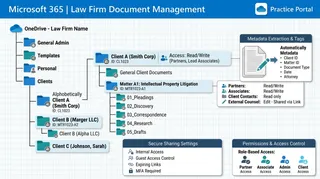
OneDrive for Law Firms: Setting Up a Secure Legal Workspace
Implementing OneDrive for law firms requires strict security configurations and standardized matter templates to protect client confidentiality. This article explains how to secure client folders, design a matter-centric hierarchy, and manage external sharing links. By integrating cloud storage with intelligent workspaces, legal practices can securely exchange large files, track activity logs, and extract metadata automatically.
Paperless Document Management Software: Transitioning Law Practice Files to Digital Repositories
Physical filing cabinets and off-site paper archives trap critical legal knowledge in static banker boxes, delaying discovery responses and creating compliance risks across active dockets. Paperless document management software converts physical records into structured, searchable digital repositories organized around clients and legal matters. This guide explains how law practices transition legacy paper files into secure cloud workspaces and automate document extraction.

Paralegal File Organization: Practical Systems for Case Documents
Paralegal file organization transforms chaotic matter folders into structured, predictable systems where attorneys and legal assistants can retrieve any pleading, exhibit, or discovery document within seconds. Establishing standardized naming conventions, uniform folder taxonomies, and clear intake logs prevents lost records and accidental disclosure. This guide provides copy-pasteable folder schemas, exhibit logs, and staging workflows for modern legal teams.

Paralegal Litigation Checklist: End-to-End Case Management Workflow
A paralegal litigation checklist establishes an operational standard across every phase of a civil lawsuit, from initial client intake to courtroom exhibit assembly. While traditional law firm checklists rely on static spreadsheets or paper binders, modern litigation teams coordinate case documents inside structured digital workspaces. This workflow details the five litigation phases, matter folder hierarchies, and digital exhibit management methods.

Paralegal Software Programs: Essential Tools for Legal Support
Paralegal software programs help legal support teams coordinate case files, assemble pleadings, index discovery records, and track deadlines across active matters. While practice management suites handle billing, support teams require specialized tools for intensive document processing, legal research, and secure file collection. This guide outlines the five core software categories legal assistants rely on daily and explains how to structure an efficient digital workspace.

Paralegal Technology: Modern Tech Stacks for Legal Support
Paralegal technology encompasses the integrated software platforms, cloud workspaces, and collaborative tools legal assistants use to manage case files, organize discovery, and coordinate with attorneys. Rather than relying on scattered email attachments and isolated desktop drives, modern legal support teams build modular stacks across practice management, structured document workspaces, and client portals. Here is how to evaluate and assemble the essential layers of technology for paralegals.

Patent Attorney Software: Document and Docketing Tools for IP Firms
Managing a patent practice requires tracking strict statutory deadlines and protecting highly sensitive pre-publication assets. While specialized patent attorney software manages docketing dates, intellectual property case management depends on secure file collaboration. This guide explores the document and docketing tools that protect firm operations from missed deadlines and disclosure risks.

Practice Management Software for Law Firms: Operations & Architecture Guide
Practice management software for law firms coordinates matter records, legal calendaring, time capture, and client billing within a centralized administrative system. While commercial systems govern relational dockets, legal practices face storage caps and security risks when handling high-capacity case files. This guide evaluates practice management architecture, document storage bottlenecks, client portals, and dedicated legal workspaces.

PracticeMaster Guide: Practice Management and Modern File Workspaces
PracticeMaster from Tabs3 provides centralized matter management, conflict checking, and calendar tracking for boutique and mid-sized law firms. While the software excels at tracking client profiles and linking billing to Tabs3, modern legal teams face friction with remote access, large discovery files, and client file delivery. This guide covers PracticeMaster capabilities, pricing models, and how to pair practice management with modern cloud workspaces.

Real Estate Document Management Software: Managing Workspaces and Contracts
Real estate document management software is essential for consolidating transaction files, ensuring regulatory compliance, and protecting client data. While legacy storage systems create operational drag and security risks, intelligent workspaces simplify document organization and client sharing. By implementing structured metadata extraction and secure collaboration portals, brokerages can reduce transaction closing times and eliminate manual data entry.

Records Management for Law Firms: Retention, Governance, and Lifecycle Tracking
Law firm records management is the systematic administration of client and firm records from creation and active matter management through retention, archiving, and defensible disposition. Establishing a structured information governance policy ensures regulatory compliance and protects client confidentiality. This guide examines how legal teams build enforceable retention schedules, handle legal holds, and implement matter-centric cloud storage.
Remote Deposition Exhibit Sharing: Managing and Introducing Exhibits Online
Remote deposition exhibit sharing is the procedural and technical method of presenting, marking, and distributing digital documentary exhibits to witnesses, attorneys, and court reporters during virtual proceedings. Clumsy screen-sharing and rigid court-reporting tools frequently disrupt testimony and create record ambiguities. This guide provides a four-step protocol for pre-deposition staging, digital exhibit stamping, secure real-time introduction, and post-deposition distribution.

Reveal eDiscovery: Platform Review, AI Capabilities, and Review Workflows
Litigation discovery bottlenecks rarely occur during document tagging alone; they emerge across the entire data lifecycle, from custodian collection to final production. This review examines Reveal eDiscovery, evaluating its Brainspace visual analytics, behavioral AI models, review acceleration engines, and the staging infrastructure required to move massive evidence volumes securely.

Rocket Matter Pricing: Plans, Hidden Fees, and Cost Comparison
Rocket Matter pricing operates on a multi-tiered subscription model ranging from $59 to $145 per user per month billed annually, with baseline entry promotions starting at $49. This guide breaks down feature differences across Essentials, Pro, and Premier tiers, analyzes add-on costs like CRM and website hosting, and evaluates legal software budgeting.

Rocket Matter Reviews: Features, Limitations, and Usability for Law Firms
Independent Rocket Matter reviews show a mature practice management platform optimized for time billing, Kanban matter tracking, and trust accounting. Small law firms frequently face operational friction when managing large discovery productions, client file collection, and unstructured document extraction. This evaluation examines Rocket Matter ratings, core practice management features, storage boundaries, and how pairing matter workflows with intelligent workspaces modernizes firm operations.

Salesforce for Law Firms: CRM Capabilities, Storage Limits, and Architecture
Using Salesforce for law firms provides enterprise client relationship management and intake pipeline tracking, but requires careful architecture to handle matter documents without incurring exorbitant native Salesforce storage fees. This guide analyzes legal CRM capabilities, storage quotas, and how decoupling matter files protects firm budgets.

Secure Workflows for Legal Transcription File Sharing and Audio Ingestion
Setting up secure workflows for legal transcription file sharing requires matter-centric workspaces, encrypted intake portals for contractors, and auditable version control. This guide explains how law firms can organize deposition audio, securely receive transcripts from independent court reporters, and automatically extract structured data from documents.

Secure Workspace Infrastructure for Law Firm Virtual Assistants
Attorneys deploying a virtual assistant for law firms struggle to protect client confidentiality because consumer-grade cloud storage lacks granular access controls and audit trails. A matter-centric workspace isolates client files, structures metadata, and logs all user interactions. This guide covers how to set up secure folder structures, client portals, and auditable workspaces.

Selecting and Implementing Investigation Case Management Software
A single compromised file can ruin a corporate investigation. This guide covers how to choose and implement investigation case management software to help compliance officers, human resources, and private investigators organize evidence securely, verify chains of custody, and protect sensitive records.

Setting Up an Actionstep Client Portal for File Delivery
Setting up an Actionstep client portal is a standard method for sharing legal case files, but native storage caps and fixed branding can limit modern firms. By integrating Actionstep's practice management with Fastio's intelligent workspaces, legal operations can deliver custom branded portals and handle large deposition videos. This guide explains how to sync matter folders, collect client files without login walls, and extract structured document metadata using Metadata Views.

ShareFile for Legal: Secure Document Exchange and Law Firm Portals
ShareFile for Legal provides law firms with encrypted file sharing, branded client portals, and audit trails to replace unencrypted email attachments. While legacy platforms solve basic file transfer and size restrictions, growing practices increasingly require matter-centric indexing, structured document extraction, and granular access controls to manage complex legal records.
SharePoint for Legal Document Management: Capabilities and Limits
Using SharePoint for legal document management involves configuring Microsoft 365 libraries and metadata to store, version, and search matter files, though it lacks native matter-centricity. While Microsoft 365 provides familiar desktop tools, law firms frequently encounter governance friction, 5,000-item threshold limits, and awkward external sharing. Discover where native SharePoint supports legal workflows and how modern matter workspaces bridge the operational gap.

Small Law Firm Software: Essential Practice Systems for Modern Practices
Small law firm software encompasses the essential digital tools, including matter workspaces, client delivery portals, and billing platforms, scaled to support small legal teams without enterprise overhead. While traditional legal suites focus on back-office accounting, boutique practices require high-capacity document workspaces and secure client intake channels. This guide evaluates core architecture, matter systems, and client delivery tools for growing firms.

Small Law Office Software Stack: Essential Tools for 1-5 Attorney Practices
Running a 1-5 attorney law practice requires a software stack that balances case tracking, secure matter storage, trust billing, and client intake without dedicated IT personnel. While monolithic legal platforms claim to handle every operational requirement, boutique practices often face bottlenecks with document management and large file sharing. This guide outlines the five essential software layers needed to build a flexible, modular legal tech stack for small law offices.
Software Used by Law Firms: The Essential Legal Operations Stack
Software used by law firms spans specialized practice management, billing, document management, e-discovery, and secure client delivery platforms. While generic office tools handle everyday typing and messaging, legal practices require matter-centric structures, ethical access boundaries, and high-capacity file transfer systems. Auditing your legal operations stack maintains reliable case workflows, accurate time capture, and clean client communication across every active matter.

Standardizing File Organization in Legal Matter Management Software
Managing the document substrate of legal matters requires more than financial tracking. This guide covers how corporate legal departments can standardize folder hierarchies, control permissions, and secure external sharing within matter management software to prevent version sprawl and protect client confidentiality.

Summation Legal Software: Managing Legacy Case Databases and Modern Alternatives
Summation legal software is a legacy litigation support and case management platform historically used by law firms to organize deposition transcripts, evidence documents, and case chronology. Decades of critical trial exhibits, transcript annotations, and Bates-stamped productions remain trapped inside these aging on-premise databases. This guide covers how to extract legacy Summation case data, resolve broken image paths, and migrate litigation materials into modern cloud workspaces.

The Best Legal Document Management Software for Mac Users
Mac-based law firms face unique challenges with traditional document management systems that lack native desktop integrations. This guide compares the leading macOS legal software and explains how to organize client files securely.
The Complete Law Firm File Migration Checklist for IT & Legal Ops
A successful law firm file migration requires systematic auditing, matter taxonomy design, pilot testing, and strict cutover protocols to protect case history and billable hours. This 5-stage checklist guides legal IT and operations teams through moving legacy file shares to modern cloud workspaces while preserving document metadata.

Thomson Reuters Legal Tracker: Enterprise Matter Management and Outside Counsel File Exchange
Thomson Reuters Legal Tracker anchors corporate legal operations by standardizing electronic billing, auditing outside counsel invoices, and tracking matter milestones. Yet legal departments encounter bottlenecks when exchanging large case files and deposition archives with outside counsel. This guide evaluates Legal Tracker and examines how legal teams pair enterprise e-billing with secure matter collaboration workspaces.

Time Matters Legal Software: Capabilities, Modernization, & Cloud Options
Time Matters legal software remains a fixture in law firms requiring deep relational matter tracking, but its on-premises SQL architecture creates remote access and IT maintenance challenges. Firms modernizing legacy databases must choose between private cloud hosting, full SaaS replacement, and decoupling document workspaces. This guide examines Time Matters technical capabilities, migration pitfalls, and cloud modernization pathways.

Top Bankruptcy Software for Lawyers: Form Prep and E-Filing Compared
Choosing the right bankruptcy software for lawyers requires balancing form-filling accuracy against deployment models. This guide compares Best Case by Stretto, NextChapter, Jubilee, and CINcompass across their prep workflow, credit integrations, and electronic court filing capabilities.

Top eDiscovery Vendors: Software Platforms and Managed Review Services
Selecting an eDiscovery vendor requires balancing software capabilities against litigation scale and ongoing hosting expenses. While global eDiscovery vendors handle massive corporate reviews, boutique law firms often face unpredictable per-gigabyte ingestion fees and monthly hosting minimums. This guide evaluates leading software platforms and managed service providers, analyzes commercial pricing structures, and outlines a two-tier workflow that keeps discovery costs predictable.

Top Legal Intake Software: How to Automate Client Onboarding
Law firms struggle with client onboarding due to slow response times and manual data entry. While standard legal intake software simplifies form building, it often neglects secure file capture. We evaluate the top platforms and show how a secure workspace optimizes document collection.

Top Legal Technology Companies: A Complete 2026 Buyers Guide
Evaluating the top legal technology companies is essential for structuring a modern law firm's tech stack. While practice management software coordinates day-to-day operations and billing, document workspaces secure critical evidence. This guide compares the best legal technology software of 2026, evaluating Clio, NetDocuments, Relativity, and Fast.io. You will learn how next-generation client portals and workspaces help firms protect client data and simplify matter operations.

Trademark Management Software: Organizing Portfolios, Specimens, and Client Workspaces
Trademark management software helps IP law firms and corporate legal teams track registration deadlines, preserve specimens of use, and organize brand portfolios. While docketing databases excel at statutory calendaring, modern trademark operations require dedicated workspaces for evidence hygiene and self-service client brand portals. This guide compares docketing software with asset workspaces and shows how to coordinate portfolios cleanly.
Trellis Legal Intelligence Review: State Trial Court Analytics and Motion Research
Trellis Legal Intelligence aggregates state trial court dockets, judicial analytics, and motion histories across thousands of county courts. For litigation teams, surfacing judge ruling tendencies and opposing counsel filing histories provides critical tactical depth during pretrial brief preparation. Connecting state court research directly to structured matter workspaces ensures case teams transition from docket intelligence to organized trial exhibits and filed briefs without document loss.

Understanding Clio Document Sharing Limits (and How to Bypass Them)
Firms handling large case files often encounter Clio document sharing limits, including a five gigabyte individual file upload cap and a one hundred megabyte client portal limit. This how-to guide explains how to bypass these native constraints using archive splitting and dedicated external workspaces. By integrating secure workspaces with your case management system, your firm can check and optimize client delivery without sync delays.

Understanding eDiscovery Software Pricing Models: A Complete Guide
Calculating the total cost of an eDiscovery project requires looking past entry-level storage rates to account for ingestion processing, metadata extraction, monthly hosting, user licensing, and production egress. This guide breaks down the core pricing models used by digital forensics and litigation review platforms. Learn how to identify hidden vendor fees and implement early case assessment strategies to control your litigation budgets.

Understanding iManage Document Management: File Structures and Modern Alternatives
Traditional legal document management platforms rely on local drive mapping and thick clients that introduce friction for modern remote teams. This guide compares iManage document management file structures with modern web-native cloud storage alternatives, highlighting how firms can transition to lightweight, browser-native client portals and automated data extraction workspaces.

Why General Storage Like Dropbox for Law Firms Falls Short
Using Dropbox for law firms is a common practice among solo and small-firm practitioners, but general storage tools lack the matter-centric structure, secure client portals, and document intelligence required for legal operations. This guide explores why consumer-grade storage falls short and how transitioning to matter-centric workspaces protects sensitive case files and builds client trust.

Workers' Compensation Case Management Software: Buyer's Guide
Workers' compensation law firms handle heavy caseloads packed with medical treatment records, lien disputes, and strict statutory filing deadlines. Selecting the right practice management platform requires evaluating how systems organize ongoing medical records, track lien resolutions, and structure matter files. This buyer's guide outlines essential software capabilities, key evaluation criteria, and modern file management strategies for legal teams.