Paperless Document Management Software: Transitioning Law Practice Files to Digital Repositories
Physical filing cabinets and off-site paper archives trap critical legal knowledge in static banker boxes, delaying discovery responses and creating compliance risks across active dockets. Paperless document management software converts physical records into structured, searchable digital repositories organized around clients and legal matters. This guide explains how law practices transition legacy paper files into secure cloud workspaces and automate document extraction.

Why Paper Filing Cabinets Fail Modern Law Practices
Physical filing cabinets trap critical matter intelligence in static banker boxes where only one person can inspect a case file at a time. When a senior partner preparing for trial needs a key contract amendment that sits misfiled in an off-site warehouse, the legal team loses valuable billable hours requesting courier deliveries, sifting through loose folders, and piecing together fractured paper records. This manual retrieval model creates filing errors, delays discovery deadlines, and introduces severe compliance risks across active litigation dockets.
Paperless document management software digitizes, indexes, and stores physical records into searchable, access-controlled matter repositories to eliminate paper filing cabinets. It converts physical records into structured digital assets, extracting text through optical character recognition (OCR) and binding documents directly to their corresponding client and matter workspaces.
Traditional law offices dedicate extensive floor space to rows of metal filing cabinets, archive shelves, and storage boxes. Beyond physical office footprint costs, paper records impose severe operational friction on daily practice management:
- Single-Threaded Access: Physical files can only exist in one location at a time. If an associate brings a case binder home for weekend trial preparation, colleagues at the office cannot access those pleadings, discovery responses, or witness statements until the physical binder returns.
- Fragile Document Security: Paper files have no access controls beyond a locked door. Anyone walking past an unattended file room or scanning station can view sensitive client disclosures, financial statements, or medical histories, and nothing records who took or changed a file.
- Version Ambiguity: When attorneys print, mark up, and re-file paper drafts, loose physical sheets quickly detach from their exhibits. Staff cannot determine whether a marked-up brief represents the final stamped court filing or an abandoned initial draft.
- Physical Disaster Exposure: Paper files remain vulnerable to water leaks, building fires, misplaced boxes, and transit loss during courthouse commutes. Reconstructing a lost paper trial binder from opposing counsel and court clerks consumes weeks of non-billable staff labor.
Many law firms attempt to solve this paper burden by scanning documents into generic consumer cloud drives. However, consumer storage tools treat scanned PDFs as passive digital paper. Without matter-centric organization, deep text indexing, and automated data extraction, dumping scanned records into consumer folders merely creates a digital junk drawer that mirrors the disorder of the physical file room.
Related guides
- Box for Law Firms: Secure Document Management AlternativesAn analysis of Box for law firms alongside modern legal document management alternatives. While enterprise cloud...
- PracticeMaster Guide: Practice Management and Modern File WorkspacesPracticeMaster from Tabs3 provides centralized matter management, conflict checking, and calendar tracking for boutique...
- DocketBird Review: Court Docket Tracking and Law Firm File IntegrationDocketBird automates court docket tracking and document retrieval across federal and state courts, capturing new...
- Electronic Case Files: How to Organize and Manage Digital Legal RecordsAn electronic case file is a structured digital repository containing all pleadings, discovery, correspondence, and...
- Legal Knowledge Management Software: Systems, Precedent Retrieval, and WorkspacesLegal knowledge management software organizes, indexes, and surfaces a law firm historical work product, precedents,...
- Legal OCR Software: Converting Scans, Pleadings, and Discovery Files into Searchable AssetsStandard optical character recognition frequently scrambles legal pleadings, ignores Bates numbers, and leaves...
More on this subject: Legal Teams (211 guides)
What Capabilities Define Paperless Legal Document Management
Transitioning a legal practice away from physical paper requires specialized software designed around legal workflows rather than generic file storage. While consumer cloud services store digital objects, dedicated paperless document management systems understand the relationship between clients, legal matters, court filings, and evidentiary exhibits.
Many software evaluations fixate on hardware scanner specifications, such as pages-per-minute throughput, optical resolution settings, and automated document feeder capacities. While reliable scanning hardware matters, scanning is merely the initial ingestion step. The true operational bottleneck in law practice management is document indexing, optical character recognition (OCR) text extraction, and matter-centric access controls. Once a paper file converts to a digital PDF, the scanner hardware disengages; the paperless filing system software must make that file instantly findable, securely organized, and collaborative.
To evaluate paperless document management software effectively, legal operations managers should look for eight essential technical capabilities:
- Matter-Centric Repository Architecture: Organizes all files, emails, pleadings, and discovery volumes into distinct, dedicated client and matter workspaces, preventing cross-matter file contamination.
- Full-Text Optical Character Recognition (OCR): Automatically extracts and indexes machine-readable text from scanned PDFs, historical paper filings, and image-based exhibits so attorneys can search every page.
- Structured Document Data Extraction: Uses natural language schemas to pull critical metadata fields, such as docket numbers, execution dates, and contracting parties, directly into filterable views.
- Granular Role-Based Access Controls: Defines permissions at the organization, workspace, and share levels, ensuring that staff, contract attorneys, and outside experts only access authorized matter files.
- Detailed Activity Logging of Changes: Records uploads, edits, renames, moves, and deletions across the workspace, documenting who modified matter records.
- Secure Client Intake Portals: Provides branded links for external clients and witnesses to upload documents directly into the matter workspace without relying on insecure email attachments.
- Integrated E-Signatures: Allows teams to send retainers, joint defense agreements, and settlement releases for signature directly from the workspace, generating tamper-evident audit certificates.
- Per-File Version History: Preserves every draft revision automatically, allowing legal teams to review earlier drafts and coordinate revisions without overwriting colleague work product.
Steps to Migrate Law Practice Files to Digital Repositories
Transitioning accumulated paper files to a digital repository requires a structured, multi-phase migration strategy. Law firms that attempt to scan every historical banker box in a single uncoordinated push quickly burn through operational budgets and overwhelm staff. High-performing legal teams enforce a five-stage migration framework that prioritizes active dockets and establishes disciplined digital filing habits.
File Inventory and Retention Auditing Before scanning a single document, the practice manager and designated ethics counsel must inventory existing paper records. Case files divide into active matters, closed files subject to mandatory retention schedules, and obsolete files eligible for secure destruction. Firms should consult their internal records retention policy and state bar association guidelines to determine statutory retention periods for completed matters. Securely destroying eligible closed files before digitization eliminates scanning costs for obsolete records.
Standardizing Workspace Hierarchies and Matter Naming A paperless office software deployment fails if staff recreate disorganized desktop habits in the cloud. Legal operations leaders must deploy a standardized matter hierarchy for every active case. Standardized workspace templates establish predictable directories:
01_Client_Intake: Retainers, conflict check verifications, engagement letters, and client contact profiles.02_Court_Pleadings: Filed complaints, summonses, answers, court orders, and docket sheets.03_Discovery: Requests for production, interrogatories, privilege logs, and produced record sets.04_Depositions: Full deposition transcripts, exhibits, video files, and errata sheets.05_Motions_and_Briefs: Motions, memorandums of law, supporting affidavits, and proposed orders.06_Trial_Exhibits: Admitted evidence, demonstratives, witness examination binders, and jury instructions.07_Client_Correspondence: Formal client advisories, settlement evaluations, and billing records.
File naming conventions must also follow strict standardized syntax, such as YYYY-MM-DD_DocType_Description_v02.docx. That structure informs every attorney of the document date, type, subject, and revision state without opening the file.
Executing Day-Forward Scanning and Selective Backfile Conversion Rather than attempting to digitize decades of closed physical records simultaneously, firms should adopt a day-forward scanning policy. From an established cut-off date, all incoming physical mail, court notices, discovery productions, and client records are scanned immediately upon receipt and filed into the appropriate matter workspace. For historical files, prioritize active litigation dockets, impending trial files, and frequently referenced corporate client records. Outsource bulk scanning of inactive closed files to professional legal scanning vendors equipped for high-volume conversion.
Implementing OCR Extraction and Metadata Tagging Scanning paper creates raw image files. To make these files functional, the paperless system must process them through optical character recognition. With Intelligence Mode enabled on the workspace, Fastio indexes uploaded files for search automatically. Paralegals can then apply Metadata Views to extract docket numbers, filing dates, and case captions across scanned batches, transforming unstructured scanned records into a searchable index.
Staff Training and Decommissioning Physical Cabinets The final phase focuses on workflow adoption. Paralegals, associates, and legal assistants must be trained on saving email attachments directly into matter workspaces, using shared links instead of internal email attachments, and routing documents for signature through integrated e-signatures. Once active cases run entirely within the digital workspace, physical files can be boxed, indexed, and transferred to off-site secure retention or shredded in accordance with the firm document retention schedule.
How to Structure Matter Workspaces and Manage Heavy Discovery Files
Litigation and transactional practices routinely handle diverse, high-volume file types that overwhelm standard file storage systems. A single commercial litigation matter can generate thousands of scanned discovery pages, multi-gigabyte forensic database exports, high-definition demonstrative trial animations, and multi-hour deposition video recordings. When paralegals attempt to upload heavy production archives into standard office drives, sync engines can stall, crash browsers, or leave partial uploads behind.
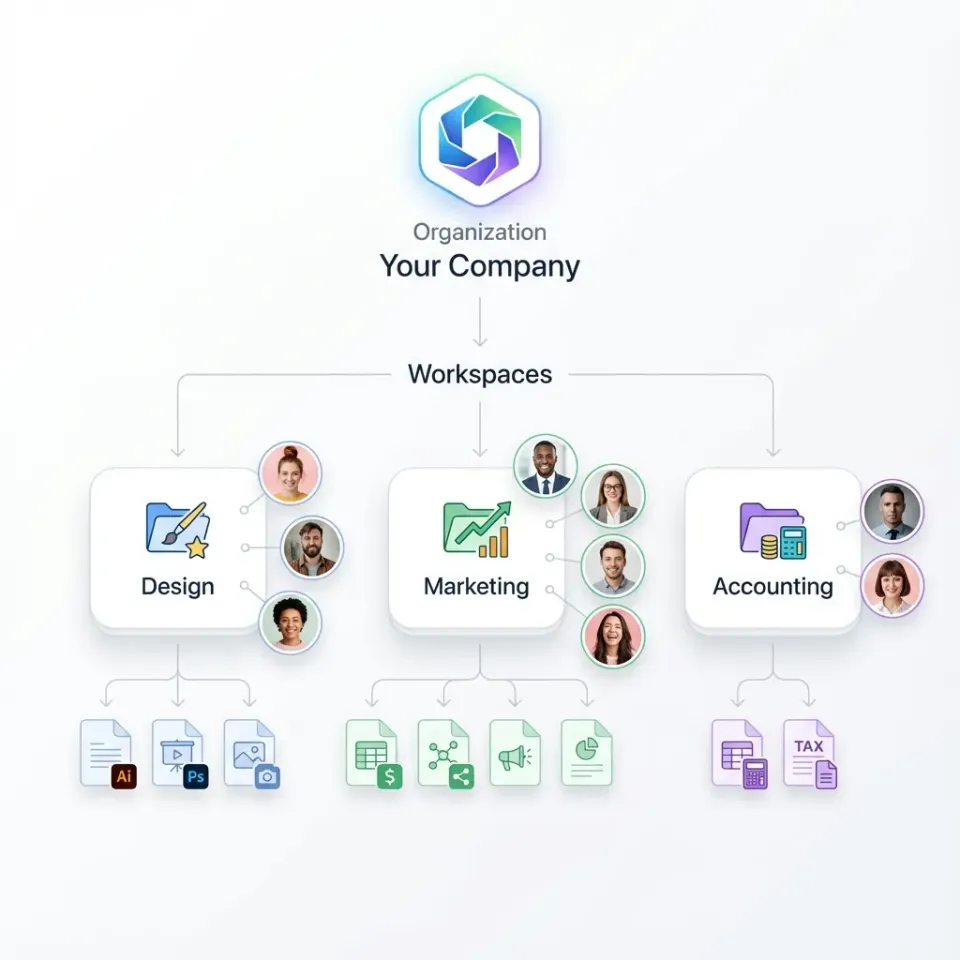
Fastio provides dedicated cloud workspaces engineered for heavy legal files. Organizations can deploy a distinct shared workspace for each client and matter, providing a collaborative environment where litigators, paralegals, and outside specialists work from the same authoritative case record.
To support heavy legal data handling, Fastio incorporates purpose-built architectural features:
- Chunked Uploads: Massive litigation productions and forensic disk images upload via chunked transfers. The platform splits files into manageable segments during upload, preventing browser timeouts and network drops from forcing staff to restart large uploads from scratch.
- Browser-Based HLS Video Streaming: Video depositions and surveillance footage often span multiple gigabytes. Fastio delivers browser-based HLS streaming, allowing attorneys to scrub through multi-hour deposition videos directly in adaptive bitrate playback without downloading massive video files to local hard drives.
- Branded Client Portals: Collecting sensitive documents from clients via email attachments exposes firms to data interception and bounces against file size limits. Fastio enables teams to create branded client portals with firm logos and custom styling. Legal staff send a durable or expiring share link configured for file receipt. Clients open the link in any web browser without creating an account and upload tax returns, corporate contracts, or medical records directly into the matter workspace.
- External Co-Counsel and Expert Shares: When collaborating with outside co-counsel, joint defense partners, or expert witnesses, litigators can create scoped shares that provide access only to specific matter folders or exhibit collections. Shares can be configured with expiration dates, per-recipient access controls, or disabled downloads to protect sensitive work product.
- Advisory File Locking: During intense brief drafting cycles, multiple litigators frequently collaborate on the same memorandum of law. Fastio provides advisory per-file leases through its MCP toolset (
lock-acquireandlock-releaseon thestorage_managetool, andlock-statuson thestoragetool). When an associate acquires an advisory lock on a draft motion, colleagues can see who holds the lease. If concurrent saves occur, Fastio preserves both versions in complete per-file version history, allowing the team to review and restore revisions without losing billable work product.


Transition your firm to paperless matter workspaces
Replace physical filing cabinets with structured, searchable cloud repositories. Organize files by matter, extract structured metadata, and collaborate securely with clients and co-counsel. Monthly plans start with a 14-day free trial.
How to Automate Legal Document Extraction with Metadata Views
In traditional law firms, paralegals spend countless non-billable hours opening scanned pleadings, lease agreements, and discovery productions to manually transcribe key details into case management spreadsheets. This manual indexing process is slow, expensive, and prone to human transcription errors. When fifty new discovery responses or court filings arrive in a single week, manual data entry falls behind, exposing the firm to missed response dates and blown scheduling orders.
Fastio reduces manual indexing through Metadata Views. Metadata Views turn unstructured documents in a matter workspace into a live, structured, queryable database. Instead of building fragile optical character recognition templates or writing custom regular expressions, legal teams describe the fields they want extracted using natural language prompts.
The extraction engine automatically designs a typed schema across seven distinct data formats: Text, Integer, Decimal, Boolean, URL, JSON, and Date & Time. It processes scanned PDFs, Word documents, images, and spreadsheets, extracts the requested information, and populates a filterable, sortable view beside the workspace files.
Legal operations teams can configure specialized extraction schemas across various practice workflows:
- Court Pleadings and Orders: Automatically extract court docket numbers, presiding judge names, filing parties, document titles, hearing dates, and certificate of service timestamps from incoming court notices.
- Contract Portfolios and Due Diligence: Extract counterparties, effective dates, termination dates, renewal notice windows, indemnification caps, and governing law jurisdictions across hundreds of commercial contracts.
- Discovery and Production Sets: Extract Bates start and end ranges, producing parties, document dates, custodian names, and confidentiality designations from incoming litigation productions.
- Closing Binders and Real Estate: Extract parcel identification numbers, purchase prices, closing dates, escrow agent details, and lienholder disclosures across transactional filings.
Because Metadata Views operate dynamically, legal teams can add new metadata columns at any time without reprocessing existing documents. If a partner needs to track a newly discovered contractual clause across three hundred executed agreements, they add a column in plain language, and the system extracts that value across the entire workspace folder.
For comprehensive matter research across complex discovery records, firms can enable Intelligence Mode on the workspace. Intelligence Mode auto-indexes documents for built-in retrieval-augmented generation. Litigators and paralegals can query the matter repository in plain English, receiving answers backed by page-level citations to specific exhibits, deposition pages, and motion briefs. Instead of spending hours reading through voluminous paper binders, attorneys can locate critical factual admissions quickly.
How to Maintain Change Records and Ethical Document Retention
Law practices operate under strict professional responsibilities regarding client confidentiality, work product protection, and evidence preservation. Under American Bar Association Model Rules of Professional Conduct regarding technological competence and confidentiality of client information, attorneys must make reasonable efforts to prevent the inadvertent or unauthorized disclosure of, or unauthorized access to, client information. When transitioning from physical file rooms to paperless software, legal operations leads must ensure that digital repositories satisfy these professional obligations.
Matter files need clear accountability. If a question arises between co-counsel over who edited a settlement agreement, the firm needs a clear history of changes.
Fastio maintains document accountability through a detailed activity log. The activity log records changes across the workspace, capturing every upload, edit, rename, move, and deletion, along with permission updates and share creations. When paralegals stage court exhibits or create shares for external experts, the activity log records who uploaded, changed, or shared the files and when.
Version control provides an essential safety net during high-stakes drafting. Fastio maintains complete per-file version history automatically. Every time an attorney saves a revision to a pleading, agreement, or memorandum, the platform stores the new revision as a distinct version while preserving all prior drafts. Team members can inspect earlier iterations and restore previous drafts if a critical legal argument was cut by mistake.
Matter management also requires integrated signing workflows. When retaining new clients, executing joint defense agreements, or finalizing court settlement releases, legal teams need an efficient execution process. Fastio provides built-in e-signature capabilities directly from the matter workspace on every plan. Legal teams can send documents for signature to multiple recipients in sequence or parallel, add optional one-time passcodes per signer, and generate a tamper-evident audit certificate. Once signed, the executed document and its audit certificate automatically file back into the matter workspace, eliminating the manual steps of downloading and re-uploading executed agreements.
When a legal dispute or transactional matter concludes, closed case files must transition to long-term archiving. Storing inactive files in active workspaces clutters daily search results and increases the risk of inadvertent file modifications. Operations teams should move closed matters to dedicated archive workspaces.
State bar associations and court rules prescribe specific record retention guidelines depending on the practice area and jurisdiction. Legal teams should consult their firm internal records retention policy and designated ethics counsel to establish retention timelines. Fastio runs on infrastructure partners (Google Cloud Platform and Cloudflare) certified to industry security standards. Archived legal files are protected with encryption in transit and at rest and role-based workspace permissions, and they stay available in cloud storage when appellate, audit, or malpractice questions come up.
Frequently Asked Questions
What is paperless document management software?
Paperless document management software is a specialized digital platform that digitizes, indexes, and stores physical records into searchable, access-controlled matter repositories. Unlike generic cloud drives, paperless legal software organizes files around clients and legal matters, extracts full text through optical character recognition (OCR), and provides structured metadata extraction and activity tracking.
How do law firms transition from paper files to paperless software?
Law firms transition to paperless software through a structured five-stage framework: auditing existing paper files and purging records past mandatory retention periods, standardizing matter folder hierarchies and file naming conventions, implementing day-forward scanning for incoming mail alongside selective historical scanning, applying automated OCR text extraction and metadata tagging, and training staff on cloud workspace collaboration.
What features are most important in paperless legal document management?
The most critical features include matter-centric workspace architecture, full-text optical character recognition (OCR), structured metadata extraction via Metadata Views, role-based access permissions, detailed activity logging of changes, secure client intake portals, per-file version history, and integrated e-signatures with tamper-evident audit certificates.
How does paperless document management software differ from generic cloud storage?
Generic cloud storage treats files as isolated objects in loose directories, lacking full-text OCR indexing, legal matter boundaries, and structured extraction. Dedicated paperless legal software organizes records around clients and active dockets, extracts structured data from pleadings and contracts, supports heavy litigation files like video depositions, and maintains detailed change logs.
How do digital repositories handle large discovery files and deposition videos?
High-performance paperless platforms handle large files using chunked uploads and browser streaming. Chunked uploads break multi-gigabyte production archives into segments during transfer, preventing browser timeouts. Browser-based HLS streaming allows attorneys to scrub through multi-hour video depositions directly within their web browser using adaptive bitrate playback without downloading massive files locally.
Does paperless software support electronic signatures for legal documents?
Yes. Modern paperless platforms provide built-in e-signature capabilities directly within the matter workspace. Legal teams can send engagement letters, settlement agreements, and joint defense agreements to signers in sequence or parallel, add optional one-time passcodes, and generate tamper-evident audit certificates, with the executed copy automatically filed back into the workspace.
Related Resources

Transition your firm to paperless matter workspaces
Replace physical filing cabinets with structured, searchable cloud repositories. Organize files by matter, extract structured metadata, and collaborate securely with clients and co-counsel. Monthly plans start with a 14-day free trial.