Case Management Software for Law Firms: Document Workspaces
Modern legal practice requires moving beyond basic calendaring to centralize sensitive files. This guide explains how to evaluate case management software for law firms with a focus on document workspaces. By adopting case-centric document workspaces, teams can organize litigation files, stream video evidence, and secure discovery materials.


Why Case Management Software for Law Firms Centers on Documents
A deposition video does not fit in an email, and it does not fit in most practice management systems either. That single fact reshapes what a law firm actually needs from case management software. This is a shift in legal operations. For years, legal case management systems focused primarily on scheduling court dates, tracking billable hours, and managing billing codes. While these administrative tools remain important, the daily pressure on litigation teams has shifted to the massive volume of digital evidence. Modern files are no longer simple text documents. They are high-resolution scans, multi-gigabyte email chains, and video records.
When a firm relies on basic calendaring platforms, attorneys are left to manage files across disparate systems. A paralegal might track a deposition date in a case manager, but download the actual video to a local hard drive, upload a transcript to a generic cloud drive, and email sensitive files to co-counsel. This fragmented approach creates security vulnerabilities and versions that are difficult to track. Case management software for law firms must evolve to center around a dedicated document workspace, ensuring that files live where the legal work actually happens.
Moving Beyond Legacy Practice Management
Legacy practice management software often treats files as secondary attachments. An attorney uploads a contract, which sits as a static file linked to a billing entry. If a colleague edits the file, the change is invisible to the rest of the team. If a client needs to sign a document, the file must be exported, uploaded to a different signature tool, and imported back.
In contrast, a modern document workspace provides a live, collaborative environment. Multiple attorneys, paralegals, and clients can access the same folders, view version histories, and search across all files in a single space. By prioritizing the document workspace, law firms eliminate the administrative overhead of exporting, importing, and tracking files across different systems. The workspace becomes the single source of truth for the entire matter.
Related guides
- Lightweight eDiscovery for Small Law FirmsTraditional ediscovery software for small law firms is often too complex and expensive for boutique practices. This...
- Document Management Software for Attorneys: Workspaces and Active Case FilesDocument management software for attorneys organizes privileged case files, discovery exhibits, and pleadings into...
- Google Drive Alternatives for Law Firms: Secure Document ManagementFinding secure google drive alternatives for law firms is essential to protect client confidentiality and organize case...
- Client Intake Software for Law Firms: Automating Onboarding & Case FilesClient intake software for law firms automates client screening, conflict verification, and case file creation. While...
- Choosing a Document Management System for Law Firms: A Complete GuideChoosing a document management system for law firms requires balancing secure internal case storage with the practical...
- Legal Document Repository Software: Top Tools for Modern Law FirmsSelecting the right legal document repository software is critical to resolving document fragmentation and protecting...
More on this subject: Legal Teams (211 guides)
How Legal Case Management Systems Handle Large Files
Average litigation files exceed 5GB when including high-definition deposition videos, a threshold that breaks traditional communication systems. Consumer-grade cloud storage solutions and standard legal case management systems struggle with the scale of modern digital evidence. For instance, the Clio practice management platform caps general document uploads at 5 gigabytes and limits files shared through its client portal to just 100 megabytes [Clio Help Center: Create and Upload Document Files and Folders]. When a firm receives a series of high-definition deposition videos, a standard litigation support team cannot easily share them. Splitting files into smaller compressed packages or shipping physical hard drives is slow and insecure. In legal proceedings, a delay in reviewing a deposition video can impact preparation timelines. Law firms need a document workspace that handles large files naturally. Fast.io addresses this scale by supporting chunked uploads for files up to 40 gigabytes, depending on the active subscription plan. This allows litigation teams to upload entire deposition runs, expert witness recordings, and discovery exports without splitting files or using third-party transfer services.
High-Definition Video Playback and Exhibit Organization
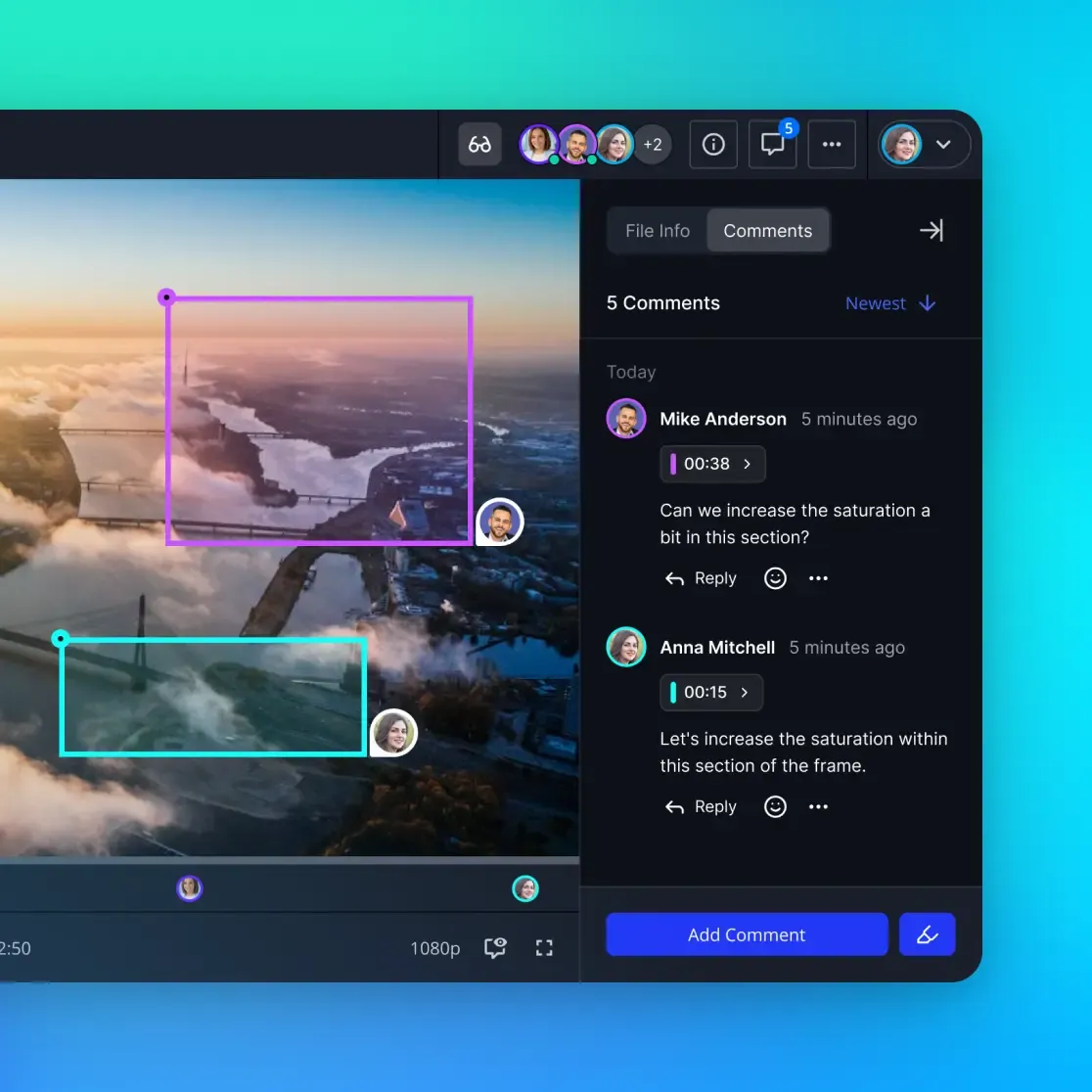
Once a large video is uploaded, the next challenge is access. Fast.io includes a media engine that offers adaptive bitrate streaming for video files. This means attorneys can stream deposition videos directly in their browser with smooth scrubbing, similar to consumer video platforms. The system automatically generates optimized preview proxies while keeping the original file untouched. In addition to video streaming, a legal workspace must keep trial exhibits organized alongside transcripts. A litigation team can store video files in the same folder as the matching PDF transcripts, deposition outlines, and scanned exhibits. By keeping all media and text in a single, high-capacity workspace, firms ensure that everyone on the case has instant access to the evidence they need without downloading large files to local machines.
A Matter-Centric Setup Guide for Legal Workspaces
To keep files organized and secure, a law firm should establish a consistent, matter-centric folder structure. A document workspace should match the lifecycle of a legal case. By setting up a dedicated workspace for each client or active matter, legal teams ensure that files remain isolated and access is tightly controlled.
A recommended structure for a litigation matter workspace includes the following folder hierarchy:
- 01_Client_Intake_and_Correspondence: Contains engagement letters, client-provided documents, and meeting notes.
- 02_Pleadings_and_Court_Filings: Holds formal pleadings, motions, and orders, organized chronologically.
- 03_Discovery_and_Exhibits: Organized into separate subfolders for inbound discovery, outbound productions, and marked exhibits.
- 04_Depositions_and_Transcripts: Houses video recordings, audio files, and written transcripts from witness depositions.
- 05_Attorney_Work_Product: A restricted folder for case strategy, research memos, and deposition outlines.
By isolating files into this structure, firms prevent accidental sharing. For example, a firm can share the '03_Discovery_and_Exhibits' folder with opposing counsel while keeping the '05_Attorney_Work_Product' folder completely private. Fast.io supports these granular permissions at the organization, workspace, folder, or file level. This ensures that paralegals, contract attorneys, and outside experts only access the specific folders they need to complete their tasks.
Collaborative Notes for Outline Drafting
Within this folder structure, attorneys and paralegals need to collaborate on strategy documents. Instead of exporting drafts to local processors or using consumer tools, firms can use Collaborative Notes directly inside the workspace. These notes support real-time editing with visible cursors.
Litigation teams can use Collaborative Notes to draft deposition outlines, track case tasks, and compile exhibit lists. Because these notes are saved inside the matter workspace, they are automatically indexed. They are secure and accessible to anyone with workspace permissions. If an agent is connected, it can read and write these notes to assist with case organization.


Secure your matter files and stream depositions
Organize litigation files in a dedicated workspace, stream video evidence in-browser, and extract case metadata. Start your 14-day trial today.
Automating Document Ingestion Steps and Metadata Extraction
Legal document management software is only useful if files are easy to import and organize. When a case starts, firms often receive files from various sources: client drives, opposing counsel portal links, and physical media. Manually downloading and re-uploading these documents wastes billable hours. Fast.io simplifies this process with secure, one-time cloud import, allowing firms to import files directly from Google Drive, OneDrive, Box, or Dropbox. Firms can also import documents from public URLs without downloading them to a local computer.
Once files are imported, legal teams must organize the facts. During early case assessment, a paralegal might spend days reading through contracts or invoices to extract dates, counterparty names, and amounts. Fast.io automates this structured extraction using Metadata Views. With Metadata Views, users describe the information they want to extract in plain English. The AI designs a typed schema, scans the workspace files, and populates a filterable spreadsheet.
Extracting Facts Without Manual Data Entry
For example, in a contract dispute, a firm can create a Metadata View with columns for:
- Contract Effective Date (Date & Time)
- Counterparty Name (Text)
- Termination Notice Period (Integer)
- Governing Law (Text)
- Total Contract Value (Decimal)
The system scans all contract files in the workspace and extracts this data automatically. Metadata Views work with PDFs, Word documents, scanned pages, and handwritten notes. Legal teams can sort and filter the resulting data grid to identify key risks or prioritize document review. If the case requires new information, a team member can add a column at any time without reprocessing existing files. This structured data layer allows small firms to quickly analyze large document sets without hiring temporary data entry staff.
Security, Auditing, and Client Handoff Checklist
Maintaining a clean chain of custody is a primary duty for law firms. If a firm cannot prove who accessed a discovery file or when a document was modified, the integrity of the evidence can be challenged. Fast.io provides a detailed activity log that records every file upload, download, access, and permission change. This log provides a clear record of document history for both human team members and connected agents.
In modern legal practices, AI agents can assist with case research. An agent can connect to a matter workspace via the Fast.io MCP server. Because permissions are granular, the firm can restrict the agent's access to a single case folder. The agent can then use semantic search to locate specific witness testimonies or draft summaries of expert reports without seeing sensitive firm-wide files. Fast.io supports ownership transfer, allowing contract attorneys or agents to set up a case workspace and hand it over to a firm partner. The partner then joins the paid subscription, which starts with a 14-day free trial requiring a credit card. Plans range from the Starter plan at $9.99 per month to the Business plan at $49.99 per month and the Enterprise plan at $199.99 per month, details of which are on the pricing page.

Compliance Honesty and Best Practices
When choosing legal technology, evaluate what the tooling actually enforces. Fast.io provides encryption in transit and at rest, expiring shares, granular permissions at the organization, workspace, folder, and file level, and a detailed activity log of every access. Fast.io runs on cloud infrastructure partners, including Google Cloud Platform and Cloudflare, that are certified to industry-leading security standards.
Also, Fast.io does not guarantee attorney-client privilege, work product protection, or confidentiality. Legal teams should consult their firm's own counsel or internal records policy to ensure their file sharing methods comply with state bar rules. To minimize risk, firms should use expiring shares with password protection when sending documents to external parties, and regularly audit workspace access.
Sources
References used to verify factual claims in this guide.
-
Average litigation files exceed 5GB when including high-definition deposition videos the Clio practice management platform caps general document uploads at 5 gigabytes and limits files shared through its client portal to just 100 megabytes
-
supporting chunked uploads for files up to 40 gigabytes
-
Starter plan at $9.99 per month to the Business plan at $49.99 per month and the Enterprise plan at $199.99 per month 14-day free trial requiring a credit card
Frequently Asked Questions
What is the difference between legal case management and legal document management?
Legal case management systems focus on administrative tasks such as calendaring court dates, tracking billable hours, and managing client billing. In contrast, document management systems focus on the ingestion, organization, search, and secure sharing of files. Modern law firms require a dedicated document workspace to manage the large volume of digital evidence, such as video depositions and e-discovery exports, which traditional case managers are not designed to handle.
How does a law firm securely share large deposition videos with clients and co-counsel?
To share large deposition videos that exceed email attachment limits, firms should use secure document workspaces rather than standard email. With Fast.io, teams can create branded shares that support adaptive streaming, allowing recipients to play videos in-browser without downloading massive files. These shares can be set to expire, protected with guest passwords, and restricted using granular access controls to maintain security.
Does Fast.io guarantee compliance for strict security requirements or enterprise security standards regulations?
Fast.io protects matter files with encryption in transit and at rest, granular permissions at the organization, workspace, folder, and file level, expiring and password-protected shares, and a detailed activity log recording every access. Fast.io runs on cloud infrastructure partners, including Google Cloud Platform and Cloudflare, that are certified to industry-leading security standards. No storage platform can guarantee attorney-client privilege or work product protection on its own, so firms should check their own counsel or records policy to confirm that a given configuration meets their professional responsibility requirements.
Related Resources

Secure your matter files and stream depositions
Organize litigation files in a dedicated workspace, stream video evidence in-browser, and extract case metadata. Start your 14-day trial today.