How to Set Up a Centralized Document Management System for Legal Teams
A centralized document management system replaces fragmented desktop folders and scattered email attachments with an authoritative matter repository. By organizing files into structured matter workspaces with automated indexing and role-based access, legal teams eliminate version conflicts and speed up document retrieval. This guide details a five-step rollout strategy for law firms, from initial file auditing and hierarchy design to deprecating local silos and managing external client delivery.

Why Legal Teams Need a Centralized Document Management System
In an enterprise workflow analysis, 49% of surveyed workers reported having trouble locating documents across their organization. In a legal practice, this fragmentation manifests as partners saving final drafts to local desktop folders, paralegals circulating redlines over email attachments, and associate attorneys maintaining private subfolders on consumer cloud drives. Over time, matter records fracture into isolated repositories. When a trial attorney needs the definitive exhibit list or a corporate client requests the closing binder from a transaction completed two years ago, staff spend hours piecing together files from multiple personal inboxes and unindexed local drives.
A centralized document management system establishes a single, authoritative repository where all organizational documents are stored, indexed, access-controlled, and version-tracked. In legal environments, centralization is not simply a matter of tidying up digital storage. It determines how reliably a firm protects client confidentiality, adheres to court deadlines, and captures billable time. When law firms adopt dedicated legal workspaces, they create an operational foundation where casework remains organized across partners, associates, and paralegals.
Unlike general business files, legal documents carry strict evidentiary, ethical, and operational burdens. A single matter can span thousands of pleadings, discovery productions, court transcripts, legal research memos, and client communications accumulated over several years. When these records live in decentralized silos, four major operational failures occur:
- Version Confusion and Conflicting Revisions: When multiple team members work on a brief or contract revision, circulating draft copies via email creates divergent documents. A paralegal incorporates revisions into draft four while an associate reviews draft three, leading to conflicting files and wasted billable hours spent reconciling redlines.
- Inconsistent Security and Access Visibility: Dispersed files bypass firm-wide governance policies. Sensitive client disclosures stored in personal folders escape organizational retention controls and administrative oversight.
- Information Loss from Personnel Departures: When an attorney leaves the firm, their active matter history remains locked inside local drives or personal cloud accounts. Successor counsel must reconstruct case history from fragmented correspondence, delaying active litigation.
- Discovery and Exhibit Compilation Bottlenecks: When trial preparation begins, paralegals spend days tracking down exhibits across individual laptops, network shares, and email threads rather than assembling the trial binder from an indexed, authoritative archive.
Centralized legal document management resolves these failures by establishing one source of truth. Every document associated with a client or matter enters the central system upon arrival, where it remains accessible to authorized team members regardless of who created or received it.
Related guides
- SharePoint for Legal Document Management: Capabilities and LimitsUsing SharePoint for legal document management involves configuring Microsoft 365 libraries and metadata to store,...
- Standardizing File Organization in Legal Matter Management SoftwareManaging the document substrate of legal matters requires more than financial tracking. This guide covers how corporate...
- Best Case Management Software for Lawyers: Evaluation and RankingsLegal case management software organizes matter records, docket dates, billable time, and client communications into a...
- Case File Management Software: Structuring Digital Matter FilesCase file management software provides structured, matter-centric digital repositories for legal pleadings, discovery...
- Legal Tech Solutions: The Modern Law Firm Technology GuideLegal tech solutions encompass software applications and digital platforms engineered to coordinate legal operations,...
- Paralegal Technology: Modern Tech Stacks for Legal SupportParalegal technology encompasses the integrated software platforms, cloud workspaces, and collaborative tools legal...
More on this subject: Legal Teams (247 guides)
Core Architectural Requirements for a Legal Document Repository
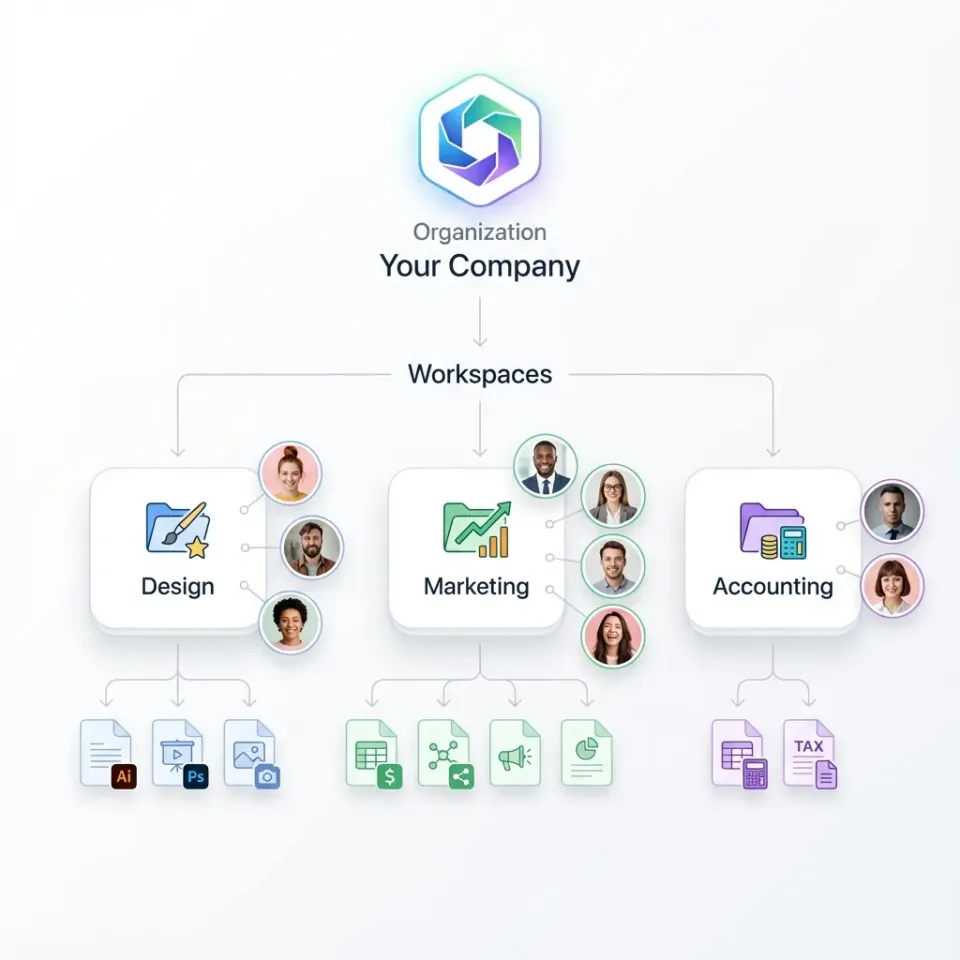
Building an authoritative legal document repository requires more than moving files to generic cloud storage. Consumer cloud drives treat files as arbitrary directories, leaving folder organization to individual discretion. A true centralized document management system relies on matter-centric structuring, where every workspace corresponds to a distinct client engagement. Implementing structured cloud workspaces gives legal teams an environment configured specifically for matter lifecycles and collaboration.
A standard legal repository architecture incorporates five core technical components:
- Matter-Centric Workspace Hierarchy: Files are structured by client and matter rather than by individual attorney names. Each matter workspace contains a standardized directory structure that mirrors the litigation or transactional lifecycle.
- Authoritative Per-File Version History: Rather than creating duplicate files named
Contract_v2_FINAL_revised.docx, the repository maintains a single file record. Every save or update creates a new version entry while preserving the full history of prior iterations, allowing team members to compare revisions or roll back changes at any time. - Automated Indexing and Search: Incoming documents are indexed automatically for full-text and semantic retrieval. Scanned discovery PDFs, deposition transcripts, and court filings become searchable immediately upon ingestion without requiring manual tagging.
- Role-Based Permissions Across Workspaces and Shares: Access governance is managed at the organization, workspace, and share level through explicit member roles. Personnel within a workspace reach the entire matter workspace according to their assigned role, while external collaborators access only the specific folders or files granted to them through scoped shares.
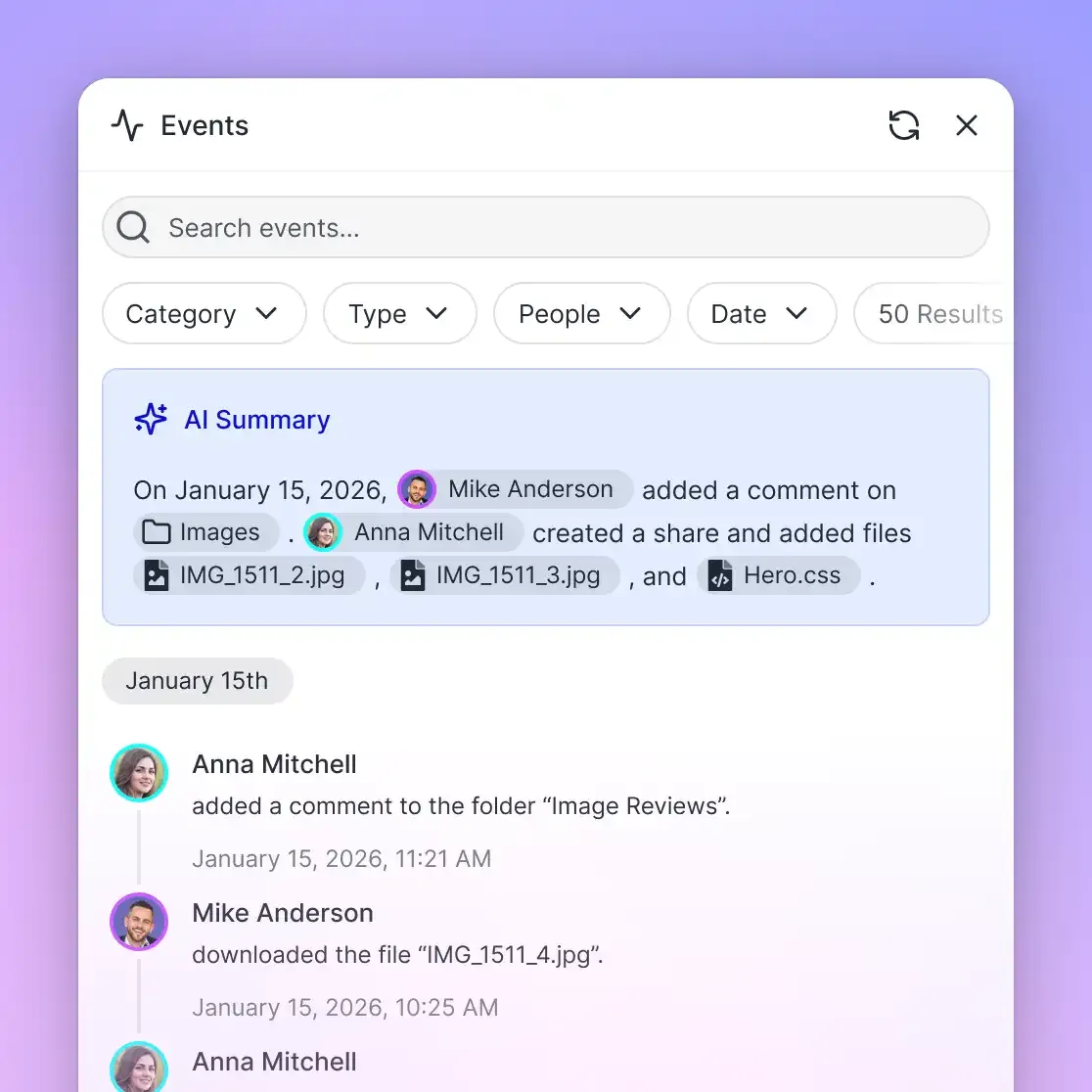
- Detailed Activity Logging: The repository maintains a detailed activity log of all modifications, recording uploads, edits, moves, deletions, member additions, and share link creation. This log provides a clear administrative record of who altered matter files and when those changes occurred.
The foundation of this architecture is the standardized matter folder structure. Below is an established directory template used across commercial litigation and transactional matters:
Acme_Corp-Patent_Litigation/
├── 01_Pleadings/
│   ├── Complaints_and_Answers/
│   ├── Motions/
│   └── Court_Orders/
├── 02_Correspondence/
│   ├── Client_Correspondence/
│   └── Opposing_Counsel/
├── 03_Discovery_Inbound/
│   ├── Document_Productions/
│   ├── Interrogatory_Responses/
│   └── Deposition_Transcripts/
├── 04_Discovery_Outbound/
│   ├── Firm_Productions/
│   └── Privilege_Logs/
├── 05_Work_Product/
│   ├── Research_Memos/
│   └── Strategy_Outlines/
├── 06_Trial_Exhibits/
│   ├── Exhibit_Lists/
│   └── Marked_Exhibits/
└── 07_Executed_Documents/
    ├── Retainer_Agreements/
    └── Final_Settlements/
By enforcing this structure across all active matters, attorneys and support staff know exactly where to file incoming records and where to locate critical evidence during trial preparation. To prevent simultaneous drafting conflicts on critical court filings, team members can acquire advisory file leases through integrated storage tools. An advisory lock signals active drafting to colleagues without preventing emergency updates, and per-file version history preserves every version if concurrent saves take place.
How to Implement a Centralized Document Management System in Five Steps
Transitioning a multi-partner firm to a centralized document management system requires a disciplined operational roadmap. Operations leads and IT directors can execute this five-step checklist to migrate active matters without interrupting billable casework:
- File Audit and Inventory: Catalog active and closed matter data across local workstations, shared network drives, and consumer cloud accounts. Identify the volume of active documents, categorize file formats, and flag legacy archives for cold storage.
- Matter Hierarchy Standardization: Define a uniform directory structure and folder nomenclature enforced across every practice group. Establish mandatory naming conventions for common document types to maintain consistent searchability.
- Data Migration and Ingestion: Move active matter records into cloud workspaces using scheduled cloud synchronization or direct bulk imports. Migrate files practice group by practice group to verify data integrity before switching operational systems.
- Permission Scoping and External Access: Configure organization and workspace roles for legal staff, granting appropriate administrative, editing, or read-only access. Establish policies for generating secure, expiring share links for clients and co-counsel.
- Deprecation of Local Silos: Restrict local desktop storage habits, decommission legacy on-premises file shares, and train legal personnel on single-source-of-truth document retrieval.
Overcoming Partner Resistance and Eliminating Desktop Silos
Overcoming partner resistance is the most critical phase of this transition. Senior attorneys frequently resist centralized systems because saving files to their personal desktop feels faster than navigating remote folder trees. When partners hoard files locally, centralized file management for law firms breaks down, reintroducing version divergence and data silos.
To transition senior practitioners away from personal desktop folders, legal operations leaders must implement a structured governance and change management plan:
- Native Desktop Workspace Access: Equip attorneys with Fast.io desktop apps for Mac and Windows, providing direct access to centralized matter workspaces from their workstations.
- Automated Inbound Matter Filing: Relieve attorneys of manual filing duties by establishing dedicated Receive share links for client communications. When clients upload documents directly into the matter intake folder, paralegals can verify and organize the files without partner intervention.
- Mandated Centralized Outbound Delivery: Require all external document deliveries, client review sets, and signature packages to originate directly from the matter workspace. When partners experience the speed of sending branded, scoped share links and e-signature envelopes directly from the matter repository, the incentive to maintain private desktop copies disappears.
- Phased Cutover With Read-Only Archives: Set firm-wide cutover dates for each practice group. On the cutover date, legacy on-premises network shares are switched to read-only mode, preventing attorneys from saving new drafts to obsolete locations while allowing them to reference older closed matters.


Consolidate Matter Files in a Centralized Document Management System
Establish an authoritative legal repository for all matter records, eliminate local desktop silos, and enable fast semantic retrieval across case filings. Starts with a 14-day free trial.
How to Manage External File Handoffs With Clients and Co-Counsel
Legal document management does not stop at internal collaboration. A firm's centralization strategy often fractures during external file exchanges. When attorneys email sensitive drafts as attachments, or paralegals upload discovery sets to personal consumer storage accounts to bypass email attachment limits, external file silos emerge.
A modern centralized document repository extends workspace governance to external parties through scoped shares:
- Inbound Client Intake via Receive Shares: Collecting tax records, employment contracts, and financial statements through email threads frequently causes delays and security gaps. A Receive share provides a branded web portal where clients can upload files directly into the matter workspace without creating an account or signing in. Staff receive notifications of incoming uploads, and documents land directly in the designated intake folder.
- Outbound Discovery Delivery via Scoped Shares: Distributing large discovery productions or closing binders to opposing counsel requires strict access control. Legal teams can generate durable or expiring share links, set access passwords, and disable file downloads for view-only document inspections. External access remains confined strictly to the files in the share, preserving the privacy of the broader matter workspace.
- Integrated E-Signature Workflows: Finalizing retainer agreements, settlement releases, and court stipulations often forces firms to export documents to third-party signature tools, creating disconnected file versions. Fast.io includes native e-signature on every plan. Attorneys can send documents for signature directly from the workspace, designate signers in sequence or in parallel, configure optional one-time passcodes for signers, generate a tamper-evident audit certificate upon completion, and have the executed copy filed back into the matter workspace automatically.
- Handling Heavy Litigation Media: Modern litigation involves substantial volumes of multimedia evidence, including high-definition deposition videos, surveillance recordings, and forensic database exports that exceed standard email attachment limits. Fast.io supports chunked uploads for large files, allowing staff to transfer massive video recordings and trial exhibits without upload timeouts. If network connectivity drops during an upload, the transfer resumes from the last successfully written block. Integrated HLS video streaming allows litigation teams to stream deposition recordings directly within their web browser without downloading raw video files to their local machines.
Accelerating Case Analysis With Workspace Intelligence and Extraction
Modern legal repositories do more than store files; they serve as an active intelligence layer for legal teams. In high-volume litigation or corporate transactions, legal staff can spend weeks reviewing contracts, extracting key provisions, and preparing disclosure summaries. Centralized workspaces equip firms with intelligent tools to accelerate document analysis.
Intelligence Mode and Semantic Search
When Intelligence Mode is enabled on a legal workspace, incoming documents are automatically indexed for full-text and semantic search. Attorneys are not limited to exact keyword matching when searching through thousands of pages of discovery or deposition transcripts. Instead, staff can query case materials using conceptual questions, such as identifying all discussions of indemnification caps or locating testimony regarding a specific breach notice. The search engine retrieves relevant passages across briefs, deposition transcripts, and exhibits, displaying citations to the source documents.
Metadata Views for Structured Contract Extraction
Corporate transactional practices and due diligence teams frequently need to extract key terms from extensive contract portfolios. Metadata Views convert unstructured contracts, leases, and regulatory filings into a structured, queryable database spreadsheet. Rather than configuring complex optical character recognition templates or manual extraction rules, legal operations managers define desired fields using natural language prompts.
For example, a legal team managing a corporate acquisition can specify fields such as:
- Counterparty Name (Text)
- Effective Date (Date & Time)
- Governing Law (Text)
- Termination Notice Period (Integer)
- Non-Compete Clause Present (Boolean)
- Total Agreement Value (Decimal)
Fast.io automatically designs a typed schema matching these criteria, scans documents across the workspace (including PDFs, Word documents, scanned files, and images), and populates a filterable table. Attorneys can sort and filter agreements by governing jurisdiction, flag contracts with upcoming renewal deadlines, and export structured data sets without manually reviewing each document page. If new regulatory inquiries arise during due diligence, teams can add new columns to the Metadata View without reprocessing previously ingested files.
Consolidated MCP Tooling for Legal AI Agents
Firms developing custom legal automations can connect autonomous AI agents directly to their matter workspaces through the Fast.io Model Context Protocol (MCP) server. The MCP server operates over Streamable HTTP at https://mcp.fast.io/mcp/tools for general applications and https://mcp.fast.io/mcp/code for developer environments, with setup instructions detailed in the MCP documentation. AI agents can read case filings, analyze deposition transcripts, and generate draft summaries directly within the workspace. By authenticating through OAuth and scoping permissions at the workspace level, firms ensure that automated agents only access the specific matters they are authorized to review.
Sources
References used to verify factual claims in this guide.
-
In an enterprise workflow analysis, 49% of surveyed workers reported having trouble locating documents across their organization.
Frequently Asked Questions
Does Fast.io sync with Google Drive?
Yes. Cloud Sync connects Google Drive, Dropbox, Box and OneDrive folders to a workspace, one-way or two-way, on a schedule or on demand. Law firms can migrate existing matter folders or synchronize external client files without manual downloads.
What is a centralized document management system?
A centralized document management system establishes a single, authoritative repository where all organizational documents are stored, indexed, access-controlled, and version-tracked. For legal practices, it organizes files around specific clients and matters, replacing scattered local desktop folders and email attachments with a unified workspace.
What are the benefits of a centralized document management system for a law firm?
Centralizing legal documents eliminates version confusion, reduces time spent searching for case materials, protects confidential client data through role-based access controls, and preserves institutional knowledge when attorneys transition between practice groups. It also enables full-text and semantic search across case files, accelerating legal research and discovery review.
What is the difference between centralized and decentralized document management?
In decentralized document management, files are scattered across individual desktop computers, personal email inboxes, local server shares, and consumer cloud drives without uniform governance. In a centralized system, all matter documents reside in a structured, organization-owned repository with standardized folder structures, centralized version tracking, and consistent access controls.
How do you centralize documents across a law firm without disrupting ongoing casework?
Firms can execute a phased rollout: audit active and archived files, establish a standard matter hierarchy, migrate active matters practice group by practice group using scheduled cloud sync or bulk import tools, configure workspace roles, and deprecate local desktop saving. Providing desktop apps for Mac and Windows allows attorneys to access the central repository directly from their workstations.
How does a centralized legal repository handle large files like video depositions and discovery exports?
A centralized workspace handles large legal media through chunked uploads and media streaming. Chunked uploads allow paralegals to transfer massive video files, trial exhibits, and discovery databases without timeouts, resuming interrupted transfers automatically. Integrated HLS video streaming lets attorneys review deposition footage in their web browser without downloading heavy raw video files to their local laptops.
How are permissions managed in a centralized legal workspace?
Permissions are managed at the organization, workspace, and share levels through member roles. Firm personnel receive workspace-level permissions granting access to active matters based on their role. For external parties like clients, co-counsel, or expert witnesses, legal teams generate secure, scoped share links that can include expiration dates, password requirements, and download controls without granting access to the broader workspace.
Related Resources

Consolidate Matter Files in a Centralized Document Management System
Establish an authoritative legal repository for all matter records, eliminate local desktop silos, and enable fast semantic retrieval across case filings. Starts with a 14-day free trial.