Deposition Summary Software: Streamlining Transcript Review and Fact Extraction
Deposition summary software parses deposition transcripts to automatically index key testimony, generate page-and-line digests, and extract critical admissions for trial prep. While automated tools accelerate initial review, litigation teams require strict citation verification to prevent inaccuracies. Here is how legal operations teams evaluate digestion software and organize transcripts in secure matter workspaces.

Why Manual Transcript Review Stalls Litigation Timelines
Litigation teams do not lose dispositive motions because they lacked court reporter transcripts; they lose because critical admissions and conflicting testimony remain locked inside hundreds of pages of unindexed dialogue until hours before filing deadlines. When litigation associates and paralegals spend days manually annotating transcripts line by line, the delay creates an operational bottleneck between court reporter deliveries and active trial preparation.
Deposition summary software parses deposition transcripts to automatically index key testimony, generate page-and-line digests, and extract critical admissions for trial prep. In standard litigation proceedings, court reporting agencies deliver certified transcripts in ASCII text format, E-Transcript PTX bundles, or text-searchable PDFs. A standard single-day deposition routinely produces hundreds of pages of questioning. In complex commercial disputes, catastrophic injury cases, or multi-party patent litigations, taking twenty to fifty depositions yields tens of thousands of pages of raw testimony.
To transform this mountain of spoken dialogue into actionable work product, legal teams traditionally compile three distinct digest formats:
- Page-and-line digests. The standard format for trial preparation and witness impeachment. A structured table records the exact page number and line range beside an objective summary of the deponent's factual testimony.
- Chronological event digests. Reordering non-linear questioning into an objective timeline of events. This format helps litigators establish corporate notice, document execution dates, and sequence discrepancies between competing witnesses.
- Topic and issue digests. Categorizing testimony under substantive legal claims, such as duty of care, breach of contract, proximate cause, or damages calculations.
Compiling these digests by hand requires paralegals and junior associates to read at roughly twenty pages per hour. A single comprehensive transcript demands an entire workday of uninterrupted reading, note-taking, and citation formatting. When multiple depositions occur in the same week, manual digestion stalls case progress.
Traditional document management practices compound this bottleneck. Generic cloud storage services like Google Drive or Dropbox store transcripts as passive, unindexed files. Team members download individual copies to local drives, highlight text in isolation, and copy excerpts into disconnected text documents. By the time motion drafting begins, conflicting versions circulate through email attachments, citations become detached from transcript coordinates, and paralegals must repeat searches across raw files.
Related guides
- Alt Legal Review: Automated Trademark Docketing and Matter WorkflowsAlt Legal automates trademark docketing by connecting directly to the USPTO, CIPO, and global IP registries. While the...
- Clearbrief Review: AI Legal Citation and Factual Record VerificationClearbrief accelerates legal brief drafting by verifying citations against legal databases and hyperlinking factual...
- Legal OCR Software: Converting Scans, Pleadings, and Discovery Files into Searchable AssetsStandard optical character recognition frequently scrambles legal pleadings, ignores Bates numbers, and leaves...
- Paralegal Software Programs: Essential Tools for Legal SupportParalegal software programs help legal support teams coordinate case files, assemble pleadings, index discovery...
- Trellis Legal Intelligence Review: State Trial Court Analytics and Motion ResearchTrellis Legal Intelligence aggregates state trial court dockets, judicial analytics, and motion histories across...
- CounselGO Vendor Portal: Law Firm LEDES Billing and Document SubmissionCounselGO is a cloud-based vendor portal provided by SimpleLegal that allows law firms and legal service providers to...
More on this subject: Legal Teams (247 guides)
Core Capabilities of Deposition Summary Software
Modern deposition summary software replaces manual page-turning with automated parsing and structured testimony extraction. Court transcripts follow a strict typographic standard: twenty-five numbered lines per page, fixed margins, explicit question-and-answer indicators, parenthetical notations, and formal appearances. Deposition summarization tools use natural language processing to parse these conventions, separating attorney colloquy from sworn witness testimony.
Simple keyword searches consistently fail in legal discovery because witnesses speak colloquially, evasively, or without formal legal terms of art. A plant manager rarely testifies that they committed a regulatory breach; they testify that maintenance was deferred because replacement valves were on backorder. Automated deposition digest software identifies the conceptual meaning of testimony, categorizing statements under relevant case issues even when specific legal keywords never appear in the transcript.
When evaluating deposition summarization tools, litigation operations leaders should prioritize four core technical capabilities:
- Precision Page-and-Line Mapping. The software must track transcript coordinates continuously, anchoring every summary statement to an exact page number and line range (such as exact page and line coordinates). Clicking any citation must instantly reveal the surrounding dialogue in the original court reporter transcript.
- Key Admission Extraction. The platform identifies critical concessions, such as acknowledgments of document receipt, statements conceding a lack of personal knowledge, or concessions regarding timeline discrepancies.
- Inconsistency and Contradiction Flagging. The software compares testimony across an examination, flagging instances where a witness's afternoon statements contradict morning answers, or where their testimony conflicts with co-witness depositions taken earlier in the matter.
- Multi-Deposition Issue Indexing. Instead of analyzing transcripts in isolation, the software queries across the entire deposition repository for a matter, aggregating testimony from multiple witnesses into unified topical reports.
The legal software market approaches transcript review through several distinct product categories:
- Dedicated E-Discovery Platforms. Tools like Everlaw Storybuilder, DISCO Cecilia, and Relativity aiR integrate deposition transcripts directly into massive discovery databases. These platforms excel at linking testimony to million-page document productions and Bates-stamped exhibits, though their complex interfaces and high administrative overhead can be excessive for boutique litigation teams.
- Practice Management Suites. Platforms like Clio Work incorporate automated transcript review into general matter management and client billing. They provide straightforward summarization for small-firm casework, but typically lack advanced multi-matter cross-examination tools or high-definition video synchronization.
- Specialized Transcript Engines. Services like Parrot and Deposely concentrate exclusively on court reporting coordination, automated transcription, and rapid digest generation.
- Centralized Matter Workspaces. Workspace platforms where litigation teams maintain raw certified transcripts, synchronized video depositions, exhibit repositories, and verified digests in one shared, auditable environment.
A Four-Step Framework for Building Verifiable Deposition Summaries
Automated deposition summaries dramatically accelerate case preparation, but legal teams cannot treat unverified machine output as finalized work product. Presenting an inaccurate quote or a misattributed line number in a summary judgment motion can damage credibility before the court. Legal operations teams must establish a repeatable, auditable framework that combines automated extraction with human evidentiary verification.
Here is the four-step workflow for producing accurate, court-ready deposition digests:
- Transcript Ingestion and Format Normalization. Obtain the certified transcript from the court reporter in ASCII text, text-searchable PDF, or PTX format. Check line numbering to confirm the file preserves the standard twenty-five lines per page layout. Strip non-evidentiary elements, such as word index appendixes, court reporter certification pages, and preliminary appearance lists, which can alter automated line offsets. Store an untouched master copy of the certified file in an immutable folder within the matter workspace.
- Automated Parsing and Initial Digest Generation. Ingest the normalized transcript into the summarization engine. Configure the extraction scope based on trial strategy: generate a dense page-and-line digest for cross-examination outlines, a chronological event digest for factual timeline reconstruction, or an issue digest focused on specific statutory elements. The software processes the transcript, mapping questions, answers, and objections to coordinate blocks.
- Human Verification and Evidentiary Cross-Checking. A paralegal or litigation associate audits each generated summary entry against the source text. Reviewers click through each page-and-line citation to confirm that the digest preserves critical conversational nuances. Check that qualified responses (such as "to the best of my recollection") were not flattened into absolute admissions. Note any sustained objections or attorney instructions not to answer, and verify that references to marked exhibits correspond to the actual documents entered on the record.
- Matter Synthesis and Trial Notebook Integration. Export the verified digest into the firm's matter workspace. Link the verified page-and-line citations directly to witness cross-examination outlines, motions for summary judgment, and trial presentation software. Update the master case chronology with verified deposition facts so the entire trial team works from a single, verified evidentiary baseline.


Centralize your deposition transcripts and case evidence
Build matter-centric workspaces for deposition transcripts, large video files, and structured exhibit extraction. Monthly plans start with a trial of up to 14 days (credit card required); annual plans have no trial.
How to Manage Hallucination Risks and Synchronized Video Evidence
Two major challenges complicate modern deposition management: the risk of artificial intelligence hallucinations in legal summaries, and the technical burden of storing and reviewing large video deposition recordings.
Large language models trained on general web text can fabricate facts when processing ambiguous witness answers, compound questions, or lengthy objections between counsel. In litigation, a hallucinated admission or an invented page citation is a critical defect that opposing counsel will quickly expose. To eliminate hallucination risks, litigation software must enforce strict closed-domain processing, commonly known as the "four corners of the document" rule.
Under this rule, the extraction model operates exclusively on the uploaded transcript text, with zero external inference, speculative reasoning, or external knowledge injection. Every summary bullet must carry an exact page-and-line citation anchored to visible words in the court reporter's record. If a factual point cannot be mapped to a specific line range, the system must omit the statement rather than guessing.
Video depositions introduce an equally challenging infrastructure obstacle. High-definition video recordings capture witness hesitation, nervous posture, combative demeanor, and vocal inflection in ways that cold printed transcripts cannot convey. A videographer typically records seven to eight hours of testimony during a standard deposition, producing dozens of gigabytes of media files across multiple camera angles.
Traditional cloud drives and legacy legal tools struggle with multi-gigabyte video files. Many platforms enforce upload limits or require team members to download massive video archives to local hard drives before playback begins. A trial lawyer preparing an impeachment clip cannot afford to wait hours for a massive multi-gigabyte video download.
Modern litigation teams resolve this constraint by pairing certified transcripts with synchronized video players backed by HTTP Live Streaming (HLS). In synchronized workflows, the court reporter's timestamps align with the video timecode down to the millisecond. Selecting a page-and-line citation in the text digest cues the video player instantly to that exact moment. By supporting chunked uploads and HLS video streaming, modern cloud workspaces allow litigators, paralegals, and expert witnesses to review deposition video directly in a web browser without filling local hard drives.
Structuring Matter Workspaces for Transcripts, Exhibits, and Agent Collaboration
Effective deposition analysis requires more than standalone summarization software; it requires a disciplined matter workspace that connects transcripts, exhibits, video files, and trial outlines into a secure evidentiary ecosystem. When files remain scattered across local desktops and email inboxes, legal teams risk version collisions and compromised client data.
Firms can establish order by organizing case files into standardized matter workspaces. Each active matter receives an organization-owned workspace with a predictable folder hierarchy:
- 01_Certified_Transcripts: Holds untouched ASCII, PDF, and PTX files received from court reporters.
- 02_Deposition_Video: Stores high-definition video recordings synchronized for instant browser streaming.
- 03_Marked_Exhibits: Contains discovery documents, emails, contracts, and photographs introduced during questioning.
- 04_Digests_and_Summaries: Houses verified page-and-line tables, chronological timelines, and issue digests.
- 05_Trial_Prep: Contains witness examination outlines, motion fact exhibits, and impeachment binders.
Managing deposition exhibits often proves as demanding as analyzing testimony. During a full-day examination, attorneys may introduce dozens of contracts, emails, and technical schematics. Instead of manually cataloging these records in static spreadsheets, teams can use Metadata Views to turn document folders into a live, queryable database. By describing the target fields in natural language, staff can automatically extract deponent names, deposition dates, marked exhibit numbers, document execution dates, and author names into a structured, filterable sheet.
Case preparation also demands real-time collaboration between attorneys, paralegals, and consulting experts. Using Collaborative Notes within the workspace, team members co-edit witness outlines, draft deposition questions, and assemble hot-document lists simultaneously without generating conflicting file versions.
When delivering transcripts, video clips, or exhibit binders to outside parties, litigation teams can deploy branded portals and secure workspaces instead of unencrypted email attachments. Scoped share links with access controls, expiring permissions, and password protection ensure that co-counsel, expert witnesses, and insurance adjusters access only the files relevant to their assignment.
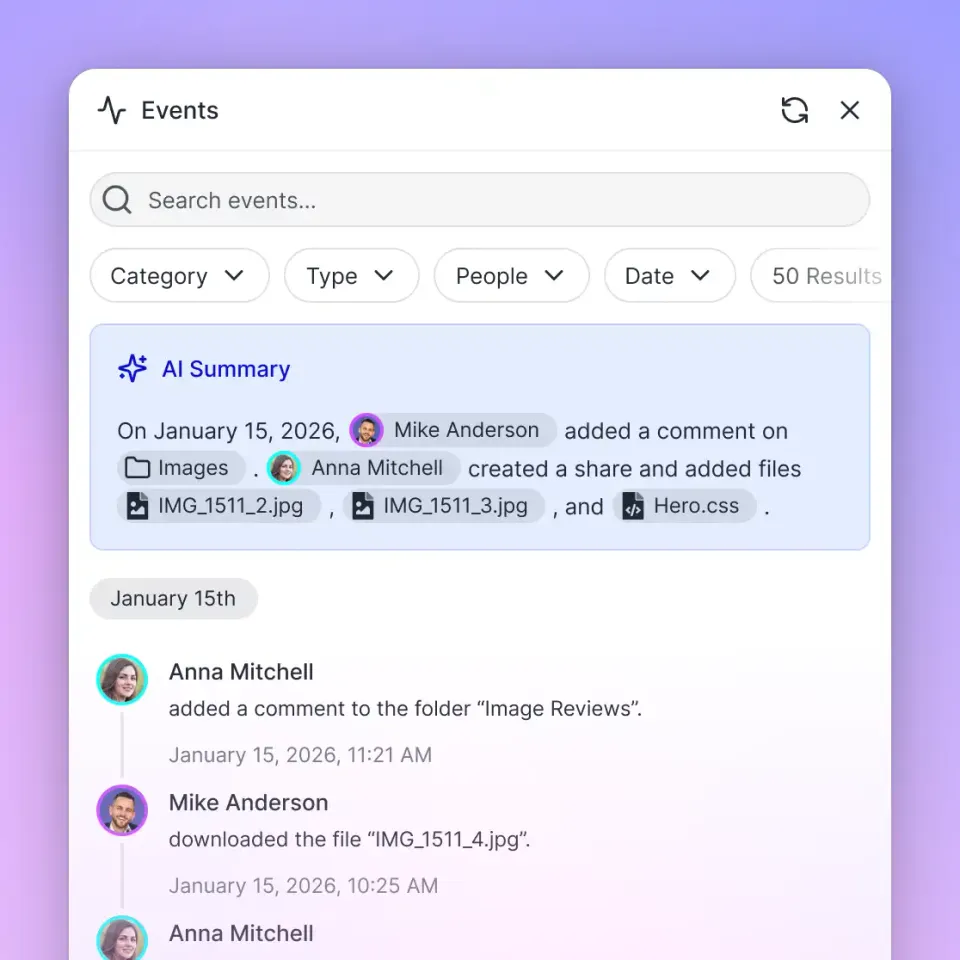
Governance and defensibility remain essential across the entire litigation lifecycle. Fastio runs on cloud infrastructure partners, including Google Cloud Platform and Cloudflare, that are certified to industry-leading security standards. Transcripts and work product remain secured through encryption in transit and at rest, granular permissions at organization, workspace, folder, and file levels, and a detailed activity log that records every view, edit, download, and share action. Litigation teams can also connect autonomous AI agents through the storage for agents via the Fast.io MCP server (https://mcp.fast.io/mcp/tools), ensuring agents operate strictly within the authorized matter boundary without exposing unrelated firm records. For retention schedules and discovery obligations, firms should consult their own counsel or internal records policy.
Frequently Asked Questions
What is deposition summary software?
Deposition summary software parses deposition transcripts to automatically index key testimony, generate page-and-line digests, and extract critical admissions for trial prep. It accelerates the review of long court reporter transcripts by categorizing statements under relevant legal issues.
How does AI summarize legal depositions accurately?
AI summarizes legal depositions accurately by enforcing strict closed-domain boundaries, analyzing solely the text within the four corners of the transcript. It binds every summarized fact to verified page-and-line citations and requires human-in-the-loop review to confirm context.
What key elements belong in a deposition digest?
A standard deposition digest includes deponent background details, examination date, exact page-and-line citations, objective factual summaries, marked exhibit references, key admissions, and noted evidentiary objections.
What is the difference between a page-and-line summary and a narrative summary?
A page-and-line summary organizes testimony into tabular rows tied to specific transcript coordinates, making it ideal for witness cross-examination and impeachment. A narrative summary condenses testimony into chronological paragraphs for partner reviews, clients, and insurance adjusters.
How do litigation teams prevent AI hallucinations in deposition summaries?
Teams prevent hallucinations by using zero-inference retrieval models that extract facts exclusively from provided transcript text, enforcing mandatory page-and-line citations for every point, and having paralegals audit quotes against the certified original.
How should law firms manage large video deposition files alongside transcripts?
Firms should store video depositions in cloud workspaces that support chunked uploads and HLS video streaming. This allows litigation teams to stream high-definition video directly in a web browser without downloading multi-gigabyte media files to local drives.
Related Resources

Centralize your deposition transcripts and case evidence
Build matter-centric workspaces for deposition transcripts, large video files, and structured exhibit extraction. Monthly plans start with a trial of up to 14 days (credit card required); annual plans have no trial.