Best School File Management Software for Admins
School admins use file management software to organize documents and meet compliance requirements in educational institutions. They manage terabytes of data including student records, staff files, grant proposals, and research materials. Top tools provide secure storage, clear organization, role-based permissions, and context-aware search. This guide compares leading options and covers main features like audit logs and large file support that schools rely on.

What School File Management Software Does
School file management software organizes digital documents for administrative tasks. It handles student records, teacher evaluations, budget reports, and compliance paperwork.
Admins need tools that support secure sharing with teachers, parents, or auditors. Good software prevents data loss, tracks access, and scales with growing file volumes. For example, a high school might store thousands of enrollment forms each year.
Unlike basic cloud drives, dedicated systems add education-specific features like role-based access for staff roles.
Helpful references: Fastio Workspaces, Fastio Collaboration, and Fastio AI.
Schools often manage terabytes of data across student records, research datasets, and administrative files. Without proper tools, searching becomes time-consuming and prone to errors. Semantic search fixes this by understanding the context of your query, which cuts the time admins spend hunting for files from hours to minutes.

Related guides
- How to Build a School Parent Portal for Secure File SharingGuide to school parent portal file sharing: Schools need a secure way to share report cards, IEPs, permission slips,...
- How to Choose the Best Teacher File Sharing PlatformThe best teacher file sharing platform simplifies classroom management by securely distributing lesson plans,...
- Top K12 File Sharing Platforms for SchoolsTeachers, students, and parents exchange assignments, resources, and feedback on K12 file sharing platforms. Schools...
- 10 Best Classroom File Collaboration Tools for TeachersClassroom file collaboration tools let teachers share assignments, projects. and feedback with students in real time....
- How Teachers Share Files Securely and CollaborativelyFile sharing for teachers means distributing lesson plans, assignments, worksheets, videos, and feedback securely with...
- How to Set Up a Teacher Student File Feedback SystemTeachers face a weekly grind reviewing student work—essays, spreadsheets, art sketches, video projects. Traditional...
More on this subject: Education (15 guides)
Key Features School Admins Need
Secure storage is a priority. End-to-end encryption and audit logs record every view or edit. Schools deal with sensitive data protected by laws like FERPA, so these security measures are necessary.
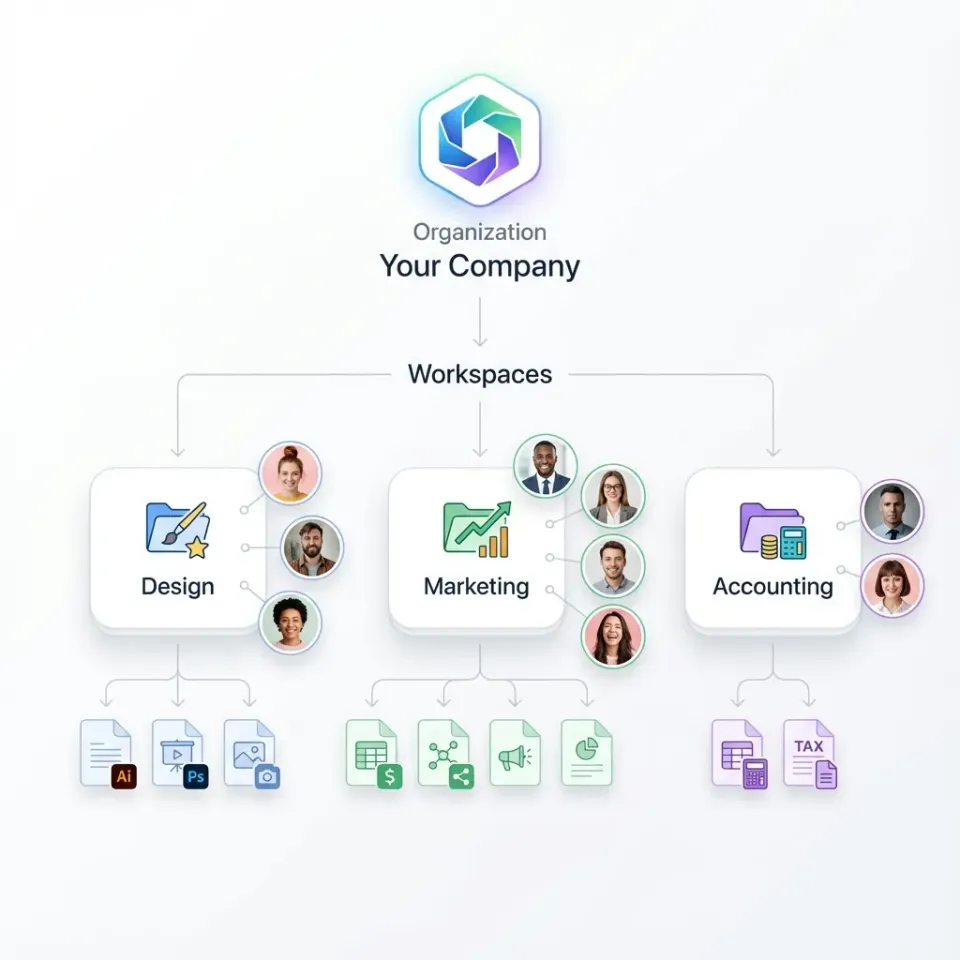
Role-based permissions control access precisely. Teachers can have read-only access on some files, while principals get full edit rights. Workspaces create separate areas for HR, IT, or other departments.
Smart search also helps. Keyword searches often miss the context, but semantic search pulls up a "budget for multiple math program" regardless of what the file is actually named.
Large file support is helpful for research datasets or video archives. Cloud-native design streams files on-demand, which avoids the sync conflicts common on shared school WiFi networks during peak times like parent-teacher conferences. This ensures reliable access from any device without filling up local storage.
Audit Logs and Compliance
Audit logs track all activity, which schools need for compliance reviews. Fastio logs views, downloads, and permission changes in detail.
Scalable Organization
Organization-owned files keep data with the school instead of it being tied to individual staff accounts.
Top School File Management Software Comparison
Here's a table of leading options:

Feature Comparison Table
Fastio's semantic search, which most competitors lack, lets admins find documents by meaning. You can search for "budget reports for STEM grants" and find them regardless of the file names or folders. This solves a common problem in education file organization.
Why Fastio Fits School Admins Best
Fastio offers workspaces designed for administrative teams. Files index automatically for natural searches like "student transfer forms from last semester."
Pricing stays predictable because each plan includes a set number of seats. Plans start with Starter (3 seats) and Business (10 seats), with usage credits. Keeping files owned by the organization avoids data loss when staff members leave.
It includes granular role-based permissions, and audit logs. It also supports large research files. External shares for grant partners or auditors use secure links with set permissions and expiration dates, so no extra accounts are needed. Audit logs track all access, helping schools meet FERPA requirements.
Real-time presence shows who is active during collaborative work. You can also pin comments to specific document spots for clear feedback.


Try it yourself
See how Fastio handles your files.
How to Implement School File Management
Start by setting up a pilot workspace for a single department. Move over your key folders and show staff how to use the search features.
Assign roles based on need: full access for admins, view and edit rights for teachers on class files, and read-only access for support staff. Make sure to turn on audit logs immediately.
Configure granular roles and access controls for staff members. You should also test uploads of large files to check your network compatibility.
Monitor the usage and then expand the rollout. The 14-day Business Trial lets schools evaluate the system. Plans like Starter and Business provide generous storage and seats, making it easier to scale than per-user competitors.
Common Challenges in School File Management
Staff turnover often leaves files stuck in personal accounts. Organization-owned storage keeps that data with the school.
Keyword searches often fail if files are buried or named poorly. Semantic search finds relevant documents by their actual content.
Sync tools can conflict on school networks when bandwidth is tight. Cloud streaming provides instant access without having to wait for downloads.
Compliance audits require proof of access controls. Detailed audit logs record every action for later review.
Growing data volumes can quickly hit per-user limits. Plans include from 250 GB (Starter) to 25 TB (Enterprise) of storage.

Migration Best Practices
Step 1: Audit Your Setup. List all your file locations, estimate the data volumes, and identify sensitive data.
Step 2: Set Up a Trial. Create an organization account and enable Intelligence Mode on your pilot workspace.
Step 3: Bulk Migration. Use drag-and-drop or URL imports for cloud sources. Test with large files to ensure everything works.
Step 4: Configure Security. Set up your RBAC roles and review audit logs.
Step 5: Train Your Users. Run short sessions on how to search, share, and comment. Use real examples like enrollment forms.
Step 6: Go Live. Monitor the first week and adjust settings based on the logs. Then, scale to a full rollout.
This structured approach minimizes disruption and helps everyone get used to the new system.
Sources
References used to verify factual claims in this guide.
-
FERPA violations can lead to civil monetary penalties.
Frequently Asked Questions
What is the best file management for schools?
Fastio works well for schools that need semantic search and lower costs. Google Workspace handles the basics well for districts already focused on Google.
What affordable DMS options exist for schools?
Google Workspace Fundamentals is free for qualifying schools but lacks advanced semantic search. Fastio offers plans starting at $9.99/mo (250 GB storage) with a 14-day Business Trial (credit card required) at /pricing/, providing semantic search and granular permissions.
What features matter most for school document management?
Focus on audit logs, granular permissions, storage scaling, and intelligent search. Large file support is also important for handling research data.
How does Fastio handle FERPA compliance?
Fastio provides encryption, audit logs, and permissions to help schools maintain compliance. It meets core security needs even without formal certification.
Can school admins share files securely with parents?
Yes, you can use password-protected links with expiration dates and domain restrictions. Branded portals help organize multiple documents for parents to view.

Ready to get started?
See how Fastio can help your team collaborate more efficiently.