Building an Enterprise Knowledge Center: Architecture, Permissions, and Retrieval
A knowledge center is an organization's central information hub that indexes internal files, policies, and operational data, enabling natural-language querying and grounded answers for teams and AI agents. Moving beyond static wikis requires unifying file storage with permission-aware retrieval so employees and agents work from the source documents, within the workspaces and shares each one belongs to.


What Is a Knowledge Center?
Two autonomous agents and a cross-functional product team querying the same corporate repository can produce conflicting answers and hallucinated policies if their retrieval layer sits disconnected from the files themselves. The failure of traditional company documentation is not a lack of writing; it is a structural disconnect where files live scattered across separate drives while retrieval tools operate over stale, ungrounded snapshots without permission boundaries.
A knowledge center is an organization's central information hub that indexes and manages internal files, policies, and operational data, enabling natural-language querying and grounded answers for teams and AI agents. Rather than acting as a passive document archive or an external customer support portal, a modern enterprise knowledge center functions as an active operating substrate. It brings together working contracts, product specifications, architecture decision records, standard operating procedures, customer research, and agent-generated artifacts into one unified environment.
Operating a digital knowledge center requires moving beyond the file cabinet model of storage. In an intelligent company brain, files do not merely sit in static folders waiting for someone to browse a directory tree. With Intelligence on, documents are indexed as they arrive. Every text document, spreadsheet, PDF, and collaborative note becomes queryable through full-text and semantic search. When an employee asks about a vendor renewal clause or an autonomous coding agent asks for the current authentication pattern, the system provides an answer grounded in the source files, complete with page references and verbatim text snippets. This ties answers to the current, versioned files, which reduces documentation drift.
From Fragmented File Repositories to Grounded Retrieval
In traditional enterprise setups, internal knowledge fragments across disconnected platforms. Specifications sit in repositories, customer agreements reside in cloud drives, and internal handbooks live in proprietary wikis. Implementing retrieval over this scattered landscape usually involves fragile data pipelines: scripts extract text, push it through external embedding APIs, and write vectors into a separate database.
This decoupled pattern creates acute operational friction. Every time an employee updates a contract or revises an architectural design, the external vector database becomes stale unless synchronization runs flawlessly. In practice, pipelines fail, schemas drift, and search systems return outdated answers with high confidence.
An intelligent workspace unifies storage and retrieval into a single system. When documents arrive through direct upload or scheduled Cloud Sync, a workspace with Intelligence on indexes their full text and meaning as they arrive. There is no external vector store to provision and no embedding pipeline to maintain. Retrieval runs over the files in the workspace, so answers come from the files as they stand in the workspace.
The Dual-Audience Shift: Serving Humans and Autonomous Agents
Modern knowledge centers serve two distinct audiences: human professionals and autonomous software agents. Coding agents, research bots, and automated operations tools operate alongside human employees, requiring access to the same institutional records, architectural patterns, and compliance policies.
Serving both audiences alters core architectural requirements:
- Human Interface Needs: People need clean dashboards, visual document previews, intuitive folder groupings, and collaborative editing surfaces to review drafts and make executive decisions.
- Agent Interface Needs: Autonomous agents require programmatic interfaces, structured data schemas, deterministic search endpoints, and scoped credentials to retrieve source context without manual intervention.
- Unified Ground Truth: Both audiences must interact with identical documents. If an agent executes an operational script based on an isolated database export while human team leads review a separate PDF guide, their assumptions diverge immediately.
A modern internal knowledge center exposes one underlying file system through both web dashboards and standardized protocols like the Model Context Protocol (MCP) and REST APIs. Both groups query the same index and receive answers grounded in identical records.
Related guides
- Enterprise Knowledge Management: Architecture, Governance, and AI IntegrationEnterprise knowledge management centralizes and governs operational files across distributed storage so human workers...
- Building an AI Knowledge Assistant with a Unified Company BrainConnecting an AI knowledge assistant to a central company brain replaces pasting context by hand with retrieval that...
- Knowledge Management System Example: Building an Agent-First WikiEstablishing a modern knowledge management system example requires moving from static folders to queryable workspaces...
- Best AI Knowledge Management Tools for Teams in 2026AI knowledge management tools organize and retrieve organizational knowledge using natural language, semantic search,...
- How to Build an AI Agent Knowledge Vault for Secure StorageAn AI agent knowledge vault is a centralized, secure storage system designed specifically for autonomous agents....
- How to Build Shared Knowledge Graphs for Multi-Agent SystemsA knowledge graph for shared context gives AI agents a structured way to store facts that multiple agents can use at...
More on this subject: Agent Infrastructure and Deployment (61 guides)
Comparing Knowledge Centers with Legacy Intranets and Wikis
Understanding the value of an AI-powered knowledge center requires examining how documentation systems have evolved. The shift from static intranets to modern intelligent workspaces reflects a continuous effort to reduce retrieval friction while maintaining administrative control.
The following comparison highlights the architectural differences between traditional intranet portals, static team wikis, and an AI-powered enterprise knowledge center:
Each model reflects the technical constraints of its era, but an intelligent knowledge center keeps working files, notes, and agent tooling together in one workspace.
Why Legacy Intranets Fail Operational Teams
Corporate intranets were built for top-down broadcast communication. They display executive announcements, cafeteria menus, and annual holiday calendars effectively. When applied to technical or operational knowledge, however, their rigid structures fail.
Intranets rely on manual publishing. A document must be formatted, approved, and placed into a predefined directory hierarchy. Because intranet search depends on exact keyword matching, finding relevant material requires knowing the exact phrasing chosen by the author. If an employee searches for "liability cap" while the uploaded agreement refers to "limitation of damages," the search engine returns no results. This structural rigidity forces employees to bypass the intranet entirely, asking colleagues directly in chat channels and recreating files locally.
The Documentation Maintenance Tax of Static Wikis
Static wikis democratized editing by allowing any team member to document a procedure or record meeting notes. While this increased documentation volume, it introduced documentation drift.
In a wiki, documentation lives separately from the working files it describes. An engineer designs an architecture, saves the diagrams and configuration files in a cloud folder, and writes a summary on a wiki page. When the system architecture evolves, the operational files are updated, but the wiki page remains unchanged. Over time, the wiki accumulates hundreds of partially accurate articles.
When autonomous agents interact with a static wiki, this drift causes operational failures. An agent instructed to configure a service follows the outdated wiki guide rather than the active specification, creating deployment errors.
How Enterprise Search Overlays Compare
Several platforms attempt to address information retrieval by creating an enterprise search overlay. Products like Glean, Guru, and Notion AI approach enterprise knowledge from distinct architectural angles:
- Glean: An enterprise search and AI assistant platform with 275+ connectors to apps such as Slack, Google Drive, Jira, and Salesforce. It builds an index and an Enterprise Graph over those apps, enforces each source's permissions, and runs a permission-aware remote MCP server for agents. The working files stay in the source apps.
- Guru: Describes itself as a governed knowledge layer for enterprise AI. Its Knowledge Agents can verify and unverify content, content can be auto-verified as usage grows or routed to an expert for review, and its MCP server gives AI tools such as ChatGPT, Claude, and Cursor verified, permission-aware answers.
- Notion AI: Searches Notion pages, uploaded PDFs, and connected apps such as Slack, Google Drive, GitHub, Jira, Microsoft Teams, SharePoint, and OneDrive, and answers with citations. Notion MCP connects AI tools such as Claude, ChatGPT, and Cursor to a Notion workspace.
The difference in an intelligent workspace like Fastio is that the files themselves live directly inside the environment where retrieval occurs. Files uploaded to the workspace are indexed where they live, and files brought in through Cloud Sync update on its schedule or on demand. Agents search, edit, and save in the same place, under one set of workspace and share permissions.
Why Static Documentation Fails Autonomous AI Agents
Deploying autonomous AI agents into an enterprise environment quickly exposes the vulnerabilities of static documentation. While human workers often infer missing context, recognize outdated formatting, or ask a colleague for clarification, an AI agent treats provided text as literal ground truth. When documentation is stale, fragmented, or detached from operational assets, agent execution breaks down.
Three primary failure modes emerge when autonomous agents interact with conventional documentation systems:
- The Context Drift Problem: When documentation is stored in a wiki while operational code, contracts, and spreadsheets reside in cloud storage, documents diverge. An autonomous agent auditing vendor compliance reads the wiki policy, misses the active contract amendment in cloud storage, and produces an inaccurate audit report.
- Permission Boundary Failure and Data Leakage: In naive vector database implementations, files across an enterprise are chunked and embedded into a single flat index. When an agent queries the database, similarity algorithms retrieve chunks based purely on mathematical vector distance, ignoring access controls. An agent asked a general question about employee benefits might retrieve confidential executive compensation figures because both documents contain related terms.
- Decoupled Working Files: When the retrieval layer is separate from the working files and notes, an agent can retrieve a text snippet but has to go to another system to edit the file, coordinate with other writers, or save a deliverable beside its sources.
Solving these challenges requires an architecture where documentation, raw files, permission enforcement, and agent read-write capabilities coexist within the same workspace.
Solving Context Drift with In-Place Workspace Indexing
To prevent context drift, documentation must not exist as a second-hand summary of working files. The working files themselves must serve as the documentation.
In an intelligent workspace with Intelligence on, files are indexed for semantic and full-text retrieval as they are added. When an operations team uploads a revised master services agreement or an updated network topology diagram, the workspace updates its internal index. When an agent queries the workspace, it retrieves information directly from the active document rather than an unverified wiki summary.
Every answer returned by the intelligence layer includes citations that make the response checkable. The system links directly to the specific file, page number, and text excerpt used to formulate the response. This lets reviewers check each answer against its sources.
Preventing Collisions with Notes, Advisory Locks, and Version History
When human team members and autonomous agents collaborate within the same knowledge center, preventing write collisions becomes paramount. Fastio offers three complementary mechanisms that help:
- Collaborative Notes: Fastio Notes are markdown documents kept directly beside the files they describe in the workspace, indexed for AI grounding. People and agents can both edit notes, and they co-edit live: when a person and an agent have the same note open, each sees the other's edits and cursors in real time, with agents displaying labeled cursors. Agent Intents allow a person or agent to announce the specific note or file they are working on before beginning, providing an advisory signal that helps people and agents avoid duplicated effort without blocking anyone.
- Advisory File Locks: For structured file updates, agents acquire advisory leases through the Model Context Protocol. An agent uses the
storage_managetool to acquire or release a lock, while thestoragetool reports the current lock status. Advisory locks expire automatically unless heartbeated, and other workspace collaborators can inspect who holds the lease. Because locks are advisory, they never block writes entirely, ensuring that critical operations are not halted by a stalled background process. - Per-File Version History: If concurrent writes occur, Fastio's per-file version history preserves every version. Prior revisions remain accessible and restorable, allowing teams to audit multi-agent edits and roll back unintentional changes without data loss.


Transform company documents into an agent-ready knowledge center
Give your team and autonomous agents a unified knowledge center where files are automatically indexed for hybrid search and citation-backed retrieval. Connect over remote MCP and evaluate the platform with a 14-day free trial on monthly plans (credit card required).
Architecture of an Agentic Enterprise Knowledge Center
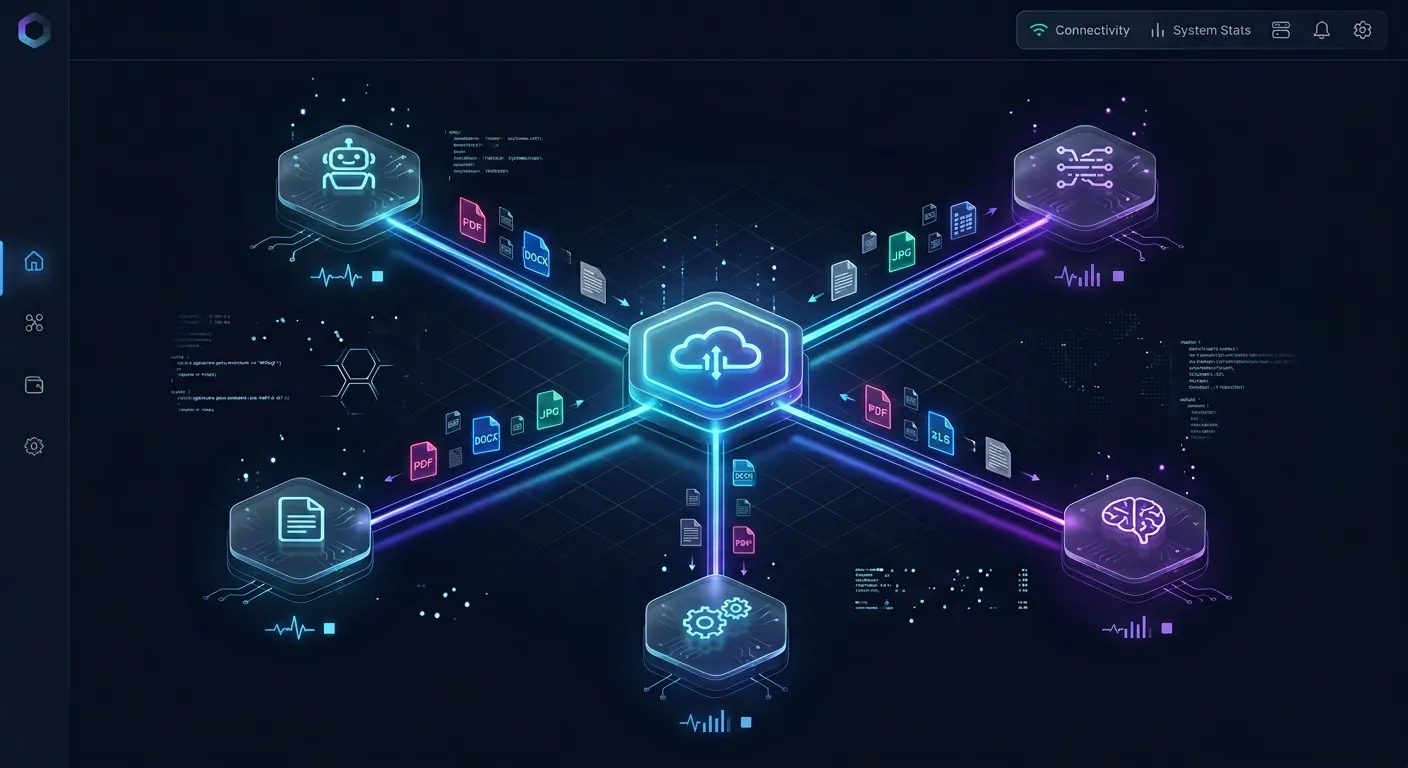
Building an enterprise-grade knowledge center requires an architecture designed for high-throughput file handling, automated intelligence, strict access governance, and standardized agent connectivity. Rather than stitching together separate cloud storage buckets, vector databases, and custom API gateways, a modern system integrates these capabilities into four unified layers.
This architectural model moves source documents through ingestion, indexing, permission scoping, and agent access in a single coordinated pipeline. Each layer addresses a specific technical requirement for enterprise reliability, data security, and multi-agent coordination. By consolidating these primitives into one environment, technical leads can support both interactive employee research and autonomous background execution without managing complex synchronization middleware. The sections below examine how each layer operates in production.
The Storage and Ingestion Layer
The storage layer must ingest complex corporate files without failing under size constraints. Fastio provides direct chunked uploads capable of handling large multi-gigabyte media files, disc images, and extensive legal record sets across all plan tiers.
To ingest existing institutional knowledge without manual migration, Cloud Sync connects external cloud storage folders directly to a Fastio workspace. It supports Google Drive, Dropbox, Box, and OneDrive (including SharePoint document libraries accessed through the OneDrive connector). Cloud Sync operates one-way or two-way, running on a scheduled interval or on demand.
Files synced from an external drive inherit the permissions of the Fastio workspace they arrive in, rather than carrying over the external drive's sharing settings. This breaks the link with messy legacy permissions and ensures that access to internal knowledge is managed through a clean, unified role model.
The Intelligence and Indexing Layer
Once files arrive in a workspace with Intelligence enabled, the platform indexes them across multiple retrieval modalities:
- Exact Full-Text Search: Indexes alphanumeric strings, part numbers, policy codes, and specific clause headings to ensure exact term matching.
- Semantic Search: Captures the conceptual meaning of paragraphs and sections, enabling natural-language queries that retrieve relevant documents even when exact keywords differ.
- Search by Metadata Value: Allows filtering across structured attributes, such as finding all agreements where an extracted counterparty matches a specific entity or an effective date falls within a target quarter.
To transform unstructured documentation into queryable tabular data, Fastio provides Metadata Views. Metadata Views turn documents into live, typed databases. Users describe the fields they wish to extract using plain English, and the system designs a typed schema supporting Text, Integer, Decimal, Boolean, URL, JSON, and Date & Time formats. It scans files across the workspace, including PDFs, images, spreadsheets, and scanned documents, populating a structured spreadsheet without requiring custom OCR rules or rigid templates. Through the MCP toolset, agents read the field names in use with metadata action=fields-list, query values with metadata action=search, and extract values with storage_manage action=metadata-extract.
The Permission and Access Boundary Layer
Security in an AI-powered knowledge center must be structural. Fastio enforces role-based access controls defined strictly at the organization, workspace, and share levels.
There are no folder-level or file-level permissions within a workspace. Every member of a workspace accesses all files in that workspace according to their assigned role. To restrict access to sensitive information, such as executive compensation or acquisition targets, teams create dedicated workspaces or scoped shares.
When a person or autonomous agent performs a search or initiates an AI chat, the system answers exclusively from the workspaces and shares that specific user or agent belongs to. Workspace join settings default to letting any member of an organization join; keeping a sensitive workspace to named people means restricting the join setting to org admins and owners (or owners only), so everyone else gets in only when added.
Workspace roles include owner, admin, member, guest, and view, while organization roles comprise owner, admin, and member. When an agent connects using an API key, the key carries defined scopes and acts with the exact permissions of the user who generated it. When a person signs in with OAuth and chooses Read Only, tools that change data are not offered at all, so the connection cannot write.
The Agent Integration Layer via Remote MCP
To enable autonomous tools like Claude Code, Cursor, Codex, and custom software agents to interact with the knowledge center, Fastio provides a remote Model Context Protocol (MCP) server. Rather than running a local Node.js process or installing custom npm packages, clients connect directly to the hosted server over Streamable HTTP.
The server provides distinct endpoints tailored to different client types:
https://mcp.fast.io/mcp/toolsserves general agent runtimes, personal productivity bots like OpenClaw and Hermes Agent, and desktop applications like Claude.https://mcp.fast.io/mcp/codeserves coding agents in IDEs and terminals, including Claude Code, Cursor, VS Code, and Cline.https://mcp.fast.io/mcp/operationsserves ChatGPT and Codex custom server configurations when the Fastio plugin, the preferred setup for both, is not used.
Interactive applications authenticate via OAuth in the browser, presenting a review screen where users select Read Only or Read & Write permissions and choose accessible workspaces. Headless server agents and automated background jobs pass a scoped API key as an Authorization: Bearer <api key> header on the connection.
For example, configuring Cursor to connect to the knowledge center requires adding the server to ~/.cursor/mcp.json:
{
  "mcpServers": {
    "fast-io": {
      "url": "https://mcp.fast.io/mcp/code"
    }
  }
}
For Claude Code in a terminal environment, developers add the server directly using the CLI command:
claude mcp add --transport http fast-io https://mcp.fast.io/mcp/code
Connecting through these endpoints exposes a consolidated MCP toolset that allows agents to list directory structures, read document contents, query hybrid search, acquire advisory locks, and write output files back to the workspace. Complete setup instructions are available in the Fastio MCP documentation, and agent tooling guidelines are documented in the Fastio agent guide.
How to Build and Govern a Multi-Workspace Knowledge Center
Transitioning an organization from scattered documents to an active knowledge center requires a systematic rollout strategy. Without deliberate planning, document repositories quickly suffer from permission creep, conflicting duplicates, and degraded search precision. By following a structured five-step implementation process, operations and technical leaders can establish clear security boundaries, automate document indexing, and integrate autonomous agents safely.
This procedure addresses workspace boundaries first, followed by data ingestion, automated intelligence activation, agent credential configuration, and ongoing operational governance. Each phase introduces operational safeguards before expanding access across teams, ensuring that institutional knowledge remains organized, fresh, and securely bounded as the system scales.
Step 1: Map Knowledge Boundaries and Restrict Workspace Settings
Begin by auditing institutional files and grouping them into functional categories based on sensitivity and audience. Because Fastio enforces permissions at the workspace level rather than on individual folders or files, security boundaries correspond directly to workspace boundaries.
Establish separate workspaces for core organizational domains:
- General Company Operations: Contains employee handbooks, travel policies, brand assets, and general standard operating procedures accessible to all employees.
- Engineering Specifications: Houses architecture decision records, API documentation, deployment manuals, and code style guides used by developers and coding agents.
- Product and Go-to-Market: Holds product requirement documents, competitor analysis, release plans, and sales enablement collateral.
- Finance and Legal: Stores vendor agreements, master services agreements, financial models, and regulatory filings restricted to executive and finance leads.
By default, workspace settings allow any member of an organization to join, and any workspace member can manage the workspace's members. For restricted workspaces like Finance and Legal, restrict the workspace join setting to org admins and owners, and restrict member management to admins and owners, so other people and agents get in only when they are added.
Step 2: Ingest Repositories via Cloud Sync and Chunked Upload
Once workspaces are established, populate them with primary source files. Instead of requiring employees to manually download and re-upload thousands of documents, use Cloud Sync to connect existing Google Drive, Dropbox, Box, and OneDrive folders.
Set up one-way or two-way sync on a schedule that fits how the team works, or run it on demand. For proprietary record sets, deposition recordings, or high-resolution architectural schematics, use direct chunked uploads to transfer large multi-gigabyte datasets reliably without client-side timeouts.
When bringing in external folders, remember that files take on the Fastio workspace permissions automatically. This cleans up years of messy third-party sharing links and ensures that access conforms to the workspace role hierarchy.
Step 3: Enable Intelligence Mode and Configure Extraction Views
Turn on Intelligence Mode for each workspace. With Intelligence on, documents are indexed for keyword and semantic search and for AI chat with citations. Workspaces created programmatically by agents default to having Intelligence enabled.
Next, configure Metadata Views on document-heavy folders like vendor contracts or technical invoices. Define custom schemas with typed fields such as effective date, total value, renewal notice window, and governing law. Fastio extracts these fields directly from PDFs and scanned documents into a filterable table, allowing both human managers and autonomous agents to query structured parameters across hundreds of documents simultaneously.
Step 4: Connect Team Agents with Scoped Permissions
Equip developers, researchers, and operations staff with agent access to the knowledge center. Connect interactive desktop tools like Claude Desktop and Cursor using browser-based OAuth. On the sign-in screen, users review permissions and explicitly choose which organizations and workspaces the connection can reach, as well as whether to grant Read Only or Read & Write access.
For headless background agents running on dedicated servers, generate an API key with appropriate scopes and pass it as a Bearer token over Streamable HTTP to https://mcp.fast.io/mcp/tools or https://mcp.fast.io/mcp/code. For interactive connections, choosing Read Only at sign-in means tools that change workspace data are not offered to the agent.
Step 5: Establish Governance and Lifecycle Auditing
A knowledge center requires ongoing governance to maintain retrieval precision and operational trust. As organizations scale, documents must be reviewed, archived, and audited systematically.
A governance framework establishes rules for ownership, review cadences, and access permissions to prevent duplicate documents and drift. Assign designated owners to each workspace who are responsible for archiving outdated documentation and validating active procedures.
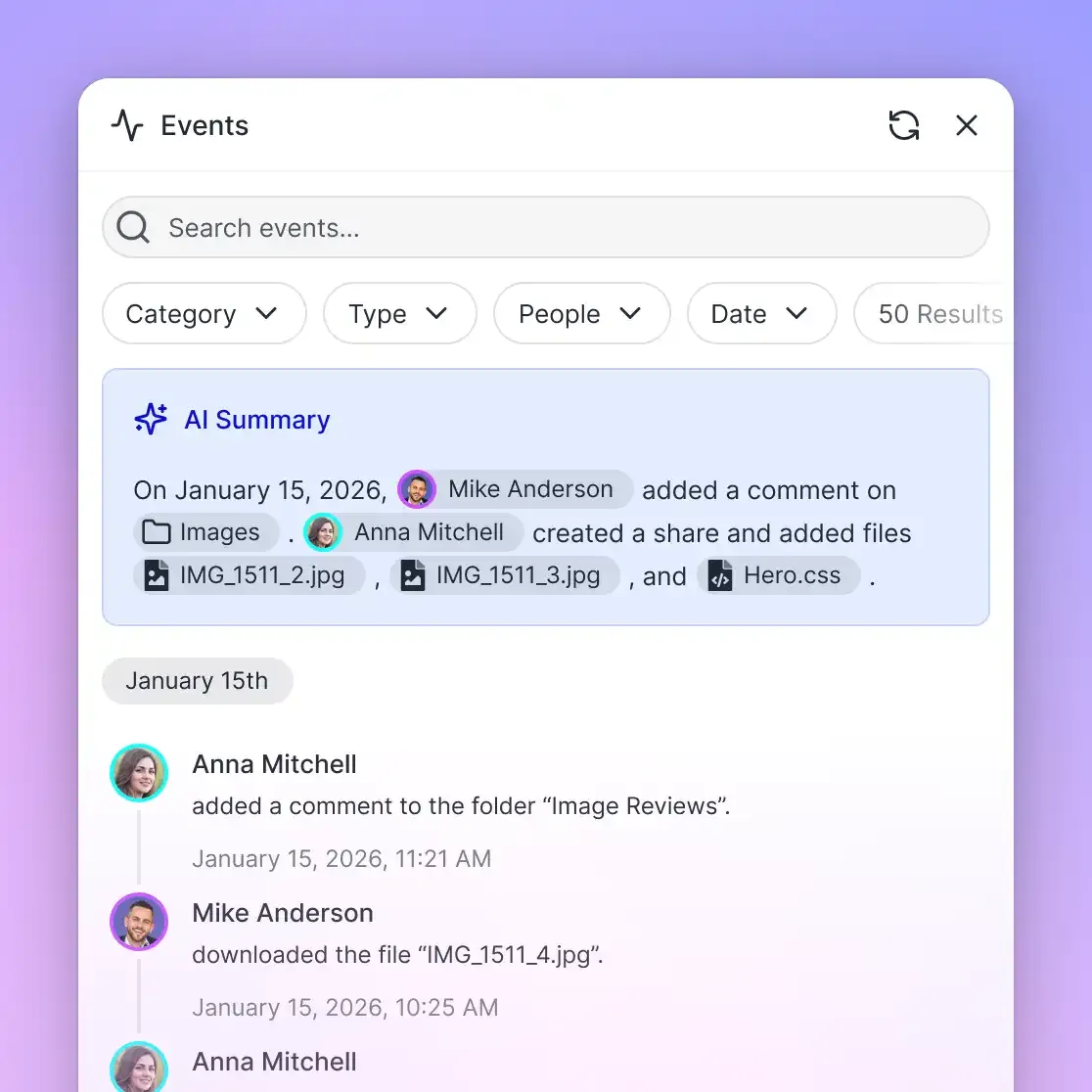
To monitor workspace modifications without compromising security, administrators rely on the detailed activity log. The activity log records every file addition, modification, rename, deletion, membership update, and share creation across both human users and AI agents. If an agent creates an erroneous file or modifies a configuration note, team leads can review the activity log to identify the exact agent identity, timestamp, and action taken, then use per-file version history to restore the previous state immediately.
Finally, manage project completions through ownership transfer. An autonomous agent can be tasked with setting up a new project workspace, structuring directories, and importing assets. Once initial setup is complete, the agent transfers workspace ownership to a human team lead. The previous owner becomes an admin, allowing the agent to continue contributing while the human assumes primary administrative authority over the workspace.
Sources
References used to verify factual claims in this guide.
-
A governance framework establishes rules for ownership, review cadences, and access permissions to prevent duplicate documents and drift.
Frequently Asked Questions
What is a knowledge center?
A knowledge center is an organization's central information hub that indexes and manages internal files, policies, and operational data, enabling natural-language querying and grounded answers for teams and AI agents. It unifies working documents like contracts, technical specifications, and procedures in an intelligent workspace where files are indexed for full-text and semantic retrieval with Intelligence on.
What is the difference between an intranet and a knowledge center?
A legacy corporate intranet is primarily a static portal designed for top-down broadcast announcements and HR forms, relying on rigid keyword search and manual page updates. In contrast, an AI-powered knowledge center acts as an active operating workspace that directly hosts working documents, automatically indexes files upon arrival, supports hybrid semantic search with source citations, and connects directly to autonomous AI agents via remote protocols like MCP.
How do you build a modern knowledge center for teams and AI agents?
Building a modern knowledge center involves mapping institutional files into distinct workspaces by sensitivity, restricting join settings on private areas, and importing files via direct upload or Cloud Sync from Google Drive, Dropbox, Box, or OneDrive. Teams then enable Intelligence Mode for automatic indexing, configure Metadata Views for structured document extraction, connect agents via remote MCP endpoints over Streamable HTTP, and maintain operational oversight through the detailed activity log.
How does Fastio keep AI answers within each person's access?
Fastio enforces permission boundaries at the organization, workspace, and share levels. There are no folder-level or file-level permissions within a workspace, meaning all files in a workspace inherit that workspace's security settings. When an employee or agent queries the system, hybrid search and Intelligence features answer exclusively from the specific workspaces and shares that the user or agent belongs to. Because any organization member can join a workspace by default, restrict the join setting on workspaces that hold sensitive material.
Can AI agents edit or write notes in the knowledge center?
Yes. Fastio Notes are markdown documents stored beside files in a workspace, indexed for AI grounding. Both people and agents can write them, and they co-edit live: when a person and an agent have the same note open, each sees the other's cursors and edits as they type, with agents displaying labeled cursors. Agents can also announce their current work using advisory Agent Intents and acquire temporary advisory file locks through MCP tools.
How does Cloud Sync work with existing cloud storage?
Cloud Sync connects external folders from Google Drive, Dropbox, Box, and OneDrive (including SharePoint libraries via OneDrive) to a Fastio workspace. Sync runs one-way or two-way on a scheduled cadence or on demand, rather than continuous real-time sync. Files synced through Cloud Sync take on the permissions of the Fastio workspace, ensuring access conforms to internal workspace roles rather than legacy external sharing links.
What plans and trials are available for deploying Fastio?
Fastio subscriptions are organized into Starter, Business, and Enterprise tiers structured around workspace seats, persistent storage, and monthly credits that meter AI operations. Monthly plans begin with a 14-day free trial that requires a credit card. An agent can create an account and then hand off to a human who creates or joins an organization to start the trial.
Related Resources

Transform company documents into an agent-ready knowledge center
Give your team and autonomous agents a unified knowledge center where files are automatically indexed for hybrid search and citation-backed retrieval. Connect over remote MCP and evaluate the platform with a 14-day free trial on monthly plans (credit card required).