How to Collaborate on Workspace Notes with Devin AI
Human developers and autonomous agents frequently require a shared context to work together effectively. Devin AI collaborative note editing enables humans and agents to co-edit project documentation and markdown specs in real time. This how-to guide explains how to connect Devin AI to Fast.io workspaces using the Model Context Protocol (MCP) to collaborate on workspace notes.


Why Human-Agent Co-Editing Suffers from Edit Collisions
When a human developer and an autonomous coding agent like Devin AI edit project documentation concurrently, they will inevitably overwrite each other's changes if they rely on static local files. Standard development tools lack the real-time presence markers needed to prevent edit collisions between human developers and autonomous agents.
Autonomous software engineering agents operate within isolated container sandboxes to ensure safety and maintain clean system state. When an agent edits a local markdown specification, it reads the file into its sandboxed environment, modifies the text, and writes it back to the workspace. If a human developer is simultaneously editing the same document in their local IDE, the version control system or the file synchronizer must reconcile the conflict. In standard workflows, this results in a classic last-write-wins collision, silently discarding the agent's generated insights or the human's manual refinements.
To prevent these conflicts, teams must move past the habit of relying on static local file sync or raw object storage. While standard cloud storage folders or S3 buckets are viable for saving static files, they do not support real-time presence indicators or edit locking. When a developer and Devin AI are both working inside a shared folder, the lack of coordination leads to fragmented documentation. The solution is a shared substrate where human and agent co-editing is supported natively. By shifting the co-editing interface to an intelligent workspace like Fast.io workspaces with real-time multiplayer connections, humans and agents can collaborate on project requirements, database schemas, and documentation without risk of collision.

Related guides
- Creating a Shared Workspace for Hermes AgentWhile the Nous Research Hermes Agent can execute workflows in local sandboxes, its output often needs to reach human...
- 7 Best OpenClaw Skills for AI Image EditingOpenClaw skills can turn your AI assistant into a full image editing pipeline. This guide ranks seven image editing...
- How to Set Up a Dedicated Workspace for the Devin Coding AgentPointing the Devin coding agent at an unconstrained repository or local file system invites catastrophic file...
- How to Install and Use the Devin AI CLICognition positions Devin AI CLI as a local coding agent that runs on your machine, separate from cloud Devin in a VM....
- How to Use Devin DeepWiki for Codebase DocsDevin DeepWiki is Cognition's AI documentation layer for Devin AI. It indexes repositories into architecture diagrams,...
- How to Use the Devin IDE to Review and Take Over Agent WorkNubank reported 8-12x engineering efficiency and over 20x cost savings when people reviewed Devin's changes instead of...
More on this subject: Devin (104 guides)
Why Devin Has No Shared Note Surface of Its Own
Devin AI collaborative note editing refers to the practice of humans and autonomous agents co-editing project documentation and markdown specs in a shared workspace via real-time multiplayer connections. While Cognition's Devin is a highly capable autonomous agent, it has no note-taking surface built for shared authoring. Its session tools are a shell, an IDE, a browser, a Progress tab, and side chats. The Progress tab shows the agent's plan and execution state, and a human can read it, but it is not a document two parties can edit at once.
The common workaround is to instruct Devin to write to a progress file in its workspace, which humans can inspect but cannot co-edit while the agent is running. That boundary isolates the agent's reasoning from the team's ongoing discussion. Cognition's documentation lists maintaining documentation among the repetitive engineering tasks Devin handles well, but it does not describe any collaborative note editing feature.
Other AI systems have a related gap. The note-taking system in Open WebUI, for example, provides a collaborative rich-text editing environment with AI-powered enhancement, and its models can search, read and update notes on their own. However, systems like it are built as user-facing chat frontends rather than developer workspaces designed to coordinate autonomous VM-based agents running long terminal and IDE sessions elsewhere.
Establishing Real-Time Multiplayer Collaboration on Notes
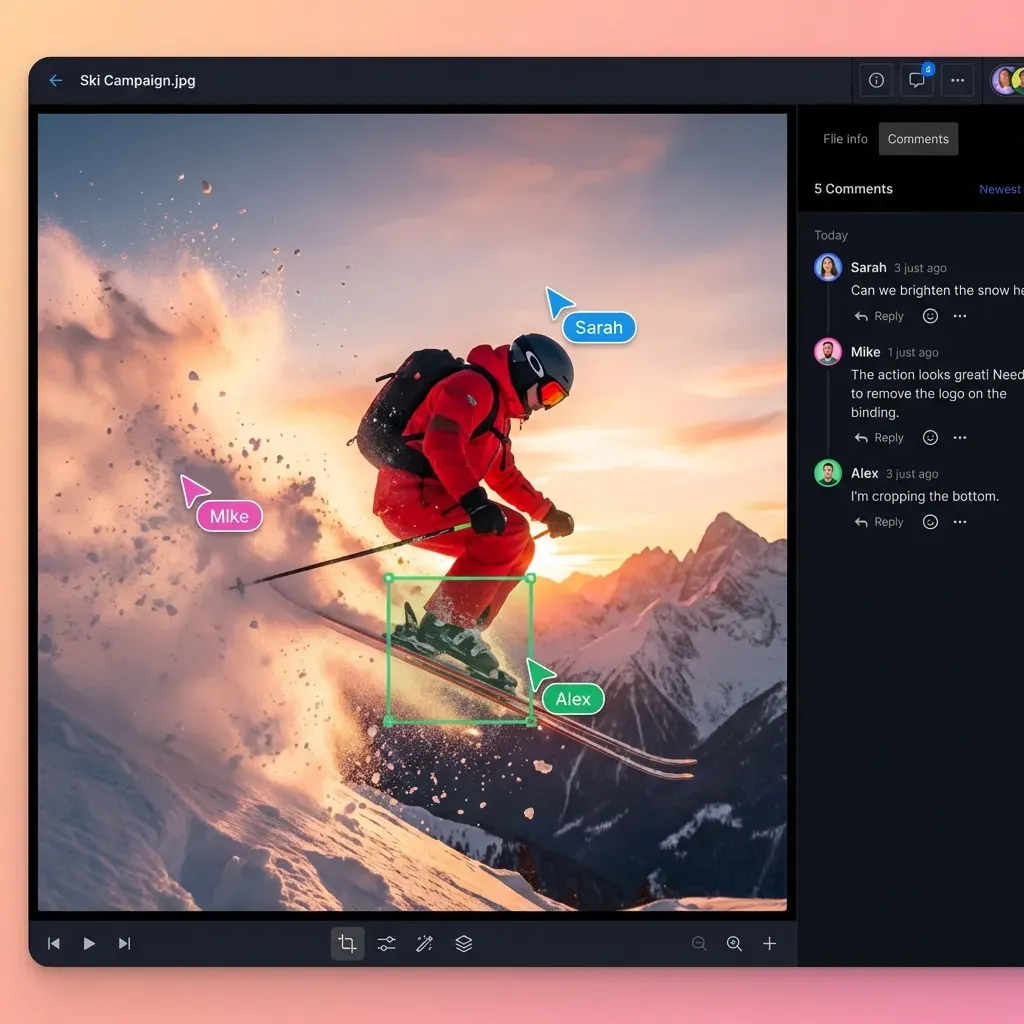
Fast.io Notes addresses this collaboration gap by bringing Google-Docs-style real-time co-editing to every workspace. Fast.io Notes features multiplayer co-editing with visible cursors for humans and agents. This presence tracking turns notes into a shared canvas where developers and agents interact as first-class co-editors.
Multiplayer cursors prevent edit collisions between autonomous agents and developers. When Devin AI writes to a Fast.io note, the human developer sees the agent's cursor moving through the document, highlighting the exact paragraph it is editing. If the developer needs to modify a specification or correct a step, they can do so in the same note in real time. The agent picks up the correction on its next read of the note, or by watching the workspace activity long poll and re-reading when something changes, so no separate prompt is needed to hand the change over.
Beyond preventing collisions, Fast.io's Collaborative Notes connect with the workspace's underlying intelligence layer:
Indexing on Arrival
Turn on Intelligence Mode for the workspace and Fast.io indexes each note as it is written, making it available for semantic search and retrieval-augmented generation (RAG).
AI Grounding
The indexed notes serve as persistent memory. Ask Ripley, the built-in workspace AI, a question about project requirements and it answers from the current indexed contents of the shared note with a citation back to the source. Devin can reach the same grounding by calling the workspace AI over MCP instead of re-reading the whole document.
Granular Permissions
You can configure read and write access at the organization, workspace, folder, or file level, ensuring that sensitive credentials or specifications are only accessible by authorized agents and team members.
This real-time multiplayer note-taking replaces the standard pattern of passing instructions via Git commits or long prompt inputs. Instead of copy-pasting code fragments or requirements back and forth, the note serves as a living scratchpad. If Devin needs feedback on a system architecture design, it can draft the architecture markdown in a Collaborative Note. The developer can edit the diagram, correct structural assumptions, and add comments directly in the note. The agent reads the corrected note over the Model Context Protocol and continues execution, preserving a clear, contiguous history of the decisions made.
Steps to Connect Devin AI to Fast.io Notes via MCP
To connect Devin AI to Fast.io's Collaborative Notes, developers configure the remote Fast.io MCP server. The Fast.io MCP server is remote, at mcp.fast.io, over Streamable HTTP. It is not an npm package and there is no npx command that starts it. A config block therefore carries a url, not a command/args pair.
To authenticate a headless connection, generate a Fast.io API key from your organization settings and send it as a Bearer token in the Authorization header on https://mcp.fast.io/mcp/tools.
Where the configuration lives depends on which Devin surface you use. For Devin CLI, add the block below to the project file at .devin/mcp_config.json, and keep the key itself in the gitignored .devin/mcp_config.local.json. For cloud Devin, an organization admin adds a custom HTTP MCP server under Settings, Connections, MCP servers. Devin Desktop reads ~/.codeium/mcp_config.json.
{
  "mcpServers": {
    "fastio-notes": {
      "url": "https://mcp.fast.io/mcp/tools",
      "transport": "http",
      "headers": {
        "Authorization": "Bearer YOUR_FASTIO_API_KEY"
      }
    }
  }
}
In this block:
- url: The server URL is set to
https://mcp.fast.io/mcp/toolsto route HTTP requests directly to Fast.io's remote server and its named tools. - transport: Set to
httpto use the Streamable HTTP transport mode for bidirectional communication. - headers: Passes the
Authorizationheader containing your organization's API key.
Once the configuration is saved, Devin AI gains access to the consolidated Fast.io MCP toolset. Notes are their own node type, distinct from an uploaded Markdown file, and the agent reads them with the workspace tool and writes them with workspace_manage:
workspace_manage action=create-note: creates a new note from Markdown content.workspace action=read-note: returns the current contents of a note.workspace_manage action=update-note: replaces the contents of an existing note.
For example, when Devin needs a spec document to build a feature, it calls read-note and receives the Markdown content. If the agent needs to log its unit testing results, it calls update-note with the report added, and the human co-editor sees the change appear in the document. Uploading a .md file through the upload flow produces a File rather than a Note, and read-note will reject it, so create notes with create-note when the agent needs to edit them later.
Troubleshooting the connection is straightforward. If Devin fails to load the tools, check the JSON syntax in .devin/mcp_config.json to ensure there are no trailing commas or unescaped characters. In corporate networks, you must verify that outbound HTTP traffic to mcp.fast.io is not blocked by a firewall or custom security policies. If Devin returns an authorization error, regenerate the API key in the Fast.io dashboard and update the configuration. Remember that the three Devin surfaces read different configuration files, so confirm you edited the one that matches how your team runs the agent before assuming the server is at fault.


Stop overwriting project specs during agent runs
Provide Devin AI and your development team with a shared workspace for Collaborative Notes. Connect your agent via the Fast.io MCP server to write, search, and co-edit documents in real time. Monthly plans start with a trial of up to 14 days (credit card required); annual plans have no trial.
Managing Access Permissions and Handoff inside Shared Workspaces
Collaborating with autonomous agents on documentation requires strict governance to protect sensitive business assets. While standard file sharing tools offer simple public links, they do not provide the versioning or granular access control needed for AI-agent connections. Fast.io provides these capabilities directly, allowing teams to establish clear permission boundaries for humans and agents.
Fast.io supports granular permissions at the organization, workspace, folder, and file level. When you invite Devin AI into your workspace, you can restrict its permissions to a specific documentation folder. This ensures that the agent can read and write to project notes without accessing sensitive financial or customer directories.
Fast.io also supports per-file version history and a detailed activity log:
Per-file Version History
Every time Devin AI or a developer saves changes to a Collaborative Note, Fast.io creates a new version. If an agent misinterprets an instruction and corrupts a document, you can restore previous versions with a single click.
Detailed Activity Log
Fast.io maintains a detailed activity log of every file operation, permission change, and AI activity, retained according to your plan. The log lists human and agent actions side by side, providing a record of who accessed and changed your project docs.
Once Devin AI finishes writing the documentation or building a prototype workspace, it can hand the workspace over to a human manager. Fast.io supports ownership transfer, allowing agent accounts to transfer an organization or workspace to a human teammate. The agent can retain administrative access to run updates, while the human takes over billing and primary ownership.
Using these workspace features requires a paid subscription. Monthly plans start with a trial of up to 14 days (credit card required); annual plans have no trial. Paid plans include Starter at 9.99 USD per month, Business at 49.99 USD per month, and Enterprise at 199.99 USD per month. By starting a trial, teams can connect Devin AI, set up Collaborative Notes, and test the multiplayer editing workflow before commits are merged into the main repository.

Sources
References used to verify factual claims in this guide.
-
Devin is built to assist engineering teams and is capable of maintaining documentation.
-
The Open WebUI note-taking system provides a collaborative rich-text editing environment.
Frequently Asked Questions
Can Devin AI edit Google Docs in real time?
Not as a live co-editor. Devin can create and change Google Docs through connectors such as Zapier or Google's Drive MCP server, but those are request and response file operations. They do not put Devin in the document beside you with a visible cursor while you type. To co-edit a spec that way, teams connect Devin AI to an intelligent workspace platform like Fast.io. Fast.io exposes Collaborative Notes over its remote MCP server, enabling Devin AI and human developers to edit the same markdown document concurrently with visible multiplayer cursors.
How do I collaborate with Devin AI on documentation?
To collaborate with Devin AI on documentation, set up a shared workspace using Fast.io and enable Intelligence Mode. Define your project requirements inside a Collaborative Note. Then, configure Devin AI to connect to the Fast.io remote MCP server by adding the HTTP endpoint `https://mcp.fast.io/mcp/tools` to the MCP configuration for the Devin surface you use, which is `.devin/mcp_config.json` for Devin CLI. Once connected, Devin can read and update markdown specs directly in the note, showing a visible cursor next to yours.
Does Devin AI have a built-in multiplayer notepad?
No, Devin AI does not have a built-in multiplayer notepad. Its session surfaces are a shell, an IDE, a browser, a Progress tab and side chats. The Progress tab is a readable log of the agent's plan and execution state, not a document a human can edit alongside the agent. For live document collaboration, pair Devin with Fast.io's remote MCP server, which exposes Collaborative Notes with real-time multiplayer cursors.
Related Resources

Stop overwriting project specs during agent runs
Provide Devin AI and your development team with a shared workspace for Collaborative Notes. Connect your agent via the Fast.io MCP server to write, search, and co-edit documents in real time. Monthly plans start with a trial of up to 14 days (credit card required); annual plans have no trial.