Connecting OpenAI Codex to Cloud Storage: Complete Setup Guide
Connecting OpenAI Codex to cloud storage gives coding agents access to architecture plans, API schemas, and documentation without blowing prompt context. Direct file downloads and local sync stubs trigger token exhaustion, expired OAuth tokens, and 0-byte read errors. Syncing cloud storage into an intelligent Fastio workspace lets Codex search indexed project files over remote Model Context Protocol tools without pulling entire directory trees.

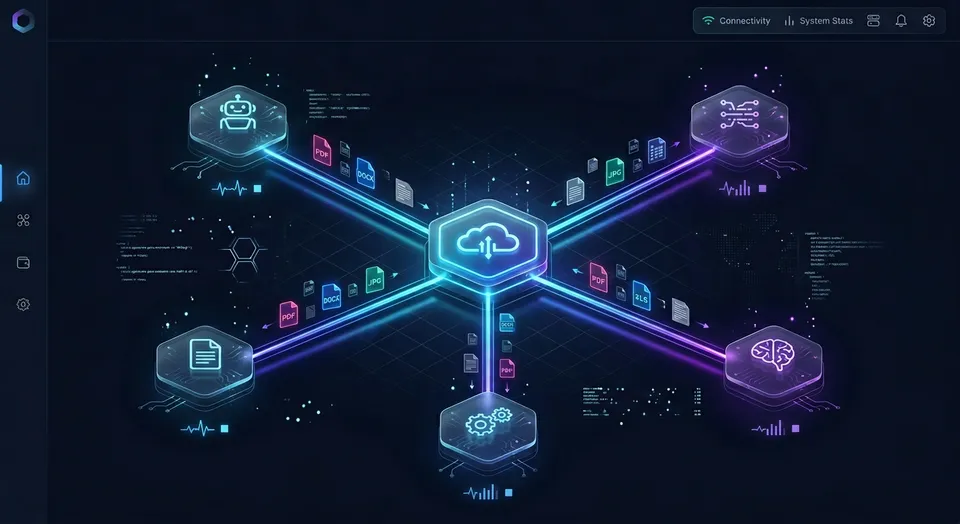
Why Direct Cloud Drive Streaming Fails OpenAI Codex
An autonomous coding agent executing a refactor across twenty files will fail before writing a single test if its reference architecture documents get piped in as raw, unindexed file streams. The failure is not model reasoning capacity; it is prompt context saturation caused by treating cloud drives like local disk mounts.
Software engineering teams maintain critical architectural assets outside git repositories. Product requirement specifications, database schemas, OpenAPI contracts, architecture decision records, data migration plans, and security policies frequently live in corporate cloud repositories like Google Drive, Dropbox, Box, OneDrive, or SharePoint.
When a developer prompts OpenAI Codex to implement a feature, generate migration scripts, or reconcile interface definitions, the agent needs direct access to those reference documents. Without grounded context, autonomous models invent data types, generate conflicting database fields, and write code that breaks during integration tests.
A Codex cloud storage connector bridges OpenAI Codex agents with cloud storage providers, enabling code generation workflows to search and query documents across distributed cloud folders.
Connecting an agent to corporate storage historically relied on ad-hoc scripts, bulk file downloads, or local operating system drive mounts. Each approach introduces severe technical friction during iterative development.
The Zero-Byte Placeholder and Virtual Filesystem Trap
Engineers frequently attempt local file access first because desktop clients for Google Drive, OneDrive, or Dropbox already mount cloud drives to local workstation folders. That desktop convenience creates silent failures when autonomous coding agents execute command-line tasks.
Modern cloud storage desktop clients use virtual filesystem architectures to conserve local drive capacity, such as Cloud Files on Windows and File Provider on macOS. These systems stream files on demand rather than storing complete files locally.
In a graphical file explorer, placeholder files display normal names, file sizes, and modification dates. On physical disk blocks, their allocated footprint is zero bytes until an application issues a read call that triggers network hydration.
When OpenAI Codex runs shell scripts, compiles code, or executes automated test suites against an unhydrated placeholder file, standard POSIX system calls return empty byte streams or trigger input-output timeouts. Operating system kernels do not pause non-interactive terminal processes while a desktop daemon fetches payloads over the network.
If Codex inspects a database schema stored as a streaming placeholder, it reads zero bytes and treats the file as empty. The agent then generates incomplete schema definitions or terminates execution with syntax errors.
Direct Cloud Drive APIs and Headless Authentication Fragility
To bypass virtual filesystem stubs, developers often try connecting agents directly to cloud storage REST APIs. While direct API calls work for basic read operations, direct API calls to cloud drives introduce authentication refresh complexities in headless agent runs.
Interactive OAuth consent flows require a local web browser to capture callback redirects and refresh access tokens. When OpenAI Codex runs in remote development environments, continuous integration runners, Docker containers, or cloud execution instances, no graphical browser exists to complete interactive login challenges. Expired refresh tokens cause headless agent sessions to crash mid-execution.
Autonomous coding loops also trigger severe API rate limits. During code generation, Codex explores directory structures, inspects file metadata, checks schema definitions, and validates dependencies across dozens of files. This bursty, sequential polling triggers HTTP 429 and HTTP 403 rate-limit responses on cloud storage endpoints, stalling agent execution.
Context Window Saturation and Attention Degradation
When an ad-hoc connector downloads full files into an agent session, it dumps multi-megabyte payloads directly into the model context buffer.
A comprehensive API specification, enterprise compliance guideline, or data dictionary can span dozens of pages. Ingesting complete documents consumes tens of thousands of tokens in a single tool call.
Loading unindexed documents directly into prompt context causes measurable drawbacks:
- Attention Degradation: In long prompts, models suffer from the lost-in-the-middle effect. Reasoning accuracy degrades when critical schema definitions are buried in the middle of a massive context window.
- Rapid Token Exhaustion: Ingesting large files burns through token quotas on iterative programming loops, raising operational costs.
- Inference Latency: Transferring and parsing large document payloads inflates time-to-first-token response times, slowing interactive terminal sessions.
An autonomous coding agent rarely needs an entire fifty-page document. It needs the specific lines describing an authentication header, a database constraint, or an endpoint response schema.
Related guides
- Claude Box Connector: Connecting Anthropic Agents to Box CloudA Claude Box connector links Anthropic Claude models to enterprise Box storage, enabling AI agents to search and...
- OpenClaw Cloud Storage Connector: Persistent Workspaces for AI AgentsAn OpenClaw cloud storage connector links autonomous agents to persistent cloud storage repositories across sessions....
- How to Connect OpenAI Codex to Google Drive via MCP ServerConnecting OpenAI Codex to Google Drive gives coding agents access to project documentation, API schemas, and...
- Codex Dropbox Integration: Connect OpenAI Coding Agents to Dropbox FilesConnecting OpenAI Codex to Dropbox gives coding agents indexed semantic search over repository design files, assets,...
- How to Connect Aider to Cloud Storage with MCP: Fast Remote Workspace SetupConnecting Aider to cloud storage through the Model Context Protocol gives terminal coding sessions direct access to...
- Codex Google Drive Integration: Connect Coding Agents to Cloud StorageA Codex Google Drive integration links autonomous coding agents to cloud repositories containing project documentation,...
More on this subject: AI Coding Assistants (109 guides)
How a Codex Cloud Storage Connector Uses a Synchronized Workspace Layer
Solving the context bottleneck requires decoupling source storage from agent retrieval. Most guides assume manual file downloads or ad-hoc scripts rather than a persistent, synchronized workspace layer. A production-ready architecture uses three distinct layers: source cloud storage, a synchronized workspace coordination layer, and a remote Model Context Protocol interface.
Source Cloud Storage (Google Drive, Dropbox, Box, OneDrive, SharePoint)
  |
  v (Cloud Sync: Scheduled or On-Demand)
Fastio Workspace Coordination Layer
  * Central Org-Owned Workspaces
  * Intelligence Mode (Full-Text + Semantic Search)
  * Metadata Views (Structured Schema Extraction)
  * Per-File Version History and Detailed Activity Log
  |
  v (Streamable HTTP / Model Context Protocol)
OpenAI Codex Agent Connection (Codex CLI, ChatGPT Desktop, Remote Runner)
Layer 1: Source Cloud Storage
The enterprise continues to store official documentation in its existing systems of record: Google Drive, Dropbox, Box, or OneDrive. Teams do not need to migrate repositories or change human authoring workflows. For organizations using Microsoft 365, SharePoint document libraries connect through the OneDrive connector.
Layer 2: Fastio Workspace Synchronization and Intelligence
Instead of streaming raw files directly into Codex, designated folders synchronize into an organization-owned Fastio workspace. Cloud Sync handles the data movement server-to-server in the cloud, completely bypassing local workstation bandwidth and operating system disk mounts.
Once files land in the workspace, Fastio's Intelligence Mode automatically parses and indexes them. The platform builds a hybrid search index combining full-text search, semantic vector embeddings, and metadata values. Rather than treating a technical document as an undifferentiated blob of text, the workspace chunks content by semantic boundaries and tags sections with structural metadata.
Layer 3: OpenAI Codex Agent Connection
OpenAI Codex connects to Fastio through the Model Context Protocol using a remote Streamable HTTP connection. Instead of reading whole files from disk, Codex issues targeted search queries to the workspace index.
Remote MCP search isolates Codex from raw file system locking issues and virtual file hydration stubs. When Codex needs to verify an API payload, it calls workspace search tools to retrieve the exact three-line JSON schema definition with source file citations. The agent gets ground-truth context without bloating prompt memory or hitting rate limits on source storage providers.
Measured Benchmark Performance
When evaluating how agents access distributed documents, benchmark performance matters. In the published evaluation report, Fastio was measured the fastest and the lowest cost of the providers tested. Every measured row represents that provider's native connector in Claude Cowork, without local stdio servers, filesystem stubs, or SharePoint configurations. SharePoint was not measured at all, and retrieval accuracy was parity across tested providers.
Steps to Configure Fastio Cloud Sync for Corporate Drives
Setting up the Codex cloud storage connector begins by connecting your corporate drives to a Fastio workspace. Cloud Sync connects Google Drive, Dropbox, Box and OneDrive folders to a workspace, one-way or two-way, on a schedule or on demand. SharePoint document libraries connect through the OneDrive connector.
Step 1: Create a Dedicated Engineering Workspace
In your Fastio organization, create a workspace dedicated to your development project:
- Open the Fastio dashboard and select New Workspace.
- Name the workspace to match your project (for example,
billing-service-architecture). - Navigate to workspace settings and turn on Intelligence Mode to enable automatic indexing for semantic search and retrieval-augmented generation.
Step 2: Establish Cloud Sync Connections
Connect your team's cloud storage provider to the workspace:
- In your workspace, select Cloud Sync and choose your cloud provider: Google Drive, Dropbox, Box, or OneDrive (or SharePoint libraries via OneDrive).
- Authenticate through your provider's OAuth prompt to authorize folder access.
- Select the remote folder containing your project's technical specifications, schemas, and design documents.
- Choose your synchronization direction:
- One-Way Sync: Best for read-only reference folders containing corporate architecture guidelines, security policies, and product requirements. Changes in the cloud drive sync to Fastio, but agent writes do not alter the source folder.
- Two-Way Sync: Ideal for active engineering repositories where Codex generates documentation, updates schema files, or produces architecture decision records that need to sync back to the team's shared drive.
- Configure the sync frequency: set an automated schedule or select on-demand execution. Cloud Sync runs server-to-server on a schedule or on demand; it is never continuous, live, or real-time.
Because synchronization runs cloud-to-cloud, large technical assets transfer without consuming local machine bandwidth or triggering desktop client hydration loops.
Step 3: Extract Typed Schemas with Metadata Views
For dense technical specifications, OpenAPI definitions, or database dictionaries, standard full-text search can sometimes return narrative descriptions rather than exact parameter schemas.
Fastio provides Metadata Views to transform complex engineering documents into structured, queryable tables. Users describe the fields they want extracted in natural language, and AI designs a typed schema supporting Text, Integer, Decimal, Boolean, URL, JSON, and Date & Time formats.
Metadata Views process PDFs, Word documents, spreadsheets, and scanned diagrams without rigid templates or custom OCR scripts:
- API Endpoints: Extract paths, HTTP methods, authentication scopes, request parameters, and response status codes.
- Database Tables: Extract column names, primary keys, foreign key constraints, and index definitions.
- Configuration Dictionaries: Extract environment variable names, default values, and operational descriptions.
Once extracted, Codex queries these structured tables directly over MCP, retrieving exact field types and constraints without reading through full technical documents.


Connect Cloud Storage to OpenAI Codex with Intelligent Workspaces
Keep your files in Google Drive, Dropbox, Box, or OneDrive, sync folders to an intelligent workspace, and let Codex search indexed project files over a remote MCP server. Start your 14-day free trial with credit card verification.
How to Connect Codex via the Fastio Plugin and Remote MCP Operations
With your workspace synced and indexed, you can connect OpenAI Codex to Fastio. Fastio exposes a consolidated MCP toolset over remote Streamable HTTP endpoints. Review the Fastio MCP documentation for full endpoint specifications.
Method 1: Codex CLI via the Fastio Plugin (Preferred)
Fastio is listed in the official ChatGPT and Codex plugin directories. For interactive CLI development, installing the curated plugin provides the most direct setup:
- In your terminal, run the plugin install command:
codex plugin add fast-io@openai-curated-remote
Alternatively, open the interactive plugin browser by typing /plugins inside the Codex CLI.
2. Follow the browser prompt to complete OAuth sign-in to Fastio.
3. On the Review Permissions screen, select the organization and specific project workspaces Codex can reach, then choose Read Only or Read & Write access.
Method 2: Codex in the ChatGPT Desktop App
If your team uses Codex within the ChatGPT desktop application:
- Open the Plugins tab in the desktop interface.
- Locate Fastio in the directory and select Install plugin.
- Complete the browser authentication prompt and authorize workspace access.
- Reference
@Fastioin your conversation prompt to query indexed workspace documents.
Method 3: Codex Custom MCP Server
For environments that restrict plugin installations, or when using the Codex IDE extension (which does not support plugins), configure a custom MCP connection:
- Add the Fastio remote MCP operations server:
codex mcp add fastio --url https://mcp.fast.io/mcp/operations
- Initiate the authentication flow:
codex mcp login fastio
- Authorize the connection in your browser window to grant workspace access.
Headless and Cloud Container Deployments
When deploying Codex in automated continuous integration workflows, Docker containers, or cloud execution instances like Northflank microVMs, interactive browser logins are unavailable.
As noted by Northflank in their documentation on cloud agent infrastructure: "The Codex CLI supports ChatGPT and API-key authentication."
In headless environments, configure Codex to connect to https://mcp.fast.io/mcp/operations using a scoped API key passed via the connection headers:
Authorization: Bearer <FASTIO_API_KEY>
To disconnect Codex at any time, remove the connector in your Codex interface. In Fastio, open Settings, navigate to Devices & Agents, select Connected Devices, and click Revoke.
MCP Tool Calling Mechanics
Fastio connects over Streamable HTTP. Transport protocols like legacy Server-Sent Events (SSE) or local mcp-remote bridges are not required; Codex connects directly to the remote HTTP endpoint.
The /mcp/operations endpoint separates read and write operations into distinct action tools:
- Read Operations (
storage): Listing files, reading file metadata, checking lock status, and inspecting directory structures. - Write Operations (
storage_manage): Creating folders, uploading files, deleting items, and acquiring advisory leases. - Search Operations (
search): Querying indexed workspace content using natural language queries.
When Codex needs architectural guidance during a coding task, it invokes a tool call:
{
  "jsonrpc": "2.0",
  "method": "tools/call",
  "params": {
    "name": "search",
    "arguments": {
      "query": "user authentication JWT expiration policy and refresh token rotation",
      "workspace_id": "ws_billing_prod_982",
      "limit": 3
    }
  },
  "id": "call_search_01"
}
Fastio processes the query through its hybrid search engine, returning relevant text excerpts, section titles, and source file identifiers:
{
  "jsonrpc": "2.0",
  "result": {
    "content": [
      {
        "type": "text",
        "text": "File: /specs/auth-architecture.md (Lines 42-58). Access tokens must carry a 15-minute expiration window. Refresh tokens are single-use and rotate on every redemption. Invalidation takes effect across all distributed Redis cluster nodes within 500ms."
      }
    ]
  },
  "id": "call_search_01"
}
Codex receives the exact architectural rule needed to write authentication middleware without downloading the full fifty-page specification.
Coordinating Multi-Agent Workflows with Advisory File Leases
As development teams scale autonomous workflows, multiple Codex agents, developer sessions, and automated test runners often interact with the same workspace concurrently. Production deployments require clear coordination patterns, version tracking, and administrative controls.
Advisory File Leases for Multi-Agent Workflows
When multiple agents work in a shared repository, uncoordinated concurrent writes can result in overwritten code or broken configuration files. Fastio implements advisory per-file leases across workspace storage.
Agents manage leases through MCP tools:
lock-acquireonstorage_manage: Requests an advisory lease on a specific file.lock-releaseonstorage_manage: Explicitly releases an active lease.lock-statusonstorage: Checks whether a file is currently leased and identifies the holder.
An advisory lease expires automatically unless periodically heartbeated by the holding agent. Other organization members and connected agents can inspect lock status to see who currently holds a file lease.
Advisory leases never grant exclusive write rights: concurrent writes both land, and version history keeps every version. Leases serve as an operational coordination signal, preventing agents from conflicting during multi-step edits.
Per-File Version History and Rollback
Every file in a Fastio workspace retains a complete per-file version history. When Codex updates an OpenAPI YAML file or generates a new TypeScript data model, Fastio logs the change as a new version.
If an agent run produces an erroneous code modification, developers can inspect the visual diff, review the timestamp, and restore any previous version. Every change logs actor attribution, clearly distinguishing between edits made by team members and changes pushed by autonomous agent credentials.
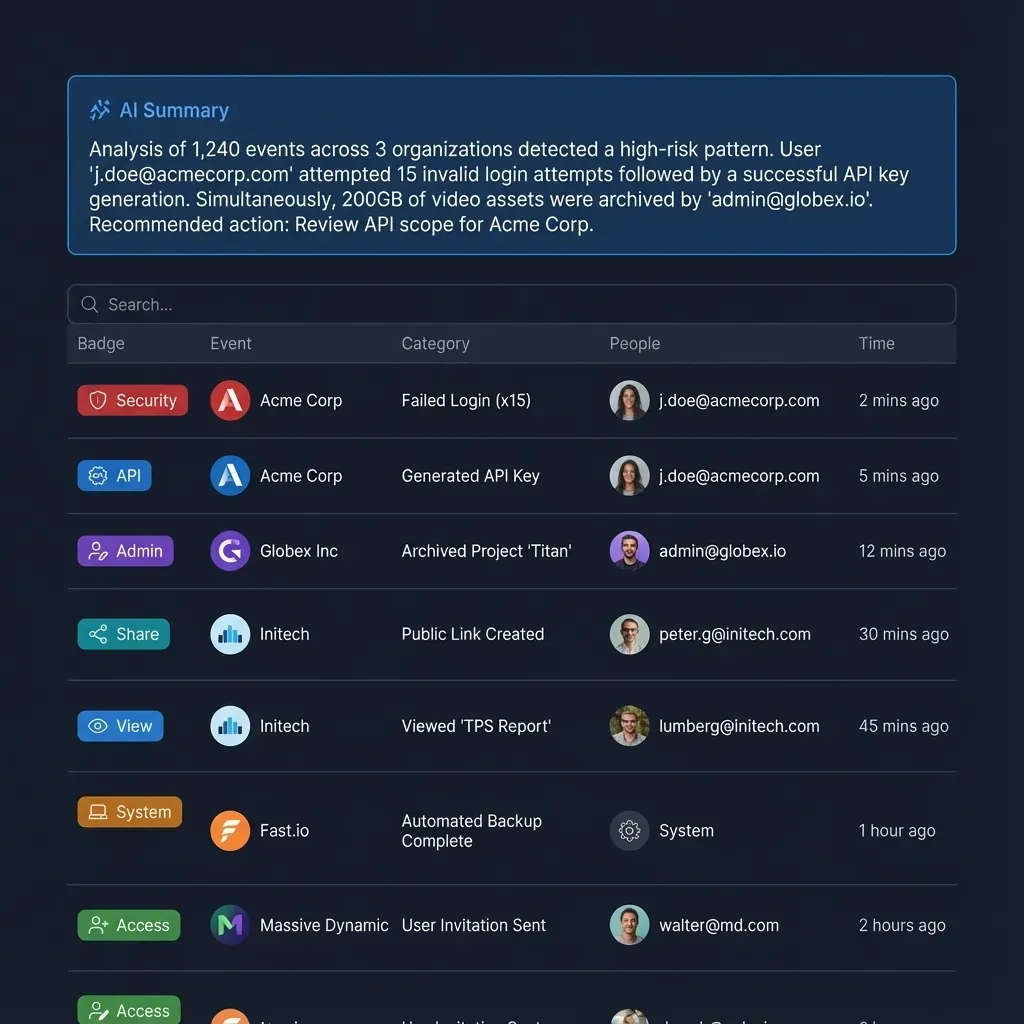
Auditing Operations with the Detailed Activity Log
Autonomous agents execute dozens of operations during code generation runs. Engineering managers and security teams require transparent visibility into workspace events.
Fastio records all operational events in a detailed activity log. The activity log documents file uploads, edits, moves, and deletions, alongside membership changes, permission adjustments, and share creation. Read-only actions like file views or downloads are not tracked. The activity log provides an auditable record of workspace changes across human engineers and autonomous agents.
Collaborative Notes for Human-Agent Handoff
Technical documentation often requires informal context that does not belong in formal specification files. Fastio includes Collaborative Notes stored directly beside workspace files.
Notes use version-checked saves rather than real-time co-editing. Developers can leave instructions, prompt constraints, or manual review checklists in a note. Codex can read the note over MCP, execute the specified refactor, and append an execution summary detailing modified files and passing test cases.
Subscribing to Workspace Changes via the Events Feed
Autonomous software pipelines need to react when reference documents change. When an architect updates a database schema or uploads a revised API contract to Google Drive, Cloud Sync updates the Fastio workspace.
External agent processes can monitor these updates using Fastio's events feed. Agents subscribe to workspace activity over WebSocket or long-poll connections (GET /current/activity/poll/{entity_id}?wait=95&lastactivity={timestamp}) to detect changes and automatically trigger code verification or documentation builds.
Enterprise Governance and Ownership Transfer
Contract development agencies and internal platform teams frequently use an agent-builds-and-hands-off workflow:
- An autonomous agent signs up for an account, sets up the project workspace, and configures Cloud Sync to link client storage folders.
- Codex indexes technical specifications, extracts structured schemas via Metadata Views, and implements the codebase.
- Upon project delivery, the agent initiates an ownership transfer by generating a secure claim link.
- The client's technical lead opens the claim link and accepts the transfer.
- The client assumes administrative ownership and billing management for the organization, while the agent retains scoped API access to maintain continuous integration tasks.
Fastio runs on cloud infrastructure partners, including Google Cloud Platform and Cloudflare, that are certified to industry-leading security standards. Role-based permissions set at the organization, workspace, and share levels ensure agents access only the files required for their specific development tasks.
Subscription Plans and Resource Pricing
Creating an account on fast.io is free; doing real work requires an organization on a paid subscription. Monthly plans start with a 14-day free trial, which requires a credit card.
Fastio offers straightforward subscription tiers designed for engineering teams:
Each plan includes dedicated storage capacity, user seats, and monthly AI credit allowances. Credits meter artificial intelligence operations, including hybrid search indexing, semantic retrieval, and Metadata Views extraction. Credit overage, extra storage capacity, and additional bandwidth are billed transparently as documented on the pricing page.
Explore implementation details on the storage for agents page and evaluate subscription options on the pricing page.
Sources
References used to verify factual claims in this guide.
-
The Codex CLI supports ChatGPT and API-key authentication for cloud-based and local coding agent workflows.
Frequently Asked Questions
How do I connect OpenAI Codex to cloud storage?
You can connect OpenAI Codex to cloud storage by syncing folders from Google Drive, Dropbox, Box, or OneDrive into a Fastio workspace using Cloud Sync, then connecting Codex via Fastio's remote Model Context Protocol server. In the Codex CLI, install the plugin with `codex plugin add fast-io@openai-curated-remote` or add the custom server at `https://mcp.fast.io/mcp/operations`.
Can Codex access files in Google Drive or OneDrive?
Yes. Fastio Cloud Sync connects Google Drive and OneDrive folders directly to a workspace on a schedule or on demand. Once synchronized, Fastio's Intelligence Mode indexes the files, allowing Codex to query Drive and OneDrive content over remote MCP tools without downloading local files.
What is the best way to give Codex access to company documents?
The best way to give Codex access to company documents is through a synchronized workspace layer rather than direct file downloads or local filesystem mounts. Fastio syncs corporate folders, indexes documents for hybrid semantic search, and returns targeted text excerpts via MCP, preventing context window bloat and avoiding zero-byte virtual filesystem errors.
How does a synchronized workspace layer isolate Codex from raw file system locking issues?
A synchronized workspace layer moves indexing and retrieval to the cloud. Codex queries remote MCP search endpoints instead of accessing local filesystem paths directly. This isolates Codex from local operating system file locking conflicts, background desktop sync daemons, and zero-byte virtual filesystem hydration stubs.
What transport protocol does the Codex cloud storage connector use?
The Fastio Codex connector uses Streamable HTTP for all Model Context Protocol communication. It eliminates the need for legacy Server-Sent Events (SSE) connections or local stdio bridge utilities, allowing direct connections from the Codex CLI, IDE extensions, or cloud-hosted microVMs.
Does Fastio Cloud Sync support two-way synchronization with existing cloud drives?
Yes. Cloud Sync supports both one-way and two-way synchronization for Google Drive, Dropbox, Box, and OneDrive (with SharePoint libraries supported through the OneDrive connector). Two-way sync allows Codex to write generated code, updated schemas, or technical documentation back to your corporate cloud storage on your schedule or on demand.
Related Resources

Connect Cloud Storage to OpenAI Codex with Intelligent Workspaces
Keep your files in Google Drive, Dropbox, Box, or OneDrive, sync folders to an intelligent workspace, and let Codex search indexed project files over a remote MCP server. Start your 14-day free trial with credit card verification.