OpenClaw Cloud Storage Connector: Persistent Workspaces for AI Agents
An OpenClaw cloud storage connector links autonomous agents to persistent cloud storage repositories across sessions. By synchronizing commercial storage into an indexed Fastio workspace, OpenClaw queries files via remote Model Context Protocol over Streamable HTTP. This guide details setup, multi-agent coordination, and persistent file memory.


Why Ephemeral Storage Fails Autonomous OpenClaw Agents
When an autonomous agent finishes its task execution loop and shuts down, every file written to local disk vanishes with the host container. The agent loses its deliverables, its scratchpad context, and its intermediate artifacts, forcing subsequent agent runs to regenerate work from scratch. While raw object storage buckets or local volume mounts offer bare persistence, they fail when engineering teams need their agents to interact with the documents their human colleagues already use across Google Drive, Dropbox, OneDrive, Box, or SharePoint.
An OpenClaw cloud storage connector links autonomous OpenClaw agents to persistent cloud storage repositories, enabling agents to retrieve, process, and persist project deliverables across sessions. OpenClaw functions as an open-source autonomous agent runtime designed to coordinate multi-step tool calls, execute research workflows, and interact across daily communication channels. When teams deploy OpenClaw into production, they routinely host the agent in containerized environments, remote virtual machines, or continuous integration runners. In these headless environments, connecting to enterprise file repositories presents immediate operational hurdles.
Most agent storage tutorials rely on ephemeral local disks or bare S3 buckets, overlooking how agent teams connect existing commercial cloud storage to OpenClaw via remote MCP. Ephemeral container disks disappear during pod rescheduling, while bare object storage lacks file hierarchies, automatic document indexing, search capabilities, and native access for human stakeholders.
Autonomous agents without persistent cloud connectors lose state and context across session restarts. When an agent generates an analysis report, extracts structured figures from a batch of receipts, or drafts an operational brief, that deliverable must persist in an accessible workspace where both autonomous agents and human colleagues can inspect and build upon it. Developers seeking durable architectures turn to storage for agents and dedicated storage for OpenClaw to bridge this gap.
The Operational Limits of Container Disks and Raw Buckets
Engineering teams that configure autonomous agents on cloud virtual machines or Kubernetes pods usually start by writing outputs to the local filesystem. This approach works during short interactive testing sessions, but it fails in unattended production:
- State Destruction on Pod Recycles: Cloud providers recycle worker instances, apply security patches, and rebalance cluster nodes. Every restart wipes container scratch directories, destroying uncommitted agent memory and project outputs.
- Context Window Overload: When an agent relies on local directories, scripts attempt to read entire files into the language model prompt. Loading multi-megabyte PDFs or spreadsheets into context burns token allowances and degrades model reasoning.
- Collaboration Isolation: A file saved to a virtual machine disk cannot be reviewed by a human team member without custom sync scripts, SSH bastions, or complex upload pipelines.
- Lack of Workspace Intelligence: Bare object storage buckets do not index content on arrival. An agent searching an S3 bucket must pull every object over the network or maintain a separate vector database cluster.
Connecting OpenClaw to an intelligent workspace solves these structural challenges by separating transient execution compute from persistent file memory.
Related guides
- Best Storage for Hermes Agent Autonomous Workflows: Local vs Cloud WorkspacesAutonomous agent operations require persistent file layers to retain context across task execution cycles. This guide...
- How to Connect Claude to Excel Workbooks in Cloud StorageA Claude Excel connector links Claude AI models to remote Excel files (.xlsx) in cloud storage, allowing Claude to...
- How to Set Up File Storage in OpenClaw WorkspacesOpenClaw agents need files that stick around between sessions in shared workspaces. Developers set up persistent...
- How to Set Up Persistent Storage in OpenClawOpenClaw agents forget their state between sessions. Persistent storage lets them save memory, files, and data to...
- How to Connect OpenClaw to Box: Secure Storage Integration GuideConnecting OpenClaw to Box enables autonomous AI agents to query enterprise documents without downloading heavy file...
- How to Connect OpenClaw to Dropbox: Fast Agent Storage IntegrationAn OpenClaw Dropbox integration provides autonomous AI agents with indexed, semantic access to existing Dropbox folders...
More on this subject: OpenClaw Setup and Guides (206 guides)
How the 3-Tier Architecture Connects OpenClaw to Cloud Storage
Connecting OpenClaw to commercial cloud storage relies on a 3-tier architecture that separates enterprise file storage, intelligent indexing, and agent tool execution:
- Commercial Cloud Storage Tier: Enterprise files reside in existing Google Drive, Dropbox, Box, or OneDrive accounts, with SharePoint document libraries accessed through the OneDrive connector.
- Intelligent Workspace Synchronization Tier: Fastio Cloud Sync links external folders into an organization-owned workspace, where Intelligence Mode automatically parses and indexes documents for hybrid keyword and semantic retrieval.
- Agent Interaction Tier: OpenClaw connects to the workspace through the remote Model Context Protocol endpoint over Streamable HTTP, issuing targeted search queries and retrieving extracted text passages rather than transferring raw file binaries.
This layered pattern allows teams to keep their existing file repositories intact while providing autonomous agents with a purpose-built retrieval and persistence layer.

Overcoming Native Cloud Storage Rate Limits and Token Bloat
Native connectors from commercial cloud storage providers were designed for human user interfaces, not autonomous agent execution loops. When an engineering team points an autonomous agent directly at cloud storage APIs, two distinct operational barriers emerge: aggressive rate limiting and severe token bloat.
In Google Drive, API limits are defined in terms of quota units representing resource usage and return user rate limit errors when exceeded. When an autonomous agent performs recursive directory scans across shared folders, it burns through quota units in seconds. Similarly, in SharePoint Online, when an application exceeds usage limits, the service throttles further requests and returns HTTP status code 429. If an agent script continues firing requests after receiving a throttling response, the tenant can temporarily block the application entirely.
Token bloat creates an equally severe constraint. Downloading an entire 40-page contract or technical specification into the agent context window consumes dozens of thousands of tokens per call. When the agent only needs a single clause or data point, transferring raw binaries introduces latency, drives up inference costs, and pushes other critical task instructions out of the context window.
Fastio Cloud Sync resolves both problems by acting as an intelligent intermediary. Cloud Sync connects Google Drive, Dropbox, Box and OneDrive folders to a workspace, one-way or two-way, on a schedule or on demand. When files sync into the workspace, Intelligence Mode parses the text, extracts key entities, and creates semantic embeddings. OpenClaw never calls the native cloud APIs directly; instead, it queries pre-indexed workspace chunks through remote MCP tools.
Benchmarking Autonomous Agent Retrieval Performance
The efficiency of an agent storage connector directly determines the speed and cost of multi-step automations. The connector comparison is published at fast.io/benchmarks/ and provides an objective, measured evaluation of native cloud storage connectors against dedicated agent workspaces in automated execution environments.
In documented tests, Fastio was measured the fastest and the lowest cost of the providers tested, while maintaining parity in retrieval accuracy. Instead of spending seconds transferring entire documents over REST connections, agents query pre-indexed workspace chunks, executing research tasks with fewer round-trips and lower overall overhead.


Give OpenClaw Persistent Cloud Storage Workspaces
Sync Google Drive, Dropbox, and OneDrive into an intelligent workspace. Give OpenClaw persistent file access and hybrid semantic search via remote MCP. Starts with a 14-day free trial.
How to Configure OpenClaw Storage MCP over Streamable HTTP
OpenClaw connects to external tools and environments through the Model Context Protocol (MCP). Fastio exposes its consolidated MCP toolset as a remote server over Streamable HTTP, eliminating the need to run local daemon processes, manage npm bridge packages, or maintain local Python dependencies.
To connect OpenClaw to Fastio, configure the remote endpoint at https://mcp.fast.io/mcp/tools. When OpenClaw runs in a headless environment, such as a Docker container, VPS, or continuous integration runner, supply a scoped API key as an Authorization: Bearer <api key> header on the connection.
The remote MCP server provides a consolidated MCP toolset organized into clear read and management pairs:
- Storage Operations:
storagehandles read operations including listing directory contents, inspecting file metadata, reading file content, and checking lease status withlock-status.storage_managehandles modifications including creating folders, moving items, deleting records, and acquiring or releasing advisory file leases withlock-acquireandlock-release. - Upload Operations:
uploadhandles read status checks, whileupload_managemanages file transfers and chunked uploads. - Workspace Management:
workspaceinspects workspace properties, whileworkspace_manageconfigures workspace settings. - Share Operations:
shareinspects share properties and details, whileshare_managecreates and configures Send, Receive, and Exchange shares.
For complete onboarding instructions, refer to the MCP setup documentation and inspect the MCP tool reference.
Setting Up the OpenClaw Remote MCP Configuration
In OpenClaw, external MCP servers are defined in the agent configuration file. Declare the Fastio remote MCP server using the Streamable HTTP transport:
{
  "mcp": {
    "servers": {
      "fast-io": {
        "url": "https://mcp.fast.io/mcp/tools",
        "transport": "http",
        "headers": {
          "Authorization": "Bearer YOUR_FASTIO_API_KEY"
        }
      }
    }
  }
}
Replace YOUR_FASTIO_API_KEY with a scoped API key generated in your Fastio organization settings under Devices & Agents. OpenClaw connects over Streamable HTTP, discovers available tools during the initialization handshake, and makes workspace operations available to the agent planning loop.
Executing Targeted Semantic Queries and Retrievals
Once connected, OpenClaw interacts with workspace documents using targeted semantic search rather than brute-force file downloads. When an agent needs to answer a question or inspect project files, it calls search functions on the workspace.
Instead of issuing dozens of recursive directory calls to an external cloud drive, OpenClaw issues a single targeted query:
{
  "tool": "storage",
  "arguments": {
    "action": "search",
    "query": "Q3 enterprise licensing terms and payment schedule",
    "workspace_id": "ws_8f92a1c0"
  }
}
The workspace returns relevant text passages with precise document citations and file identifiers. The agent incorporates the specific facts into its reasoning loop without filling its context window with extraneous pages.
How Multi-Agent Teams Coordinate Shared Workspaces
When production deployments expand from a single autonomous agent to multi-agent teams, uncoordinated file writes cause data loss. If a research agent and a summarization agent attempt to update the same project report simultaneously, unmanaged systems risk race conditions and lost updates.
Fastio provides structured coordination mechanisms that allow multiple OpenClaw agents and human teammates to collaborate safely within shared workspaces:
- Advisory File Leases: Agents acquire, heartbeat, and release advisory file leases through MCP actions. An agent calls
lock-acquireonstorage_managebefore beginning a long-running transformation. Other agents calllock-statusonstorageto inspect active leases and identify which agent holds the lock. - Lease Expiration and Heartbeats: Advisory leases expire automatically unless the holding agent periodically heartbeats the lock. This design prevents abandoned locks if an agent container crashes mid-task.
- Non-Exclusive Write Architecture: Fastio file leases are strictly advisory. They communicate intent between agents without blocking concurrent writes at the storage layer. If two agents write to the same file concurrently, both writes land safely.
- Per-File Version History: Every write, update, or overwrite creates a new entry in the file version history. Teammates can inspect prior versions, compare changes, or restore earlier revisions at any point.
Shared Notes and the Detailed Activity Log
Autonomous agent workflows require continuous visibility so that human operators understand what tasks were executed and what files were modified.
Fastio provides Collaborative Notes kept directly beside files in the workspace. Notes use version-checked saves rather than real-time co-editing. An OpenClaw agent can write research briefs, run summaries, or handoff instructions into a shared note. Human teammates open the note in their browser, review the agent output, and append feedback for subsequent agent runs.
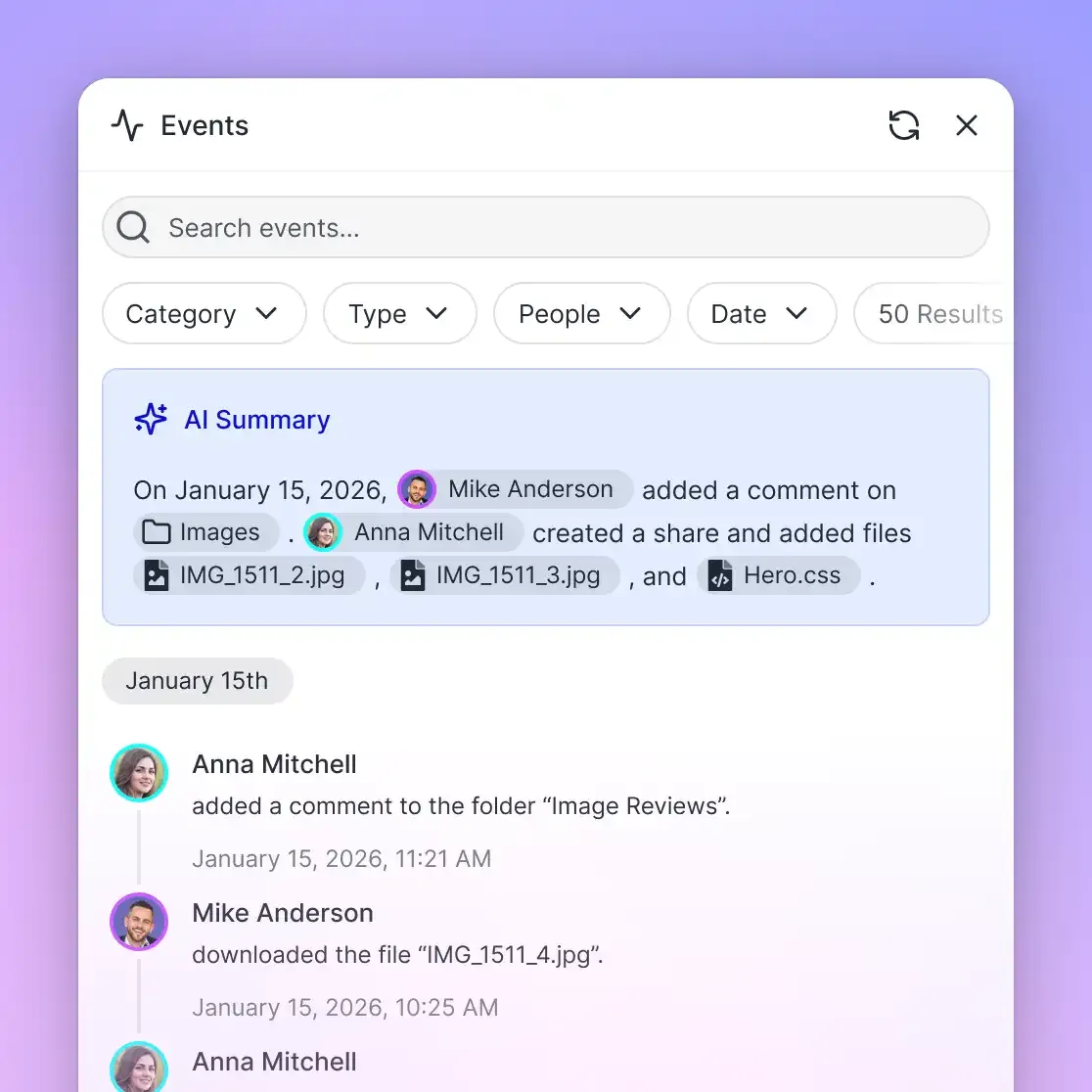
To track modifications across the entire environment, Fastio maintains a detailed activity log of changes. The activity log records organizational modifications, including file uploads, edits, moves, deletions, membership updates, permission adjustments, and share creation. It captures actions taken by human members and autonomous agents alike. The activity log focuses strictly on state changes; it does not record read-only events such as views or downloads.
Subscribing to Workspace Changes and Ownership Transfer
Autonomous agents often need to react dynamically when new files arrive or existing documents change. Rather than running constant, wasteful polling loops that consume API credits and CPU cycles, OpenClaw agents subscribe to the Fastio events feed.
The events feed provides workspace activity updates over a WebSocket connection or via an HTTP long-poll subscription (GET /current/activity/poll/{entity_id}?wait=95&lastactivity={timestamp}). When a teammate drops a new contract into a synced folder or another agent finishes an analysis step, the events feed notifies OpenClaw immediately, allowing it to trigger downstream tasks.
Fastio also supports clean agent-to-human ownership transfer. An OpenClaw agent running automated client onboarding can create an organization, configure project workspaces, sync external cloud drives, and establish branded shares. Once setup is complete, the agent transfers primary organization ownership to a human stakeholder while retaining administrative credentials to perform ongoing maintenance.
Operational Patterns for Enterprise OpenClaw Workspaces
Deploying OpenClaw with persistent cloud storage in production requires balancing synchronization timing, document extraction requirements, and access controls across teams. Autonomous agents operate around the clock, generating structured summaries, parsing incoming documentation, and handing off deliverables to human stakeholders. Without structured operational guidelines, teams risk stale retrieval indexes, unstructured file dumps, and unnecessary infrastructure costs.
Establishing production reliability starts with understanding how background synchronization interacts with real-time agent queries. By defining clear sync schedules, structuring document ingestion with automated schema extraction, and setting up controlled sharing boundaries, engineering teams ensure their autonomous agent fleet operates predictably alongside human colleagues. The following patterns establish reliable file persistence and access controls across enterprise OpenClaw deployments.
Sync Cadence and Structured Extraction with Metadata Views
Cloud Sync connects Google Drive, Dropbox, Box and OneDrive folders to a workspace, one-way or two-way, on a schedule or on demand. It operates periodically or upon manual trigger, never as a continuous or real-time sync.
For production workflows:
- Scheduled Ingestion: Configure sync to run during regular intervals (such as hourly or nightly) for background document synchronization.
- On-Demand Triggering: When an agent requires the latest files before starting a critical task, it can trigger an on-demand sync cycle to pull updated documents immediately.
When workspaces accumulate complex business documents, teams activate Metadata Views. Metadata Views turn unstructured documents into live, queryable tables. Users and agents describe the desired fields in natural language, and AI extracts typed data across PDFs, spreadsheets, Word documents, and scanned images. The schema supports Text, Integer, Decimal, Boolean, URL, JSON, and Date & Time fields. OpenClaw agents can query extracted metadata directly via MCP, enabling structured data analysis without building custom document parsing pipelines.
External Deliverable Sharing and Workspace Economics
When an OpenClaw agent produces client deliverables, organizations need secure methods to distribute files externally without granting third parties broad workspace access.
Fastio provides branded shares (Send, Receive, and Exchange) that create dedicated distribution portals:
- Send Shares: Deliver finished files or reports to clients through branded links. Shares can be configured with expiration dates, access passcodes, and disabled file downloads to keep content strictly within the web preview.
- Receive Shares: Collect files directly from external partners into a designated folder without requiring clients to create accounts.
- Exchange Shares: Enable bidirectional file sharing for collaborative engagements.
External guests who access files via branded share links do not consume organization member seats.
Monthly plans start with a 14-day free trial, which requires a credit card. Creating an account is free; deploying workspaces and connecting remote MCP servers requires an organization on a paid subscription.
Check current plan details and feature allowances on the pricing page.
Troubleshooting Common Storage Connector Issues
When operating OpenClaw with Fastio cloud storage connectors, engineers should monitor several common configuration points:
- Authentication Validation: If OpenClaw fails to connect during the MCP handshake, confirm that the Bearer token matches the key generated in Fastio organization settings. Ensure the key has not expired or been revoked.
- Sync Timing Verification: Remember that Cloud Sync runs on a schedule or on demand, not in continuous real time. If newly added files in Google Drive or OneDrive do not appear immediately in search queries, trigger an on-demand sync.
- Query Scoping: If agent searches return overly broad results, specify narrower file scopes or refine search terms to query specific folders rather than the entire workspace.
- Advisory Lease Refresh: For long-running batch jobs, configure OpenClaw to heartbeat advisory file leases before they expire to maintain coordination signals across agents.
Sources
References used to verify factual claims in this guide.
-
In Google Drive, API limits are defined in terms of quota units representing resource usage and return user rate limit errors when exceeded.
-
When an application exceeds usage limits in SharePoint Online, the service throttles further requests and returns HTTP status code 429.
Frequently Asked Questions
How do I connect OpenClaw to Google Drive or OneDrive?
You connect OpenClaw to Google Drive or OneDrive by linking your cloud folder to a Fastio workspace using Cloud Sync, and then adding the Fastio remote MCP endpoint (`https://mcp.fast.io/mcp/tools`) to your OpenClaw configuration with a scoped Bearer API key. OpenClaw accesses indexed cloud files over Streamable HTTP without needing direct native storage API scripts.
Can OpenClaw read and write files to cloud storage?
Yes. OpenClaw reads and writes files through the Fastio MCP server. It reads indexed files and semantic search chunks using the `storage` tool, and creates folders, moves files, or uploads deliverables using `storage_manage` and `upload_manage`. Two-way Cloud Sync reflects changes back to your connected cloud storage.
What is the best way to give an OpenClaw agent persistent file memory?
The best way to give an OpenClaw agent persistent file memory is through an intelligent cloud workspace connected via remote MCP. Unlike ephemeral container disks or bare S3 buckets, an intelligent workspace maintains persistent file hierarchies, full version history, and automatic semantic indexing across agent restarts.
Does Fastio sync with Google Drive and SharePoint?
Yes. Fastio Cloud Sync connects Google Drive, Dropbox, Box and OneDrive folders to a workspace, one-way or two-way, on a schedule or on demand. SharePoint document libraries connect directly through the OneDrive connector, making enterprise files accessible to OpenClaw agents.
How does an OpenClaw storage connector prevent API rate limits?
An OpenClaw storage connector prevents API rate limits by decoupling agent queries from commercial cloud APIs. Cloud Sync syncs files on a schedule or on demand, and Intelligence Mode pre-indexes the content. OpenClaw searches indexed workspace chunks via MCP rather than executing hundreds of recursive folder traversal calls against Google Drive or SharePoint.
How do multiple OpenClaw agents avoid overwriting shared files?
Multiple OpenClaw agents coordinate using advisory file leases through `lock-acquire`, `lock-release`, and `lock-status` actions. In addition, Fastio maintains per-file version history for all updates, ensuring concurrent writes are preserved and prior revisions can be restored.
Related Resources

Give OpenClaw Persistent Cloud Storage Workspaces
Sync Google Drive, Dropbox, and OneDrive into an intelligent workspace. Give OpenClaw persistent file access and hybrid semantic search via remote MCP. Starts with a 14-day free trial.