How to Use Canva Background Remover in Clay GTM Workflows
"Canva background remover" draws about 40,500 monthly US searches at keyword difficulty 17 and a CPC near $7, yet most guides stop at the click path. Clay GTM teams need the rest: transparent PNG export standards, multi-account cutout libraries, approval handoff, and sequence or ad launch. This walkthrough connects Canva BG Remover to Clay account data and a shared asset workspace.


Why GTM teams treat Canva background remover as a pipeline step
"Canva background remover" attracts about 40,500 monthly US searches, with keyword difficulty 17 and a CPC near $7 (DataForSEO, metrics updated 2026-07-19). That volume is not hobby-design traffic alone. Demand gen, ABM, and outbound ops keep searching for a reliable way to cut out logos, product shots, and headshots so personalized creatives can drop onto templates without a white box or busy stock photo behind the subject.
Canva background remover isolates subjects from photo backgrounds so GTM teams can place logos, products, or headshots onto personalized campaign templates driven by Clay account data. The tool itself is a one-click editor action. The operational problem starts after the cutout: who owns the approved transparent PNG, how you map it to hundreds of Clay rows, and how sales or media buyers get the right version into sequences and ads without downloading five copies of logo-final-v3.png from chat threads.
Clay already treats visual personalization as a first-class GTM pattern. Official Claygent marketing highlights personalized graphic generation at scale with Clay and Canva, including hackathon work on social listening and graphic generation. Clay's personalized demo play shows the same pattern with logos, profile pictures, brand colors, and mockups assembled per contact, reporting an 83% open rate and nearly 7% reply rate on a fully automated campaign. Those plays fail when logo assets still include cluttered backgrounds, low-res JPEG compression, or unapproved brand marks.
Canva's own product pages describe Background Remover (BG Remover) as a Pro-oriented feature: select an image, run BG Remover, then download a high-resolution PNG with a transparent background. Help-style guides stop at that path. They do not cover Clay-driven multi-account creative systems, batch logo cutouts for ABM, or asset approval handoff. This article fills that gap with a five-step production path:
- Remove the background in Canva
- Export a transparent PNG
- Store an approved cutout library
- Map assets to Clay accounts
- Launch in sequences or ads
The design layer (Canva), the data layer (Clay), and the file layer (shared storage) stay separate on purpose. Clay is not a design tool. Canva is not your enrichment table. A shared workspace is not optional if more than one person ships creative.
Related guides
- How to Run Cline as a Background Agent for Autonomous WorkflowsRunning Cline as a background agent transforms the coding assistant from a reactive sidebar extension into an...
- Best OpenClaw Alternatives for AI Agent Workflows in 2026OpenClaw's 353k GitHub stars make it the most popular AI agent framework, but security issues in ClawHub and a growing...
- How to Use a Canva Brand Kit with Clay GTM WorkflowsAbout 85% of companies say they have brand guidelines, yet nearly two-thirds admit those rules are not enforced. A...
- The Clay Tool: A Comprehensive Guide to No-Code GTM WorkflowsWhile traditional B2B databases yield low match rates, the Clay tool sequences data waterfalls across multiple...
- Image Resizer Workflows for Clay GTM CampaignsPages that rank for "image resizer" almost never show how Clay GTM teams turn one master creative into email, ad, and...
- Photopea for Clay GTM Creative Editing WorkflowsPhotopea draws about 450,000 monthly US searches at keyword difficulty 31 and a CPC of three dollars and fifty-three...
More on this subject: Clay and GTM Agents (82 guides)
How to use Canva background remover and export transparent PNGs
Canva's Background Remover is the fastest path most GTM marketers already have access to. On Canva Pro and higher tiers, BG Remover sits in the image edit flow so you can isolate a subject without a desktop photo editor.
Five steps from source photo to transparent PNG
- Upload the source asset. Prefer the original logo, product photo, or headshot. Avoid screenshots of screenshots. For logos, start from a high-resolution mark from brand, not a favicon pulled from a website.
- Add the image to a design and select it. Open the image editor so Effects and BG Remover are available on the toolbar.
- Run BG Remover. Canva isolates the subject and leaves a transparent canvas behind it. Inspect hair edges, thin logo strokes, and white-on-white marks before you trust the cutout.
- Clean edge problems if needed. Use erase or restore brushes when the auto cut removes product edges or leaves background crumbs. For messy stock photos, re-export from a cleaner source instead of over-editing a bad cut.
- Download as PNG with transparency. Choose PNG, enable the transparent background option where offered, and avoid JPG for cutouts. JPG flattens transparency into a solid background.
Does Canva background remover export transparent PNGs? Yes. Canva's Background Remover documentation points you to download the result as a high-resolution PNG and, on the transparent-background workflow, to export PNG so the background stays clear. Transparent PNG export for production assets is a Pro-class capability in Canva's packaging, so plan seats for the people who actually ship campaign files.
Quality rules for ads and outreach cutouts
Treat each cutout as inventory, not a one-off download:
- Naming:
acct_acme_logo_primary_transparent.png,person_jane_doe_headshot_clean.png,product_widget_hero_cutout.png - Variants: light-background and dark-background monochrome logos when brand requires them
- Resolution: export at the largest size you will place on ads or one-pagers; upscaling a 200px favicon will look soft on LinkedIn
- Color space: keep brand reds and blues checked against Brand Kit hex values after removal
- Rights: only cut logos and photos you have rights to use in outbound and paid media
For a single social post, a quick BG Remover run is enough. For ABM and multi-account sequences, the export is the start of a library, not the end of the job.
How to build a Clay multi-account cutout system for ABM
Clay is the enrichment and orchestration layer for account data, not a native Canva integration. Official Claygent pages describe agents that research the web, orchestrate workflows, and create content connected to first- and third-party data. Claygent Builder is the hub for building, testing, and deploying those agents, with document uploads (tone guides, messaging docs, PDFs, CSVs) attached as agent context. Image uploads as agent context fit the same pattern: brand rules and visual references live with the agent, while binary creatives live in a durable library you control.
How do GTM teams batch logo cutouts for ABM? They do not click BG Remover one account at a time inside a live sequence. They stage assets offline (or semi-automated), approve a library, then join cutout URLs into Clay rows.
Recommended column contract
Freeze a small schema before you generate volume:
- account_domain (primary join key)
- company_name (display string for templates)
- logo_source_url (raw logo from enrichment or brand pack)
- logo_cutout_url (approved transparent PNG host URL)
- logo_status (
raw,cutout_ready,approved,rejected) - asset_owner (design ops or campaign owner)
- campaign_id (which sequence or ad set may use the file)
- cutout_notes (edge issues, monochrome required, legal holds)
Enrich company logo URLs in Clay first. Clay enrichment properties commonly expose logo fields you can add as columns. Validate that the URL returns a usable image before design work. Broken logo URLs are cheaper to drop than to cut out.
Batch production pattern
- Pull a prioritized account list from Clay (top-tier ABM, open opportunities, or active sequence targets).
- Export a work queue of domains and logo source URLs to the design owner (CSV or shared sheet is fine for the human step).
- Run Canva BG Remover (or an equivalent cutout tool) and name files to the contract above.
- Upload approved PNGs to your asset library and write the public or share URL into
logo_cutout_url. - Join back into Clay by domain so each row carries the approved cutout for template assembly, ad creative, or mockup services.
- Gate personalization on
logo_status = approvedso sequences never ship with raw or rejected marks.
Clay's personalized demo play is a useful mental model even when your stack differs. That play pulls profile pictures, company logos, brand colors, and screenshots, then compiles a mockup per contact and exports personalization variables for the email tool. Your Canva cutouts become the clean logo and headshot inputs to that kind of assembly, whether you use DynaPictures-style template APIs, Canva Brand Templates for human production, or another creative service. The point is the join: Clay row identity plus approved transparent asset.
When Claygent helps (and when it does not)
Use Claygent for research and judgment: "Does this company rebrand," "Is this the current logo on the homepage," "Is the site running an event worth a personalized mock." Use document uploads in Claygent Builder for tone and brand copy rules. Do not invent a claim that Claygent is a built-in Canva Background Remover. Treat Canva removal as a design-side step (human or separate automation), then store results where Clay can reference them by URL or file ID.



Ship Canva background remover cutouts from one library
Store transparent PNGs from Canva background remover, keep Clay campaign folders versioned, and launch sequences only from approved cutouts. Start with a 14-day free trial.
What library setup stores approved transparent creatives
Where should Clay teams store approved transparent creatives? Not only in Canva project history, and not only as email attachments. You need a durable library that survives contractor turnover, keeps version history, and lets ops answer which file went to which account.
Common options:
- Local folders or desktop Canva downloads work for a solo marketer, then break as soon as two people ship the same campaign.
- Google Drive or Dropbox work for shared folders and light versioning. Many teams already park brand packs there. Weak spots show up when agents need API or MCP access, when you want structured metadata per file, or when approval is informal chat instead of a tracked step.
- Object storage (S3 and similar) works when engineering owns CDN URLs for ad platforms. You still need human review paths and clear naming.
- Fast.io sits as an intelligent workspace for agentic GTM teams: org-owned workspaces, per-file version history, granular permissions, branded shares for Send/Receive/Exchange, collaborative notes with anchored comments, and Intelligence Mode for semantic search across assets once enabled.
A practical library layout:
/gtm-creatives/
  /brand-source/          # original logos and photos
  /cutouts-pending/       # BG Remover exports awaiting review
  /cutouts-approved/      # only assets sequences may use
  /campaigns/
    /2026-q3-abm/
      /logos/
      /headshots/
      /final-composites/
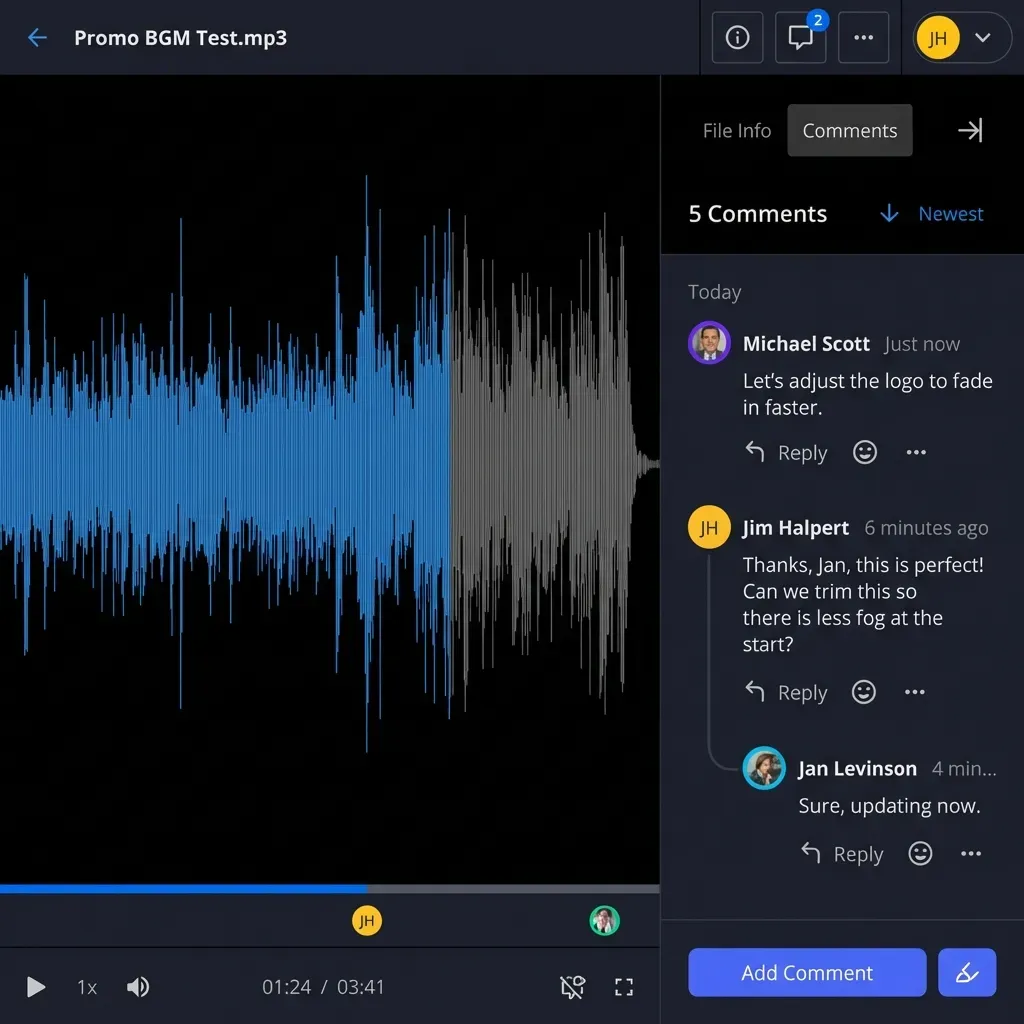
Move files from pending to approved only after a named reviewer checks edges, brand correctness, and rights. Fast.io's detailed activity log records who moved each file, so that handoff is traceable rather than "lmk if this looks ok." Per-file version history keeps a bad re-export from silently replacing last week's good mark. Branded shares let design deliver a folder of approved cutouts to media buyers without handing over the whole brand archive.
Metadata that makes search useful
Filename conventions help, but structured fields help more when volume rises. With Metadata Views, you can describe fields in natural language and extract a live grid from files and docs in the workspace. For a cutout library, useful fields include account domain, asset type (logo, product, headshot), status, campaign ID, and reviewer. Intelligence Mode is different: it indexes files for semantic search and citation-backed chat. Use Metadata Views when you need sortable columns; use Intelligence when someone asks "which transparent logos are approved for the fintech ABM list?"
Agents and humans can share the same workspace. People use the UI; agents can use the Fast.io API or MCP server (Streamable HTTP at /mcp, legacy SSE at /sse). That matters when a Clay-adjacent agent needs to fetch the approved PNG URL after a human marks the file approved. Ownership transfer covers the case where an agent scaffolds the org and a human GTM lead takes the production workspace on Starter, Business, or Enterprise pricing after the 14-day free trial (credit card required; Starter is $9.99 per month, Business $49.99 per month, Enterprise $199.99 per month). Real org work runs on a paid subscription after that trial.
Inline delivery references for agent-side storage setup live at /storage-for-agents/ and pricing at /pricing/.

How to map cutouts into Clay rows and launch sequences
Once logo_cutout_url (and any headshot or product cutout columns) are populated, Clay becomes the join table between account intelligence and creative inventory.
Map and validate
- Join on domain or CRM account ID, not fuzzy company names.
- Validate URL reachability with a simple check enrichment or HTTP call before launch.
- Prefer approved-only rows with a formula or filter so personalization columns stay empty when status is not approved.
- Write composite URLs back if a downstream template service returns a final mockup image, the same pattern Clay's personalized demo play uses when exporting variables for the email sender.
Launch paths
Email and sequence tools: Export a Clay view with contact fields plus image URLs. Import into Instantly, Smartlead, your ESP, or Clay's own sequencer path when that is your execution layer. Personalization tokens should reference hosted cutouts, not Canva edit links.
- Paid social and display: Upload approved composites or cutouts into the ad account asset library. Keep the Fast.io (or Drive/S3) file as the source of truth so media buyers can re-pull without reverse-engineering the ad UI.
- Sales-assisted ABM: Share a branded folder of account-specific one-pagers and logo cutouts with AEs. Use expiring shares when the pack is temporary; use durable shares when the territory list is ongoing and you revoke access later.
Review handoff that scales
A light but explicit path:
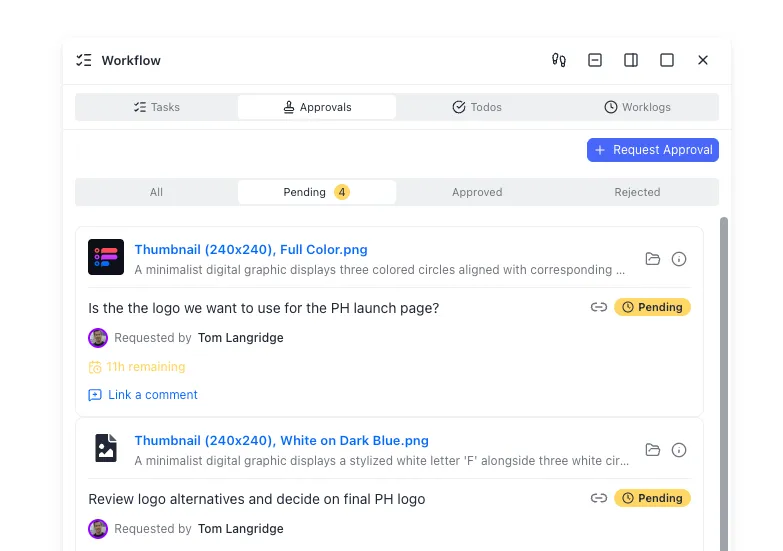
- Design drops cutouts into
cutouts-pending/ - Brand or campaign owner verifies the asset and leaves anchored comments or updates the status in a collaborative note
- Approved files move to
cutouts-approved/and status flips in Clay - RevOps enables the sequence or ad set only for rows with approved assets
- Activity and audit history (in your workspace or ad platform) answer "what shipped" after the fact
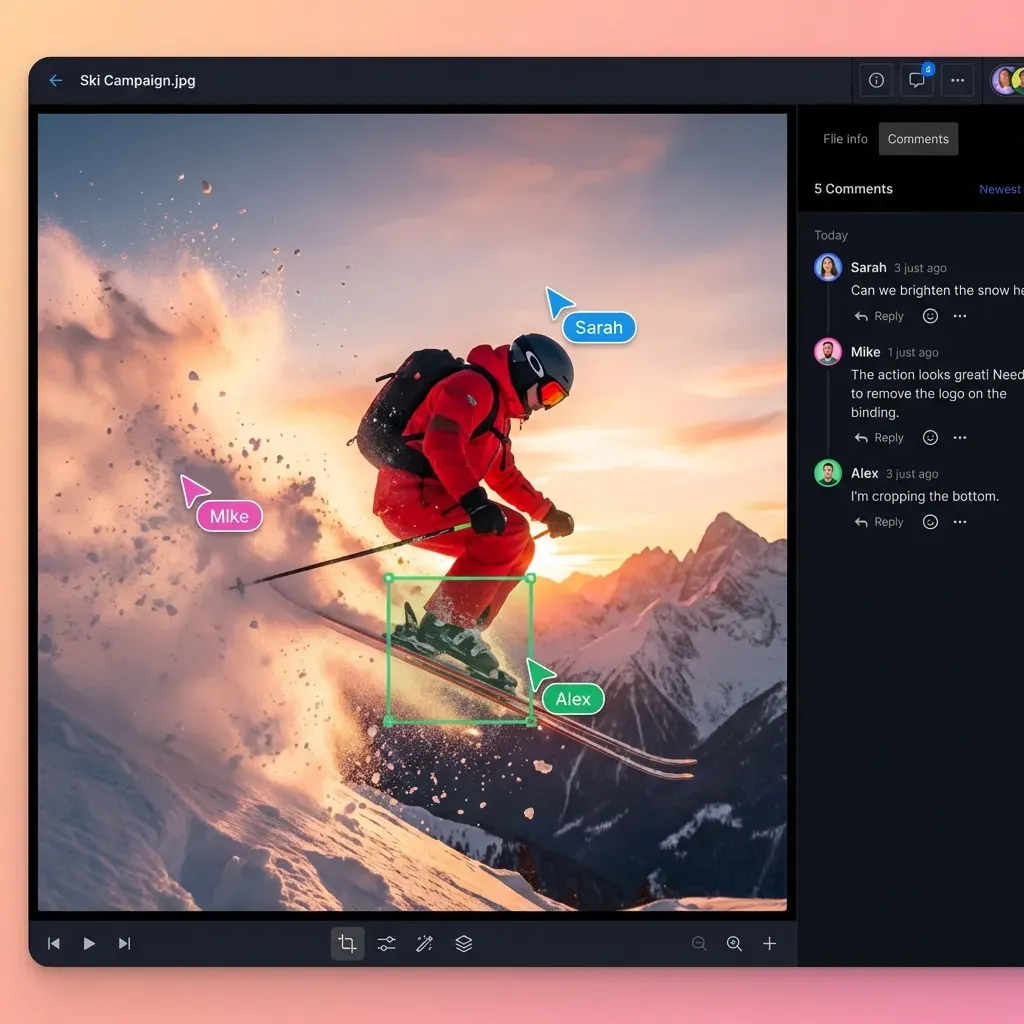
Fast.io's realtime activity feed (WebSocket or long-poll) lets an agent notice new uploads when creative ops wants the handoff automated without building custom ticketing. Comments anchored to image regions help reviewers mark a bad edge without a separate PDF markup tool.
Troubleshooting common failures
White box in email: You exported JPG or forgot transparent PNG. Re-export from Canva as PNG with transparency.
- Jagged logo on ads: Source resolution was too low. Re-cut from a vector or higher-res brand pack.
- Wrong company mark: Domain join failed or the enrichment logo was a partner brand. Re-check homepage and Brand Kit.
- Sequence uses stale file: Cache or CDN still serves an old URL. Version the filename (
_v2) and update the Clay column. - Legal pull: Revoke the share, set
logo_statusto rejected, and re-export the Clay view before the next send.
Keep Canva as the cutout and design surface, Clay as the account and launch brain, and a shared intelligent workspace as the durable file system between them. That split is what turns a Pro editor feature into a repeatable GTM creative system.
Sources
References used to verify factual claims in this guide.
-
"Canva background remover" has about 40,500 monthly US searches, keyword difficulty 17, and CPC near $7 (DataForSEO reports about $7.26)
-
Canva Background Remover removes image backgrounds and supports downloading a high-resolution PNG with a transparent background workflow
-
Canva Pro positions Background Remover for product photos, headshots, and transparent PNGs with one-click removal
-
Claygent marketing highlights personalized graphic generation at scale with Clay and Canva
-
Claygent Builder supports document uploads as agent context and centralized build/test/deploy for GTM agents
-
A Clay personalized demo play assembling logos, profile pictures, and mockups reported 83% open rate and nearly 7% reply rate (official post cites 6.8%) on an automated campaign
-
Fast.io org plans include Starter at $9.99 per month, Business at $49.99 per month, and Enterprise at $199.99 per month, each with a 14-day Business Trial requiring a credit card
Frequently Asked Questions
Does Canva background remover export transparent PNGs?
Yes. After you run BG Remover, download the design as a PNG and enable transparent background where Canva offers that option. JPG exports flatten the image and lose transparency, so use PNG for logos, product cutouts, and headshots you will place on other creatives. Transparent PNG export for production use is part of Canva's paid (Pro-class) packaging in current product docs.
How do GTM teams batch logo cutouts for ABM?
Pull a prioritized account list and logo source URLs from Clay, process cutouts in Canva (or an equivalent tool) offline in a work queue, name files by domain, upload only approved transparent PNGs to a shared library, then write cutout URLs back into Clay columns joined on account domain. Gate sequences and ads on an approved status field so raw or rejected marks never ship.
Where should Clay teams store approved transparent creatives?
Use a durable shared library outside personal Canva download folders. Google Drive or Dropbox work for simple team folders; S3 works when engineering owns CDN delivery. Fast.io is a strong fit when you need org-owned workspaces, version history, anchored comments, branded shares, and optional Intelligence Mode search across assets. Keep pending and approved folders separate and only reference approved URLs from Clay.
Is Canva Background Remover free?
Background Remover is positioned as a Pro-oriented Canva feature. Accounts without a paid Canva subscription often see limited or locked access, while Pro and higher plans unlock the one-click BG Remover workflow and transparent PNG export path described in Canva's product pages. Confirm current plan limits in your Canva admin before you build a production queue around the tool.
Does Clay integrate natively with Canva Background Remover?
There is no need to invent a native one-click Clay-to-Canva BG Remover product. The supported pattern is a recommended workflow: cut out assets in Canva, store approved transparent files in a shared library, and map file URLs into Clay columns for personalization, sequences, and ads. Claygent can research accounts and use uploaded documents as agent context; treat Canva removal as the design-side step.
What file format should I use for ad and outreach cutouts?
Use transparent PNG for logos and subjects that sit on colored templates. Keep a high-resolution source in your brand pack. For full-frame photos without transparency needs, optimized JPG or platform-native formats may be fine, but cutouts for overlays should stay PNG so email and ad templates do not paint a white rectangle behind the subject.
Related Resources

Ship Canva background remover cutouts from one library
Store transparent PNGs from Canva background remover, keep Clay campaign folders versioned, and launch sequences only from approved cutouts. Start with a 14-day free trial.