How to Build Branded Stakeholder Portals for Video Review and Approval
Stakeholder video approval portals are secure, white-labeled web environments where clients and executives can review video content and provide feedback without complex logins. Branded portals increase client approval rates by 25% while reducing the friction of traditional feedback loops. Email-based video feedback often leads to 40% more revision cycles, creating bottlenecks for creative agencies and internal marketing teams.

Why Email is Killing Your Video Production Timeline
Video production is a complex process with many moving parts, but the final stage of client approval is often where the most significant delays occur. For many agencies, this phase still relies on fragmented email threads, spreadsheets, and wetransfer links. This approach is not just unprofessional; it is fundamentally inefficient and creates a massive overhead for your project managers.
According to industry research, email-based video feedback leads to 40% more revision cycles compared to dedicated review platforms. When feedback is buried in an inbox, it becomes difficult to track which version a client is looking at or which specific frame they are referencing. This lack of context leads to "revision bloat," where editors must spend extra hours clarifying vague comments like "make it punchier around the one-minute mark" or "I don't like the music in the middle." Without a visual reference point, these comments are open to interpretation, often resulting in work that still does not meet the client's unspoken expectations.
The cost of this confusion is not just measured in hours; it is measured in the erosion of trust. Every time an editor has to ask for clarification, or every time a version is sent back because of a simple misunderstanding, the client's confidence in your agency takes a small hit. As digital collaboration becomes the standard, with 79% of workers now using dedicated collaboration tools daily, the expectation for a seamless, visual review experience has never been higher. Relying on email makes your agency look like it is stuck in a previous era of production, while a branded portal positions you as a premium, forward-thinking partner.
A centralized portal eliminates this risk by keeping the "source of truth" in a single, controlled environment that you manage. This shift prevents many of the security risks and versioning headaches associated with generic download links.
Related guides
- Video Editing Storage Solutions: Best Options for EditorsVideo editing storage solutions are specialized systems designed to handle the massive bandwidth and file sizes...
- How to Review and Share Film Dailies During ProductionManaging terabytes of raw footage daily is one of the biggest logistical challenges in film production.
- Animation Pipeline: How Studios Manage and Share Animation AssetsAn animation pipeline is the structured workflow that animation studios use to move projects from concept through...
- How to Set Up Motion Graphics Proxy Sharing WorkflowsProxy files let motion graphics teams review and iterate on compositions without transferring full-resolution source...
- How to Automate High-Volume AI Video Review via APIHigh-volume AI video review APIs help developers submit and analyze video assets generated by AI models at scale. As...
- How to Set Up Identity-Locked Character Asset Management for AI VideoIdentity-locked character asset management is the secure storage and retrieval of the digital DNA, including models,...
More on this subject: Video and Media Production (36 guides)
What is a Stakeholder Video Approval Portal?
Stakeholder video approval portals are secure, white-labeled web environments where clients and executives can review video content and provide feedback without complex logins. Unlike internal tools designed for daily editing workflows, these portals focus on the "presentation" layer of the agency-client relationship. They are designed to be as simple as possible for the end-user while providing deep technical control for the production team.
The goal of a stakeholder portal is to remove every possible point of technical friction between your video and the client's final sign-off. This means no software to download, no accounts for the client to create, and a user interface that looks like your own company's website. When a stakeholder clicks a link, they should see your logo, your colors, and a clean video player that starts instantly. They should feel like they have entered a private screening room built specifically for their project.
This professional environment does more than just host files; it creates an authoritative space for high-level decision-making. By providing a clear, branded experience, you signal that the work is ready for its final review, helping to move the conversation away from minor technical tweaks and toward strategic alignment. In practice, this means clients are less likely to nitpick and more likely to look at the big picture, which is exactly what you want during the final stages of a project.
A professional portal also acts as a bridge between the creative world and the business world. While your editors are focused on bitrates and color grading, your clients are focused on brand consistency and messaging. The portal provides a common language through visual feedback, which allows these two groups to communicate without the need for technical translation.
7 Essential Features of a Professional Approval Portal
To capture the 25% increase in approval rates associated with branded portals, your platform must offer more than just a basic video player. It needs a specific set of features designed to facilitate clear communication and fast decisions. These features work together to create a sense of momentum and clarity that email simply cannot provide.
- Branded Experience: Your portal should feature your custom logo and brand colors. This builds trust and maintains professional consistency across all touchpoints. When a client sees their project hosted on a page that reflects your agency's identity, they perceive the work as higher value.
- No-Login Access: Stakeholders are busy and often tech-averse. Forcing them to create an account, remember a password, or navigate a complex dashboard is a guaranteed way to delay feedback. A secure, direct link, often referred to as a "magic link," is the industry standard for frictionless client review.
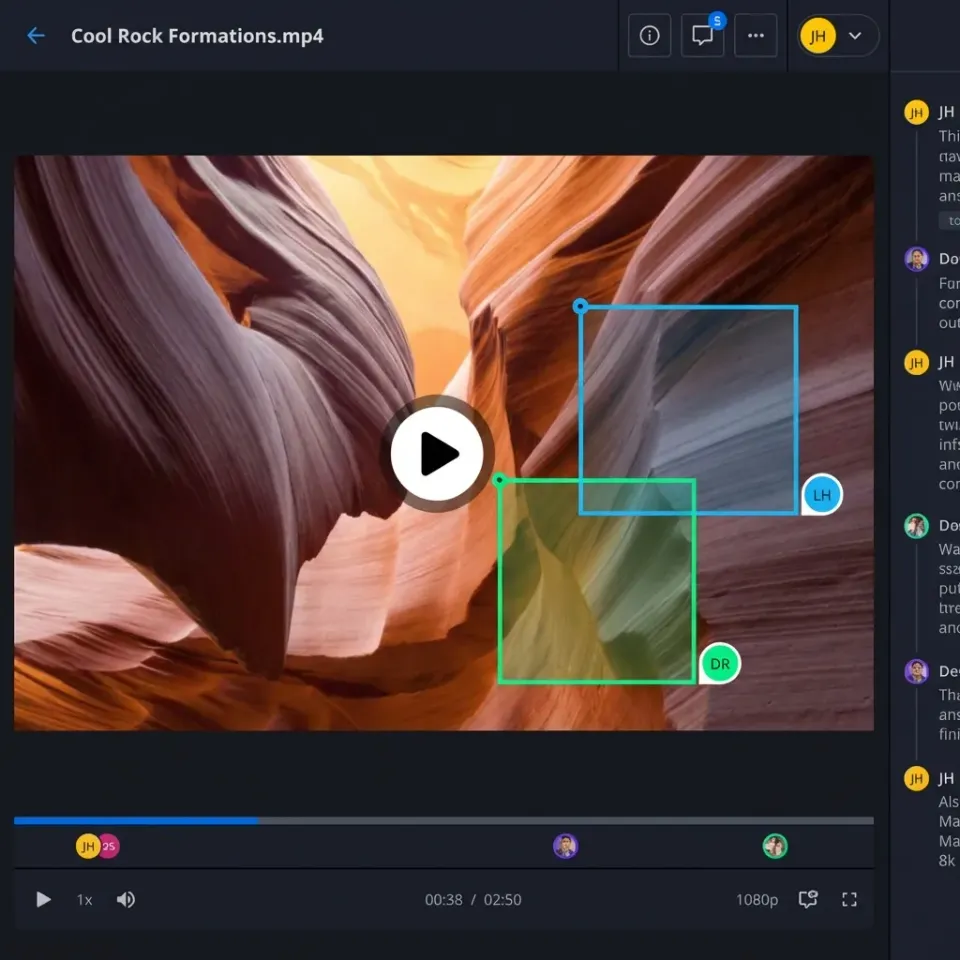
- Frame-Accurate Commenting: Feedback must be pinned to specific timestamps or even specific regions of the video frame. This eliminates the guesswork for your editing team. If a client wants a logo moved two inches to the left at the 00:42 mark, they should be able to click exactly where they want the change and leave a note.
- Version Control and History: Clients should be able to see the progression of the project without digging through their download folder. Having a clear "Version 2" vs. "Version 1" toggle ensures everyone is looking at the latest work while keeping the project's history accessible for reference. This prevents the "didn't we already fix this?" conversation.
- Instant Streaming (HLS): High-resolution video files are massive and difficult to handle. A professional portal uses Adaptive Bitrate Streaming (HLS), which is the same technology used by Netflix, to ensure the video starts playing instantly without buffering, regardless of the client's internet speed. This prevents the frustration of waiting for a file to download just to watch a 30-second clip.
- Side-by-Side Comparison: One of the most common client questions is "What changed from the last version?" A split-screen or side-by-side view allows them to see both versions simultaneously to verify that their previous feedback was implemented correctly. This visual proof of progress builds immense confidence.
- Clear Approval Status and Sign-off: A prominent "Approve" button gives the stakeholder a clear path to closure. This formalizes the process, provides a clear digital record of sign-off, and triggers the next stage of the project, whether that is final rendering or billing.
The Psychology of Client Approval: Why Perception Matters
The way you present your work is just as important as the work itself. This is a hard truth for many creatives to accept, but the psychology of presentation plays a massive role in how feedback is given. When you send a video as a raw file link, you are subconsciously inviting the client to treat it as "raw material" that is still open for significant changes.
In contrast, presenting that same video in a branded, polished portal changes the power dynamic. It signals that the work is a "finished product" ready for evaluation. This psychological shift encourages the client to be more decisive and respectful of the creative choices you have made. It moves the relationship from a vendor-client dynamic to a partnership where both sides are working toward a shared goal.
A professional portal reduces "decision fatigue" by centralizing feedback and providing a clear "Approve" button. This simplifies the client's job. Instead of having to write an email, summarize their thoughts, and double-check their notes, they can simply interact with the video in real-time. This ease of use leads to faster turnaround times and a more positive overall experience, which is the foundation of long-term client retention.
Finally, consider the "Rule of Thirds" in client communication: one-third is the work, one-third is the timing, and one-third is the presentation. If your presentation is sloppy, it drags down the perceived quality of the work and the perceived value of your time. A branded portal is an investment in your agency's reputation as much as it is an investment in your workflow.
Frame.io vs. Fastio: The Editor vs. The Stakeholder
It is common to compare video collaboration tools, but it is important to understand the difference between an "internal workflow tool" and a "client presentation portal." Choosing the wrong tool for the wrong audience can lead to confusion and frustration for everyone involved.
Frame.io is a powerhouse for editors and production teams. It integrates deeply with Adobe Premiere and Final Cut Pro, making it perfect for the daily, high-frequency back-and-forth between a lead editor and their assistants. It is built for people who live in timelines and care about metadata. However, its interface can feel technical and overwhelming for high-level stakeholders, CEOs, or clients who only check in once a week. They don't want to see a complex timeline; they just want to see the video.
Fastio takes a different approach by focusing on the presentation and delivery stage. While it supports frame-accurate feedback for the production team, its primary strength lies in creating a "presentation layer" that feels like a custom-built website for the client. It is the difference between inviting someone into your messy kitchen while you are cooking (Frame.io) and inviting them into the dining room for a five-course meal (Fastio).
Fastio's HLS streaming is 50-60% faster than traditional progressive download methods used by many sync-based services. This speed matters because a client who has to wait for a 2GB file to buffer is a client who is already losing interest in the project. In the fast-paced world of marketing and advertising, every second of friction is an opportunity for the client to get distracted by another task.
Data and Benchmarks: Why Professionalism Pays Off
The shift toward branded portals is not just about aesthetics; it is a data-driven business decision that directly affects your agency's profitability. When you provide a professional review environment, you are directly impacting your bottom line by reducing the most common bottlenecks in the production cycle.
Evidence from industry surveys by organizations like Wyowl shows that 87% of video marketers report a positive ROI from their video content. To maintain that ROI, agencies must reduce the "hidden costs" of production, which include excessive revision cycles, administrative overhead, and the time spent on "feedback gymnastics."
When a portal is branded, client approval rates increase by 25%. This is not just a random number; it is a reflection of the trust that is built when a client feels they are in a secure, professional environment. A video shared via a generic cloud link feels like a "work in progress" or a "casual draft," whereas a video presented in a branded portal feels like a "final delivery." This subtle shift in perception encourages stakeholders to focus on final sign-off rather than requesting small, incremental changes that don't actually improve the final product.
Teams using dedicated review platforms also report that they get their files approved up to 2x faster than those using email. This speed allows agencies to take on more projects with the same headcount, effectively increasing their capacity and revenue without increasing their costs. In a competitive market, the ability to deliver high-quality work faster than your competitors is a significant strategic advantage.
How to Set Up Your Branded Video Portal in Fastio
Setting up a professional approval portal does not require a developer or a complex IT project. With Fastio, you can transform a standard storage workspace into a client-ready environment in just a few minutes. Here is the step-by-step process to transition from email chaos to portal-driven clarity.
Step 1: Create a Dedicated Workspace for the Project Start by creating a new workspace specifically for your client or a particular project. This keeps your files organized and ensures that your internal production assets, source files, and project project files stay completely separate from what the client sees. Fastio plans include 5 to 200 workspaces, so you can have a clean "Client View" for every single account you manage.
Step 2: Apply Your Custom Branding Go to the workspace settings and upload your agency logo and set your brand colors. This branding will appear on every share link, portal page, and notification associated with that workspace. You are essentially creating a white-labeled extension of your agency's brand.
Step 3: Enable Intelligence Mode for Smart Features By turning on Intelligence Mode, your video files are automatically indexed. This allows you to generate smart summaries or transcripts of the video content. These can be incredibly helpful for clients who need to review the specific content of a long presentation, interview, or focus group without watching the entire file from start to finish. It adds another layer of "intelligence" to your delivery.
Step 4: Generate a Secure, Branded Share Link Select your final video file and click "Share." Choose the "Branded Portal" option and set your specific permissions. You can password-protect the link, set an expiration date for time-sensitive projects, or even restrict access to specific email domains for added security.
Step 5: Facilitate the Review and Approval Send the "magic link" to your stakeholder. They can view the video with HLS streaming for an instant, buffer-free experience. They can leave frame-accurate comments, reply to your existing notes, and finally click the "Approve" button when they are satisfied. All their feedback is synced back to your workspace in real-time, allowing your team to get to work on any final polish immediately.

Sources
References used to verify factual claims in this guide.
-
87% of video marketers report that video marketing generated a good ROI
-
79% of workers use digital collaboration tools as of 2021
-
Teams using dedicated review platforms can get files approved up to 2x faster
Frequently Asked Questions
What is a video approval portal?
A video approval portal is a dedicated, white-labeled web page where clients and stakeholders can watch video content and provide feedback. It replaces fragmented email threads with a centralized system for frame-accurate commenting, version tracking, and final sign-off.
How do I share a video for client approval professionally?
To share a video professionally, use a branded portal instead of a generic file-sharing link. Ensure the video plays instantly without downloads, include your company logo, and provide a clear way for the client to leave feedback directly on the video timeline.
Does my client need a Fastio account to review videos?
No, clients do not need to create an account or log in to review videos on a Fastio portal. You can send them a secure, direct link that allows them to watch and comment instantly, removing a major point of friction in the approval process.
Is the video quality preserved in the portal?
Yes, professional portals use HLS (HTTP Live Streaming) to deliver the best possible quality based on the viewer's internet speed. While the client watches a web-optimized proxy for speed, the original high-resolution file remains safely stored in your workspace for final delivery.
Can I password protect my video approval links?
Yes, you can add password protection, expiration dates, and domain restrictions to your share links. This ensures that sensitive content remains secure and is only viewed by the intended stakeholders.
Related Resources

Ready to speed up your video approvals?
Get generous storage with seats included. Start building branded portals for your clients today.