7 Best InVideo Alternatives for 2026 (Free & Paid)
InVideo has 7M+ users worldwide, but it's not the only option. Whether you need better AI avatars, advanced editing timelines, or stronger team collaboration features, there's an InVideo alternative that fits your workflow. This guide compares the top 7 options to help you choose the right video creation tool for your brand.

Why Look for an InVideo Alternative?
InVideo works well for template-based editing and text-to-video conversion. However, users often seek an InVideo alternative for specific reasons. Some find the browser-based editor sluggish with large projects, while others need more control over audio mixing and color correction. As the online video editor market grows 12% annually, new tools are launching with specialized features like hyper-realistic AI avatars, automated subtitle generation, and better integration with cloud storage workflows. When evaluating alternatives, consider these three factors:
- AI Capabilities: Do you need text-to-video, AI avatars, or just smart editing tools?
- Editing Control: Are you looking for simple drag-and-drop or a multi-track timeline?
- Collaboration: How easily can your team review, comment, and share assets?
Helpful references: Fastio Workspaces, Fastio Collaboration, and Fastio AI.
Related guides
- Simplify Global Video Production with Collaborative AI LocalizationGlobal video teams often struggle when translating content for different languages and cultures. Collaborative AI...
- How to Choose the Best Creative Cloud Storage for Your TeamCreative cloud storage goes beyond simple file hosting. For design teams and video editors, it means visual previews,...
- How to Build a Remote Video Editing Workflow That Actually WorksA remote video editing workflow is a structured process that enables video editors, producers, and clients to...
- Video Localization: How to Share Files for Translation and DubbingVideo localization is the process of adapting video content for different languages and regions, including translation,...
- 7 Best Vimeo Alternatives for Professional Video Hosting (2026)Creative teams are looking for Vimeo alternatives as pricing models shift and upload limits restrict high-volume...
- Best WeVideo Alternatives for Video Editing and CollaborationA WeVideo alternative is a cloud-based video editing or collaboration platform that offers different features, pricing,...
More on this subject: Team Collaboration (125 guides)
What to check before scaling invideo alternative
Best For: Marketing teams and beginners who need brand consistency. Canva is the most direct InVideo alternative for users who rely heavily on templates. While originally a graphic design tool, Canva's video editor has improved over time. It offers a large library of stock assets, smooth integration with brand kits (fonts, colors, logos), and a familiar drag-and-drop interface. Unlike InVideo, Canva's "Magic Studio" includes AI tools that connect your videos with other marketing materials. You can resize one video for TikTok, Instagram, and LinkedIn in seconds. However, it lacks some of the detailed audio controls and transition options found in dedicated video editors.

2. Descript: Best for Text-Based Editing
Best For: Podcasters, webinar creators, and content marketing. Descript takes a different approach to video editing by letting you edit the transcript instead of the timeline. If you delete a sentence in the text, it cuts the corresponding video and audio. This makes it a fast InVideo alternative for talking-head videos and interviews. Its "Overdub" feature lets you correct audio errors by typing the new words, generating a synthetic voice that matches the speaker. For teams that produce high-volume content like daily social clips or training videos, Descript's workflow is hard to beat. Consider how this fits into your broader workflow and what matters most for your team. The right choice depends on your specific requirements: file types, team size, security needs, and how you collaborate with external partners. Testing with a free account is the fast way to know if a tool works for you.


Collaborate on Files with Your Team
Stop hitting storage limits. Use Fastio to store, organize, and deliver your video projects with professional branding.
3. Kapwing: Best for Collaborative Teams
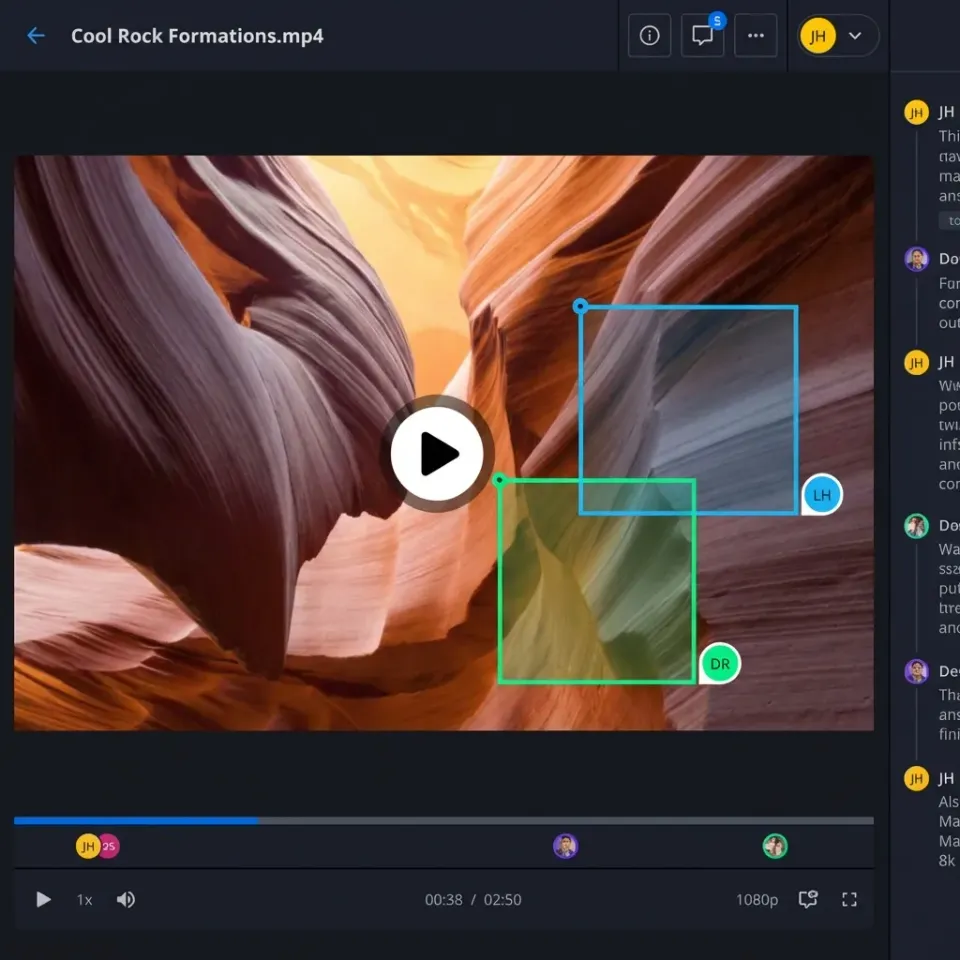
Best For: Remote teams needing real-time collaboration. Kapwing functions like the "Google Docs of video editing." Multiple users can jump into the same project, make edits, and leave comments in real-time. This addresses a major gap in many desktop-based InVideo alternatives where sharing project files is a hassle. It offers strong subtitle generation tools, smart resizing, and a clean, browser-based timeline that feels more professional than Canva's but remains accessible. Kapwing is ideal for social media managers who need to churn out memes, clips, and captioned videos quickly with team input. Effective team collaboration starts with shared context. When everyone works from the same organized workspace, you eliminate the confusion of scattered files and version conflicts. Real-time presence indicators and threaded comments keep discussions focused and productive.
4. HeyGen: Best for AI Avatars
Best For: Training videos, personalized sales outreach, and localization. If your primary use case for InVideo was AI presenters, HeyGen is the better specialist. It focuses entirely on creating hyper-realistic AI avatars that lip-sync to text or audio inputs. HeyGen stands out with its "Video Translate" feature, which translates the audio into another language and modifies the speaker's lip movements to match the new language. While it's not a general-purpose editor, it pairs well with other tools for creating the "talent" layer of your video. Consider how this fits into your broader workflow and what matters most for your team. The right choice depends on your specific requirements: file types, team size, security needs, and how you collaborate with external partners. Testing with a free account is the fast way to know if a tool works for you.
5. Adobe Express: Best for Creative Cloud Users
Best For: Users who want professional assets without the complexity of Premiere Pro. Adobe Express is Adobe's answer to the quick-creation market. As an InVideo alternative, it connects to Adobe's stock library and font collection. It integrates smoothly with Photoshop and Premiere Pro, allowing designers to create assets that non-editors can then use in video templates. It recently added "Firefly" generative AI, allowing users to create text effects and images from prompts directly within the video timeline. Cloud storage architecture matters more than most people realize. Sync-based platforms require local copies of every file, consuming disk space and creating version conflicts. Cloud-native platforms stream files on demand, so your team accesses what they need without downloading entire folder trees.
6. VEED: Best for Social Media Clips
Best For: Influencers and marketers focusing on short-form content. VEED is a streamlined online video editor designed for speed. It was one of the first to popularize the "burned-in" style of subtitles seen on TikTok and Instagram. As an InVideo alternative, it strips away complex features to focus on what creators need: auto-subtitling, progress bars, sound wave visualizations, and one-click resizing. It's less about "crafting" a film and more about packaging content for engagement. Video files demand more from your storage platform than documents do. You need adaptive bitrate streaming for smooth playback, frame-accurate commenting for precise feedback, and enough bandwidth to handle large uploads without timeouts. Progressive download is not good enough for professional review workflows.
7. CapCut: Best for Mobile-First Creators
Best For: TikTok creators and vertical video. Owned by ByteDance (TikTok's parent company), CapCut has a desktop and web version that rivals many paid tools. It's free to start and includes trending effects, music, and transitions that are native to the TikTok ecosystem. For creators who want a free InVideo alternative that handles speed ramps, keyframing, and auto-captions, CapCut is the industry standard for viral content. Consider how this fits into your broader workflow and what matters most for your team. The right choice depends on your specific requirements: file types, team size, security needs, and how you collaborate with external partners. Testing with a free account is the fast way to know if a tool works for you.
Comparison: Top InVideo Alternatives
Here is a quick comparison of how these tools stack up against key features.
The Hidden Challenge: Managing Video Assets
Choosing an InVideo alternative is only step one. The bigger challenge for growing teams is managing the explosion of video files that follows. Online editors often have storage limits, and downloading large exports to share with clients via email or WeTransfer is slow and insecure.
Why file management matters for video teams:
- Storage Limits: Most online editors cap your cloud storage, forcing you to delete old projects.
- Client Delivery: Sending a "view-only" link from an editor often looks unprofessional. Clients expect a branded download portal.
- Archive Access: You need a long-term home for raw footage and final exports that isn't tied to a specific editing tool subscription. Professional teams often use a dedicated file platform alongside their video editor to keep assets safe, organized, and deliverable.
Sources
References used to verify factual claims in this guide.
-
InVideo has 7M+ users worldwide
-
This guide compares the top 7 video creation tool options
-
online video editor market grows 12% annually
Frequently Asked Questions
What is better than InVideo?
It depends on your needs. For AI avatars, HeyGen is better. For text-based editing, Descript is superior. For team collaboration, Kapwing offers better real-time tools. For general design and templates, Canva is the strongest all-around competitor.
Is InVideo free?
InVideo offers a free plan, but it comes with watermarks on your videos and limits on stock media. Most InVideo alternatives like Canva and CapCut also offer free tiers, but often lock premium assets or high-resolution exports behind a paywall.
What is the best online video maker for beginners?
Canva and Adobe Express are the best for absolute beginners because they rely on drag-and-drop templates. If you are looking to learn actual video editing concepts (timeline, trimming), CapCut provides a gentle learning curve with powerful features.
Related Resources

Collaborate on Files with Your Team
Stop hitting storage limits. Use Fastio to store, organize, and deliver your video projects with professional branding.