Building an IT Operations Company Brain: Runbooks, Infrastructure Docs, and Incident Resolution
An IT operations company brain centralizes architecture diagrams, system configurations, and operational runbooks into an intelligent repository queryable by sysadmins and AI agents. Moving markdown and PDF documentation into indexed workspaces reduces reliance on tribal knowledge and can speed up incident response. Citation-backed search ensures engineers and automated agents retrieve checkable remediation procedures under pressure.


The Incident Resolution Gap: Why Static Runbooks Break Under Pressure
During an unscheduled production outage or network degradation, the longest phase of incident response is rarely the time required to execute a remediation command. The delay stems from locating the current, verified runbook that documents which service failed, where its configuration files live, and what steps restore normal traffic without triggering cascading failures. In most organizations, critical operational knowledge is fragmented across private directories, personal bookmarks, outdated wiki pages, and stale markdown files committed to dormant repositories. When systems degrade under load, sysadmins and on-call engineers spend critical minutes hunting across multiple platforms to confirm whether a troubleshooting procedure applies to the current infrastructure topology.
incident.io's guide to automated runbooks describes the same problem: by the time on-call engineers find the runbook link, it is outdated, missing context, or requires copying commands into a terminal under stress. Static documentation systems can fail during high-severity events because they treat operational knowledge as passive archives rather than active execution environments. A runbook written six months prior often contains obsolete flag syntax, points to retired upstream hosts, or fails to mention recent network routing changes. When responders cannot verify whether documentation is current, they fall back on tribal knowledge, ad-hoc terminal probing, or emergency phone trees.
An IT operations company brain is an intelligent, searchable repository of network architectures, system configurations, and operational runbooks used by IT staff and automation agents to rapidly diagnose and resolve technical incidents. In an operational company brain, documentation does not sit idle. As Sentra's article on company brains puts it, a company brain acts as a single, governed organizational memory layer queryable by both human teams and AI agents. Rather than maintaining isolated text silos that humans must manually browse and interpret, an intelligent company brain indexes operational files as they arrive once Intelligence is turned on. The system parses technical specifications, configuration templates, and disaster recovery playbooks so that sysadmins and automated triage agents can query the infrastructure with natural language and receive answers backed by exact file citations.
The primary difference between a passive knowledge base and an active IT operations company brain lies in how documentation interacts with modern automation:
Grounded context for AI agents: Autonomous agents such as Claude Code, Cursor, and custom diagnostics scripts cannot operate reliably without precise, bounded context. Pointing an AI agent at a generic intranet returns broad summaries that lack exact hostnames, parameter values, or environment variables. An IT company brain provides structured document retrieval that returns the exact commands, scripts, and network topology required to resolve an alert.
Single source of operational truth: Production environments evolve continuously through infrastructure updates, hardware migrations, and vendor contract renewals. When runbooks, architecture diagrams, and credential rotation procedures live in one shared workspace, the whole operations team works from the same current files, which makes obsolete troubleshooting routines easier to retire.
Elimination of documentation silos: System administrators frequently maintain specialized notes on their local workstations or within private drive folders. Centralizing these assets in a shared, org-owned workspace ensures that specialized operational expertise remains accessible when primary system owners are offline.
Related guides
- Building a Company Brain for Knowledge Management TeamsKnowledge management teams frequently struggle with fragmented documentation and inefficient search processes. By...
- Building a Company Brain for Marketing Teams: Brand Assets, Messaging, and AI GroundingA company brain for marketing teams unifies brand guidelines, messaging frameworks, customer evidence, and competitor...
- Building a Company Brain for Recruiting Teams: Rubrics, SOPs, and CalibrationA company brain for recruiting teams is an access-controlled, intelligent workspace that indexes hiring rubrics,...
- Building a Company Brain for Sales Engineering: Faster Technical WinsA sales engineering company brain organizes product specifications, architecture blueprints, security whitepapers, and...
- How to Build a Company Brain Workflow for Incident ResponseAn incident response company brain workflow centralizes infrastructure runbooks, architecture diagrams, and historical...
- 18 agentic workflows to run against your company brainYour agent starts every session knowing nothing about your company. A company brain fixes that. One Fastio workspace...
More on this subject: Agent Memory and Storage (367 guides)
Core Components of an IT Operations Knowledge Base
Building a dependable operational brain requires organizing technical assets into clear functional categories. Ingesting unorganized text dumps creates semantic confusion during search queries, increasing the risk that retrieval models pull guidance from the wrong environment. A production-ready IT operations knowledge base must centralize four primary asset types:
Operational runbooks and incident remediation playbooks: These documents provide step-by-step instructions for diagnosing, mitigating, and recovering from specific service failures. High-value runbooks include database failover procedures, ingress controller recovery, disk exhaustion cleanup routines, Kubernetes cluster node evacuations, and certificate renewal instructions. Each runbook must specify the systems affected, prerequisites, verified execution commands, rollback contingencies, and expected output validation.
Network topology diagrams and infrastructure architectures: Visual diagrams, VPC peering maps, subnet routing tables, firewall rules, and border gateway protocol configurations define the physical and logical boundaries of the environment. Storing these assets alongside text-based documentation allows both human engineers and multimodal AI agents to review network flow constraints during routing disruptions or DNS outages.
Identity, access, and SaaS provisioning playbooks: System administration involves routine user lifecycle management, role-based privilege assignments, and vendor integration. Centralizing access control matrices, provisioning guides, and offboarding checklists helps teams spot stray permissions and keep access reviews consistent across distributed teams. When provisioning playbooks remain organized and queryable, IT staff can check license allocations and access tiers quickly.
Post-incident reviews and remediation chronologies: Postmortems contain valuable institutional memory regarding root causes, timeline milestones, and preventative measures. Indexing post-incident analyses ensures that when similar symptoms appear months later, on-call engineers can review past remediation paths rather than repeating diagnostic mistakes.
To convert varied operational files into structured, queryable data, teams can use Metadata Views. Metadata Views turn unstructured documents into a live, queryable spreadsheet database without manual data entry or rigid OCR templates. IT administrators can define typed schemas (such as Server Hostname, Operating System, Kernel Version, Primary IP, Maintenance Window, and Support Tier) in natural language. The system automatically inspects configuration exports, hardware invoices, and server audit sheets, populating filterable rows that allow engineers and autonomous agents to query infrastructure parameters instantly.
Structuring Runbooks for Human and Agent Execution
To ensure runbooks function effectively for both human sysadmins under pressure and AI agents executing triage steps, documentation must follow a consistent, standardized format:
- Incident scope and severity classification: Define the exact alert triggers, error codes, and symptoms that correspond to the playbook.
- Environment prerequisites: List required administrative permissions, target clusters, and connection parameters before any destructive commands are run.
- Step-by-step diagnostic sequence: Provide read-only verification commands that determine the extent of the failure prior to remediation.
- Sequential recovery commands: Document exact terminal syntax, scripts, and flag parameters with clear explanations of expected responses.
- Verification and rollback paths: Detail the specific system checks that confirm operational recovery, along with explicit instructions for rolling back changes if the failure persists.
A 4-Step Framework for Deploying an IT Operations Company Brain
Transitioning an engineering team from scattered operational documentation to a centralized company brain requires a deliberate, structured implementation methodology. Rather than attempting an immediate, all-at-once migration of every historic script and archived memo, IT leaders must prioritize active infrastructure assets, establish secure administrative boundaries, and integrate automated query mechanisms.
Adopting a unified company brain reduces the friction of outdated wikis and disconnected drive folders. When operational files live within an intelligent, permission-governed environment, both human administrators and autonomous agents can locate documented troubleshooting procedures quickly. The following four-step framework establishes a dependable operational knowledge foundation, bridging existing cloud storage investments with modern AI retrieval capabilities.
Step 1: Centralize Runbooks and Infrastructure Diagrams
Begin by auditing existing repositories, internal wikis, shared drives, and local documentation to identify active operational files. Consolidate architecture blueprints, disaster recovery plans, Terraform configuration summaries, and diagnostic playbooks into dedicated, organization-owned workspaces.
Avoid duplicating files with fragmented suffixes like db_failover_v2.md or network_map_final_approved.pdf. Retain clean, canonical filenames such as database-failover-runbook.md and rely on per-file version history. Fastio keeps version history for each file, allowing sysadmins to inspect previous revisions, review modifications, and roll back changes if an automated script or editor introduces errors.
Step 2: Establish Cloud Sync from IT Drives
Engineering teams rarely work from a single storage provider. Different sub-teams often store system backups, network diagrams, and vendor invoices across disparate cloud platforms. Rather than demanding an abrupt manual migration, configure Cloud Sync to unify these disparate repositories into the central company brain.
Fastio Cloud Sync connects Google Drive, Dropbox, Box, and OneDrive folders to a workspace, one-way or two-way, on a schedule or on demand. Teams utilizing Microsoft environments can also sync SharePoint libraries through the OneDrive connector. When syncing documentation from external drives, imported files automatically adopt the Fastio workspace permissions rather than inheriting the source drive's access control lists. This ensures that permissions established in Fastio govern all queries, searches, and AI interactions.
Step 3: Configure Role-Based IT Workspace Permissions
Operational documentation contains proprietary network topographies, hardware serial numbers, and incident escalation paths that must remain restricted to authorized personnel. Fastio enforces role-based access controls set per organization, workspace, and share by member role. Workspace roles include owner, admin, member, guest, and view, while organization roles include owner, admin, and member.
Importantly, Fastio does not offer folder-level or file-level permissions. Every member of a workspace can access all files within that workspace according to their assigned role. To segregate sensitive materials, such as break-glass recovery protocols, executive disaster plans, or root certificate archives, administrators must establish distinct, dedicated workspaces.
A workspace's join setting defaults to allowing any member of the organization to join. To prevent unauthorized employees from browsing restricted IT assets, administrators must restrict the join setting and limit member management to admins and owners, since by default any workspace member can add members. For external auditors, hardware vendors, or contractors requiring temporary review of specific documentation, administrators can generate branded shares with custom expiration parameters and disabled file downloads, ensuring assets remain protected without granting full workspace membership.
Step 4: Integrate AI Triage and Agent Access via MCP
Once documentation is centralized and permissioned, connect autonomous agents and developer tooling directly to the workspace. Fastio provides a remote Model Context Protocol (MCP) server operating over Streamable HTTP, eliminating the need for local file scraping or custom vector databases.
Sysadmins and engineers using terminal coding agents such as Claude Code, Cursor, Cline, or custom automation scripts connect directly to https://mcp.fast.io/mcp/code. Teams using general personal agents, Claude Desktop, OpenClaw, or Hermes Agent connect via https://mcp.fast.io/mcp/tools. Detailed setup instructions and client configurations are documented at https://mcp.fast.io/docs.
When an incident occurs, responders or triage agents query the workspace using Fastio Intelligence Mode. With Intelligence Mode on, Fastio indexes uploaded and synced files as they arrive, combining full-text keyword matching with semantic search by meaning, and new files become searchable once they have been processed. Agents query the workspace to locate remediation commands, and answers cite the source files, with page numbers where a document has pages, so results can be checked.


Centralize your IT operations runbooks and infrastructure docs
Deploy an intelligent workspace for your sysadmin runbooks, network specs, and incident playbooks with built-in semantic search and remote MCP agent access. Monthly plans start with a 14-day free trial, credit card required.
Managing Infrastructure Docs, Configuration Drift, and Runbook Hygiene
The greatest threat to an IT operations company brain is documentation decay. Infrastructure configurations evolve as patches are deployed, capacity is expanded, and network routes are modified. If operational runbooks do not reflect these changes, an engineer following a legacy playbook during an active fire can inadvertently exacerbate an outage.
Maintaining runbook hygiene requires practical operational habits supported by platform-level governance:
Collaborative Notes beside production assets: When updating complex infrastructure, engineers need to capture real-time operational context, command outputs, and temporary flags. Fastio Collaborative Notes live directly beside storage files within the workspace. Notes co-edit live with labeled cursors, allowing sysadmins and connected agents to document maintenance notes, log snippets, and verification checklists without corrupting the canonical runbook file.
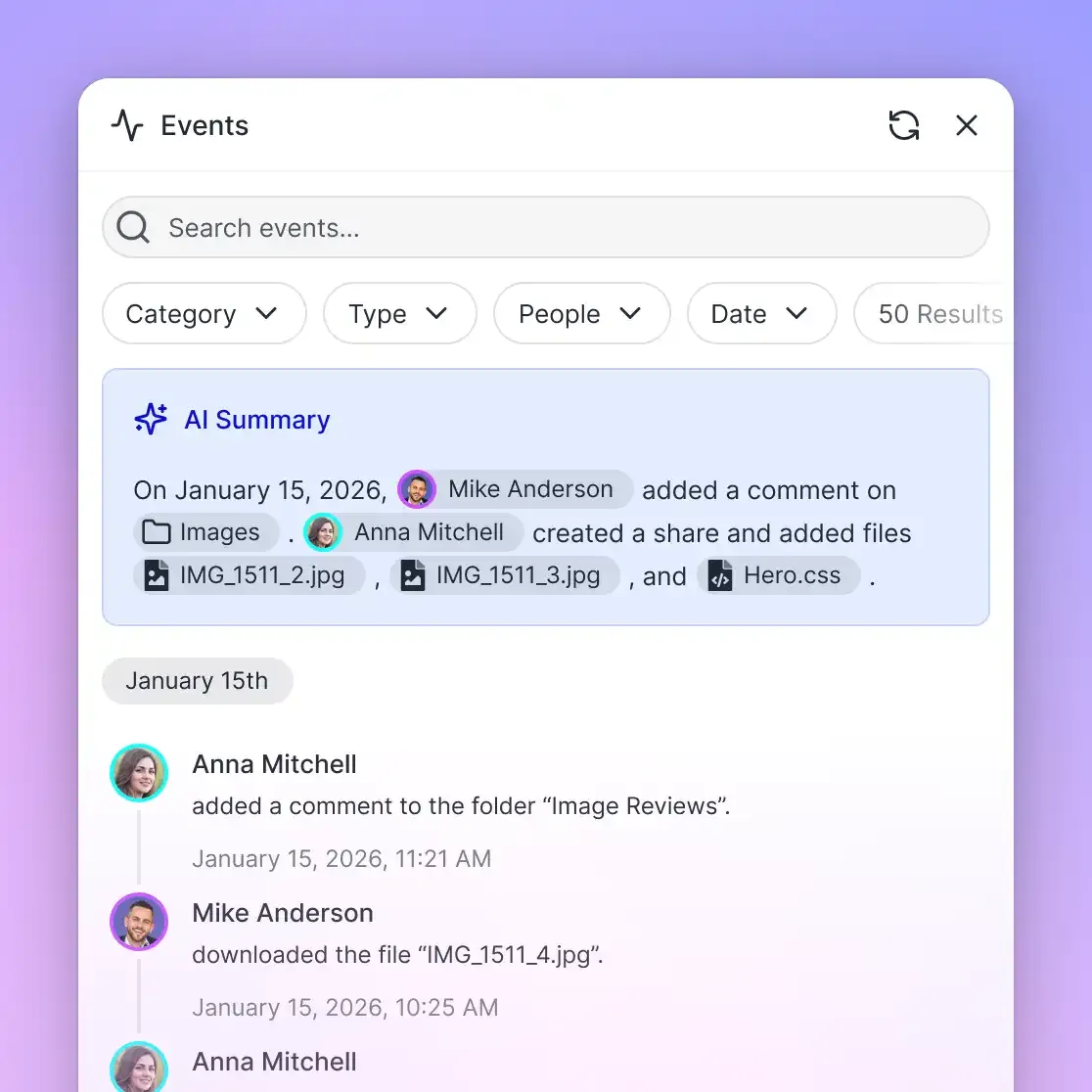
Verifying changes with the detailed activity log: Administrative accountability is essential in production environments. Fastio keeps a detailed activity log of the changes made across the workspace, capturing file uploads, edits, moves, deletions, membership changes, permission adjustments, and share creation. It provides an auditable history of which sysadmin or automation agent updated a configuration file or altered an incident playbook.
Advisory file locks for multi-agent triage: When multiple automated agents or engineers collaborate on incident diagnosis, concurrent modifications to configuration drafts can create conflicting edits. Fastio supports advisory per-file locks in workspace and share storage. Agents acquire, heartbeat, and release locks via MCP tools (
lock-acquireandlock-releaseonstorage_manage, andlock-statusonstorage). Other members and agents can check the lock to see who is updating a file and wait, and because the locks are advisory, unlocked writes still land and version history keeps the earlier versions.Scheduled documentation review cycles: Establish monthly operational audits where on-call rotations review high-frequency runbooks against actual production states. With Intelligence on, Fastio indexes files as they arrive, so a revised markdown runbook or network diagram becomes searchable for agents once it has been processed.
AI-Assisted Incident Triage and Autonomous Remediation Workflows
To understand the operational power of an IT company brain, consider an active production incident scenario:
During a nocturnal alert, an automated synthetic monitoring probe detects elevated HTTP 502 error rates across a distributed API gateway. An alert notifies the on-call systems administrator. Rather than manually opening multiple browser tabs, navigating complex directory structures, or searching through unindexed chat channels, the administrator opens Claude Code connected to the Fastio workspace via the remote MCP server at https://mcp.fast.io/mcp/code.
The engineer issues a natural language query: "Retrieve the troubleshooting runbook for API gateway 502 upstream connection errors and check recent topology changes."
Fastio search runs a hybrid query across the workspace, matching both meaning and exact keywords. The agent returns the diagnostic sequence from runbooks/gateway-troubleshooting.md and quotes the passage it came from. The retrieved documentation reveals that 502 errors commonly occur when connection pool limits on backend worker nodes become exhausted following high-throughput batch jobs. The runbook provides the exact shell commands to inspect pool capacity, verify upstream health endpoints, and trigger a graceful connection pool recycle.
Because the company brain also indexes architecture files, the agent highlights that a maintenance window scheduled two days earlier increased the worker node timeout threshold from thirty seconds to sixty seconds, which correlates directly with connection backlog accumulation. The on-call engineer runs the remediation command from the runbook in the terminal, monitors gateway telemetry as error rates drop, and documents the resolution in the incident log, without leaving the terminal to hunt for documentation.
This is where Fastio differs from enterprise search tools and wikis. Glean searches content that stays in other apps and enforces the permissions it inherits, Guru's Knowledge Agents answer from Guru knowledge bases and connected sources, and Notion keeps pages with Notion AI on top; all three run MCP servers that agents can use. In Fastio, the runbooks, diagrams, and configuration exports themselves live in the workspace, so agents search them, take file locks, co-edit Notes, and save outputs beside the sources under one set of workspace and share permissions.
Creating an account is free; doing real work requires an organization on a paid subscription. Monthly subscriptions start with a 14-day free trial that requires a credit card, while annual plans start paid. The plans on Fastio pricing are Starter ($29 a month, 5 seats, 1 TB), Business ($99 a month, 20 seats, 10 TB), and Enterprise ($299 a month, 50 seats, 50 TB), each with a monthly AI credit allowance. Teams move to a larger plan as operational documentation grows, and Enterprise adds seats at $1 a month each, up to 200.
Sources
References used to verify factual claims in this guide.
-
By the time on-call engineers find a runbook link, it is outdated, missing context, or requires copying commands into a terminal under stress.
-
A company brain acts as a single, governed organizational memory layer queryable by both human teams and AI agents.
Frequently Asked Questions
How do IT teams maintain accurate runbooks?
IT teams maintain accurate runbooks by treating documentation as an active operational asset rather than a static archive. Teams store runbooks in centralized workspaces using single canonical filenames backed by version history, schedule recurring reviews linked to on-call rotations, and update playbooks immediately following post-incident reviews. Utilizing Collaborative Notes beside files allows engineers to record command adjustments and validation checks during maintenance windows.
What should be included in an IT operations knowledge base?
An IT operations knowledge base must include operational runbooks, step-by-step incident remediation playbooks, network topology and VPC routing diagrams, infrastructure-as-code summaries, identity and access provisioning playbooks, vendor support contracts, and historical postmortems. Structuring these assets with clear diagnostic sequences and rollback steps ensures they are actionable for both human engineers and AI agents.
How does an AI company brain improve incident response?
An AI company brain improves incident response by reducing context switching and surfacing cited remediation steps quickly. Rather than manually hunting through unindexed folders or guessing parameter syntax during outages, engineers and triage agents query the brain using natural language. The system retrieves documented commands and architecture context directly from operational runbooks, which can shorten time to resolution.
Does Fastio support folder-level permissions for sensitive infrastructure docs?
No. Fastio permissions are configured at the organization, workspace, and share levels by member role. There are no folder-level or file-level access controls within a workspace. To isolate sensitive operational documentation, such as break-glass recovery credentials or executive continuity plans, administrators create distinct, dedicated workspaces restricted to authorized personnel.
How do AI agents access IT documentation stored in Fastio?
AI agents connect to Fastio using the remote Model Context Protocol (MCP) server over Streamable HTTP. Coding and terminal agents connect to the code endpoint, while general assistants connect to the tools endpoint. Step-by-step setup guides are available at https://mcp.fast.io/docs, and developer integration resources can be explored on [Fastio storage for agents](/storage-for-agents/).
Can Fastio sync operational documentation from Google Drive or OneDrive?
Yes. Fastio Cloud Sync connects Google Drive, Dropbox, Box, and OneDrive folders to workspaces. Sync runs one-way or two-way, on a schedule or on demand. Teams using Microsoft 365 can sync SharePoint document libraries through the OneDrive connector. Synced files automatically adopt the Fastio workspace permissions rather than the source drive's sharing settings.
How does Metadata Views differ from Intelligence Mode search?
Intelligence Mode provides hybrid unstructured search, combining semantic search and keyword matching to power conversational chat and citation-backed document retrieval. Metadata Views perform structured data extraction, automatically converting documents like hardware spec sheets, server inventories, and vendor contracts into typed, filterable spreadsheets without manual OCR templates.
Related Resources

Centralize your IT operations runbooks and infrastructure docs
Deploy an intelligent workspace for your sysadmin runbooks, network specs, and incident playbooks with built-in semantic search and remote MCP agent access. Monthly plans start with a 14-day free trial, credit card required.