How to Build a Collaborative AI Knowledge Base for Teams
An AI knowledge base is an intelligent workspace where humans and AI agents collaborate on organizational knowledge. While over 70% of teams will deploy autonomous AI agents by 2026, search processes still waste time, but AI-driven knowledge access can reduce information search time by up to 35%. This guide explains how to build a collaborative AI knowledge base using auto-indexing, hybrid search, real-time cursors, and Model Context Protocol access.


Why Teams Need a Collaborative AI Knowledge Base
While over 70% of teams will deploy autonomous AI agents by 2026, McKinsey research reveals that employees still spend a large portion of the day searching for details, and AI-driven knowledge access can reduce information search time by up to 35% [McKinsey Global Institute 2012]. According to Capgemini research, over 70% of teams will deploy autonomous AI agents by 2026 [Capgemini Research Institute 2025]. This search tax is not an inconvenience for human team members. For autonomous research and coding agents, fragmented data is a failure mode. When an AI agent lacks access to structured, up-to-date corporate context, it spends expensive context window tokens scanning irrelevant files, or it generates incorrect answers.
An AI knowledge base is a centralized, intelligent workspace where both human team members and AI coding or research agents can retrieve, edit, and collaborate on organizational knowledge. Traditional knowledge bases are built for customers to read static FAQs, but a modern team needs a shared environment where humans and AI agents work alongside each other. This setup bridges the gap between passive storage and automated execution, enabling developers to build agentic workflows that operate on grounded, verified corporate facts.
To build a successful system, teams must focus on the four essential pillars: automatic indexing on arrival, hybrid search retrieval, collaborative co-editing, and programmatic Model Context Protocol access. By combining these pillars, you create a unified company brain where humans write strategy briefs, agents generate research updates, and the entire workspace is queryable in plain English.
Related guides
- How to Build a Company Brain for Human-Agent CollaborationBuilding a centralized company brain is essential for organizations deploying AI agents. As teams adopt autonomous...
- 18 agentic workflows to run against your company brainYour agent starts every session knowing nothing about your company. A company brain fixes that. One Fastio workspace...
- How to Build Persistent Storage for Agentic WorkflowsAgentic workflow storage lets autonomous agents maintain state, share files, and persist progress across long-running...
- How to Build and Query Box RAG Workspaces with AI AgentsBox RAG enables AI agents to retrieve and cite context from enterprise Box documents without downloading entire folder...
- The Ultimate Company Brain Setup Checklist for Teams and AgentsLearn how to build a unified knowledge base using this practical company brain setup checklist. Connect team...
- How to Build Persistent Memory in CrewAI AgentsCrewAI memory is a framework-level feature that allows agents to store and retrieve past experiences, improving...
More on this subject: Agent Memory and Storage (261 guides)
How Auto-Indexing and Hybrid Search Power Team Retrieval
Building an AI knowledge base requires moving beyond standard folder hierarchies and local search. Traditional team storage systems rely on manual folder structures where documents go to die. When a developer builds a retrieval-augmented generation pipeline on top of basic storage, they usually have to set up separate document ingestion scripts, chunking algorithms, embedding models, and vector databases. This stack is expensive to maintain, and the latency between a file change and the vector store update often results in stale search results.
Instead of building a separate retrieval stack, teams are turning to intelligent workspaces that index files on arrival. In this architecture, when a teammate imports a document or an agent writes a draft, the workspace processes the file. The intelligence layer chunks the text, computes vector embeddings, and updates the search index automatically.
To make retrieval reliable, the system must support hybrid search. Hybrid search combines exact full-text matching with semantic meaning-based retrieval. For example, if a human or agent queries the knowledge base for a specific contract number, the engine uses full-text search to locate the exact string. If the query asks for the general policy on remote work, the engine uses semantic search to retrieve the relevant passages even if they do not contain the words "remote work."
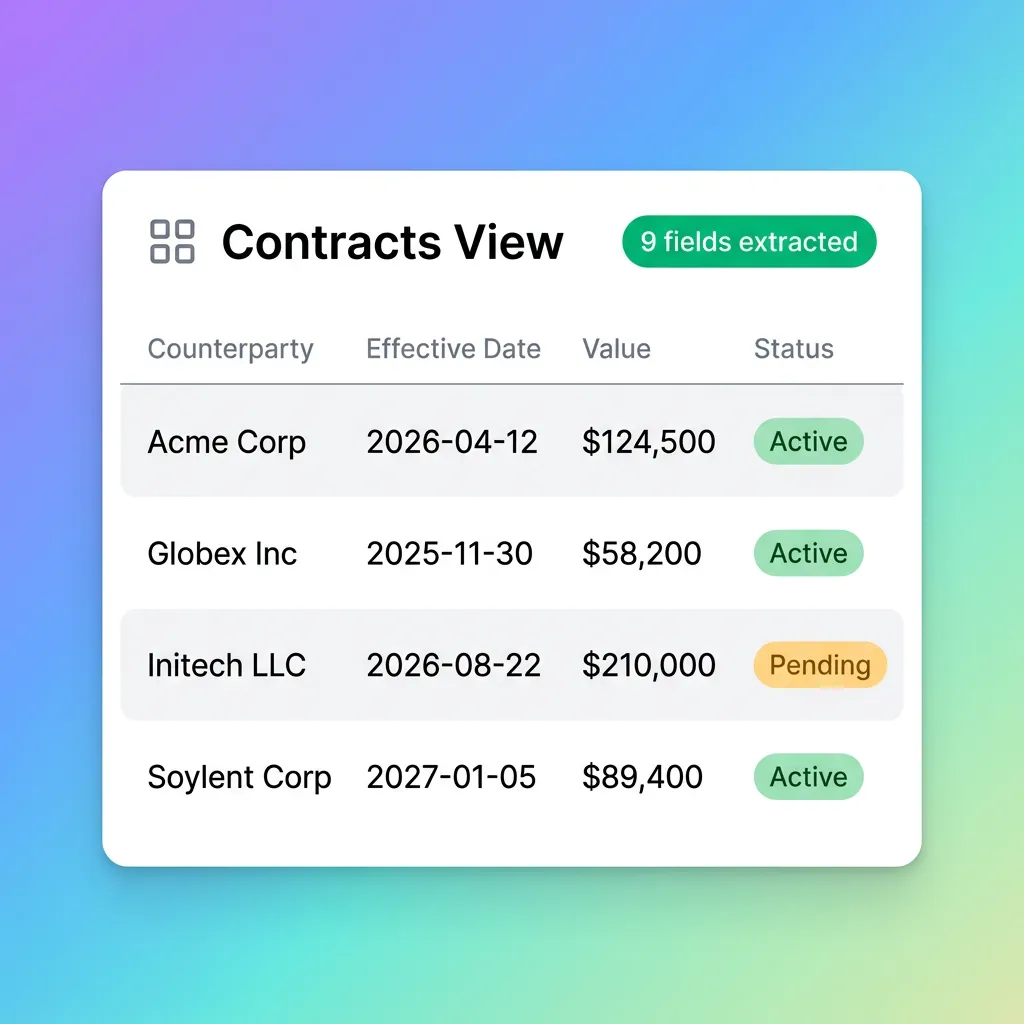
Teams can use structured metadata views to query documents by value rather than scanning text. Fastio Metadata Views turn unstructured documents into a live, queryable database. Rather than having an agent read every PDF in a folder to find relevant contract dates, you describe the fields you want extracted in natural language. The AI model designs a typed schema, matches the files, and populates a spreadsheet with fields like date, decimal, or boolean. The search engine can then filter by metadata values, allowing agents to run queries like "jurisdiction = California" or "amount greater than ten thousand" before executing text search.

Why Multiplayer Co-Editing is Key for Human-Agent Collaboration
Most documentation tools treat AI as an external assistant that summarizes text after it is written. In a collaborative AI knowledge base, human team members and AI agents are first-class co-editors. This means they share the same documents, comment threads, and cursors, allowing them to collaborate in real time.
To support this model, industry reports show that organizations with integrated human-agent knowledge workflows report 40% higher developer productivity [IBM Software Group 2025 Survey]. Rather than using separate text editors and copy-pasting drafts into communication channels, teams can write documents directly inside the intelligent workspace. Fastio Notes brings co-editing to every workspace with live multiplayer cursors. Humans and agents can edit the same note simultaneously, with their active cursors visible to each other.
This co-authoring model enables collaborative workflows:
- Real-Time Brief Generation: A human developer initiates a project note and outlines the goals. A connected research agent scans the web, retrieves competitor gaps, and appends a competitive intelligence section directly to the note. The human editor reviews the additions in real time, making corrections inline.
- Automated Document Updates: When a developer updates a code file, a connected agent reads the changes and updates the corresponding architecture notes in the workspace. Because the notes are indexed for AI grounding, the updated information is immediately available to other agents querying the workspace.
This collaborative approach prevents context rot. Because humans and agents work from the same files, folders, and shared context, they avoid duplicating research and coordinate more efficiently. When an agent finishes curating a collection of files, like an onboarding packet or an investor update, it can keep the workspace organized, add metadata tags, and hand it off to a human reviewer.



Build a Collaborative AI Knowledge Base for Your Team
Get started with an intelligent workspace featuring auto-indexing, hybrid search, and native MCP access for your AI agents. Start a 14-day trial, cancel anytime.
How to Connect Coding and Research Agents via the MCP Server
For an AI knowledge base to be useful, coding and research agents must be able to read, write, and search files programmatically. Traditional APIs require developers to write custom integration code for every tool, mapping workspace paths to database queries and writing complex authentication logic.
The Model Context Protocol (MCP) addresses this by standardizing how LLM applications connect to external data sources. Fastio exposes a consolidated MCP toolset that allows any MCP-compatible agent, such as Claude Code, Codex, Cursor, Gemini, or OpenClaw, to interact with the workspace. The platform exposes two remote transport protocols: Streamable HTTP at /mcp and Server-Sent Events (SSE) at /sse. Using the Streamable HTTP endpoint is recommended, as it runs bi-directional communication over a single connection, avoiding firewall conflicts.
When an agent connects to the Fastio MCP server, it receives scoped access to the workspaces, folders, and shares it needs. The agent can then use the consolidated tools to read and write files programmatically, search the workspace using hybrid retrieval, and query Metadata Views to retrieve structured data.
Importantly, this integration respects user permissions and access control. Every action performed by an agent is authenticated under its specific identity and recorded in a detailed activity log, retained according to your plan, so human administrators can track which agent updated a file, retrieved a document, or created a share. When credits run out or the agent's task is complete, ownership transfer lets the agent account transfer the organization to a human colleague via a claim link, keeping the workspaces active under human administration.

How to Set Up Your AI Knowledge Base in Ten Minutes
Setting up a collaborative AI knowledge base for your team does not require weeks of engineering. By using an intelligent workspace platform, you can connect your data, set up search, and configure agent access in about ten minutes.
Step 1: Initialize the Intelligent Workspace
Create a new organization-owned workspace for your team. Under the workspace settings, enable Intelligence Mode. Once enabled, every document uploaded to the workspace is automatically chunked, embedded, and indexed by Ripley, the built-in RAG assistant, for semantic search and Q&A.
Step 2: Ingest Existing Documentation
Use the Cloud Import interface to connect your existing files. Fastio supports OAuth-based imports from Google Drive, Dropbox, OneDrive, and Box, preserving your folder structure. You can also use URL import to pull files from public web addresses directly into the workspace without local I/O.
Step 3: Define Metadata Views
Set up structured columns to help agents filter your files. Create a new Metadata View (/product/document-data-extraction/) and describe the columns you want, such as "expiration_date" (Date & Time), "status" (Text), or "is_verified" (Boolean). The system will scan the workspace, extract the fields from your documents, and present them in a queryable data grid that agents can filter via MCP.
Step 4: Keep Humans in the Loop
For example, when an incident brief is uploaded, an agent can draft a summary directly into a Collaborative Note for the on-call team to review in real time. Every file keeps a complete version history, so a human reviewer can compare an agent's edit against the prior version and restore an earlier copy if needed, and the activity log records who (or which agent) changed what.
Sources
References used to verify factual claims in this guide.
-
AI-driven knowledge access can reduce information search time by up to 35%
-
Organizations with integrated human-agent knowledge workflows report 40% higher developer productivity
-
Over 70% of teams will deploy autonomous AI agents by 2026
Frequently Asked Questions
What is an AI knowledge base?
An AI knowledge base is a centralized, intelligent workspace where both human team members and AI coding or research agents can retrieve, edit, and collaborate on organizational knowledge. Unlike traditional static FAQs, it incorporates automatic indexing on arrival, hybrid semantic and full-text search, collaborative real-time editing, and programmatic API access.
How do I build an AI knowledge base for my team?
You can build an AI knowledge base in ten minutes by creating an organization workspace and enabling Intelligence Mode. Use Cloud Import to pull files from Google Drive, OneDrive, Box, or Dropbox, and define Metadata Views to extract structured columns. Finally, connect your coding or research agents to the workspace using the Fastio MCP server at `/mcp`.
What is the best AI knowledge base software?
The best AI knowledge base software combines collaborative workspaces with programmatic agent access. While tools like Google Drive or standalone vector databases require separate integration stacks, Fastio provides an integrated solution. It features automatic indexing, hybrid search, Collaborative Notes, and a native MCP server, allowing humans and AI agents to work from the same files under paid plans starting at nine dollars and ninety-nine cents a month.
How do AI agents interact with the knowledge base?
AI agents connect to the knowledge base using the Model Context Protocol (MCP) server. By connecting to the [Fastio MCP server](/storage-for-agents/) over Streamable HTTP or legacy SSE, agents can read, write, and search files programmatically. Every action is tracked in a detailed activity log, and agents can transfer ownership of workspaces to humans when tasks are complete.
What is the pricing model for Fastio workspaces?
Creating a user account is free, but executing work requires an organization on a paid subscription. Monthly plans start with a trial of up to 14 days (credit card required); annual plans have no trial. Plans include Starter (nine dollars and ninety-nine cents a month), Business (forty-nine dollars and ninety-nine cents a month), and Enterprise (one hundred ninety-nine dollars and ninety-nine cents a month), with billing based on usage-based credits.
Related Resources

Build a Collaborative AI Knowledge Base for Your Team
Get started with an intelligent workspace featuring auto-indexing, hybrid search, and native MCP access for your AI agents. Start a 14-day trial, cancel anytime.