How to Manage VR Video Assets Effectively
VR video asset management refers to the processes and tools used to organize, store, and share immersive 360-degree videos and VR content for production teams. These files pose unique challenges due to their massive sizes and specialized formats. This guide walks through practical workflows for storage, library building, team review, and advanced features to keep projects on track.

What Is VR Video Asset Management?
VR video asset management is the practice of handling 360-degree and immersive video files throughout the production lifecycle. It covers upload, organization, metadata tagging, version control, and secure sharing for teams creating VR experiences.
Production pipelines start with raw captures from 360 cameras like Insta360 or GoPro Max. These equirectangular videos need stitching, grading, and export. Teams then review, approve, and deliver finals to clients or platforms like Oculus or YouTube VR.
Effective management reduces search time and errors. A centralized system lets editors find shots by description, not filename. For example, query "drone shot of city skyline from 10am" instead of scrolling folders.
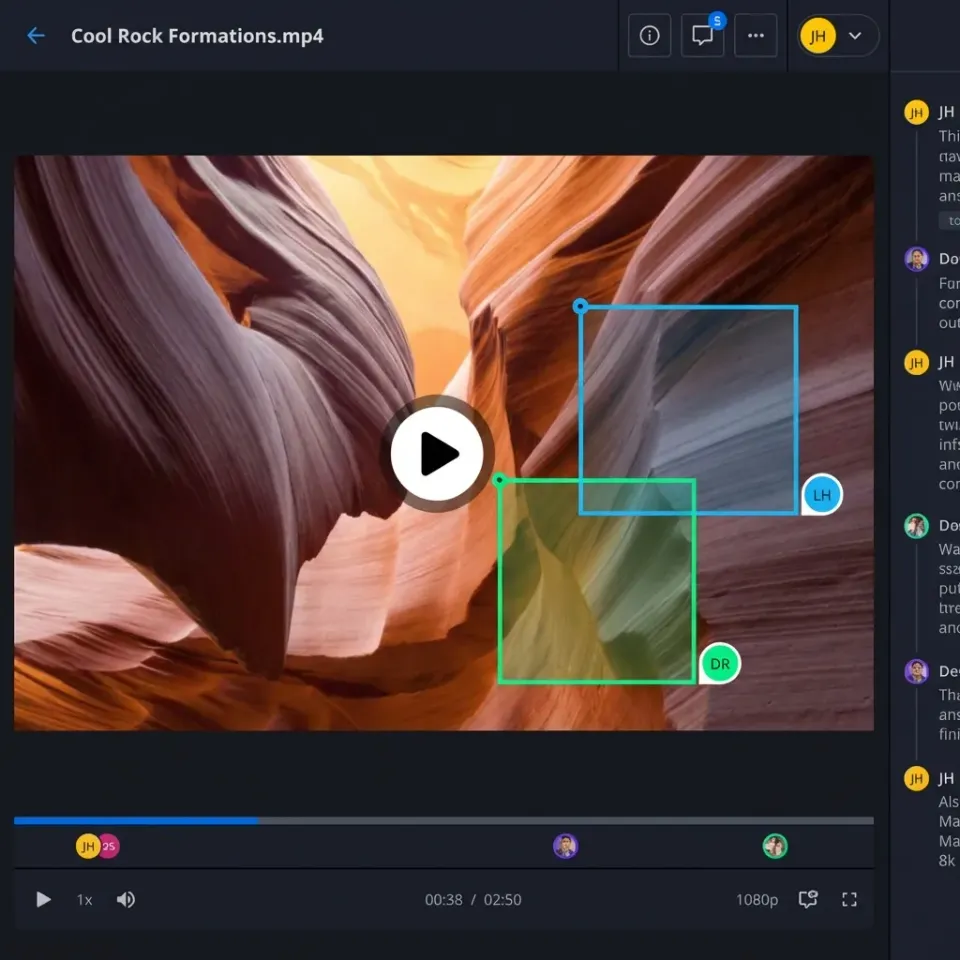
Fastio workspaces provide browser-based previews for VR files, with frame-accurate comments. This setup supports the full workflow from ingest to delivery without local storage hassles.

Related guides
- Best Wistia Alternatives for Professional Video HostingWistia is a strong video marketing platform, but its per-video pricing model and feature limitations push many...
- How to Set Up Motion Graphics Proxy Sharing WorkflowsProxy files let motion graphics teams review and iterate on compositions without transferring full-resolution source...
- Animation Pipeline: How Studios Manage and Share Animation AssetsAn animation pipeline is the structured workflow that animation studios use to move projects from concept through...
- Managing Video Datasets for Multimodal AI TrainingMultimodal AI models need video data aligned with text, audio, and sensor inputs, but managing those datasets is far...
- How to Manage Vtuber Video Assets and 3D Avatar StorageManaging Vtuber assets means keeping track of 3D models, motion capture logs, and massive video archives in one place....
- Video Editing Storage Solutions: Best Options for EditorsVideo editing storage solutions are specialized systems designed to handle the massive bandwidth and file sizes...
More on this subject: Video and Media Production (36 guides)
Key Challenges with VR Video Files
VR videos demand more resources than standard footage. A 4K 360 clip runs 100-600 Mbps bitrate, making a 60-second take 450MB to 2.7GB. Full projects quickly hit terabytes.
Common issues include slow uploads over home internet, incompatible formats across tools (Unity vs Premiere), and lost metadata like stitch params or spatial audio tracks.
Collaboration adds friction. Emailing ZIPs fails for sizes over 25MB. Traditional storage lacks VR-specific previews, forcing downloads for review.
Bandwidth limits scrubbing during edits. Without adaptive streaming, teams buffer endlessly on feedback calls.
Solutions focus on cloud platforms with chunked uploads, format-agnostic previews, and metadata persistence.
Setting Up Reliable 360 Video Storage
Start with a cloud service supporting large files without compression. Fastio uploads large files in chunked sessions, and upload limits depend on the plan.
Step 1: Create a dedicated workspace. Name it by project, e.g., "Q1-VR-Campaign." Invite team via email.
Step 2: Upload assets. Drag-drop raw footage or use API for automation. Instant transcoding generates web proxies while preserving originals.
Step 3: Enable streaming. HLS adaptive bitrate delivers smooth playback at 1080p across devices. Scrub timelines without full downloads.
Step 4: Set permissions. Workspace admins control access, folders for raw/edited/finals.
Compare options:
This foundation scales as projects grow.

Building an Effective VR Media Library
Organization turns chaos into a searchable library. Use hierarchical folders: /Project/Raw/Camera1, /Project/Edited/VFX, /Project/Deliverables.
Add metadata manually or auto-extract. Fastio's Intelligence Mode indexes files for semantic search. Ask "find beach drone shots under 5GB" for instant results with citations.
Tag with keywords: "360", "equirectangular", "spatial-audio". Custom fields for bitrate, stitch software, headset target (Quest vs PSVR).
Versioning tracks changes. Upload V2 next to V1; comments note differences.
For scale, integrate with DAM tools via API. Export metadata to CSV for Unity imports.
A well-built library cuts retrieval time by hours per project. Teams access assets from anywhere, reducing "where is that file?" emails.



Optimize Your VR Video Workflows Today
Fastio provides the storage, organization, and collaboration tools for VR teams, including shared workspaces, streaming previews, and team features.
Collaboration Workflows for VR Teams
Real-time review speeds approvals. Share workspace links with clients; they preview in browser without accounts.
Pin comments to specific frames: "At 1:23, adjust exposure on left hemisphere." Threaded replies resolve issues fast.
Use Follow Mode to sync views during calls. See teammates' cursors on timelines.
Branded portals for stakeholders: custom logo, password, analytics on views/time spent.
External shares can expire and can disable file downloads for security. Audit logs track all access.
In practice, a director joins the workspace, reviews on iPad, comments live. Editor responds instantly, iterates without new exports.

Advanced Tips for Professional VR Workflows
Subscribe to the activity feed over WebSocket or long-poll to trigger renders on upload.
For agents, MCP tools let AI analyze footage, extract clips.
Integrate URL import from cameras or S3.
Monitor usage with activity feeds. Smart summaries digest comments.
Export to platforms: direct links for YouTube 360 upload.
Troubleshoot: if streaming lags, check proxy generation status. For metadata loss, enable Intelligence early.
These steps build resilient pipelines handling growth.
Sources
References used to verify factual claims in this guide.
-
The consumer VR market is projected to reach over 18 billion U.S. dollars by the end of 2025.
Frequently Asked Questions
How do you manage VR video assets?
Use cloud workspaces for storage, semantic search for organization, and frame-accurate comments for review. Tools like Fastio combine these into one platform.
What is the best storage for 360 videos?
Choose services that handle very large files, HLS streaming, and metadata. Fastio offers browser previews without downloads.
What formats are used for VR videos?
Common formats include equirectangular MP4 for 360, fisheye for raw, and glTF for interactive. Store originals with proxies for web.
How to share large VR files securely?
Generate branded share links with expiration, passwords, and view-only access. Track downloads via audit logs.
Can teams collaborate on VR edits in real time?
Yes, with live presence, follow mode, and anchored feedback. No need for screen shares.
What tools support VR metadata?
Platforms with AI indexing extract and search by content. Manual tags supplement for custom fields.
Related Resources

Optimize Your VR Video Workflows Today
Fastio provides the storage, organization, and collaboration tools for VR teams, including shared workspaces, streaming previews, and team features.