Content Collaboration Software: Choosing a Platform for Teams, Clients, and AI Agents
Pointing an AI assistant or an external client straight at a company-wide SharePoint library or Google Drive exposes years of mixed folders that are too risky to share and too tangled to reorganize. Content collaboration software gives teams a scoped environment to store, preview, annotate, and share files with colleagues, clients, and AI agents. Here is how self-hosted platforms, cloud suites, and scoped workspaces compare.

What Content Collaboration Software Does and Why Folder Trees Break
When an IT director rolls out Claude or ChatGPT across a mid-sized firm, or when an account lead needs to hand project deliverables to an outside partner, the first instinct is to connect the company's existing SharePoint library, Google Drive, or Box folders directly. That approach fails almost immediately in practice. Production folder trees accumulate years of mixed materials: finalized client decks sit beside internal pricing spreadsheets, draft legal agreements, and personnel notes. Giving an AI assistant or an outside contractor access based on a user's broad drive permissions exposes far more than the single project they need to see, and reorganizing years of directory structures is not realistic for a busy operations team.
Content collaboration software is the workspace layer where organizations store documents and media, control who can read or modify them, preview files in the browser, capture feedback in context, track version history, and exchange deliverables with outside partners. Earlier generations of these tools focused on basic desktop folder syncing or browser co-authoring for office documents. Today, the job has expanded because three different groups need to work on the same files without stepping on each other: internal staff, external clients or agencies, and AI assistants or autonomous agents.
Across the market, platforms fall into three distinct architectural models:
- Productivity suites with bundled cloud drives: Microsoft 365 (SharePoint and OneDrive for Business) and Google Workspace (Google Drive) center on live co-editing inside native text documents, spreadsheets, and slide decks.
- Self-hosted open-source servers: Platforms such as Nextcloud Hub run on infrastructure an organization operates itself, prioritizing on-premises data residency and internal groupware.
- Scoped workspace platforms: Cloud workspaces such as Fastio organize work into dedicated spaces per deal, matter, client, or project, syncing selective folders from existing drives and giving people, external guests, and AI agents controlled access to the exact files they need.
Understanding which of these three models matches your daily bottlenecks keeps you from buying an internal co-editing suite when your real problem is external client delivery or scoped AI access.
Related guides
- How to Build a Sales Pipeline Collaboration WorkspaceSales pipeline collaboration lets teams share deal files and updates in real-time to close deals faster. By keeping...
- Best Client Collaboration Software for Agencies and TeamsClient collaboration software helps agencies manage review cycles, collect structured feedback, and run approval...
- Choosing a Better Consultant Collaboration PlatformGuide to consultant collaboration platform: Picking the right collaboration platform can save a consulting team time....
- How to Collaborate on Blender Projects with Remote TeamsBlender collaboration is the practice of multiple artists working together on 3D projects, sharing .blend files,...
- How to Orchestrate Cross-Vendor AI Agent Teams in Shared WorkspacesMixing models like GPT-4, Claude, and Gemini is often the best way to build a high-performance AI strategy. Each model...
- Best Video Collaboration Tools for Teams in 2026Video collaboration tools are software platforms that help video teams work together on production, from file sharing...
More on this subject: Team Collaboration (126 guides)
Core Capabilities of a Modern Content Collaboration Platform
Evaluating content collaboration software requires looking past raw storage capacity. Any object store or consumer cloud drive can hold bytes in a folder. The practical differences show up in how a platform scopes access, renders complex files, coordinates simultaneous writers, and handles external sharing.
Workspace- and Share-Scoped Permissions
In many legacy cloud drives, permissions are inherited down deep folder trees and overridden on individual subfolders over time. After a few years, nobody knows who can see a given directory without auditing dozens of nested access lists. A cleaner model sets permissions by member role at the organization, workspace, and share level. Every member of a workspace accesses that workspace's contents according to their role. When an outside party, a specific department, or an AI agent needs access to only certain files or a single folder, you place those items in a dedicated share or create a separate workspace for that unit of work. Boundaries stay predictable without maintaining brittle per-file exception lists.
In-Browser Previews and Anchored Comments
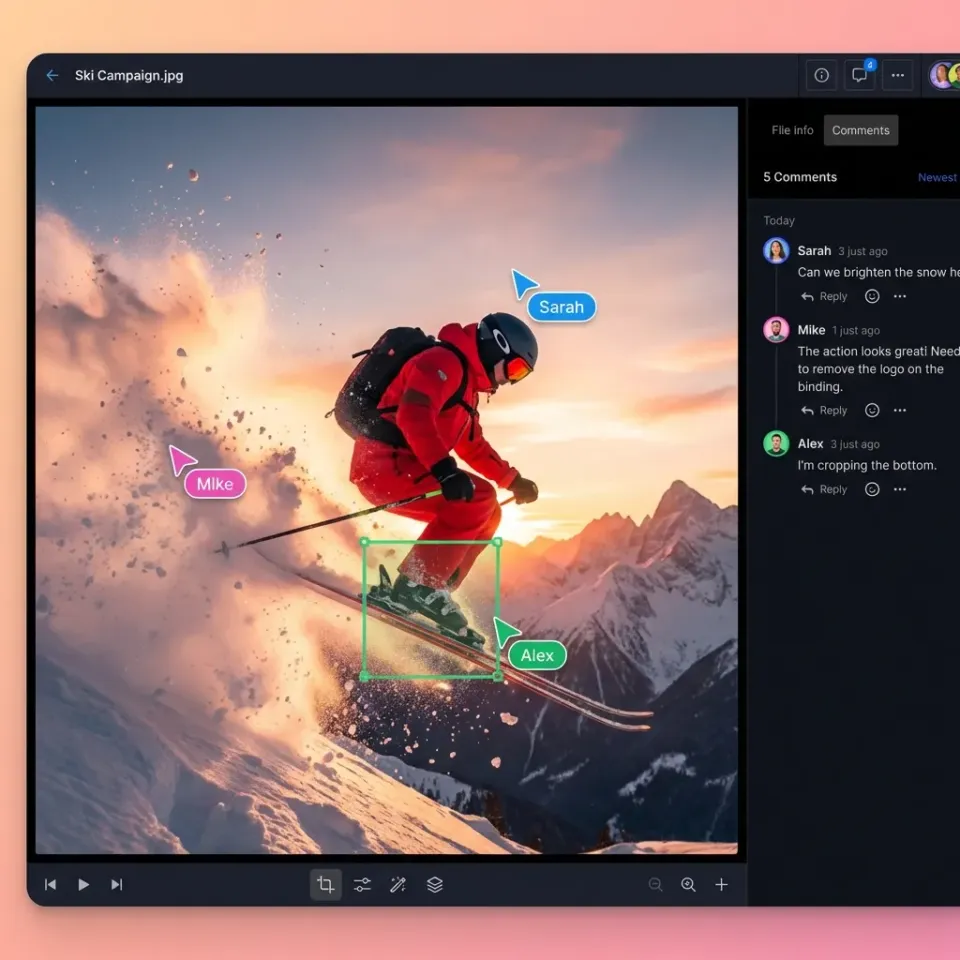
Collaboration slows down whenever reviewers have to download a massive video file, a multi-page PDF, a CAD drawing, or a layered design file just to see what changed. Modern platforms render high-resolution media, documents, audio waveforms, and camera RAW or PSD files directly in the browser using adaptive streaming. Feedback stays attached to the work through anchored comments pinned to an exact video timestamp, a specific page and text selection in a PDF, or a region of an image, alongside markdown notes stored right next to the files they describe.
Per-File Version History and Advisory File Locks
When several teammates and automated tools update files in the same workspace, uncoordinated writes create conflicting copies. Per-file version history preserves every saved iteration so an editor can inspect or restore an earlier version whenever needed. To coordinate active writers before a conflict happens, advisory per-file locks let a person or an agent acquire a lease on a file, renew it via heartbeat while working, and release it when finished. Other workspace members can see who holds the lock, and anyone with write permission can override a stale lease if a process stops responding.
Purpose-Built External Sharing and Client Portals
Sending files to a client requires a different setup than collecting source documents from fifty vendors or running a two-way deal room. Purpose-built share modes separate outbound delivery (Send), inbound file collection from guests without accounts or email attachments (Receive), and bilateral collaboration (Exchange). Branded client portals add custom logos, colors, and vanity URLs, with controls for password protection, link expiration dates, and disabling downloads.
Detailed Activity Logging and Built-In E-Signature
Accountability in a shared workspace depends on a detailed activity log that records storage changes and administrative events across both human and agent accounts: uploads, edits, moves, deletions, membership updates, permission changes, and share creation. When a collaborative draft becomes a final agreement, built-in e-signature lets teams route the document to signers in sequence or in parallel, require an optional one-time passcode per signer, generate a tamper-evident audit certificate recording the signer's IP address and browser, and file the executed copy back into the workspace automatically.
Comparing Leading Content Collaboration Platforms by Architecture
Rather than ranking tools on a single arbitrary scorecard, the overview below groups six widely used content collaboration platforms by their deployment model and primary collaboration focus: self-hosted open-source infrastructure, enterprise content management, office productivity suites, desktop media sync, and scoped workspaces for teams and AI agents.
Nextcloud Hub
Nextcloud Hub is an open-source content collaboration platform designed for organizations that want to host their own file sync, sharing, office document editing, chat, and groupware on Linux servers they control.
Key strengths:
- Full control over server location and storage hardware through self-managed deployment on private servers or virtual machines
- Integrated modules covering file management (Nextcloud Files), browser document editing with Nextcloud Office, and video calls (Nextcloud Talk)
- Federation capabilities that let separate Nextcloud servers share folders across organizational boundaries
Tradeoffs:
- Running Nextcloud in production requires dedicated systems administration for operating system patching, database tuning, backup verification, and storage scaling
- Connecting external AI assistants or giving clients polished, zero-account media portals requires extra configuration and ongoing maintenance
Best for: Organizations with strict self-hosting mandates and an internal infrastructure team to operate the stack.
Box
Box is a cloud content management platform built for large enterprises that want centralized cloud storage with external folder collaboration, metadata templates, and integrations across corporate SaaS applications.
Key strengths:
- Established external collaboration model for inviting partners into shared cloud folders
- Native e-signature capabilities through Box Sign, with metadata templates on Business Plus and higher plans
- Broad catalog of connectors for enterprise CRM, ERP, and productivity software
Tradeoffs:
- Work typically lives inside one overarching corporate folder tree, which makes scoping an AI assistant to a slice of a deal or matter harder when folders mix sensitive and shareable files
- On the Business plan, external collaborators are paid per person; Business Plus and higher plans include unlimited external collaborators
Best for: Large enterprises standardizing on a single cloud repository for corporate document management.
Microsoft SharePoint and OneDrive for Business
SharePoint and OneDrive for Business form the document storage and collaboration backbone of Microsoft 365, centered on Word, Excel, and PowerPoint co-authoring.
Key strengths:
- Bundled into existing Microsoft 365 business and enterprise licenses
- Simultaneous co-editing across desktop and web versions of Word, Excel, and PowerPoint
- Native alignment with Microsoft Entra ID groups and organizational directories
Tradeoffs:
- SharePoint site collections and document libraries accumulate complex permission inheritance over years of use
- Connecting an AI assistant directly to SharePoint often exposes every library a user has permission to read, rather than just the active project folder
Best for: Internal office document creation and spreadsheet co-authoring inside Microsoft 365 organizations.
Google Drive and Google Workspace
Google Drive and Shared Drives provide cloud storage and browser-first co-editing around Google Docs, Sheets, and Slides.
Key strengths:
- Fast browser collaboration for drafting text documents, spreadsheets, and presentations
- Shared Drives keep files owned by the team rather than an individual employee's account
- Familiar interface that requires almost no training for internal staff
Tradeoffs:
- Limited native support for branded external client portals or frame-accurate review on heavy creative formats
- External sharing with recipients who do not use Google accounts frequently creates sign-in friction
Best for: Teams whose collaboration happens primarily inside live Google Docs and Sheets.
Dropbox
Dropbox focuses on desktop file synchronization and cloud folder sharing, with add-ons geared toward creative media teams.
Key strengths:
- Reliable desktop sync client on macOS and Windows for working with local project directories
- Simple link sharing for sending files to outside contacts
- Optional add-ons such as Dropbox Replay for reviewing video and audio files
Tradeoffs:
- Folder-first architecture without built-in structured field extraction across document sets
- Managing isolated workspaces per client or engagement requires manual folder administration
Best for: Creative studios and distributed teams that prefer syncing cloud folders to local hard drives.
Fastio
Fastio is a cloud workspace platform built for teams, external clients, and AI agents to work on the same files without migrating away from their existing storage (Fastio's collaboration features). Organizations create dedicated workspaces per client, deal, legal matter, or project, and use Cloud Sync to connect folders from Google Drive, Dropbox, Box, and OneDrive (including SharePoint document libraries through OneDrive for Business) on a schedule or on demand, one-way or two-way.
Key strengths:
- Organization-owned workspaces with role-based permissions set per organization, workspace, and share, so each team, client, or agent gets a clean scope
- Branded shares for Send, Receive, and Exchange workflows, plus password-protected Content Portals where external guests preview files without needing an account or consuming a paid seat
- In-browser previews for video (with adaptive HLS streaming), audio waveforms, PDFs, Office documents, CAD files, RAW photos, and PSD or AI design assets, paired with comments anchored to video timestamps, PDF pages, image regions, and text selections
- Per-file version history, advisory per-file locks (acquire, heartbeat, release, and takeover), markdown Notes alongside files, and a detailed activity log of uploads, edits, moves, deletions, permission changes, and share creation
- Built-in e-signature on every plan with sequential or parallel routing, optional one-time passcodes, and a tamper-evident audit certificate recording IP address and browser
- Intelligence Mode for hybrid full-text and semantic search, citation-backed RAG chat across folders, and Metadata Views to extract typed fields (Text, Integer, Decimal, Boolean, URL, JSON, Date & Time) from documents into a sortable, filterable spreadsheet
- A consolidated MCP toolset (
https://mcp.fast.io/mcp/toolsfor Claude and general MCP clients,https://mcp.fast.io/mcp/operationsfor ChatGPT and Codex custom servers alongside the Fastio plugin, andhttps://mcp.fast.io/mcp/codefor coding agents), the@vividengine/fastio-clicommand-line client (fastio), and ownership transfer via a claim link when an agent builds an organization and hands it off to a human
Tradeoffs:
- Focused on workspace file collaboration, client portals, document intelligence, and agent access rather than native spreadsheet or slide deck authoring
Best for: Small and mid-sized firms in legal, private equity, finance, life sciences, architecture, consulting, and agencies that want scoped workspaces for people, clients, and AI agents on top of the drives they already use.
Pricing: Creating an account is free, and every organization runs on a paid subscription with included seats and storage plus usage-based credits for AI work. Monthly plans start with a 14-day free trial (credit card required). See current Starter, Business, and Enterprise plans at fast.io/pricing.


Give Your Clients a Better Review Experience
Set up a branded workspace with file sharing, contextual comments, and AI-powered search across your client projects. Start a 14-day Business Trial.
Scoping Existing Cloud Drives for Claude, ChatGPT, and Custom Agents
For IT directors and operations leads, the hardest collaboration problem in 2026 is rarely human-to-human file sharing alone. The company has already rolled out Claude or ChatGPT to dozens of employees, or commissioned custom agents to draft reports and analyze deal rooms, and those assistants need access to company files to do useful work.
Pointing an AI connector directly at SharePoint, Google Drive, or Box creates an immediate scoping gap. A partner at a private equity firm or a senior consultant may have read permissions across hundreds of historical SharePoint sites or shared drives, including confidential HR folders, unannounced transactions, and client materials covered by strict non-disclosure agreements. If the AI assistant inherits the user's full drive scope, every prompt searches across folders the assistant has no business reading. Yet manually uploading batches of PDFs into individual chat projects every morning breaks down as soon as files change or more than two colleagues need to work from the same document set.
A workspace layer solves this without forcing a storage migration:
- Sync only the folders that belong in scope: Using Cloud Sync in Fastio, an administrator connects specific folders from Google Drive, Dropbox, Box, or OneDrive (including SharePoint libraries via OneDrive for Business) into a dedicated workspace. Sync runs on a schedule or on demand, either one-way so nothing in the source drive is ever altered, or two-way when outputs should write back.
- Scope the AI assistant at connection time: When a team member connects Claude (via
https://mcp.fast.io/mcp/tools) or ChatGPT and Codex (via the Fastio plugin orhttps://mcp.fast.io/mcp/operations), a Review Permissions screen lets them choose exactly which workspaces the assistant can reach and select Read Only or Read & Write access. On a Read Only connection, tools that modify or delete data are not offered. - Isolate headless agents with workspace service keys: When an engineering or operations team runs a coding agent against
https://mcp.fast.io/mcp/codeor a background script via the REST API athttps://api.fast.io/current/, a scoped key grants that agent access to its assigned workspace alone. Revoking that key cuts off the single agent without disrupting anyone else.
This pattern gives every deal, legal matter, executive search, or client engagement its own shared repository where everyone on the team and their authorized AI assistants work against the exact same indexed files.
Coordinating Internal Teams, External Clients, and AI Writers
Once files are organized into scoped workspaces, daily collaboration comes down to three practical mechanics: exchanging files with outside guests, coordinating edits between people and agents, and turning large document sets into structured data.
Delivering and Collecting Client Files Without Seat Bloat
Per-seat collaboration software becomes expensive when you have to provision a paid user account every time an external client needs to view a video cut, download a closing binder, or upload tax records. In Fastio, organization seats count internal members only; external guests who open a share do not consume a seat and can access a share link without creating an account. Teams use a Receive share to collect large uploads from clients cleanly, an Exchange share when both sides are contributing drafts, and a Send share or branded Content Portal when delivering final assets with custom branding, password protection, link expiration, and downloads turned off. Inside a portal, Ripley AI can also answer client questions directly from the shared documents with citations back to the source pages.
Preventing Collisions Between Human Editors and Agents
When an AI agent generates a summary note, updates a dataset, or writes report drafts in the same workspace where human analysts are working, both sides need clear coordination signals. Fastio's Collaborative Notes sit right next to the files they describe, with live co-editing: people and agents see each other's cursors and edits as they type, and agents can announce the note or file they are working on with Agent Intents, which are advisory and never block anyone. For binary and document files, writers can acquire an advisory per-file lock through the CLI (fastio lock), the REST API, or MCP (lock-acquire and lock-release on storage_manage, and lock-status on storage). Even when two unlocked writes land concurrently, per-file version history keeps every version so a human reviewer can restore a previous state at any time. And when an autonomous agent provisions a workspace on its own to prepare a client deliverable, it can hand the completed organization over to a human owner through an ownership transfer claim link.
Extracting Structured Data Across Unstructured Files
Collaborating on hundreds of PDFs, scanned contracts, invoices, or project photos usually requires someone to open each file and copy dates, amounts, or tags into a tracking spreadsheet. With Intelligence Mode enabled on a workspace, files are automatically indexed as they arrive for hybrid full-text and semantic search as well as citation-backed chat. When a team needs structured rows and columns, Metadata Views let a user or an agent describe the fields they want in plain English. The workspace designs a typed schema across seven field types (Text, Integer, Decimal, Boolean, URL, JSON, and Date & Time), matches the relevant documents, and populates a live, filterable grid where every cell links straight back to the source file.
Choosing the Right Platform for Your Organization
The right content collaboration software depends on where your files live today and who needs to work with them tomorrow. Walk through four questions with your team before standardizing on a tool:
- Are you only co-editing internal office documents? If nearly all collaboration happens between internal employees typing simultaneously inside Word, Excel, Google Docs, or Google Sheets, your existing Microsoft 365 or Google Workspace subscription already handles that job.
- Do you have an on-premises server requirement and a Linux ops team? If policy requires running your own storage hardware and groupware inside a private data center, a self-hosted platform such as Nextcloud Hub gives you full infrastructure control in exchange for ongoing maintenance responsibility.
- Do you need to scope AI assistants and external clients below your main cloud drive permissions? If your company's files must stay in SharePoint, Google Drive, Box, or Dropbox, but you need a safe way to give Claude, ChatGPT, custom agents, or outside clients access to specific project folders without exposing the rest of the drive, look at a scoped workspace platform like Fastio.
- Do your projects mix heavy media, documents, and external sign-offs? When a single project involves streaming large video cuts with timestamped comments, extracting metadata from PDFs, routing an agreement for e-signature, and handing deliverables to clients in a branded portal without paying per guest seat, consolidating those steps into one workspace removes the friction of stitching together three separate point tools.
Frequently Asked Questions
What is content collaboration software?
Content collaboration software is a platform where teams store, organize, preview, annotate, and share files with colleagues, external clients, and AI assistants. Beyond basic cloud storage, it provides role-based access controls, in-browser media and document previews, anchored comments, per-file version history, activity logs, and external sharing portals.
How does a content collaboration platform differ from basic cloud storage?
Basic cloud storage focuses on backing up folders or syncing a personal drive across devices. A content collaboration platform adds the operational layer needed for multi-party work: workspace- and share-level permissions, inline previews for complex formats like video and CAD, timestamped or page-pinned comments, advisory file locks, e-signature routing, and structured AI search and field extraction across project files.
Can we use Fastio without migrating files out of SharePoint, Google Drive, Box, or Dropbox?
Yes. Fastio's Cloud Sync connects folders from Google Drive, Dropbox, Box, and OneDrive (including SharePoint document libraries via OneDrive for Business) directly to a Fastio workspace. You can run sync one-way or two-way, on a recurring schedule or on demand, so your files remain in their original drive while teams and AI agents work in a cleanly scoped workspace.
How do teams scope Claude or ChatGPT to specific project files?
Instead of connecting an AI assistant to an entire corporate drive where permissions are overly broad, you sync only the relevant project folders into a dedicated Fastio workspace. When connecting Claude, ChatGPT, or Codex to Fastio, the Review Permissions screen lets you pick which specific workspaces the assistant can access and whether that connection is Read Only or Read & Write.
Do external clients need a paid seat to review files in a Fastio share or portal?
No. Seats in a Fastio organization count internal organization members only. External clients and guests can open branded Send, Receive, or Exchange shares and Content Portals by link without creating an account and without consuming a paid seat.
How do teams keep AI agents and human editors from overwriting each other's work?
Fastio combines three safeguards: advisory per-file locks that people and agents can acquire, heartbeat, and release before writing; live co-editing on Collaborative Notes, where people and agents see each other's cursors; and per-file version history that preserves prior versions of every file so any change can be restored, backed by a detailed activity log.
Related Resources

Give Your Clients a Better Review Experience
Set up a branded workspace with file sharing, contextual comments, and AI-powered search across your client projects. Start a 14-day Business Trial.