How to Build a Company Brain Workflow for Competitive Intelligence
A competitive intelligence company brain centralizes competitor teardowns, battlecards, and market research into an indexed workspace where sales teams and AI agents retrieve cited answers. By combining scheduled Cloud Sync across existing team drives with hybrid semantic search, go-to-market teams query current competitive insights during active deal cycles. This architecture replaces decaying slide decks with checkable source citations.


The Competitive Intelligence Dilemma: Why Static Battlecards Fail Live Deals
Buyer and seller reasons for lost deals align only 15% of the time, according to win-loss research by Clozd. In high-stakes enterprise sales cycles, account executives routinely record generic loss reasons like pricing or timing in customer relationship management dropdowns. The primary factors that decide competitive deals, including undocumented feature gaps, unvetted architectural trade-offs, and competitor pricing concessions, remain buried across scattered documents. Product marketing teardowns sit in Google Drive, sales battlecards reside in slide decks, customer call notes rest in Box, and executive win-loss memos float through email attachments.
When sales representatives face active objections on prospect calls, they lack the time to dig through scattered repositories. Searching multiple folders while an enterprise buyer asks pointed technical questions produces hesitated responses or outdated counter-arguments. Static battlecard documents decay rapidly because competitors update pricing models, ship weekly feature releases, and alter packaging strategies without notice.
A competitive intelligence company brain is an AI-indexed workspace where competitive teardowns, pricing matrices, and market research live, allowing sales reps and product strategists to retrieve instant, source-cited answers during deal cycles. Instead of treating competitive enablement as a static library of slide decks, an intelligent workspace establishes a centralized operational hub. Verified competitive assets are aggregated, indexed for semantic search upon arrival, and made directly queryable by sales reps and autonomous AI agents alike.
The Operational Decay of Static Battlecards
Traditional sales battlecards suffer from three structural points of failure. First, maintenance requires constant manual revisions. When a product marketing manager updates a comparison table in a corporate presentation, existing decks saved on account executives' laptops immediately become obsolete. Reps end up delivering stale positioning or inaccurate competitive assertions during live prospect evaluations.
Second, static battlecard templates flatten complex technical context into oversimplified bullet points. When a prospective client raises a detailed question regarding multi-region deployment or security tenancy, bulleted summaries fail to provide the underlying architectural evidence required to satisfy technical evaluation teams.
Third, static documents saved on laptops remain isolated from agentic workflows. They are out of reach of the assistants reps use while drafting outbound proposals or reviewing opportunity notes. When critical positioning data is trapped inside static presentations, field teams default to memory and improvisation.
Where Dedicated Competitive Intelligence Platforms Fit
To solve the battlecard decay problem, many teams adopt dedicated competitive intelligence platforms such as Klue or Crayon. These platforms monitor competitors, use AI to collect and summarize competitive intel, and deliver battlecards into the tools sellers already use. Klue also lets curators update battlecards from a Claude conversation. Neither vendor publishes list prices, so cost depends on a quote for your program.
Any of these platforms still needs someone to curate what it collects: reviewing new intel, filtering noise, and keeping battlecards current. When that curation slips, rep adoption drops, so plan for the time it takes.
Building an agile competitive intelligence brain inside a company brain lets revenue teams search and query the primary documents and cloud drives they already maintain, without adding a separate platform.
Related guides
- How to Build a Company Brain Workflow for Board ReportingA board reporting company brain workflow centralizes financial models, department scorecards, and strategy memos in a...
- How to Build a Company Brain Workflow for Customer OnboardingA customer onboarding company brain workflow unifies architecture diagrams, API specifications, and implementation...
- How to Build a Company Brain Workflow for Due DiligenceA company brain workflow for due diligence centralizes corporate charters, financial audits, and commercial contracts...
- How to Build a Company Brain Workflow for Employee OnboardingAn employee onboarding company brain workflow centralizes handbooks, standard operating procedures, and team playbooks...
- How to Build a Company Brain Workflow for Engineering RFCs and Architecture DecisionsAn engineering RFC company brain workflow unites architecture proposals, decision records, and technical specs inside...
- How to Build a Company Brain Workflow for Incident ResponseAn incident response company brain workflow centralizes infrastructure runbooks, architecture diagrams, and historical...
More on this subject: Agent Memory and Storage (335 guides)
Knowledge Architecture: Organizing Market Research for Fast Retrieval
An effective competitive intelligence company brain requires intentional knowledge architecture rather than an unmanaged document dump. Uploading preliminary scratchpads, unsourced rumors, or unverified chat logs introduces noise into the retrieval corpus and increases the risk of hallucinated assertions. Go-to-market teams must establish clear ingestion criteria, define strict workspace boundaries, and structure competitive dimensions using automated metadata extraction.
Enabling built-in intelligence on a dedicated workspace ensures that every incoming document is automatically processed and indexed for both full-text keyword matching and semantic retrieval. Revenue leaders, product marketing managers, and connected AI assistants interact with an identical factual substrate. Storing source assets in native document formats preserves the tables, footnotes, and surrounding technical context that standard summaries discard.
What Documents Belong in a Competitive Intelligence Brain
A competitive intelligence workspace functions best when stocked with authoritative, primary-source assets across four functional domains:
- Competitor Teardowns and Product Dissections: Detailed architectural breakdowns, feature capability audits, API documentation comparisons, and release note analyses.
- Pricing Schedules and Packaging Matrices: Documented price lists, discounting thresholds, packaging tiers, licensing metrics, and historical competitor quotes collected during past bidding cycles.
- Win-Loss Interview Transcripts and Debriefs: Neutral buyer interview notes, deal post-mortems, and customer feedback transcripts detailing exact evaluation criteria and decision rationales.
- Objection Handling Playbooks and Trap-Setting Scripts: Approved counter-positioning guides, landmine questions designed to highlight competitor architecture weaknesses, and customer reference summaries.
Preserving these documents in native formats such as PDF, DOCX, Markdown, and CSV retains essential tables, footnotes, and context that a pasted summary strips away.
Structuring Market Data with Metadata Views
While semantic vector search retrieves relevant paragraphs in response to natural language questions, revenue operations teams also require structured comparisons across competitors. Fast.io Metadata Views transforms unstructured competitive files into a live, queryable database.
Rather than writing custom OCR scripts or defining brittle parsing templates, administrators describe desired attributes in plain English. The underlying extraction engine creates a typed schema across the workspace with fields like Text, Integer, Decimal, Boolean, URL, JSON, and Date & Time. For a competitive intelligence workspace, Metadata Views can automatically extract competitor name, primary product category, deployment model, pricing metric, estimated displacement difficulty, and the date the information was last verified.
Product marketing managers can sort and filter this dynamic spreadsheet to identify competitors missing updated pricing data or track which rivals present the highest renewal threat. Connected AI agents can filter searches by extracted values (metadata_filters on storage action=search) over MCP before generating competitive battlecards.
Workspace Boundaries and Role-Based Permissions
Competitive intelligence often involves sensitive commercial data, including unannounced product roadmaps, proprietary margin targets, and strategic customer concessions. Maintaining strict information boundaries prevents competitive analysis from leaking across unauthorized internal or external channels.
Fast.io configures permissions per organization, workspace, and share by member role. Workspace roles include owner, admin, member, guest, and view. Organization roles include owner, admin, and member. Inside a workspace, every member reaches all files according to their role; Fast.io enforces no folder-level or file-level permissions.
A workspace's join setting defaults to letting any member of its parent organization join. To keep sensitive market research confidential, administrators restrict the workspace join setting to invite-only. Revenue teams typically maintain two distinct competitive workspaces:
- Field Enablement Workspace: Contains sanitized battlecards, approved objection scripts, competitor pricing sheets, and public product teardowns accessible to all sales reps, solutions engineers, and customer success managers.
- Strategic Market Intelligence Workspace: Houses confidential win-loss transcripts, margin vulnerability assessments, M&A target evaluations, and unreleased roadmaps restricted to executive leadership and core product marketing strategists.
When collaborating with external research agencies or contract analysts, teams create a branded Share holding only the specific research folder required. Administrators can disable file downloads on the share to protect proprietary positioning briefs while allowing browser-based document review.
The Four-Step Company Brain Workflow for Competitive Intelligence
Deploying a company brain workflow for competitive intelligence requires four clear operational phases. Instead of spending months configuring complex enterprise search infrastructure, revenue teams complete a short core wiring, and syncing and indexing existing files continue in the background.
- Ingest Teardowns and Sync Team Drives: Consolidate primary market research, teardowns, and pricing sheets into the workspace via direct upload or scheduled cloud synchronization.
- Enable Workspace Intelligence for Hybrid Retrieval: Turn on Intelligence Mode to index incoming competitive documents for full-text and semantic search.
- Connect AI Assistants via Model Context Protocol: Link client applications like Claude, ChatGPT, and Cursor to the workspace using remote Streamable HTTP endpoints.
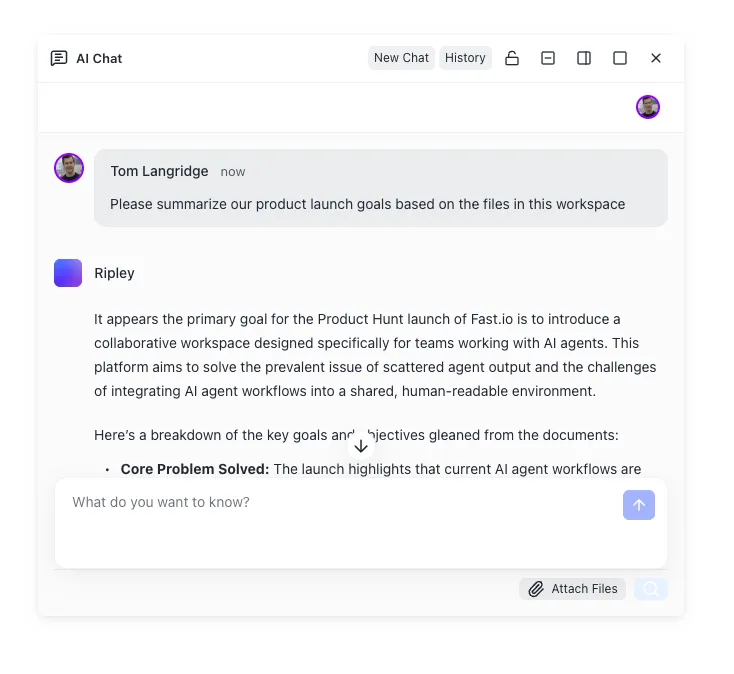
- Query Battlecards with Checkable Source Citations: Execute prompt-driven competitor analyses that ground every answer in specific files and pages.
Step 1: Ingest Teardowns and Sync Team Drives
The workflow begins by aggregating existing competitive intelligence into the designated workspace. Teams can upload local teardown PDFs, pricing spreadsheets, and battlecard slide decks directly through the web interface.
To prevent duplicate maintenance across systems, Cloud Sync connects Google Drive, Dropbox, Box, and OneDrive folders directly to the workspace. Cloud Sync runs one-way or two-way, on a schedule or on demand, never continuous, live, or real-time. SharePoint document libraries connect through the OneDrive connector.
Files synced from an external drive adopt the Fast.io workspace's permissions rather than the source drive's access rules. When product marketing maintains competitor pricing updates in a Google Drive folder and sales operations stores win-loss debriefs in OneDrive, scheduled Cloud Sync pulls both sources into the Fast.io workspace. The source drive's broad sharing settings are disregarded, ensuring that only members of the Fast.io competitive workspace can search or query the synchronized files.
Step 2: Enable Workspace Intelligence for Hybrid Retrieval
Once files arrive in the workspace, administrators enable Intelligence Mode in workspace settings. Fast.io automatically indexes all documents upon arrival for both full-text keyword matching and semantic vector retrieval.
This hybrid retrieval model combines the precision of keyword search (locating specific competitor product names, model numbers, or pricing figures) with the conceptual breadth of semantic search (matching natural language questions like how does our offline sync compare to competitor architecture). No separate vector database, chunking pipeline, or embedding infrastructure is required. The search index updates automatically whenever files are uploaded, modified, or synchronized.
Step 3: Connect AI Assistants via Model Context Protocol
Revenue teams access the competitive intelligence company brain through autonomous AI agents and interactive chat clients using the Model Context Protocol (MCP). Fast.io provides a remote MCP server running over Streamable HTTP.
Setup steps vary depending on the client:
- Claude (Web, Desktop, and Mobile): Open Customize, then Connectors. Add a custom connector, enter
https://mcp.fast.io/mcp/tools, and select Connect. Complete OAuth sign-in in the browser window that opens. In chat sessions, activate Fastio from the plus menu under Connectors. - Coding Agents and IDEs (Cursor, Claude Code): In Cursor, configure
~/.cursor/mcp.jsonwith{"mcpServers": {"fast-io": {"url": "https://mcp.fast.io/mcp/code"}}}. In Claude Code, runclaude mcp add --transport http fast-io https://mcp.fast.io/mcp/codeand complete OAuth sign-in in the browser. - ChatGPT and Codex: Install the Fastio plugin directly from the plugin directory at chatgpt.com/plugins and sign in when prompted. Alternatively, configure a custom MCP server at
https://mcp.fast.io/mcp/operations.
Interactive clients sign in via OAuth and display a Review Permissions screen where users select Read Only or Read & Write access and specify authorized workspaces. Headless agents, background evaluation scripts, and continuous research bots connect to /mcp/tools or /mcp/code using a scoped API key passed as an Authorization: Bearer <api key> header. With a Read Only connection, tools that modify files are omitted entirely from the available toolset.
Step 4: Query Battlecards with Checkable Source Citations
With MCP active, account executives and product managers query the competitive workspace directly from their preferred AI interface. The agent searches the workspace, retrieves relevant document passages, and synthesizes answers backed by explicit source citations.
Answers cite the file name, the page where one applies, and the passage the data came from. This citation mechanism makes answers checkable during deal cycles. If an account executive asks how a competitor structures API overage billing, the connected agent quotes the exact clause from the competitor's terms of service and cites the stored PDF, allowing the rep to check the claim before quoting it to an enterprise buyer.


Build an Agile Competitive Intelligence Company Brain
Centralize competitor teardowns, battlecards, and pricing matrices in an intelligent workspace. Connect AI agents via MCP to query cited market insights during active deal cycles. Monthly plans start with a 14-day free trial.
Field Execution: How Sales Reps and Strategists Query the Brain
Connecting AI assistants to an indexed competitive intelligence repository transforms how revenue teams prepare for prospect conversations and handle mid-deal friction. Rather than memorizing static battlecards, account executives retrieve context-specific talking points on demand.
Sales engineers and account executives can tailor queries to specific deal stages, buyer personas, and technical architectures. Grounding each interaction in verified company documentation helps keep field messaging accurate across the sales organization. Sales reps no longer waste time guessing competitor packaging or hunting through outdated shared drives while an enterprise buyer waits on the line. A single prompt delivers cited answers derived from technical teardowns and recent win-loss analyses.
Pre-Call Briefings and Live Objection Handling
During active deal cycles, account executives use prompt-driven queries to generate tailored preparation briefs. For example, a rep preparing for a competitive demonstration can submit a prompt to Claude or ChatGPT:
"Review our competitor teardown for Competitor Alpha and our win-loss transcripts from Q3. What are the three most common objections enterprise IT buyers raise when evaluating their multi-tenant architecture, and what landmine questions should I ask to expose those limitations?"
The AI assistant queries the Fast.io workspace, retrieves the relevant engineering teardown and buyer interview files, and produces a structured brief citing the exact documents.
During live customer evaluations, reps encounter unexpected competitive claims. When a prospect mentions that a rival vendor offers lower seat pricing on multi-year commitments, the rep can immediately query the brain: "Extract the discounting and storage overage terms from Competitor Beta's enterprise pricing matrix." The assistant returns the specific per-gigabyte costs and tier restrictions documented in the stored pricing schedule, enabling the rep to highlight hidden costs during the conversation.
Collaborative Notes and Change Tracking for CI Maintenance
Competitive intelligence requires continuous cross-functional feedback from the field. When an account executive learns a new competitive pricing concession or a solutions architect discovers an undocumented technical limitation during a proof of concept, they record the insight in Collaborative Notes.
Collaborative Notes live beside the files in the workspace. They co-edit live: people and agents with the same note open see each other's labeled cursors and edits as they type, allowing human contributors and connected AI agents to maintain live win-loss logs, trap-setting cheat sheets, and competitor battlecard summaries.
To monitor how competitive intelligence evolves, administrators reference the detailed activity log. Fast.io's detailed activity log records changes across the workspace, including uploads, edits, moves, deletions, membership updates, permission adjustments, and share creation. It does not record read-only events such as views, opens, or downloads. When a product marketing manager updates a core battlecard or an agent writes an updated teardown, the activity log provides a clear historical record of what changed and who made the modification.
Maintaining CI Freshness and Distributing Battlecard Portals
A competitive intelligence system succeeds or fails based on data freshness. Stale battlecards breed distrust among sales teams, driving reps back to ad-hoc guessing. By coupling automated ingestion with controlled distribution mechanisms, organizations maintain an agile, trustworthy knowledge asset.
Fast.io operates on a transparent subscription model based on workspaces, storage, seats, and usage credits. Every organization runs on a paid subscription.
Monthly plans start with a 14-day free trial that requires a credit card:
- Starter (
$29/mo): Includes5seats,1 TBstorage,10workspaces, and300,000credits per month. Maximum upload size is25 GB. - Business (
$99/mo): Includes20seats,10 TBstorage,100workspaces, and1,200,000credits per month. Maximum upload size is50 GB. - Enterprise (
$299/mo): Includes50seats (with additional seats at$1a month each, up to200),50 TBstorage,300workspaces, and4,500,000credits per month. Maximum upload size is100 GB.
Annual plan pricing is available at $290, $990, and $2,990 per year.
Credits cover AI work: chat, file ingestion, agent runs, and document processing, including Metadata Views extraction. Additional credits are billed at $10 per 100,000 credits. Storage beyond the plan is $0.015 per GB a month and extra bandwidth $0.04 per GB, billed separately and not in credits. Review full tier details on the Fast.io pricing page.
Automated Ingestion Schedules and Event-Driven Pipelines
Revenue teams keep competitive data current by configuring recurring sync schedules. Using Cloud Sync, folders from Google Drive, Dropbox, Box, and OneDrive can sync on a defined schedule or on demand. When product marketing updates competitive slides in Google Drive or saves market research reports to Box, the next scheduled or on-demand sync brings the files into the Fast.io workspace, where Intelligence Mode indexes them on arrival.
For technical teams operating custom competitive monitoring tools or research crawlers, Fast.io provides an events feed. The events feed allows external scripts to subscribe to workspace activity over a WebSocket or long-poll connection. When a new competitor whitepaper or teardown lands in the workspace, an automated background agent can detect the change, summarize it, extract its fields with storage_manage action=metadata-extract, and update a central competitive comparison note.
Distributing Battlecard Portals to Revenue Teams
While account executives and product managers can query the company brain through AI assistants, sales leadership often needs to distribute read-only battlecard packets to broader commercial teams, regional distributors, or external sales contractors.
Fast.io enables administrators to generate branded shares (Send, Receive, or Exchange) pointing to specific competitive folders. Shares can be durable or expiring, with optional password protection and recipient-specific access controls. Administrators can disable file downloads on the share, ensuring that external contractors or junior reps can review competitive positioning documents in a browser without downloading proprietary files to unmanaged personal devices. External recipients who open a share do not consume an organization user seat and can access shared materials without creating an account.
Sources
References used to verify factual claims in this guide.
-
Buyer and seller reasons for lost deals align only 15% of the time.
Frequently Asked Questions
What documents belong in a competitive intelligence company brain?
A competitive intelligence company brain should house competitor product teardowns, architectural specifications, rate cards, discounting guidelines, win-loss interview transcripts, buyer survey debriefs, and battlecard playbooks. Preserving these assets in native formats like PDF, DOCX, Markdown, and CSV retains essential tables, footnotes, and structured data that AI agents need for accurate retrieval.
How do sales reps query competitive battlecards using AI?
Sales reps connect conversational AI tools like Claude, ChatGPT, or Cursor to their Fast.io workspace using the Model Context Protocol (MCP) over Streamable HTTP. Reps then ask natural language questions during deal preparation, such as requesting objection-handling scripts or competitor pricing comparisons. The connected agent queries the workspace's hybrid search index and returns answers with checkable citations referencing specific files and page numbers.
How do you keep competitive intelligence updated across team drives?
Cloud Sync connects Google Drive, Dropbox, Box, and OneDrive folders directly to a Fast.io workspace. Sync runs one-way or two-way, on a schedule or on demand. When product marketing managers add new competitor analyses or update battlecards in their primary cloud storage, the next scheduled or on-demand sync updates the Fast.io workspace, where new files are indexed on arrival for search and AI retrieval.
How do workspace permissions protect sensitive competitive strategy documents?
Permissions in Fast.io are set per organization, workspace, and share by member role (owner, admin, member, guest, and view). Fast.io does not use folder-level or file-level permissions; every member of a workspace accesses all files in that workspace according to their role. Sensitive strategic files, such as M&A research or executive margin analyses, are kept in a separate, restricted workspace with its join setting set to invite-only.
How does a Fast.io company brain differ from dedicated CI platforms like Klue or Crayon?
Dedicated competitive intelligence platforms like Klue or Crayon monitor competitors, use AI to collect and summarize intel, and deliver curated battlecards to sellers; neither publishes list prices. Fast.io takes a different approach by turning the documents your team already keeps into an intelligent, AI-queryable workspace using Cloud Sync, hybrid semantic search, and MCP connectivity, where agents search the files, co-edit Notes, and save updated battlecards beside the sources.
Can AI agents modify files inside the competitive intelligence brain?
AI agents can operate with either Read Only or Read & Write permissions. The person who connects an agent through OAuth picks Read Only or Read & Write on the Review Permissions screen, and a headless agent's API key acts with its creator's permissions, narrowed by the scopes set on the key. In a Read Only connection, tools that modify files are omitted entirely from the agent's toolset. When agents hold write access, they can update Collaborative Notes or upload generated teardowns, and every modification is recorded in the workspace's detailed activity log.
Related Resources

Build an Agile Competitive Intelligence Company Brain
Centralize competitor teardowns, battlecards, and pricing matrices in an intelligent workspace. Connect AI agents via MCP to query cited market insights during active deal cycles. Monthly plans start with a 14-day free trial.