Fastio vs WeTransfer Pro: Which is Best for Creative Production?
Creative production agencies outgrow standard file sharing fast. High-res video and massive design assets quickly eat up space. While WeTransfer Pro works for quick one-off transfers, it falls short when you need persistent organization and smart asset retrieval. This guide compares Fastio and WeTransfer Pro to help you find the right tool for a high-speed workflow without the usual storage headaches.

The 1TB Wall: Why Storage Limits Stunt Creative Growth
1TB of storage sounds like plenty until you start handling raw 4K footage or massive 3D project files. WeTransfer Pro caps you at 200GB for active transfers. Once you hit that limit, you're stuck deleting old deliveries to make room for new ones. Upgrading usually means jumping to an expensive enterprise tier. Either way, you're wasting time on file management instead of the creative work that pays the bills. Fastio plans include 250 GB, 5 TB or 25 TB of storage, and storage beyond that allowance is billed by use instead of hitting a hard wall. You never have to pick which client project to delete to make room for a new delivery. When a project stays live, your team can access archive files months later without hunting through expired links or old hard drives. This removes the constant worry over storage limits so you can focus on production. Pausing a delivery because a storage quota is full is a bottleneck agencies can't afford. If you're uploading dozens of dailies and your tool stops mid-way, you lose hours of work. Fastio keeps your workspace ready for the next big upload, no matter the project size.
Helpful references: Fastio Workspaces, Fastio Collaboration, and Fastio AI.
Related guides
- WeTransfer vs Dropbox: Which One Do You Actually Need?WeTransfer and Dropbox both move files, but they solve different problems. WeTransfer sends files that expire in 7...
- Best Cloud Storage for Video: 7 Options for Production TeamsVideo files demand more from cloud storage than documents or photos. You need large file support, fast transfers, and...
- Dropbox vs Google Drive vs OneDrive: Which Cloud Storage Wins in 2026?Dropbox, Google Drive, and OneDrive are the three most popular cloud storage services, each with different strengths:...
- Best WeTransfer Alternatives for Teams Who Need MoreWeTransfer caps free uploads at 3GB (with a 10-transfer monthly limit) and offers limited branding or analytics, even...
- MOV vs MP4: Which Video Format Should You Use?Choosing between MOV and MP4 depends on your workflow: MOV offers higher quality for editing on Apple devices, while...
- Box vs Dropbox: Which Cloud Storage Is Right for Your Business?Box focuses on enterprise content management and security, while Dropbox emphasizes personal and team file sync. Both...
More on this subject: File Sharing (155 guides)
Why Creative Agencies Outgrow One-Off Transfers
WeTransfer was built for a "send and forget" model. You upload a file, send a link, and the recipient downloads it. Even with the longer expiration dates on WeTransfer Pro, the experience still centers on individual transfers. This leads to messy communication where project files are scattered across links, emails, and various chat threads. Finding the final version of an asset ends up feeling like a chore.
Fastio uses persistent workspaces. Instead of a link that eventually expires, you invite your team and clients into a dedicated project space. Files stay where you put them, keeping everyone working from one place. When a director asks for the latest cut, they don't have to search their inbox. They just open the workspace and find the file in the right folder.
A persistent model also makes version control easier. Since the workspace stays active, you can keep a clear history in one spot. Instead of sending a new link for every small change, you update the file in the workspace. Clients always see the most current version but can still look back at the history if they need to. This cuts the risk of someone approving the wrong asset, which is an easy mistake when you're juggling several different transfer links.
Universal Media Engine: Previews for Pro Formats
It's frustrating when clients need expensive software just to view a file. Most people don't have Adobe Creative Cloud or specialized CAD tools, which makes it hard for them to review source files quickly. WeTransfer Pro gives you basic previews for JPEGs or MP4s, but often fails with professional design and production files. Fastio has a Universal Media Engine that shows instant previews of professional assets right in the browser. It supports Photoshop (PSD), Illustrator (AI), InDesign (INDD), and various RAW camera formats. Your clients can see high-res designs or raw footage without downloading massive files or installing new software. This speeds up approvals because they can give feedback the moment the file is uploaded. The media engine also includes features like waveform audio visualization, so you can see music and speech patterns to find the right spot in a clip. For video, Fastio uses HLS streaming, the same tech Netflix uses. This means you get smooth playback even on slower connections. It's a big step up from the old progressive download method that makes viewers wait for a video to buffer before they can watch.

Intelligence Mode: The Time Saver
Most file sharing tools move data without understanding what's inside. Fastio uses Intelligence Mode to index every file you upload for better search and AI interaction. Once you turn it on, every document, video transcript, and comment becomes part of a searchable knowledge base.
Creative agencies using automated file indexing save significant time each week. Instead of clicking through folders or trying to remember a specific filename, you can search for content by its actual meaning. You can find "all the drone footage from the coast" instantly. The system understands what's in your files even if they aren't named perfectly.
This works for your clients, too. When you enable Intelligence Mode on a client portal, they can ask questions about project files in plain English. A client might ask, "What was the feedback on the first script draft?" and the AI will scan the comments and documents to give them a cited answer. This lets them help themselves, reducing the "where is this file?" emails that clutter your day.



A Faster Way for Creative Production Agencies to Work
Move your WeTransfer Pro workflows to Fastio and stop worrying about storage limits. Join the agencies saving time each week with smart indexing. Get generous storage and AI tools today. Built for fast wetransfer pro creative production agencies workflows.
Automating the Boring Stuff: AI Agents for Production
Creative workflows are starting to use AI agents for repetitive tasks. While WeTransfer doesn't have native AI automation, Fastio is built for agentic teams. We offer an official Model Context Protocol (MCP) server with a consolidated MCP toolset that lets AI agents work in your workspaces like a human team member.
Agencies use these agents to handle asset management tasks that used to take hours. For example, you can set an agent to tag new uploads, extract video transcripts, and sort your assets into the right project folders. This is all possible through the Fastio API and integrations with tools like OpenClaw. You can connect any MCP client directly to https://mcp.fast.io/mcp/tools to start managing files using natural language.
To make this easy to try, we offer a 14-day Business Trial (card required; see /pricing/). When an agent creates a workspace or portal, it can transfer ownership to a human user while keeping the access it needs to stay helpful. This lets agents act as project coordinators that set up the folders and structure for your team from day one.

Real-time Collaboration and Frame-Accurate Reviews
Video production needs clear feedback to avoid mistakes. WeTransfer Pro allows for basic comments on Portals, but it lacks the depth needed for professional reviews. Fastio focuses on collaboration, with tools that make remote reviews feel like you're in the same room.
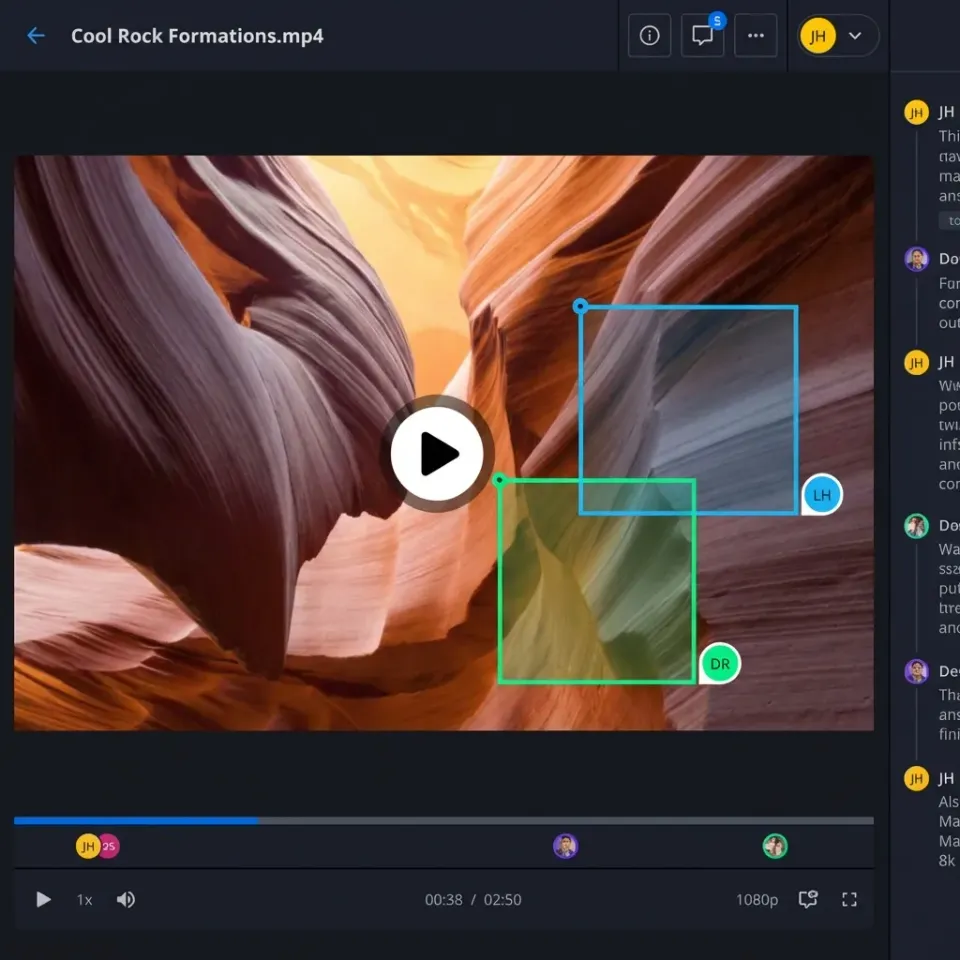
The best feature for editors is frame-accurate commenting. You can pin a comment to a specific timestamp and part of the frame. If a client sees an issue at a specific point in the video, they mark it right on the screen. The editor sees that feedback in context, so they don't have to hunt for timecodes in a separate email. It makes the revision process faster and more accurate.
Multiplayer Presence and Follow Mode make collaboration even better. When you're in a workspace with a client, you can see their activity live. With Follow Mode, you can sync your views. As you scroll through a storyboard or scrub a video, the other person sees exactly what you're seeing. It adds a human touch to digital workspaces that a simple download link can't match.
Security, Audit Logs, and Client Trust
Agencies often handle sensitive material that needs more than just a password. WeTransfer Pro offers basic security, but it lacks the audit trail that professional productions need. If an asset is leaked or accessed by someone who shouldn't have it, you need to know what happened.
Fastio provides detailed audit logs that track every action. You can see when a client viewed a file, how long they watched a video, and if they shared the link. This transparency builds trust with clients who are worried about their intellectual property. You can also set specific permissions at the workspace, folder, or file level to make sure only the right people have access.
For big pitches or sensitive deals, our Data Rooms provide a branded experience with extra security. You can watch viewer engagement in real-time and pull access instantly if you need to. It's a polished way to present your work compared to a standard transfer link, and it gives you peace of mind that your assets are safe.
Pricing: Flat Plans vs. Per-Seat Costs
A common complaint about WeTransfer Pro is the per-seat pricing. As your agency grows or you bring in freelancers, your monthly costs go up. If you want to give a client full access to a folder, you often end up paying for an extra seat just for them. These costs add up quickly.
Fastio uses tiered plans with usage-based credits: Starter ($9.99/mo, 3 seats, 250 GB), Business ($49.99/mo, 10 seats, 5 TB), and Enterprise ($199.99/mo, 30 seats, 25 TB). Point your team to /pricing/ to evaluate plan limits. You pay based on transparent plan tiers and usage-based credits with generous storage allowances.
This is great for agencies working with many external partners. You can invite unlimited guest users to specific folders without paying for more seats. Your clients get a branded experience, and your freelancers can work together on plans that include 3, 10 or 30 seats. It's a pricing structure built for the way creative teams work.
Sources
References used to verify factual claims in this guide.
-
1TB of storage sounds like plenty until you start handling raw 4K footage or massive 3D project files. WeTransfer Pro caps you at 200GB for active transfers.
-
Get generous storage and AI indexing today. Fastio offers a 14-day Business Trial requiring a credit card. Fastio offers tiered plans including Starter, Business, and Enterprise. Fastio provides usage-based credits with per-plan seat and storage limits.
-
We offer an official Model Context Protocol (MCP) server with a consolidated MCP toolset that lets AI agents work in your workspaces like a human team member.
Frequently Asked Questions
Does WeTransfer Pro have a file size limit?
Yes, WeTransfer Pro currently has a large limit per transfer. While this works for many, it can be a problem for long multiple videos or large archives. Fastio supports much larger uploads and handles them through a high-performance media engine.
Can I use AI to search my files in WeTransfer?
No, WeTransfer doesn't offer native AI indexing or semantic search. You have to rely on filenames and folder structures. Fastio includes Intelligence Mode, which indexes your files so you can search by meaning or even chat with your documents.
Is Fastio better for video reviews than WeTransfer?
Fastio is generally better for video reviews because it offers HLS streaming for smooth playback and frame-accurate commenting. It also has Follow Mode for synced screening sessions with clients, which WeTransfer Portals don't have.
What happens to my files when a project ends on Fastio?
Unlike WeTransfer where links usually expire, Fastio workspaces stay active. Your files stay organized in the cloud as long as you want them there. You can archive them or keep them active for future reference, so you always have a full history of your work.
Does Fastio charge per client I invite?
No, Fastio allows for unlimited guest access. You can share folders or files with as many clients as you need without paying for extra seats. This is much more cost-effective than platforms that charge a fee for every collaborator.
Related Resources

A Faster Way for Creative Production Agencies to Work
Move your WeTransfer Pro workflows to Fastio and stop worrying about storage limits. Join the agencies saving time each week with smart indexing. Get generous storage and AI tools today. Built for fast wetransfer pro creative production agencies workflows.