How to Design a Company Brain Architecture for People and AI Agents
A company brain architecture unites operational storage, hybrid search, and autonomous agents inside an authoritative workspace substrate. By indexing business documents on arrival and enforcing strict workspace-level permissions, organizations enable human teams and AI agents to query identical source files with grounded snippet citations.


How Company Brain Architecture Unifies Four Core Layers
When an autonomous AI agent and a human operator consult internal company documentation to execute an operational decision, both reach conflicting conclusions if their context relies on ungrounded wikis, stale vector databases, or drifting cloud drive permissions. An enterprise intelligence system fails not because models lack reasoning capacity, but because the underlying knowledge architecture lacks an authoritative, permission-governed source of truth.
A company brain architecture is a unified workspace storage and retrieval substrate where business documents are indexed upon arrival, allowing people and AI agents to query the same source files with strict permission boundaries and exact snippet citations.
Rather than treating internal knowledge as static reading material for human staff, a production company brain functions as operational infrastructure. It connects files, vector representations, lexical indexes, access policies, and agent interfaces into a continuous system.
The friction of fragmented documentation across organizations is measurable. A Gartner survey of 4,861 digital workers found that 47% struggle to find the information or data they need to perform their jobs effectively. When files are scattered across personal drives, disconnected chat threads, and ad-hoc folders, teams lose hours reconstructing context or making operational decisions on obsolete assumptions. A company brain architecture eliminates this vulnerability by grounding answers in the actual source documents, connecting humans and autonomous agents to a continuously updated knowledge substrate.
Deconstructing the Four Architectural Layers
A resilient company brain architecture comprises four distinct functional tiers:
- The Ingestion Layer: The entry point for institutional data. Documents arrive through direct file uploads, URL imports, or scheduled Cloud Sync connections from distributed storage providers like Google Drive, Dropbox, Box, and OneDrive. Files remain in their native formats rather than being fragmented into proprietary editor blocks.
- The Indexing Layer: The retrieval engine that processes files upon arrival. When a document lands in an enabled workspace, the system indexes it for lexical keyword search, dense semantic vector search, and structured metadata extraction. No external embedding pipelines or manual chunking scripts are required.
- The Access Boundary Layer: The governance boundary that controls retrieval scope. Permissions are established per organization, workspace, and share by member role. Search and intelligence mechanisms answer queries strictly within the workspaces and shares the asking person or agent belongs to, preventing unauthorized context leakage across departments.
- The Interface Layer: The interaction surface where humans and autonomous agents consume and produce knowledge. People work in the web app, the desktop app, and Collaborative Notes. Agents connect programmatically through the Model Context Protocol (MCP) or the REST API, reading source snippets and writing verified deliverables into the same workspace environment.
Why Disconnected Vector Silos Fail Human and Agent Teams
Early enterprise artificial intelligence deployments attempted to construct company brains by bolting standalone vector databases onto existing internal file repositories. Engineers built custom synchronization scripts to extract text from cloud drives, run chunks through external embedding models, and store vector representations in databases like Pinecone, Milvus, or Qdrant.
This decoupled pattern introduces three severe architectural failure modes:
- Context Drift: When a human teammate updates an engineering specification or customer contract in a cloud drive, the external vector database remains stale until the next batch processing cycle completes. Autonomous agents reading from the vector store execute tasks using obsolete operational guidelines.
- Broken Provenance: Vector databases store arbitrary text chunks detached from underlying file containers. When an agent generates an answer, it cannot reliably provide a verifiable, page-level citation back to the original document, making human verification tedious and unreliable.
- Permission Blindness: Standalone vector indexes rarely mirror complex enterprise file permissions. When an agent queries a centralized vector store, it risks pulling chunks from executive compensation spreadsheets or legal settlement drafts into an answer delivered to an unauthorized user.
To prevent these vulnerabilities, an intelligent workspace anchors retrieval directly inside the file storage substrate. The files themselves reside in Fast.io workspaces where agents execute their tools.
Related guides
- Company Brain vs. Wiki: Why File-Centric Workspaces Replace Static Internal PagesA company brain replaces static wiki pages by turning operational files into an indexed context layer queryable by...
- How to Build a Company Brain Workflow for Security QuestionnairesA company brain workflow for security questionnaires centralizes compliance certifications, security policies, and...
- How to Design a Company Brain Metadata Schema for AI Search and RetrievalA company brain metadata schema provides the organizational framework AI agents and humans need to locate documents,...
- How to Build a Company Brain Workflow for Architecture Decision RecordsAn Architecture Decision Record (ADR) company brain workflow is a structured system for indexing finalized software...
- How to Build a Company Brain Workflow for Engineering RFCs and Architecture DecisionsAn engineering RFC company brain workflow unites architecture proposals, decision records, and technical specs inside...
- 18 agentic workflows to run against your company brainYour agent starts every session knowing nothing about your company. A company brain fixes that. One Fastio workspace...
More on this subject: Agent Memory and Storage (365 guides)
How Cloud Sync Eliminates Source Drive Permission Drift
Enterprise knowledge is rarely consolidated in a single drive. Legal teams frequently maintain agreements in OneDrive, product teams draft specifications in Box, marketing groups manage media in Google Drive, and engineering teams store architectural assets in Dropbox. Forcing departments to abandon established systems creates immediate adoption resistance.
A practical company brain resolves this fragmentation through scheduled Cloud Sync. Cloud Sync connects Google Drive, Dropbox, Box, and OneDrive folders to a workspace, one-way or two-way, on a schedule or on demand. It is never continuous, live, or real-time, so teams decide when updates arrive. SharePoint document libraries connect directly through the OneDrive connector.
Decoupling Ingestion from Source Drive Sharing Chaos
The primary failure mode of syncing files from third-party cloud drives into an enterprise retrieval system is permission drift. In platforms like Google Drive or OneDrive, access permissions often accumulate through individual file shares, expiring links, department aliases, and nested folder overrides. Over months of staff turnover, determining who actually possesses access to a specific document becomes nearly impossible.
A company brain eliminates source drive permission drift by enforcing unified workspace permissions. Files synced or imported from Google Drive, Dropbox, Box, or OneDrive take the Fast.io workspace permissions, not the source drive's sharing settings.
This separation gives three practical boundaries:
- Clean Boundaries: If an external contractor had access to a folder inside Google Drive, that contractor gains no access to the corresponding Fast.io workspace unless explicitly invited as a workspace collaborator.
- Predictable Scoping: When an agent queries workspace intelligence, it reaches only workspaces where the user behind its sign-in or API key is a member, and the key's scopes can narrow that further.
- Simplified Governance: Administrators audit access at the workspace and share tier rather than auditing thousands of individual file permission inheritances across multiple third-party clouds.
Structuring Unstructured Files with Metadata Views
A comprehensive company brain must handle diverse document formats, including PDFs, scanned invoices, vendor contracts, spreadsheets, presentations, and technical diagrams. Traditional retrieval systems struggle with structured operational questions across these formats, such as filtering agreements by expiration timeframe, counterparty jurisdiction, or financial terms.
To bridge the gap between unstructured documents and structured databases, the architecture incorporates Metadata Views. Document data extraction via Metadata Views turns unstructured files into a live, queryable database.
Users and agents describe the operational fields they need extracted using natural language. The system constructs a typed schema supporting Text, Integer, Decimal, Boolean, URL, JSON, and Date & Time types, matches files across the workspace, and populates a filterable spreadsheet without requiring custom OCR rules or rigid document templates. Through MCP, agents read the workspace's field names with metadata action=fields-list, extract values for chosen fields with storage_manage action=metadata-extract, and query extracted values with metadata action=search, providing a structured query layer that complements semantic search.
Why Hybrid Retrieval Outperforms Pure Vector Search
Retrieval failure is a common cause of agent hallucinations in enterprise settings. When an agent receives incomplete, irrelevant, or misaligned context from internal documentation, it attempts to bridge the knowledge gap using parametric memory, generating plausible yet factually incorrect assertions.
Solving this challenge requires a hybrid retrieval strategy that combines lexical matching, semantic vector search, and metadata value filtering inside an integrated workspace intelligence engine.
The Limitations of Pure Vector Search
Many modern AI search implementations rely solely on dense vector retrieval. Vector embeddings excel at understanding semantic proximity, allowing a query for "remote employee reimbursement policies" to retrieve documents discussing "stipends for home office equipment" even when exact terms do not match.
However, pure vector retrieval exhibits severe blind spots on operational company documentation:
- Exact Identifiers: Vector models struggle to differentiate between precise alphanumeric strings, such as part numbers (
SKU-8921-AversusSKU-8921-B), API error codes (ERR_AUTH_EXPIREDversusERR_AUTH_REVOKED), or legal clause numbers (Section 14.2(b)). Embedding algorithms compress these specific tokens into broad semantic regions, causing retrieval misses. - Short Technical Queries: When an engineer searches for a specific function name or database column, vector search frequently returns broad conceptual articles rather than the definitive definition file.
- Temporal Precision: Queries specifying concrete fiscal quarters, version tags, or policy revision dates often retrieve older, conceptually similar policies because embedding vectors prioritize topic similarity over exact temporal tokens.
The Grounding Mechanics of Hybrid Retrieval
An authoritative company brain employs hybrid retrieval to combine the strengths of lexical and vector search. Lexical algorithms (such as BM25) index specific keywords, exact terms, and alphanumeric tokens with high precision. In parallel, dense vector indexes capture conceptual intent and synonym relationships.
When a human worker or an AI agent submits a query to an enabled workspace, Fast.io search combines keyword and semantic matching across the files in the workspaces the asker belongs to. Keyword matching finds exact tokens such as SKU identifiers and contract clause designations, semantic matching finds conceptual context and equivalent phrasing, and the results come back as ranked source snippets.
Combining lexical and semantic matching catches queries that either method alone would miss. The agent receives the exact technical clause required for its task, backed by the conceptual context necessary to interpret it correctly.
Source Citations and Parametric Defense
In Fast.io workspaces with Intelligence enabled, documents are automatically indexed upon arrival for full-text search, semantic search, summaries, and chat. When an agent queries workspace intelligence, the response includes exact source citations referencing the specific file, page number, and source snippet.
This makes answers checkable: a reader can click the cited snippet to see the source. Human operators can check an agent's reasoning the same way, while autonomous agents can compare intermediate reasoning steps against the cited text before executing downstream operations.


Architect Your Company Brain on Fast.io Workspaces
Connect your team and autonomous AI agents to a unified company brain with hybrid search, MCP connectivity, and strict workspace permission boundaries. Start your 14-day free trial on any monthly plan.
How Workspace Boundaries Govern Multi-Agent Access
A critical architectural challenge when designing a company brain is access control. Traditional file systems rely on nested folder hierarchies with complex permission inheritance, where a subfolder can inherit, break, or override rules established by parent directories.
In an environment where autonomous agents perform broad semantic queries, nested folder permission trees become exceptionally fragile. A minor inheritance misconfiguration can expose restricted payroll documents or legal correspondence to general company search indexes.
Workspace-Centric Permission Architecture
A modern company brain replaces nested permission trees with explicit, workspace-centric boundaries. Permissions are set per organization, workspace, and share by member role. A workspace has no folder-level or file-level permissions, ensuring that every workspace member accesses the entire workspace according to their designated role.
Organization roles include:
- Owner: Holds administrative control over the organization subscription, billing, member seats, and top-level settings.
- Admin: Manages organization members, creates workspaces, and configures organization-wide parameters.
- Member: Participates in assigned workspaces and creates new workspaces according to organization policies.
Workspace roles include:
- Owner: Manages workspace settings, membership invitations, integrations, and lifecycle.
- Admin: Manages workspace permissions, shares, and content organization.
- Member: Uploads, edits, moves, and deletes documents within the workspace.
- Guest: Limited guest access to the workspace.
- View: Reads documents, performs searches, and asks questions via workspace intelligence without edit or deletion capabilities.
By eliminating folder-level and file-level access controls, administrators avoid accidental permission leaks. When material requires restricted access, such as executive leadership deliberations or acquisition audits, teams simply provision a separate, isolated workspace.
Managing Workspace Join Policies and Ownership Transfers
A workspace join setting defaults to letting any member of its organization join. Keeping a workspace strictly confined to named personnel requires administrators to restrict this join setting explicitly during provisioning.
When agents collaborate with humans, ownership transitions must remain orderly. When an autonomous agent provisions an organization or workspace on behalf of a user, it can transfer ownership to a human operator. Transferring ownership demotes the previous owner to admin, so the agent keeps day-to-day management while only the human owner can close or transfer the organization.
Concurrency Control and the Detailed Activity Log
When multiple autonomous agents and human staff collaborate within the same workspace, concurrent document edits can create race conditions. Fast.io addresses this through two foundational mechanisms:
- Advisory File Leases: Agents can acquire advisory per-file locks in workspace or share storage using the
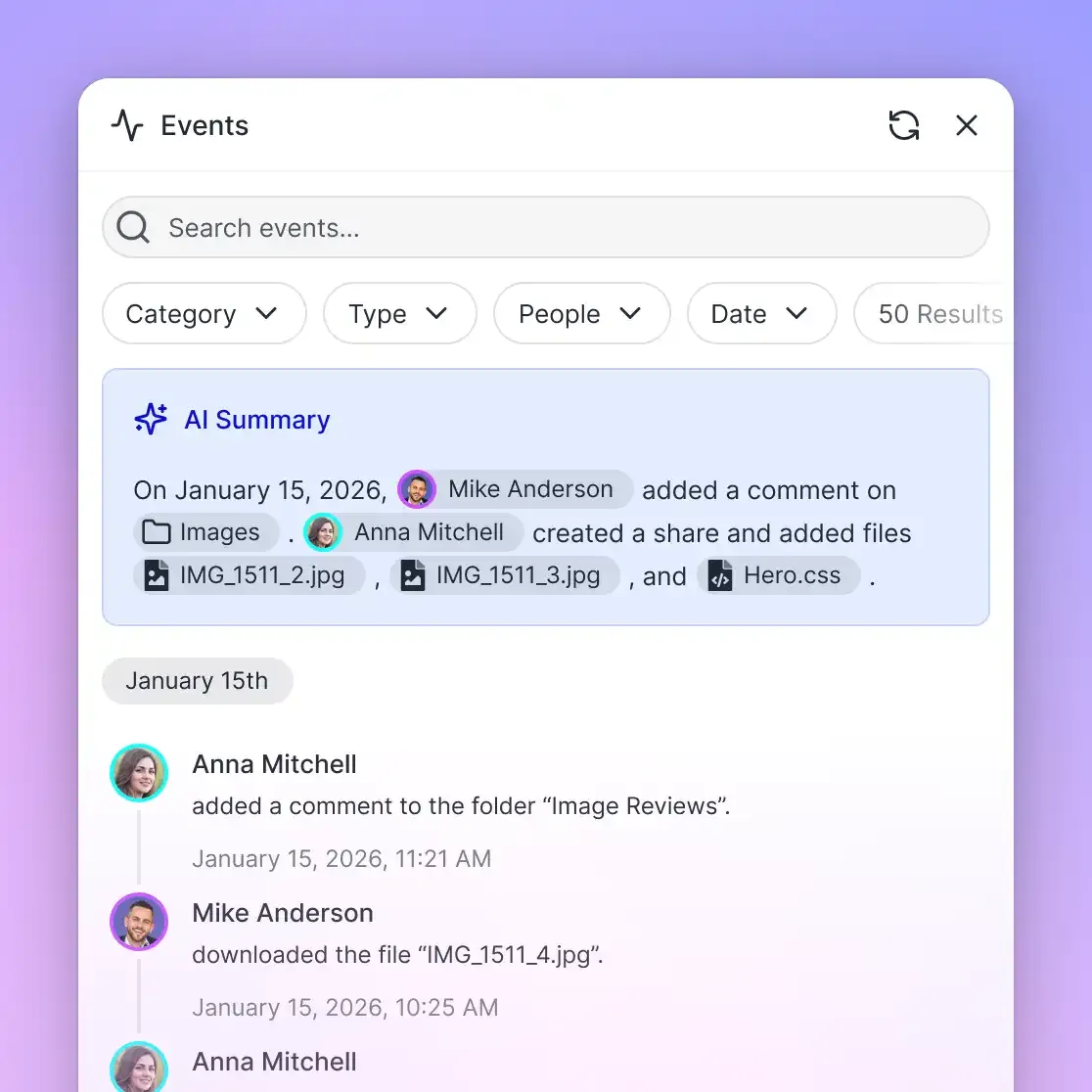
lock-acquireaction on thestorage_manageMCP tool, check lock states vialock-statusonstorage, and release them vialock-release. A lock expires unless periodically heartbeated by the holding agent, preventing abandoned locks if an agent process terminates unexpectedly. Advisory locks inform other participants of active edits without enforcing destructive overwrite blocks; concurrent writes land safely, and per-file version history preserves every revision. - Detailed Activity Log: The platform maintains a detailed activity log recording operational modifications across the organization. It records uploads, edits, moves, and deletions, alongside membership alterations, permission changes, and share creations. It does not record read-only events, views, or downloads.
This activity record provides complete transparency into which agent or human initiated specific changes, ensuring operational accountability across the company brain.
How to Connect AI Agents via the Model Context Protocol
The interface tier connects human cognition with artificial intelligence capabilities. For people, the company brain offers clean web portals, search dashboards, and Collaborative Notes kept beside files with live co-editing and labeled cursors. For autonomous agents, the company brain exposes standardized connectivity through the Model Context Protocol (MCP) and the REST API.
The Model Context Protocol establishes an open standard for connecting language models to external data systems. Fast.io provides a consolidated, remote MCP server running over Streamable HTTP, eliminating the need for local process bridges or complex custom middleware. Dedicated storage for agents enables continuous context retention across reasoning sessions.
Client-Specific MCP Server Endpoints
Because different AI tools implement varying MCP capabilities, Fast.io provides dedicated endpoints tailored to specific client categories:
- Claude Applications and General Agents: Claude Desktop, Claude web, Claude Cowork, Manus, OpenClaw, and Hermes Agent connect via Streamable HTTP at
https://mcp.fast.io/mcp/tools. - Coding Agents in Development Environments: Claude Code, Cursor, Gemini CLI, Cline, Roo Code, and Devin connect to
https://mcp.fast.io/mcp/code. - ChatGPT and OpenAI Codex: Connect via the Fastio plugin in the ChatGPT plugin directory, or configure a custom connector pointing to
https://mcp.fast.io/mcp/operations.
Setup documentation and integration instructions are available at Fast.io MCP documentation.
Separating Read Tools from Modification Tools
To enforce the principle of least privilege, Fast.io organizes MCP tools into distinct operational scopes. On https://mcp.fast.io/mcp/tools, each operational domain provides a read tool and a corresponding management tool:
storagehandles file and folder lookups and lock status,downloadreturns download links, andstorage_managehandles creates, moves, deletions, and lock acquisition.workspacereads workspace properties,workspace_managechanges settings and lifecycle, and new workspaces are created withorg_manage.shareinspects existing shares, whileshare_managecreates and configures file delivery links.
When a user connects an AI assistant with a Read Only permission profile, tools that change data are not offered at all. Because modification tools are omitted from the protocol schema during initialization, the agent never attempts an unauthorized write, eliminating failed executions and error recovery loops.
Concrete Configuration for Cursor and Claude Code
Connecting development agents to the company brain requires adding a lightweight configuration entry. For Cursor, add the following to ~/.cursor/mcp.json or your project's .cursor/mcp.json:
{
  "mcpServers": {
    "fast-io": {
      "url": "https://mcp.fast.io/mcp/code"
    }
  }
}
For Claude Code, add the HTTP connection directly via the command line:
claude mcp add --transport http fast-io https://mcp.fast.io/mcp/code
When agents run headless within background infrastructure or automated server containers, authentication is handled by passing a scoped API key in the connection headers:
POST /mcp/code HTTP/1.1
Host: mcp.fast.io
Authorization: Bearer <FASTIO_API_KEY>
Content-Type: application/json
Accept: application/json, text/event-stream
API keys carry explicit scopes and act with the permissions of the user who generated them. They possess no independent role, ensuring that an agent operating via an API key cannot exceed the workspace boundaries of its creator.
Event-Driven Workflows via Activity Feeds
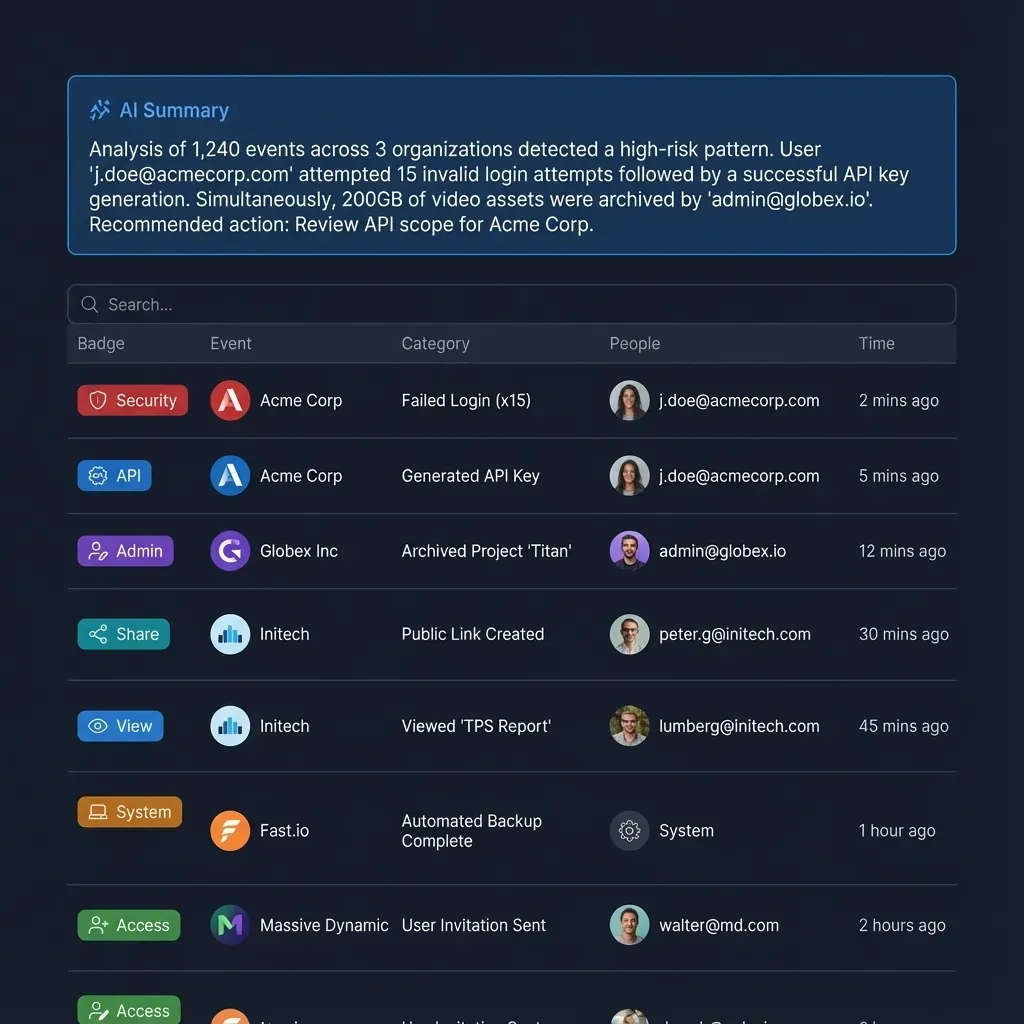
A reactive company brain does not require continuous polling. Agents monitor workspace updates using the Fast.io events feed via WebSocket or HTTP long-polling:
GET /current/activity/poll/{workspace_id}?wait=95&lastactivity={timestamp}
Host: api.fast.io
Authorization: Bearer <FASTIO_API_KEY>
When a new contract, customer brief, or technical specification lands in the workspace, the long-poll returns at once with an activity key naming what changed, and the agent then reads that file. An autonomous research agent can parse the incoming asset, generate a comprehensive executive summary, extract key operational milestones using Metadata Views, and save a Collaborative Note directly beside the source file for human team review.
Plan Selection and Trial Provisioning
Deploying a production company brain requires selecting an organizational subscription matching your team's storage and processing volume. Fast.io structures subscription plans across three transparent tiers:
Monthly subscriptions begin with a 14-day free trial that requires a credit card. Credits cover AI work: chat, file ingestion, agent runs, and document processing. Each plan includes a monthly credit allowance rather than per-seat surcharges, and more credits cost $10 per 100,000. Extra storage costs $0.015 per GB a month and extra bandwidth $0.04 per GB, and neither uses AI credits. Enterprise plans can add seats beyond the 30 included, at $1 a seat a month, up to 200.
Sources
References used to verify factual claims in this guide.
-
A Gartner survey of 4,861 digital workers found that 47% struggle to find the information or data they need to perform their jobs effectively.
Frequently Asked Questions
What is the architecture of a company brain?
A company brain architecture consists of four unified layers: an ingestion layer that imports files via Cloud Sync and uploads; an indexing layer that creates lexical, vector, and metadata indexes upon document arrival; an access boundary layer that enforces workspace-level role permissions; and an interface layer where people and AI agents interact via web interfaces, Collaborative Notes, REST APIs, and Model Context Protocol (MCP) endpoints.
How do AI agents connect to internal company documentation?
AI agents connect to company documentation using the Model Context Protocol (MCP) over Streamable HTTP. Fast.io provides dedicated endpoints including `https://mcp.fast.io/mcp/tools` for Claude and general agents, `https://mcp.fast.io/mcp/code` for IDE coding agents, and `https://mcp.fast.io/mcp/operations` for ChatGPT and Codex, enabling agents to search files and inspect metadata with source snippet citations.
How do workspace permissions work in a company brain?
Permissions in a company brain are established per organization, workspace, and share by member role, with no folder-level or file-level permissions. Organization roles include owner, admin, and member; workspace roles include owner, admin, member, guest, and view. Search and intelligence mechanisms answer queries strictly within the workspaces and shares the asking person or agent belongs to.
Does Fast.io sync with Google Drive?
Yes. Cloud Sync connects Google Drive, Dropbox, Box, and OneDrive folders to a Fast.io workspace, one-way or two-way, on a schedule or on demand. It is never continuous, live, or real-time. Files synced from Google Drive take the Fast.io workspace permissions, decoupling them from the source drive's sharing settings.
How does a company brain differ from enterprise search platforms like Glean or Guru?
Enterprise search tools like Glean index data across third-party apps, and Guru pairs verified knowledge cards with AI answers over connected sources. A company brain on Fast.io differs because the actual operational files live directly inside the workspace where human teammates and AI agents collaborate, allowing agents to read source files, run structured data extractions, and write outputs in the same environment.
How do teams prevent AI agents from overwriting shared documents in a company brain?
Teams manage concurrent agent modifications using advisory file locks and per-file version history. Agents acquire leases using lock-acquire on the storage_manage MCP tool and verify status with lock-status on storage. If concurrent edits occur, version history preserves every revision, while the detailed activity log records who initiated each change.
Related Resources

Architect Your Company Brain on Fast.io Workspaces
Connect your team and autonomous AI agents to a unified company brain with hybrid search, MCP connectivity, and strict workspace permission boundaries. Start your 14-day free trial on any monthly plan.