One Tool per Operation and Read-Only MCP Sessions
A new MCP endpoint gives agents one tool per operation, and every Fastio tool now comes as a read tool and a separate write tool, each labeled with hints.
Agents have a new way to connect to Fastio today. The MCP server has a new endpoint that offers one tool per operation, and every tool now comes as a read version and a separate write version, so you decide what an agent is able to change.
One Tool per Operation
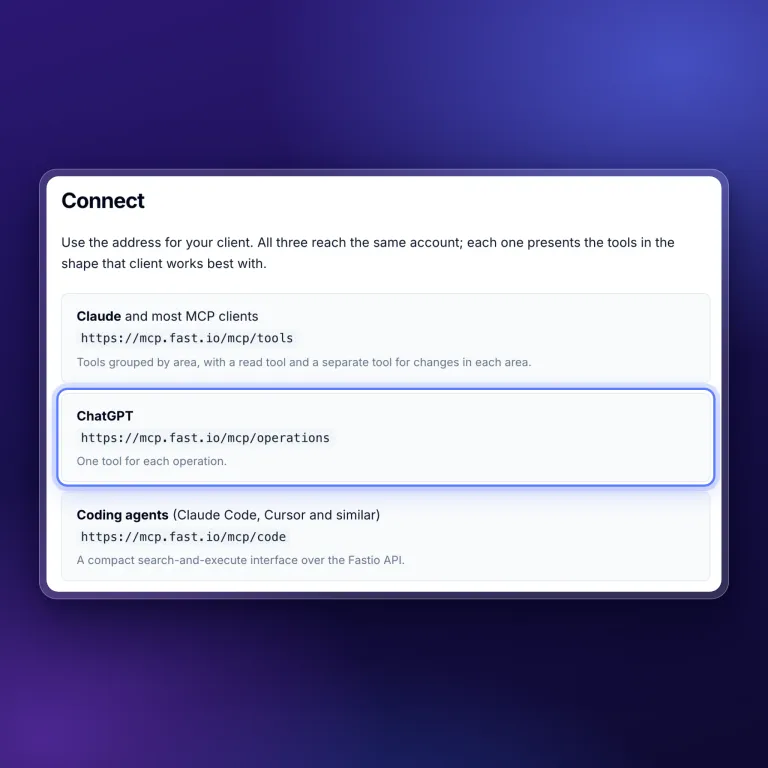
The new https://mcp.fast.io/mcp/operations endpoint gives your agent a single-purpose tool for each thing it can do in Fastio. Instead of picking an action inside a larger tool, the agent picks the one tool that matches the job.
- Each tool does one thing. Clients that choose tools by name and description get a short, specific description for every operation.
- It sits beside the other addresses.
/mcp/toolsserves named tools and/mcp/codeserves code mode, and the MCP setup guide lists the right address for each client.
Separate Tools for Reading and Writing
Each area of Fastio now has a tool that only reads and, where it can make changes, a separate _manage tool for writing. A workspace, for example, has a workspace tool for looking things up and a workspace_manage tool for creating and updating.
- Read-only sessions get read tools only. When you sign an agent in with Read Only permissions, the write tools are not part of its session at all.
- Every tool carries hints. Each one is marked as read-only or destructive and has a display title, so MCP clients that support these hints can label tools clearly and take extra care before a destructive action.
- You can see the split in the tool list. Any tool name ending in
_manageis one that changes your files, workspaces or shares.
This makes it simple to match an agent’s access to its task. A research agent can read a workspace without any way to change it, and an agent that saves its own output gets the write tools it needs.
Read-only sessions are the part to try first. If you want an agent to look through your files and answer questions, connect it with Read Only permissions and it will have no tools that change anything. Read more about how agents work in Fastio on the storage for agents page.
Related Posts
Passkey Sign-In, Cloud Imports With Live Progress, and New MCP Tools
Sign in to Fastio with a passkey, import a cloud folder once and watch it run, and give agents new MCP tools for notes, file versions, comments and invites.
An MCP Setup Guide and Cloud Sync Folder Checks
A public guide walks you through connecting each MCP client to Fastio, and Cloud Sync now sizes and checks a folder before you connect it to a workspace.
Claude Sonnet 5.5 vs Sonnet 5 on Fastio's Agent Benchmark
Claude Sonnet 5 found 4 to 14 of 17 contract contradictions, depending on the run. Claude Sonnet 5.5 found all 17 in six of seven runs and 16 in the other.