Top 7 Tools for AutoGen Agents in 2026
Guide to tools autogen agents: AutoGen tools enable multi-agent conversations to execute code, browse the web, and persist data. This guide ranks seven tools that solve the most common gaps in the AutoGen ecosystem, from sandboxed code execution to long-term file storage and agent observability. Each entry includes strengths, limitations, and pricing so you can pick the right stack for your project.


How We Evaluated These Tools
AutoGen v0.4 redesigned the framework around an asynchronous, event-driven architecture. Agents communicate through messages, execute code in sandboxes, and call external tools via the Model Context Protocol (MCP) or custom Python functions. The framework itself is powerful, but it ships intentionally minimal on infrastructure. You bring your own storage, your own observability, and your own memory layer.
That gap is where tooling matters. We evaluated each tool on four criteria:
- Integration depth. Does it connect natively to AutoGen's agent classes, or does it require heavy glue code?
- State persistence. Does it solve the "stateless agent" problem where files and context vanish between sessions?
- Production readiness. Can it handle concurrent agents, retries, and failure recovery?
- Cost at scale. What does the free tier cover, and when do costs ramp up?
Research from MDPI and ScienceDirect shows that multi-agent validation pipelines can reduce hallucinations by 35 to 60 percent compared to single-agent setups, with hybrid RAG architectures showing the most consistent improvements. The tools below help you build that kind of system reliably.
Related guides
- LangGraph vs AutoGen: Which Multi-Agent Framework Should You Choose?LangGraph models agent workflows as directed graphs with typed state, while AutoGen treats workflows as multi-agent...
- Top 5 Tools Every LangGraph Developer NeedsLangGraph lets you build stateful, cyclic AI agents, but the framework alone isn't enough. You need tools for...
- Best Tools for AI Agent Prompt Versioning in 2026Prompt versioning tools track changes to agent prompts over time, enabling teams to roll back regressions, A/B test...
- Best AI Tools for Developers in 2026Most "best AI tools" lists stop at coding assistants. This guide covers 14 tools across every phase of the software...
- Best AI Tools for Web Development in 202684% of developers use or plan to use AI coding tools, but only 29% trust what the tools produce. This guide evaluates...
- Best Tools for Multi-Modal AI Agents in 2026Multi-modal AI agents need more than a capable model. They need infrastructure to store, index, retrieve, and deliver...
More on this subject: AI Tool Directories and Comparisons (231 guides)
What to check before scaling top tools for autogen agents
Letting an AI agent write and run arbitrary code on your host machine is a recipe for disaster. Docker provides the sandboxing layer that makes AutoGen's code execution safe. The framework includes a built-in DockerCommandLineCodeExecutor that spins up a container, runs the agent's generated code inside it, and tears it down when finished.
This is not optional for production systems. Without containerization, a single hallucinated rm -rf / command could wipe your server. Docker isolates the blast radius to a disposable container.
Key strengths:
- Native AutoGen support through
DockerCommandLineCodeExecutorwith no extra wiring - Full control over installed libraries and system dependencies via Dockerfiles
- Reproducible environments that behave identically across dev and production
Limitations:
- Requires Docker Desktop or a container runtime on the host machine
- Container startup adds a few seconds of latency per execution cycle
Best for: Any AutoGen workflow that involves code generation and execution.
Pricing: Free for individuals; Docker Business plans are priced per user per month; see the vendor's pricing page.
2. AutoGen Studio: Visual Agent Builder
AutoGen Studio is the official low-code interface for the AutoGen framework. Rebuilt on the v0.4 AgentChat API, it transforms the Python SDK into a visual environment where you can define agents, assign tools, set speaker selection rules, and test conversations without writing boilerplate.
The real value is speed. You can prototype a three-agent research pipeline in minutes, test it interactively, then export the configuration to production code. Skills (Python functions) can be added through the UI, and session history lets you replay and debug past conversations step by step.
Key strengths:
- Drag-and-drop workflow builder for agent teams and conversation patterns
- Built-in skill management for adding custom Python functions as agent tools
- Session replay and conversation debugging for iterating on agent behavior
Limitations:
- Less flexible than raw Python for complex custom orchestration logic
- Limited deployment options compared to the core SDK
Best for: Rapid prototyping and testing agent behaviors before committing to code.
Pricing: Free and open source. Install via pip install autogenstudio.
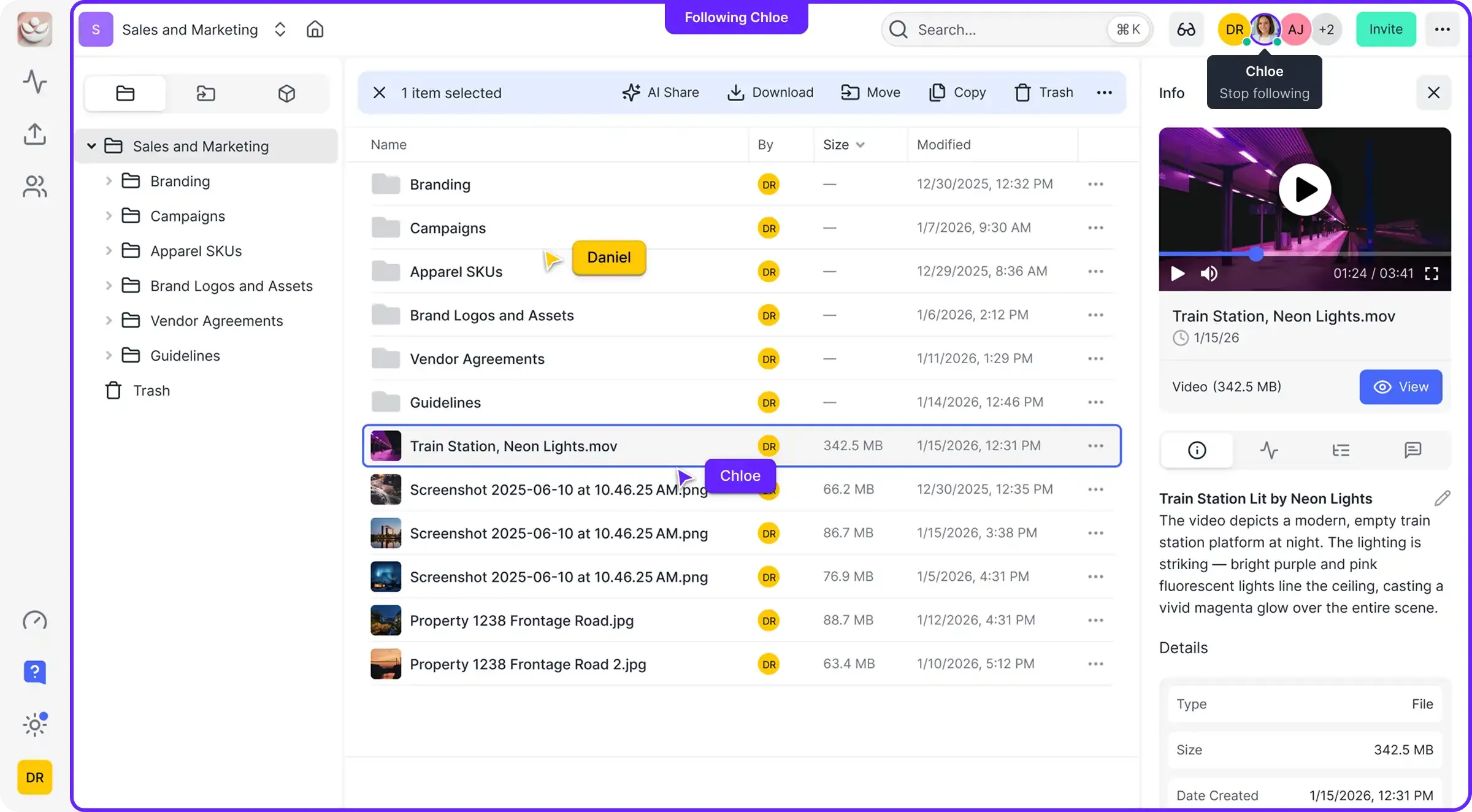
3. Fastio: Persistent File Storage and MCP Access
Most AutoGen agents lose their files when the session ends or the container restarts. Fastio solves this by giving each agent a persistent workspace where files survive across sessions, can be shared with other agents, and are accessible to humans through the same interface.
The integration works through the Model Context Protocol (MCP). Fastio exposes Streamable HTTP at /mcp and legacy SSE at /sse, providing a consolidated MCP toolset that covers workspace management, file operations, and AI-powered search. An AutoGen agent connects to Fastio as an MCP server and gets immediate access to upload, download, search, and organize files without custom API code.
What sets Fastio apart from generic cloud storage is Intelligence Mode. Enable it on a workspace and every uploaded file gets automatically indexed for semantic search and RAG queries. Your agents can ask questions about their own stored documents with cited answers, no separate vector database required.
The ownership transfer feature is particularly useful for agent-built deliverables. An agent creates a workspace, populates it with reports or analysis, then transfers the entire org to a human client. The agent keeps admin access for ongoing updates while the human gets full ownership.
Key strengths:
- Persistent workspace storage that survives agent restarts
- Consolidated MCP toolset for file operations, AI search, and shares
- Built-in RAG through Intelligence Mode, eliminating the need for a separate vector database
- Ownership transfer lets agents build workspaces and hand them to humans
Limitations:
- Focused on file storage and workspace management rather than conversation memory
Best for: Agents that create, edit, or store files and need those files to persist between sessions. Sign up for the Business Trial or explore the MCP documentation.
Pricing: Plans start at $9.99/mo (Starter, 250 GB); 14-day Business Trial available.



Give Your AutoGen Agents Persistent Storage
Stop losing files when agent sessions end. Built for tools autogen agents workflows.
4. Mem0: Long-Term Agent Memory
Mem0 tackles a different persistence problem than file storage. Where Fastio keeps files, Mem0 keeps facts. It tracks user preferences, past decisions, and entity relationships across sessions so that agents remember context without re-asking.
The API is minimal: add() stores a memory, search() retrieves relevant ones, and get() fetches by ID. Mem0 automatically extracts entities and relationships from conversations, building a graph of connected facts. When an agent starts a new session, it queries Mem0 for relevant context and picks up where it left off.
For AutoGen specifically, Mem0 plugs into the assistant agent's system message or tool set. Before responding, the agent searches Mem0 for anything relevant to the current user or topic, then includes that context in its reasoning.
Key strengths:
- Automatic entity and relationship extraction from conversation history
- Graph-based memory that connects related concepts for better recall
- Simple
add(),search(),get()API that works alongside any Python agent
Limitations:
- Adds latency to each agent turn for memory retrieval and storage
- Memory quality depends on the extraction model, which can miss nuance
Best for: Customer support agents, personalized assistants, and any workflow where remembering user preferences across sessions matters.
Pricing: Free open-source core; hosted cloud version with managed infrastructure available on usage-based pricing.
5. ChromaDB: Local Vector Search for RAG
ChromaDB remains the go-to choice for local RAG in AutoGen workflows. When your agents need to answer questions from private documentation without sending data to an external service, Chroma provides fast vector search that runs entirely on your machine.
AutoGen has native support for ChromaDB through its retrieval-augmented agents. You point Chroma at a folder of documents, it chunks and embeds them, and your agents can query the resulting vector store during conversations. Metadata filtering lets you narrow searches to specific document types, date ranges, or custom tags.
The tradeoff is operational complexity at scale. Chroma works well for thousands of documents on a single machine, but scaling to millions of vectors across a distributed cluster requires more infrastructure work than managed alternatives.
If you need cloud-hosted RAG without managing infrastructure, Fastio's Intelligence Mode offers a different approach: upload files to a workspace, enable Intelligence, and the system auto-indexes everything for semantic search and AI chat with citations. This works well when your agents already use Fastio for file persistence, since the same files are searchable without a separate vector database.
Key strengths:
- Runs entirely locally with no data leaving your machine
- Native AutoGen integration through retrieval-augmented agent classes
- Metadata filtering for precise control over which document chunks are retrieved
Limitations:
- Scaling beyond a single machine requires significant cluster management effort
- No built-in persistence across restarts without explicit save/load
Best for: Agents that need to answer questions from private or sensitive documentation sets.
Pricing: Free and open source.

6. AgentOps: Observability and Debugging
Debugging a multi-agent conversation is painful when you cannot see what happened between agents. AgentOps provides session-level observability for AutoGen workflows, capturing every LLM call, tool invocation, and agent message in a structured timeline.
The integration is lightweight. Add two lines of Python to initialize AgentOps, and it automatically instruments your AutoGen agents. The dashboard shows session replays, token costs per agent, latency breakdowns, and failure traces. When an agent goes off the rails, you can step through the exact sequence of prompts and responses that led to the problem.
AgentOps also supports tagging sessions for A/B testing different agent configurations. Run the same task with two different system prompts, compare the traces side by side, and pick the one that performs better.
For teams that prefer the LangChain ecosystem, LangSmith offers similar tracing and cost-tracking capabilities with its own dashboard and dataset collection features for fine-tuning.
Key strengths:
- Automatic instrumentation for AutoGen with minimal setup code
- Session replay with full prompt and response visibility across all agents
- Cost tracking by agent, session, and model for budget management
Limitations:
- High-volume, long-running agents generate large amounts of log data
- Requires sending trace data to AgentOps servers (self-hosted option available for enterprise)
Best for: Teams debugging complex multi-agent workflows or tracking LLM costs in production.
Pricing: Free tier for individual developers; usage-based pricing for teams.
7. Apify: Web Data Extraction
When AutoGen agents need live data from the web, Apify provides the infrastructure to get it reliably. Instead of writing brittle Playwright scripts that break when a website changes its layout, Apify Actors handle proxies, retries, CAPTCHAs, and anti-bot detection automatically.
AutoGen's MCP support means you can connect to Apify's MCP server and expose web scraping capabilities as standard tools. Your agent describes what data it needs, the Apify Actor fetches it, and the result comes back as structured JSON that the agent can parse and reason about.
The Apify Store has thousands of pre-built Actors for popular sites, from Google search results to LinkedIn profiles to e-commerce product pages. For custom targets, you build an Actor in JavaScript or Python and deploy it to Apify's cloud.
Key strengths:
- Handles proxies, retries, and anti-bot detection without manual configuration
- Returns structured JSON that agents can parse directly
- Large library of pre-built Actors for common scraping targets
Limitations:
- Costs scale with volume, and high-frequency scraping gets expensive fast
- Some Actors require maintenance when target websites change their structure
Best for: Market research agents, competitive analysis, and any workflow that needs fresh data from the live web.
Pricing: Free trial with $5 monthly platform credit; see the vendor's pricing page for paid tiers.
Which Combination Should You Use?
No single tool covers every gap in the AutoGen ecosystem. The right stack depends on your specific bottleneck.
If you are just starting out, begin with AutoGen Studio to prototype your agent team visually. Add Docker for code execution safety from day one, since this is a security baseline, not an optimization.
If your agents produce deliverables, add Fastio for persistent file storage. Reports, generated code, analysis results, and any other files that need to outlive the agent session belong in a workspace where both agents and humans can access them.
If your agents need to remember users, integrate Mem0 for conversational memory. This pairs well with Fastio: Mem0 handles "what does this user prefer?" while Fastio handles "where did the agent save that report?"
If you are debugging production issues, add AgentOps for session-level tracing. The ability to replay an agent conversation step by step saves hours compared to reading raw logs.
Most production AutoGen systems end up using three or four of these tools together. A typical stack looks like Docker for execution safety, Fastio for file persistence, Mem0 or ChromaDB for context, and AgentOps for visibility. Start with the tools that address your most pressing gap and add others as your system matures.
Sources
References used to verify factual claims in this guide.
-
Multi-agent validation pipelines can reduce hallucinations by 35 to 60 percent compared to single-agent setups
-
AutoGen v0.4 adopts an asynchronous event-driven architecture with agents communicating through messages
-
Microsoft Agent Framework converges AutoGen and Semantic Kernel, targeting 1.0 GA by end of Q1 2026
Frequently Asked Questions
Can AutoGen use external tools?
Yes. AutoGen v0.4 supports external tools through several mechanisms: custom Python functions registered with `FunctionTool`, MCP servers connected via `McpWorkbench` (supporting Streamable HTTP transport), the `HttpTool` for REST APIs, and adapters for LangChain tools via `LangChainToolAdapter`. You can also use GraphRAG tools for local and global search over knowledge graphs.
What is the best way to extend AutoGen?
The most flexible approach is writing Python functions and wrapping them with the `FunctionTool` class, which makes any callable available to your agents. For pre-built integrations, connect to MCP servers using `McpWorkbench`. This gives agents access to external tools like file storage, web browsing, and database operations through a standardized protocol. The AutoGen extensions module also provides community-maintained tools that you can install via pip.
Can AutoGen agents save files permanently?
Not by default. Standard AutoGen agents lose local files when the session ends or the Docker container restarts. To persist files across sessions, integrate an external storage service. Fastio provides persistent cloud storage accessible through MCP, offering generous storage with automatic indexing for semantic search. Alternatively, you can mount Docker volumes to preserve files locally between container restarts.
Is AutoGen Studio free to use?
Yes. AutoGen Studio is free, open-source software maintained by Microsoft as part of the AutoGen project. Install it with pip and run it locally. The tool itself has no licensing fees, but you will pay for the LLM API calls your agents make, such as OpenAI, Azure OpenAI, or other model providers.
What happened to AutoGen and AG2?
AutoGen was originally developed by Microsoft Research. In 2024, a community fork called AG2 emerged as a separate project. Microsoft continued developing the official AutoGen (now at v0.4), and in late 2025 announced the Microsoft Agent Framework, which converges AutoGen with Semantic Kernel into a unified, production-grade SDK. The official AutoGen repository at github.com/microsoft/autogen remains the primary source for the Microsoft-maintained version.
Related Resources

Give Your AutoGen Agents Persistent Storage
Stop losing files when agent sessions end. Built for tools autogen agents workflows.