Fastio API Audit Log Retrieval: A Developer's Tutorial
Audit log retrieval via the Fastio API lets developers export and monitor agent and human workspace activity for security and compliance. This tutorial covers authentication, GET /current/events/search/, and long-poll GET /current/activity/poll/{entityId} so you can automate compliance reporting.

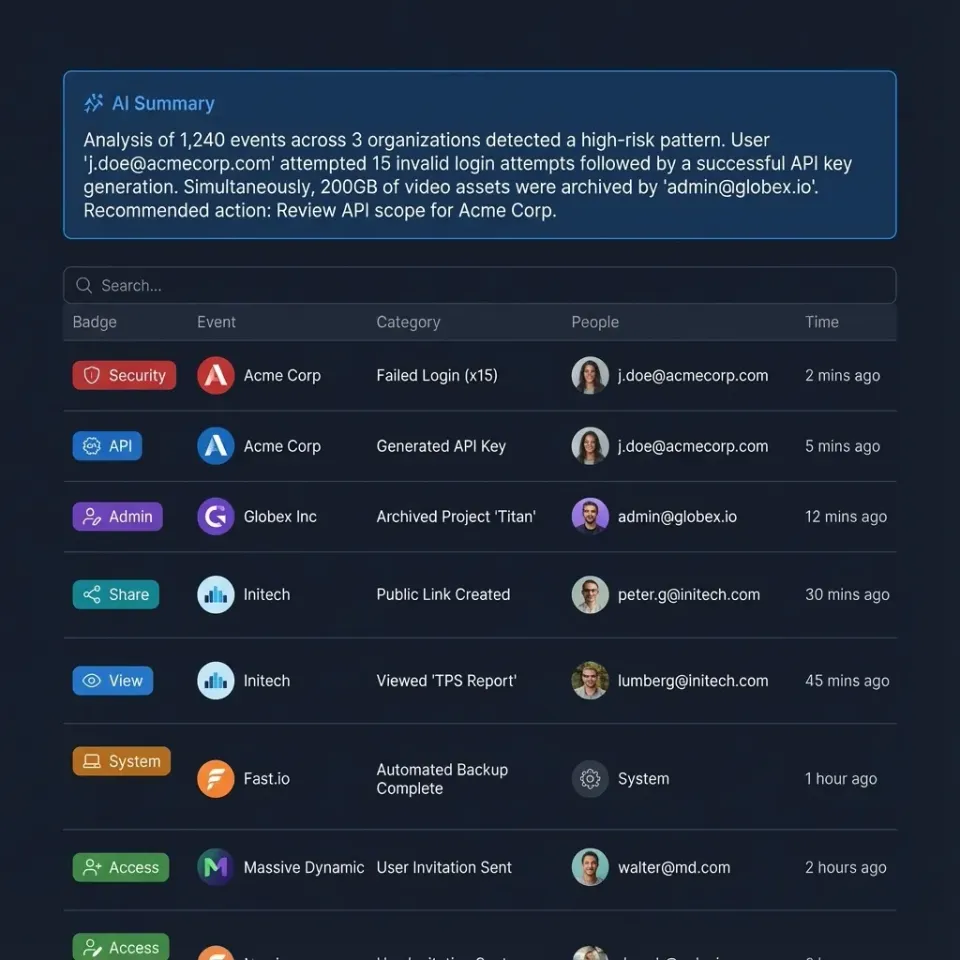
Why Automate Audit Log Retrieval?
Audit log retrieval via the Fastio API lets developers export and monitor agent and human interactions for security and compliance. When AI agents and humans share a workspace, tracking file and workspace activity is a hard security requirement.
Automating this export removes the manual work of downloading CSVs from a dashboard. Direct log ingestion speeds up compliance reporting, so security teams can analyze anomalies instead of just gathering data. Fastio exposes the audit log at GET /current/events/search/ and a long-poll activity stream at GET /current/activity/poll/{entityId}, so you can pull those events into your SIEM.
This guide covers authenticating, querying the audit log, and waiting on live activity. We will build a small export script that handles rate limits and resumes from the last activity timestamp. By the end, you will have a working pipeline to extract agent and human workspace activity.
Related guides
- How to Create Fastio Workspaces Programmatically via APIProgrammatic workspace creation allows developers to dynamically spin up isolated, intelligence-ready Fastio...
- Zero Retention Workspaces for AI Agents: A Practical GuideA zero retention workspace gives AI agents a place to read, write, and process files without leaving file content...
- How to Store CI/CD Build Artifacts Using the Fastio APIThis Fastio API guide shows you how to works alongside platforms like GitHub Actions and GitLab CI. Adding the Fastio...
- How to Build an Agentic Workspace with the Fastio APIAn agentic workspace built with the Fastio API provides persistent memory, file sharing, and tools for autonomous...
- How to Build a Custom RAG Application with Fastio APIBuilding a custom RAG (Retrieval-Augmented Generation) application traditionally requires complex orchestration between...
- Fastio API vs Amazon S3: Which is Better for Agent Storage?While Amazon S3 offers raw object storage, Fastio provides an intelligent workspace with built-in MCP tools and...
More on this subject: Agent Memory and Storage (261 guides)
Prerequisites and API Authentication
Before making requests to the Fastio audit log, you need a valid API key. Fastio uses Bearer token authentication on every authenticated call: Authorization: Bearer {api_key}.
Generate a key in Settings > Devices & Agents > API Keys, or create one with POST /current/user/auth/key/. Store the key in an environment variable or a secrets manager. Never hardcode it in application code.
Here is how you search the audit log:
curl -X GET "https://api.fast.io/current/events/search/" \
  -H "Authorization: Bearer YOUR_API_TOKEN"
If you are integrating this into an AI agent's workflow, use the MCP server instead of raw HTTP. Connect at https://mcp.fast.io/mcp/tools (or https://mcp.fast.io/mcp/code for coding agents), sending an API key as a Bearer header from headless agents. Named mode exposes a consolidated toolset, including event querying for the activity log. Code mode for headless agents exposes tools for authentication, upload, search, execution, and documentation. The Storage for Agents guide covers that setup. Agents can then read the same workspace activity they write to.
Querying the Fastio Audit Logs API Endpoint
The audit log lives at GET /current/events/search/. Use it when you want a searchable history of workspace activity for compliance export and SIEM ingestion.
For a live feed, long-poll GET /current/activity/poll/{entityId}?wait=95&lastactivity={timestamp}. The call waits for the next event, then your script can continue. Pass lastactivity as the timestamp you already have so the next wait starts from that point.
curl -X GET "https://api.fast.io/current/events/search/" \
  -H "Authorization: Bearer YOUR_API_TOKEN"

curl -X GET "https://api.fast.io/current/activity/poll/{entityId}?wait=95&lastactivity={timestamp}" \
  -H "Authorization: Bearer YOUR_API_TOKEN"
Humans and agents share the same workspaces, so both show up in the same activity stream. You can review exactly how an OpenClaw agent touched files during a run. For more on that setup, see Storage for OpenClaw.
Handling Pagination and Rate Limits
Workspace activity grows quickly when multiple AI agents process files at once. Use GET /current/events/search/ for the historical audit log, and resume the live stream with lastactivity on GET /current/activity/poll/{entityId}?wait=95&lastactivity={timestamp}. Store the timestamp from your last successful wait so the next job run continues from there instead of replaying the same window.
Here is a Python example that searches the audit log, long-polls for new activity, and backs off on rate limits:
import os
import requests

API_KEY = os.environ["FASTIO_API_KEY"]
HEADERS = {"Authorization": f"Bearer {API_KEY}"}

def search_audit_log():
    response = requests.get(
        "https://api.fast.io/current/events/search/",
        headers=HEADERS,
    )
    if response.status_code == 429:
        expires = response.headers.get("x-ve-limit-expires")
        raise RuntimeError(f"Rate limited until {expires}")
    response.raise_for_status()
    return response

def poll_activity(entity_id, last_activity):
    response = requests.get(
        f"https://api.fast.io/current/activity/poll/{entity_id}",
        headers=HEADERS,
        params={"wait": 95, "lastactivity": last_activity},
    )
    if response.status_code == 429:
        expires = response.headers.get("x-ve-limit-expires")
        raise RuntimeError(f"Rate limited until {expires}")
    response.raise_for_status()
    return response
Fastio rate limits with HTTP 429 and error code 1671. When that happens, back off until the x-ve-limit-expires header. Handling this keeps daily compliance jobs from failing mid-export.


Secure Your AI Agent Workflows
Get workspace storage, full API access, and a consolidated MCP toolset to build and monitor your agentic applications.
Filtering Logs by Agent and Event Type
Pulling history is only half the job. Daily monitoring usually focuses on agent file activity and the events your auditors ask for.
Agents should read that stream through MCP. Named-mode clients call the event tool for the activity log. Headless agents can reach the same REST audit log through the code-mode execute tool:
{"jsonrpc":"2.0","id":1,"method":"tools/call",
 "params":{"name":"execute","arguments":{"method":"GET","path":"/current/events/search/"}}}
After the response returns, keep the events your compliance policy requires and discard the rest in your own pipeline. File and workspace activity is available from GET /current/events/search/ and GET /current/activity/poll/{entityId}?wait=95&lastactivity={timestamp}.

Exporting and Ingesting into SIEM Tools
After you retrieve the payload, the next step is routing that data into your security infrastructure. Most teams push these logs into platforms like Splunk, Datadog, or Elasticsearch for long-term storage and alerting.
Because the Fastio API returns JSON, transformation is usually a mapping step. Normalize the payload to match your SIEM schema, then ship it through the collector your security team already runs.
For a continuous ingestion pipeline, long-poll GET /current/activity/poll/{entityId}?wait=95&lastactivity={timestamp} and write each response into the SIEM as it arrives. Pair that live wait with GET /current/events/search/ so you also keep a searchable historical record. The Fastio API reference documents both routes.
Testing with the Business Trial
Developers can test the audit log extraction process during the Fastio Business Trial.
Spin up a test workspace, connect a local agent using the MCP server, generate some file activity, and extract the log with GET /current/events/search/ or a long-poll on GET /current/activity/poll/{entityId}?wait=95&lastactivity={timestamp}. Your security team can validate the SIEM ingestion pipeline before rolling Fastio out across the organization.
Agents and humans share the exact same workspaces, so the auditing setup you build in the trial translates directly to production. Files uploaded during testing are indexed for workspace intelligence and Ripley, the built-in RAG agent, once Intelligence is enabled for the workspace, and file activity appears in the audit stream. Read more about configuring these shared environments in our Storage for Agents overview.
Sources
References used to verify factual claims in this guide.
-
Named mode exposes a consolidated toolset, including event querying for the activity log. Create an API key in Settings > Devices & Agents > API Keys, or with POST /current/user/auth/key/. Authenticated calls send Authorization Bearer. File activity is read with GET /current/events/search/ or GET /current/activity/poll/{entityId}?wait=95&lastactivity={timestamp}.
Frequently Asked Questions
How do I get audit logs from Fastio?
Make an authenticated GET to https://api.fast.io/current/events/search/ with Authorization: Bearer {api_key}. Create the key in Settings > Devices & Agents > API Keys, or with POST /current/user/auth/key/. For live activity, long-poll GET /current/activity/poll/{entityId}?wait=95&lastactivity={timestamp}.
Is there an API for Fastio workspace logs?
Yes. GET /current/events/search/ is the audit log. GET /current/activity/poll/{entityId}?wait=95&lastactivity={timestamp} waits for the next event. Agents can use the MCP event tool for the same activity log.
How to monitor AI agent activity in Fastio?
Search the audit log with GET /current/events/search/, or long-poll GET /current/activity/poll/{entityId}?wait=95&lastactivity={timestamp}. Humans and agents share the same workspace, so both appear in that stream. Named-mode agents can call the MCP event tool.
What is the rate limit for the Fastio audit logs API?
If you exceed the limit, the API returns HTTP 429 with error code 1671. Back off until the x-ve-limit-expires header, then retry the request.
How long does Fastio retain audit logs?
Export the audit log with GET /current/events/search/ and archive the payload in your SIEM or cold storage. Long-poll GET /current/activity/poll/{entityId}?wait=95&lastactivity={timestamp} to keep that archive current.
Related Resources

Secure Your AI Agent Workflows
Get workspace storage, full API access, and a consolidated MCP toolset to build and monitor your agentic applications.