Enterprise Search Software Guide: Architecture, Indexing, and Evaluation
Enterprise search software indexes multi-format corporate files, combining lexical keyword matching with dense semantic retrieval while enforcing strict workspace access boundaries. Standalone search crawlers keep files in their source systems and depend on connectors to stay current. This guide examines document ingestion pipelines, hybrid retrieval, permission models, and evaluation criteria for selecting an enterprise search platform.


Why Standalone Enterprise Search Crawlers Break Down
Enterprise search software indexes, organizes, and retrieves unstructured documents, communications, and data across an organization while enforcing strict role-based access permissions. When an enterprise search engine retrieves the exact clause from a technical specification but points an engineer to an external repository they cannot edit or execute against, the retrieval pipeline succeeds while the team workflow stalls. The fundamental failure mode of standalone enterprise search platforms is not embedding quality or ranking accuracy, but the operational disconnect between search and action.
Corporate knowledge does not live in uniform database records. Contracts, architectural decision records, technical specifications, financial audits, security policies, and meeting records accumulate across unstructured file formats, including multi-page PDFs, spreadsheets, presentation decks, and text files. When organizations attempt to locate information across these archives, traditional retrieval approaches break down across two distinct generations of search technology:
- First-Generation Lexical Search Portals. Early enterprise search systems, including legacy intranet portals, Apache Solr, and early Elasticsearch clusters, relied strictly on inverted keyword indices and exact term matching. Users had to know exact file names or boolean syntax. A query for vendor security guidelines failed to return a policy titled Third-Party Risk Management because the terms did not overlap. These systems returned raw links, forcing employees to open files individually and skim through dozens of pages.
- Second-Generation Cognitive and AI Search Engines. Modern enterprise search engines, including platforms like Glean, Coveo, Elastic, Guru, and Notion AI, introduced dense vector embeddings and natural language processing. These platforms map queries and document passages into high-dimensional semantic spaces, enabling conceptual discovery and generative question answering across disparate cloud drives and communication tools.
While cognitive search engines improved semantic relevance, most enterprise search software platforms remain architected around standalone web crawlers. These platforms deploy background connectors that crawl external software silos, extract text snippets into a remote vector database, and present users with a centralized query portal.
The Operational Limitations of Standalone Crawlers
Deploying a standalone search crawler over disconnected enterprise repositories introduces three operational challenges:
- Connector Synchronization Lag. External crawlers rely on periodic API polling or batched webhooks to detect changes in external drives. Because large organizations generate thousands of file revisions daily, crawler synchronization runs on intervals that frequently introduce synchronization lag. If an engineering team updates an incident postmortem or a legal team revises a supplier contract, employees and AI agents querying the search index continue to receive stale answers until the next crawl cycle completes.
- Read-Only Data Isolation. Standalone search engines construct read-only indices. They extract text to display search snippets and AI summaries, but they possess no persistent file storage or direct document execution capabilities. When an employee or an automated system identifies the needed document, they must leave the search application, open the third-party storage silo, authenticate, and locate the original file.
- The AI Agent Coordination Breakdown. In modern technical teams, autonomous AI agents (such as Claude Code, Cursor, Codex, or custom runtimes) do not just read text; they generate code, update specifications, process invoices, and draft deliverables. When an enterprise search engine exists as a standalone read-only layer, AI agents cannot access the underlying file system, verify source documents directly, or write their outputs back to the shared repository. The search tool becomes a passive lookup window rather than an active workspace.
The table below contrasts traditional crawler-based enterprise search platforms with unified, agent-accessible company brains:
Addressing these coordination challenges requires examining how modern enterprise search software processes unstructured documents from initial ingestion through hybrid retrieval.
Related guides
- Enterprise Search Tools: Evaluating Modern AI Search PlatformsEnterprise search tools index internal records and specifications to help employees and AI agents locate accurate...
- Enterprise Cognitive Search: Semantic Understanding and Natural Language RetrievalEnterprise cognitive search transforms fragmented corporate documents into a unified knowledge base by pairing semantic...
- AI Workplace Search: How to Query Company Documents with People and AgentsAI workplace search unifies company documents into a semantically searchable knowledge base that answers questions with...
- How to Enable AI Search Across Box Files with Coding AgentsConnecting coding agents to Box files often exposes a fundamental limitation: native Box search relies on keyword...
- Can ChatGPT Read Google Docs? Native vs. Workspace AccessChatGPT can read Google Docs through its native Google Drive connector or via remote MCP integrations, though native...
- How to Connect ChatGPT to Company Knowledge SafelyConnecting ChatGPT to company knowledge enables teams to query internal specifications, contracts, and operating...
More on this subject: AI Agents: General Guides (248 guides)
How Modern Enterprise Search Software Architectures Index Corporate Documents
Modern enterprise search requires an ingestion and indexing pipeline designed for structural fidelity, fast retrieval, and verifiable answers. A production enterprise search architecture consists of three interconnected layers: document ingestion, layout parsing with semantic chunking, and hybrid search retrieval.
Multi-Channel Document Ingestion
Enterprise files originate across multiple operational streams. In an intelligent workspace, files arrive through three primary pathways:
- Direct Interactive Uploads. Team members upload multi-page contracts, architectural designs, research whitepapers, and operational reports directly through browser interfaces.
- Programmatic API Ingestion. Automated pipelines, data processing jobs, and AI agents write documents into workspace storage via REST API endpoints.
- Scheduled Cloud Sync. Organizations frequently maintain archives in third-party cloud drives. To maintain unified search without disrupting existing workflows, Cloud Sync connects external cloud storage folders to search-enabled intelligent workspaces. Cloud Sync connects Google Drive, Dropbox, Box, and OneDrive folders (including SharePoint document libraries through the OneDrive connector) to a workspace, one-way or two-way, on a schedule or on demand. Synchronization operates on a schedule or on demand rather than as continuous live mirroring.
Layout Parsing and Multi-Modal Extraction
The primary bottleneck in enterprise document processing is layout parsing. Business documents feature multi-column formatting, embedded tables, running headers, and non-text elements. Naive text extractors read text horizontally across the entire page width, concatenating parallel columns into jumbled sentences that destroy semantic meaning. Flat text extraction also strips table geometry, losing the association between data values and their row or column headers.
High-fidelity layout parsers decompose each page into semantic regions: identifying section headers, paragraphs, lists, tables, and captions. Preserving visual reading order keeps extracted text in its original structural context before entering the chunking pipeline.
Semantic Chunking vs. Fixed-Token Windowing
Once text is extracted, the search pipeline divides documents into searchable passages, or chunks. In early retrieval-augmented generation setups, developers divided text using fixed token windows (for example, several hundred tokens with an arbitrary sliding overlap). Fixed-token chunking fails in enterprise environments because arbitrary boundaries fracture semantic context, such as splitting an indemnification clause directly between its general obligation and its specific exclusions.
In contrast, context-aware semantic chunking divides documents along natural structural boundaries:
- Chunks are aligned to Markdown headings, section breaks, list groups, and table boundaries.
- Each chunk inherits parent metadata, including document name, author, creation timestamp, section hierarchy, and source page number.
- When a table is chunked, header rows are prepended to each chunk so that individual rows retain contextual column definitions during vector embedding.
Hybrid Retrieval: Balancing BM25 and Dense Vector Spaces
When searching corporate files, relying exclusively on either keyword matching or vector similarity introduces major failure modes. Dense vector retrieval maps text passages into high-dimensional vector spaces using neural embedding models, allowing users to search by conceptual intent (such as matching reimbursement limits to an expense policy). However, vector-only retrieval exhibits recurring failure modes on precise enterprise queries:
- Alphanumeric Identifiers. Embedding models blur distinct alphanumeric strings into similar vector neighborhoods, struggling with specific product codes, server hostnames, or release tags.
- Exact Clause References. A query for a specific contract sub-clause retrieves general dispute clauses across dozens of agreements rather than locating that exact sub-clause.
- Negation and Exclusions. A vector query for contracts without arbitration clauses frequently ranks contracts containing prominent arbitration clauses near the top, because the vector space is dominated by the semantic concepts of contracts and arbitration.
Sparse lexical retrieval engines based on the BM25 algorithm provide the necessary balance. BM25 evaluates exact token frequencies, inverse document frequency across the corpus, and document length normalization, matching specific part numbers, acronyms, and legal section identifiers reliably.
Hybrid search pipelines combine both methods: parallel query execution across BM25 and vector indices, score normalization using Reciprocal Rank Fusion, and cross-encoder reranking over candidate passages to score contextual relevance before returning final results.
Structuring Enterprise Data with Metadata Views
While hybrid search retrieves narrative passages, enterprise operations frequently require querying structured business attributes across hundreds of documents, such as filtering vendor agreements executed recently where annual recurring contract fees exceed key commercial thresholds.
To solve this challenge, Fastio provides Metadata Views to turn unstructured documents into typed, structured databases. Rather than configuring complex regular expressions or writing rigid OCR templates, users define target fields in natural language. The extraction engine designs a typed schema supporting Text, Integer, Decimal, Boolean, URL, JSON, and Date & Time formats, evaluates files in the workspace, and populates a filterable, sortable spreadsheet.
AI agents can create Views, trigger extraction routines, and query structured records programmatically via MCP tooling. Combining structured Metadata Views with unstructured hybrid search enables two-stage retrieval: the system first filters documents by structured business parameters, then runs dense semantic retrieval over the filtered subset.
Why Workspace-Level Access Containment Outperforms File-Level ACL Synchronization
The defining challenge of enterprise search software is authorization. In a corporate environment, search results must reflect what the asking user is permitted to inspect. An intern querying internal policies must never receive snippets from executive severance packages, pending acquisition targets, or sensitive human resources investigations.
The Fragility of Synchronizing File-Level ACLs
Many standalone enterprise search platforms attempt to solve security by synchronizing file-level and folder-level Access Control Lists (ACLs) from third-party storage systems into an external search index. In practice, synchronizing granular file permissions across disparate cloud applications introduces three operational vulnerabilities:
- Permission Drift and Synchronization Lag. In source systems such as Google Drive, OneDrive, or Box, permissions change continuously as employees share documents or adjust folder access. External search crawlers discover these changes only when synchronization routines poll source APIs. During the window between changes, the search index suffers from permission drift, risking the exposure of confidential snippets to unauthorized users.
- Pre-Filtering Latency Spikes. In pre-filtered retrieval, document chunks carry access control tags. When a user searches, the query engine appends boolean filters matching the user's directory groups. In enterprises with deeply nested groups, these filter queries span thousands of terms, degrading vector index performance and spiking query latency.
- Post-Filtering Result Starvation. In post-filtered retrieval, the engine retrieves top semantic matches across the entire corpus, then filters results against an identity gateway. If top matches reside in restricted files, the filter discards all candidates. The user receives an empty result set, missing relevant non-confidential documents ranked lower down.
Workspace-Level Containment: Predictable Role-Based Boundaries
Fastio sidesteps external ACL synchronization by setting access on shared, organization-owned workspaces and shares. Permissions are set per organization, workspace, and share, through member roles. A workspace has no folder-level or file-level permissions; every workspace member reaches the whole workspace according to their role.
This architecture establishes clean, enforceable access boundaries for enterprise search:
- Defined Member Roles. Access inside a workspace is governed by five defined roles: owner, admin, member, guest, and view. Organization-level governance is managed through owner, admin, and member roles.
- Strict Search Containment. Search queries and workspace Intelligence answer exclusively from the workspaces and shares the asking person or agent belongs to. There are no file-level ACLs to evaluate at query time. If a user or an AI agent is not a member of a confidential workspace, search and Intelligence do not answer from it.
- Restricting Workspace Access. A workspace's join setting defaults to letting any member of its organization join. Keeping a workspace restricted to named individuals requires updating that setting to restrict membership.
- Selective Sharing Without Global Exposure. When a team needs to provide access to only certain documents or a single folder without granting access to the entire workspace, they create a dedicated share or a separate workspace. A share can be durable or expiring, configured with per-recipient access, and can disable file downloads when distributing materials externally.
- External Sync Permission Reset. Files synced from Google Drive, Dropbox, Box, or OneDrive inherit Fastio workspace permissions, not the source drive's sharing settings. This prevents external sharing misconfigurations from leaking into the enterprise search index.
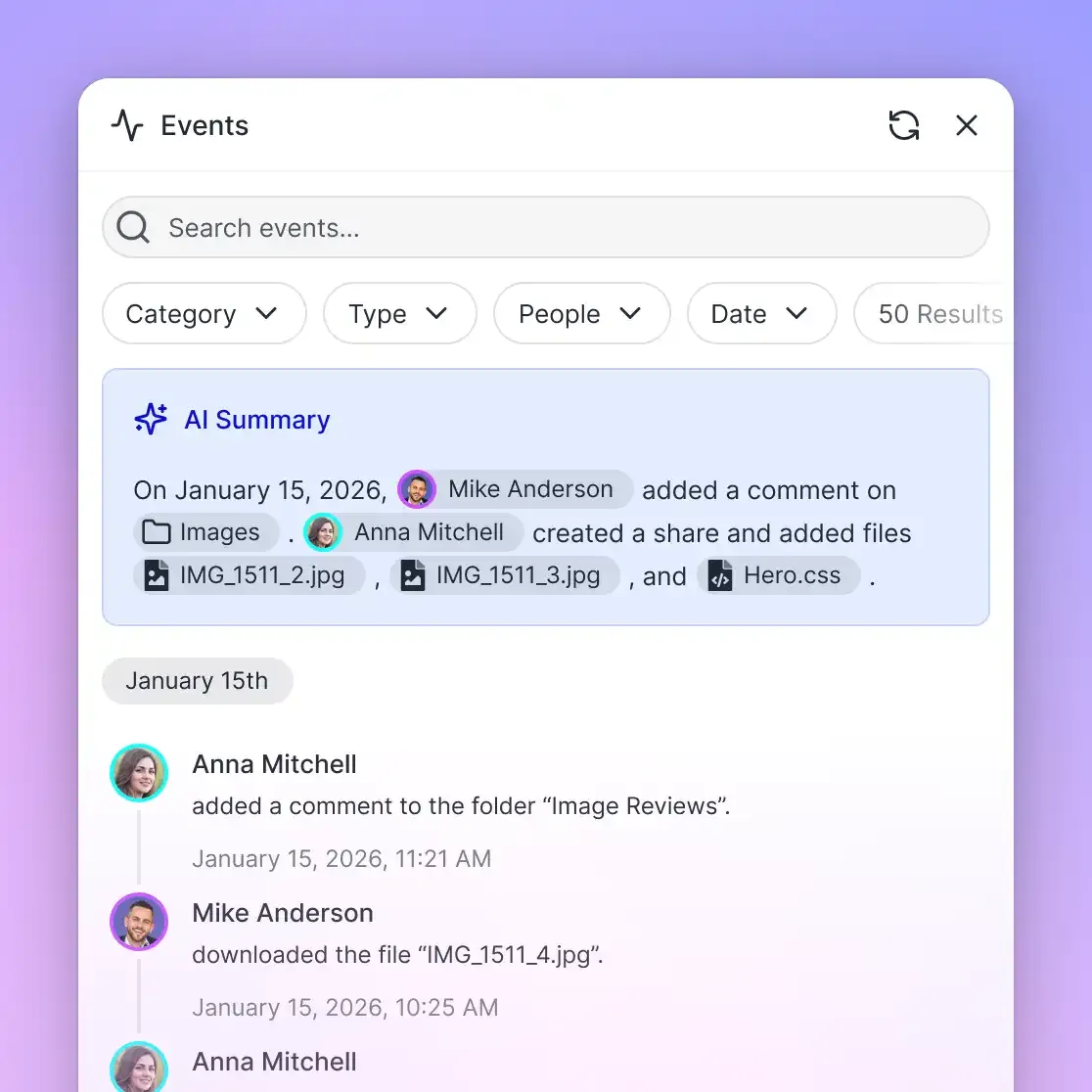
- Auditing System Activity. The detailed activity log records changes across an organization and its workspaces: tracking file uploads, edits, moves, deletions, membership changes, permission modifications, and share creation. Because the log focuses strictly on state changes, administrators maintain a clear audit trail of who modified documents or workspace boundaries.
By organizing documents into permissioned workspaces, technical teams provide comprehensive search capabilities to employees and AI agents while keeping each answer inside the workspaces the asker belongs to.


Turn Enterprise Search Software into an Active Company Brain
Deploy intelligent enterprise search software across your corporate files, query documents with exact page citations, and connect people and AI agents in shared workspaces. Monthly plans start with a 14-day free trial.
How Technical Teams Evaluate Enterprise Search Solutions
Selecting an enterprise search platform requires evaluating architectural design, operational reliability, and downstream usability. Technical decision-makers comparing enterprise search platforms (such as Glean, Coveo, Elastic, Guru, Notion AI, or Fastio) should evaluate solutions against five architectural criteria:
1. Ingestion Freshness and Storage Topology
Enterprise search solutions differ in where documents live and how quickly new information is indexed. Standalone search engines crawl third-party SaaS tools and storage drives via background API connectors. This architecture preserves existing storage habits but introduces synchronization lag and connector maintenance overhead. In contrast, an integrated intelligent workspace stores active files directly, indexing content immediately upon arrival. Crawlers must also navigate third-party API rate quotas; if rate limits are exceeded, indexing throttles, delaying search availability.
2. Query Precision, Hybrid Retrieval, and Citation Grounding
A modern enterprise search engine must deliver precise answers rather than unverified summaries. Technical teams must evaluate whether the platform combines lexical BM25 indexing with dense semantic vector embeddings natively, as pure vector platforms struggle with part numbers, error codes, and exact legal terminology. Cross-encoder reranking steps further improve relevance by evaluating query-document context after candidate retrieval. Generative search must ground every summary in exact source citations. Fastio implements this grounding natively when Intelligence is enabled on a workspace. When a user or agent queries the workspace, the system generates answers backed by direct citations linking to the exact file, page, and snippet where the source text resides. Readers can review Fastio AI capabilities to inspect how citation-backed retrieval functions across multi-format business archives.
3. Authorization and Access Containment
Data security is the most critical operational requirement in enterprise search. Evaluators should determine whether the platform attempts to synchronize file-level and folder-level ACLs from external drives or enforces clear workspace-level containment. Synchronizing external ACLs frequently causes permission drift, query latency spikes, and result starvation. The platform must maintain a detailed activity log recording state changes, including file uploads, edits, moves, deletions, and permission changes, allowing administrators to audit organizational activities.
4. AI Agent Interoperability and Model Agnosticism
Modern enterprise search must support both human employees and autonomous AI agents. Evaluators should confirm whether the platform exposes standard integration protocols like the Model Context Protocol (MCP) or provides only proprietary browser chat interfaces. AI agents need programmatic toolsets to search documents, retrieve context, and update files. Organizations should also avoid search platforms that lock them into a single proprietary large language model. An open architecture allows teams to connect Claude, OpenAI models, Gemini, Cursor, Codex, or local open-weights models to the same underlying search index.
5. Total Cost of Ownership and Maintenance Overhead
Deploying enterprise search involves infrastructure, licensing, and ongoing maintenance costs. Building an in-house enterprise search platform using standalone vector databases (such as OpenSearch, Milvus, Qdrant, or Pinecone) requires substantial engineering overhead. Teams must build, monitor, and maintain custom parsing pipelines, embedding services, chunking logic, connector sync scripts, and identity management gateways. Standalone enterprise search vendors often price by user, query, or indexed item. Integrated intelligent workspaces bundle persistent file storage, hybrid search indexing, and AI credits into predictable subscription plans.
The checklist below summarizes the essential questions technical teams should ask when conducting vendor evaluations or proof-of-concept trials:
How to Connect People and AI Agents to a Shared Company Brain
Enterprise search software achieves its highest value when it ceases to be a passive lookup portal and becomes the operational foundation of the business. When an organization organizes its institutional knowledge into an intelligent workspace, that workspace functions as an active company brain. Human professionals and autonomous AI agents collaborate over the same documents, specifications, and project records.
Remote MCP Integration for AI Agent Runtimes
AI agents require programmatic access to enterprise documents to conduct research, draft specifications, and verify factual claims. Fastio provides this connectivity through the Model Context Protocol (MCP), hosting a remote MCP server running over Streamable HTTP. This eliminates the operational burden of hosting local server processes, background daemons, or bridge scripts.
Engineering teams connect their selected AI runtimes to specific Fastio MCP endpoints:
- Claude Applications. Claude Desktop, web, mobile, and Claude Cowork connect using the tools endpoint at
https://mcp.fast.io/mcp/tools. - ChatGPT and Codex. Connect through the Fastio plugin in the ChatGPT and Codex plugin directories (preferred), or configure a custom MCP server endpoint at
https://mcp.fast.io/mcp/operations. - Coding Agents. Development environments and coding agents, such as Cursor, Claude Code, Cline, Devin, and Gemini CLI, connect directly to
https://mcp.fast.io/mcp/code.
Detailed setup instructions are documented in the Fastio MCP setup guide, and technical tool specifications are maintained in the MCP tooling reference.
For interactive environments like Claude Desktop or Cursor, authentication is handled via browser OAuth. During connection setup, the person signing in reviews permissions on the Review Permissions screen, selecting Read Only or Read & Write access and designating the exact organizations and workspaces the connection may access. With a Read Only connection, tools that modify or delete data are not offered to the agent at all.
For headless automation runners, background scripts, or CI/CD pipelines, agents authenticate by passing a scoped API key via an Authorization: Bearer <api key> header on the Streamable HTTP connection. Scoped API keys operate with the exact permissions of the user account that created them.
Workspace Collaboration, Versioning, and Coordination
When human teams and autonomous AI agents collaborate in a shared document environment, maintaining data integrity requires explicit coordination mechanisms:
- Per-File Version History. Every file in a workspace retains a complete version history. When an AI agent updates an architectural specification, revises a project plan, or refines a contract summary, the prior versions remain preserved. Team members can review earlier versions and restore one if an agent generates unintended changes.
- Collaborative Notes. Teams maintain context beside source documents using Collaborative Notes. Notes co-edit live with labeled cursors, allowing humans and AI agents to co-document implementation decisions, meeting summaries, and research findings directly beside the files they reference.
- Activity Event Streams. External systems and agent frameworks monitor workspace changes using the activity events feed, subscribing via WebSocket or long-polling HTTP requests (
GET /current/activity/poll/{entity_id}) to trigger downstream workflows when new documents arrive. - Ownership Transfer. An AI agent can create an organization, configure workspaces, index source documents, and transfer ownership to a human stakeholder with a claim link. The agent keeps admin access while establishing human governance over the project. An owner can also transfer an organization or a workspace directly to another member, and the previous owner becomes an admin.
Subscription Plans and Commercial Evaluation
Organizations evaluating intelligent workspace architectures can review plan options on the Fastio pricing page. Starter, Business, and Enterprise plans provide scalable storage, intelligence credits, and multi-user workspace access.
By combining multi-format layout parsing, hybrid retrieval, workspace-level access containment, and open MCP agent tooling, modern enterprise search software bridges the gap between passive document indexing and active team execution.
Frequently Asked Questions
What is the best enterprise search software?
The best enterprise search software depends on whether an organization needs a standalone crawler to index external SaaS applications or an integrated workspace where teams and AI agents collaborate on files directly. Standalone platforms like Glean, Coveo, and Elastic provide search connectors across external tools. In contrast, an intelligent workspace platform like Fastio functions as an active company brain: indexing multi-format corporate files upon arrival, grounding answers in exact page citations, and allowing AI agents to read, search, and update documents within permissioned workspaces.
How does modern AI enterprise search work?
Modern AI enterprise search combines sparse lexical retrieval (BM25) with dense semantic vector embeddings in a hybrid search pipeline. During document ingestion, high-fidelity parsers extract text, tables, and structural headings from files such as PDFs, Word documents, and spreadsheets. The system chunks content along section boundaries and generates vector embeddings. When a query is submitted, both keyword matching and vector similarity retrieve candidate passages, which a cross-encoder model reranks. In generative setups, the system synthesizes answers and cites exact files, pages, and text snippets.
What is the difference between enterprise search and intranet search?
Intranet search typically indexes static web pages, internal news posts, and employee directories hosted within a single intranet portal such as SharePoint or Confluence. Enterprise search spans an organization's entire document corpus, covering heterogeneous file formats across cloud drives, technical documentation, legal agreements, and operational records. Modern enterprise search also supports natural language queries, multi-format layout parsing, hybrid retrieval, and programmatic access for AI agents rather than simple link lists on a web page.
How do enterprise search engines handle document permissions?
Traditional enterprise search platforms attempt to synchronize file-level and folder-level Access Control Lists (ACLs) from external cloud drives into a vector index, which often leads to permission drift and query latency spikes. Modern intelligent workspaces enforce role-based boundaries at the organization, workspace, and share levels. Every workspace member accesses the workspace according to their assigned role (owner, admin, member, guest, view). Queries and AI search answer only from the specific workspaces and shares the user or agent belongs to.
Can AI agents edit or create files discovered through enterprise search?
In standalone search crawler platforms, the index holds copies of content from remote drives, so an agent that needs to change a file works in the source application, through the vendor's actions where they exist. In an intelligent workspace, files live directly inside the workspace where search and AI agents operate. Through standard protocols such as the Model Context Protocol (MCP) or REST APIs, AI agents can search the repository, retrieve context with citations, co-edit Collaborative Notes, and write updated deliverables directly back into the workspace under per-file version history.
Related Resources

Turn Enterprise Search Software into an Active Company Brain
Deploy intelligent enterprise search software across your corporate files, query documents with exact page citations, and connect people and AI agents in shared workspaces. Monthly plans start with a 14-day free trial.