Best AI Dashboard Builders for Agents: Top 9 Tools (2026)
AI dashboard builders provide visual interfaces and no-code tools to design, deploy, and customize user-facing dashboards for AI agent interactions. While agents often run headlessly, users need simple ways to monitor performance, review outputs, and intervene when necessary. This guide reviews the top tools for building these interfaces.

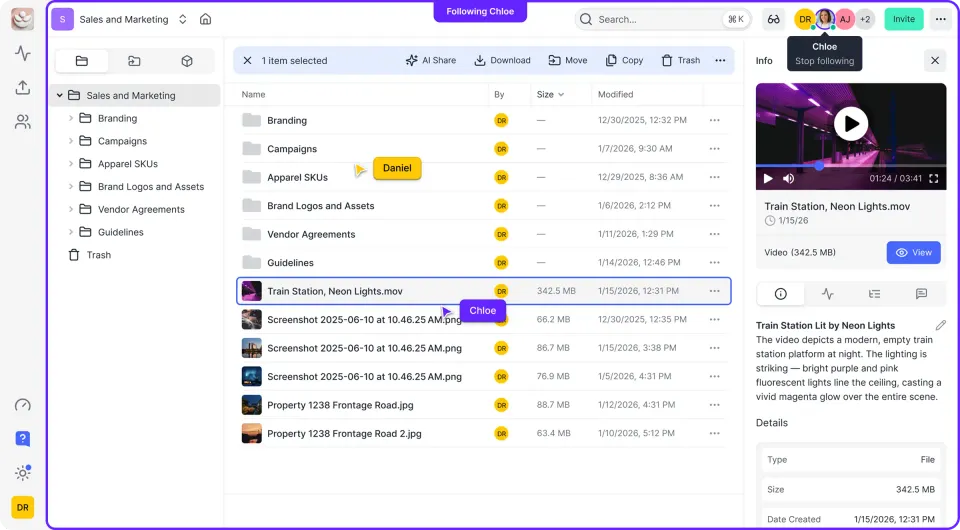
Why Agents Need Custom Dashboards
Most AI agents start as scripts in a terminal, but end users need more than a command-line interface. A custom dashboard turns a raw agent into a product, allowing users to see reasoning steps, edit memory, and approve sensitive actions. Dashboard-driven agents typically see higher user adoption than chat-only interfaces.
Building these interfaces from scratch takes time. AI dashboard builders solve this by providing pre-built components for chat, data visualization, and control inputs. Whether you are building an internal tool for operations or a customer-facing SaaS, picking the right builder cuts development time .
Helpful references: Fastio Workspaces, Fastio Collaboration, and Fastio AI.
Related guides
- 7 Best AI Agent Monitoring Tools for ProductionAI agents introduce new failure modes that traditional APM tools can't catch, from infinite reasoning loops to...
- Best Tools for AI Agent Testing and EvaluationAgent testing tools automate the evaluation of agent performance, checking for accuracy, loop detection, and goal...
- How to Build an AI Agent Performance DashboardMost teams running AI agents in production rely on raw logs to detect problems, which means failures go unnoticed for...
- Best Observability Tools for AI Agents: Monitor & DebugAI agent observability tools provide visibility into agent reasoning, tool usage, and cost per run. Without them,...
- Best Tools for AI Agent Evaluation (Evals)Evaluating AI agents is no longer about simple "vibe checks." As agents move from prototypes to production, engineering...
- Best AI QA and End-to-End Testing Tools for Web and Mobile AppsAI QA tools write, run and repair end-to-end tests of your web and mobile apps, so a test suite can keep up as the...
More on this subject: Agent Observability and Evaluation (24 guides)
What to check before scaling best ai dashboard builders for agents
We looked at these tools based on ease of use, component library quality, and integration with popular agent frameworks like LangChain and CrewAI.
1. Streamlit
Streamlit has become the standard for Python developers who need to build web apps without writing HTML or CSS. It handles data visualization well, so it works for agents that process large datasets or generate complex reports.
Pros:
- Pure Python: Build your UI logic in the same language as your agent.
- Rich Ecosystem: Thousands of community components.
- Instant Deploy: Deploy directly from GitHub.
Cons:
- State Management: Handling complex multi-turn agent state can be tricky.
- Customization: Hard to break out of the standard layout.
Best For: Agents that generate charts, graphs, or data analysis reports.

2. Chainlit
Chainlit is often described as "Streamlit for Chat." It is built for conversational AI interfaces. Unlike generic web frameworks, Chainlit comes with built-in concepts for "Reasoning Steps," "Sources," and "Elements," which helps show the internal thought process of an agent.
Pros:
- Agent Native: Built-in support for visualizing LangChain and AutoGen traces.
- Multi-Modal: Easily display images, PDFs, and audio inline.
- Easy Auth: Simple integration for user authentication.
Cons:
- Niche: only good for chat interfaces, not general dashboards.
Best For: Debugging agents and showing "Chain of Thought" reasoning to users.
3. Retool
Retool is a strong option for building internal tools. If your agent needs to interact with your production database, trigger APIs, or require human-in-the-loop approval workflows, Retool is a good choice. It connects to most data sources and offers a drag-and-drop builder for detailed forms and tables.
Pros:
- Data Connectors: Native integrations with PostgreSQL, REST APIs, and GraphQL.
- Enterprise Security: SSO, audit logs, and on-premise deployment options.
- AI Components: New AI blocks for summarizing text or generating content within the tool.
Cons:
- Cost: Can become expensive for large teams.
- Learning Curve: Requires understanding of SQL and JavaScript queries.
Best For: Internal operations agents that automate business workflows.


Give Your AI Agents Persistent Storage
Dashboards need data. Fastio provides persistent cloud storage for your agents to save files, logs, and memories that can be displayed in any UI.
4. Vercel AI SDK UI
For developers building commercial SaaS products, the Vercel AI SDK (combined with Next.js) offers the most control. It provides React hooks like useChat and useCompletion that handle the streaming of text from LLMs automatically.
Pros:
- Streaming Support: Excellent support for streaming text and tool calls.
- Generative UI: Can render React components directly from LLM output.
- Framework Agnostic: Works with OpenAI, Anthropic, Mistral, and more.
Cons:
- High Skill: Requires full-stack web development skills (React/Next.js).
Best For: Production-grade, customer-facing AI applications.
5. Fastio
While not a UI builder itself, Fastio provides the backend infrastructure that powers agent dashboards. Agents need a place to store their state, log their actions, and keep the files they generate (PDFs, images, code). Fastio acts as the memory layer that any of the above dashboards can read from.
Pros:
- MCP Support: Connects to Claude or other agents via a consolidated MCP toolset.
- Persistent Storage: Persistent cloud storage for agent logs, memory, and outputs.
- Open Access: Dashboards (like Retool or Streamlit) can read agent outputs via standard URLs.
Cons:
- No UI Builder: Focuses on storage and state, not visual components.
Best For: Managing agent artifacts, long-term memory, and state across different sessions.

6. Bubble
Bubble is an established no-code platform that allows for the creation of fully functional web applications. It's powerful enough to build clones of Airbnb or Uber. For agents, Bubble offers deep database capabilities and API connector plugins to interface with LLMs.
Pros:
- Full Stack: Handles frontend, backend, and database in one visual tool.
- Plugin Marketplace: Large library of community-built AI plugins.
Cons:
- Complexity: High learning curve for a no-code tool.
- Performance: Can be slower than custom code for heavy loads.
Best For: Founders building a complete SaaS product without coding.
7. FlutterFlow
If your agent needs to live in a user's pocket, FlutterFlow is the best choice for building native mobile apps (iOS and Android) visually. It exports clean Flutter code, so you aren't locked in forever.
Pros:
- Native Performance: Builds real mobile apps, not just web wrappers.
- Visual Builder: Excellent drag-and-drop interface for mobile layouts.
- AI Gen: Built-in AI features to generate code snippets or page layouts.
Cons:
- Deployment: Publishing to App Stores adds complexity.
Best For: Consumer-facing mobile AI assistants.
8. Gradio
Gradio (acquired by Hugging Face) is a quick way to demo a machine learning model. With just a few lines of Python, you can create a web interface around your model inputs and outputs. It is less flexible than Streamlit but even easier to set up.
Pros:
- Simple: Create an interface in 3 lines of code.
- Hosting: Free hosting on Hugging Face Spaces.
- Shareable: Instantly creates a public link to your local server.
Cons:
- Limited UI: standardized look and feel; hard to brand custom apps.
Best For: Rapid prototyping and sharing model capabilities with stakeholders.
9. Embeddable
Embeddable is a developer toolkit for building customer-facing analytics into your own application. Instead of sending customers to a separate BI tool, you embed dashboards directly inside your SaaS product. Engineers define data models, React components, and themes in their own repository, push them to Embeddable with its SDK, and then assemble dashboards in code or in a no-code builder. Data models are built on Cube, an open-source library, and connect read-only to databases including Postgres, MySQL, SQL Server, BigQuery, Snowflake, Redshift, Databricks, and ClickHouse.
To embed a dashboard, you load Embeddable's web component and place an em-beddable element in your page. The docs include examples for plain HTML, React, Next.js, Angular, and Vue. Your server calls the Tokens API to get a short-lived, scoped token for each user, and Embeddable applies row-level security to every query based on that token, so each customer sees only their own rows. Embeddable says it does not use iframes and does not copy your data into a separate warehouse.
Pros:
- Native Embedding: A web component plus server-side tokens, rather than an iframe around a BI tool.
- Multi-Tenant Security: Row-level security through security filters, SQL-based rules, or access policies.
- Agent-Friendly Development: Embeddable ships Claude skills that let an AI coding agent such as Claude Code generate components, data models, dashboards, and themes as reviewable code.
Cons:
- Setup: You need a database connection and data models before you can build a dashboard.
- Pricing: No public price list. Embeddable sells a flat monthly subscription and quotes it mainly by project scope.
- AI Chat Still a Prototype: The docs label the in-product AI chatbot, which answers end-user questions with your own LLM API key, as a prototype.
Best For: SaaS teams that need customer-facing dashboards embedded natively in their own product.
Which Builder Should You Choose?
The right choice depends on your team's skills and the agent's purpose.
- For Data Scientists: Start with Streamlit or Gradio. They let you stay in Python and focus on the logic.
- For React Developers: Use Vercel AI SDK or Chainlit if you need fine-grained control over the chat experience.
- For Internal Tools: Retool is hard to beat for connecting agents to existing business data safely.
- For Mobile: FlutterFlow is the best option for native experiences.
- For Customer-Facing Analytics: Embeddable fits SaaS teams that want dashboards embedded in their own product, with row-level security for each customer.
Regardless of the frontend, remember that your agent needs a reliable backend to store its memory and files. A dashboard without persistent state is just a momentary view.
Sources
References used to verify factual claims in this guide.
-
Plans from $9.99/month with 14-day Business Trial
-
Consolidated MCP toolset Persistent cloud storage for agent workflows
-
Create an interface in 3 lines of code
Frequently Asked Questions
How do you build a UI for AI agents?
You can build an agent UI using code-based libraries like Streamlit and Chainlit (Python) or the Vercel AI SDK (JavaScript). Alternatively, low-code platforms like Retool and Bubble allow you to drag and drop components to create interfaces that connect to your agent's API.
What are the best no-code agent dashboards?
Bubble and FlutterFlow are top no-code choices for building full applications. For internal business tools, Retool offers a powerful low-code environment. These platforms allow you to connect to LLM APIs (like OpenAI or Anthropic) without writing backend code.
Can you create agent interfaces without coding?
Yes, platforms like Bubble, Softr, and Glide allow you to build interfaces for AI agents without writing code. They connect to your agent logic via API/Webhooks, allowing users to input prompts and view generated responses or data visualizations.
Why do I need a dashboard for an autonomous agent?
Even autonomous agents need human supervision. A dashboard allows you to monitor the agent's 'thought process' (logs), review its outputs (files/reports), and provide feedback or approval for sensitive actions. It builds trust in the agent's operations.
Related Resources

Give Your AI Agents Persistent Storage
Dashboards need data. Fastio provides persistent cloud storage for your agents to save files, logs, and memories that can be displayed in any UI.