How to Configure AI Agent Granular Permissions
Granular permissions are the defense layer between an autonomous AI agent and your sensitive data. With identity weaknesses playing a material role in nearly 90% of the incidents Palo Alto Networks' Unit 42 investigated, giving an agent "full access" is a critical vulnerability. This guide explains how to implement Role-Based Access Control (RBAC) for agents, manage file-level inheritance, and use Fastio's specialized Agent Workspaces to enforce the principle of least privilege.

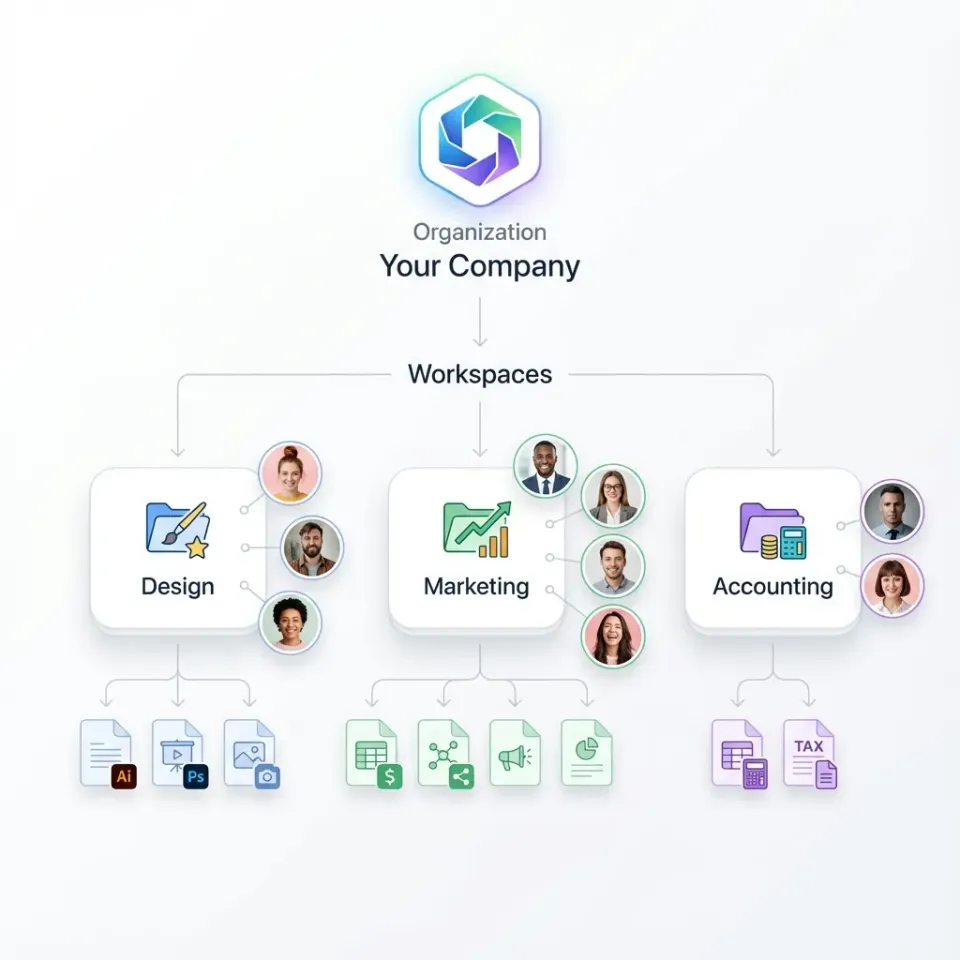
Why Agents Need Specialized Access Controls
AI agents are not human users. They operate at high speed, process thousands of files simultaneously, and can unintentionally hallucinate actions if not strictly bounded. Traditional permission models often force you to choose between giving a bot full admin rights or no access at all, neither of which is safe for production workflows. Granular permissions control agent access at file, folder, and region levels. Unlike standard user accounts, agent identities require strict scoping. An agent designed to summarize marketing PDFs should not have read access to legal contracts, nor write access to the finance directory. According to Palo Alto Networks, identity weaknesses played a material role in nearly 90% of the incidents its Unit 42 team investigated. For autonomous agents, the risk is amplified because they execute actions without human latency. Implementing granular controls is not just about compliance; it's about containment. When a human makes a mistake, they might delete one file. When an agent hallucinates or enters a loop, it can delete thousands of files in seconds or exfiltrate an entire database before anyone notices. This "blast radius" difference is why agent-specific RBAC is mandatory for any serious deployment. Also, agents often interact with other agents. A "Writer" agent might pass a draft to an "Editor" agent, who then passes it to a "Publisher" agent. If the "Writer" has "Publisher" permissions, a prompt injection attack on the Writer could bypass the entire editorial review process. Segregation of duties is enforced through granular permissions.
Helpful references: Fastio Workspaces, Fastio Collaboration, and Fastio AI.

Related guides
- ChatGPT Google Drive Permissions: Workspace Security and Access ScopesChatGPT Google Drive permissions represent the specific OAuth 2.0 authorization scopes granted to OpenAI to index,...
- Best Code Execution Sandboxes for AI Agents in 2026Code execution sandboxes let AI agents run generated code in isolated environments without risking your host system....
- Best Secret Management Tools for AI AgentsAI agents need API keys, database credentials, and service tokens to do their work. Hardcoding those secrets into agent...
- How to Manage AI Agent Secrets and API CredentialsAI agent secrets management is about securely storing, rotating, and accessing API keys and tokens that autonomous...
- How to Build an AI Agent Credential VaultAn AI agent credential vault is a specialized security system designed to manage, rotate, and inject secrets for...
- Dynamic Secrets for AI Agents: How to Implement Runtime Injection and RotationStatic credentials are a major liability for automated systems, especially for agents with broad permissions. This...
More on this subject: Agent Security and Governance (65 guides)
The Agent Permission Matrix
To secure an agentic workflow, you must move beyond binary "Read/Write" settings. We recommend mapping agent roles to specific capabilities using a permission matrix. This approach ensures that each agent has exactly the authority it needs, and nothing more.
Recommended Role Definitions:
Human vs. Agent Roles It is often tempting to reuse human roles for agents (e.g., giving the "SQL Bot" the same permissions as the "Lead Developer"). This is a mistake. Humans have judgment; agents follow instructions.
- Humans need broad access to explore, debug, and fix unforeseen issues.
- Agents need narrow access to perform repetitive, predefined tasks. If an agent's scope is "resize images in /assets/raw", it should strictly have Read access to
/assets/rawand Write access to/assets/processed. It should have zero visibility into/srcor/config. This is the essence of Least Privilege for non-human identities.
Step-by-Step: Setting Up Agent Permissions
Configuring a secure agent workspace involves more than just inviting an email address. Follow this process to establish a strong permission architecture.
1. Create a Dedicated Agent Identity
Never share API keys between agents or between a human and an agent. Create a unique identity for each bot (e.g., agent-invoice-processor@yourdomain.com). This ensures that the Audit Log reflects exactly which bot performed an action.
2. Define the Workspace Boundary
Create a specific workspace for the agent's task. For example, Finance - Invoice Processing. Do not let the agent roam in your general Company Wide workspace.
- Action: Create Workspace -> "Invoice Processing"
- Setting: Enable "Intelligence Mode" if the agent needs RAG capabilities.
3. Establish Folder Structure with Inheritance Structure your folders to use permission inheritance.
/Inbox(Agent: Read/Write)/Processed(Agent: Write Only)/Archive(Agent: Read Only)/Errors(Agent: Read/Write)
4. Apply the Permissions Invite the agent's email to the workspace as a "Viewer" (base level). Then, override permissions on specific folders.
- Right-click
/Inbox-> Share -> Addagent-invoice-processor-> "Editor". - Right-click
/Archive-> Share -> Addagent-invoice-processor-> "Viewer".
This "deny by default" approach means if a new folder is created at the root, the agent effectively has no dangerous access to it until explicitly granted.
How Inheritance and Overrides Work
Fastio uses a strict inheritance model where permissions cascade down from the Organization to the Workspace, Folder, and finally the File. However, AI workflows often require exceptions to these rules.
The Inheritance Flow:
- Organization: The broadest scope. Agents denied here cannot enter any workspace.
- Workspace: The primary container. An agent can be an Admin in "Marketing" but blocked from "Finance".
- Folder: Specialized access. You can grant an agent access to a specific project folder without revealing the rest of the workspace.
- File: The most granular level. Lock specific sensitive files (like
.envorsalary_data.csv) even inside open folders.
Overrides: Explicit file-level permissions always override inherited folder permissions. If you set a specific file to "No Access" for an agent, it remains inaccessible even if the agent has "Full Access" to the parent folder. This is critical for securing sensitive assets in shared environments.
For example, you might have a /Project-Alpha folder where the "Dev-Bot" has Full Access. However, inside that folder is a keys.json file. By explicitly setting keys.json to "No Access" for the bot, you create a secure enclave within an otherwise open workspace. The bot can read code, write logs, and update documentation, but it cannot steal credentials.


Secure Your Agent Workflows
Give your AI agents a safe, controlled environment with granular permissions and built-in audit logs. Built for agent granular permissions workflows.
Managing Concurrency with Versioning and Permissions
When multiple agents work in the same environment, write conflicts can occur. What happens when Agent A processes a document while Agent B updates the same folder?
Fastio addresses concurrency through advisory file locks, automatic file version history, and granular folder-level permissions. An agent can acquire an advisory file lock before writing, heartbeat it while working, and release it when done. Another agent attempting to lock the same file receives an HTTP 409 and can wait or read. Because locks are advisory, any concurrent write is still preserved in version history as a safety net.
Best Practices for Multi-Agent Workspaces:
- Acquire Advisory File Locks: Have agents lease a file before writing and release it when complete.
- Separate Workspaces and Folders: Give each agent write permissions only to its designated output directory.
- Leverage File Versioning: Fastio tracks every update automatically, making accidental overwrites fully reversible.
- Monitor Activity: Use the activity feed or WebSocket events feed to react to changes as they happen without conflicts.
Security Pitfalls and Common Mistakes
Even with granular permissions, misconfiguration can lead to vulnerabilities. Here are the most common mistakes we see in production agent deployments.
1. Over-Privileged Context Windows Using RAG (Retrieval Augmented Generation) on a root folder with "Administrator" access exposes every file to the agent's context window. If a user asks "What are the CEO's salary details?", and the agent has access to HR folders, it will retrieve and answer.
- Fix: Scope RAG agents to specific "Knowledge Base" folders, never the entire Organization root.
2. The "Service Account" Trap Creating one "Super Agent" account that powers all your different bots (Customer Support, Internal Search, Code Gen). If this one account is compromised via prompt injection, your entire stack is vulnerable.
- Fix: One Agent = One Identity. Isolate capabilities.
3. Ignoring "Write" Risks We often worry about data leaks (Read access), but data integrity (Write access) is equally critical. An agent with "Write" access to a production database dump could corrupt it.
- Fix: Use "Versioning" alongside permissions. Fastio automatically versions every file upload. If an agent corrupts a file, you can roll back to the previous version instantly.
Auditing and Compliance
Permissions are only effective if you can verify they are working. Fastio provides a comprehensive Audit Log that tracks every single action taken by an agent, distinct from human activity. This is essential for enterprise security standards and internal compliance reviews.
What to Monitor:
- Access Denied Events: A spike in these suggests a misconfigured agent or a potential prompt injection attack trying to access unauthorized data.
- High-Volume Reads: An agent reading vastly more data than usual might indicate a loop or data exfiltration attempt.
- Permission Denials: Repeated access rejections indicate an agent may need its path configuration or role updated.
- Geo-IP Anomalies: If your agent is hosted in
us-east-1but an access request comes from a residential IP in another country, the credential may have been leaked.
Automated Alerting You can monitor the Fastio activity feed or WebSocket events feed for specific audit events. For example, if an agent accesses a restricted path, alert your security team immediately. This moves security from "post-mortem" to "real-time response."

Sources
References used to verify factual claims in this guide.
-
Identity weaknesses played a material role in nearly 90% of Unit 42 incident response investigations
Frequently Asked Questions
Can I give an agent access to just one file?
Yes. You can invite an agent email address to a single file. This overrides any parent folder restrictions, allowing the agent to access that specific asset without seeing anything else in the workspace.
How do I revoke an agent's access?
You can revoke access instantly from the workspace settings or the file's share menu. Because Fastio checks permissions in real-time on every request, the agent's token will immediately stop working for that resource.
Do agents need their own accounts?
Yes. We recommend creating distinct accounts for your agents (e.g., `agent-sql@yourdomain.com`). This allows you to track their actions separately in the audit logs and assign specific permissions rather than sharing a human user's API key.
What happens if two agents write to the same file?
Agents should acquire an advisory file lock before writing; a second acquire receives an HTTP 409 so the agent can wait. If two agents write concurrently without locking, both writes land safely in Fastio's automatic file version history.
Does Fastio support OAuth for agents?
Yes. Fastio supports standard OAuth flows. This allows your custom agents to request specific scopes (like `files.read` or `files.write`) on behalf of a user, ensuring they only get the permissions explicitly granted during the authorization handshake.
Can I use IP allowlisting for agents?
Fastio supports granular permissions and scoped API keys to restrict workspace access. If your agents run in automated pipelines, you can scope credentials to specific workspaces and folders.
Related Resources

Secure Your Agent Workflows
Give your AI agents a safe, controlled environment with granular permissions and built-in audit logs. Built for agent granular permissions workflows.