Adaptive Bitrate Streaming: How It Works and Why It Matters
Adaptive bitrate streaming automatically adjusts video quality in real-time based on the viewer's bandwidth and device capabilities. This technology eliminates buffering and ensures smooth playback across all network conditions, from 5G mobile to spotty WiFi.


What Is Adaptive Bitrate Streaming?
Adaptive bitrate streaming is a method of video delivery that dynamically adjusts video quality to match available bandwidth. The same video content is encoded at multiple quality levels (240p, 360p, 720p, 1080p, 4K), and the player automatically selects the best version based on current network conditions.
When your internet connection slows down, ABR switches to a lower quality stream to prevent buffering. When bandwidth improves, it upgrades to higher quality. This happens continuously during playback, often multiple times per minute, without interrupting the viewer's experience.
According to research from Columbia University, users abandon a video after just 2 seconds of buffering. ABR technology solves this problem by prioritizing continuous playback over maximum quality.
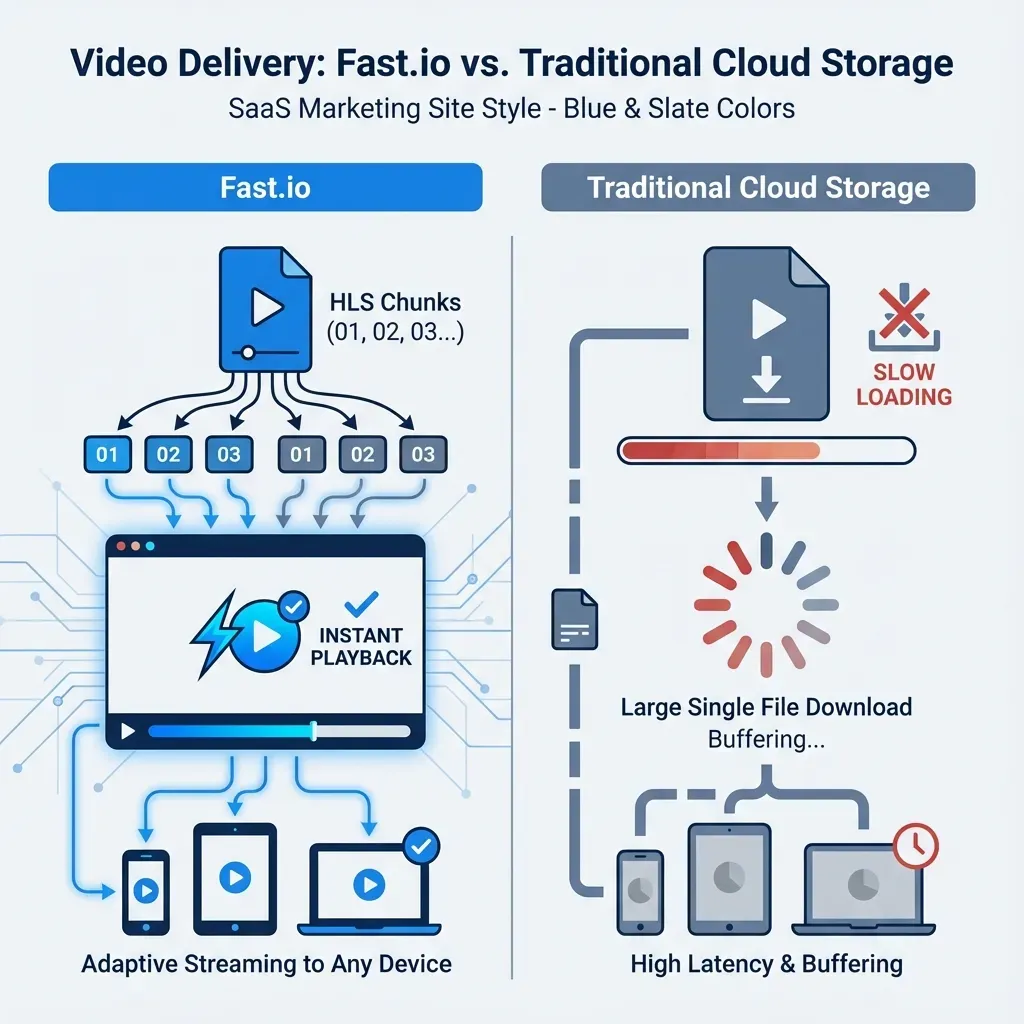
How it differs from progressive download: Traditional progressive download forces viewers to wait while the entire video file downloads sequentially. ABR breaks video into small chunks (typically 2-10 seconds each) and downloads only what's needed next, making instant playback possible.
Related guides
- HLS Streaming: How HTTP Live Streaming WorksHLS (HTTP Live Streaming) is the standard protocol for delivering high-quality video over the internet. It works by...
- How to Use a Video CDN for Faster StreamingA Video CDN (Content Delivery Network) is the backbone of modern streaming, ensuring smooth playback by caching content...
- Best Cloud Storage for Video: 7 Options for Production TeamsVideo files demand more from cloud storage than documents or photos. You need large file support, fast transfers, and...
- How to Share Large Files on Discord (Without Hitting the Size Limit)Discord's file upload limit is 10MB for free users, 50MB for Nitro Basic, and 500MB for full Nitro subscribers. For...
- How to Send 4K Video Files Without Losing Quality4K video files range from 3GB for a short clip to over 100GB per hour of professional footage. Most transfer methods...
- How to Share Videos: The Best Methods for 2026Video files are the most demanding content to share. A single minute of 4K ProRes can exceed 5GB, and most tools either...
More on this subject: File Sharing (155 guides)
How Adaptive Bitrate Streaming Works
The ABR process involves three main components working together: the encoder, the origin server, and the player.
1. Encoding and Segmentation
The source video is encoded at multiple bitrates. A typical ladder might include:
- 240p at 400 kbps (mobile data saver)
- 360p at 800 kbps (standard mobile)
- 720p at 2.5 Mbps (HD viewing)
- 1080p at 5 Mbps (Full HD)
- 4K at 15-25 Mbps (Ultra HD)
Each quality level is then segmented into small chunks, usually 2-10 seconds long. This chunking is what enables dynamic switching without restarting playback.
2. Manifest Files
The encoder generates a manifest file (also called a playlist) that lists all available quality levels and their corresponding segment URLs. This manifest uses different formats depending on the protocol:
- HLS (HTTP Live Streaming) uses
.m3u8playlists - DASH (Dynamic Adaptive Streaming over HTTP) uses XML-based
.mpdfiles
3. Real-Time Adaptation
The player maintains a buffer of downloaded segments (typically 10-30 seconds of video) and constantly monitors download speed and buffer health. It uses this data to make switching decisions:
- If segments download faster than playback speed and the buffer is healthy (above 15-20 seconds), request higher quality
- If throughput drops or buffer drains below a threshold (5-10 seconds), immediately switch to lower bitrates
- If buffer is critically low (under 3 seconds), drop to the lowest quality available to prevent rebuffering
These decisions happen automatically, multiple times during a typical viewing session, based on changing network conditions.
HLS vs DASH: The Two Main ABR Protocols
While adaptive bitrate streaming is the concept, HLS and DASH are the two dominant protocols that implement it.
HLS (HTTP Live Streaming)
Developed by Apple, HLS has become the de facto standard for ABR streaming. It uses .m3u8 playlist files and works natively in Safari and most modern browsers.
Advantages:
- Universal compatibility: Works on iOS, macOS, Android, web browsers, and smart TVs
- Simple implementation: HTTP-based, no special server software required
- Wide CDN support: Every major CDN supports HLS delivery
Technical details:
- Default segment length: 6 seconds (configurable)
- Supports AES-128 encryption for DRM
- Low-latency HLS (LL-HLS) reduces delay to under 2 seconds
DASH (Dynamic Adaptive Streaming over HTTP)
DASH is an international standard (ISO/IEC 23009-1) developed as an open alternative to proprietary streaming protocols. It uses XML-based MPD (Media Presentation Description) files.
Advantages:
- Codec flexibility: Not tied to specific video codecs like H.264
- Lower latency options: DASH-LL supports sub-second latency
- Open standard: No licensing fees or vendor lock-in
Which should you choose?
For most use cases, HLS is the safer choice due to universal device support. DASH offers more flexibility but requires client-side JavaScript players since browsers don't natively support it. Many platforms encode to both formats to maximize compatibility.


Start with adaptive bitrate streaming on Fastio
Fastio uses HLS streaming to give clients instant playback of large video files, 50-60% faster than traditional file transfer. Preview immediately, download when needed.
The Technical Benefits of ABR
Adaptive bitrate streaming solves several critical problems in video delivery:
1. Eliminates Buffering
Research from Bitmovin shows that 47% of consumers have unsubscribed from streaming services due to buffering issues, translating to $390 million in monthly losses across the industry. ABR prevents this by prioritizing continuous playback.
The player maintains a buffer ahead of the current playback position. When network conditions worsen, ABR drops quality to keep the buffer from draining, preventing the dreaded spinning wheel.
2. Reduces Abandonment Rates
Studies show that the abandonment rate on live videos is 6% as a result of taking longer than two seconds to load. ABR delivers near-instant start times by beginning playback at a lower quality while higher quality segments download in the background.
3. Optimizes Bandwidth Usage
Traditional progressive download wastes bandwidth by downloading high-quality video that viewers might not watch. ABR only downloads what's needed, at the quality appropriate for current conditions.
4. Adapts to Device Capabilities
A mobile phone with a 720p screen doesn't need 4K video. ABR considers not just network speed but also screen resolution, avoiding unnecessary data transfer and battery drain.
5. Handles Network Variability
Mobile viewers experience constantly changing conditions, switching between WiFi, 5G, 4G, and dead zones. ABR adapts automatically, maintaining playback quality through these transitions.
Implementing ABR in Your Video Workflow
Adding adaptive bitrate streaming to your video delivery involves several technical steps:
Step 1: Encoding
Generate multiple quality versions of each video. Most workflows use FFmpeg or commercial encoders to create an encoding ladder. A basic ladder might include:
240p  - 400 kbps  - 426x240
360p  - 800 kbps  - 640x360
540p  - 1.5 Mbps  - 960x540
720p  - 2.5 Mbps  - 1280x720
1080p - 5 Mbps    - 1920x1080
Step 2: Segmentation
Break each quality level into segments. Shorter segments (2-4 seconds) enable faster adaptation but increase server requests. Longer segments (6-10 seconds) reduce overhead but slow adaptation.
Step 3: Generate Manifests
Create playlist files that reference all quality levels. For HLS, this means a master .m3u8 playlist pointing to individual quality playlists.
Step 4: Distribution
Host segments and manifests on a CDN or origin server. Standard HTTP servers work fine, no special streaming server software is required.
Step 5: Player Integration
Use a video player that supports ABR. For HLS, native browser players work on most devices. For DASH, you'll need JavaScript players like Video.js or Shaka Player.
Transcoding at Scale
For professional workflows, cloud-based transcoding services can automate this process. They handle encoding, segmentation, and manifest generation automatically when you upload source files.

ABR Performance: What to Expect
Properly implemented adaptive bitrate streaming delivers measurable improvements over traditional progressive download:
Start Time
- Progressive download: 5-15 seconds (depends on file size)
- ABR streaming: Under 2 seconds (often under 1 second)
Buffering Events
- Progressive download: 2-3 stalls per minute on variable networks
- ABR streaming: Near-zero on most connections
Bandwidth Efficiency
- Progressive download: 100% of max quality downloaded regardless of viewing
- ABR streaming: 30-50% bandwidth savings by matching quality to conditions
Quality Consistency
- Progressive download: All-or-nothing (either perfect quality or unusable buffering)
- ABR streaming: Graceful degradation (watchable at all network speeds)
According to Streaming Media, adaptive streaming is 50-60% faster than traditional progressive download methods, primarily due to instant start times and elimination of buffering delays.
Common ABR Implementation Challenges
While ABR solves many problems, implementation has its own challenges:
Storage Requirements
Multiple quality versions mean 3-5x storage consumption compared to single-file delivery. A 1GB source file becomes 3-5GB when encoded at multiple bitrates. Cloud storage with intelligent caching helps manage these costs.
Encoding Time and Cost
Generating multiple quality versions takes processing power. A 1-hour video might require 2-4 hours of encoding time depending on the number of quality levels and encoding settings.
Quality Switching Artifacts
Poorly configured encoding ladders can cause visible quality jumps when switching between bitrates. Consistent GOP (Group of Pictures) alignment across quality levels minimizes this issue.
Live Streaming Latency
Standard HLS introduces 15-30 seconds of latency due to segment buffering. Low-latency variants (LL-HLS, DASH-LL) reduce this to under 3 seconds but require more sophisticated infrastructure.
Cache Complexity
CDN caching becomes more complex with multiple quality levels and segment files. Proper cache configuration is essential for cost-effective delivery.
ABR for Large File Delivery
Adaptive bitrate streaming isn't just for consumer video platforms. It's increasingly important for professional workflows involving large video files:
Remote Collaboration
Post-production teams reviewing dailies or rough cuts benefit from instant preview playback via ABR, even when working with multi-gigabyte ProRes or RAW source files. Editors can scrub through footage immediately instead of waiting for progressive downloads.
Client Delivery
Fastio uses HLS streaming to deliver professional video assets to clients without requiring downloads. Clients get instant playback in their browser, while the original high-resolution files remain available for download when needed.
This approach is 50-60% faster than traditional file transfer methods because viewing and downloading are decoupled. Clients can preview immediately and decide what to download.
Version Control
When working with multiple video versions, ABR enables instant comparison without downloading every revision. Teams can scrub through V1, V2, and V3 of a cut immediately, making version review dramatically faster.
Sources
References used to verify factual claims in this guide.
-
Users abandon a video after just 2 seconds of buffering
-
The abandonment rate on live videos is 6% as a result of taking longer than two seconds to load
-
47% of consumers have unsubscribed from streaming services due to buffering issues, translating to $390 million in monthly losses
-
Adaptive streaming is 50-60% faster than traditional progressive download methods ABR is 50-60% faster than traditional file transfer because viewing and downloading are decoupled
-
Video encoded at multiple quality levels including 240p, 360p, 720p, 1080p, and 4K with bitrates from 400 kbps to 25 Mbps Each quality level is segmented into small chunks, usually 2-10 seconds long for adaptive bitrate streaming Encoding ladder includes 240p at 400 kbps, 360p at 800 kbps, 540p at 1.5 Mbps, 720p at 2.5 Mbps, 1080p at 5 Mbps Shorter segments of 2-4 seconds enable faster adaptation but increase server requests; longer segments of 6-10 seconds reduce overhead 4K streaming at 15-25 Mbps for premium Ultra HD content delivery
-
Player maintains a buffer of 10-30 seconds of video and monitors download speed for switching decisions Buffer health threshold above 15-20 seconds triggers higher quality requests, below 5-10 seconds triggers lower bitrates Progressive download start time 5-15 seconds compared to ABR streaming under 2 seconds Progressive download causes 2-3 stalls per minute on variable networks versus near-zero for ABR ABR streaming achieves 30-50% bandwidth savings by matching quality to network conditions ABR enables near-instant start times under 2 seconds by beginning playback at lower quality Progressive download requires 5-15 seconds or more before playback begins
-
HLS default segment length is 6 seconds and supports AES-128 encryption for DRM Low-latency HLS (LL-HLS) reduces delay to under 2 seconds Standard HLS introduces 15-30 seconds of latency; low-latency variants reduce to under 3 seconds Live streaming latency of 15-30 seconds for standard HLS; under 3 seconds for LL-HLS and DASH-LL
-
DASH low-latency (DASH-LL) supports sub-second latency as an open standard DASH is an international standard ISO/IEC 23009-1 developed as an open alternative
-
Multiple quality versions mean 3-5x storage consumption; a 1GB source file becomes 3-5GB at multiple bitrates Buffer critically low under 3 seconds drops to lowest quality to prevent rebuffering 720p screen does not need 4K video; ABR considers screen resolution to avoid unnecessary data transfer ABR storage requirements increase by 3-5x; 1GB source becomes 3-5GB with intelligent caching
-
A 1-hour video might require 2-4 hours of encoding time depending on quality levels and settings
Frequently Asked Questions
What is adaptive bitrate streaming?
Adaptive bitrate streaming is a video delivery method that automatically adjusts video quality in real-time based on the viewer's available bandwidth and device capabilities. The same video is encoded at multiple quality levels, and the player switches between them during playback to maintain smooth viewing without buffering.
How does adaptive bitrate work?
ABR works by encoding video at multiple bitrates and breaking each version into small segments (typically 2-10 seconds). The player continuously monitors network speed and buffer health, requesting higher quality segments when bandwidth is good and lower quality when it deteriorates. This switching happens automatically during playback without interrupting the viewer.
What is the difference between HLS and DASH?
HLS (HTTP Live Streaming) is Apple's ABR protocol using .m3u8 playlists, with universal device support and native browser playback. DASH (Dynamic Adaptive Streaming over HTTP) is an open international standard using XML-based .mpd manifests, offering more codec flexibility but requiring JavaScript players. HLS has wider compatibility; DASH offers more technical flexibility.
Why is adaptive streaming important for video delivery?
Adaptive streaming prevents buffering, which is the leading cause of video abandonment. Research shows users leave videos after just 2 seconds of buffering, and 47% of viewers have unsubscribed from streaming services due to buffering issues. ABR ensures continuous playback across varying network conditions, dramatically improving viewer retention.
What are the storage requirements for ABR?
ABR requires encoding each video at multiple quality levels, typically increasing storage by 3-5x compared to single-file delivery. A 1GB source file becomes 3-5GB when encoded for adaptive streaming. Cloud storage with intelligent caching helps manage these costs while maintaining fast delivery.
How does ABR improve video start times?
ABR enables near-instant start times (under 2 seconds) by beginning playback at a lower quality while higher quality segments download in the background. Progressive download requires waiting for a significant portion of the file to download before playback begins, often taking 5-15 seconds or more.
Can adaptive bitrate streaming work for live video?
Yes, both HLS and DASH support live streaming. Standard implementations introduce 15-30 seconds of latency due to segment buffering. Low-latency variants (LL-HLS and DASH-LL) reduce this to under 3 seconds, making ABR suitable for live events, sports, and interactive content.
What bitrates should I use for adaptive streaming?
A typical encoding ladder includes 240p (400 kbps), 360p (800 kbps), 540p (1.5 Mbps), 720p (2.5 Mbps), and 1080p (5 Mbps). Add 4K (15-25 Mbps) for premium content. The exact ladder depends on your audience's devices and typical bandwidth. Mobile-heavy audiences benefit from lower bitrate options; desktop users may prefer higher quality.
Related Resources

Start with adaptive bitrate streaming on Fastio
Fastio uses HLS streaming to give clients instant playback of large video files, 50-60% faster than traditional file transfer. Preview immediately, download when needed.