How to Set Up an S3 MCP Server for AI Agent Workspaces
Connecting AI agents directly to Amazon S3 using the Model Context Protocol requires setting up a dedicated MCP server and managing AWS credentials. This guide walks through configuring local configuration files, defining scoped IAM policies for security, and analyzing access constraints. It also explores zero-config workspaces as a simpler alternative to complex cloud storage permissions.


Why Connecting AI Agents to S3 presents Security Hurdles
Unstructured data represents 80% of the enterprise's overall data volume, making Amazon S3 or S3-compatible systems the standard storage substrate for most modern applications. When organizations begin deploying AI agents to analyze documents, write reports, or manage files, these agents need a direct pathway to read and write data in object storage. Historically, connecting a language model to S3 required building a custom API, writing a middleware database, or wrapping S3 SDK calls inside custom software.
The Model Context Protocol (MCP) changes this architecture. It provides an open standard for developers to expose data sources and tools directly to AI clients. An S3 MCP server is an implementation of the Model Context Protocol that allows AI agents to list, read, and write files directly within AWS S3 buckets using structured tool calls. By running an S3 MCP server, you give your agent a native way to interact with your cloud storage, turning a raw object store into a queryable filesystem.
However, configuring these servers exposes major security and complexity challenges. S3 was built for application backends, not for direct client access. S3 access requires AWS credentials, IAM policies, and bucket configurations that are difficult to manage, especially when distributing tool access across a team of developers or third-party agent systems.
Related guides
- How to Set Up the GitLab MCP Server for AI Devops AgentsSetting up a GitLab MCP server connects your AI coding assistants directly to your repositories, issues, and pipelines....
- How to Set Up a MySQL MCP Server for SQL Query AgentsExposing relational databases to large language models allows AI agents to inspect schemas and run queries on demand....
- How to Set Up the ClickHouse MCP Server for AI AgentsRunning analytical queries with AI agents requires strict safety controls to prevent performance issues. This guide...
- How to Set Up and Configure the SQLite MCP ServerAn SQLite MCP server is a tool that exposes a local SQLite database schema and query capabilities to AI assistants...
- How to Set Up an MCP Server Proxy for Production AI AgentsMCP servers work fine over localhost during development, but production deployments need TLS termination,...
- How to Set Up an MCP Server for GitHub ActionsMost GitHub MCP guides stop at repo management. This guide covers the Actions-specific surface: connecting an MCP...
More on this subject: MCP and Model Context Protocol (274 guides)
How to Configure a Custom S3 MCP Server Step-by-Step
Setting up an S3 MCP server requires installing the server package, defining AWS credentials, and configuring your MCP client file. In this guide, we use the txn2/mcp-s3 server, a Go-based open-source project that runs locally and connects to standard S3 buckets.
Follow these steps to configure your S3 MCP server:
- Install the server binary on your local machine using Go:
go install github.com/txn2/mcp-s3/cmd/mcp-s3@latest
- Locate your client configuration file. If you use Claude Desktop, the configuration file is situated in your user directory:
- MacOS:
~/Library/Application Support/Claude/claude_desktop_config.json - Windows:
%APPDATA%\Claude\claude_desktop_config.json
- Open the configuration file and add the S3 server entry. Set your region and AWS credentials in the environment block:
{
  "mcpServers": {
    "s3-storage": {
      "command": "mcp-s3",
      "env": {
        "AWS_REGION": "us-east-1",
        "AWS_ACCESS_KEY_ID": "AKIAIOSFODNN7EXAMPLE",
        "AWS_SECRET_ACCESS_KEY": "wJalrXUtnFEMI/K7MDENG/bPxRfiCYEXAMPLEKEY",
        "MCP_S3_EXT_READONLY": "false"
      }
    }
  }
}
- If you wish to restrict the agent to read-only access, change the readonly environment variable to true:
"MCP_S3_EXT_READONLY": "true"
- Restart your MCP client. If configured correctly, your agent will display new tools for listing buckets, reading objects, and writing files.
Most open-source S3 MCP projects are raw GitHub repositories with minimal documentation. This means credential management and permissions handling are left entirely to the developer. Exposing broad credentials in a local JSON config file can create severe security vulnerabilities if your local system or repository configurations are compromised.
How to Restrict Agent Power using AWS IAM Policies
AI agents can execute tools rapidly. A single prompt can trigger multiple read, write, or delete calls in a fraction of a second. If you connect Claude or another assistant to S3 using administrator credentials, a hallucination or logic error could result in data loss or accidental deletion. You must apply the principle of least privilege to your AWS IAM configurations.
Create a dedicated IAM user or role for the MCP server. Do not reuse your developer credentials. The policy should restrict the agent to a specific bucket and only allow the actions required for its workflow.
Below is an IAM policy template that limits the agent to listing and managing objects within one target bucket:
{
  "Version": "2012-10-17",
  "Statement": [
    {
      "Effect": "Allow",
      "Action": [
        "s3:ListBucket",
        "s3:GetBucketLocation"
      ],
      "Resource": "arn:aws:s3:::my-agent-workspace-bucket"
    },
    {
      "Effect": "Allow",
      "Action": [
        "s3:GetObject",
        "s3:PutObject",
        "s3:DeleteObject"
      ],
      "Resource": "arn:aws:s3:::my-agent-workspace-bucket/*"
    }
  ]
}
If your agent only needs to read documentation or reference files, remove the s3:PutObject and s3:DeleteObject permissions entirely. This ensures that even if the agent is compromised or experiences a logic loop, it cannot overwrite or delete your data.
AWS credential rotation is another operational hurdle. Local JSON config files require manual updates when access keys rotate. In production environments, managing these keys across multiple local development environments increases administrative overhead.
Why Fast.io Workspaces Solve AWS IAM Credentials Overhead
For teams that want to avoid the complexity of AWS IAM setups, managing local config files, and storing long-lived cloud credentials on developer laptops, Fast.io provides a simpler architecture. Fast.io serves as an intelligent cloud workspace for agentic teams, allowing humans and AI agents to work within the same security boundaries.
Instead of writing custom IAM policies, you create a shared workspace in Fast.io. Fast.io provides zero-config workspaces that replace complex IAM setups. Agents connect to the workspace using the Fast.io MCP server. This server exposes a consolidated MCP toolset for storage, share, upload, and workspace operations. Claude apps and general MCP clients connect at https://mcp.fast.io/mcp/tools, and coding agents such as Claude Code and Cursor connect at https://mcp.fast.io/mcp/code. Interactive clients sign in with OAuth in the browser, and headless scripts send an API key as a Bearer token.
This approach offers several practical advantages over raw S3 connections:
- Built-in Intelligence: Amazon S3 is an object store that holds raw bytes. To make files searchable, you must build data pipelines, connect vector databases, and implement retrieval-augmented generation (RAG). Fast.io has Intelligence Mode built-in. When enabled on a workspace, files are automatically indexed on arrival for full-text, semantic, and metadata search. Agents can query the workspace directly and receive answers with precise document citations.
- Auditable Collaboration: In a raw S3 bucket, multiple agents writing to the same keys can easily overwrite each other's work without keeping track of changes. Fast.io maintains a per-file version history and a detailed activity log. If a research agent overwrites a writer agent's document, humans can review the changes and restore prior versions in the web UI.
- Ownership Transfer: When building workspaces or portals for clients, an agent can spin up the organization, configure the folders, and transfer ownership to a human supervisor with a claim link.
- Expiring Share Links: S3 pre-signed URLs are difficult to manage and expire after short windows. Fast.io enables agents to generate branded shares (Send, Receive, or Exchange shares) that can carry custom access rules or explicit expiration times.
Getting started with Fast.io does not require complex infrastructure. Monthly plans start with a 14-day free trial, which requires a credit card. Paid subscription plans are Starter, Business and Enterprise; see pricing for current prices. This tiered setup allows teams to prototype their agent workflows before scaling to enterprise deployments.
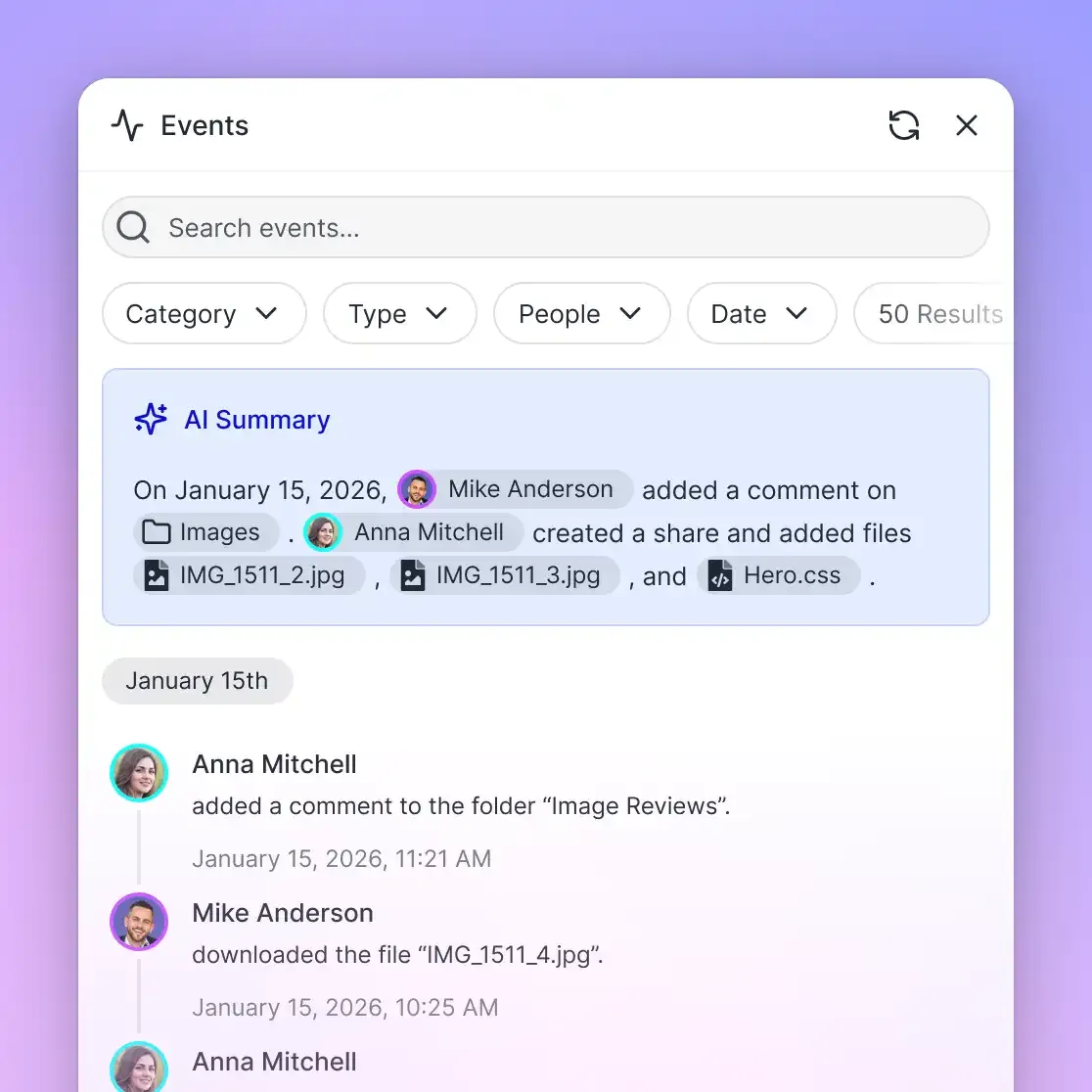


Build S3 agent workspaces without AWS IAM overhead
Deploy persistent, intelligent workspaces with built-in RAG and automatic file versioning for your S3 MCP server agents. Monthly plans start with a 14-day free trial.
How to Resolve S3 MCP Throttling and Access Constraints
If you decide to deploy a raw S3 MCP server, your team will need to handle several runtime constraints and edge cases:
- API Throttling: AWS S3 imposes request limits of 3,500 PUT/COPY/POST/DELETE and 5,500 GET/HEAD requests per second per prefix. If you run multiple parallel agents scanning thousands of files, you can quickly hit these limits, triggering throttling errors. Your agent logic must implement retry patterns with exponential backoff.
- Missing Version Visibility: Standard S3 MCP tools do not summarize bucket versioning. If your bucket has versioning enabled, your agent will only see the latest version of an object. It cannot easily compare changes over time or review what a colleague did in a previous execution cycle.
- Network Latency and Chunked Uploads: Transferring large files like media or database dumps over local MCP connections to S3 can block agent execution. You must ensure your server handles chunked uploads to prevent network timeouts when writing large payloads.
- Multi-Tenant Isolation: If you use one S3 bucket for multiple clients, you must carefully partition prefixes in your config file. Exposing a broad bucket to an agent running on a developer's machine carries the risk of data leakage across client boundaries.
Raw S3 MCP setups are powerful for simple, single-user tasks. For complex workflows involving team review, version control, and structured search, a dedicated workspace platform like Fast.io resolves these infrastructure concerns, letting you focus on building the agent logic itself.
Sources
References used to verify factual claims in this guide.
-
Unstructured data represents 80% of the enterprise's overall data volume
-
AWS S3 supports 3,500 PUT/COPY/POST/DELETE and 5,500 GET/HEAD requests per second per prefix.
Frequently Asked Questions
How do I connect Claude to S3?
To connect Claude to Amazon S3, you can use an open-source Model Context Protocol (MCP) server like txn2/mcp-s3. You install the server package, configure your Claude Desktop configuration file with your AWS credentials and region, and restart the client to load the S3 toolset.
Is there an MCP server for AWS S3?
Yes, there are several open-source MCP servers for AWS S3, including txn2/mcp-s3 for standard object storage and the official AWS S3 Tables MCP server for querying tabular data lakes. These servers expose tools that allow agents to list buckets, read objects, and write files.
How do I handle S3 permissions for AI tools?
You should follow the principle of least privilege by creating a dedicated AWS IAM role for the MCP server. Restrict the agent's policy to specific S3 buckets and allow only the minimum required actions, such as GetObject and ListBucket, to prevent accidental data modification.
Related Resources

Build S3 agent workspaces without AWS IAM overhead
Deploy persistent, intelligent workspaces with built-in RAG and automatic file versioning for your S3 MCP server agents. Monthly plans start with a 14-day free trial.