How to Automate OpenClaw Workflows with Zapier MCP
OpenClaw agents are good at reasoning, but they need a way to act on that reasoning across your existing tools. Zapier MCP bridges that gap by giving OpenClaw scoped access to 8,000+ apps and 30,000+ actions through a single protocol connection. This guide walks through the full setup, from creating your first Zapier MCP server to building multi-step agent workflows with human approval checkpoints.


What Zapier MCP Actually Does for OpenClaw
MCP (Model Context Protocol) is a standard that gives AI agents a structured menu of tools they can call. Zapier built an MCP server that wraps their entire app directory, so any MCP-compatible agent can send a Slack message, create a Jira ticket, or draft a Gmail without needing direct API credentials for each service.
For OpenClaw specifically, this means your agent can move beyond local file operations and reasoning into real actions across your stack. Instead of building custom API integrations for every service, you point OpenClaw at Zapier's MCP server and select which actions to expose.
The architecture is a layered stack. OpenClaw handles the intelligence layer: parsing instructions, making decisions, maintaining context across conversations. Zapier handles the plumbing layer: authentication, rate limiting, API versioning, and credential management for thousands of services. Each tool does what it does best.
Zapier MCP is available on all Zapier plans. Each tool call consumes two tasks from your plan's quota, the same task pool your regular Zaps use. No separate billing or add-on required.

Related guides
- How to Automate E-Signatures from Clay Prospect WorkflowsClay e-signature workflow automation is the process of triggering contract signing and capturing executed agreements...
- How to Set Up an MCP Server for n8n Workflow AutomationThe Model Context Protocol turns n8n into an AI-accessible automation platform. This guide walks through setting up n8n...
- OpenClaw Automation Recipes: Ready-to-Use Workflow TemplatesUsers who configure two or more OpenClaw workflows in their first week retain at 78%, nearly double the 41% rate for...
- How to Automate Email Workflows with OpenClaw AgentsOpenClaw agents can monitor inboxes, classify messages, extract data from attachments, and route actions through...
- OpenClaw vs Zapier: How to Choose the Right Automation ToolOpenClaw is an autonomous AI agent that reasons through complex tasks dynamically. Zapier is a no-code workflow...
- How to Automate Airtable with OpenClawOpenClaw can read, write, and manage Airtable records through natural language commands, replacing manual Zapier and...
More on this subject: OpenClaw Setup and Guides (199 guides)
Setting Up Zapier MCP for OpenClaw
Setup takes a few minutes and does not require writing code. The process has two phases: configuring the Zapier side, then connecting it to your OpenClaw agent.
On the Zapier side:
- Log into your Zapier account and open the MCP dashboard.
- Click + New MCP Server and select OpenClaw as the client.
- Click + Add tool and search for the app you want to connect (Slack, Gmail, Asana, whatever your workflow needs).
- Select the specific action event. For example, choosing Slack gives you options like "Send Channel Message" or "Send Direct Message." Pick only what the agent needs.
- Connect your account for that app through Zapier's OAuth flow.
- Use the kebab menu next to each action to configure defaults: which channel to post to, what fields to pre-fill, which fields the agent can override.
- Click Connect at the top of the dashboard and follow the instructions to get your MCP server URL.
On the OpenClaw side:
Add the Zapier MCP server to your OpenClaw configuration so your agent can discover the available tools at runtime. The exact configuration method depends on your OpenClaw setup, but the key piece is the MCP server URL from step 7.
Start with a narrow set of actions. Zapier's guide recommends enabling only the specific actions your agent needs rather than exposing everything. Letting an agent draft emails is different from letting it send them. Restrict to drafts first, then expand access once you trust the workflow.


Store and Share Your Agent Workflow Outputs
OpenClaw builds the workflows, Zapier connects the apps. Fastio gives both sides persistent storage with built-in intelligence once enabled, audit trails, and human handoff.
Building Multi-Step Agent Workflows
Simple trigger-action patterns are fine for basic automation, but OpenClaw's reasoning capability lets you build workflows that require judgment at each step.
Consider a content review pipeline. A new blog post lands in your CMS. OpenClaw reads the draft, checks it against your style guide, flags issues, and creates a task in your project management tool with specific revision notes. If the draft passes review, the agent notifies the author on Slack and moves the post to "ready for publish" status.
Each of those steps is a separate Zapier MCP action, but OpenClaw ties them together with conditional logic that a static Zap cannot handle. The agent decides whether to flag issues or approve based on the content, not just based on whether a trigger fired.
Practical example: support ticket triage
- A new ticket arrives in your helpdesk (Zapier trigger detects this).
- OpenClaw reads the ticket content, checks your knowledge base, and classifies the issue by severity and category.
- For low-severity known issues, the agent drafts a response using your FAQ and creates it as a draft in your helpdesk.
- For high-severity or ambiguous tickets, the agent escalates by assigning to the right team member and posting a summary in a Slack channel.
The key difference from a standard Zap: the routing logic lives in OpenClaw's reasoning, not in a branching workflow builder. You describe the policy in natural language rather than configuring conditional paths.
Adding Human Approval Gates
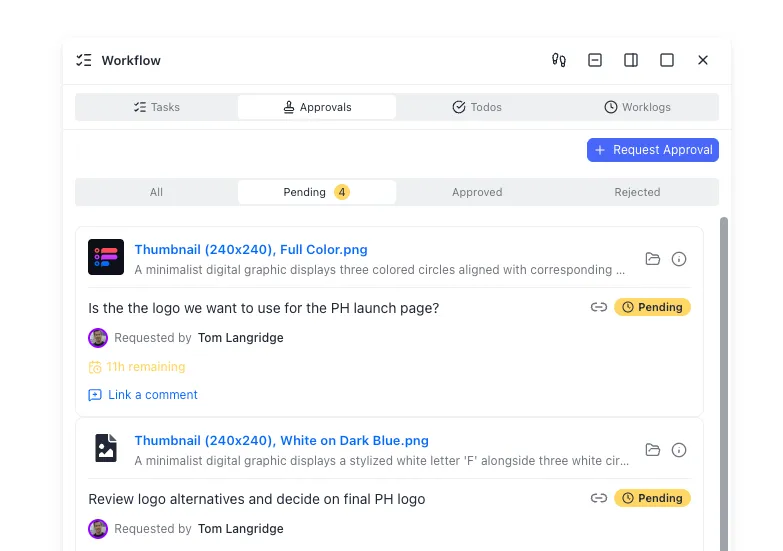
Giving an agent full autonomy is risky. The practical answer is approval gates: checkpoints where the agent pauses and waits for a human to confirm before proceeding.
OpenClaw supports approval workflows that let plugins pause tool execution and prompt the user for confirmation before the agent takes an action. You can route these prompts to the same chat session where the agent is running or to specific channels and users when a manager or team lead needs to sign off.
Place approval gates before irreversible actions. The OWASP AI Agent Security Cheat Sheet recommends requiring explicit approval for external communications (emails, social posts), destructive actions (deleting files, overwriting data), and financial actions (refunds, invoices, payments).
When combining approval gates with Zapier MCP, keep in mind that external MCP tool calls may not pass through the same plugin hook pipeline as native OpenClaw tools. The safest pattern is to structure your workflow so the agent calls a local approval-gated step first, then triggers the Zapier MCP action only after approval is confirmed. Zapier also offers its own confirmation features within action configurations, giving you a second layer of control on the Zapier side.
For teams that need governance on the file storage and handoff side, Fastio provides granular permissions at the organization, workspace, folder, and file level with a detailed activity log, so you can control share access and verify actions.
Security and Credential Management
Running an AI agent that can take real actions across your tools raises obvious security questions. The OpenClaw-plus-Zapier approach addresses this through separation of concerns.
What Zapier handles:
Zapier MCP keeps credentials centralized. Your agent never sees raw API keys or OAuth tokens for connected services. Zapier manages authentication using the same infrastructure they have run for 13+ years. Each action has per-action toggles you can enable or disable without deleting the configuration. Centralized audit logs track every action the agent takes through Zapier.
What OpenClaw handles:
OpenClaw runs locally on your machine or server, so your data and conversation context stay on your infrastructure. You control which MCP servers the agent can access and which tools are exposed.
What Zapier's AI Guardrails add:
Zapier offers an optional AI Guardrails layer that scans agent interactions for PII leakage, toxic language, prompt injection attempts, and negative sentiment. This is a separate feature from the MCP connection itself but useful for production deployments where the agent interacts with customer-facing systems.
Storage and audit on the Fastio side:
When your OpenClaw agent generates files, reports, or artifacts as part of these workflows, you need somewhere to store them with proper access controls. Fastio workspaces give agents persistent storage with file versioning, granular permissions, and audit trails. The Fastio MCP server lets your agent store outputs directly alongside its Zapier actions. Files are indexed and searchable once Intelligence is enabled for the workspace, making them queryable by both agents and team members.
Agents can build workspaces, populate them with workflow outputs, and then transfer ownership to a human when the project is complete. Fastio offers a 14-day Business Trial requiring a credit card (see pricing).

Choosing Between Zapier MCP, Direct APIs, and Zaps
Zapier MCP is not the only way to connect OpenClaw to external services. Here is when each approach fits.
Zapier MCP works best when you want broad app coverage without building custom integrations. If your workflow touches five or more services and you want managed credentials, this is the fast path. The tradeoff is the two-task-per-call cost and dependency on Zapier's action catalog.
Direct API integration makes sense for high-volume, latency-sensitive workflows where you need full control. If your agent makes hundreds of calls per hour to a single service, connecting directly avoids the per-call overhead. OpenClaw supports custom tool definitions, so you can wrap any REST API as an agent tool.
Standard Zaps (trigger-action automations without MCP) are better for workflows that do not need agent judgment. If every new Typeform submission should create a row in Google Sheets with no decision-making involved, a Zap is simpler and cheaper than routing through an agent.
The layered approach combines all three. Use Zapier MCP for the long tail of integrations where you need occasional agent-driven actions across many apps. Use direct APIs for your core high-frequency workflows. Use standard Zaps for simple automations that do not benefit from AI reasoning.
On the storage layer, Fastio works across all three approaches. Whether your agent writes files through MCP tools, direct API calls, or receives them from Zap-triggered uploads, the workspace provides a single location where both agents and humans can access, review, and manage outputs. S3 and Google Drive work too for pure storage, but they lack the built-in intelligence layer that makes files searchable by meaning and queryable through chat.
Sources
References used to verify factual claims in this guide.
-
Zapier MCP connects to 8,000+ apps with 30,000+ available actions
-
Each MCP tool call uses two tasks from Zapier plan quota
-
OWASP recommends human approval for external communications, destructive actions, and financial actions by AI agents
Frequently Asked Questions
How do I connect OpenClaw to Zapier?
Log into Zapier, create a new MCP server from the MCP dashboard, select OpenClaw as the client, add the specific app actions you want to expose, connect your accounts through OAuth, and then add the MCP server URL to your OpenClaw configuration. The Zapier side takes about five minutes and requires no coding.
What is Zapier MCP for OpenClaw?
Zapier MCP is a Model Context Protocol server that gives OpenClaw agents scoped access to 8,000+ apps and 30,000+ actions through a single connection. Instead of building custom API integrations, your agent calls Zapier's MCP server, which handles authentication and API management for each connected service.
Can OpenClaw trigger Zapier automations automatically?
Yes. OpenClaw can call Zapier MCP actions as part of its reasoning flow, triggering actions like sending messages, creating tasks, or updating records without human intervention. For safety, you can add approval gates that pause the agent before irreversible actions and wait for human confirmation.
How much does Zapier MCP cost?
Zapier MCP is available on all Zapier plans. Each MCP tool call consumes two tasks from your plan's existing task quota. There is no separate MCP add-on fee.
Does the OpenClaw approval gate work with Zapier MCP actions?
External MCP tool calls may not pass through the same plugin hook pipeline as native OpenClaw tools. The safest approach is to structure your workflow so the agent calls a local approval-gated step before triggering the Zapier MCP action, or use Zapier's own confirmation features within the action configuration.
Where should I store files generated by OpenClaw Zapier workflows?
Fastio workspaces provide persistent storage with versioning, audit trails, and built-in AI indexing. Your agent can store workflow outputs via the Fastio MCP server, and then transfer the workspace to a human when the project is ready for review. Fastio offers a 14-day Business Trial requiring a credit card; see [pricing](/pricing/) for plan options.
Related Resources

Store and Share Your Agent Workflow Outputs
OpenClaw builds the workflows, Zapier connects the apps. Fastio gives both sides persistent storage with built-in intelligence once enabled, audit trails, and human handoff.