How to Build a Fastio MCP Server Custom Authorization Guide
Custom authorization for the Fastio MCP server keeps AI agents restricted to the files and resources they actually need. This guide shows developers how to set up granular access controls. If you are running multi-agent deployments or managing local workspaces, strict permissions keep your intelligent systems secure.

How to implement fastio mcp server custom authorization guide reliably
Custom authorization for the Fastio MCP server limits AI agents to the files and resources they are allowed to use. Unauthenticated local connections don't cut it for enterprise multi-agent systems. You need strong fastio mcp auth strategies to verify and log every action, restricting what an agent can do.
The Model Context Protocol (MCP) defines how AI agents talk to external tools and data. In a shared workspace, an agent might read documents, summarize video transcripts, or run codebase analytics. Without custom security fastio mcp configurations, that same agent could stumble into confidential financial records or overwrite production assets.
Fastio works as an intelligent workspace, not just basic storage. Once Intelligence is enabled for the workspace, files are indexed automatically so you can search them by meaning and query them in chat. Agents and humans share these exact same workspaces. Humans use the visual UI, and agents connect programmatically. Fastio provides a consolidated MCP toolset via Streamable HTTP and SSE, so every UI feature has a programmatic endpoint. This broad access means you need granular access control for enterprise setups. A custom authorization layer lets you control which tools an agent can run and what resources it can touch.
According to the official Fastio MCP server documentation, the system supports tools for file management and intelligent search. When you deploy the server, you can wrap the default transports with custom middleware. This lets you enforce modern OAuth authentication, JSON Web Tokens (JWT), or your own API key validation.
Related guides
- How to Build an MCP Server for AWS CognitoBuilding an MCP server for AWS Cognito allows AI agents to securely manage user identities, handle sign-ups, and verify...
- How to Build a Fastio MCP Client in ElixirBuilding a Fastio MCP client in Elixir uses OTP to maintain highly resilient, concurrent agent workspaces that...
- How to Implement MCP Server Rate LimitingMCP server rate limiting controls how often AI agents can invoke tools through a Model Context Protocol server. Without...
- How to Set Up an MCP Server Proxy for Production AI AgentsMCP servers work fine over localhost during development, but production deployments need TLS termination,...
- How to Add OAuth Authentication to Your MCP ServerIf you're running a remote MCP server over HTTP, OAuth authentication isn't optional. The MCP specification (revised...
- How to Set Up MCP Server AuthenticationMCP server authentication is the process of verifying the identity of AI agents and applications connecting to a Model...
More on this subject: MCP and Model Context Protocol (244 guides)
What to check before scaling fastio mcp server custom authorization guide
Building a solid authorization framework starts with understanding the Fastio MCP server architecture. The remote MCP server maintains persistent session connections via Streamable HTTP or SSE, keeping connections reliable even across network interruptions and making it easier to handle authorization workflows that check token validity.
At the transport layer, agents connect using standard HTTP or Server-Sent Events (SSE) for streaming. Your custom security fastio mcp layer sits between the agent's request and the tool execution. When an agent tries to call an MCP tool, the server intercepts the payload.
A standard custom authorization flow looks like this:
- Initial Connection: The agent connects to the Fastio MCP server endpoint and sends its credentials in the header or payload.
- Token Validation: The server checks the token or API key against a trusted Identity Provider (IdP) or internal secrets manager.
- Scope Resolution: The system reads the verified identity to find the agent's assigned scopes and permissions.
- Contextual Enforcement: The server checks the requested action and target resource against those authorized scopes. If allowed, the tool runs. If not, the server rejects the request with an error code.
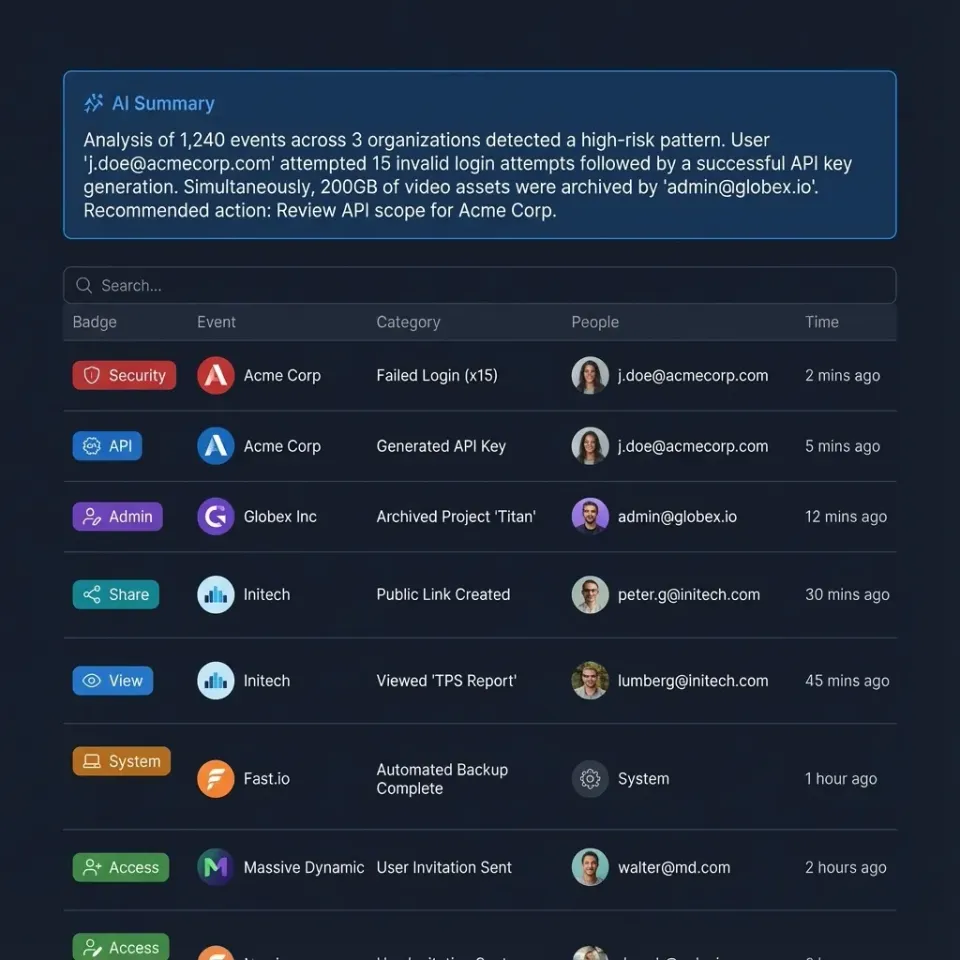
This setup blocks unauthorized data access without slowing down reactive multi-agent workflows. If your team is building specialized tools, you can monitor the real-time activity feed or audit log to alert administrators if an agent keeps failing authorization checks. You can learn more about deploying these systems on the /storage-for-agents/ page.

Implementing Role-Based Access Control (RBAC)
Role-Based Access Control (RBAC) is the core of effective custom authorization. In Fastio, RBAC keeps agents restricted to just the permissions they need. A "Research Agent" might get read-only access to specific folders. Meanwhile, a "Compilation Agent" gets read-and-write access for temporary processing directories.
To set up RBAC in your Fastio MCP server custom authorization guide deployment, map agent identities to specific workspace roles. You usually handle this mapping with environment variables or an external configuration service.
Think about a setup where you configure agent tools to connect to Fastio's remote MCP server. Production security requires custom environment variables to limit the agent's actions. You can lock the agent to specific workspace IDs so it cannot touch your entire organization's data.
When writing custom authorization middleware, check the requested tool name and the target path. If an agent tries a write operation on a restricted path, the middleware needs to block it. This level of control matters because agents work on their own and can run numerous operations continuously.
Fastio's architecture supports ownership transfer. An agent can create an organization, build workspaces, add data, and then transfer ownership to a human user. The agent can keep administrative or restricted access after the handoff. Custom authorization makes sure the agent's permissions match its exact job during and after this transfer.
Managing Workspace Boundaries and File Locks
Multi-agent systems create concurrency challenges that basic authentication alone cannot resolve. If multiple agents attempt to modify shared resources simultaneously, systems risk race conditions and data corruption. Fastio resolves this through advisory file locks alongside automatic file version history, granular permissions, and a detailed activity log.
A secure Fastio MCP authorization strategy ensures that agents can only acquire file locks and modify resources within their permitted workspace or folder scope. An agent acquires a file lock before writing, heartbeats it while working, and releases it when done. If another agent attempts to lock the same file, it gets an HTTP 409 and can wait. If a holder disconnects, the lease expires or can be taken over by anyone with write permission, while version history preserves every write as a safety net.
URL Import functionality also requires clear boundary management. Fastio lets agents import files from Google Drive, OneDrive, Box, and Dropbox without local I/O operations. Your custom authorization layer should verify that an agent possesses appropriate workspace permissions before initiating external imports, ensuring data ingestion aligns with organization quotas.
Combine workspace boundary rules with granular permissions and audit tracking to build a secure collaborative environment. For more details on storage limits and plans, check out our /pricing/ page.


Secure Your Multi-Agent Workflows
Configure granular permissions and audit controls across intelligent Fastio workspaces with remote MCP access for your AI agents.
Integrating External Identity Providers and modern OAuth
Hardcoded API keys are a security risk for enterprise deployments. The best approach for a Fastio MCP server custom authorization guide implementation is to integrate an external Identity Provider (IdP) using modern OAuth standards.
Modern OAuth secures the authorization flow by requiring Proof Key for Code Exchange (PKCE) and dropping less secure grant types. When your MCP client connects, it negotiates an access token from a service like Auth0, Keycloak, or Microsoft Entra ID.
Once the agent gets a valid JWT (JSON Web Token), it sends this token with every request to the Fastio MCP server. Your server middleware then validates the token's cryptographic signature, checks the expiration timestamp, and verifies the iss (issuer) and aud (audience) claims.
This setup lets administrators manage agent access through the same enterprise directory systems they use for human employees. If an agent needs to be retired or starts acting strangely, administrators can revoke its token at the IdP level. This cuts off access to the intelligent workspace immediately without changing the MCP server configuration.
Evidence and Benchmarks for Secure Agent Operations
You need solid data to prove your custom authorization works. Without auditing and benchmarking, you cannot be sure your access controls actually block unauthorized operations.
Fastio's infrastructure includes full audit logging for all workspace activity. The system records every action an agent takes. Uploading a document, querying the built-in RAG system, or transferring workspace ownership all generate logs with exact timestamps and identity markers. Route these logs to a security information and event management (SIEM) system to monitor agent behavior in real-time.
Fastio provides a 14-day Business Trial (credit card required) with access to persistent workspaces and the remote MCP server. This allows developers to test and benchmark their custom authorization setups before deploying to production. You can run multi-agent concurrency tests, measure the latency of your modern OAuth middleware, and check that rate limits work correctly across different agent identities.
Test heavily within these parameters to make sure your production deployments are secure and auditable. This builds trust so human teams can confidently share intelligent workspaces with AI agents.
Frequently Asked Questions
What are the authorization options for Fastio MCP?
Fastio MCP supports API keys, JSON Web Tokens (JWT), and modern OAuth flows. For enterprise deployments, we recommend integrating an external Identity Provider using modern OAuth so you can easily manage and revoke agent access.
How do I secure an MCP server for multi-agent systems?
Secure an MCP server by setting up Role-Based Access Control (RBAC), requiring authentication for all connections, and defining strict workspace boundaries. You should also use Fastio's advisory file locks and automatic version history to coordinate modifications safely when multiple agents work together.
Can agents transfer workspace ownership to humans?
Yes. Fastio supports ownership transfer. An agent can programmatically create an organization, build workspaces, and then transfer the ownership to a human user. Custom authorization makes sure the agent keeps only the required access rights after the handoff.
How does Intelligence Mode affect file permissions?
When Intelligence is enabled for the workspace, Fastio indexes files for RAG and semantic search. Custom authorization controls this so agents can only query or retrieve information from files they have explicit permission to read.
Is the Fastio MCP server compliant with enterprise standards?
Fastio includes enterprise security features like detailed audit logs, encryption, and scoped API access. You can use these features to build compliant architectures that work with your existing identity management systems.
Related Resources

Secure Your Multi-Agent Workflows
Configure granular permissions and audit controls across intelligent Fastio workspaces with remote MCP access for your AI agents.