Explainer Video Collaboration Tools Compared
Explainer video collaboration tools improve feedback for animation teams, agencies, and clients on drafts, storyboards, and final renders. They enable precise, frame-specific comments that cut down on miscommunications and speed up iterations. With agencies often handling many projects annually, efficient review processes keep tight deadlines on track. This comparison covers essential features like real-time co-watching, region-based annotations, and adaptive streaming.

What Is Explainer Video Collaboration?
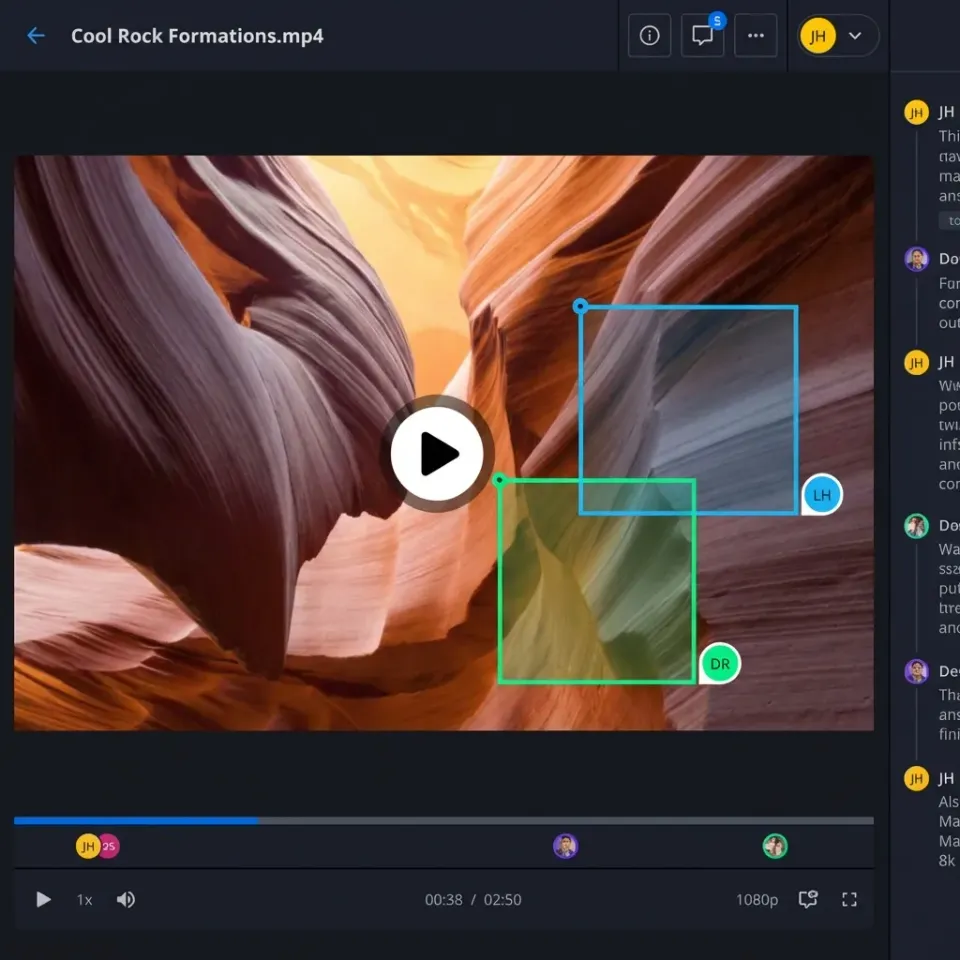
Explainer video collaboration involves centralized platforms where creative teams share drafts with clients for targeted feedback. Animation studios upload storyboards in PDF or Figma links, rough MP4 cuts from After Effects, and high-res finals in ProRes. Reviewers add timestamped notes, draw on frames to highlight issues like easing problems or color mismatches, and approve revisions without downloading files.
Traditional methods rely on email chains with ZIP attachments, leading to version confusion and delayed responses. Modern tools use browser-based previews, eliminating software installs for clients. Frame-accurate tools pinpoint specific moments like "at 0:45, smooth the logo bounce" instead of vague descriptions.
Fastio supports this natively with previews for Adobe formats (PSD, AI), video waveforms, and region-anchored comments. Branded portals let clients access without accounts, maintaining professional delivery.
Links: Fastio Workspaces, Fastio Collaboration, Fastio Media.
Related guides
- Best Instructional Video Collaboration Platforms ComparedInstructional video collaboration platforms let training teams review elearning videos with precise feedback. Upload...
- How to Clean Video Metadata and Remove PII for AI Model TrainingGuide to video metadata cleaning: Video datasets for AI model training often contain hidden personal information and...
- Video Editing Storage Solutions: Best Options for EditorsVideo editing storage solutions are specialized systems designed to handle the massive bandwidth and file sizes...
- 5 Best Blackmagic Cloud Alternatives for Video Teams in 2026Blackmagic Cloud works well if your entire team lives in DaVinci Resolve, but its tight ecosystem lock-in creates...
- How to Set Up Identity-Locked Character Asset Management for AI VideoIdentity-locked character asset management is the secure storage and retrieval of the digital DNA, including models,...
- Best Iconik Alternatives for Video Teams in 2026Iconik is a powerful hybrid cloud media management hub, but its complexity and pricing don't fit every video team. This...
More on this subject: Video and Media Production (36 guides)
Why Explainer Video Collaboration Matters
Poor collaboration creates bottlenecks in explainer video production. Tight deadlines amplify issues like lost feedback emails or mismatched file versions, forcing overtime and scope creep. Agencies juggling multiple clients lose billable hours resolving these. Effective tools centralize reviews, enabling faster iterations and higher throughput.
Explainer videos drive measurable results for businesses. According to Wyzowl, 96% of consumers watch explainer videos to learn about products, and 85% have been convinced to buy after watching one. Landing pages with video see 80% higher conversion rates than text-only pages. These numbers explain why explainer video demand continues climbing year over year.
The challenge is that animation production involves many moving parts: storyboards, voiceover recordings, After Effects compositions, music and SFX tracks, and multiple revision rounds. Each stage requires different stakeholders, from internal creative teams to external clients and their managers. Without a centralized system, feedback gets scattered across email threads, Slack messages, and shared drive folders.
Animation-specific review needs differ from live-action video. Studios need to examine layered comps, check frame-by-frame easing, and verify that elements match the approved storyboard at each timestamp. Standard video review tools often miss these needs. Platforms with proxy generation, waveform previews, and region-specific annotations address these gaps directly.

Key Features for Explainer Video Teams
Choosing the right collaboration platform for explainer video production requires understanding the specific needs that animation workflows create. Unlike standard video review, explainer projects involve layered compositions, multiple file formats, and technical requirements that general-purpose tools often miss. Here are the features that matter most.
Frame-Accurate Commenting: Look for the ability to attach comments to specific timestamps or regions within a video. When a reviewer says "at a specific moment, smooth the logo bounce," that note needs to land exactly on the right frame. Tools that support frame-level precision eliminate ambiguity about what needs fixing.
Real-Time Presence and Follow Mode: Live collaboration features let team members see who's online and what they're viewing. Follow mode synchronizes everyone's playback position, making remote review sessions as productive as sitting in the same room. This matters for agencies with distributed teams or clients in different time zones.
Adaptive Streaming: Clients shouldn't need to download multi-gigabyte files to review a draft. HLS (HTTP Live Streaming) delivers smooth 1080p playback that adapts to connection quality. Even on spotty hotel WiFi or mobile networks, reviewers can scrub through timelines and leave feedback without buffering interruptions.
Region and Drawing Annotations: Static comments attached to timestamps help, but region-based drawing takes feedback further. Reviewers can circle a specific element, draw an arrow pointing to an easing issue, or highlight color mismatches directly on the frame. This visual context reduces back-and-forth clarification.
Format Support for Animation: Explainer videos typically start in After Effects, Animate, or Blender. Your review platform should handle the outputs: ProRes for final delivery, H.264 for drafts, but also layered project files where relevant. Adobe PSD and AI previews let clients see source graphics without needing the full Creative Suite.
Activity and Audit Logs: Professional workflows require accountability. Who watched which version, when, and for how long? Audit trails matter for billing disputes, client satisfaction tracking, and ensuring stakeholders actually reviewed materials before approval gates.
Branded Portals and Guest Access: Clients shouldn't need to create accounts to review your work. Branded portals with password protection, expiration dates, and customizable visuals maintain professionalism. Guest-only access keeps costs predictable since you won't pay per external reviewer.
Usage-Based Pricing: Many platforms charge per-seat regardless of whether users are internal team or external clients. For agencies managing dozens of active projects with multiple stakeholders per project, per-guest fees add up quickly. Usage-based models that charge for storage and bandwidth rather than seats scale more predictably.
Integration with Creative Tools: The smoother the handoff between your editing suite and review platform, the faster iterations go. Look for Premiere Pro and After Effects integrations, Figma connectivity for storyboard phases, and simple drag-drop uploads that preserve folder structures.
When evaluating options, prioritize tools that address animation-specific needs. Generic video review platforms often fall short when clients need to examine layered compositions or when you need to share source files without requiring software licenses.

Top Explainer Video Collaboration Tools Compared
Here's a feature comparison table for explainer video collaboration tools, focusing on animation review capabilities.
Frame.io
Frame.io has become the industry standard for professional video review, and for good reason. Its frame-accurate commenting system lets reviewers pin notes to exact frames, eliminating ambiguity about what needs revision. The integration with Adobe Premiere Pro and After Effects means you can send sequences directly from your timeline without rendering temporary files.
Pros:
- Gold standard for frame-accurate review and annotations
- Deep Adobe Premiere/After Effects integration
- Enterprise security features including watermarks and audit logs
- Strong real-time presence with follow mode for live reviews
Cons:
- Per-user pricing scales poorly for client-inclusive teams
- Steeper learning curve for non-video professionals
- Storage limits require additional purchases as projects grow
- Less focus on animation-specific features like layered comp reviews
Best For: Professional post-production teams at agencies with existing Adobe subscriptions and budget for per-seat licensing.
Vyond
Vyond takes a different approach by combining animation creation with collaboration in a single platform. Users build animated videos using its library of templates and characters, then share directly within the platform for feedback. This tight integration appeals to teams that want to keep everything in one place.
Pros:
- Built-in animation tools reduce need for external software
- Template library enables fast prototyping for quick turnarounds
- Multiple export options for different distribution channels
- Straightforward for teams without dedicated video editors
Cons:
- Collaboration limited to basic timestamp comments
- No real-time co-review or follow mode features
- Seat-based costs scale linearly with team size
- Less suitable for agencies that use external animators or After Effects
Best For: In-house marketing teams creating animated content without dedicated video production staff.
Fastio
Fastio positions itself as a collaboration-focused alternative with plans that include seats. Clients join shares as guests without taking a seat, which suits agencies managing multiple client relationships simultaneously. Its support for Adobe file previews and region-based annotations addresses animation workflow gaps that generic tools miss.
Pros:
- Clients join shares as guests without taking a seat
- Region and timestamp comments on video, images, and PSD files
- HLS adaptive streaming for buffer-free playback across devices
- Organization-owned files persist beyond individual user accounts
- Plans include seats, storage and a monthly credit allowance
Cons:
- Less specialized video integrations than Frame.io
- Heavy AI use beyond the monthly credit allowance is billed as overage
- Newer to video review compared to established players
Best For: Agencies and studios that need cost-effective client review without per-guest fees.
Animaker and Renderforest
Both Animaker and Renderforest serve beginners and small teams looking for quick video creation tools. They offer template-based workflows that let users produce animated content without animation expertise. However, their collaboration features remain basic compared to dedicated review platforms.
When to Consider These:
- Solo creators or small teams with minimal collaboration needs
- Projects requiring fast turnaround on simple animated content
- Budget-conscious users who need template libraries
How Fastio Supports Explainer Video Workflows
Fastio structures explainer projects in dedicated workspaces, grouping storyboards, raw assets (PSD/AI), animation comps, voiceover tracks, and finals. Upload large ProRes or H.264 files; automatic proxies enable quick reviews without transcoding waits.
Attach threaded comments to specific frames, regions, or timelines. Clients enter via branded, password-protected portals. No signup needed. Real-time avatars show active reviewers; follow mode syncs scrolls for live sessions.
HLS adaptive streaming ensures smooth playback up to 1080p on desktops, mobiles, or tablets, with waveform views for audio sync checks. Full audit logs detail views, comments, and downloads for stakeholder reports.
Organization-owned model means files endure staff changes. Clients join as guests without taking a seat, and plans include 5, 50 or 200 workspaces. The Starter plan includes 100,000 credits a month for AI features.
Example workflow: Agency creates client workspace, uploads Figma storyboards, AE roughs (MP4), SFX folder. Client gets link, watches draft, at 1:23 draws box on bumpy animation, notes "Ease out stronger." Animator notified via activity feed, revises, tags "@client: fixed easing, check bounce." Client approves via thumbs-up reaction. Final render streams flawlessly. Total cycle: hours vs. days, minimizing stalls.


Speed Up Explainer Video Reviews
Fastio gives frame-specific feedback, client portals, and guest access without extra seats. Start trial. Built for explainer video collaboration workflows.
Sample Workflow for Animated Explainer Review
A structured workflow transforms scattered feedback into efficient revision cycles. Here's how professional explainer video teams approach collaboration, adaptable to platforms like Fastio or Frame.io.
1. Storyboard Approval: Before any animation begins, establish visual direction with storyboard review. Create a dedicated folder for Figma exports, PDF storyboards, or Sketch files. Internal team members add initial notes on pacing, transitions, and key frame compositions. Clients review layouts without animation distractions, catching script issues or visual direction problems early when changes cost least.
During this phase, gather feedback on character designs, color palettes, and the overall narrative flow. Use threaded comments to organize feedback by scene rather than mixing notes randomly. This keeps revision requests clear and actionable.
2. Rough Animation Review: Once animators produce initial cuts, upload low-res MP4 drafts from After Effects. Frame-accurate tools let reviewers pinpoint specific problems: "At 0:32, the graph animation lags behind the voiceover peak." Region annotations highlight problem areas like off-color elements or inconsistent character proportions.
Timeline scrubbing becomes essential here. Reviewers need to examine frame-by-frame for issues like awkward easing curves or sync problems. Waveform views help identify where audio and visual elements drift apart.
3. Voiceover and Audio Sync: After approving animation timing, layer in voiceover recordings and sound design. Waveform previews make it easy to spot synchronization issues. Comments like "Lip sync off by 0.5 seconds at 0:47" give animators exact corrections to implement.
Mobile playback testing matters at this stage. What looks smooth on a desktop might stutter on phones or tablets. Testing across devices catches compression artifacts and playback issues before final delivery.
4. Stakeholder Approval Rounds: Distribute branded review links that track engagement metrics. See who watched which versions, how long they spent reviewing, and where they paused or replayed. This data informs follow-up conversations and helps identify stakeholders who haven't reviewed materials.
Collect approvals or final revision notes systematically. File version history automatically tracks each revision, maintaining a clear record of drafts without manual file management.
5. Final Delivery and Archive: Once approved, compile all assets into a master folder with final exports. Generate shareable links or direct downloads for client distribution. Archive the workspace for future reference, preserving audit logs in case billing disputes arise or clients request changes later.
This structured approach compresses traditional two-week cycles into two to three days. Platforms like Fastio support this workflow with unlimited guests and persistent storage that handles repeat clients consistently, preserving complete project history across engagements.

Choosing the Right Platform for Your Agency Size
Not every explainer video team needs the same toolset. Your production volume, client types, and budget constraints should guide platform selection. Here's how different agency profiles match with available options.
Small Agencies and Freelancers (1-5 team members): When you're handling a handful of projects monthly, simplicity matters more than enterprise features. Look for platforms with generous free tiers and straightforward interfaces that don't require training clients on new tools. Animaker or Renderforest work for basic animated explainers, while Fastio's 14-day Business Trial handles client review evaluation.
The key consideration is whether your workflow fits template-based tools or requires custom After Effects animation. If you're subcontracting animation work to freelancers who deliver video files, you need a review tool regardless of your creation approach.
Mid-Size Studios (5-20 team members): This range typically involves multiple simultaneous projects with distinct client stakeholders. Per-seat pricing starts becoming painful when every project stakeholder counts as a user. Platforms with unlimited guest access, like Fastio, reduce cost surprises as client lists grow.
Look for strong audit trails since mid-size agencies often face billing questions or scope disputes. Activity logs showing who reviewed what and when protect both parties during revision negotiations.
Large Production Houses (20+ team members): Enterprise teams need the full feature set: SSO integration, advanced permissions, API access for custom workflows, and dedicated support channels. Frame.io Enterprise provides these capabilities alongside deep Adobe integration that matches professional pipelines.
At this scale, storage costs matter. Per-project add-ons on some platforms compound quickly when handling dozens of active productions. Evaluate total cost of ownership including storage, seats, and premium features you'll actually use.
Client Types Influence Choice: Agencies serving enterprise clients often face stricter security requirements. Watermarking, download restrictions, and compliance certifications matter when reviewing confidential product launches. Smaller startup clients typically prioritize speed and cost over security theater.
Budget also shifts priorities. A platform with lower per-user costs but fewer features might outperform an expensive solution your team won't fully use. Match tool complexity to your actual workflow needs.

Sources
References used to verify factual claims in this guide.
-
Landing pages with video see 80% higher conversion rates.
-
96% of consumers watch explainer videos to learn about products. 85% of consumers have been convinced to buy by watching a video.
-
Frame.io Pro plan starts at $15 per user per month.
Frequently Asked Questions
What are the best tools for explainer video teams?
Frame.io excels in pro frame review, Vyond in animation building, Fastio in cost-effective agency feedback with regions and streaming. Choose based on team size and client volume.
How do teams collaborate on explainer videos?
Use shared workspaces for uploads, timestamped comments, real-time cursors, and version history. Fastio enables client comments sans accounts via branded portals.
What makes Fastio good for animated explainer review?
Region-specific comments on frames/images, real-time presence, HLS streaming, full audits. Unlimited guests avoid client seat costs; Adobe previews built-in.
How much do explainer video collaboration tools cost?
Frame.io starts at $15/user per month. Fastio plans start at $9.99/mo (Starter) with seats included, and extra storage, bandwidth and AI credits are billed by use.
Can clients review explainer videos without software?
Yes, browser-based previews work universally. Fastio streams 1080p adaptively, no plugins required.
What features address animation review gaps?
Prioritize region annotations, proxy generation, and waveform audio sync. Fastio offers these plus organization-owned storage for long-term project access.
How to set up real-time explainer video reviews?
Create shared workspace, upload drafts, invite via link, enable presence/follow mode. Tools like Fastio sync views instantly for director walkthroughs.
Related Resources

Speed Up Explainer Video Reviews
Fastio gives frame-specific feedback, client portals, and guest access without extra seats. Start trial. Built for explainer video collaboration workflows.