Best Instructional Video Collaboration Platforms Compared
Instructional video collaboration platforms let training teams review elearning videos with precise feedback. Upload drafts, add timestamped notes, track versions, and approve changes without email chaos. These tools cut revision cycles, especially as video powers most of corporate training. Fast.io offers AI-powered clip search, which few competitors match.
What Is an Instructional Video Collaboration Platform?
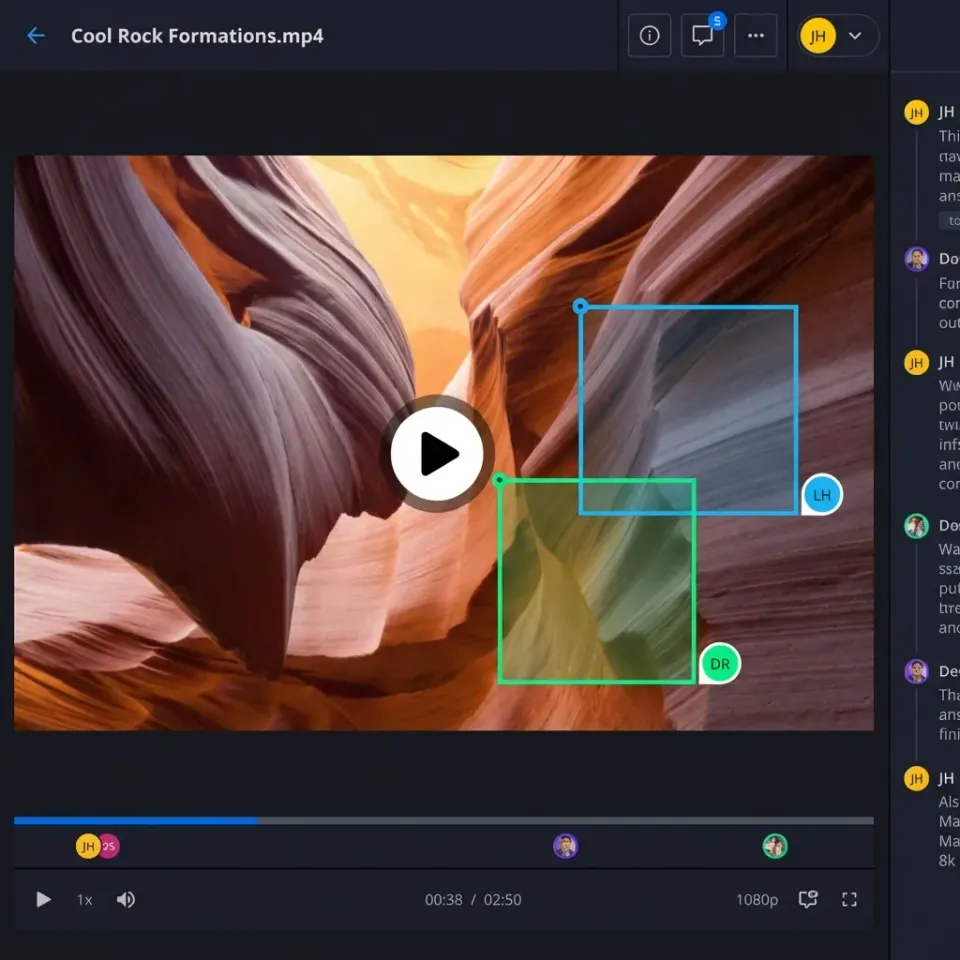
An instructional video collaboration platform is software designed for teams creating training or elearning videos. These tools centralize upload, high-quality streaming playback, frame- or timestamp-specific annotations, automatic version tracking, and structured stakeholder feedback.
Consider a product training team producing a software demo video. The editor uploads the draft to the platform. Managers add comments like "Clarify the login step at multiple:multiple" directly on the timeline. Designers respond in threaded discussions, asking for asset specs. The editor makes revisions, tags the new version v2, and notifies reviewers. Everyone stays aligned without emailing ZIP files or using mismatched Google Drive links.
These platforms beat shared drives and email chains. They provide in-browser previews for large videos without downloads, waveform displays for audio synchronization checks, and activity feeds that show exactly who viewed which sections and when. For elearning content, where compliance and accuracy matter, annotations stick to exact moments, making audits straightforward.
Key capabilities include adaptive streaming for smooth playback across devices, real-time co-watching with presence indicators, and integration with editing software for easy workflows. Platforms like these turn scattered feedback into clear action items and reduce miscommunication.
Helpful references: Fast.io Workspaces, Fast.io Collaboration, and Fast.io Media.
Why Training Teams Need These Platforms Now
Video has become the dominant format in training. Teams prefer video for learning content because it demonstrates processes visually and allows self-paced review.
Without dedicated tools, review processes become bottlenecks. Teams resort to emailing massive files, leading to version confusion ("Is this v3 or v4?"). Verbal feedback over calls gets lost or misinterpreted. Stakeholders download gigabyte files just to pause and note issues, wasting bandwidth and time.
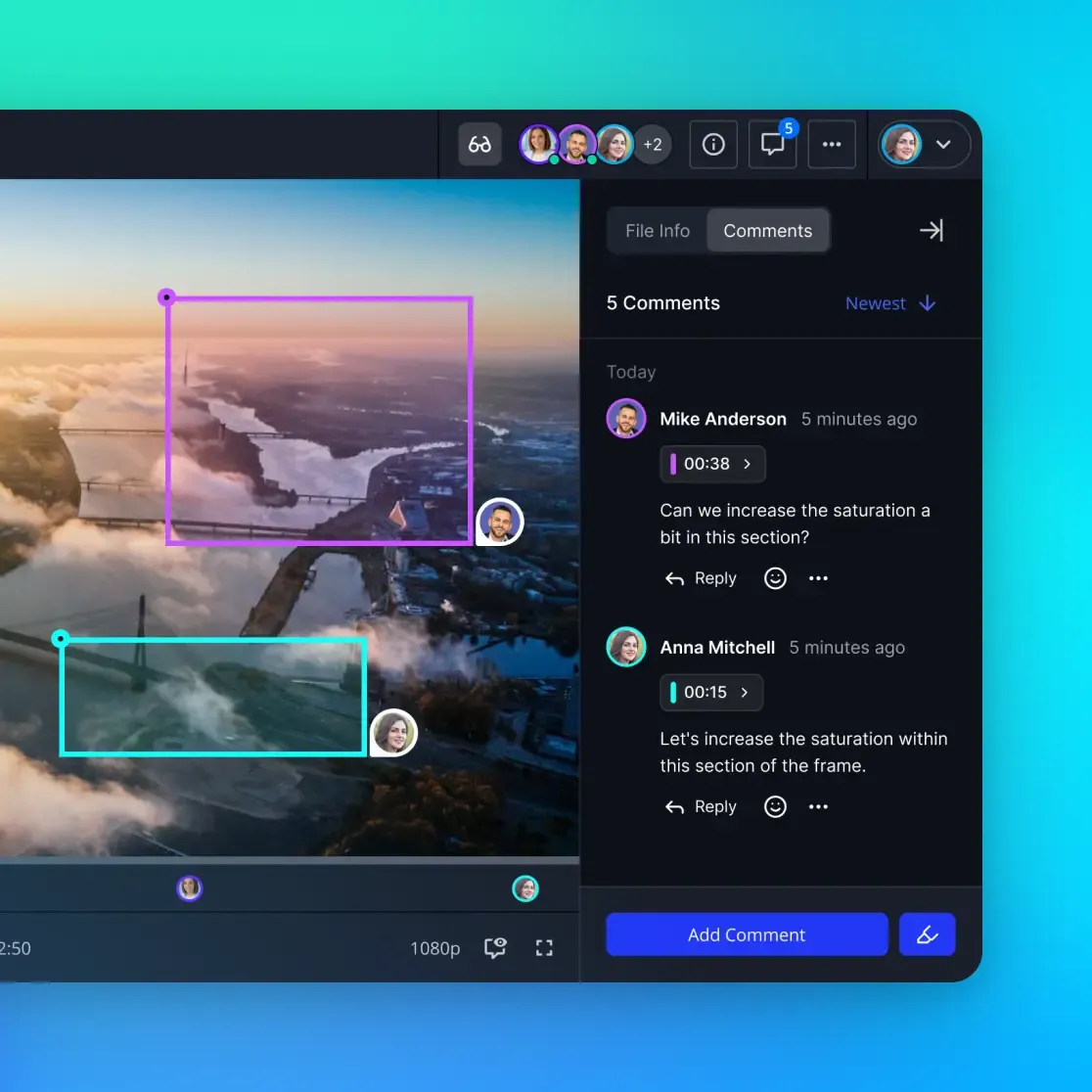
Dedicated platforms solve these issues. Precise, timestamped comments enable targeted edits. Automated notifications alert reviewers to changes. Version histories prevent overwrites. Collaboration tools can cut revisions, accelerating video launches from weeks to days.
eLearning workflows gain the most. Remote subject matter experts, instructional designers, and executives need to collaborate asynchronously. Real-time presence features let you see "Sarah is reviewing the intro section - jump in now." Mobile support ensures field trainers can approve on the go.
In corporate training, where videos cover safety procedures or software demos, accuracy matters. A misplaced comment can lead to costly errors. These platforms provide audit trails and approval workflows to meet compliance needs.

Pain Points in Traditional Workflows
Email threads bury key feedback amid unrelated messages. Google Drive comments don't support timeline markers for videos. Zoom screen shares require scheduling and frustrate with "Can you scroll back?"
Teams spend a significant portion of project time on coordination alone. Downloads for review eat storage and slow remote workers. Lost context from verbal notes leads to repeated questions.
Real Costs of Broken Review Cycles
Each revision cycle that drags on costs money. A training video stuck in review for two weeks instead of two days means delayed onboarding for employees, which directly impacts productivity. In regulated industries, a compliance training delay can mean audit findings or safety incidents.
Consider a manufacturing company rolling out new safety procedures. If the training video approval takes three weeks instead of one, workers continue using outdated methods. The cost of one workplace incident far exceeds the price of any collaboration platform.
Beyond direct costs, there's the hidden tax on team morale. Designers growing frustrated with endless revision loops often disengage. Instructional designers juggling multiple courses feel the pressure of bottlenecked reviews. These platforms don't just save time. They preserve team energy and commitment to quality.
Top Platforms Side-by-Side
Here's a comparison of core features for instructional video collaboration:
Fast.io differentiates with native AI for querying clips by description ("find safety training examples"). Most competitors charge per active user; Fast.io uses storage/bandwidth credits with a generous free tier.

Detailed Platform Breakdown
Frame.io: A top choice for video pros. Pin comments to exact frames, use collections for organized reviews, smooth Adobe integrations. Pricing starts at Paid plans for Pro, scaling up for teams. Best for agencies with editing-heavy workflows. Limitation: Per-user costs add up for large training departments.
Wipster: Clean interface focused on player-side comments and side-by-side version comparisons. Good for quick turnarounds. Starts at Paid plans. Strong for small creative teams but lacks deep AI or enterprise reporting.
Ziflow: Built for proofing with automated workflows, decision-maker approvals, and asset libraries. Enterprise pricing (custom quotes). Excels in marketing but overkill for simple training videos.
Vimeo Review: Affordable add-on to Vimeo hosting. Basic timestamp comments, easy sharing. Paid pricing per reviewer seat, limited to a set number of reviewers per video. Good starter but lacks advanced annotations.

Pricing Realities Across Platforms
Per-user pricing hurts scaling teams. Frame.io for large reviewer groups? Costs escalate quickly. Fast.io bills by usage - free tier covers multiple storage and thousands of streams, ideal for testing instructional workflows.
Integration and Workflow Fit
Training teams need LMS exports (SCORM), editor plugins. Fast.io's API and MCP tools fit agentic elearning pipelines. Frame.io wins Adobe shops; Vimeo suits hosted video needs.
Enterprise Considerations
Large organizations face unique challenges. A global company with training teams across time zones needs asynchronous collaboration that actually works. Look for timezone-aware notifications, multi-language interfaces, and strong admin controls.
Security matters for corporate training. Customer service scripts, HR policies, and compliance content often contain sensitive information. Choose platforms with encryption at rest, SSO integration, and detailed permission controls. Fast.io offers granular sharing permissions and audit logs that satisfy most corporate security requirements that meet most corporate security needs.
Fast.io for Instructional Video Teams
Fast.io combines media power with collaboration smarts for training videos. Upload raw footage; instant HLS proxies stream smoothly, no buffering on any device. Scrub timelines precisely without lag.
Annotate with frame accuracy: "@multiple:multiple pacing too fast." Threaded replies keep discussions contextual. Real-time presence shows teammate cursors; follow mode syncs views for live walkthroughs.
Turn on Intelligence Mode for AI features. Videos auto-transcribe and index. Query "Show clips explaining login process" with cited sources. Perfect for elearning where finding reusable segments saves time.
Unlimited guest reviewers with no seat fees for SMEs or execs. Organization-owned files persist beyond individual access. Full audit logs track every view and comment for compliance.
Workflow example: Instructional designer uploads module draft. SMEs add timestamp notes. AI summarizes feedback threads. Editor revises v2, pings reviewers. Export approved version to LMS. Whole cycle in a few hours.
Scales to enterprise with SSO, granular permissions, branded portals for external training partners.



Collaborate on Video with Your Team
Fast.io offers frame feedback, AI search, unlimited guests. Perfect for training teams.
Key Features to Prioritize
Frame/timestamp accuracy: Essential for precise feedback. When a reviewer says "change the wording at multiple:multiple," that comment must attach to the exact frame, not a rough time estimate.
Adaptive streaming: Ensures reviews work on slow connections. Field trainers reviewing on tablets over cellular need smooth playback without constant buffering. HLS streaming adjusts quality dynamically.
Version control: Auto-save changes, diff views. Seeing what changed between v1 and v2 prevents regressing fixes. Some platforms show visual diffs; others list changed frames.
Guest access: Unlimited without costs. Subject matter experts outside your organization shouldn't require paid seats. External reviewers, clients, and stakeholders should access without licensing friction.
AI search: Query content semantically. "Find all clips showing the login error" beats scrubbing manually through hours of footage. This is Fast.io's standout feature. Few competitors match it.
Mobile support: Review on tablets in meetings. Walking through a draft with stakeholders in a conference room requires touch-friendly timeline scrubbing and clear comment visibility.
Integrations: LMS, editors, Slack notifications. Your final approved video needs to publish to your Learning Management System. SCORM or xAPI exports should be native, not manual downloads.
Reporting: Who viewed what, engagement time. Know whether stakeholders actually watched the full video or skimmed. Engagement data helps prioritize follow-up conversations.
Approval workflows: Structured sign-off chains. Not every video needs CEO approval, but compliance content often requires documented stakeholder sign-off before publishing.

Implementation Best Practices
Start with pilot: Choose 2-3 videos, invite 10 reviewers, measure round-trip time. Track how long feedback takes to implement and how many rounds occur. This baseline proves ROI.
Standardize templates: Safety video checklist, software demo structure. When every video follows consistent naming and tagging, finding content later becomes simple. Templates also guide less experienced team members.
Train team: multiple-minute session on annotations. Show reviewers how to pin comments to specific frames, how to use @mentions, and how to mark comments as resolved. Poor training leads to scattered feedback that defeats the platform's purpose.
Integrate tools: Hook to your LMS for final delivery. Set up automated uploads to Moodle, Cornerstone, or Workday Learning. Manual exports introduce error and delay.
Monitor metrics: Revision count, time to approval. Track week-over-week trends. If approval time creeps up, investigate whether the bottleneck is reviewer availability or unclear feedback quality.
Common pitfalls: Overloading with too many reviewers early; skipping mobile tests. Too many voices creates contradictory feedback. Mobile testing is essential since half your reviews may happen on tablets.
Establish clear roles: Who provides creative feedback? Who approves final content? Who handles technical quality? Role clarity prevents the "everyone comments on everything" chaos that kills efficiency.

Common Use Cases for Training Videos
Different training video types have distinct collaboration needs. Understanding your primary use case helps prioritize platform features.
Onboarding and New Hire Training: New employees need consistent, polished content. Multiple departments contribute: HR, operations, IT. Reviewers include stakeholders who may never watch the final video but must approve it. Platforms with approval workflows and guest access shine here.
Software Product Demos: Fast-moving teams update demos with each release. Sales and customer success teams provide feedback on clarity and accuracy. The review cycle must be fast. Waiting a week for approval means demos lag behind product updates. Look for rapid streaming and mobile support.
Compliance and Safety Training: Accuracy is non-negotiable. Legal and compliance teams need audit trails showing exactly who approved what content. Frame-accurate comments matter when explaining safety procedures. Version history must show evolution from draft to approved content.
Sales Enablement: Customer-facing content must be perfect. Sales reps review for messaging accuracy, managers for brand alignment. External stakeholders like partners or agencies often contribute. Unlimited guest access becomes valuable when multiple organizations collaborate.
Customer Education and Support: Self-service knowledge bases benefit from video tutorials. Support team members identify gaps in existing content. Product teams suggest technical additions. Continuous improvement cycles benefit from platforms with clear version comparisons.

Frequently Asked Questions
Best platform for instructional video teams?
Fast.io offers AI clip search and unlimited scaling. Frame.io suits Adobe pros. Choose based on integrations and budget.
Video collaboration for elearning workflows?
Prioritize timestamps, exports to LMS like Moodle, version approvals. Fast.io and Frame.io lead here.
Do these platforms support large training files?
Yes, all stream multiple files. Fast.io auto-proxies for instant reviews without full downloads.
How much do video review tools cost?
Typical per-user monthly pricing. Fast.io usage-based starts free, better for variable teams.
AI features in video collaboration?
Fast.io offers semantic search across transcripts/clips. Others have basic captions.
Free trials for team review?
All offer trials. Fast.io has permanent free tier - no card needed.
Mobile support for video reviews?
Critical for field training. All platforms responsive; test scrubbing on phones.
How to migrate from email reviews?
Export old feedback to new tool, train on timestamps, set notification rules.
What about SCORM exports for compliance training?
Fast.io and Frame.io support SCORM packages for LMS upload. Check that your chosen platform exports the format your Learning Management System requires.
How do AI clip search features work?
Platforms like Fast.io transcribe videos and build semantic indexes. You describe what you want ('safety check procedure example') and AI finds matching moments in the transcript or visual content.
Related Resources

Collaborate on Video with Your Team
Fast.io offers frame feedback, AI search, unlimited guests. Perfect for training teams.