VFX Pipeline: File Management and Sharing Guide
A VFX pipeline is the end-to-end workflow that visual effects studios use to manage assets, shots, and renders from initial plate delivery through final composite output. With projects involving many artists across multiple locations and shots going through many iterations during production, efficient file management and collaboration tools are essential to delivering on time and on budget.
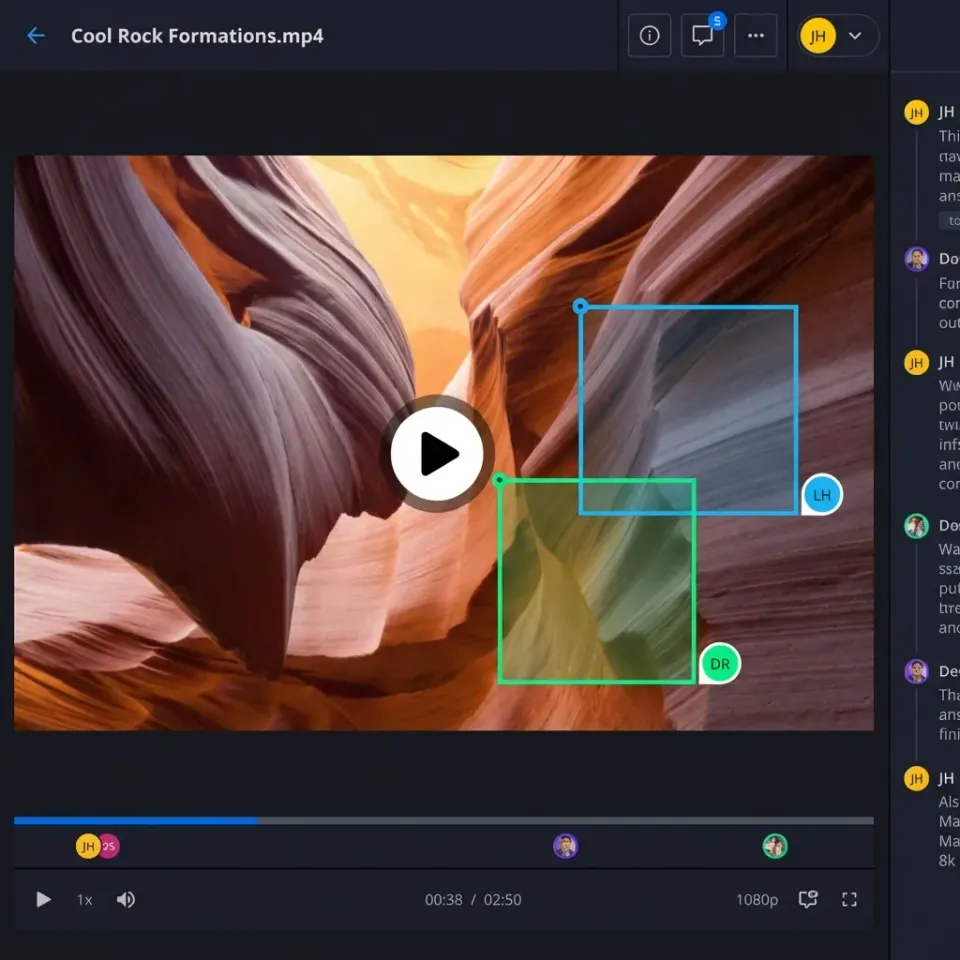
What Is a VFX Pipeline?
A VFX pipeline is the structured sequence of stages that take a visual effects project from concept to final delivery. Each stage produces specific outputs that feed into the next phase, creating dependencies that require careful coordination. The pipeline encompasses three main phases:
- Pre-production: Shot planning, previsualization, and asset preparation
- Production: Principal photography, on-set data capture, and dailies review
- Post-production: Asset creation, animation, lighting, compositing, and final delivery
Unlike traditional linear workflows, VFX pipelines are inherently iterative. A single shot may cycle between departments multiple times as directors request changes or technical issues arise. This means artists need constant access to the latest versions of shared assets, reference footage, and approved renders. The complexity multiplies when teams work across different locations. A studio in Los Angeles might handle modeling and animation while outsourcing lighting to Montreal and compositing to London. Each facility needs reliable access to terabytes of shared data without delays that stall production.
Helpful references: Fast.io Workspaces, Fast.io Collaboration, and Fast.io AI.
What to check before scaling vfx pipeline
Pre-Visualization and Planning
Before cameras roll, VFX supervisors work with directors to plan complex shots. This stage generates storyboards, animatics, and low-resolution 3D mockups that communicate the creative vision. These files get shared extensively with cinematographers, production designers, and the VFX team to align everyone on technical requirements. File types at this stage include Photoshop boards, Maya scene files, and video animatics. While file sizes are manageable, the challenge is keeping multiple stakeholders synced as plans evolve.
Production and On-Set Data Capture
During principal photography, massive amounts of data flow from set to post-production facilities. Red cameras shooting 8K capture massive amounts of data per shoot day. LiDAR scans of environments can reach massive file sizes. HDR environment maps for lighting reference add another layer. This data needs rapid transfer to editorial and VFX teams, often on the same day. Traditionally, hard drives get physically shipped overnight. Modern productions increasingly rely on camera-to-cloud workflows that upload footage directly from set, though network reliability remains a concern.
Asset Creation and Animation
VFX artists build 3D models, textures, rigs, and animations that will be composited into live-action footage. A single hero character model with full texture maps can be massive. Environment builds for large-scale destruction sequences often reach huge file sizes. These assets get referenced across multiple shots, creating dependencies. When a character model gets updated, every shot using that asset needs access to the new version immediately. This requires centralized asset libraries with version control and clear naming conventions.
Lighting and Rendering
Once animation is approved, lighting artists set up virtual lighting that matches on-set photography. Rendering transforms these scenes into final images, a process that can take hours per frame even with render farms. A single shot rendered can produce massive EXR image sequences. These get passed to compositing, but lighting often needs to deliver multiple passes (beauty, reflection, shadow, ambient occlusion) for maximum compositing flexibility. Complex shots generate massive amounts of render layers.
Compositing and Review Cycles
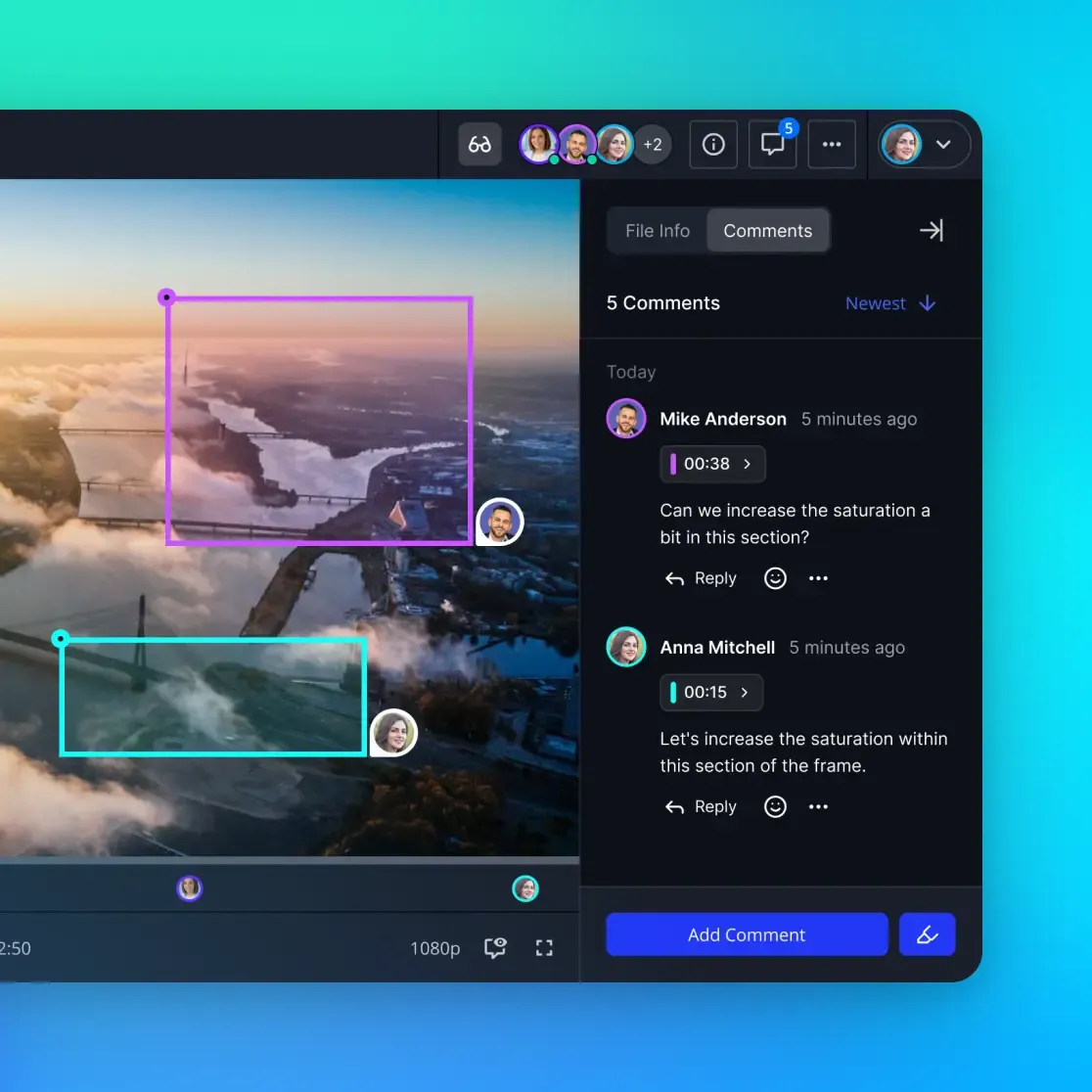
Compositors combine rendered CG elements with live-action plates, adding final color correction, grain, and effects integration. The output is a finished shot ready for client review. Review cycles create the most intense file-sharing demands. Directors and producers need to see work-in-progress composites, often daily. Studios generate large amounts of review QuickTime files daily. Traditionally, these files get uploaded to review platforms where clients leave timestamped notes. The problem is upload time. Compositors often face long upload times before directors can review work. Multiply this across an entire team, and hours get wasted on file transfers instead of creative work. Fast.io's HLS streaming transcodes uploads instantly into streamable proxies. Directors can start reviewing almost immediately after the compositor clicks share, even if the original file is still uploading in the background. Frame-accurate comments let reviewers pin feedback to specific frames, removing ambiguous notes like "make the explosion bigger around the middle part."


Start with vfx pipeline on Fast.io
Fast.io gives VFX teams cloud storage built for massive media files, instant HLS streaming for client review, frame-accurate commenting, and workspace collaboration that scales across distributed facilities.
File Management Challenges in VFX Production
Managing Hundreds of Versions Per Shot
A typical VFX shot goes through many iterations during production. Challenging shots can reach many versions as the creative direction shifts. Each version might exist in multiple states: work-in-progress, submitted for review, client-approved, or archived. Without rigorous naming conventions and version tracking, artists waste time searching for the right file. "Which comp did the director approve? Was that v34 or v34_revised?" These questions can consume valuable time each day. Modern VFX pipelines implement automated version control where artists save iterations with clear metadata. The system tracks who created each version, when it was submitted, and whether it received approval. Artists can instantly jump to the latest approved version or roll back to compare against earlier attempts.
Sharing Assets Across Distributed Teams
Studios rarely keep all work in-house anymore. Budget pressures and specialized expertise mean modeling happens in one country, animation in another, and final compositing in a third location. Each facility needs access to shared asset libraries. The traditional approach uses FTP servers or sync-based storage like Dropbox. Both create problems. FTP requires technical knowledge many artists lack. Sync-based systems try to copy the entire project library to every location, consuming local storage and creating conflicts when multiple artists edit shared files simultaneously. Cloud-native storage changes this model entirely. Assets live in the cloud, and artists stream what they need on demand. When a Montreal artist updates a texture, the London compositor instantly sees the new version without manual syncing. No conflicts, no wasted bandwidth downloading files they won't use.
Handling Client Feedback Efficiently
The client review cycle makes or breaks VFX schedules. Fast turnaround from submitted shot to director feedback keeps artists productive. Delays create idle time where artists wait for notes, or worse, they move forward with additional work that might get rejected. Email-based review is painfully slow. An artist exports a QuickTime, uploads to Dropbox, sends a link via email, and waits. The director opens the link hours later, watches the shot, and replies with written notes that the artist must interpret. "The lighting feels off in the explosion" could mean anything from exposure to color temperature to shadow density. Frame-accurate video review tools remove the guesswork. The director clicks the exact frame where they see an issue and types a comment directly on that frame. The artist sees exactly which moment needs adjustment and what change is requested. This specificity cuts revision rounds from many iterations to just a few.

File Formats and Storage Requirements
Image Sequences vs. Video Files
VFX work relies heavily on EXR image sequences rather than encoded video. EXR files are much larger than video formats but preserve full dynamic range and store multiple render passes in a single file. A beauty pass, reflection pass, shadow pass, and ambient occlusion pass might all live in one 32-bit floating-point EXR. This gives compositors maximum flexibility to adjust each element independently. The downside is storage consumption. Large feature films with many VFX shots generate massive amounts of EXR sequences during production. Studios need storage solutions that scale without exponentially increasing costs.
Working File Sizes and Transfer Speeds
Different pipeline stages generate drastically different file sizes:
- Storyboards and previz: Moderate file sizes (JPEG images, low-res video)
- Camera plates: Massive data ingestion per shoot day (RAW or ProRes)
- 3D assets: Substantial storage footprint per environment (models, textures, rigging data)
- Render sequences: High capacity required per shot (EXR passes)
- Review comps: Efficient but numerous files per shot (H.264 or ProRes)
Transfer speed becomes important when artists work remotely or facilities collaborate across cities. Downloading large render sequences over standard business internet connections can take many hours. That's an entire workday lost to file transfer. UDP-based transfer protocols can speed this up . Fast.io's file transfer achieves gigabit speeds even over long distances, dramatically reducing download times. The difference between starting work immediately versus the next day.
Best Practices for VFX File Sharing
Implement Clear Naming Conventions
Every studio develops naming standards, but consistency in enforcement varies. A solid naming convention includes:
- Project code: Short identifier for the film or episode (e.g., "PROJ_001")
- Shot number: Unique identifier matching editorial (e.g., "SH_0450")
- Asset type: Comp, render, model, texture, etc.
- Version number: Zero-padded sequential numbering (v001, v002, not v1, v2)
- Artist initials: Who created this version
- Date stamp: YYMMDD format
Example: PROJ_001_SH_0450_comp_v034_AB_260213.exr
This level of detail prevents confusion when dozens of artists work on hundreds of shots simultaneously. Anyone looking at the filename knows exactly what they're opening.
Use Workspaces to Organize by Shot or Sequence
Flat folder hierarchies can become unwieldy for large projects with many shots. Artists waste time navigating deep folder trees looking for specific assets. Workspace-based organization groups related files into logical containers. A VFX supervisor might create separate workspaces for each sequence in the film: "SEQ_100_City_Destruction," "SEQ_200_Character_Battle," etc. Within each workspace, subfolders organize by department: modeling, animation, lighting, compositing. Artists join the workspaces relevant to their tasks and ignore the rest. This reduces clutter and speeds up file access. Fast.io's workspace discovery lets team members browse and join open workspaces without manual invitations. New artists onboarding to the show can find the sequences they're assigned to and start working immediately.
Control Access for Different Stakeholders
Not everyone needs full access to all files. VFX producers reviewing shots don't need to see raw render passes or work-in-progress models. External clients shouldn't access production files, only finished review comps. Granular permissions handle this. Set up separate client-facing portals where directors see only approved-for-review material. Internal workspaces remain private to the production team. Within those workspaces, assign roles: artists get full read/write access, coordinators get read-only, and supervisors get admin rights to manage membership. This layered approach prevents accidental overwrites while keeping collaboration smooth. Artists don't get blocked waiting for permission requests, but sensitive files stay protected.
Optimizing Review and Approval Workflows
Enable Frame-Accurate Feedback
General notes waste everyone's time. "The background looks wrong" leaves the artist guessing which part of the background and what type of wrongness. Specific feedback accelerates fixes. Frame-accurate commenting removes the ambiguity. The director scrubs to a specific frame, clicks the area that needs adjustment, and types feedback. The artist sees exactly which frame, which region, and what change to make. This precision matters more in VFX than traditional editing because shots contain many frames. Vague feedback that points to general areas rather than specific frames requires artists to spend time determining exactly what needs to change. Precise feedback eliminates this detective work.
Maintain Audit Trails of Revisions
Studios working on commercials or episodic TV often revisit shots weeks after initial delivery when clients request changes. "Can we go back to the version before you added the lens flare?" becomes impossible to answer without version history. Detailed activity logs track every upload, approval, and revision request. When a director asks for a specific version, coordinators can check the logs and retrieve it instantly. This audit trail also protects against scope creep. If a client claims they never approved a particular creative choice, the activity log shows their approval timestamp on the specific version. Documentation prevents disputes and supports billing for additional revisions.
Simplify the Dailies Process
VFX dailies happen daily (hence the name) where the team reviews work-in-progress shots together. In-person dailies mean gathering everyone in a room with a projector. Remote teams need virtual dailies where everyone sees the same playback simultaneously. The technical challenge is getting files reviewed quickly. If an artist finishes a comp but the file takes a long time to upload before the dailies session, they miss that day's review. Work that could get feedback tonight instead waits until tomorrow, adding a full day to the iteration cycle. Instant streaming preview fixes this bottleneck. The artist shares the file, and streamable proxies are ready quickly for the entire team to watch together. The original high-quality file continues uploading in the background for archival, but the review happens immediately.
Frequently Asked Questions
What is a VFX pipeline?
A VFX pipeline is the end-to-end workflow that visual effects studios use to manage assets, shots, and renders from initial plate delivery through final composite output. It includes pre-production planning, asset creation, animation, lighting, rendering, compositing, and client review stages.
How do VFX studios manage files across distributed teams?
Modern VFX studios use cloud-native storage systems that let artists stream assets on demand rather than syncing entire project libraries locally. This eliminates version conflicts, reduces bandwidth consumption, and ensures every team member works from the latest approved versions regardless of location.
What file formats do VFX pipelines use?
VFX pipelines primarily use EXR image sequences for renders because they preserve full dynamic range and can store multiple passes (beauty, reflection, shadow, etc.) in a single 32-bit floating-point file. Review comps typically use H.264 or ProRes video formats for smaller file sizes.
How many iterations does a typical VFX shot go through?
A typical VFX shot goes through multiple iterations during normal production. Complex shots can reach dozens of versions as creative direction shifts and technical challenges arise. This makes version control and organized file management critical to maintaining efficiency.
What are the biggest file transfer challenges in VFX production?
The main challenges are managing massive file sizes (single shots can generate substantial render data), sharing assets across geographically distributed teams, and getting review files to clients quickly enough to maintain iteration speed. Slow uploads create idle time where artists wait for feedback instead of working.
How can VFX teams improve client review workflows?
Implement frame-accurate video review tools that let directors pin comments to specific frames and regions. This eliminates ambiguous feedback like 'make it better around the middle,' replacing it with precise timestamps and spatial annotations that artists can act on immediately.
What is the best way to organize VFX project files?
Use workspace-based organization where each sequence or major asset group gets its own collaborative space. Within workspaces, organize by department (modeling, animation, lighting, compositing) and use strict naming conventions that include project code, shot number, asset type, version number, artist initials, and date.
Related Resources

Start with vfx pipeline on Fast.io
Fast.io gives VFX teams cloud storage built for massive media files, instant HLS streaming for client review, frame-accurate commenting, and workspace collaboration that scales across distributed facilities.