How to Set Up Remote Collaboration for Small Businesses
Remote tools keep small business teams connected from anywhere. They cover file sharing, live updates, and task tracking to match office work. Hybrid and remote work is popular now. SMBs want tools that handle growth without high prices. Fast.io workspaces show live activity and smart search to simplify file sharing. This cuts version problems and delays. This guide shows setup steps, main features, and practical tips.
Why Small Businesses Need Remote Collaboration Tools
Small businesses run tight teams across different places. Email and scattered files create problems that remote tools can fix.
Picture a marketing agency with designers in various cities. Files end up in multiple versions, feedback drags, deadlines miss without good tools. Workspaces gather files together and show active users.
Consultants with global freelancers deal with it too. Clients want fast work, but file mix-ups cause mistakes.
Retail staff updating inventory from stores need instant sync to match stock counts.
E-commerce teams working on photos and descriptions like comments right on the images.
Numbers support this. Buffer's 2023 remote work report says 98% of remote workers recommend it, and 82% work from home.
SmallBizGenius notes 62% of remote workers feel more productive.
Owl Labs finds companies allowing remote work have 25% less turnover.
Good tools let small businesses compete without large IT spends. They secure file sharing and show updates right away.
Fast.io workspaces have real-time views, unlimited users, no per-seat costs. Dropbox charges per-user fees; Fast.io Pro covers them cheaper.
Helpful references: Fast.io Workspaces, Fast.io Collaboration, and Fast.io AI.

Essential Features for Effective SMB Remote Workspaces
Pick tools with easy setup, unlimited users, no per-user fees to fit small business budgets.
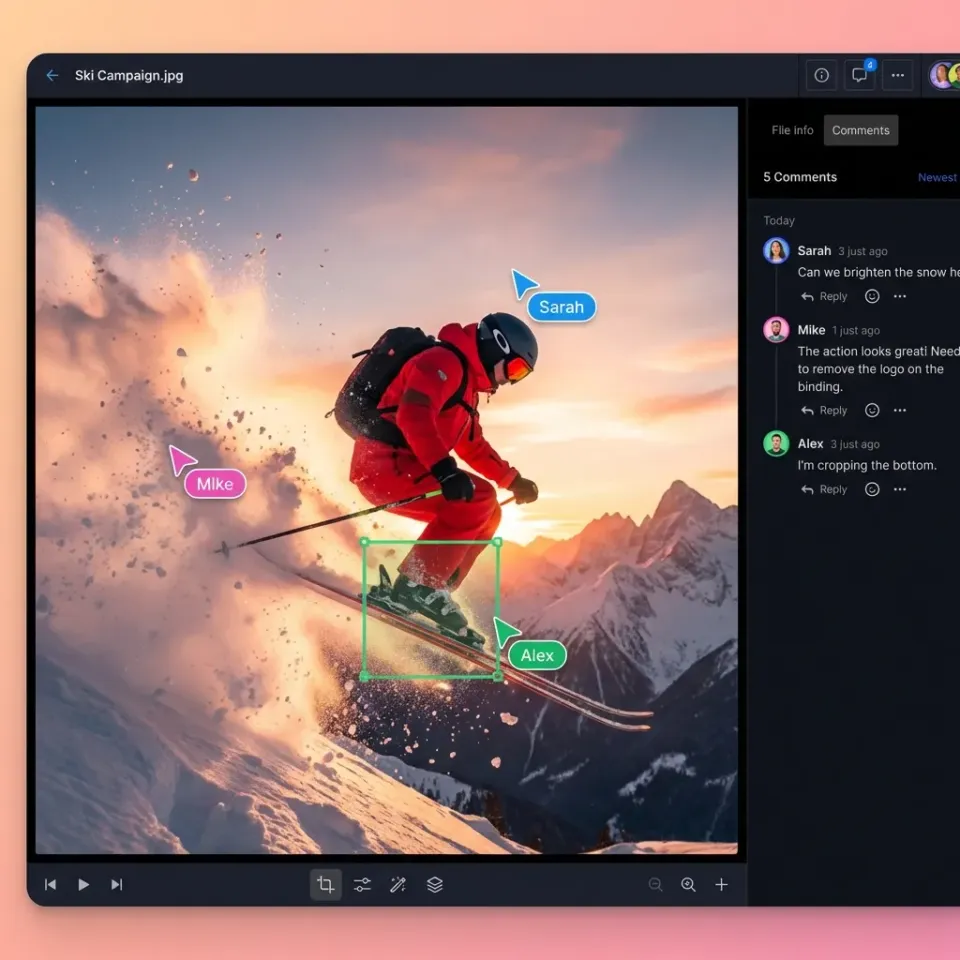
Real-time presence shows teammate avatars on files. Cut down on "you there?" messages and see live action.
Follow mode matches your view to a teammate's. Perfect for reviews without Zoom screen shares.
Contextual comments pin notes to video frames, image spots, or doc pages. Threads and reactions keep talks on track.
Permissions work at org, workspace, folder, file levels. Share folders with clients safely. Roles: admin, editor, viewer.
Activity logs track uploads, views, downloads, changes. See who did what when.
Cloud setup skips Dropbox-style sync issues. Files stream instantly, HLS for media, handles large files uncompressed.
Quick comparison:
| Feature | Fast.io | Dropbox | Slack |
|---|---|---|---|
| Unlimited Users | Yes | No (published pricing) | No ($multiple.25/user/mo) |
| Real-time Presence | Yes | No | Chat only |
| File Comments | Region-specific | Basic | No files |
| Large File Support | Large | 2TB/team | N/A |
Small business tip: Use the free plan first, upgrade to Pro later.
Real-Time Presence and Follow Mode
Click to follow a teammate's view. Useful for reviews or training. No screen sharing needed.
Step-by-Step Guide to Setting Up Small Business Remote Collaboration
Sign up for a free Fast.io account. Visit fast.io and create an account with your email, no credit card required. The free plan includes unlimited workspaces and users, perfect for small businesses starting out.
2. Create your organization. From the dashboard, click "New Organization" and name it (e.g., "Acme Marketing"). Organizations own all files, ensuring nothing is lost if a team member leaves. This contrasts with personal-drive models like Google Drive.
3. Build your first workspace. Click "New Workspace," name it "Q1 Campaign," add a description, and set privacy (org-wide or invite-only). Workspaces act like shared project folders but with real-time collaboration.
4. Upload files. Drag and drop files or use URL import from Google Drive, OneDrive, or Box. Fast.io auto-generates previews for images, videos (HLS streaming), PDFs, and more. Supports up to large files without compression.
5. Invite your team. Click "Invite Members," enter emails, and assign roles: Admin (full control), Editor (upload/edit), Viewer (read-only). Unlimited invites on free plan, no per-seat fees.
6. Set granular permissions. At workspace, folder, or file level, control who sees what. External clients get view-only shares without accounts.
7. Share externally. Create branded portals or password-protected links. Add expiration dates, domain restrictions, watermarks. Track views/downloads in audit logs.
8. Enable Intelligence Mode. Toggle on for auto-indexing. Now search by meaning: "Show budget spreadsheet from January." 9. Test the workflow. Run a mock project: upload assets, invite tester, comment, share. Adjust based on feedback. This setup takes under multiple minutes and scales with your business.

Boost Productivity with Real-Time Features
Live activity raises productivity. Follow mode lets you click an avatar to match their view in design reviews.
Logs track uploads, views, downloads, permission changes. Notice files viewed often but uncommented and follow up.
Region comments cut email ping-pong. Pin notes to image spots or video frames, like "Fix lighting at multiple:multiple," then reply in threads.
One marketing agency shortened reviews with follow mode and logs.
Avatars on files create remote team feel, like office presence during busy times.
Track improvements: Compare review times before and after. Audit logs give the numbers.
Add one practical example, one implementation constraint, and one measurable outcome so the section is concrete and useful for execution.
Add AI Intelligence to Your Remote Workflows
Few remote file tools have AI built in. Many rely on add-on apps like ChatGPT. Fast.io Intelligence Mode indexes uploads for natural language search.
Turn it on by workspace: files index fast. Query "Q4 budget overages" for results from PDFs or sheets with sources.
Summaries shorten long docs, transcripts, threads. Turn multiple pages into key points.
Sales teams ask "feedback on proposal v2" and get comments from files, cited.
Others give storage and chat. Fast.io adds file smarts. Skip manual hunts.
No vector DB setup. Ready for small teams.
Add one practical example, one implementation constraint, and one measurable outcome so the section is concrete and useful for execution.

Best Practices and Troubleshooting for Remote Teams
Define workspace norms. Open for brainstorming, private for HR/finances. Document in a pinned README file.
Onboard team. multiple-min demo: upload, comment, follow mode, search. Record for async hires.
Weekly rituals. multiple-min sync: review activity logs, celebrate wins, plan shares.
Troubleshooting table:
| Issue | Cause | Fix |
|---|---|---|
| Permission denied | Wrong role | Check roles, re-invite |
| Slow previews | Large video | Wait for transcoding or stream |
| Can't find file | Bad naming | Use semantic search: "logo draft" |
| Share expired | Time limit | Renew or recreate |
| No activity log | Disabled | Enable in settings |
Security best practices. Use SSO if available, MFA, audit reviews monthly. External shares: password + expire.
Scale tips. As team grows to multiple+, use discoverable workspaces for cross-team collab.
Track review times, feedback count, share views. Look for steady gains.
One consulting firm cut client emails by using Fast.io for all files.
Frequently Asked Questions
What are remote tools for small business?
File tools like Fast.io, chat apps like Slack, video like Zoom. Fast.io adds live file views and search.
What is the best SMB collab software?
Best depends on needs, but Fast.io offers unlimited users, real-time features, and no per-seat costs. Good for SMB remote workspaces.
How does remote team file sharing work?
Upload to shared workspaces, set permissions, share links. Fast.io streams files without downloads for security.
Can small businesses use free remote tools?
Yes, Fast.io's free plan supports unlimited users and large storage. Upgrade as needed.
How to improve productivity in remote SMB teams?
Use real-time presence and comments to cut delays. AI search finds info fast.
Related Resources

Start Remote Collaboration Today
Intelligent workspaces for small business teams. Unlimited users, real-time features, free to start. Built for small business remote collaboration workflows.