5 Best ShareFile Alternatives for Secure Business File Sharing
ShareFile works well for basic document sharing, but many teams find the pricing steep and the interface dated. This guide compares five alternatives that offer better value, modern UX, or specialized features depending on what you actually need. This guide covers sharefile alternative with practical examples.
Why Teams Look for ShareFile Alternatives
ShareFile (now owned by Progress Software after Citrix spun off its enterprise division) has been a reliable enterprise file-sharing tool for years. But "reliable" doesn't always mean "right for your team."
The most common reasons teams switch:
- Pricing confusion: ShareFile's plans start at published pricing for individuals but jump to published pricing/month for teams. That adds up fast.
- Dated interface: The UI feels clunky and outdated. Younger team members especially find it clunky compared to consumer tools.
- Integration gaps: If you're not in the Citrix ecosystem, ShareFile can feel isolated from your other tools.
- Overkill for simple needs: Many ShareFile features target legal and financial compliance. If you don't need those, you're paying for capabilities you won't use. The right alternative depends on what you actually need. Document-heavy workflows? Creative file sharing? Simple team storage? Each alternative below serves different use cases.
Helpful references: Fast.io Workspaces, Fast.io Collaboration, and Fast.io AI.
Quick Comparison: Top ShareFile Alternatives
Here's how the leading alternatives stack up against ShareFile:
The biggest gap most comparisons miss: pricing models. ShareFile and most competitors charge per user. Fast.io charges based on usage, which can save 70%+ for teams that don't need every person at a full seat.
1. Fast.io: Best for Teams That Share Large or Media Files
Fast.io takes a different approach to team file sharing. Instead of charging per seat, you pay based on actual usage. For teams of 25 or more, this typically costs 70% less than ShareFile.
What makes it different:
- Usage-based pricing: Pro plan includes 25 seats. Add more for published pricing each. You pay for storage and bandwidth, not headcount.
- HLS video streaming: Netflix-style adaptive streaming. Videos play instantly without buffering. ShareFile uses progressive download, which means waiting.
- Organization-owned files: When someone leaves, their files stay. No scrambling to transfer ownership.
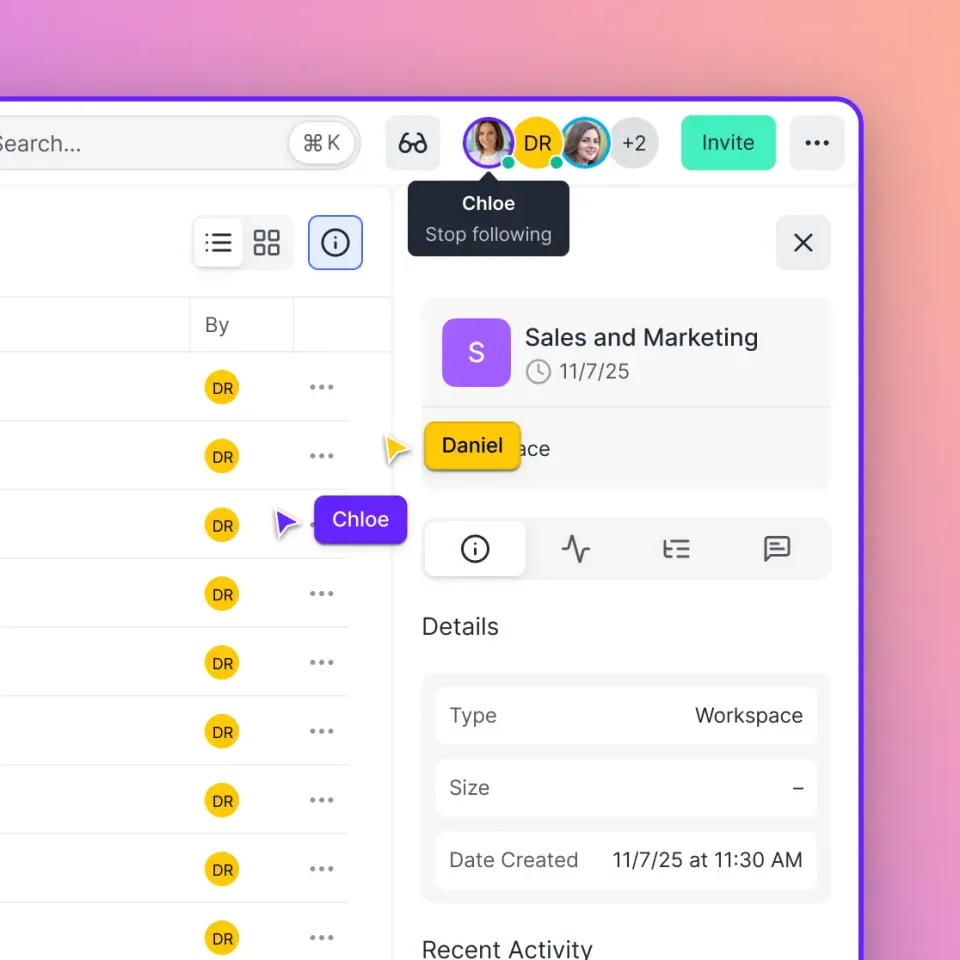
- Real-time collaboration: See who's viewing a workspace live. Follow teammates to sync your view during reviews.
Where Fast.io fits best:
Video production teams, creative agencies, and marketing departments benefit most. If you regularly share large files or need frame-accurate video reviews, the streaming capabilities alone justify the switch.
Limitations:
Fast.io focuses on file sharing and collaboration, not document signing or contract management. If you need e-signatures, you'll pair it with a dedicated tool like DocuSign.



Start with sharefile alternative on Fast.io
See how much you could save with usage-based pricing. Start a free trial and migrate your files in minutes.
2. Box: Best for Enterprise Integrations
Box has positioned itself as the content management layer for large enterprises. If your company already uses Salesforce, Slack, and dozens of other enterprise tools, Box likely has pre-built integrations. For smaller teams or those primarily sharing media files, it's overkill. Consider how this fits into your broader workflow and what matters most for your team. The right choice depends on your specific requirements: file types, team size, security needs, and how you collaborate with external partners. Testing with a free account is the fast way to know if a tool works for you. Consider how this fits into your broader workflow and what matters most for your team. The right choice depends on your specific requirements: file types, team size, security needs, and how you collaborate with external partners. Testing with a free account is the fast way to know if a tool works for you.
3. Dropbox Business: Best for Teams Who Want Familiar UX
Dropbox built its reputation on simplicity. The desktop sync and familiar folder structure mean minimal training for new team members.
Strengths:
- Everyone knows how to use it: The learning curve is nearly flat
- Smart Sync: Access all files without filling your hard drive
- Paper and Capture: Built-in tools for documents and scanning
- Transfer: Send large files (up to 250GB) even to non-Dropbox users
Drawbacks:
- Per-user pricing: published pricing/month for Standard, $30 for Advanced
- Video limitations: Progressive download, not streaming. Large videos buffer.
- Personal account confusion: Team files can mix with personal files if you're not careful
Dropbox Business works well for general team storage when you don't need specialized media handling. The familiarity saves training time.
4. Egnyte: Best for Hybrid Cloud Needs
Egnyte targets companies that can't go fully cloud. Maybe you have regulatory requirements, legacy systems, or just prefer keeping some data on-premises.
Strengths:
- True hybrid architecture: Mix on-prem and cloud storage in one system
- Industry solutions: Purpose-built for architecture, engineering, construction, and life sciences
- Governance features: Classify data, set retention policies, track access
- Strong security: Encryption, access controls, detailed audit logs
Drawbacks:
- Complexity: More configuration than pure-cloud alternatives
- Pricing: Starts at published pricing/month, custom quotes for larger deployments
- Not ideal for small teams: The feature set targets mid-size and enterprise
Egnyte makes sense if you have specific hybrid requirements or work in industries like AEC where it has specialized features. For pure-cloud needs, simpler options exist.
5. Tresorit: Best for Maximum Security
Tresorit built its entire product around end-to-end encryption. If security is your primary concern and you're willing to trade some convenience for it, this is your platform. The security comes with trade-offs in speed and flexibility. Security is not just about checking boxes on a features list. It requires encryption at rest and in transit, granular access controls, and comprehensive audit logging. Look for platforms that build security into the architecture rather than bolting it on as an afterthought. Security is not just about checking boxes on a features list. It requires encryption at rest and in transit, granular access controls, and comprehensive audit logging. Look for platforms that build security into the architecture rather than bolting it on as an afterthought.

How to Choose the Right Alternative
Skip the feature checklists. Start with your actual workflow:
Choose Fast.io if:
- Your team shares video, images, or large design files regularly
- You want to stop paying per seat and switch to usage-based pricing
- Real-time collaboration during reviews matters (follow mode, live presence)
- Files should belong to the organization, not individuals
Choose Box if:
- You need to works alongside 50+ enterprise tools
- Compliance certifications are non-negotiable
- Your IT team prefers established enterprise vendors
Choose Dropbox if:
- Training time is a concern and familiarity matters
- Your files are mostly standard documents (not large media)
- You already have Dropbox personal accounts on the team
Choose Egnyte if:
- You can't go 100% cloud for regulatory or legacy reasons
- You work in AEC, life sciences, or similar industries
- You need granular data governance
Choose Tresorit if:
- End-to-end encryption is required, not optional
- You handle genuinely sensitive data (legal, medical, financial)
- You're willing to trade speed for security
Making the Switch from ShareFile
Migration doesn't have to be painful. Most alternatives offer tools or services to move your data:
- Export from ShareFile: Use ShareFile's admin tools to download folders or request a data export. 2. Map your folder structure: Before importing, decide if you want to replicate your exact ShareFile structure or reorganize. This is a good time to clean up. 3. Set up permissions first: Create your user groups and permission structure in the new platform before importing files. 4. Import in batches: Don't try to move everything at once. Start with one department or project, verify it works, then continue. 5. Run in parallel for several weeks: Keep ShareFile active while you verify the new system works. This avoids disruption if issues arise. 6. Communicate with external collaborators: If clients or partners accessed files via ShareFile links, give them notice before those links stop working. Most teams complete a full migration in several weeks, depending on data volume and complexity.
Frequently Asked Questions
What is similar to ShareFile?
Box, Dropbox Business, and Egnyte offer similar enterprise file sharing capabilities with secure external sharing, audit logs, and team collaboration. Fast.io provides comparable features with usage-based pricing instead of per-seat costs. The best choice depends on whether you prioritize integrations (Box), familiarity (Dropbox), hybrid storage (Egnyte), or cost efficiency (Fast.io).
Is there a free alternative to ShareFile?
Google Drive and Dropbox offer free tiers with limited storage. For business use with multiple team members, free options are limited. Fast.io's usage-based model means small teams can start for less than ShareFile's published pricing/month, though it's not free. Most free tiers lack the security features (audit logs, granular permissions) that make ShareFile attractive to businesses.
Why is ShareFile so expensive?
ShareFile targets regulated industries like legal, accounting, and healthcare where compliance features justify premium pricing. The published pricing/month Business plan includes advanced audit trails, e-signatures, and client portals. If you don't need these specific compliance features, you're paying for capabilities you won't use. Alternatives like Fast.io offer core file sharing at 70%+ lower cost by focusing on collaboration rather than compliance.
Can I migrate my files from ShareFile to another platform?
Yes. Most ShareFile alternatives provide migration tools or services. The process typically involves exporting your ShareFile data, mapping your folder structure, setting up permissions in the new platform, then importing in batches. Plan for several weeks of parallel operation to verify everything works before decommissioning ShareFile.
Which ShareFile alternative is best for video files?
Fast.io is the strongest choice for video workflows. It uses HLS (adaptive bitrate) streaming, meaning videos play instantly without buffering, similar to Netflix. ShareFile and most competitors use progressive download, which requires waiting for videos to buffer. Fast.io also offers frame-accurate commenting for video reviews, which ShareFile doesn't support.
Related Resources

Start with sharefile alternative on Fast.io
See how much you could save with usage-based pricing. Start a free trial and migrate your files in minutes.