How to Set Up Secure File Sharing for Your Business
Secure file sharing for business is the practice of transferring sensitive documents between team members, clients, and partners using encryption, access controls, and audit trails. This guide covers the five security features every business needs and how to implement them without slowing down your team.
What Makes File Sharing 'Secure' for Business?
Secure file sharing for business is the practice of transferring sensitive documents and data between team members, clients, and partners using encryption, access controls, and audit trails to prevent unauthorized access. Most businesses already share files. The question is whether you're doing it safely. Email attachments, personal Dropbox accounts, and USB drives create security gaps that put your company at risk. 43% of data breaches involve internal actors. Sometimes it's malicious, but more often it's simple mistakes like sending files to the wrong person. The average cost of a data breach is $4.45 million. For small businesses, the stakes are even higher: many close within six months of a cyberattack. Secure file sharing doesn't mean adding friction to every transfer. It means building the right defaults so your team can work fast without thinking about security.
Helpful references: Fast.io Workspaces, Fast.io Collaboration, and Fast.io AI.
5 Security Features Every Business Needs
Not all file sharing platforms are equally secure. Here are the five features that separate genuinely secure options from marketing claims:
1. Encryption at Rest and in Transit
Your files should be encrypted twice: once while traveling over the internet (in transit) and again while stored on servers (at rest). This means even if someone intercepts the data or accesses the storage directly, they get unreadable gibberish. Look for AES-256 encryption, which is the same standard used by banks and government agencies.
2. Granular Permission Controls
"View" and "Edit" aren't enough. Real security requires permissions at multiple levels: organization, workspace, folder, and file. You should be able to set view-only access for some users while letting others download or edit. Asset-level permissions matter when you have mixed audiences. Your legal team shouldn't have access to the same files as your marketing agency.
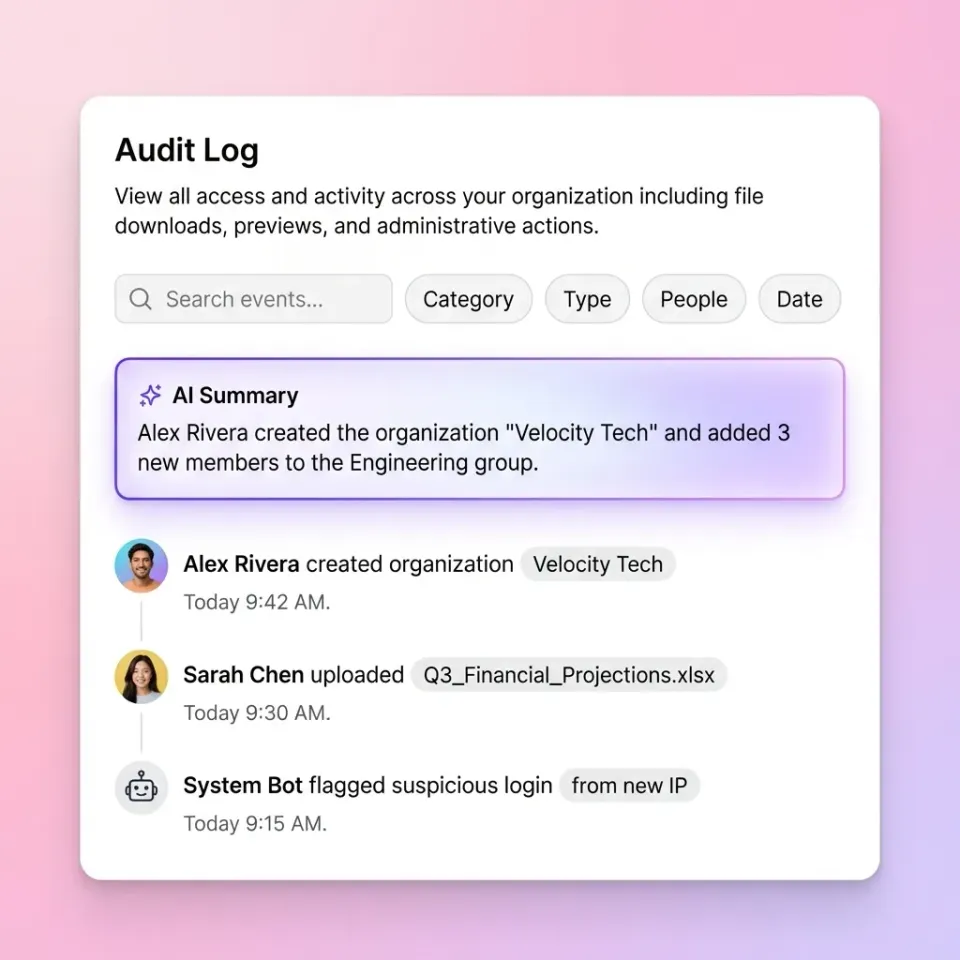
3. Audit Logs That Track Everything
If you ever need to answer "who accessed what, and when?" you need detailed audit logs. Good audit trails track:
- File views and downloads
- Permission changes
- Login attempts (successful and failed)
- Link shares and expirations
This isn't just for compliance. When something goes wrong, audit logs help you understand exactly what happened.
4. Secure Sharing Links with Controls
External sharing is where most security breaks down. Look for links that support:
- Password protection
- Expiration dates
- View-only mode (no downloads)
- Domain restrictions (only people from specific companies)
- Watermarking on sensitive documents
These controls reduce accidental exposure when someone forwards a link they shouldn't.
5. Single Sign-On (SSO) and Multi-Factor Authentication (MFA)
SSO integration with providers like Okta, Azure AD, or Google means employees use their existing company credentials. This reduces password sprawl and makes it easier to revoke access when someone leaves. MFA adds a second verification step, so even if a password gets compromised, attackers still can't get in. Enable MFA for all users, not just admins.

Why Traditional File Sharing Falls Short
Most businesses start with consumer-grade tools that weren't designed for sensitive data. Here's where they break down:
Email attachments have no expiration, no access controls, and sit in inboxes forever. That contract you emailed three years ago? Still accessible to anyone who had access to that inbox.
Consumer cloud storage like personal Dropbox or Google Drive accounts tie files to individual users. When an employee leaves, their files leave too. Worse, they may keep access after they're gone. Files belong to people, not the organization.
FTP servers require technical setup for every user and lack modern security features. They were built for a different era, before zero-trust security existed.
USB drives are the worst option: easily lost, easily stolen, and completely untraceable once they leave the building. The common thread? These methods work for individuals but fail when you need organization-level control over sensitive business documents.


Secure your team's file sharing
Fast.io gives you usage-based cloud storage built for secure file sharing for business. Get streaming previews, AI-powered search, and unlimited guest sharing. Start with a free account, no credit card required.
How to Evaluate File Sharing Security
When comparing platforms, ask these specific questions:
Where does encryption happen? Client-side encryption (files encrypted on your device before upload) is stronger than server-side only. Zero-knowledge architecture means the provider can't access your files even if compelled by a court order.
Who owns the files? In organization-owned models, files belong to the company, not individual users. When someone leaves, their access ends, but the files stay put. This is different from consumer tools where deleting a user account can delete their files.
How granular are permissions? Folder-level permissions are helpful; asset-level permissions are better. Test whether you can give one client access to certain files in a folder without exposing everything else in that folder.
What happens to old files? Ephemeral sharing (files that automatically expire and delete) is becoming standard practice. Old copies in mailboxes and shared folders represent risk that compounds over time.
Can you prove compliance? Even if you don't need formal certifications, audit logs should be detailed enough to demonstrate you're handling data responsibly.

Setting Up Secure Sharing for External Partners
Sharing with clients, vendors, and partners is tricky. They're outside your organization but need access to sensitive files.
Create dedicated sharing spaces. Don't give external users access to your full workspace. Set up specific folders or portals for each external relationship with only the files they need.
Use guest access without seat costs. Some platforms charge per user, making external sharing expensive. Look for unlimited guest access so clients can view files without creating accounts or consuming licenses.
Set default expirations. Every external share should have an expiration date. If you're sharing project files, set the link to expire when the project ends. This reduces the surface area of potential breaches.
Enable watermarking for sensitive documents. If someone screenshots or prints a watermarked document, you can trace it back to the specific viewer. This discourages leaks and makes people think twice about how they handle files.
Branded portals build trust. A white-label client portal with your logo and colors looks more professional than a generic file link. It also makes phishing attempts more obvious since clients learn to expect your branding.
Balancing Security and Usability
The highly secure system is useless if people work around it. When security adds too much friction, employees find shortcuts: personal email, consumer cloud accounts, messaging apps. Your security policy needs to be the path of least resistance.
Make secure options faster than insecure ones. If sharing through your approved platform takes many more clicks than emailing an attachment, guess which one people will choose? The secure option should be the easy option.
Set smart defaults, not manual requirements. Instead of asking users to remember to enable encryption or set expirations, make these the default. Let users change settings when needed, but protect them by default.
Provide immediate value. Security tools that also make work easier get adopted faster. Instant file previews, real-time collaboration, and good search give users reasons to use the secure platform beyond "because IT said so."
Train on the why, not just the how. People follow security policies better when they understand the risks. "Files in personal Dropbox accounts leave when you leave" is more compelling than "use the approved platform."
The goal isn't to lock everything down. It's to make secure sharing the natural way your team works.
Frequently Asked Questions
What is the highly secure way to share files for business?
The highly secure approach combines end-to-end encryption, fine-grained permission controls, detailed audit logs, secure sharing links with expirations, and single sign-on with multi-factor authentication. Choose a platform with organization-owned files (not user-owned) so data stays with the company when employees leave.
How do companies securely share files with external partners?
Companies use dedicated sharing portals with guest access, expiring links, password protection, and view-only permissions. Watermarking helps track document handling. The key is limiting external users to specific folders rather than giving them broad workspace access.
What is the safest file sharing platform for business?
The safest platforms offer AES-256 encryption at rest and in transit, zero-knowledge architecture, SSO/SAML integration, full audit logs, and file-level permissions. Look for organization-owned file models rather than personal account structures.
Do I need compliance certifications for secure file sharing?
Formal certifications aren't always required, but you need the underlying security features: encryption, access controls, audit logs, and authentication. Even without certification requirements, these features protect your business and demonstrate responsible data handling to clients and partners.
How can I share large files securely?
Use a cloud-native platform that supports large files without compression or quality loss. Look for streaming delivery rather than forcing recipients to download entire files. Set expiration dates on large file shares and use view-only permissions when recipients don't need to keep copies.
Related Resources

Secure your team's file sharing
Fast.io gives you usage-based cloud storage built for secure file sharing for business. Get streaming previews, AI-powered search, and unlimited guest sharing. Start with a free account, no credit card required.