How to Use Photo Proofing Software to Speed Up Client Selection
Photo proofing software allows photographers to share image galleries with clients for selection, approval, and feedback before final delivery or printing. The right tool can cut your editing time in half by confirming selections early, and professional proofing workflows can increase average order values. This guide covers what to look for, how to set up an efficient proofing workflow, and how to choose between dedicated proofing tools and general file sharing platforms.

What Is Photo Proofing Software?
Photo proofing software is a platform that lets photographers upload images to a private gallery, share that gallery with clients, and collect feedback on which photos to edit, print, or deliver. At its core, proofing software solves a communication problem. After a wedding shoot with thousands of images, how do you efficiently narrow down to their final selections? Email chains fall apart. Texting photo numbers gets confusing. Proofing software gives clients a visual interface to browse, mark favorites, leave comments, and submit their final picks. Most proofing tools include these core features:
- Gallery organization - Group images by event, date, or session
- Client access controls - Password protection, expiring links
- Selection tools - Heart, star, or checkbox systems for marking favorites
- Feedback collection - Comments on individual images or the entire gallery
- Download management - Control what clients can download and when
Helpful references: Fast.io Workspaces, Fast.io Collaboration, and Fast.io AI.
Why Photographers Need a Dedicated Proofing Workflow
Proofing reduces editing time by confirming selections early in the process. Instead of editing hundreds of photos and hoping clients like them, you edit only the ones they actually want. Here's what a typical workflow looks like without proofing software:
- Shoot thousands of photos at a wedding
- Cull to hundreds of "keepers"
- Edit hundreds of photos (several hours)
- Send a download link to the client
- Client requests changes to many of the images
- Re-edit and re-deliver
With proofing software:
- Shoot thousands of photos
- Cull to hundreds of keepers
- Upload unedited (or lightly edited) proofs
- Client selects their favorites
- Edit only those photos (a couple hours)
- Deliver final images
The time savings are significant. Photographers report cutting post-production time substantially when clients proof selections before heavy editing begins.

Key Features to Look for in Proofing Software
Not all proofing tools work the same way. Some are built specifically for photographers. Others are general file sharing platforms with features that happen to work well for proofing. Here's what matters most:
Client Experience
Your clients shouldn't need to create an account or download an app to view their photos. Look for tools with:
- Web-based galleries (no software installation)
- Mobile-friendly viewing
- Simple, intuitive selection process
- Guest access without requiring signup
Branding and Presentation
Professional photographers want galleries that look like an extension of their brand:
- Custom colors and logos
- Watermarking options
- Clean, distraction-free layouts
- Custom domain support (yourname.gallery)
Feedback and Selection Tools
The core of proofing is collecting client input:
- Multiple selection methods (favorites, ratings, checkboxes)
- Comments on individual images
- Comment threads for back-and-forth discussion
- Selection limits (e.g., "choose up to 50 images")
Security and Access Control
Protect your work before it's paid for:
- Password-protected galleries
- Expiring links
- View-only mode (no downloads until approved)
- Watermarking on proofs


Simplify your photo proofing workflow
Fast.io gives you usage-based cloud storage built for photo proofing software. Get streaming previews, AI-powered search, and unlimited guest sharing. Start with a free account, no credit card required.
Dedicated Proofing Tools vs. File Sharing Platforms
You have two main options: purpose-built proofing software designed specifically for photographers, or general file sharing platforms with collaboration features.
Dedicated proofing tools (Picdrop, SmugMug, PhotoProofPro, Pic-Time) offer:
- Photography-specific features like print ordering integration
- Built-in e-commerce for selling prints
- Album design proofing
- Lab fulfillment connections
File sharing platforms with proofing capabilities (like Fast.io) offer:
- Broader use beyond just photo proofing
- Often better pricing for teams
- Stronger sharing and collaboration features
- Integration with other business workflows
The right choice depends on your business model. If you sell prints directly and need lab integration, dedicated tools make sense. If proofing is one part of a larger client collaboration workflow, and you're also sharing contracts, mood boards, and final deliverables, a unified platform may be more efficient.

Setting Up an Efficient Proofing Workflow
A good proofing workflow is about more than just the software. Here's a step-by-step process that works:
Step 1: Cull First Don't upload every image from the shoot. Remove obvious rejects, duplicates, and out-of-focus shots. Aim to show clients 60-80% of your total shots.
Step 2: Apply Light Edits (Optional) Some photographers upload completely unedited RAW exports. Others apply basic exposure and white balance corrections first. Light edits help clients envision the final product without committing to full processing.
Step 3: Organize Into Groups Break large galleries into logical sections: ceremony, reception, portraits, candids. This makes navigation easier and helps clients make decisions without scrolling through hundreds of images.
Step 4: Set Clear Selection Guidelines Tell clients exactly what you need from them:
- How many images they should select
- What selections mean (e.g., "these will be fully edited")
- Deadline for submitting selections
- How to leave comments if they want specific edits
Step 5: Add Watermarks Protect unedited proofs with visible watermarks. Most proofing tools apply these automatically and remove them from final delivered images.
Step 6: Share and Follow Up Send the gallery link with instructions. Follow up after a few days if you haven't heard back. Most clients need a gentle reminder.
How Fast.io Handles Photo Proofing
Fast.io wasn't built exclusively for photographers, but its collaboration features map well to proofing workflows.
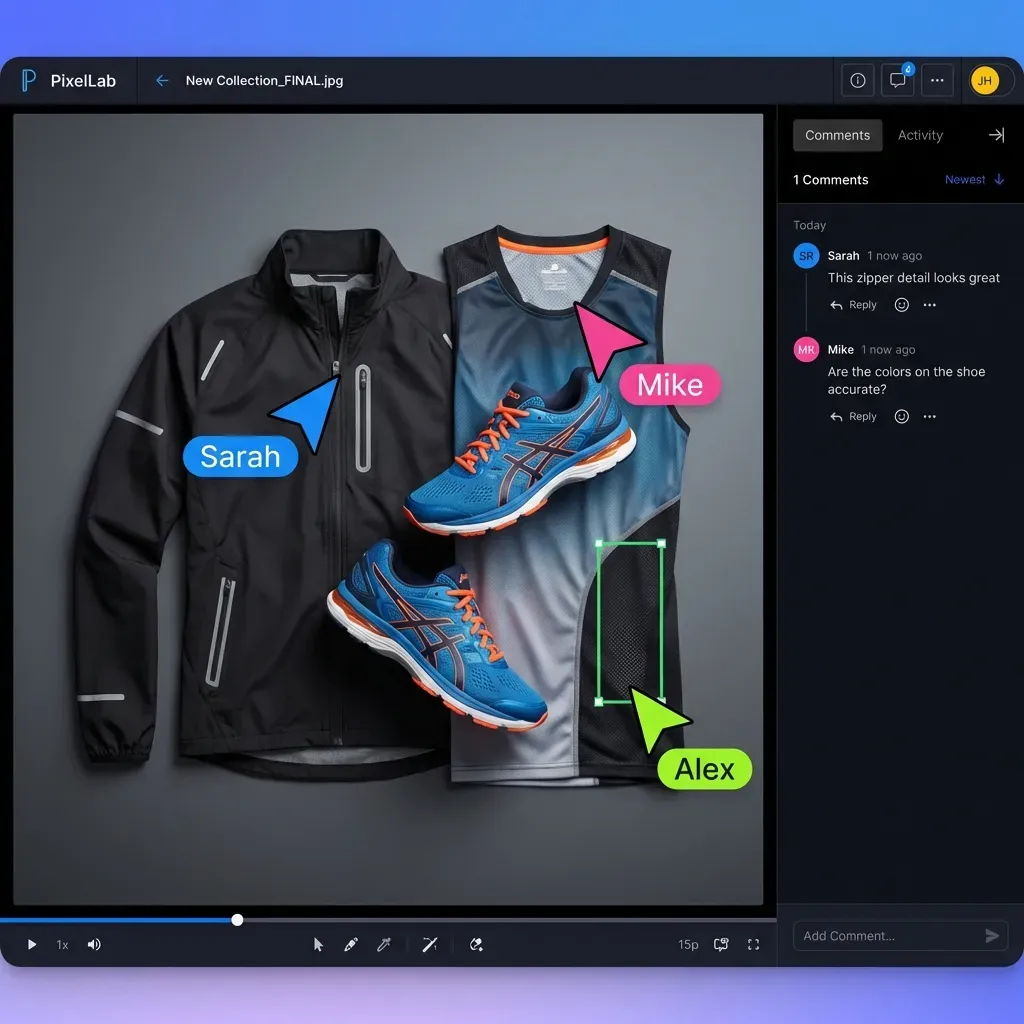
Contextual comments let clients click on any image and leave feedback directly on that file. Comments appear as threaded discussions, so you can respond and clarify without losing context.
Branded portals give you a professional gallery experience with your logo and colors. Clients see your brand, not generic file sharing interface.
Link controls include password protection, expiration dates, and view-only mode. You can share high-resolution proofs without worrying about unauthorized downloads.
Universal previews display images in the browser without requiring clients to download anything. RAW files, PSDs, and other professional formats preview automatically. The main difference from dedicated proofing tools: Fast.io doesn't include print ordering or lab fulfillment. If your business model centers on selling prints, you'll need a separate solution. If proofing is primarily about getting client approval before final delivery, the collaboration features work well.
Common Proofing Mistakes to Avoid
After years of working with photographers, certain patterns lead to client confusion and wasted time:
Showing too many images. More isn't better. If clients have to scroll through thousands of photos, they'll either give up or select everything. Cull aggressively before uploading.
Skipping instructions. Don't assume clients know what to do. Include clear text explaining how to select images, how many to choose, and what happens next.
No deadline. Without a deadline, proofing can drag on for weeks. Set a specific date and mention it costs extra if selections are late.
Forgetting mobile users. Many clients review galleries on their phones during commutes or lunch breaks. Test your galleries on mobile before sending.
Over-editing proofs. If you spend hours editing proofs and clients only select half, you've wasted time. Keep proof edits minimal until selections are confirmed.
Frequently Asked Questions
What is photo proofing software?
Photo proofing software is a platform that allows photographers to share image galleries with clients for review, selection, and feedback before final editing or delivery. Clients can browse photos, mark favorites, leave comments, and submit their selections through a web interface.
How do photographers share proofs with clients?
Photographers upload images to a proofing platform, organize them into galleries, apply watermarks, and share a link with clients. The link typically leads to a password-protected gallery where clients can view images and mark their selections. No software installation is required for clients.
What is the best proofing software for photographers?
The best option depends on your needs. Dedicated tools like Picdrop, SmugMug, and Pic-Time offer photography-specific features like print ordering and lab integration. File sharing platforms with collaboration features work well if proofing is part of a broader client workflow. Consider whether you need e-commerce features or primarily need selection and feedback tools.
Do I need proofing software?
If you regularly deliver dozens of images per client and want input on which photos to edit or deliver, proofing software saves significant time. It's especially valuable for wedding and event photographers who shoot thousands of images per session. For smaller shoots or clients who want everything delivered, simple file sharing may be sufficient.
How much does photo proofing software cost?
Pricing varies widely. Dedicated proofing tools typically have affordable monthly subscriptions. Others take a percentage of print sales. File sharing platforms like Fast.io use usage-based pricing rather than per-project fees, which can be more economical for photographers who share large volumes of images.
Related Resources

Simplify your photo proofing workflow
Fast.io gives you usage-based cloud storage built for photo proofing software. Get streaming previews, AI-powered search, and unlimited guest sharing. Start with a free account, no credit card required.