How to Choose Media Asset Management Software for Production Teams
Guide to media asset management software: Media asset management (MAM) software is a specialized system for organizing, storing, and distributing video, audio, and image files across production teams. Unlike general DAM, MAM handles the unique demands of media workflows: proxy editing, format transcoding, and metadata that editors actually use. This guide covers what MAM does, how it differs from DAM, the 5 features that matter most, and how to evaluate options for your production company or age
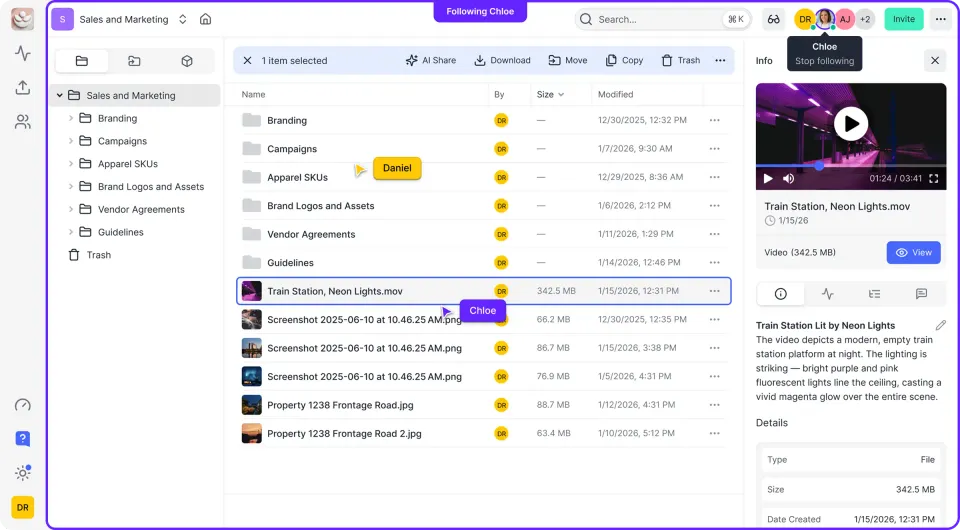
What Is Media Asset Management Software?
Media asset management software is a centralized system built for video, audio, and broadcast workflows. It does more than store files. It handles the actual challenges of production media: large files, professional codecs, remote collaboration, and the need to find that one shot from three projects ago.
A working definition: MAM software is where your media lives, gets organized, and moves through the production pipeline from ingest to delivery. The core functions include:
- Ingest automation: Pulling footage from cameras, hard drives, or transfer services into the system with metadata extraction
- Proxy generation: Creating lightweight preview copies so editors can scrub footage without downloading 50GB originals
- Metadata management: Tagging clips with scene numbers, shot types, keywords, and any custom fields your workflow requires
- Search and retrieval: Finding specific clips by keyword, timecode, date, or visual similarity
- Transcoding: Converting between formats for editorial, review, and delivery
Production teams are creating more footage than ever. Media teams waste 30% of their time searching for assets when they lack good organization. That's the problem MAM solves: more media to manage, less time wasted finding it. The simplest test for whether you need MAM: If "finding that clip" is a recurring problem, you need a better system.
Helpful references: Fast.io Workspaces, Fast.io Collaboration, and Fast.io AI.

MAM vs DAM: Understanding the Difference
Media Asset Management (MAM) and Digital Asset Management (DAM) sound similar but solve different problems.
Digital Asset Management (DAM) is built for marketing and brand teams. It handles logos, photos, design files, and marketing collateral. DAM focuses on brand consistency, approval workflows, and distribution to internal teams or partners.
Media Asset Management (MAM) is built for production teams. It handles raw footage, audio tracks, project files, and broadcast content. MAM focuses on the production pipeline: getting footage in, making it editable, and pushing deliverables out.
Key Differences
| Aspect | DAM (Marketing/Brand) | MAM (Production) |
|---|---|---|
| Primary users | Marketing, brand, creative ops | Editors, producers, post supervisors |
| Typical files | Images, PDFs, design files | Video, audio, project files |
| File sizes | Megabytes | Gigabytes to terabytes |
| Key workflow | Approve, distribute, track usage | Ingest, edit, transcode, deliver |
| Search priority | Keywords and brand tags | Timecode, scene, visual similarity |
| Preview needs | Static images, PDFs | Streaming video, waveform audio |
Which Do You Need? If your team primarily creates video or audio content for production, you need MAM. The proxy workflows, timecode search, and format transcoding don't exist in general DAM platforms. If your team manages marketing assets for distribution and brand consistency, DAM is the better fit. Some organizations need both. A production company might use MAM for active projects and footage archives, then move finished deliverables into DAM for client distribution and marketing use.
5 Features That Define Good MAM Software
Most MAM comparisons list dozens of features. Here are the five that actually separate useful tools from expensive file servers.
1. Proxy Workflows
Proxy workflows create lightweight preview versions of your footage while keeping originals safe. This is what makes remote video work practical. A large ProRes master might generate a much smaller H.264 proxy. Editors scrub, review, and make selects using proxies. The system maintains links between proxies and originals. Final renders use the high-res source. Without proxies, remote editors download terabytes overnight. With proxies, they start working in minutes. For distributed teams, this single feature often justifies the entire MAM cost.
What to look for: Automatic proxy generation on ingest, multiple proxy sizes for different use cases, smooth linking to originals in NLE timelines.
2. Browser-Based Preview and Streaming
Stakeholders shouldn't need editing software to watch footage. Good MAM streams video directly in the browser. You can play a timeline on a laptop over hotel WiFi and scrub to any point without waiting for buffers. The technical term is HLS (HTTP Live Streaming), the same approach Netflix uses. It's what separates real MAM from "we put files in folders."
What to look for: Instant playback, smooth scrubbing, frame-accurate seeking, waveform display for audio files.
3. Metadata That Matches Your Workflow
Generic file storage offers filename search. MAM needs metadata that matches how production teams actually work. Useful metadata for production includes:
- Scene and shot numbers
- Camera and lens information
- Talent names
- Location data
- Ingest date and source
- Review status
- Delivery version
What to look for: Custom metadata fields, required fields on ingest, bulk editing tools, metadata templates by project type.
4. Search That Finds What You Need
Production search isn't like Google search. You're looking for specific frames, shots, and takes. Good MAM search includes:
- Timecode search: Find the exact frame by TC
- Metadata filtering: Narrow by scene, date, camera, status
- Visual similarity: Find shots that look like this one
- AI transcription search: Find clips by spoken words
- Natural language: "Show me drone shots from the beach location"
What to look for: Multiple search modes, saved search presets, AI-assisted tagging.
5. Format Transcoding
Productions juggle formats constantly: camera originals, editorial formats, review proxies, delivery masters. Each stage of the pipeline may need different codecs. MAM should handle:
- Automated ingest transcoding
- Watch folders for hands-free processing
- Preset libraries for common deliverable specs
- Background processing that doesn't lock up workstations
What to look for: Built-in transcoding engine, preset management, queue visibility, popular codec support.

What Software Is Used for Media Asset Management?
The MAM market ranges from open-source tools to six-figure enterprise systems.
Enterprise Broadcast MAM
Systems like Dalet, Avid MediaCentral, and EditShare FLOW are built for broadcast operations with continuous content cycles. They work alongside broadcast infrastructure but require big budgets and dedicated IT support.
Best for: Broadcast networks, large media conglomerates, non-stop news operations Typical cost: Substantial upfront implementation plus ongoing maintenance
Mid-Market Production MAM
Platforms like Iconik, CatDV, and Kyno serve production companies and agencies without broadcast-scale requirements. They offer core MAM features with more accessible pricing.
Best for: Production companies, agencies, corporate video teams Typical cost: Subscription pricing depending on storage and features
Cloud-Native Collaboration Platforms
Newer platforms like Fast.io blur the line between MAM and collaborative cloud storage. They handle media-specific workflows (streaming, transcoding, frame-accurate review) without the complexity of traditional MAM. Fast.io's approach includes:
- HLS streaming for instant video playback in browser
- Proxy generation and format transcoding
- Frame-accurate commenting for review workflows
- AI-powered semantic search
- Usage-based pricing instead of per-seat fees
Best for: Distributed teams, agencies, production companies wanting MAM capabilities without MAM complexity Typical cost: Usage-based starting around published pricing for teams
Open Source Options
ResourceSpace and Razuna offer free MAM with self-hosted deployment. They work for organizations with technical staff who can manage the infrastructure.
Best for: Technical teams with hosting resources and limited budgets Typical cost: Free software, hosting and maintenance costs vary
The Trend
The market is shifting from monolithic MAM systems toward cloud-native tools. Instead of one massive system, teams combine specialized tools: one for storage, one for review, one for delivery. Or they pick platforms like Fast.io that handle multiple workflows without the traditional MAM overhead.
How to Organize Your Media Assets
Software helps, but organization strategy matters more. Here's how production teams actually structure their media libraries.
Folder Structure Approaches
By Project: Each project gets a top-level folder with standard subfolders for raw footage, selects, cuts, and exports. Simple to understand, harder to find assets across projects.
By Date: Media organized by ingest date. Easy to find recent material, harder to browse by project or content type.
By Content Type: Separate hierarchies for footage, audio, graphics, and documents. Works for ongoing operations but fragments project materials.
Hybrid: Projects at top level, with a separate "library" area for cross-project assets like music, stock footage, and graphics. Most teams use hybrid approaches. What matters is consistency. Document your structure and enforce it.
Metadata Strategy
Required metadata on ingest prevents "I'll tag it later" syndrome. Figure out the minimum you actually need:
- Project name (always)
- Content type (footage, audio, graphic, document)
- Date range or shoot date
- Primary keywords (3-5 tags minimum)
Optional metadata adds richness:
- Scene and shot information
- Talent and location
- Technical specs (camera, lens, settings)
- Rights and licensing info
Start lean. Add fields when you have actual use cases, not hypothetical ones.
Naming Conventions
File naming seems minor until you're troubleshooting a missing asset months later. Basic rules:
- No spaces (use highlights or hyphens)
- Date format: YYYY-MM-DD
- Version numbering: v01, v02 (not "final," "final_final")
- Descriptive but concise: ProjectName_SceneNumber_Take_Date
Archive Strategy
Active projects need fast access. Archives need reliable storage you can search later. Different needs, different solutions. Establish policies for:
- When projects move from active to archive
- What gets archived (everything vs. selects only)
- Retention periods for different content types
- How to restore archived material when needed

MAM for Remote and Distributed Teams
Remote work changed production workflows. MAM is no longer optional for distributed teams.
The Remote Production Challenge
Traditionally, most post-production happened in facilities with local storage. Editors sat next to the media. Producers walked over to review cuts. That doesn't work when your editor is in LA, your colorist is in London, and your producer is reviewing from their living room. Shipping hard drives doesn't scale. Downloading terabytes over home internet doesn't work. Email chains for feedback lose context.
What Remote Teams Need
Streaming preview: Watch footage without downloading. HLS streaming lets anyone with a browser review media, regardless of internet speed.
Proxy editing: Work with lightweight files locally while originals stay secure. Your editor cuts with low-res proxies at home, then reconforms to high-res masters for finishing.
Centralized search: One place to find everything. No more "check the Dropbox folder, or maybe the Google Drive, or ask Sarah if she has it."
Real-time collaboration: See who's working on what. Comment on specific frames. Know when reviews are done without email chains.
Access control: Give the colorist access to color work, not the entire project. Give clients review access without editing capabilities.
How Fast.io Addresses Remote Workflows
Fast.io was built for distributed teams from the start. Key capabilities:
- HLS streaming: Netflix-style adaptive bitrate playback. Start watching immediately, smooth scrubbing, works on any device.
- Frame-accurate comments: Pin feedback to exact video frames. No more vague timecode guessing.
- Real-time presence: See who's in a workspace right now. Know when reviewers are looking at your cut.
- Follow mode: Sync your view with a teammate. Walk them through an edit without screen sharing.
- Unlimited guest access: Clients review without accounts. No seat fees for occasional reviewers. Old MAM assumed everyone was in the same building. Modern MAM assumes they're not.
Evaluating MAM Software: A Practical Approach
Skip exhaustive feature comparison spreadsheets. Run your actual workflow through each tool instead.
Define Your Requirements First
Before demoing tools, document:
- Volume: How much footage do you ingest monthly? 1TB? 10TB? 100TB?
- Team size: How many editors, producers, and reviewers need access?
- Location: Is the team co-located or distributed?
- Formats: What cameras and codecs do you work with?
- Integration: What editing software does the team use?
- Budget: What can you actually spend monthly or annually?
The Evaluation Checklist
Test each platform against real scenarios:
- Ingest test: Upload substantial amounts of your actual footage. How long? How automated?
- Search test: Find a specific clip from an old project. How many clicks? How long?
- Concurrent access: Have two people work in the same project simultaneously
- Proxy test: Generate proxies and import them into your NLE
- Review test: Share a sequence with a client for feedback
- Delivery test: Export a final deliverable to client specifications
Demos show best-case scenarios. Testing shows how the tool actually works.
Pricing Considerations
MAM pricing varies a lot. Watch for:
- Per-seat fees: Adding users gets expensive fast
- Storage tiers: Overages can surprise you
- Feature gating: Essential capabilities locked to higher tiers
- Transcoding costs: Some charge per minute or per gigabyte
- Egress fees: Downloads and deliveries may cost extra
Fast.io uses usage-based pricing with included seats (Pro includes 25, Business includes 100). Extra seats cost published pricing. You pay for storage and features, not potential users. For a team of 25 using 5TB, that's around published pricing compared to $450+ on per-seat platforms.
Red Flags
- Demos only show curated content (ask to use your files)
- Vague answers about pricing
- Long implementation timelines without clear scope
- No trial or POC option
- Features require professional services to configure
Getting Started with MAM
Implementation doesn't have to be painful. Here's one way to do it.
Start Small
Don't migrate your entire archive on day one. Start with one active project. Learn the workflows. Identify pain points. Then expand.
First two weeks: Set up the system, ingest one current project, establish basic folder structure and metadata standards.
Next two weeks: Add team members, test collaboration workflows, gather feedback.
Second month: Migrate additional active projects, refine metadata schemas based on actual use.
Third month+: Decide on archive migration strategy based on what you've learned.
Essential Setup Tasks
Before inviting the team:
- Define folder structure: Document and communicate the organization system
- Create metadata templates: Required fields for different content types
- Set permissions: Who can view, edit, and delete in each area
- Configure transcoding: Proxy settings, delivery presets
- Establish naming conventions: Document and share with the team
Getting Team Buy-In
The best MAM fails if nobody uses it. Adoption tactics:
- Show the time savings: "Remember when finding that clip took hours? Now it takes seconds."
- Start with pain points: Solve their biggest problem first, not yours.
- Make it easier than alternatives: If Dropbox is still easier, people will use Dropbox.
- Identify champions: Find the person who's excited and let them lead adoption.
Common Mistakes
- Migrating everything at once (start small)
- Overcomplicating metadata (start with 5-10 required fields)
- Restricting access to save money (undermines collaboration)
- Expecting instant adoption (plan for gradual rollout)
- Skipping governance (without rules, it becomes another mess)
Frequently Asked Questions
What is the difference between MAM and DAM?
MAM (Media Asset Management) is built for video and audio production workflows with features like proxy editing, timecode search, and format transcoding. DAM (Digital Asset Management) is built for marketing and brand teams managing images, documents, and design files with features for approval workflows and brand distribution. Production teams need MAM; marketing teams need DAM.
What software is used for media asset management?
MAM software ranges from enterprise broadcast systems (Dalet, Avid MediaCentral) to mid-market solutions (Iconik, CatDV) to cloud-native platforms (Fast.io). The choice depends on scale, budget, and specific workflow needs. Most production companies and agencies use mid-market or cloud-native options.
How do I organize my media assets?
Most teams use hybrid folder structures: projects at the top level with standard subfolders for raw footage, selects, and exports, plus a separate library for cross-project assets. Combine this with required metadata on ingest (project name, content type, date, keywords) and consistent file naming conventions.
How much does MAM software cost?
MAM pricing varies widely. Enterprise broadcast systems involve substantial implementation costs. Mid-market solutions offer subscription pricing depending on storage and users. Cloud-native platforms like Fast.io use usage-based pricing starting around published pricing for teams, with extra seats at published pricing each.
Do I need MAM or can I use Dropbox?
Dropbox is file storage. MAM is media workflow software. If you just need to store and share files, Dropbox works. If you need proxy workflows, streaming playback, timecode search, transcoding, or frame-accurate review, you need MAM. The deciding factor is whether your team works with video or just stores it.
What are the key features of MAM software?
Five features define good MAM: proxy workflows for remote editing, browser-based streaming preview, metadata schemas for production workflows, search that includes timecode and visual similarity, and format transcoding for delivery. Without these, you have file storage with a MAM label.
Can MAM software help remote video teams?
Yes. Modern MAM is built for distributed teams. HLS streaming lets anyone review footage without downloading. Proxy workflows enable remote editing. Frame-accurate comments replace vague email feedback. Real-time presence shows who's working on what. These capabilities didn't exist in traditional on-premise MAM.
Related Resources

Run Choose Media Asset Management Software For Production Teams workflows on Fast.io
Fast.io gives video teams streaming preview, frame-accurate review, and collaborative workspaces with usage-based pricing that doesn't charge per seat.