Best Google Drive Alternatives for Business Teams
Google Drive dominates cloud storage with 2 billion users, but businesses hit its limits fast: 15GB free storage, privacy concerns from file scanning, and a personal-first design that creates folder chaos in teams. This guide compares Google Drive alternatives built for teams who need organization-owned files, professional sharing, and predictable costs.
Why Teams Look for Google Drive Alternatives
Google Drive works well for individuals and small groups collaborating on Google Docs. But when organizations try to use it as their primary file storage, problems emerge:
15GB runs out fast. The free tier sounds generous until you upload a few video files or project archives. Then you're buying Google One storage or managing constant cleanup.
Privacy concerns are real. Google scans Drive files to improve AI products, detect policy violations, and serve targeted advertising across its ecosystem. Many users cite privacy as a primary reason for switching from Drive.
"My Drive" creates chaos. Files live in personal accounts by default. Shared Drives help, but the permission model gets confusing. Who owns what? Where did that file go? Why can't this person see that folder?
Per-user pricing scales poorly. Google Workspace starts at published pricing/month for business. A 50-person team pays published pricing before adding extra storage.
Files disappear when employees leave. Unless you've set up Shared Drives correctly, files in a departing employee's "My Drive" become inaccessible or require admin intervention to transfer. If your team shares files with clients, handles large media files, or needs clear file ownership, Google Drive's consumer-first design gets in the way.
Helpful references: Fast.io Workspaces, Fast.io Collaboration, and Fast.io AI.
What Google Drive Alternatives Are
Google Drive alternatives are cloud storage services that offer different features, pricing, or privacy approaches than Google's ecosystem. Some focus on privacy with end-to-end encryption Google doesn't offer. Others target specific use cases like video production or enterprise compliance. A few take entirely different architectural approaches, like usage-based pricing instead of per-seat fees. The right alternative depends on what's pushing you away from Google Drive:
If Privacy Is Your Concern
Look for services with end-to-end encryption where the provider can't read your files. Proton Drive, Sync.com, and Tresorit encrypt data before it leaves your device.
If
You Need Better Team Organization Look for organization-owned files and shared workspaces rather than personal accounts with sharing bolted on. Fast.io, Box, and Dropbox Business offer team-centric architectures.
If
Pricing Is the Issue Look for usage-based pricing or generous free tiers. Fast.io charges by storage and transfer rather than per seat. MEGA offers 20GB free.
If
You Work with Large Media Files Look for adaptive streaming and instant previews. Waiting to fully download large video files before watching wastes time. Fast.io and some specialized media platforms stream video instantly.


Run Google Drive Alternatives For Business Teams workflows on Fast.io
Fast.io gives you organization-owned workspaces, HLS video streaming, and branded client portals. No per-seat pricing.
9 Best Google Drive Alternatives Compared
Here's how the main alternatives stack up for business use:
Fast.io
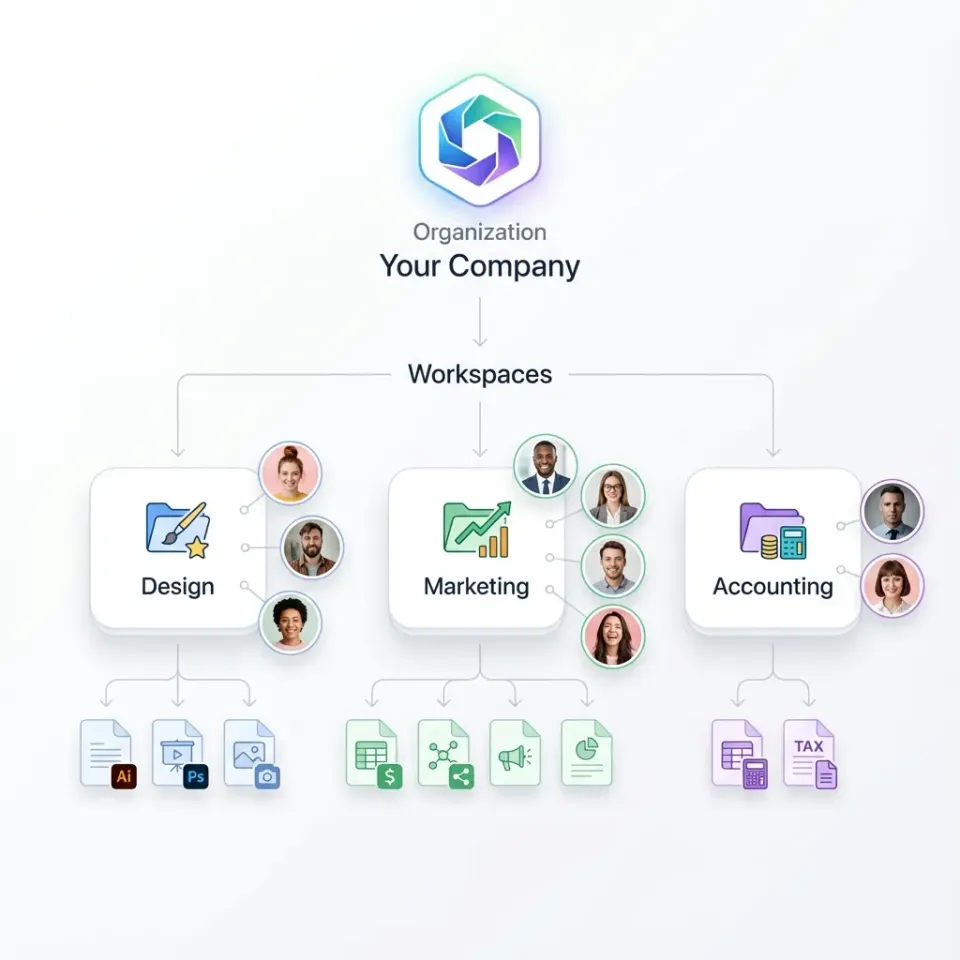
Fast.io approaches cloud storage differently than Google Drive. Instead of personal accounts with sharing added later, files belong to your organization from day one. Workspaces replace folder chaos with discoverable, joinable project spaces. What sets it apart from Google Drive:
- Organization-owned files: When employees leave, their files stay. No transfer requests, no admin cleanup.
- Real-time collaboration: See who's viewing a workspace, follow their cursor, comment on specific regions of files.
- HLS video streaming: Watch video files instantly without downloading. Adaptive bitrate adjusts to connection speed.
- Branded client portals: Share files professionally with your logo, colors, and custom domain.
- Usage-based pricing: No per-seat fees. A 25-person team costs around published pricing versus $450+/month on Dropbox. Best for: Teams sharing files with clients, video and creative professionals, organizations that want predictable costs without per-seat pricing.
Dropbox
The original cloud sync service. Dropbox reliably keeps files synchronized across devices, and the mobile apps are polished. Most people already know how to use it.
Advantages over Google Drive:
- More reliable sync engine with better conflict resolution
- Paper and DocSend add document workflow features
- Simpler interface for file management
Limitations:
- $18+/user/month adds up fast for teams
- Sync-based architecture means local storage requirements
- Consumer DNA shows in team features
Best for: Teams who need reliable sync and don't mind per-seat pricing.
OneDrive
Microsoft's cloud storage option. If your company already uses Microsoft 365, OneDrive works well with Word, Excel, and SharePoint.
Advantages over Google Drive:
- Strong Office integration for document collaboration
- Often included in existing Microsoft 365 subscriptions
- SharePoint underneath for complex permission structures
Limitations:
- SharePoint complexity lurks below the surface
- Per-seat licensing applies
- No differentiated external sharing experience
Best for: Organizations already paying for Microsoft 365 who want to stay in that ecosystem.
pCloud
Swiss-based cloud storage known for lifetime pricing plans. Pay once, store forever.
Advantages over Google Drive:
- Lifetime plans eliminate recurring costs
- Swiss jurisdiction with optional client-side encryption
- No file scanning for advertising
Limitations:
- Consumer-first design lacks team architecture
- pCloud Crypto encryption costs extra
- Limited collaboration features
Best for: Individuals who want to pay once and own their storage, or privacy-conscious personal users.
Sync.com
Zero-knowledge encryption where Sync can't read your files, even if they wanted to.
Advantages over Google Drive:
- True end-to-end encryption by default
- Canadian jurisdiction with strong privacy laws
- Competitive pricing for encrypted storage
Limitations:
- Interface feels dated
- No real-time collaboration
- Basic client delivery features
Best for: Teams where encryption matters more than collaboration features.
MEGA
New Zealand-based service offering 20GB free with end-to-end encryption.
Advantages over Google Drive:
- 20GB free versus 15GB
- End-to-end encryption included
- Generous paid plans
Limitations:
- Controversial history and leadership changes
- Not designed for team collaboration
- Limited business features
Best for: Individuals wanting encrypted storage with a generous free tier.
Proton
Drive
From the makers of ProtonMail. Swiss privacy focus with end-to-end encryption.
Advantages over Google Drive:
- End-to-end encryption by default
- Swiss privacy protection
- No data monetization or file scanning
Limitations:
- Small free tier (1GB versus 15GB)
- Missing team and business features
- Relatively new service
Best for: Privacy-first users already in the Proton ecosystem (ProtonMail, ProtonVPN).
Box
Enterprise-focused cloud storage with strong compliance and admin features.
Advantages over Google Drive:
- Detailed audit logs and compliance certifications
- Strong admin controls for large organizations
- Good external sharing analytics
Limitations:
- $20+/user/month pricing targets enterprise budgets
- Overkill for small-to-medium teams
- Complex feature set
Best for: Large enterprises with specific compliance requirements.
Nextcloud
Open-source, self-hosted cloud storage. You run it on your own infrastructure.
Advantages over Google Drive:
- Complete data ownership and control
- No vendor lock-in
- Highly customizable
Limitations:
- Requires technical resources to deploy and maintain
- You're responsible for security, backups, and scaling
- Support costs can exceed hosted alternatives
Best for: Organizations with strong IT teams who need complete control over their data.

Who Each Alternative Is Best For
The right Google Drive alternative depends on your situation:
Choose Fast.io If You:
- Share files with external clients regularly
- Work with video or large media files
- Want organization-owned files, not personal accounts with sharing
- Prefer usage-based pricing over per-seat fees
- Need branded, professional delivery experiences
Choose Dropbox If You:
- Need reliable sync across many devices
- Already use Dropbox and don't want to retrain users
- Prioritize familiar interfaces over new features
- Have budget for per-seat pricing
Choose OneDrive If You:
- Already pay for Microsoft 365
- Need tight Word/Excel integration
- Prefer staying in one ecosystem
- Have IT resources for SharePoint complexity
Choose pCloud or MEGA If You:
- Are an individual, not a team
- Want to avoid recurring subscriptions
- Prioritize storage over collaboration
- Don't share files with external clients
Choose Proton or Sync.com If You:
- Have serious privacy or regulatory concerns
- Need end-to-end encryption by default
- Can accept fewer collaboration features
- Work primarily with documents, not media
Choose Box If You:
- Work at a large enterprise
- Have specific compliance requirements
- Have IT budget for enterprise pricing
- Need detailed admin controls
Choose Nextcloud If You:
- Have technical staff to self-host
- Need complete data sovereignty
- Want maximum customization
- Can handle your own security and maintenance
Google Drive vs Fast.io: Direct Comparison
For teams considering a move from Google Drive to Fast.io, here's how they compare:
When Google Drive Makes Sense
Google Drive works well when:
- You're heavily invested in Google Workspace and Docs collaboration
- Individual users need free storage for personal files
- Document editing is more important than file delivery
- You're okay with Google's data practices
When Fast.io Fits Better
Fast.io targets teams that:
- Deliver files to external clients as a core workflow
- Handle video and large creative files regularly
- Need organization-owned files that survive employee turnover
- Want costs tied to usage, not headcount
- Require branded, professional sharing experiences

What Is the Most Private Cloud Storage?
Privacy means different things to different people. Here's how to think about it:
End-to-End Encryption (Highest Privacy)
With E2E encryption, files are encrypted on your device before upload. The provider can't read them. If law enforcement requests your data, the provider can only hand over encrypted files they can't decrypt.
E2E encrypted options:
- Proton Drive (Swiss, E2E by default)
- Tresorit (Swiss, enterprise-focused)
- Sync.com (Canadian, zero-knowledge)
- MEGA (New Zealand, E2E included)
- pCloud with Crypto (Swiss, E2E as add-on)
Trade-off: E2E encryption typically means no server-side features like search, previews, or AI summaries. The provider can't process what they can't read.
Strong
Privacy Policies (Good Privacy)
Some providers don't offer E2E encryption but have strong privacy policies, no data monetization, and favorable jurisdictions.
- Fast.io (no file scanning, no ad targeting)
- Dropbox (US-based, but no advertising business model)
- OneDrive (no ad targeting from files)
What Google Drive Does
Google Drive encrypts files at rest and in transit, but Google can read your files. They use this access to:
- Detect policy violations and illegal content
- Improve AI and search products
- Show relevant ads across Google services
If you're storing sensitive business documents, client information, or anything you wouldn't want scanned, Google Drive's approach may not match your privacy requirements.
How to Migrate from Google Drive
Moving from Google Drive takes some planning. Here's how to do it:
1. Audit Your Current Storage
Check what you actually have in Drive:
- Go to drive.google.com and check storage usage
- Note how much is in "My Drive" versus Shared Drives
- Identify files shared externally that need new links
2. Choose Your Export Method
Google Takeout (for complete export):
- Go to takeout.google.com
- Select Google Drive
- Download your entire archive
- Can take days for large accounts
Backup and Sync App (for selective migration):
- Install Google Drive for Desktop
- Enable selective sync for files you need
- Copy from local sync folder to new platform
Third-party migration tools (for large organizations):
- Tools like MultCloud or CloudHQ can transfer directly
- Useful for avoiding massive local downloads
- Cost varies based on data volume
3. Plan Your New Structure
Don't copy Google Drive's folder mess. Use the move as a chance to reorganize:
- Group files by project, not by who created them
- If moving to Fast.io, design workspace structure before uploading
- Create clear naming conventions going forward
4. Update Shared Links
Old Google Drive links will keep working until you delete the files. But:
- Find active shares that people outside your team use
- Create new share links on your new platform
- Tell people you share files with about the change
- Set a deadline for shutting down old links
5. Handle Google Docs
Google Docs, Sheets, and Slides only exist in Google's format. Export options:
- Download as .docx, .xlsx, .pptx (Microsoft formats)
- Download as PDF for archival
- Some formatting may change in conversion
6. Run Parallel for a Month
Keep Google Drive running while you switch:
- Verify everything copied correctly
- Give users time to adjust
- Catch any files you missed
- Update any connected apps or automations
Frequently Asked Questions
What is better than Google Drive?
It depends on what you need. For privacy, Proton Drive or Sync.com offer end-to-end encryption. For teams sharing files with clients, Fast.io has organization-owned workspaces and branded portals. For Microsoft shops, OneDrive works well. Dropbox is still good for reliable sync.
Is Dropbox better than Google Drive?
Dropbox has more reliable sync and fewer conflicts when multiple people edit files. Google Drive integrates better with Google Docs and offers more free storage than Dropbox Basic. For pure file sync, Dropbox edges ahead. For document collaboration, Google Drive wins.
What is the most private cloud storage?
Proton Drive and Tresorit offer the strongest privacy with end-to-end encryption by default in Swiss jurisdiction. Sync.com provides zero-knowledge encryption from Canada. Google Drive encrypts files but can access them for policy enforcement and AI training.
Why do people switch from Google Drive?
Privacy concerns about file scanning , running out of the 15GB free storage, needing better team organization than 'My Drive' allows, and per-seat pricing that gets expensive as teams grow. Some also want features Google doesn't have, like video streaming or branded client portals.
Is 15GB of Google Drive storage enough?
For light personal use, yes. For business use or anyone handling video files, no. A single 4K video project can exceed 15GB, which means paying for Google One or Workspace.
Can I use Google Drive for business?
Yes, through Google Workspace. Plans start at published pricing/month with large storage per user (pooled). It works well for Google Docs collaboration but lacks features like branded client portals, video streaming, and organization-first file architecture that dedicated business file sharing platforms offer.
Related Resources

Run Google Drive Alternatives For Business Teams workflows on Fast.io
Fast.io gives you organization-owned workspaces, HLS video streaming, and branded client portals. No per-seat pricing.