File Hosting Services: What They Are, How They Work, and How to Choose One
A file hosting service is a cloud-based platform that stores, organizes, and enables sharing of digital files over the internet. This guide covers how file hosting works, what separates good services from mediocre ones, and how to evaluate options based on your actual workflow needs.

What Is a File Hosting Service?
A file hosting service is a cloud-based platform that stores, organizes, and enables sharing of digital files over the internet. Instead of keeping files on local hard drives or company servers, you upload them to remote data centers and access them through a web browser or dedicated app. The average business now uses three or more file hosting services. That fragmentation creates real problems: files scattered across platforms, inconsistent security policies, and wasted time searching for the right version of a document.
Core Functions of File Hosting Services
- Storage: Keep files in remote data centers with redundancy and backup
- Access: Retrieve files from any device with internet connectivity
- Sharing: Send files to others via links, email, or direct collaboration
- Organization: Structure files into folders, workspaces, or projects
- Version control: Track changes and restore previous file versions
File hosting began as simple online storage in the early 2000s. Services like MediaFire and Megaupload let users upload files and share download links. That basic model worked fine for passing around MP3s, but modern teams need something more sophisticated.
Helpful references: Fast.io Workspaces, Fast.io Collaboration, and Fast.io AI.
Is File Hosting the Same as Cloud Storage?
File hosting and cloud storage overlap , but they're not identical. Cloud storage is the broader category. File hosting is a specific type of cloud storage optimized for storing, organizing, and sharing discrete files.
Cloud Storage Categories
File hosting services focus on managing and sharing individual files and folders. Examples: Dropbox, Google Drive, Box, Fast.io.
Object storage handles massive volumes of unstructured data at lower cost. Examples: Amazon S3, Google Cloud Storage, Azure Blob. Developers use these for application backends, not daily file work.
Block storage provides raw storage volumes that work like hard drives. Examples: AWS EBS, Azure Disk. Used for databases and virtual machines, not file sharing. When someone says "cloud storage for my team," they usually mean file hosting. When a developer says "cloud storage for our app," they probably mean object or block storage.
Sync-Based vs. Cloud-Native
Traditional services like Dropbox and OneDrive use a sync model. Files live on your computer and copy to the cloud. Change a file locally, and it syncs up. This works well for small teams with fast internet, but causes problems at scale:
- Local storage fills up with files you rarely need
- Sync conflicts occur when multiple people edit simultaneously
- Large video files take forever to sync across devices
Cloud-native services like Fast.io stream files on demand. Files exist only in the cloud until you need them, then download instantly. No local copies, no sync conflicts, no storage pressure on your laptop.
What's the Difference Between File Hosting and File Sharing?
File hosting is where files live. File sharing is how files travel between people. Every file hosting service includes sharing capabilities, but the sophistication varies enormously.
Basic Sharing
Most services let you generate a link that anyone can click to download a file. That's functional but limited. Questions arise: Who clicked the link? Did they download it? Can they forward it to others?
Advanced Sharing Controls
Better services give you granular control:
- Password protection: Require a password to access shared files
- Expiration dates: Links stop working after a set time
- View-only access: Recipients can see but not download
- Domain restrictions: Limit access to specific email domains
- Watermarking: Add visible marks to discourage unauthorized distribution
- Download tracking: See exactly who accessed what and when
If you're sending a contract to a client, a simple download link works. If you're sharing unreleased video footage with a production partner, you need expiration dates, watermarking, and access logs.
External vs. Internal Sharing
Internal sharing among team members needs different controls than external sharing with clients or partners. Some services charge per-seat for external collaborators, which gets expensive fast. Others, like Fast.io, allow unlimited guest access without additional fees.

What Makes a Good File Hosting Service?
After testing dozens of services, patterns become clear. Good file hosting services share certain characteristics. The mediocre ones cut corners in predictable ways.
Speed and Reliability
Upload and download speeds matter more than marketing claims suggest. A service might advertise "high-capacity bandwidth," but if their servers are congested, you'll wait minutes to download a 500MB file. Test actual performance before committing, especially for large files. Video files expose hosting services quickly. Cheap services transcode everything to lower quality or force you to download before viewing. Good services stream video directly at full resolution with instant playback, not progressive downloads that buffer constantly.
Organization and Search
Dumping files into folders worked in 2010. Modern teams need:
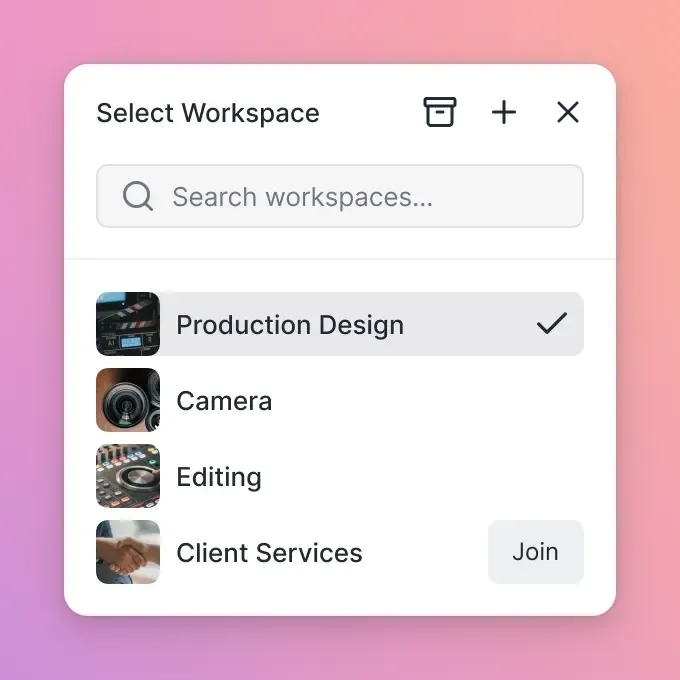
- Workspaces that group related projects with shared permissions
- Search that finds files by content, not just filename
- Metadata and tags for categorization beyond folder hierarchy
- Recent activity views that surface what matters now
Some services now offer AI-powered search that understands natural language queries like "show me the contract with Acme from Q3" rather than requiring exact filename matches.
Security That Doesn't Slow You Down
Security features are worthless if they create so much friction that people bypass them. The goal is appropriate security, not maximum security. Look for:
- Encryption in transit and at rest (this should be standard)
- Single sign-on (SSO) integration with your identity provider
- Multi-factor authentication options
- Audit logs that track who accessed what
- Granular permissions at organization, workspace, folder, and file levels
Skip services that make you choose between security and usability. Both are possible.


Start with file hosting service on Fast.io
Fast.io handles large files, streams video instantly, and works with unlimited external collaborators.
File Hosting for Large Files and Video
Email attachments cap at 25MB. Consumer cloud storage struggles with files over 2GB. But modern work increasingly involves massive files: raw video footage, CAD drawings, research datasets, high-resolution photography.
The Large File Problem
Most file hosting services weren't designed for large files. They:
- Impose arbitrary upload limits (sometimes as low as 250MB per file)
- Throttle transfer speeds on free and cheap plans
- Compress files during upload, degrading quality
- Timeout during long uploads without resumption
What Professional Users Need
Video editors, architects, photographers, and researchers need:
- No practical file size limits: Upload multi-gigabyte files without compression
- Resume capability: Pick up interrupted uploads where they left off
- Parallel transfers: Upload multiple large files simultaneously
- Integrity verification: Confirm files arrived without corruption
Video Streaming vs. Downloads
Here's where services differ. When you share a video through most platforms, recipients must download the entire file before watching. For large video files, that means significant wait times before viewing. Better services use adaptive bitrate streaming (the same technology Netflix uses). The video starts playing immediately while the rest downloads in the background. Viewers can scrub to any point without waiting. The service generates multiple quality levels automatically, so viewers on slow connections see a lower-resolution version without buffering. For teams that work with video regularly, streaming quality separates professional-grade services from consumer tools pretending to serve business users.
File Hosting for Teams and Businesses
Individual file storage is a solved problem. Team collaboration is where things get interesting. Here's what matters when multiple people need to work with the same files.
Ownership and Permissions
Consumer services like Google Drive and Dropbox started with personal accounts. Files belong to whoever uploaded them. When that person leaves the company, transferring ownership is painful or impossible. Business-grade services use an organization-first model. Files belong to the organization, not individuals. When someone leaves, their access ends but files stay exactly where they are. No frantic transfer processes, no lost work.
Pricing Models
Two pricing approaches dominate:
Per-seat pricing: Pay for each user who needs access. Dropbox charges published pricing/month, Box charges published pricing/month. A 25-person team pays $450-500/month. Adding external clients or contractors means more seats, more cost.
Usage-based pricing: Pay for storage and bandwidth you actually use, not headcount. A 25-person team might pay published pricing if they use 5TB. Adding unlimited external guests costs nothing extra. For teams that collaborate heavily with outside partners, the pricing model matters more than the base price. Per-seat services become expensive fast when every client, contractor, and vendor needs access.
Real-Time Collaboration
Basic services let people take turns editing. Advanced services let people work simultaneously:
- See who else is viewing the same files right now
- Follow a colleague's view during presentations or reviews
- Comment on specific parts of files (frames in video, regions in images)
- Get notified when someone mentions you or needs your attention
These features sound minor. Then you spend 20 minutes asking "can you see my screen?" Or discover that two people edited the same document offline and now have to merge changes manually.

How to Choose a File Hosting Service
Switching file hosting services is painful. Choose carefully. Start with your actual requirements, not feature checklists.
Questions to Answer First
What's your largest typical file? If you regularly work with files over 5GB, eliminate any service with restrictive upload limits. If your biggest files are Word documents, this matters less.
How many external collaborators need access? If clients, vendors, and partners need regular access, per-seat pricing will hurt. If it's mostly internal, per-seat might be fine.
Do you work with video? If yes, streaming quality and playback performance are non-negotiable. Most services handle documents fine but fail at video.
What's your security baseline? Determine whether you need SSO integration, audit logs, and granular permissions. Some industries (legal, healthcare, finance) have specific requirements.
Where do files need to be accessible? Mobile access, offline capabilities, and international performance all vary between services.
Evaluation Approach
- Start with a real project: Upload actual files you work with, not test documents. Share them with real collaborators. 2. Test the worst case: Upload your largest files. Share with someone on slow internet. Try the mobile app while commuting. 3. Check the migration path: How would you get files out if you needed to switch? Good services make export easy. Bad ones trap you. 4. Calculate total cost: Include external users, storage overages, and premium features you'll need. The advertised price is rarely the real price. 5. Talk to actual users: Marketing materials and review sites optimize for SEO, not truth. Ask peers in your industry what they use and why.
Popular File Hosting Services Compared
The market has consolidated around a few major players plus some specialized alternatives. Here's how they actually compare.
Google Drive
Best for: Individuals and small teams already using Google Workspace.
Strengths: Tight integration with Docs, Sheets, and Slides. 15GB free. Familiar interface.
Weaknesses: Organization becomes chaotic at scale. "My Drive" model creates silos. Video playback is basic. Business pricing gets steep with many users.
Dropbox
Best for: Teams that need reliable sync across devices.
Strengths: Sync works reliably across devices. Smart Sync reduces local storage pressure. Wide third-party integration.
Weaknesses: Per-seat pricing adds up fast (published pricing/month for business). Video streaming is limited. File ownership model creates problems when people leave.
OneDrive
Best for: Organizations committed to Microsoft 365. Strengths: Bundled with Microsoft 365. Deep Office integration. SharePoint backend for complex permissions.
Weaknesses: SharePoint complexity leaks through. Performance can lag. Mobile apps are inconsistent.
Box
Best for: Enterprises with heavy compliance requirements.
Strengths: Strong security and governance features. Extensive enterprise integrations. Reliable for large deployments.
Weaknesses: Expensive (published pricing/month minimum). Interface feels dated. Per-seat model limits external collaboration.
Privacy-Focused Alternatives
Services like pCloud, Sync.com, and Tresorit emphasize end-to-end encryption. Worth considering if you handle highly sensitive data and can accept tradeoffs in collaboration features and speed.
What About Free File Hosting?
Free tiers let you try services before committing. But the limitations are consistent, and they make free plans impractical for serious work.
Common Free Tier Restrictions
- Storage caps: Usually 2GB to 15GB, enough for documents but not video or large projects
- File size limits: Often 100MB to 2GB per file
- Transfer limits: Throttled speeds or monthly bandwidth caps
- Feature restrictions: No link passwords, no audit logs, no custom branding
- Advertising: Some services insert ads or promotions into shared file pages
When Free Works
Free tiers are fine for:
- Personal backup of documents and photos
- Trying a service before committing your team
- One-off file transfers where you don't need tracking
- Students and hobbyists with limited budgets
When Free Doesn't Work
Upgrade when:
- You need consistent performance for client work
- File sizes exceed free tier limits
- You require audit trails or access controls
- Your team has more than a few people
- Professionalism matters (branded portals, no ads)
The hidden cost of free services is time. Dealing with limitations, working around restrictions, managing fragmented files across multiple free accounts. All that often costs more than just paying for a proper solution.
Getting Started with File Hosting
Migrating to a new file hosting service takes effort. The process is straightforward if you plan ahead.
Migration Steps
- Audit current files: Know what you have, where it lives, and who needs access. Most teams discover files scattered across personal Dropbox accounts, Google Drive, email attachments, and USB drives. 2. Define the structure: Plan your workspace and folder organization before uploading. Restructuring after the fact is tedious. 3. Upload in phases: Start with active projects. Move archives later. This reduces risk if something goes wrong. 4. Test sharing workflows: Before going all-in, verify that sharing with external partners works as expected. 5. Train your team: The top file hosting service fails if people don't know how to use it. Schedule a short session to walk through key workflows.
Red Flags During Setup
Watch out for services that:
- Make it hard to understand what you're paying for
- Don't offer clear export/backup options
- Require IT involvement for basic tasks
- Have outdated documentation or dead support channels
A good file hosting service should feel obvious within the first hour. If you're still confused after watching tutorials and reading help docs, that confusion won't disappear.
Frequently Asked Questions
What is the top file hosting service?
The best service depends on your specific needs. For teams that work with large files and video, look for streaming capabilities and usage-based pricing. For Microsoft-heavy organizations, OneDrive integrates well. For maximum privacy, consider end-to-end encrypted options like Tresorit. Evaluate based on your actual file types, team size, and collaboration requirements rather than generic 'best of' lists.
Is file hosting the same as cloud storage?
File hosting is a type of cloud storage specifically designed for storing, organizing, and sharing files. Cloud storage also includes object storage (for application data) and block storage (for databases). When people talk about cloud storage for business files, they usually mean file hosting services like Dropbox, Google Drive, or Fast.io.
What is the difference between file hosting and file sharing?
File hosting refers to where files are stored, while file sharing describes how files are distributed to others. File hosting services provide both: storage infrastructure plus sharing features like link generation, permission controls, and access tracking. You need hosting before you can share.
Are free file hosting services safe?
Reputable free tiers from established providers like Google, Microsoft, and Dropbox are generally safe. However, free services often lack security features like audit logs, SSO integration, and granular permissions. For business use with sensitive files, paid plans offer better security controls. Avoid unknown free services that may monetize your data or disappear without notice.
How much does file hosting cost for a business?
Business file hosting typically costs $10-20 per user per month with traditional per-seat pricing. A 25-person team might pay $250-500/month. Usage-based pricing alternatives charge for actual storage and bandwidth instead, which can reduce costs for teams that collaborate with many external users. Calculate total cost including all users, storage needs, and required features.
What file size limits do hosting services have?
Limits vary dramatically. Consumer services often cap at 2-5GB per file. Business plans typically allow 15-50GB. Some services marketed to video professionals have no practical limits. Always verify limits against your actual largest files before choosing a service, as hitting upload limits during important projects causes frustrating delays.
Related Resources

Start with file hosting service on Fast.io
Fast.io handles large files, streams video instantly, and works with unlimited external collaborators.