How to Create and Share a Digital Fashion Lookbook
A fashion lookbook is a curated collection of photographs showcasing a brand's clothing line or collection, used to present styles to buyers, press, and customers. This guide covers how to create professional digital lookbooks, avoid the pitfalls of PDF distribution, and share your collection through branded web portals that work on any device.
What Is a Digital Fashion Lookbook?
A fashion lookbook is a curated collection of photographs showcasing a brand's clothing line or collection. Unlike a product catalog, which focuses on prices and SKUs, a lookbook tells a story. It sells the mood, the aesthetic, the lifestyle that your brand represents. Think of it as your collection's visual manifesto. The shift from print to digital lookbooks happened for practical reasons. Traditional print lookbooks cost thousands to produce. You need photographers, designers, printers, and shipping logistics. By the time your lookbook reaches a buyer in Tokyo, the trends may have shifted. Digital lookbooks eliminate these bottlenecks entirely.
Why forward-thinking brands go digital:
- Lower production costs: Digital lookbooks greatly reduce printing and shipping expenses. That budget can go toward better photography or wider distribution instead.
- Instant global reach: Share your collection with buyers in Paris, Milan, and New York at the same moment. No more waiting for packages to clear customs.
- Real-time updates: Spotted a typo after sending? Need to add a late addition to the collection? Update the file once, and everyone sees the current version.
- Better engagement metrics: Track who opened your lookbook, which pages they viewed, and how long they spent looking. Print gives you zero visibility into buyer interest.
- Mobile-first viewing: Buyers increasingly review collections on tablets during trade shows and meetings. Digital formats adapt to any screen size. The fashion industry has been slower to adopt digital workflows than other creative fields. But the pandemic accelerated this transition. Brands that resisted digital lookbooks found themselves scrambling when in-person showrooms closed. Those that had already built digital sharing workflows maintained buyer relationships without interruption.
Key Elements of a Professional Lookbook
Whether you run a startup label or manage an established fashion house, your lookbook needs specific elements to compete for buyer attention. Buyers receive hundreds of lookbooks each season. The ones that stand out share common characteristics.
High-Quality Photography
Your photography is the foundation of everything. Poor lighting, inconsistent color grading, or low resolution makes even beautiful garments look amateur. Buyers will not take your brand seriously if your images look like they were shot on a phone in bad lighting. Plan for three types of shots:
- Lifestyle shots: Models wearing clothes in context. A beachwear collection shot at an actual beach. Evening wear photographed in an upscale restaurant setting. These images sell the dream.
- Product shots: Clean images on a neutral background (white, grey, or black). These show construction details, true colors, and silhouettes without distraction.
- Detail shots: Close-ups of fabric textures, buttons, stitching, hardware. Buyers want to see the quality of your materials and craftsmanship.
Consistent Visual Identity
Your lookbook is an extension of your brand. Every page should feel cohesive. This means using your official brand fonts and color palette throughout. Include your logo on the cover and subtly on subsequent pages. Maintain a consistent layout grid so viewers know where to look for information.
Essential Product Information
While the focus is visual, buyers need data to make purchasing decisions. Include style numbers or names to identify each piece . List fabric compositions like organic cotton or silk blend. Show available colorways for each style. Wholesale and retail pricing can be included or kept in a separate line sheet for confidentiality.

How to Create Your Digital Lookbook
You do not need a full design team to build a professional lookbook. With the right workflow, you can produce polished results with minimal resources. Here is a practical approach that works for brands of any size.
Step 1: Concept and Story Development
Before you schedule a photoshoot, define the narrative of your collection. What story are you telling? Is it "Urban Decay" or "French Riviera"? Is the collection inspired by 1970s disco or minimalist Japanese design? This concept drives every creative decision that follows. Create a mood board that captures the feeling you want to convey. Gather reference images, color palettes, and styling notes. Share this with your photographer, stylist, and anyone else involved in production. Everyone needs to understand the vision before the camera starts clicking.
Step 2: The Photoshoot
Hire a professional photographer who understands fashion lighting. This is not the place to cut corners. Natural light works for some aesthetics, but most fashion photography requires controlled studio lighting to achieve consistent, publication-quality results. Shoot in high resolution, preferably RAW format. This gives you flexibility during post-production to adjust exposure, color, and cropping without losing quality. Shooting JPEG to save time will limit your editing options later. Organize your files immediately after the shoot. Rename images with a logical naming convention like FW26_Jacket_Red_Front.jpg rather than leaving them as IMG_4521.jpg. This saves hours of confusion when you are assembling the lookbook weeks later.
Step 3: Layout and Design
Use professional layout software like Adobe InDesign for precise control, or Canva for a more accessible option. Structure your lookbook with clear sections:
- Cover page: Collection name, season, and a striking hero image that captures the mood.
- Introduction: A brief paragraph about the collection's inspiration. Keep it to 100 words or less.
- Look pages: Feature one or two looks per page. Resist the temptation to cram in too many images. White space is not wasted space.
- Contact page: Sales email, press contact, showroom address, and order deadline dates. Export your final design in a format suitable for digital distribution. This is where most brands make their biggest mistake.
The Problem with PDF Lookbooks
For years, the fashion industry defaulted to a simple workflow: export the lookbook as a PDF, attach it to an email, and send it to your buyer list. This approach made sense when email was the only option. It no longer works.
File size kills delivery
High-resolution photography creates massive files. Typical lookbooks with professional images easily exceed email attachment limits. Most email servers reject attachments over 25MB. Gmail caps at 25MB. Many corporate Outlook accounts have lower attachment limits. Your beautiful lookbook never reaches the buyer's inbox. It bounces silently, and you never know the delivery failed. Workarounds like compressing images degrade quality. The details that differentiate your brand from competitors become muddy. You spent thousands on photography only to crush it into an unrecognizable mess.
Mobile viewing is painful
Buyers increasingly review materials on tablets and phones during trade shows, flights, and quick meetings between appointments. A horizontal A4 PDF on a vertical iPhone screen requires constant pinching and zooming. The experience is frustrating. Frustrated buyers move on to the next brand in their queue.
Version control becomes chaos
You spot a typo after sending. Or you need to add a late addition to the collection. Or pricing changes at the last minute. With PDFs, you have two options: live with the error, or send a "CORRECTED VERSION" email that makes your brand look disorganized. Buyers who downloaded the original PDF still have the wrong information. You have no way to update what they already saved to their devices.
Zero analytics
You have no idea if the buyer opened your email. You cannot tell if they viewed the lookbook or deleted it unread. You do not know which pages caught their attention or how long they spent reviewing your collection. This lack of data makes follow-up calls awkward guessing games. There is a better approach that solves every one of these problems.
How to Share Your Lookbook Through a Branded Portal
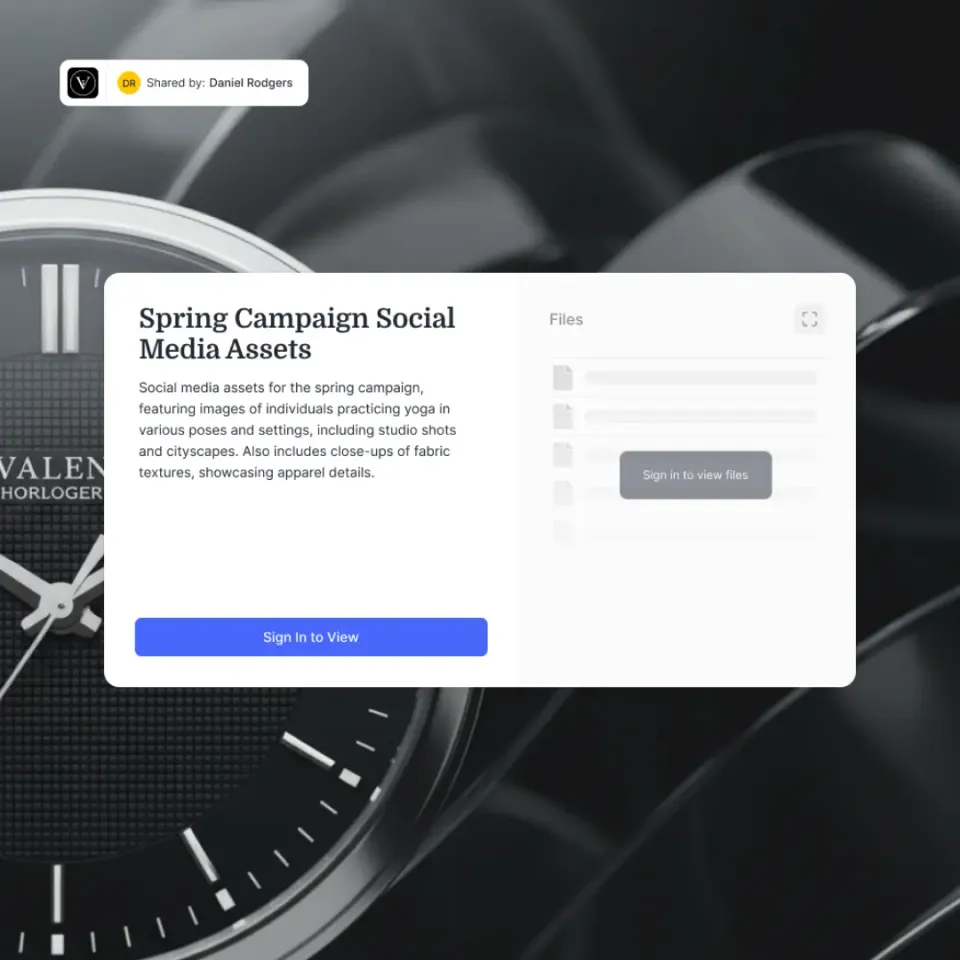
Modern fashion brands use cloud-based sharing platforms to deliver lookbooks. Instead of attaching files to emails, you send a link to a branded web portal. This method looks professional, solves the file size problem, and gives you visibility into buyer engagement.
Method 1: The Branded Portal (Recommended)
A branded client portal replaces email attachments with a dedicated web experience for your buyers. Here is how the workflow operates:
- Upload your assets: Upload your high-resolution images, layout files, and any supplementary materials like line sheets or order forms to a secure cloud platform. 2. Brand the experience: Add your logo, brand colors, and a custom background to the download page. The portal should feel like an extension of your website, not a generic file sharing service. 3. Share a single link: Send one lightweight link in your email. Buyers click through to a beautiful gallery interface where they can preview images before downloading.
Why this approach wins:
- Visual preview: Buyers see a grid of thumbnails before downloading anything. They can assess the collection at a glance and decide if it warrants a deeper look.
- Always current: Need to swap a photo or update pricing? Change the file in your cloud folder. The link stays the same, and buyers always access the latest version.
- Mobile-ready: Branded portals are responsive by design. Images display beautifully on iPads during showroom appointments, on phones during trade show walks, and on desktop monitors in buying offices.
- Separate viewing options: Offer web-resolution files for quick browsing and print-resolution files for magazines that need to feature your images in editorial spreads.
Method 2: Interactive Flipbooks
Tools like Issuu or Flipsnack convert PDFs into "flippable" digital magazines. The page-turn animation feels tactile and familiar. However, these platforms have limitations. Loading times can be slow on poor connections. Downloading for offline viewing is cumbersome. And you are adding another subscription to your tech stack. For fashion brands that want control and professionalism, the branded portal approach delivers better results with fewer dependencies.

Best Practices for Lookbook Delivery
Sharing your digital lookbook is not just about getting files from point A to point B. How you deliver matters as much as what you deliver. Follow these security and etiquette guidelines to protect your designs and impress your buyers.
Use Expiration Dates for Exclusive Previews
For pre-release collections, set links to expire after a specific date. If you are showing next season's collection to select buyers before your runway show, the link should stop working once the embargo lifts. This prevents designs from leaking before your official launch. A shared link that works forever is a liability. Former employees, departed agency partners, and outdated buyer contacts could access materials indefinitely. Expiration dates enforce boundaries automatically.
Password Protection for Confidential Collections
If your collection is highly confidential, add password protection to the access link. Send the password through a separate channel like a text message or phone call. This two-factor approach ensures that even if the email is forwarded, unauthorized viewers cannot access the content.
Track Engagement to Time Your Follow-ups
Use a sharing platform that offers download tracking and view analytics. Knowing that a buyer viewed your lookbook for several minutes and downloaded several files tells you they are interested. That insight transforms your follow-up call from a cold check-in to a warm conversation about specific styles they spent time reviewing. Conversely, if a key buyer has not opened your link after a week, you know to follow up with a reminder or try a different contact at their company.
Provide Multiple Resolution Options
Not every viewer needs the same file quality. Create two download tiers in your portal:
- Web resolution: Smaller files for quick viewing on screens. Buyers reviewing collections on the go appreciate the faster downloads.
- Print resolution: Full-quality files for magazines, catalogs, and press features. Fashion editors need high-resolution images for publication. Label these options so viewers download the appropriate version for their needs.
Organizing Your Lookbook Assets for Long-Term Use
A lookbook is not a one-time deliverable. Those photographs become marketing assets, social media content, e-commerce imagery, and press kit materials. Proper organization from the start pays dividends for seasons to come.
Create a Logical Folder Structure
Organize your assets in a hierarchy that makes sense for retrieval:
FW26 Collection/
├── Lookbook/
│   ├── Final Layout/
│   ├── Individual Looks/
│   └── Behind the Scenes/
├── Line Sheet/
├── Press Kit/
└── Social Media Crops/
Use consistent naming conventions across all files. Include the season, style number, color, and view angle in each filename. FW26_DRS-042_Navy_Front.jpg is infinitely more useful than Final_Version_2_EDITED.jpg when you need to find a specific image six months later.
Maintain a Master Archive
Keep unedited RAW files in a separate archive. You may need to re-edit images with different crops or color grading for future campaigns. Once you delete the original RAW files, those options disappear.
Set Access Permissions Thoughtfully
Not everyone needs access to everything. Your social media manager needs the final edited images, not the RAW files or pricing spreadsheets. Your sales team needs the lookbook and line sheet, not the behind-the-scenes content reserved for press. Use a platform with granular permissions to give each team member exactly the access they need and nothing more. This reduces clutter for users and protects sensitive information.
Document Your Asset Library
Create a simple reference document listing what is available, where it lives, and who owns each category. When an intern joins next season or a new PR agency comes on board, they should be able to find what they need without scheduling a meeting to ask.

Frequently Asked Questions
What is the difference between a lookbook and a line sheet?
A lookbook is a visual storytelling tool focused on style, mood, and brand image. It features editorial photography that sells the lifestyle your brand represents. A line sheet is a technical sales document containing pricing, size runs, SKUs, fabric compositions, and ordering information. Line sheets are functional, not artistic. Most brands use both: the lookbook captures attention, and the line sheet closes the sale.
How many pages should a fashion lookbook be?
Most effective digital lookbooks feature your strongest looks over a manageable number of pages. Quality matters more than quantity. Buyers review hundreds of lookbooks each season, and their attention spans are limited. Cut anything that does not add value. A tight lookbook with stunning photography outperforms a lengthy collection padded with mediocre shots.
How do I send a large lookbook via email?
Do not attach large files directly to emails. Most email servers reject attachments over 25MB, and high-resolution lookbooks easily exceed this limit. Instead, upload your lookbook to a cloud sharing platform and paste the secure link into your email. This approach ensures reliable delivery, avoids spam filters, and allows you to update files after sending without re-emailing everyone.
Can I protect my lookbook from being copied or shared without permission?
You cannot completely prevent screenshots or screen recordings, but you can deter unauthorized sharing. Use password-protected links for sensitive materials. Add watermarks to preview images. Disable downloads for viewers who have not been vetted. Set expiration dates so links stop working after your launch date. These measures will not stop a determined leaker, but they discourage casual forwarding and create accountability.
What resolution should I use for digital lookbook images?
Provide two versions. For web viewing and quick sharing, use screen-optimized resolution. This loads quickly on any device while maintaining good screen quality. For print and press purposes, provide print-quality resolution at full size. Label these options in your portal so buyers download the appropriate version for their needs.
Related Resources

Share your collection in style for fashion lookbook
Ditch the clunky PDFs. Create a beautiful, branded portal for your lookbook that buyers will love to view on any device.