Best Box Alternatives for Teams in 2026
Box is a solid enterprise cloud storage platform, but it's not the right fit for every team. If you're paying $15-20 per user per month and not using Box's governance features, you're likely overspending. This guide compares the best Box alternatives based on real pricing, features, and use cases so you can find a better match for your team.
Why Teams Switch From Box
Box built its reputation on enterprise content management. It has 100,000+ business customers and strong compliance features. But that enterprise focus comes with tradeoffs.
Common reasons teams leave Box:
- Per-seat pricing adds up fast. At $15-20 per user per month, a 50-person team pays $750-1,000 monthly. Many alternatives offer team-based pricing that costs 70% less.
- Overkill for creative teams. Box excels at document governance but lacks native video streaming, frame-accurate feedback, or creative workflow tools.
- Sync-based architecture causes friction. Box Drive works well for documents but struggles with large media files. Teams working with video, RAW photos, or design files often hit limitations.
- IT-centric, not user-centric. Box prioritizes admin controls over user experience. Some teams find the interface dated compared to modern alternatives. The right alternative depends on what you actually need. A legal firm has different requirements than a video production house.
Helpful references: Fast.io Workspaces, Fast.io Collaboration, and Fast.io AI.
Box Alternatives Comparison Table
A Box alternative is a cloud content management platform that offers similar enterprise features to Box, often with better pricing or specialized capabilities. Here's how the major options compare:
Price comparison based on publicly available pricing as of January 2026.


Start with box alternative on Fast.io
See how Fast.io handles your team's files with usage-based pricing and native video streaming.
Fast.io: Best for Creative and Media Teams
Fast.io takes a different approach than Box. Instead of per-seat pricing, it uses usage-based billing. Your 25-seat team costs around published pricing with 5TB of storage, compared to $375+ on Box.
Where Fast.io beats Box:
- Native video streaming. HLS adaptive streaming means instant playback for any video. No buffering, no downloads. Box serves video as progressive downloads that require waiting.
- Frame-accurate feedback. Pin comments to specific frames in a video timeline. Reviewers can give precise feedback like "fix the color at 1:42:15" instead of vague notes.
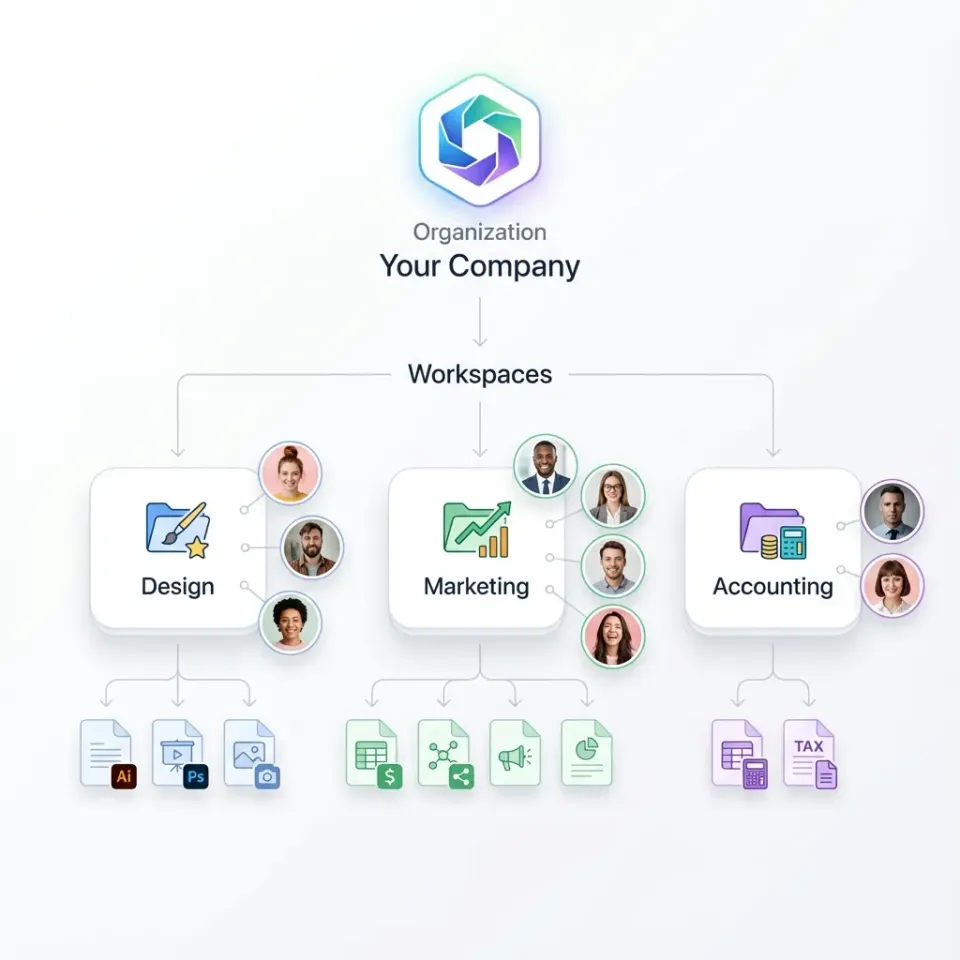
- Organization-owned files. Files belong to the company, not individual users. When someone leaves, their files stay put. No awkward transfer processes.
- Real-time collaboration. See who's viewing files right now. Follow a teammate's view during reviews. Built for "let's look at this together" workflows. If you need enterprise governance and compliance documentation, Box remains a solid choice.

Dropbox Business: Familiar and Straightforward
Dropbox Business is Box's closest competitor. Both serve enterprise teams, but Dropbox has a simpler, more consumer-friendly approach.
Dropbox advantages over Box:
- More intuitive interface. Less IT overhead.
- Better individual user experience.
- Smart Sync for managing local storage.
- Generally cheaper for small teams.
Box advantages over Dropbox:
- Stronger admin and governance controls.
- More granular permissions.
- Better suited for regulated industries.
- More enterprise integrations. Is Dropbox better than Box? For teams under 100 users who don't need advanced compliance, often yes. For enterprises with strict governance requirements, Box's admin controls justify the premium. Both charge per seat. Both require you to sync files locally. Both struggle with large video files. If those are your pain points, look at cloud-native alternatives instead.
Google Drive and OneDrive: Ecosystem Plays
If your company already uses Google Workspace or Microsoft 365, the bundled storage makes sense. You're probably already paying for it.
Google Drive works well when:
- Your team lives in Google Docs, Sheets, and Slides
- Real-time document collaboration is primary
- You want simple sharing with Gmail integration
OneDrive works well when:
- You're deep in the Microsoft ecosystem
- SharePoint handles your intranet needs
- Office file collaboration is the main use case
Why teams still leave these platforms:
- "My Drive" chaos. Files scattered across personal drives are hard to find and manage.
- Storage limits per user. You pay per seat, with capped storage per account.
- Weak for large files. Neither handles video workflows well.
- No real content management. These are storage systems, not asset management platforms. Google and Microsoft optimize for their own productivity suites. If your main need is file sharing and organization, a purpose-built platform often works better.
ShareFile and Egnyte: Enterprise Specialists
ShareFile (owned by Citrix) and Egnyte serve specific enterprise niches.
ShareFile works best for:
- Document-centric workflows
- eSignature integrations
- Client portals for professional services
- Healthcare and financial services compliance
ShareFile feels dated compared to newer platforms. The UX hasn't changed much, and pricing starts at $16+ per user.
Egnyte works best for:
- Hybrid deployments mixing cloud and on-premise storage
- Companies with strict data residency requirements
- Architecture and engineering firms with CAD file needs
- Enterprises that can't go fully cloud
Egnyte's hybrid approach adds complexity. If you don't need on-prem integration, you're paying for capability you won't use. Both are solid for their niches. Both charge enterprise prices. If you're considering either, make sure their specific strengths match your specific needs.
Budget Options: pCloud and Sync.com
Not every team needs enterprise features. If you're a small team looking for reliable cloud storage without the enterprise price tag, consider these options.
pCloud offers:
- Lifetime purchase options (pay once, own forever)
- No per-seat pricing on some plans
- Block-level sync for faster uploads
- Crypto folder for client-side encryption
Sync.com offers:
- Zero-knowledge encryption by default
- Simple pricing with generous storage
- Strong privacy focus (Canadian company)
The tradeoff:
Budget platforms lack collaboration features. No real-time presence, limited commenting, basic sharing controls. They're storage systems, not team workspaces. If you just need somewhere to keep files with basic sharing, these work well. If you need your team to actively collaborate on files, you'll outgrow them quickly.
How to Choose Your Box Alternative
Picking the right alternative comes down to what you actually need. Move one project or team to the new platform. See how it handles your actual workflows. That's how you'll know if it's a real improvement over Box for your situation. Switching platforms is a significant decision, so it pays to evaluate alternatives carefully. Consider not just the features on paper, but the actual workflow experience: how intuitive is the interface, how fast are uploads, and how well does it handle the specific file types your team works with every day. Switching platforms is a significant decision, so it pays to evaluate alternatives carefully. Consider not just the features on paper, but the actual workflow experience: how intuitive is the interface, how fast are uploads, and how well does it handle the specific file types your team works with every day.
Frequently Asked Questions
What is better than Box?
It depends on what you need. Fast.io is better for creative teams who want video streaming and usage-based pricing. Dropbox is better for simpler needs with a familiar interface. Google Drive or OneDrive make sense if you're already in those ecosystems. Box is still the better choice for enterprises that need compliance and governance features.
Is Dropbox better than Box?
Dropbox is simpler and more user-friendly, making it better for small to mid-size teams without complex compliance needs. Box has stronger admin controls, granular permissions, and enterprise governance features that justify its higher price for regulated industries.
Why are companies switching from Box?
Common reasons include high per-seat costs that add up with larger teams, dated user experience compared to modern platforms, lack of native video and creative workflow support, and sync-based architecture that struggles with large media files. Many teams find they're paying for enterprise governance features they don't actually use.
How much does Box cost compared to alternatives?
Box Business starts at published pricing per month, with Enterprise tiers at $25+. Dropbox Business starts at published pricing. Google and Microsoft are around published pricing. Fast.io uses usage-based pricing at around published pricing for 25 users with large storage, which can save 70% or more compared to per-seat models.
Can I migrate my files from Box to another platform?
Yes, most alternatives support migration from Box. Methods include direct API connections, third-party migration tools like Mover or MultCloud, or manual download and re-upload for smaller libraries. Plan for metadata and permissions to require manual setup, as these rarely transfer perfectly between platforms.
Related Resources

Start with box alternative on Fast.io
See how Fast.io handles your team's files with usage-based pricing and native video streaming.