How to Implement Zero-Trust AI File Sharing
Zero-trust architecture assumes breach and verifies every access. Traditional file sharing trusts users and networks, creating risks in AI workflows where agents access sensitive data. This guide shows how to build zero-trust file sharing for AI agents with layered permissions, real-time audit logs, and encryption.
What Is Zero-Trust File Sharing?
Zero-trust replaces implicit trust with continuous verification. Every user, device, or agent proves identity and context before accessing files. No automatic access based on network location or user role.
Core principles:
- Verify explicitly: Check identity, device health, and request context every time.
- Least privilege: Grant minimum access needed for the task.
- Assume breach: Design for compromised credentials or insiders.
In file sharing, this means per-file permissions, session timeouts, and full audit trails, not just login checks.
Practical example: A research AI agent seeking proprietary datasets verifies API token, workspace role, and file ACLs before access.
Constraint: Demands upfront policy definition for every file type.
Outcome: Immutable logs support forensic analysis post-incident.
Teams should validate this approach in a small test path first, then standardize it across environments once metrics and outcomes are stable.
Practical execution note for zero trust ai file sharing: define a baseline process, assign ownership, and document fallback behavior when dependencies fail. Run a pilot with a small team, collect concrete metrics, and compare throughput, error rate, and review time before broad rollout. After rollout, keep a living checklist so future contributors can repeat the workflow without re-learning critical constraints.
What Are the Challenges of File Sharing in AI Agent Workflows?
AI agents read/write files autonomously, amplifying risks. Agents pull from multiple sources, process data, and share outputs. Traditional storage trusts API keys or IP addresses, vulnerable to leaks.
Common issues:
- Over-permissive API access exposes entire accounts.
- No visibility into agent actions without logs.
- Shared credentials across agents create blast radius.
- Human-agent handoffs lack clear ownership tracking.
Zero-trust mitigates by enforcing policy per request.
Define clear tool contracts: specify exact files, access levels, and error handling, so agents fail safely when dependencies are unavailable. This improves reliability in production workflows. See tool calling best practices.
Teams should validate this approach in a small test path first, then standardize it across environments once metrics and outcomes are stable.
Practical execution note for zero trust ai file sharing: define a baseline process, assign ownership, and document fallback behavior when dependencies fail. Run a pilot with a small team, collect concrete metrics, and compare throughput, error rate, and review time before broad rollout. After rollout, keep a living checklist so future contributors can repeat the workflow without re-learning critical constraints.
Key Features for Zero-Trust AI File Sharing
Effective zero-trust file sharing needs:
- Granular permissions at organization, workspace, folder, file levels.
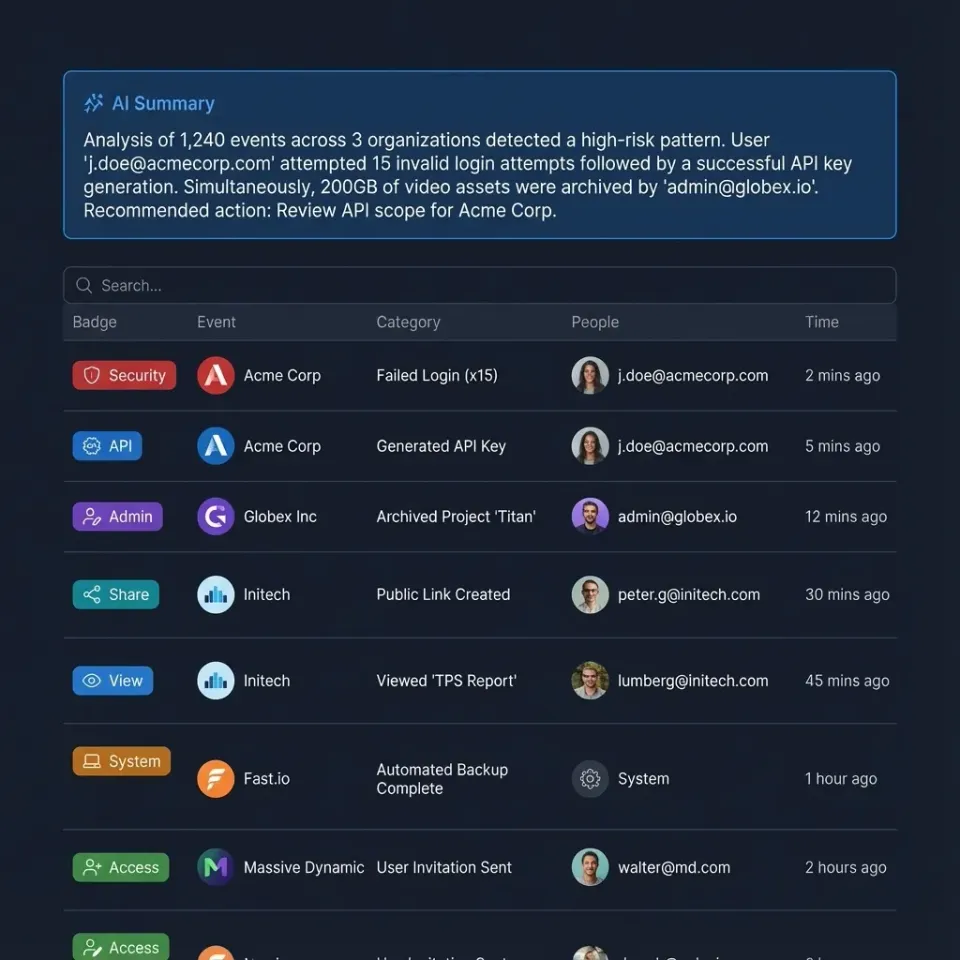
- Real-time audit logs tracking every access.
- Encryption at rest and in transit.
- Multi-factor auth and SSO.
- Webhooks for real-time monitoring.
Platforms like Fast.io provide these natively for human and agent users. Follow NIST SP multiple-multiple Zero Trust Architecture for implementation guidance.
Practical example: Enable webhooks to notify on bulk file downloads by agents.
Constraint: API rate limits must align with security policies.
Outcome: Real-time alerts reduce response time to threats.
Teams should validate this approach in a small test path first, then standardize it across environments once metrics and outcomes are stable.
Practical execution note for zero trust ai file sharing: define a baseline process, assign ownership, and document fallback behavior when dependencies fail. Run a pilot with a small team, collect concrete metrics, and compare throughput, error rate, and review time before broad rollout. After rollout, keep a living checklist so future contributors can repeat the workflow without re-learning critical constraints.
How to Set Up Zero-Trust in Fast.io Workspaces
- Create dedicated workspaces per project/agent role.
- Assign least-privilege roles: read-only for analysis agents, write for builders.
- Enable MFA/SSO for humans; API keys scoped to workspaces for agents.
- Review audit logs regularly for anomalies.
- Use webhooks to alert on high-risk actions.
Agents join as collaborators via MCP or API, inheriting workspace policies. Check our data rooms solution for secure collaboration examples.
Practical example: Assign 'analysis' role to read-only access for ML training agents.
Constraint: Role hierarchies must prevent privilege escalation.
Outcome: Clear separation ensures agents can't alter source data.
Teams should validate this approach in a small test path first, then standardize it across environments once metrics and outcomes are stable.
Practical execution note for zero trust ai file sharing: define a baseline process, assign ownership, and document fallback behavior when dependencies fail. Run a pilot with a small team, collect concrete metrics, and compare throughput, error rate, and review time before broad rollout. After rollout, keep a living checklist so future contributors can repeat the workflow without re-learning critical constraints.
What Are the Best Practices for Ongoing Zero-Trust?
Rotate credentials regularly. Use short-lived tokens for agents. Segment data by sensitivity. Automate policy enforcement. Conduct access reviews quarterly.
Monitor for shadow access: undocumented shares or forgotten invites.
Practical example: Quarterly reviews flag inactive collaborators with access to sensitive folders.
Constraint: Automation scripts needed for large teams.
Outcome: Eliminates forgotten permissions proactively.
Teams should validate this approach in a small test path first, then standardize it across environments once metrics and outcomes are stable.
Teams should validate this approach in a small test path first, then standardize it across environments once metrics and outcomes are stable.
Practical execution note for zero trust ai file sharing: define a baseline process, assign ownership, and document fallback behavior when dependencies fail. Run a pilot with a small team, collect concrete metrics, and compare throughput, error rate, and review time before broad rollout. After rollout, keep a living checklist so future contributors can repeat the workflow without re-learning critical constraints.
Frequently Asked Questions
What does zero-trust mean for file sharing?
It means verifying every file access request based on user identity, device, context, and behavior, regardless of location. No implicit trust for internal networks or known users.
How do AI agents fit into zero-trust file sharing?
Agents authenticate via scoped API keys or MCP sessions, receive least-privilege access to specific workspaces/files, and all actions are logged for review.
What are the main benefits of zero-trust file sharing?
Reduced breach impact, better compliance, clear accountability via logs, and secure human-AI collaboration.
Can Fast.io support zero-trust principles?
Yes, with granular permissions, audit logs, encryption, SSO/MFA, and webhooks.
Related Resources

Secure Your AI File Sharing with Zero-Trust
Implement zero-trust principles in agent workspaces. Granular access, full audit trails, free agent tier with 50GB storage. Built for zero trust file sharing workflows.