8 Best Video Review Platforms for Collaborative Feedback
A video review platform is software that enables stakeholders to watch, annotate, and approve video content through a structured workflow. The best platforms replace scattered email feedback with organized, time-coded comments that editors can actually act on.
What Is a Video Review Platform?
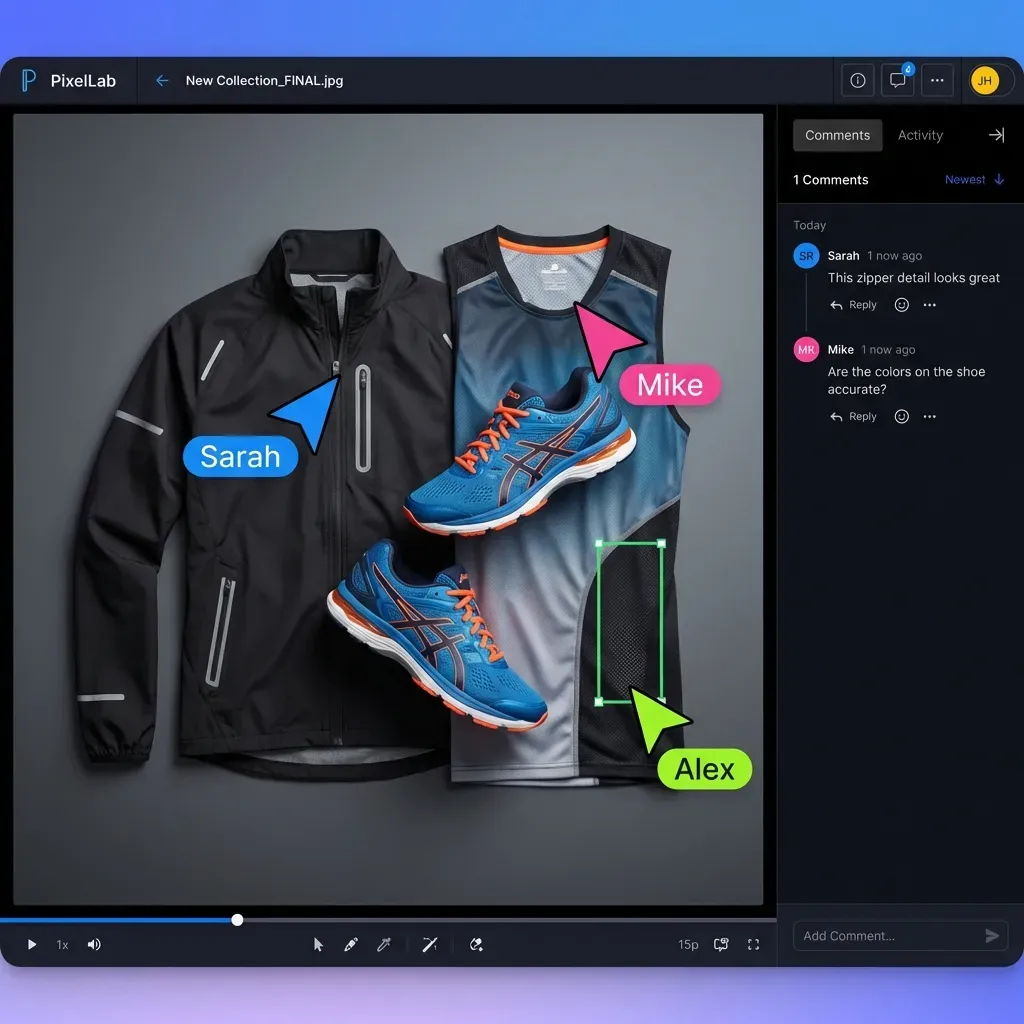
A video review platform centralizes video feedback in one place. Reviewers watch the video, leave comments pinned to specific frames or timecodes, and editors see exactly what needs fixing without decoding vague email threads. The core problem these tools solve: unclear feedback is a leading cause of revision delays. When a client says "the transition feels off" in an email, you don't know which transition, at what timecode, or what "off" means. Time-coded comments eliminate the guesswork. Enterprise video projects typically involve multiple stakeholders who need to weigh in. Without a central platform, feedback arrives through email, Slack, text messages, and phone calls. Consolidating everything in one interface cuts approval time in half for most teams.
Helpful references: Fast.io Workspaces, Fast.io Collaboration, and Fast.io AI.
Key Features to Compare
Not every video review platform works the same way. Before comparing specific tools, here's what matters most:
Time-coded comments - Can reviewers pin feedback to exact frames? This is non-negotiable for professional video work. Vague feedback wastes editing time.
Streaming quality - Does the platform stream video smoothly, or do reviewers wait for downloads? Large files should play instantly through adaptive bitrate streaming, not progressive download.
Version comparison - Can you show reviewers what changed between v1 and v2? Side-by-side comparison reduces "I thought we fixed that" confusion.
Permission controls - Who can view, comment, or approve? Enterprise teams need granular control. Smaller teams need simplicity.
Integration - Does it connect to your editing software? Adobe Premiere, DaVinci Resolve, and Final Cut integrations save time importing comments into your timeline.
Notification management - How does it handle feedback alerts? Too many emails bury important comments. Too few means stakeholders miss deadlines.
1. Frame.io
Frame.io is the most widely adopted video review platform, now owned by Adobe. It's the default choice for teams working in Premiere Pro.
Strengths:
- Frame-accurate comments with drawing tools
- Deep integration with Adobe Premiere and After Effects
- Camera-to-cloud uploads for on-set workflows
- Version stacking to track revision history
Best for: Post-production teams using Adobe Creative Cloud. The Premiere Pro panel means editors never leave their timeline to see feedback.
Limitations: Per-seat pricing gets expensive for large teams. The approval workflow is basic compared to dedicated approval tools. Storage costs add up for teams with large archives.

2. Wipster
Wipster built a reputation for intuitive review workflows and clean design. It's particularly strong for teams managing client-facing review.
Strengths:
- Simple, client-friendly interface
- Customizable approval workflows
- Adobe and Final Cut Pro integration
- Deadline tracking and automated reminders
Best for: Creative agencies managing external client review. The interface is simple enough that clients can use it without training.
Limitations: Storage-based pricing can get expensive. Less suited for complex multi-stage enterprise workflows. Consider how this fits into your broader workflow and what matters most for your team. The right choice depends on your specific requirements: file types, team size, security needs, and how you collaborate with external partners. Testing with a free account is the fast way to know if a tool works for you.
3. Ziflow
Ziflow handles complex approval workflows with automated routing. Built for teams that need to prove who approved what and when.
Strengths:
- Multi-stage approval workflows
- Automated routing rules
- Comprehensive audit trail
- Supports video, images, PDFs, and documents
Best for: Enterprise creative teams with compliance requirements or complex stakeholder hierarchies. Marketing teams reviewing multiple asset types, not just video.
Limitations: Steep learning curve. Overkill for small teams with simple needs. Video-specific features aren't as polished as dedicated video tools. Consider how this fits into your broader workflow and what matters most for your team. The right choice depends on your specific requirements: file types, team size, security needs, and how you collaborate with external partners. Testing with a free account is the fast way to know if a tool works for you.


Collaborate on Files with Your Team
Stream video to stakeholders instantly. Collect frame-accurate feedback. See who's viewing in real-time.
4. Filestage
Filestage focuses on the approval workflow more than the review experience. You define review stages, assign stakeholders, and track progress through a clear pipeline.
Strengths:
- Visual project pipeline showing status at a glance
- Multi-stage approval (internal, then legal, then client)
- Due dates with automated reminders
- Works across video, images, and documents
Pricing: Free tier available. Paid plans start at published pricing/month.
Best for: Marketing teams and agencies juggling approval across multiple asset types. The pipeline view makes it obvious where projects are stuck.
Limitations: Video review features are less sophisticated than Frame.io or Wipster. The focus is workflow management, not video playback quality.
5. Fast.io
Fast.io takes a different approach. Instead of a dedicated review tool, it provides workspace-based collaboration where video review happens alongside all your other project files.
Strengths:
- HLS streaming plays video instantly, no download required
- Frame-accurate comments pinned to specific moments
- Activity tracking shows who viewed what and when
- Branded client portals for external stakeholders
- Contextual threaded discussions
- Real-time presence shows who's reviewing right now
- Follow mode lets you sync views with teammates during review sessions
Best for: Teams that need video review integrated with project file management. When reviewers need to reference scripts, storyboards, or other assets while reviewing video, having everything in one workspace eliminates context-switching.
How it compares: Fast.io won't replace Frame.io's deep Premiere integration for editors who live in their timeline. But for teams where the bottleneck is getting feedback from stakeholders who struggle with downloads and separate tools, the streaming-first approach solves the right problem.
6. ReviewStudio
ReviewStudio was built by production designers who understood that video review is often part of a larger creative proofing workflow.
Strengths:
- Visual markup tools for precise feedback
- Compare multiple versions side by side
- Comment threading keeps discussions organized
- Project-based organization
Best for: Creative teams reviewing mixed media. When a project includes video, motion graphics, and print materials, ReviewStudio handles all of them.
Limitations: Video streaming isn't as smooth as tools built specifically for large video files. Better suited for web video and motion graphics than high-resolution production files. Consider how this fits into your broader workflow and what matters most for your team. The right choice depends on your specific requirements: file types, team size, security needs, and how you collaborate with external partners. Testing with a free account is the fast way to know if a tool works for you.
7. GoVisually
GoVisually positions itself as the simple alternative to complex enterprise tools. The focus is speed: quick upload, quick review, quick approval.
Strengths:
- Clean, minimal interface
- Fast upload and processing
- Visual annotations with drawing tools
- Real-time collaboration
Best for: Small teams and freelancers who need something simple. No learning curve, no feature bloat.
Limitations: Limited workflow customization. Not suited for enterprise requirements like audit trails or complex approval routing. Consider how this fits into your broader workflow and what matters most for your team. The right choice depends on your specific requirements: file types, team size, security needs, and how you collaborate with external partners. Testing with a free account is the fast way to know if a tool works for you.
8. Ftrack
Ftrack combines review with production tracking. It's built for studios managing multiple projects with complex pipelines.
Strengths:
- Review integrated with task management
- Resource planning and scheduling
- Asset versioning across the production pipeline
- Studio-grade media playback
Best for: Post-production studios and VFX houses where review is part of a larger production pipeline. The combination of review and project management reduces tool sprawl.
Limitations: Enterprise pricing. The production management features may be unnecessary for teams that only need review. Consider how this fits into your broader workflow and what matters most for your team. The right choice depends on your specific requirements: file types, team size, security needs, and how you collaborate with external partners. Testing with a free account is the fast way to know if a tool works for you.
How to Choose the Right Platform
The right choice depends on where your review process breaks down:
If stakeholders can't figure out how to view videos: Choose a platform with instant streaming (Fast.io, Frame.io). Downloads are the enemy of timely feedback.
If feedback is vague and unclear: Prioritize frame-accurate commenting. Frame.io, Wipster, and Fast.io all support time-coded annotations.
If you need complex approval routing: Ziflow and Filestage handle multi-stage workflows where internal review must complete before client review begins.
If editors need feedback in their timeline: Frame.io's Premiere integration is unmatched. Wipster also offers solid NLE integration.
If you review more than just video: Ziflow, Filestage, and Fast.io handle multiple asset types. Single-purpose video tools create silos.
Questions to Ask Before Choosing
How many stakeholders typically review each video?
- Do external clients need to use the tool?
- Does your team use Adobe, Final Cut, or DaVinci Resolve?
- What's your budget per seat vs. per storage?
- Do you review other asset types beyond video?
- Do you need an audit trail for compliance?
Frequently Asked Questions
What is the best video review software?
The best video review software depends on your workflow. Frame.io is the standard for teams using Adobe Premiere. Wipster excels at client-facing review. Fast.io works well when video review needs to happen alongside other project files. Ziflow and Filestage are better when complex approval workflows matter more than video-specific features.
How do production companies review videos?
Production companies use dedicated platforms where stakeholders watch videos and leave time-coded comments pinned to specific frames. Editors can then jump directly to the flagged moments. Most teams have an internal review stage before external stakeholders see the work. Platforms like Frame.io integrate directly with editing software so comments appear in the timeline.
What do video editors use for client approvals?
Video editors typically share review links through platforms like Frame.io, Wipster, or Fast.io. Clients watch the video in their browser without downloading, leave frame-specific comments, and mark the video as approved when satisfied. The editor sees all feedback in one place, often with direct integration into their editing software.
What's the difference between video review and video approval platforms?
Video review platforms focus on collecting feedback through time-coded comments and annotations. Video approval platforms add workflow management: tracking who needs to sign off, in what order, with deadlines and status tracking. Many tools do both, but the emphasis varies. Frame.io excels at review. Ziflow excels at approval workflows.
How much does video review software cost?
Pricing varies widely. Filestage offers a free tier with paid plans from published pricing/month. Frame.io and Wipster use storage-based pricing that can reach several hundred dollars per month for active teams. Enterprise tools like Ziflow and Ftrack require custom quotes. Fast.io uses usage-based pricing without per-seat costs, which often works out cheaper for teams with many reviewers.
Related Resources

Collaborate on Files with Your Team
Stream video to stakeholders instantly. Collect frame-accurate feedback. See who's viewing in real-time.