How to Replace FTP With a Modern File Transfer Solution
FTP was designed in 1971 when network security meant locking the server room door. Today, it remains a liability: credentials travel in plain text, setup requires IT expertise, and there's no built-in collaboration. This guide covers what to look for in a modern FTP alternative and how to migrate your business workflows. This guide covers ftp alternative for business with practical examples.
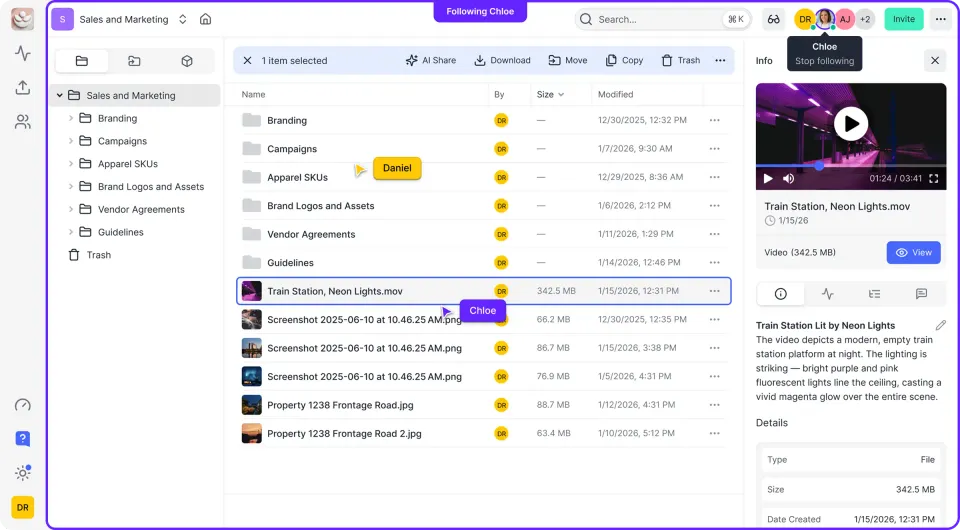
Why FTP Is a Security Risk for Business: ftp alternative for business
An FTP alternative is a modern file transfer solution that replaces legacy FTP servers with cloud-based platforms offering better security, easier setup, and improved user experience. Standard FTP has a fundamental flaw: it transmits usernames, passwords, and file data without encryption. Anyone monitoring network traffic can intercept credentials. This isn't a theoretical risk. It's why regulations like PCI-DSS explicitly discourage FTP for sensitive data. Beyond security, FTP creates operational headaches:
- Server maintenance: Someone has to patch, monitor, and troubleshoot the FTP server
- Firewall complexity: FTP uses multiple ports (20, 21, and dynamic ranges), making firewall configuration painful
- No collaboration: FTP moves files. That's it. No comments, previews, or version tracking
- User training: Clients need FTP software and connection details, creating friction
The 50-year-old protocol served its purpose when businesses operated on local networks. It wasn't built for remote teams, external clients, or mobile access.
Helpful references: Fast.io Workspaces, Fast.io Collaboration, and Fast.io AI.
FTP Limitations vs. Modern Alternatives
Understanding what you're replacing helps you evaluate alternatives. Here's how FTP compares to cloud-based file transfer:
| Capability | Traditional FTP | Modern Alternative |
|---|---|---|
| Encryption | None (credentials visible) | TLS/SSL in transit, AES at rest |
| Authentication | Username/password only | SSO, MFA, OAuth |
| Setup time | Days to weeks | Minutes |
| User experience | Requires client software | Browser-based access |
| Mobile access | Limited or none | Native mobile apps |
| Collaboration | None | Comments, previews, approvals |
| Audit trails | Basic logs if configured | Complete activity tracking |
| Large files | Often unreliable | Designed for large transfers |

What to Look for in an FTP Replacement
Not every "FTP alternative" solves the same problems. Some replace the protocol (SFTP, FTPS), while others replace the entire approach (cloud file sharing). Here's what matters for business use:
Security Without Complexity
Your alternative should encrypt data automatically. You shouldn't need to configure certificates, manage keys, or explain security settings to users. Look for:
- Encryption in transit and at rest (standard for cloud platforms)
- Single sign-on (SSO) integration with your identity provider
- Multi-factor authentication (MFA)
- Granular permission controls at folder and file level
Zero Server Management
The point of replacing FTP is eliminating infrastructure headaches. Cloud solutions handle uptime, patches, and scaling. You sign up and start sharing.
External Sharing That Actually Works
FTP fails at client collaboration because recipients need software, credentials, and patience. Modern alternatives let you share via link with password protection, expiration dates, and download tracking. Recipients open files in their browser.
Large File Support
FTP often chokes on large files, especially over unstable connections. Look for platforms designed for video, design assets, or other large files. Resumable uploads and adaptive streaming prevent failed transfers.
Types of FTP Alternatives
FTP alternatives fall into three categories. Each serves different needs.
Protocol Replacements (SFTP, FTPS)
SFTP (SSH File Transfer Protocol) and FTPS (FTP over SSL) add encryption to the FTP workflow. They're backward-compatible options for organizations that can't fully abandon FTP infrastructure.
- SFTP: Uses SSH for encryption, operates on a single port (22), easier firewall configuration
- FTPS: Adds TLS/SSL to standard FTP, maintains FTP compatibility, uses multiple ports
These work for server-to-server automation or legacy system integration. They don't solve the user experience or collaboration problems.
Managed File Transfer (MFT)
MFT platforms are enterprise solutions that orchestrate file transfers across systems. They support multiple protocols (SFTP, FTPS, AS2, HTTPS), provide automation workflows, and include compliance reporting. MFT makes sense for organizations with complex B2B integrations or regulatory requirements. For most businesses, it's more infrastructure than necessary.
Cloud File Sharing Platforms
Cloud platforms replace both the protocol and the server. Files live in cloud storage. Users access them through a web browser or mobile app. Sharing happens via links instead of credentials. This works well for teams that need:
- Simple external sharing with clients
- Collaboration features like comments and approvals
- No IT infrastructure to manage
- Mobile access for remote work

Migrating Away From FTP
Switching from FTP doesn't require a big-bang migration. Most businesses run parallel systems while transitioning workflows.
Step 1: Audit Current FTP Usage
Document who uses FTP, what they transfer, and how often. Common patterns:
- Internal file transfers: Moving files between departments or servers
- Client deliverables: Sending completed work to customers
- Vendor data exchange: Receiving files from suppliers or partners
- Automated processes: Scripts that push or pull files on schedules
Each use case may need a different solution. Internal transfers might move to a cloud workspace. Client deliverables might use branded sharing portals.
Step 2: Identify Quick Wins
Start with use cases that have the most pain:
- Users complaining about failed uploads
- Clients struggling with FTP software
- Security audit findings about unencrypted transfers
A cloud alternative can handle these immediately while you plan the full migration.
Step 3: Set a Deprecation Timeline
Give users a deadline for moving off FTP. Three to six months is reasonable for most organizations. Keep the FTP server read-only during transition, then shut it down.
How Fast.io Replaces FTP for Teams
Fast.io provides the file sharing features businesses need without the FTP baggage.
Security by default: All files are encrypted in transit and at rest. SSO integration means users authenticate with existing credentials. Audit logs track every view, download, and permission change.
No servers to manage: Fast.io runs in the cloud. You create a workspace and start sharing. No hardware, no patches, no firewall rules.
External sharing that works: Send files via link with password protection, expiration dates, and view-only options. Recipients click a link and view files in their browser. No software required.
Large file handling: Upload files up to 50GB. Adaptive streaming lets video files play without waiting for a full download. Resumable uploads handle unreliable connections.
Collaboration built in: Add comments to specific files, frames in a video, or regions in an image. Track who viewed what and when. Keep discussions attached to the work instead of scattered across email threads.
Usage-based pricing: Unlike per-seat alternatives, Fast.io charges based on storage and bandwidth. Add unlimited team members without multiplying costs.
Frequently Asked Questions
Why should I stop using FTP?
FTP transmits usernames, passwords, and file data without encryption. Anyone monitoring your network traffic can intercept credentials. Beyond security, FTP requires server maintenance, complex firewall rules, and client software that frustrates external users.
What is the highly secure FTP alternative?
For protocol-level security, SFTP provides SSH encryption on a single port. For business file sharing, cloud platforms with SSO, MFA, and automatic encryption provide better overall security without configuration complexity.
Is SFTP the same as FTP?
No. FTP transmits data without encryption. SFTP uses SSH to encrypt all data including credentials. Despite similar names, SFTP is a completely different protocol built on SSH, while FTPS adds TLS encryption to standard FTP.
Can I migrate from FTP without disrupting workflows?
Yes. Most businesses run FTP and cloud alternatives in parallel during migration. Start with use cases that have the most friction, like client sharing or large file uploads, then gradually move other workflows.
How do FTP alternatives handle large files?
Cloud platforms designed for media and creative work support files up to 50GB or more. Features like resumable uploads, adaptive streaming, and chunked transfers handle large files reliably over any connection.
Related Resources

Start with ftp alternative for business on Fast.io
Fast.io gives you usage-based cloud storage built for ftp alternative for business. Get streaming previews, AI-powered search, and unlimited guest sharing. Start with a free account, no credit card required.